Mermaid vs PlantUML vs D2 vs Graphviz: 6 Diagrams Tested
On this page
- The scorecard
- How we tested
- Round 1: a flowchart where two branches meet
- Round 2: a sequence diagram with an alt block
- Round 3: a class diagram
- Round 4: a state machine
- Round 5: an ER diagram with keys
- Round 6: an architecture diagram with a boundary
- What it weighs and how fast it draws
- When you get the syntax wrong
- Where each one renders
- Licences and who is behind each
- Which one to pick
- Mermaid, Graphviz and nomnoml in Jira and Confluence
A pull request adds docs/architecture.md with a PlantUML block. On GitHub it shows as code. One
reviewer asks why it is not Mermaid, another links D2’s gallery, and the thread runs to 30 comments
without a single diagram in it.
We settled it the slow way: one refund system drawn as six diagrams in Mermaid, PlantUML, D2, Graphviz and nomnoml, every one rendered in a browser, timed, and looked at. Below are the 28 renders, what went wrong in each, the numbers, and every source so you can repeat it.
Short answer: pick Mermaid when diagrams live in Markdown: it drew all six, and GitHub and GitLab render it with no setup. Pick PlantUML for strict UML (timing, object, deployment, C4), knowing its activity flowcharts cannot merge branches into one step. Pick Graphviz for big graphs you need laid out fast and exactly (about 1 ms per diagram here). Pick D2 for architecture pictures that look designed, if 5.85 MB in the browser is acceptable. nomnoml is the lightest (26 KB) and shortest, but it has no sequence diagrams and its frames break arrows.
The scorecard
Six diagram types, five languages. ✓ means it drew the diagram correctly, ◐ drew it with a flaw we name, ✗ has no way to draw it.
| Diagram | Mermaid 12.3 | PlantUML 1.2026.9 | Graphviz 16.1 | D2 | nomnoml 1.7 |
|---|---|---|---|---|---|
| Flowchart with merging branch | ✓ 10 lines | ◐ step drawn twice | ✓ 20 lines | ✓ 17 lines | ✓ 11 lines |
| Sequence with alt block | ✓ 19 lines | ✓ 20 lines | ✗ no sequence type | ◐ replies dashed by hand | ✗ no sequence type |
| Class (abstract, composition) | ✓ 22 lines | ✓ 22 lines | ◐ record labels by hand | ◐ no abstract marker | ✓ 7 lines |
| State machine | ✓ 9 lines | ✓ 10 lines | ✓ 14 lines | ✓ 10 lines | ◐ labels overlap |
| ER with keys | ✓ 18 lines | ✓ 22 lines | ◐ HTML tables by hand | ✓ 20 lines | ◐ no crow’s-foot ends |
| Architecture with a boundary | ✓ 10 lines | ✓ 20 lines | ✓ 21 lines | ✓ 19 lines | ◐ duplicate boxes |
| Download for all six (gzip) | 805 KB | 1,677 KB | 621 KB | 5,850 KB | 26 KB |
| Unclosed block | error, with line | no error, still draws | error, with line | error, with line | error, with line |
| Renders on GitHub | yes | no | no | no | no |
| Diagram types | 33 documented | 9 UML + 18 other | graphs, 8 layouts | graphs + sequence, SQL table and class shapes | UML-style boxes |
How we tested
- One system, six diagrams. A refund over 500 EUR needs a manager’s approval; the API calls a payment provider and updates the Jira ticket. The same nodes, labels and arrows in every language (sources at the end of each round).
- Engines in the browser, the way a docs site or an Atlassian app runs them:
mermaid12.3.0,@plantuml/core1.2026.9 (PlantUML compiled to JavaScript, no Java, no server),@hpcc-js/wasm-graphviz1.30.0 (Graphviz 16.1.0),@terrastruct/d20.1.33 (D2.js, the WebAssembly build of D2) andnomnoml1.7.0. - Headless Chromium (Playwright 1.62.1) on an AMD Ryzen 5 3600, files served from localhost so network time is not counted. Render time is the median of seven warm renders; load time the median of three fresh pages.
- Lines are non-empty source lines. We wrote each diagram the way that language’s docs suggest, not golfed.
No engine made a network request while rendering. That matters for Jira and Confluence apps and for anyone pasting internal architecture into a renderer.
Round 1: a flowchart where two branches meet
The refund flow has one awkward spot: both “under 500 EUR” and “approved” lead to the same step, Refund via payment provider.
Four languages drew one Refund box with two arrows into it. PlantUML drew it twice. Its
activity syntax is structured (if, else, endif), so a branch cannot jump to a step that
another branch already reached; you repeat the step or restructure the logic. For a process with
loops and shared steps that is a real limit.
Graphviz needed the most text (20 lines, shape=diamond on each decision) but was the fastest by
far: 1.5 ms against Mermaid’s 77 ms and D2’s 126 ms. Mermaid’s diamonds grow with their label,
which makes long questions tall.
Sources for the flowchart (5 languages)
Mermaid
flowchart TD
  start([Refund request]) --> amount{Amount over 500 EUR?}
  amount -- yes --> manager[Manager approval]
  amount -- no --> refund[Refund via payment provider]
  manager --> approved{Approved?}
  approved -- yes --> refund
  approved -- no --> declined[Tell customer: declined]
  refund --> close[Close Jira ticket]
  declined --> close
  close --> finish([Done])
PlantUML
@startuml
start
:Refund request;
if (Amount over 500 EUR?) then (yes)
  :Manager approval;
  if (Approved?) then (yes)
    :Refund via payment provider;
  else (no)
    :Tell customer: declined;
  endif
else (no)
  :Refund via payment provider;
endif
:Close Jira ticket;
stop
@enduml
Graphviz DOT
digraph refund {
  node [shape=box, style=rounded, fontname="Helvetica"]
  start [label="Refund request", shape=oval]
  amount [label="Amount over\n500 EUR?", shape=diamond]
  manager [label="Manager approval"]
  approved [label="Approved?", shape=diamond]
  refund [label="Refund via\npayment provider"]
  declined [label="Tell customer:\ndeclined"]
  close [label="Close Jira ticket"]
  finish [label="Done", shape=oval]
  start -> amount
  amount -> manager [label="yes"]
  amount -> refund [label="no"]
  manager -> approved
  approved -> refund [label="yes"]
  approved -> declined [label="no"]
  refund -> close
  declined -> close
  close -> finish
}
D2
start: Refund request {shape: oval}
amount: Amount over 500 EUR? {shape: diamond}
manager: Manager approval
approved: Approved? {shape: diamond}
refund: Refund via payment provider
declined: "Tell customer: declined"
close: Close Jira ticket
finish: Done {shape: oval}
start -> amount
amount -> manager: yes
amount -> refund: no
manager -> approved
approved -> refund: yes
approved -> declined: no
refund -> close
declined -> close
close -> finish
nomnoml
#direction: down
[<start> start] -> [Refund request]
[Refund request] -> [<choice> Amount over 500 EUR?]
[<choice> Amount over 500 EUR?] yes -> [Manager approval]
[<choice> Amount over 500 EUR?] no -> [Refund via payment provider]
[Manager approval] -> [<choice> Approved?]
[<choice> Approved?] yes -> [Refund via payment provider]
[<choice> Approved?] no -> [Tell customer declined]
[Refund via payment provider] -> [Close Jira ticket]
[Tell customer declined] -> [Close Jira ticket]
[Close Jira ticket] -> [<end> end]
Round 2: a sequence diagram with an alt block
Five participants, a request, a provider call and two outcomes: refunded or declined.
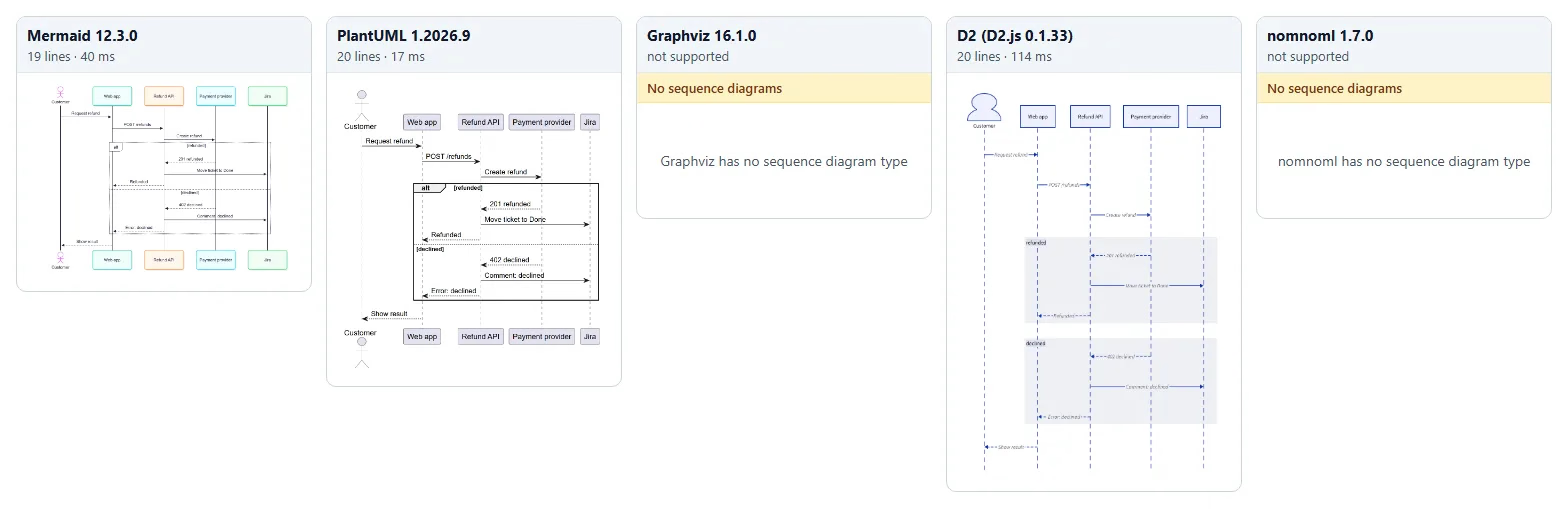
This is the round that splits the field. Mermaid and PlantUML have a real sequence language:
-->> or --> for a reply, alt … else … end for branches, and both drew it correctly from 19
and 20 lines. PlantUML has more sequence features (nested activations, numbered returns, more arrow
kinds); for this diagram it made no difference.
D2 draws sequence diagrams when you set shape: sequence_diagram. Its docs put it as “Unlike
other tools, there is no special syntax to learn for sequence diagrams.” The flip side: there is no
reply arrow and no alt. We dashed each reply by hand and used two labelled groups for the outcomes,
which reads fine but carries less meaning. Graphviz and nomnoml have no sequence diagram at
all; people fake one in DOT with invisible nodes, which nobody wants to maintain.
Sources for the sequence diagram (3 languages)
Mermaid
sequenceDiagram
  actor C as Customer
  participant W as Web app
  participant A as Refund API
  participant P as Payment provider
  participant J as Jira
  C->>W: Request refund
  W->>A: POST /refunds
  A->>P: Create refund
  alt refunded
    P-->>A: 201 refunded
    A->>J: Move ticket to Done
    A-->>W: Refunded
  else declined
    P-->>A: 402 declined
    A->>J: Comment: declined
    A-->>W: Error: declined
  end
  W-->>C: Show result
PlantUML
@startuml
actor Customer as C
participant "Web app" as W
participant "Refund API" as A
participant "Payment provider" as P
participant Jira as J
C -> W: Request refund
W -> A: POST /refunds
A -> P: Create refund
alt refunded
  P --> A: 201 refunded
  A -> J: Move ticket to Done
  A --> W: Refunded
else declined
  P --> A: 402 declined
  A -> J: Comment: declined
  A --> W: Error: declined
end
W --> C: Show result
@enduml
D2
shape: sequence_diagram
C: Customer {shape: person}
W: Web app
A: Refund API
P: Payment provider
J: Jira
C -> W: Request refund
W -> A: POST /refunds
A -> P: Create refund
refunded: {
  P -> A: 201 refunded {style.stroke-dash: 3}
  A -> J: Move ticket to Done
  A -> W: Refunded {style.stroke-dash: 3}
}
declined: {
  P -> A: 402 declined {style.stroke-dash: 3}
  A -> J: "Comment: declined"
  A -> W: "Error: declined" {style.stroke-dash: 3}
}
W -> C: Show result {style.stroke-dash: 3}
Round 3: a class diagram
An abstract Payment, a CardPayment that extends it, Refund objects composed into a payment,
and a Customer with multiplicities.
nomnoml wins on brevity: 7 lines, because a class is written as it looks,
[Refund|+id: String;+amount: Money]. PlantUML has the most UML-correct output (italic
abstract class, visibility icons). Mermaid is close and colourful. Graphviz can do it with
shape=record and \l line ends, which is fiddly to edit. D2 has a shape: class with typed
fields, but no way to mark a class abstract or add a stereotype, so we left it out; its
multiplicity labels came out tiny.
Sources for the class diagram (5 languages)
Mermaid
classDiagram
  class Customer {
    +String id
    +String email
  }
  class Payment {
    <<abstract>>
    +String id
    +Money amount
    +refund(Money amount) Refund
  }
  class CardPayment {
    +String last4
  }
  class Refund {
    +String id
    +Money amount
    +Status status
  }
  Customer "1" --> "0..*" Payment : pays
  Payment <|-- CardPayment
  Payment "1" *-- "0..*" Refund
PlantUML
@startuml
class Customer {
  +id: String
  +email: String
}
abstract class Payment {
  +id: String
  +amount: Money
  +refund(amount: Money): Refund
}
class CardPayment {
  +last4: String
}
class Refund {
  +id: String
  +amount: Money
  +status: Status
}
Customer "1" --> "0..*" Payment : pays
Payment <|-- CardPayment
Payment "1" *-- "0..*" Refund
@enduml
Graphviz DOT
digraph classes {
  node [shape=record, fontname="Helvetica"]
  edge [fontname="Helvetica"]
  Customer [label="{Customer|+id: String\l+email: String\l}"]
  Payment [label="{«abstract»\nPayment|+id: String\l+amount: Money\l|+refund(amount: Money): Refund\l}"]
  CardPayment [label="{CardPayment|+last4: String\l}"]
  Refund [label="{Refund|+id: String\l+amount: Money\l+status: Status\l}"]
  Customer -> Payment [label="pays", taillabel="1", headlabel="0..*"]
  CardPayment -> Payment [arrowhead=onormal]
  Payment -> Refund [dir=back, arrowtail=diamond, taillabel="1", headlabel="0..*"]
}
D2
Customer: {
  shape: class
  +id: String
  +email: String
}
Payment: {
  shape: class
  +id: String
  +amount: Money
  +refund(amount Money): Refund
}
CardPayment: {
  shape: class
  +last4: String
}
Refund: {
  shape: class
  +id: String
  +amount: Money
  +status: Status
}
Customer -> Payment: pays {source-arrowhead: 1; target-arrowhead: "0..*"}
CardPayment -> Payment: {target-arrowhead.shape: triangle; target-arrowhead.style.filled: false}
Payment -> Refund: {source-arrowhead: {shape: diamond; style.filled: true}; target-arrowhead: "0..*"}
nomnoml
[Customer|+id: String;+email: String]
[<abstract> Payment|+id: String;+amount: Money|+refund(amount: Money): Refund]
[CardPayment|+last4: String]
[Refund|+id: String;+amount: Money;+status: Status]
[Customer] 1 -> 0..* [Payment]
[Payment] <:- [CardPayment]
[Payment] 1 +-> 0..* [Refund]
Round 4: a state machine
The refund ticket’s workflow: Open, In review, Approved or Declined, Refunded, with a reopen loop.
Mermaid and PlantUML share almost the same syntax here ([*] --> Open), and both read well.
Graphviz and D2 have no state type, but a state machine is just a graph, so it costs a few extra
lines for the start and end markers. nomnoml drew “decline” and “approve” on top of each other
where the two arrows leave InReview; on a bigger workflow you would be nudging labels by hand.
Sources for the state machine (5 languages)
Mermaid
stateDiagram-v2
  [*] --> Open
  Open --> InReview : assign
  InReview --> Approved : approve
  InReview --> Declined : decline
  Declined --> Open : reopen
  Approved --> Refunded : provider confirms
  Refunded --> [*]
  Declined --> [*]
PlantUML
@startuml
[*] --> Open
Open --> InReview : assign
InReview --> Approved : approve
InReview --> Declined : decline
Declined --> Open : reopen
Approved --> Refunded : provider confirms
Refunded --> [*]
Declined --> [*]
@enduml
Graphviz DOT
digraph states {
  node [shape=box, style=rounded, fontname="Helvetica"]
  edge [fontname="Helvetica"]
  init [shape=point, width=0.2]
  final [shape=doublecircle, label="", width=0.2]
  init -> Open
  Open -> InReview [label="assign"]
  InReview -> Approved [label="approve"]
  InReview -> Declined [label="decline"]
  Declined -> Open [label="reopen"]
  Approved -> Refunded [label="provider confirms"]
  Refunded -> final
  Declined -> final
}
D2
init: "" {shape: circle; width: 20; style.fill: black}
final: "" {shape: circle; width: 20; style.double-border: true}
init -> Open
Open -> InReview: assign
InReview -> Approved: approve
InReview -> Declined: decline
Declined -> Open: reopen
Approved -> Refunded: provider confirms
Refunded -> final
Declined -> final
nomnoml
[<start> start] -> [<state> Open]
[<state> Open] assign -> [<state> InReview]
[<state> InReview] approve -> [<state> Approved]
[<state> InReview] decline -> [<state> Declined]
[<state> Declined] reopen -> [<state> Open]
[<state> Approved] provider confirms -> [<state> Refunded]
[<state> Refunded] -> [<end> end]
[<state> Declined] -> [<end> end]
Round 5: an ER diagram with keys
Three tables, primary and foreign keys, one-to-many relations.
D2’s sql_table is the nicest to write: one line per column with {constraint: primary_key}.
With the default layout its arrows join table to table, not row to row, and it put the referencing
table on top, because an arrow from a foreign key goes up to the key it references. Mermaid and PlantUML draw proper crow’s-foot
ends. Graphviz is the only one here that pointed arrows at the key rows, but only through HTML-like tables: 1,197
characters, the longest source in the whole test. nomnoml has <table> boxes but no crow’s
feet; cardinality is text on the line.
Sources for the ER diagram (5 languages)
Mermaid
erDiagram
  CUSTOMER ||--o{ PAYMENT : makes
  PAYMENT ||--o{ REFUND : has
  CUSTOMER {
    uuid id PK
    text email
  }
  PAYMENT {
    uuid id PK
    uuid customer_id FK
    int amount_cents
  }
  REFUND {
    uuid id PK
    uuid payment_id FK
    int amount_cents
    text status
  }
PlantUML
@startuml
entity customer {
  *id : uuid <<PK>>
  --
  email : text
}
entity payment {
  *id : uuid <<PK>>
  --
  customer_id : uuid <<FK>>
  amount_cents : int
}
entity refund {
  *id : uuid <<PK>>
  --
  payment_id : uuid <<FK>>
  amount_cents : int
  status : text
}
customer ||--o{ payment : makes
payment ||--o{ refund : has
@enduml
Graphviz DOT
digraph er {
  node [shape=plain, fontname="Helvetica"]
  rankdir=LR
  customer [label=<<table border="0" cellborder="1" cellspacing="0" cellpadding="4">
    <tr><td bgcolor="#e2e8f0"><b>customer</b></td></tr>
    <tr><td port="id" align="left">id uuid PK</td></tr>
    <tr><td align="left">email text</td></tr></table>>]
  payment [label=<<table border="0" cellborder="1" cellspacing="0" cellpadding="4">
    <tr><td bgcolor="#e2e8f0"><b>payment</b></td></tr>
    <tr><td port="id" align="left">id uuid PK</td></tr>
    <tr><td port="customer_id" align="left">customer_id uuid FK</td></tr>
    <tr><td align="left">amount_cents int</td></tr></table>>]
  refund [label=<<table border="0" cellborder="1" cellspacing="0" cellpadding="4">
    <tr><td bgcolor="#e2e8f0"><b>refund</b></td></tr>
    <tr><td port="id" align="left">id uuid PK</td></tr>
    <tr><td port="payment_id" align="left">payment_id uuid FK</td></tr>
    <tr><td align="left">amount_cents int</td></tr>
    <tr><td align="left">status text</td></tr></table>>]
  customer:id -> payment:customer_id [arrowtail=teetee, arrowhead=crowodot, dir=both]
  payment:id -> refund:payment_id [arrowtail=teetee, arrowhead=crowodot, dir=both]
}
D2
customer: {
  shape: sql_table
  id: uuid {constraint: primary_key}
  email: text
}
payment: {
  shape: sql_table
  id: uuid {constraint: primary_key}
  customer_id: uuid {constraint: foreign_key}
  amount_cents: int
}
refund: {
  shape: sql_table
  id: uuid {constraint: primary_key}
  payment_id: uuid {constraint: foreign_key}
  amount_cents: int
  status: text
}
payment.customer_id -> customer.id: {target-arrowhead.shape: cf-one-required; source-arrowhead.shape: cf-many}
refund.payment_id -> payment.id: {target-arrowhead.shape: cf-one-required; source-arrowhead.shape: cf-many}
nomnoml
[<table> customer| id | uuid PK || email | text]
[<table> payment| id | uuid PK || customer_id | uuid FK || amount_cents | int]
[<table> refund| id | uuid PK || payment_id | uuid FK || amount_cents | int || status | text]
[customer] 1 - 0..* [payment]
[payment] 1 - 0..* [refund]
Round 6: an architecture diagram with a boundary
A customer, a cloud boundary with five parts inside, and two outside services.
All five can group boxes. D2 and PlantUML look the most finished out of the box: D2 with its
container and person shape, PlantUML with a cloud outline and component icons. Mermaid’s
subgraph does the job in 10 lines. Graphviz needs the cluster_ prefix on the subgraph name,
or the boundary silently disappears.
nomnoml failed this one. An arrow from outside a <frame> cannot reach a box inside it:
[Customer] -> [Web app] drew a second “Web app” box outside the frame, and the arrows to the
payment provider and Jira came from a second “Refund worker”. The diagram looks plausible and is
wrong, which is worse than an error.
Sources for the architecture diagram (5 languages)
Mermaid
flowchart LR
  user((Customer)) --> web
  subgraph cloud [Cloud, eu-west-1]
    web[Web app] --> api[Refund API]
    api --> db[(Postgres)]
    api --> queue[[Refund queue]]
    queue --> worker[Refund worker]
  end
  worker --> psp[Payment provider]
  worker --> jira[Jira Cloud]
PlantUML
@startuml
left to right direction
actor Customer
cloud "Cloud, eu-west-1" {
  component "Web app" as web
  component "Refund API" as api
  database Postgres as db
  queue "Refund queue" as q
  component "Refund worker" as worker
}
node "Payment provider" as psp
node "Jira Cloud" as jira
Customer --> web
web --> api
api --> db
api --> q
q --> worker
worker --> psp
worker --> jira
@enduml
Graphviz DOT
digraph arch {
  rankdir=LR
  node [shape=box, style=rounded, fontname="Helvetica"]
  user [label="Customer", shape=circle]
  subgraph cluster_cloud {
    label="Cloud, eu-west-1"
    style=dashed
    web [label="Web app"]
    api [label="Refund API"]
    db [label="Postgres", shape=cylinder]
    queue [label="Refund queue", shape=box3d]
    worker [label="Refund worker"]
  }
  psp [label="Payment provider"]
  jira [label="Jira Cloud"]
  user -> web -> api
  api -> db
  api -> queue -> worker
  worker -> psp
  worker -> jira
}
D2
direction: right
user: Customer {shape: person}
cloud: "Cloud, eu-west-1" {
  style.stroke-dash: 3
  web: Web app
  api: Refund API
  db: Postgres {shape: cylinder}
  queue: Refund queue {shape: queue}
  worker: Refund worker
  web -> api
  api -> db
  api -> queue
  queue -> worker
}
psp: Payment provider
jira: Jira Cloud
user -> cloud.web
cloud.worker -> psp
cloud.worker -> jira
nomnoml
#direction: right
[<actor> Customer] -> [Web app]
[<frame> Cloud, eu-west-1|
  [Web app] -> [Refund API]
  [Refund API] -> [<database> Postgres]
  [Refund API] -> [<pipe> Refund queue]
  [<pipe> Refund queue] -> [Refund worker]
]
[Refund worker] -> [Payment provider]
[Refund worker] -> [Jira Cloud]
What it weighs and how fast it draws
If diagrams render in a reader’s browser (a docs site, a wiki, an Atlassian app), the engine is part of the page.
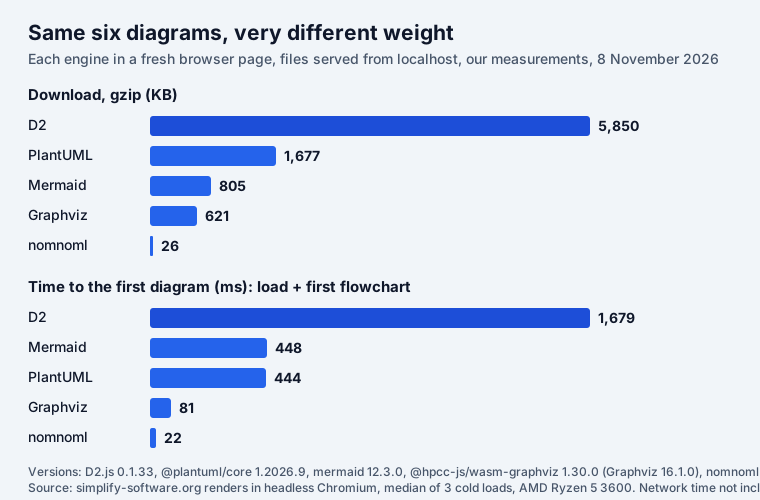
| Engine | Files | Download (gzip) | Load | First diagram | Each next diagram |
|---|---|---|---|---|---|
| D2 | 1 | 5,850 KB | 1,475 ms | 204 ms | 88–126 ms |
| PlantUML | 2 | 1,677 KB | 256 ms | 188 ms | 9–17 ms |
| Mermaid | 34 | 805 KB | 58 ms | 390 ms | 40–109 ms |
| Graphviz | 1 | 621 KB | 61 ms | 20 ms | 0.8–1.5 ms |
| nomnoml | 2 | 26 KB | 11 ms | 11 ms | 1.5–4.1 ms |
Three things stand out:
- D2’s browser build is the heaviest by far: one 8 MB file (5.85 MB gzipped) and 1.5 seconds before the first diagram. It is also behind the CLI: the npm package we used (0.1.33) dates from August 2025, while D2 itself released v0.9.0 in September 2026. D2 shines as a CLI in CI that commits SVGs; in a page it is a cost.
- Mermaid loads fast and pays later. Its core is small, but each diagram type is a lazy chunk: 34 files by the time all six had rendered, and 390 ms for the first flowchart.
- PlantUML in the browser is real now. The TeaVM build needs no Java and no server, which makes
“PlantUML needs a Java server”, a claim still repeated on comparison pages, out of date. It does
bring 1.7 MB along, and
!includeof the standard library (C4, for example) fetches more files unless you host them yourself.
Render speed itself rarely matters for a handful of diagrams. It matters for a wiki page with 40 of them, or a dependency graph with 2,000 nodes, where Graphviz’s millisecond is a different class.
When you get the syntax wrong
The same mistake in each language: a block opened and never closed.
| Language | What it said |
|---|---|
| Mermaid | Parse error on line 2: followed by the line, a caret, and a list of 15 expected tokens |
| PlantUML | nothing: an if without endif rendered a diagram, no error |
| Graphviz | syntax error in line 3 near '->' |
| D2 | index:1:19: maps must be terminated with } |
| nomnoml | Parse error at line 1 column 30, expected "]" but got end of file |
D2 and nomnoml give the most useful messages: line, column and what was missing. Mermaid’s points
at the right place but buries it under token names. PlantUML’s silence is the one to know: it
closed the if for us and drew a diagram that is not what we wrote. Review PlantUML diagrams by
looking at the picture, not only at the source diff.
Where each one renders
A diagram language is only as useful as the places that draw it without an export step.
| Where | Mermaid | PlantUML | Graphviz | D2 | nomnoml |
|---|---|---|---|---|---|
| GitHub Markdown | yes | no | no | no | no |
| GitLab.com | yes (Mermaid 12) | yes | no | no | no |
| GitLab self-managed | yes | if an admin enables it | via Kroki | via Kroki | via Kroki |
| Confluence Cloud apps | 77 | 36 | 14 | 7 | 3 |
| Jira Cloud apps | 18 | 4 | 5 | 0 | 1 |
| In a browser, no server | yes | yes (TeaVM build) | yes (WebAssembly) | yes (WebAssembly) | yes |
GitHub’s own documentation is short on this: “You can create diagrams in Markdown using four different syntaxes: mermaid, geoJSON, topoJSON, and ASCII STL” (GitHub Docs). Everything else shows as a code block. GitLab renders Mermaid and, on GitLab.com, PlantUML; D2, Graphviz and nomnoml need the Kroki integration, which the GitLab docs list for self-managed and Dedicated instances, turned on by an administrator.
The Atlassian numbers are our count of Cloud apps on the Marketplace that name the language in their name, tagline or summary (public Marketplace API, 8 November 2026; an app that supports several languages counts under each). In Confluence there is plenty of choice: the biggest are Gliffy (15,542 installs, which mentions Mermaid), Just Add+ (7,924) and Stratus’s PlantUML Diagrams for Confluence (5,198). Jira is thinner: the largest PlantUML app, Versatile PlantUML Renderer for Jira, has 88 installs, and there is no D2 app for Jira Cloud at all.
Licences and who is behind each
| Language | Licence | Since | GitHub stars | Layout |
|---|---|---|---|---|
| Mermaid | MIT | 2014 | 91,038 | own layouts per type; ELK optional |
| PlantUML | your choice of GPL, LGPL, Apache, EPL or MIT | 2010 | 13,408 | Graphviz (bundled) for class-like types; its own for sequence |
| Graphviz | Eclipse Public License | — | on GitLab | 8 engines: dot, neato, fdp, sfdp, circo, twopi, osage, patchwork |
| D2 | MPL-2.0; TALA layout closed source and paid | 2022 | 25,806 | dagre (default), ELK, TALA |
| nomnoml | MIT | 2014 | 2,840 | graphre (a fork of dagre) |
One licence detail catches teams out. D2’s TALA layout engine, the one built for architecture diagrams, is a separate product: its README says it “is free to evaluate, but without a license, will render with a watermark”, and that it “requires a license for any commercial use”. The default dagre and ELK layouts are free.
Which one to pick
- Your docs live in Markdown on GitHub or GitLab: Mermaid. Nothing else renders on GitHub without an export step, and it drew all six diagram types here.
- You need real UML (timing, object, deployment, use case) or C4 with a legend: PlantUML. Draw flowcharts with care: branches cannot merge into one step.
- Large graphs (dependencies, call graphs, org charts), exact layout control, or rendering thousands of diagrams: Graphviz.
- Architecture diagrams for people outside engineering, rendered in CI and committed as SVG: D2. Budget for TALA if you want its layout without a watermark.
- Quick UML sketches inside a page where weight matters: nomnoml, for class and simple flow diagrams only, and without frames that arrows need to cross.
Nothing stops you from using two: Mermaid for everyday docs and one specialist (PlantUML for UML-heavy work, Graphviz for big graphs).
Mermaid, Graphviz and nomnoml in Jira and Confluence
Our own apps sit on the Mermaid, Graphviz and nomnoml side of this table: they render in the browser inside Atlassian, with no external calls, and they do not render PlantUML or D2.
- Mermaid Tabs for Jira keeps Mermaid diagrams (all the types above) in tabs on a work item, and Graphviz Tabs does the same for DOT.
- Excalidraw for Confluence turns Mermaid text into an Excalidraw drawing you can annotate by hand; Excalidraw Graphviz for Confluence does it for DOT graphs.
- Excalidraw UML for Jira draws nomnoml or Mermaid class, state and ER diagrams on a whiteboard on the work item (and for Confluence). The frame trap above applies there too.
All are free for up to 10 users. For syntax help, see the Mermaid UML cheat sheet, the nomnoml syntax guide, Graphviz in Confluence and the C4 model examples, where the same three notations draw one system at three zoom levels.
Frequently asked questions
What is better than PlantUML?
For diagrams in GitHub Markdown, Mermaid: GitHub renders it and not PlantUML. For layout control and speed, Graphviz (about 1 ms per diagram in our test). For architecture diagrams that look designed, D2. For strict UML (nine types, including timing and deployment) and C4, PlantUML is still hard to replace.
Is Mermaid good for sequence diagrams?
Yes. It drew our refund sequence (five participants, an alt block, dashed replies) correctly from 19 lines; PlantUML needed 20. PlantUML has more sequence features, such as nested activations and numbered returns, but most teams never need them.
Is Mermaid free?
Yes, the library is open source under the MIT licence. PlantUML, Graphviz, nomnoml and D2 are free too; only D2’s TALA layout engine is paid for commercial use and adds a watermark without a licence.
Does GitHub render PlantUML?
No. GitHub renders four diagram syntaxes in Markdown: Mermaid, GeoJSON, TopoJSON and ASCII STL. PlantUML, D2, DOT and nomnoml show as code, so you commit an exported SVG or render it in CI. GitLab.com renders Mermaid and PlantUML.
What is a D2 diagram?
A text-to-diagram language from Terrastruct, open source (MPL-2.0) since 2022. You write `a -> b`, and special shapes add sequence diagrams, SQL tables and UML classes. Layouts: dagre (default), ELK or the paid TALA. Its browser build weighed 5.85 MB gzipped in our test.
Can I use Mermaid, PlantUML or D2 in Jira and Confluence?
Only through Marketplace apps. On 8 November 2026, 77 Confluence Cloud and 18 Jira Cloud apps named Mermaid, 36 and 4 PlantUML, 14 and 5 Graphviz, and 7 Confluence apps D2; none for D2 in Jira.