Mermaid Cheat Sheet: Class, Sequence and State Diagrams
On this page
The pull request adds one line to the architecture notes, and the diagram on the page turns into
“Parse error on line 4”. The line was A->>B: total ; tax. Mermaid treats the semicolon as the end
of a statement, and nothing in the message says so.
This page is the Mermaid syntax for the three UML diagrams people search for most (sequence, class and state) with every piece rendered, not just copied from the docs. We ran 88 small probes and three full diagrams through Mermaid 11.17.2 and 12.3.0 on 7 November 2026. 82 probes worked in both versions. The six that failed failed in both, and they are in the traps section with their fixes.
Short answer: a sequence diagram is sequenceDiagram plus one A->>B: text per message; a class
diagram is classDiagram plus classes and relations such as A <|-- B; a state diagram is
stateDiagram-v2 plus transitions such as [*] --> Paid. Mermaid 12 draws class and state
diagrams with a new layout (ELK) and look; the syntax did not change. Watch for semicolons in
messages, end as a name, and spaces in state names.
Sequence diagrams
Participants
sequenceDiagram
  actor U as Customer
  participant S as Shop
  participant DB@{ "type" : "database", "alias" : "Payments DB" }
  U->>S: Pay
S->>DB: Saveparticipantdraws a box,actora stick figure.asgives a short id a readable label.- Other UML symbols use the JSON form
@{ "type" : "..." }: boundary, control, entity, database, collections and queue all rendered for us. The alias goes inside the same braces. create participant Bbefore the first message to B draws it where it appears, anddestroy Bends its lifeline.box Payments ... endgroups participants under a label.
Every message arrow
Mermaid has ten basic arrows and, since 11.12.3, sixteen half arrows (the solid and dashed forms of eight shapes). This is how each one renders, with its code as the label:
| Code | Meaning | Use it for |
|---|---|---|
->> | Solid line, arrowhead | A call or request |
-->> | Dashed line, arrowhead | A reply |
-> / --> | Line without a head | A plain link |
<<->> | Heads at both ends (v11+) | A two-way exchange |
-x / --x | Cross at the end | A message that is lost or rejected |
-) / --) | Open head | An async message: event, webhook |
-|\ -|/ | Top or bottom half arrowhead | Detailed protocol diagrams |
-\\ -// | Top or bottom stick half head | Detailed protocol diagrams |
Two things the docs do not make obvious. The reverse forms (/|-, \|-, //-, \\-) put the
head at the sender: A\|-B draws an arrow pointing at A. And the docs’ half-arrow table lists
\\- twice, once as “reverse bottom half” and once as “reverse bottom stick”. We tried both
spellings: \|- is the reverse bottom half, \\- is the reverse bottom stick.
Activations, notes, blocks and numbering
sequenceDiagram
  autonumber
  A->>+B: call
  B-->>-A: return
  Note right of B: a note
  Note over A,B: spans both
  loop Every minute
    A->>B: poll
  end
  alt approved
    B-->>A: ok
  else declined
    B-->>A: no
  end
  opt has coupon
    A->>B: apply
  end
  par to B
    A->>B: x
  and to C
    A->>C: y
  end
  critical Charge card
    A->>B: charge
  option Timeout
    A->>A: retry
  end
  break card blocked
    B-->>A: stop
  end
  rect rgb(220, 235, 255)
    A->>B: highlighted
end+after the arrow starts an activation bar on the receiver,-ends it;activate Banddeactivate Bon their own lines do the same.autonumbernumbers every message;autonumber 10 5starts at 10 and counts in fives (Mermaid 11.15 and later; it rendered in both versions we tried).<br/>breaks a message over two lines;%%starts a comment.- Characters with a meaning in the syntax go in as entity codes:
#59;for a semicolon.
A full example: a refund
sequenceDiagram
  autonumber
  actor Agent as Support agent
  participant API as Payments API
  participant PSP as Card provider
  participant DB@{ "type" : "database", "alias" : "Payments DB" }
  Agent->>+API: Refund order 1042 (€40)
  API->>DB: Load payment
  critical Provider call
    API->>+PSP: POST /refunds
    PSP-->>-API: 202 Accepted
  option Timeout after 10 s
    API->>API: Retry once
  end
  alt Refund accepted
    API->>DB: Save refund, status pending
    API-->>Agent: Refund pending
  else Refund declined
    API-->>Agent: Declined, card closed
  end
  Note over API,PSP: The provider confirms later by webhook
  PSP-)API: webhook refund.succeeded
  API->>-DB: Status refunded
Class diagrams
Classes and members
classDiagram
  class Payment {
    +String id
    -Money amount
    #Status status
    ~String note
    +refund(Money amount) bool
    +create()$ Payment
    +validate()*
  }
  class Repository~T~ {
    +find(id) T
    +all() List~T~
  }
  class Gateway {
    <<interface>>
    +charge()
}| Mark | Meaning |
|---|---|
+ | Public |
- | Private |
# | Protected |
~ | Package or internal |
$ | Static (after a method) |
* | Abstract (after a method) |
Generics use tildes: Repository~T~, List~T~. A return type follows the closing bracket. An
annotation such as <<interface>> goes inside the class or on its own line as
<<interface>> Gateway. A label with spaces or brackets needs the bracket form:
class P["Payment (card)"].
The eight relations
| Code | Relation | Reads as |
|---|---|---|
<|-- | Inheritance | B is an A |
*-- | Composition | A owns B; B dies with A |
o-- | Aggregation | A has B; B lives on its own |
--> | Association | A knows B |
-- | Link (solid) | A and B are related |
..> | Dependency | A uses B |
..|> | Realization | A implements the interface B |
.. | Link (dashed) | A weaker, unnamed link |
Multiplicity goes in quotes on either side and a label after a colon:
Order "1" --> "*" LineItem : contains. Heads on both ends work too (A <|--|> B), and ()-- draws
a lollipop interface. Group classes with namespace Payments { ... }; a dotted name such as
namespace Shop.Payments rendered in both versions. note for Payment "Money is in cents" adds a
note and direction LR turns the diagram on its side.
A full example: the payments domain
classDiagram
  direction LR
  class Payment {
    +String id
    +Money amount
    +Status status
    +capture() bool
    +refund(Money amount) Refund
  }
  class Refund {
    +String id
    +Money amount
    +Status status
  }
  class Money {
    +long cents
    +String currency
  }
  class PaymentGateway {
    <<interface>>
    +authorise(Payment p) bool
    +refund(Refund r) bool
  }
  class CardProviderGateway
  class LedgerEntry
  Payment "1" *-- "0..*" Refund : has
  Payment --> Money : amount
  Refund --> Money : amount
  PaymentGateway <|.. CardProviderGateway
  Payment ..> PaymentGateway : uses
  Payment "1" o-- "1..*" LedgerEntry : records
State diagrams
stateDiagram-v2
  [*] --> Pending
  Pending --> Paid : captured
  state "Waiting for 3-D Secure" as ThreeDS
  W : Waiting for the bank
  state check <<choice>>
  state f <<fork>>
  state j <<join>>
  state Active {
    [*] --> A1
    --
    [*] --> B1
  }
  note right of Paid
    Money moved
  end note
Paid --> [*][*]is the start or the end, depending on which side of the arrow it sits.- A name with spaces needs
state "..." as Id;Id : descriptionsets the text another way. <<choice>>draws a decision diamond;<<fork>>and<<join>>split and merge.- A block
state Active { ... }is a composite state;--inside it separates regions that run at the same time. direction LRturns it on its side;classDef bad fill:#f88plusclass Failed bad(orFailed:::badon a transition) colours a state.
A full example, in Mermaid 11 and 12
stateDiagram-v2
  state "Waiting for 3-D Secure" as ThreeDS
  state check <<choice>>
  [*] --> Created
  Created --> ThreeDS : card needs check
  Created --> check : no check needed
  ThreeDS --> check : customer approved
  check --> Authorised : bank says yes
  check --> Declined : bank says no
  state Authorised {
    [*] --> Held
    Held --> Captured : capture
  }
  Authorised --> Refunded : refund
  Declined --> [*]
  Refunded --> [*]
  note right of Declined
    Customer sees the bank's reason
  end note
What Mermaid 12 changed
Nothing in the syntax we tested: all 88 probes gave the same result in 11.17.2 and 12.3.0. What
changed is the drawing. Mermaid’s docs: class and state diagrams “use the redux-color theme and the
neo look by default, and are laid out by ELK rather than Dagre”; sequence diagrams get the same
theme and look. So a diagram written last year looks different on a site that upgrades, as the two
state diagrams above show.
To keep the old drawing in Mermaid 12, put this front matter at the top of the diagram (it brought back the curved, lavender version in our test):
---
config:
  theme: default
  look: classic
  layout: dagre
---
stateDiagram-v2
  [*] --> Created
Seven lines that break a diagram
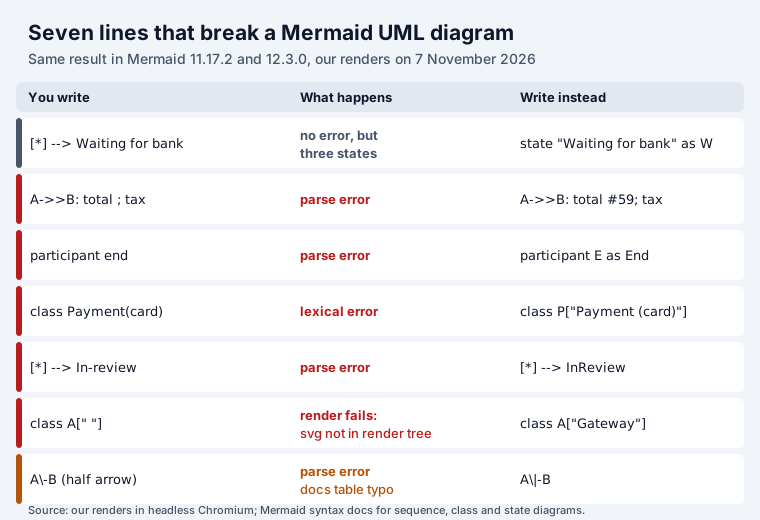
The quiet one is first. [*] --> Waiting for bank raises no error: Mermaid draws three states
called Waiting, for and bank. The end trap ignores letter case: participant End and
participant END fail the same way, so give it a different id and a label (participant E as End).
The word end inside a message is fine.
Where to use these diagrams in Jira and Confluence
Neither Jira nor Confluence draws Mermaid by itself; a mermaid code block stays code. Two of our
apps render it:
- Mermaid Tabs for Jira shows a diagram in a tab on the work item and on project pages; it ships Mermaid 12, so expect the new look shown above.
- Our Excalidraw apps for Jira and Confluence put the diagram on a whiteboard with the source kept, so Update redraws it after you edit the text. They render with Mermaid 11.
All 16 Mermaid apps for Jira are compared in Mermaid in Jira, and the 53 for Confluence in Confluence Mermaid. For architecture rather than UML, see our C4 model examples in Mermaid, PlantUML and Graphviz.
How we tested
- 7 November 2026, mermaid 11.17.2 and 12.3.0 in headless Chromium (Playwright). Each probe was rendered, not just parsed: 88 probes × 2 versions, plus the three full examples, the arrow and relation reference diagrams, and the front-matter check.
- Probes covered every sequence arrow and block, participant type, numbering, escapes; all eight class relations, members, generics, annotations, namespaces, notes; state choice, fork, join, composite, concurrency, notes, classDef, and names with spaces, hyphens and brackets.
Sources
- Mermaid documentation: sequence diagrams, class diagrams, state diagrams (read 7 November 2026, develop branch).
- Our renders in Mermaid 11.17.2 and 12.3.0, 7 November 2026.
Frequently asked questions
How do I draw a sequence diagram in Mermaid?
Start with sequenceDiagram, name the participants, then write one message per line: A->>B: text. ->> is a solid arrow, -->> a dashed reply, -) an async message, -x a lost one. Wrap parts in loop, alt/else, opt, par/and, critical/option or break, each closed with end. Add autonumber to number the messages.
What are the relationship arrows in a Mermaid class diagram?
<|-- inheritance, *-- composition, o-- aggregation, --> association, -- solid link, ..> dependency, ..|> realization and .. dashed link. Put multiplicity in quotes on either side, for example Order "1" --> "*" LineItem : contains.
Why does my Mermaid diagram say “Parse error”?
The usual causes we hit: a semicolon in a message (write #59;), a participant called end in any letter case (use an alias such as participant E as End), brackets in a class name (use class P["Payment (card)"]) and a hyphen in a state name. A state name with spaces does not error at all: it silently becomes several states.
What changed in Mermaid 12 for these diagrams?
The defaults. Sequence, class and state diagrams use the redux-color theme and the neo look, and class and state diagrams are laid out by ELK instead of Dagre, so lines become right-angled. The syntax we tested parsed the same in 11.17.2 and 12.3.0. To get the old drawing, set theme default, look classic and layout dagre in the diagram’s front matter.
Should I use stateDiagram or stateDiagram-v2?
stateDiagram-v2 is the one the Mermaid docs use and the one to write. Both keywords parsed in our test, in Mermaid 11 and 12.
Can I use these diagrams in Jira or Confluence?
Not natively: Jira and Confluence show a mermaid code block as code. Apps render it. Our Mermaid Tabs for Jira shows the diagram in a tab on the work item, and our Excalidraw apps for Jira and Confluence put it on a whiteboard with the source kept for later edits.