C4 Model Examples: One System in Mermaid, PlantUML and DOT
On this page
A new engineer joins the payments team and asks where a refund actually happens. Someone opens a two-year-old whiteboard photo: six boxes, arrows without labels, one box called “Backend”. Twenty minutes later three people agree on an answer that two of them will remember differently next week.
The C4 model exists for that conversation. We drew one system, a payments platform, at three C4 levels and in three diagram-as-code notations, rendered every diagram, and kept what went wrong. Everything below can be copied.
Short answer: the C4 model draws a system at zoom levels: context (who uses it, what it talks to), containers (apps and data stores), components (parts of one container) and code. Draw the first two for every system; the C4 site calls component and code diagrams optional. As code, C4-PlantUML gave the best result on the first try (legend, automatic layout); Mermaid C4 renders wherever Mermaid does but needed manual layout and has no legend; Graphviz needs every box styled by hand.
What the C4 model is
Simon Brown, who created it, describes C4 as “a set of hierarchical abstractions - software systems, containers, components, and code” with a diagram for each, and adds that it is “notation independent” and “tooling independent”. The abstractions nest: a software system is “made up of one or more containers (applications and data stores), each of which contains one or more components, which in turn are implemented by one or more code elements”.
| Level | Shows | For | C4 site recommends |
|---|---|---|---|
| 1. System context | Your system, its users and the systems around it | Everybody, technical or not | Yes, every team |
| 2. Container | Apps and data stores inside the system, with technology | Developers, architects, operations | Yes, every team |
| 3. Component | Parts inside one container | Architects and developers | Only if it adds value |
| 4. Code | Classes, tables, functions | Developers | No, IDEs make it |
The container is the level people misread most. In C4 it has nothing to do with Docker: “a container is an application or a data store”, such as a single-page app, an API, a database schema or a storage bucket. The container diagram “says very little about deployment aspects such as clustering, load balancers, replication, failover”; those go in a deployment diagram.
The example: a payments platform at three levels
Customers pay for orders by card; support agents look up payments and issue refunds and also work customer requests in Jira Service Management. The platform calls a card payment provider, gets its webhooks back, and emails receipts.
Level 1: system context
@startuml
!include <C4/C4_Context>
title System context diagram for the Payments Platform
Person(customer, "Customer", "Buys from the web shop and pays by card")
Person(agent, "Support agent", "Answers payment questions in Jira Service Management")
System(pay, "Payments Platform", "Takes card payments, refunds and payouts")
System_Ext(psp, "Card payment provider", "Authorises and captures card payments")
System_Ext(mail, "Email service", "Sends receipts and refund notices")
System_Ext(jsm, "Jira Service Management", "Customer requests about payments")
Rel(customer, pay, "Pays for orders", "HTTPS")
Rel(agent, pay, "Looks up payments and issues refunds", "HTTPS")
Rel(pay, psp, "Authorises, captures and refunds", "REST/HTTPS")
Rel(pay, mail, "Sends receipts", "SMTP")
Rel(agent, jsm, "Works customer requests in")
SHOW_LEGEND()
@enduml
No technology inside the boxes, no databases: C4 calls this “the sort of diagram that you could show to non-technical people”.
Level 2: containers
@startuml
!include <C4/C4_Container>
title Container diagram for the Payments Platform
Person(customer, "Customer", "Pays by card")
Person(agent, "Support agent", "Issues refunds")
System_Ext(psp, "Card payment provider", "Authorises and captures")
System_Ext(mail, "Email service", "Sends receipts")
System_Boundary(b, "Payments Platform") {
  Container(web, "Checkout web app", "TypeScript, React", "Card form and order summary in the browser")
  Container(api, "Payments API", "Java, Spring Boot", "Creates payments and refunds, applies fraud rules")
  Container(worker, "Webhook worker", "Java", "Handles provider webhooks and retries")
  ContainerDb(db, "Payments database", "PostgreSQL", "Payments, refunds and the ledger")
  ContainerQueue(queue, "Events queue", "Kafka", "Payment events for other systems")
}
Rel(customer, web, "Pays in", "HTTPS")
Rel(agent, api, "Refunds through the admin screen", "HTTPS")
Rel(web, api, "Creates payment", "JSON/HTTPS")
Rel(api, psp, "Authorises and captures", "REST/HTTPS")
Rel(psp, worker, "Sends payment status", "Webhook/HTTPS")
Rel(api, db, "Reads and writes", "JDBC")
Rel(worker, db, "Updates status", "JDBC")
Rel(worker, queue, "Publishes payment events", "Kafka")
Rel(worker, mail, "Requests receipt", "SMTP")
SHOW_LEGEND()
@enduml
This is the diagram that answers the new engineer: a refund starts in the Payments API, goes to the provider, and comes back as a webhook to the worker, which updates the database and the queue.
Level 3: components of the Payments API
@startuml
!include <C4/C4_Component>
title Component diagram for the Payments API
Container(web, "Checkout web app", "TypeScript, React", "Card form")
System_Ext(psp, "Card payment provider", "Authorises and captures")
ContainerDb(db, "Payments database", "PostgreSQL", "Payments and ledger")
Container_Boundary(api, "Payments API") {
  Component(ctrl, "Payment controller", "Spring MVC", "REST endpoints for payments and refunds")
  Component(fraud, "Fraud rules", "Java", "Blocks risky payments before authorisation")
  Component(client, "Provider client", "Java, HTTP", "Calls the card payment provider")
  Component(ledger, "Ledger repository", "Spring Data JPA", "Writes every money movement once")
}
Rel(web, ctrl, "Creates payment", "JSON/HTTPS")
Rel(ctrl, fraud, "Checks payment")
Rel(ctrl, client, "Authorises and captures")
Rel(client, psp, "Calls", "REST/HTTPS")
Rel(ctrl, ledger, "Records payment")
Rel(ledger, db, "Reads and writes", "JDBC")
SHOW_LEGEND()
@enduml
The C4 site is cautious here: “only create component diagrams if you feel they add value, and consider automating their creation for long-lived documentation”. This one earns its place because fraud rules and the ledger are where payment bugs live.
The same diagram in Mermaid
Mermaid has C4 diagrams built in (C4Context, C4Container, C4Component), and its documentation
says the syntax “is compatible with plantUML”. We pasted the context diagram above, minus the
PlantUML wrapper. It rendered, in Mermaid 11.17.2 and 12.3.0 alike, like this:
Mermaid does not lay C4 diagrams out by itself. Its docs: “The position of shapes is adjusted by
changing the order in which statements are written.” Two changes fixed it: four shapes per row
became two (UpdateLayoutConfig), and the statements were reordered so the system sits under the
people and above its providers. Two labels still needed a nudge:
C4Context
  title System context diagram for the Payments Platform
  UpdateLayoutConfig($c4ShapeInRow="2", $c4BoundaryInRow="1")
  Person(customer, "Customer", "Buys from the web shop and pays by card")
  Person(agent, "Support agent", "Answers payment questions in Jira Service Management")
  System(pay, "Payments Platform", "Takes card payments, refunds and payouts")
  System_Ext(jsm, "Jira Service Management", "Customer requests about payments")
  System_Ext(psp, "Card payment provider", "Authorises and captures card payments")
  System_Ext(mail, "Email service", "Sends receipts and refund notices")
  Rel(customer, pay, "Pays for orders", "HTTPS")
  Rel(agent, pay, "Looks up payments and issues refunds", "HTTPS")
  Rel(agent, jsm, "Works customer requests in")
  Rel(pay, psp, "Authorises, captures and refunds", "REST/HTTPS")
  Rel(pay, mail, "Sends receipts", "SMTP")
  UpdateRelStyle(agent, pay, $offsetX="-60", $offsetY="-20")
  UpdateRelStyle(pay, mail, $offsetX="40", $offsetY="-10")
What will not cross over from C4-PlantUML: the docs list Legend, sprites, tags and links as not
supported, and the Lay_ commands as not planned. We checked the two most common ones: adding
SHOW_LEGEND() or Lay_R(a, b) to a Mermaid C4 diagram stops it with “Lexical error on line 5.
Unrecognized text.” Delete them when you copy a diagram from PlantUML.
And in Graphviz
Graphviz has no C4 shapes, so every box is styled by hand: rounded filled boxes, the C4 blues and greys, and an HTML label with the element type in brackets. Rendered by Graphviz 16.1.0:
digraph context {
  graph [label="System context diagram for the Payments Platform", labelloc=t, fontname="Helvetica"]
  node  [shape=box, style="rounded,filled", fontname="Helvetica", fontcolor=white, fillcolor="#08427b"]
  edge  [fontname="Helvetica", fontsize=11, color="#666666"]
  customer [label=<<b>Customer</b><br/><font point-size="10">[Person]</font><br/>Buys from the web shop<br/>and pays by card>]
  agent    [label=<<b>Support agent</b><br/><font point-size="10">[Person]</font><br/>Answers payment questions<br/>in Jira Service Management>]
  pay      [label=<<b>Payments Platform</b><br/><font point-size="10">[Software System]</font><br/>Takes card payments,<br/>refunds and payouts>, fillcolor="#1168bd"]
  node [fillcolor="#999999"]
  psp  [label=<<b>Card payment provider</b><br/><font point-size="10">[Software System]</font><br/>Authorises and captures>]
  mail [label=<<b>Email service</b><br/><font point-size="10">[Software System]</font><br/>Sends receipts>]
  jsm  [label=<<b>Jira Service Management</b><br/><font point-size="10">[Software System]</font><br/>Customer requests>]
  customer -> pay [label="Pays for orders\n[HTTPS]"]
  agent -> pay [label="Looks up payments,\nissues refunds\n[HTTPS]"]
  agent -> jsm [label="Works customer\nrequests in"]
  pay -> psp [label="Authorises, captures\nand refunds\n[REST/HTTPS]"]
  pay -> mail [label="Sends receipts\n[SMTP]"]
  {rank=same; customer; agent}
  {rank=same; pay; jsm}
}
The layout came out clean on the first render. The cost is the legend: C4 asks for one on every diagram, and in Graphviz you draw it yourself as a subgraph.
Three notations side by side
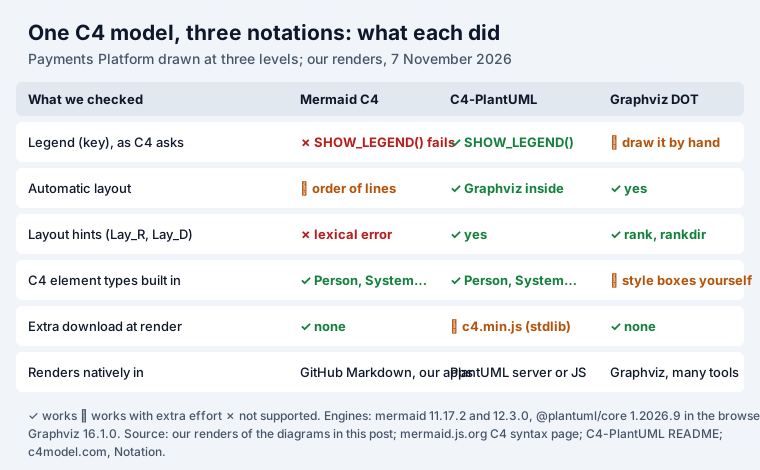
One detail matters for teams with strict network rules. C4-PlantUML’s shapes come from PlantUML’s
standard library. In the browser build we used (@plantuml/core 1.2026.9), !include <C4/C4_Context>
made one request to plantuml.github.io for c4.min.js; the package’s README says to self-host the
bundles in production. Mermaid and Graphviz rendered without fetching anything.
The C4 rules that make a diagram readable
C4’s notation page has a short checklist; most bad architecture diagrams break at least three of these:
- A title that names the diagram type and scope (“System Context diagram for My Software System”).
- A key or legend for shapes, colours and line styles.
- An explicit type on every element: Person, Software System, Container, Component.
- A short description on every element, and a technology on every container and component.
- One direction per line, and a label on every line, “ideally avoiding single words like ‘Uses’”.
- Protocols on relationships between containers (HTTPS, JDBC, Kafka).
Colour is up to you: the blue and grey boxes are a convention of the tools, “not something that is dictated by the C4 model”. Keep it consistent and readable in black and white.
Keeping the diagrams where people look
Diagrams as code live best next to the code and change in the same pull request. People still look for them in Confluence pages and Jira work items. Our Excalidraw apps for Confluence and Jira render Mermaid with the same Mermaid 11 engine we tested here: insert the Mermaid C4 source and it lands on the whiteboard next to your sketches, with the source kept so Update redraws it. For the Graphviz version, Excalidraw Graphviz for Confluence takes the DOT source the same way. Our Confluence Graphviz guide compares the other Graphviz apps, and Confluence Mermaid the 53 Mermaid ones.
For the classic UML diagrams that C4 leaves to the code level, our Mermaid class, sequence and state diagram cheat sheet has every arrow tested.
How we tested
- 7 November 2026. Engines: mermaid 11.17.2 and 12.3.0 and
@plantuml/core1.2026.9 in headless Chromium (Playwright), Graphviz 16.1.0 through@hpcc-js/wasm-graphvizin Node. - The three levels rendered in Mermaid 11, Mermaid 12 and C4-PlantUML (9 renders, all succeeded),
plus the tuned Mermaid context diagram, the Graphviz context diagram, and two probes:
SHOW_LEGEND()andLay_R()in Mermaid. - Network requests recorded during rendering; one external request (C4-PlantUML’s
c4.min.js). - The C4-PlantUML legend’s small icons came out as empty squares in the browser build; the rest of the legend rendered.
Sources
- The C4 model by Simon Brown: Abstractions, System context, Container, Component, Code, Notation.
- Mermaid documentation: C4 diagrams.
- C4-PlantUML README (legend and layout commands).
@plantuml/coreREADME (standard library loading).
Frequently asked questions
What is the C4 model?
A way to draw software architecture as a set of zoom levels, created by Simon Brown. Its site describes hierarchical abstractions (software systems, containers, components and code) and matching diagrams: system context, container, component and code, plus supporting system landscape, dynamic and deployment diagrams. It is notation independent and tooling independent.
Which C4 diagrams do I need?
C4's own site recommends a system context diagram and a container diagram for every team. Component diagrams only if they add value (and ideally generated), and code diagrams are not recommended for long-lived documentation because IDEs produce them on demand.
What is the difference between a container and a component in C4?
A container is something that runs or stores data: “an application or a data store”, such as a web app, an API, a database or a queue. A component is a part inside one container, such as a controller or a repository. Relationships between containers typically cross a process boundary, which is why C4 asks for the protocol on them.
Does Mermaid support C4 diagrams?
Yes: C4Context, C4Container, C4Component, C4Dynamic and C4Deployment. Its documentation says the syntax is compatible with PlantUML, but layout depends on the order of statements, and Legend, sprites, tags, links and the Lay_ layout commands are not supported. In our test, SHOW_LEGEND() and Lay_R() from a C4-PlantUML diagram stopped Mermaid with a lexical error.
Which tool is best for C4 diagrams as code?
C4-PlantUML for complete diagrams: it draws a legend and lays out the boxes itself. Mermaid when the diagram must render where Mermaid already renders (GitHub Markdown, many wikis), accepting some manual layout. Graphviz when you want full control and do not mind styling the boxes yourself.
Is the C4 model the same as UML?
No. C4 uses simple boxes and lines with text, and its site says the core diagrams can also be drawn in UML with packages, components and stereotypes. At the code level C4 suggests UML class diagrams, entity relationship diagrams or similar.