FREE TOOL · RELIABILITY
Error budget calculator
Turn an SLO into a budget you can spend: minutes of downtime or failed requests. See how much of it is gone, how fast it is burning, when it runs out, and which burn rates should page someone.
Your budget
50 % of the budget spent
- Budget
- 43 min 12 s
- Left
- 21 min 36 s
- Burn rate
- 1.50
- Runs out in
- 10.0 days
At this pace the budget runs out on day 20 of 30. Burn rate above 1 means it will not last the window.
| Budget spent | Within | Burn rate | Error rate | Action |
|---|---|---|---|---|
| 2 % | 1 hour | 14.4 | 1.44 % | Page |
| 5 % | 6 hours | 6 | 0.6 % | Page |
| 10 % | 3 days | 1 | 0.1 % | Ticket |
What an error budget is
Google's SRE book, in its chapter Embracing Risk, defines the budget as what the SLO leaves over: a 99.999 % SLO means “the service's error budget is a failure rate of 0.001% for a given quarter”. Its rule for using it is simple: “as long as there is error budget remaining—new releases can be pushed”. When the budget is gone, releases slow down until reliability is back.
| SLO | 30 days | 90 days | Failed per 1,000,000 requests |
|---|---|---|---|
| 99 % | 7 h 12 min | 21 h 36 min | 10,000 |
| 99.5 % | 3 h 36 min | 10 h 48 min | 5,000 |
| 99.9 % | 43 min 12 s | 2 h 9 min | 1,000 |
| 99.95 % | 21 min 36 s | 1 h 4 min | 500 |
| 99.99 % | 4 min 19 s | 12 min 58 s | 100 |
| 99.999 % | 26 s | 1 min 18 s | 10 |
Burn rate
The SRE Workbook chapter on alerting defines burn rate as “how fast, relative to the SLO, the service consumes the error budget”. At 1 the budget lasts exactly the window; at 2 it lasts half.
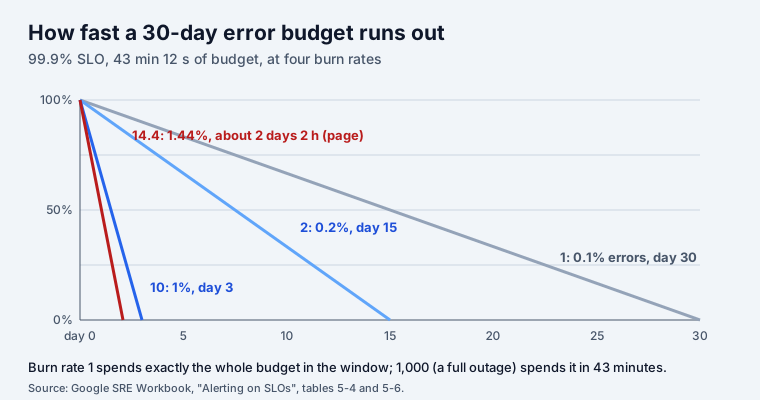
The Workbook recommends “2% budget consumption in one hour and 5% budget consumption in six hours as reasonable starting numbers for paging, and 10% budget consumption in three days as a good baseline for ticket alerts”. Its table gives the burn rates for a 30-day window: 14.4, 6 and 1. Those numbers only hold for 30 days. The table under the calculator recomputes them for your window with burn rate = budget share × window ÷ alert window: for a 28-day window the first one is 13.44.
A worked example
A 99.9 % SLO over 30 days gives 43 minutes 12 seconds. Ten days in, the service has been down 21 minutes 36 seconds: half the budget in a third of the window, a burn rate of 1.5. At that pace the rest lasts another 10 days, so the budget is gone on day 20, and a release freeze would start with ten days of the window still to go.
For the incidents behind those minutes, the MTTR calculator gives mean time to recovery, MTBF and availability from a list of incidents. To see what each number of nines means for a customer over a year, try the SLA uptime calculator.
SLAs in Jira Service Management
If your SLOs are SLA goals in JSM, SLA Reports shows weekly and monthly compliance per SLA, request type and priority, the breaches and the requests close to breaching, against a compliance goal you set.
Frequently asked questions
How do you calculate an error budget?
Error budget = 1 − SLO, applied to the window. A 99.9 % SLO over 30 days leaves 0.1 % of 43,200 minutes: 43 minutes 12 seconds of downtime, or 1,000 failed requests out of every 1,000,000.
What is a burn rate?
How fast you spend the budget compared with spending it evenly. Google’s SRE Workbook: a burn rate of 1 is “consuming error budget at a rate that leaves you with exactly 0 budget at the end of the SLO’s time window”. Burn rate 2 empties a 30-day budget in 15 days.
What burn rate should page someone?
The SRE Workbook suggests paging at 2 % of the budget spent in one hour (burn rate 14.4 for a 30-day window) or 5 % in six hours (6), and a ticket at 10 % in three days (1). The calculator works these out for your own window.
What happens when the error budget runs out?
In Google’s model, releases slow down or stop until reliability recovers: as long as there is budget left, new releases can go out. Write the policy down before you need it, so nobody negotiates it during an outage.
Is SLO the same as SLA?
No. An SLO is the target your team sets for itself; an SLA is a promise to a customer, usually with a penalty. Keep the SLO stricter than the SLA, so the error budget runs out before the contract is broken.
Is my data sent anywhere?
No. The calculator runs in your browser; nothing is sent, logged or stored.