Mermaid ER Diagram: Crow's Foot, Keys and Silent Traps
On this page
- Copy this: a working schema with every kind of key
- Read the crow’s foot first
- Step 1: tables and their names
- Step 2: relationships and their labels
- Step 3: columns, types and keys
- Step 4: many-to-many with a junction table
- Step 5: direction and layout
- Step 6: colours and fonts
- Step 7: group tables with subgraph
- Lines Mermaid quietly turns into tables
- What Mermaid ER diagrams cannot do
- The error messages, decoded
- ER diagrams in Jira, Confluence and Excalidraw
- How we tested
- Sources
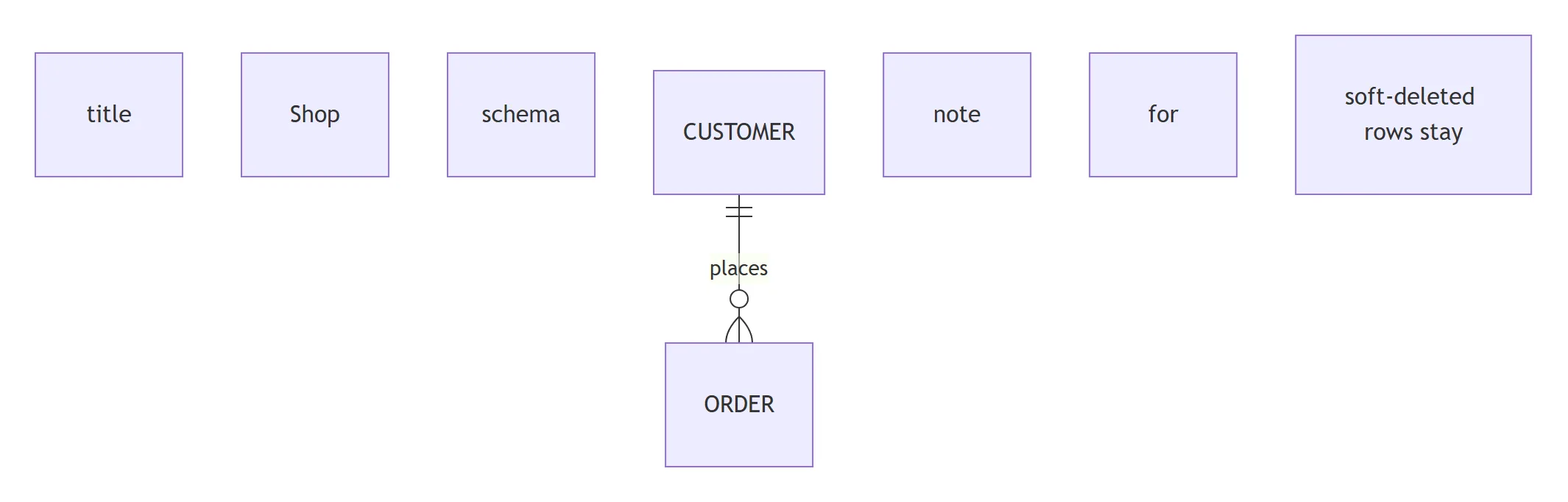
A pull request adds a schema diagram to the README. The reviewer sees the tables they expect, plus
three they do not: boxes called note, for and soft-deleted rows stay. Someone had written
note for ORDER "soft-deleted rows stay", a line from Mermaid’s class diagrams. The ER diagram has
no notes, so Mermaid read every word as a table name and drew them. No error, no warning.
That is the shape of most problems with erDiagram: the grammar accepts almost any word as a table,
so mistakes draw instead of failing. To find them we wrote 253 small diagrams, one or more for
every question in Google’s autocomplete for “mermaid er diagram” (130 phrases on 18 November 2026),
and rendered each in Mermaid 11.17.2, 12.3.0 with its new defaults, and 12.3.0 with the
classic look our own apps use. 252 of 253 gave the same tables, lines and errors in all three. We
also read the grammar itself, erDiagram.jison, which is identical in both versions and lists
spellings the documentation does not.
Copy this: a working schema with every kind of key
Four tables, three relationships, every kind of key and a comment. Every line below is checked:
erDiagram
    CUSTOMER ||--o{ ORDER : places
    ORDER ||--|{ ORDER_LINE : contains
    PRODUCT ||--o{ ORDER_LINE : "appears in"
    CUSTOMER {
      int id PK
      string email UK
      string name
    }
    ORDER {
      int id PK
      int customer_id FK
      date placed_on
      string status "new, paid, shipped"
    }
    ORDER_LINE {
      int order_id PK, FK
      int line_no PK
      int product_id FK
      int qty
      decimal(10,2) price
    }
    PRODUCT {
      int id PK
      string sku UK
      string title
    }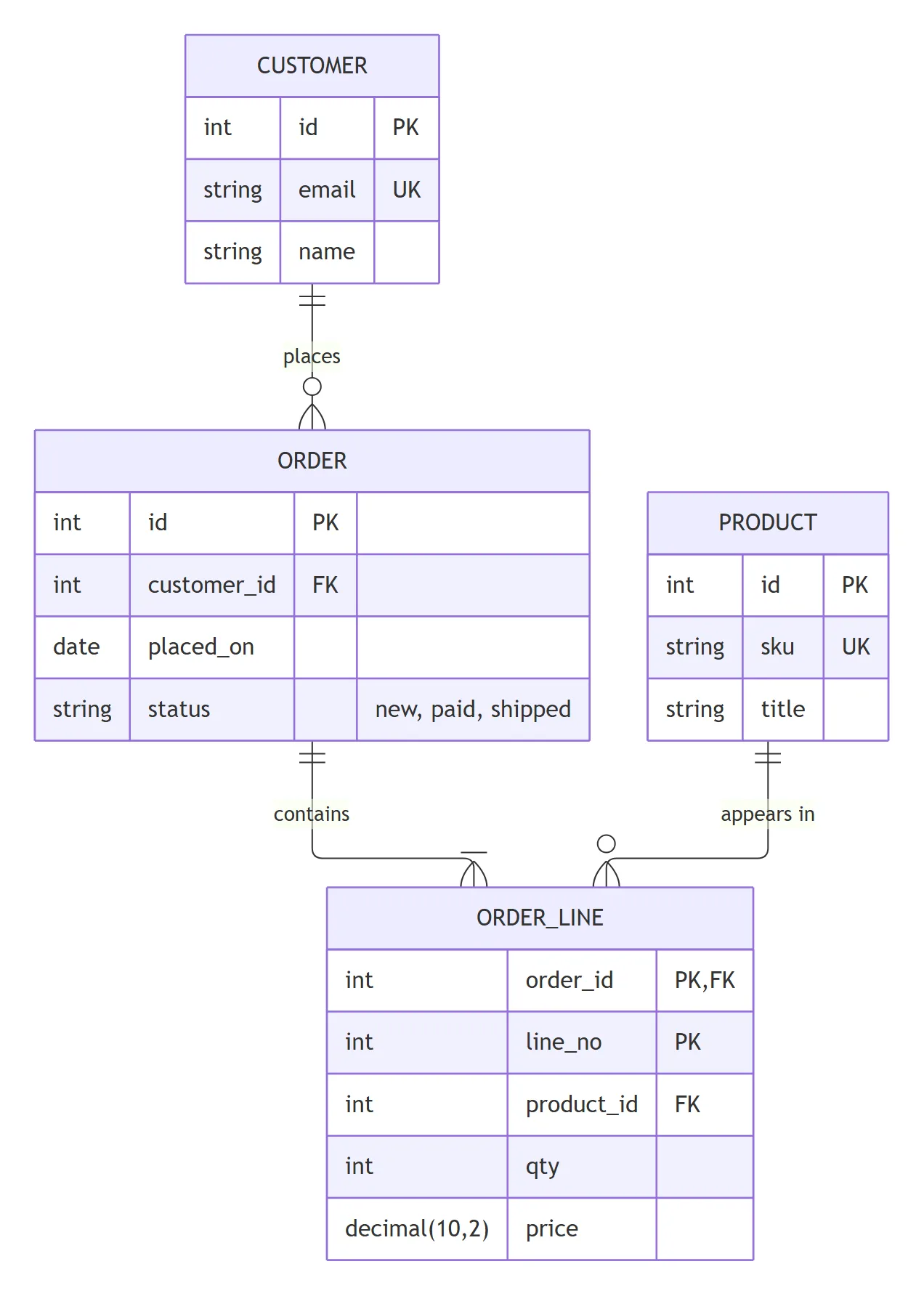
Each table is a block: the name, then one column per line as type, name, keys, comment. Each relationship is one line: table, line ends, table, colon, label. The rest of this page builds the same diagram one step at a time and shows what breaks at each step.
Read the crow’s foot first
The two characters at each end of a relationship say how many rows can sit on that side. The
character touching the table is the maximum, the one further out is the minimum: o{ next to
ORDER reads “zero (circle) or more (crow’s foot) orders”.
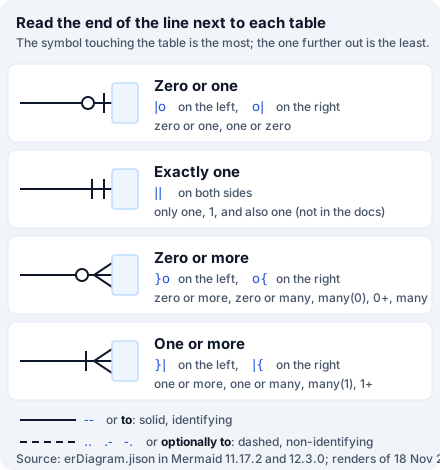
We drew all 16 pairs of ends, solid and dashed, and every word form. All 32 symbol pairs and 16 word forms drew the end the table promises. What people usually want to type:
| You mean | Write |
|---|---|
| One customer, any number of orders | CUSTOMER ||--o{ ORDER : places |
| Every order has at least one line | ORDER ||--|{ ORDER_LINE : has |
| One user, one profile | USER ||--|| PROFILE : has |
| A profile is optional | USER ||--o| PROFILE : has |
| Many students, many courses | STUDENT }o--o{ COURSE : takes |
| An employee may manage other employees | EMPLOYEE |o--o{ EMPLOYEE : manages |
| The same with words | CUSTOMER one to many ORDER : places |
Two things in the grammar are worth knowing before you use words. many on its own means zero or
more, not one or more: one to many draws a circle at the many end. And the left and right spellings
are not enforced: A o{--|| B is accepted and draws the crow’s foot at A, which is just
B ||--o{ A written backwards. 1 to n and 1 to * are parse errors.
Step 1: tables and their names
A table needs no block at all. LONELY on its own line draws an empty table, and so does
LONELY { }. Names may use letters of any script, dots and dashes:
sales.order, NAMED-DRIVER and КЛИЕНТ all draw as written.
Spaces are where it goes wrong. Order Line ||--o{ Product : lists gives no error: it draws a table
called Order on its own and a table called Line joined to Product. Quote names with spaces:
"Order Line". A name that starts with a digit splits the same way: 1TABLE becomes the tables 1
and TABLE. Inside quotes a % is refused ("50% off" is a parse error), while an apostrophe is
fine.
An alias shows a label instead of the name, but only where the table is declared:
erDiagram
    ol["Order line"] {
      int qty
    }
    ol }o--|| PRODUCT : lists
p[Person] ||--o{ a[Address] : has on one line is a parse error. Declare p[Person] on its own
line, or with its block, then use p in relationships.
A few words cannot be table names at all, because the grammar reserves them: end, style,
class and direction give parse errors. A name that merely starts with
one, such as endpoint, is fine.
Step 2: relationships and their labels
The label is not optional. A ||--o{ B without a colon fails with
Expecting 'COLON', and a bare colon fails too. If a line needs no text, write an empty label:
A ||--o{ B : "".
A label of one word needs no quotes: places, is-in and v1.2 all work. Two words do:
: places many is a parse error, : "places many" works. Inside double quotes a colon, a #, a
; and <br/> are all fine, and Markdown works: "**new** orders" draws “new” in bold. Single
quotes are not quotes here: : 'places' is a parse error.
The line between the ends says whether the child can exist on its own. -- (or the word to) draws
a solid line: identifying, the child cannot exist without the parent. .., .-, -. (or
optionally to) draw a dashed one: non-identifying. Mermaid only changes the line style; it does not
check your keys against it. The same two tables may have several relationships, and a table may
relate to itself: EMPLOYEE |o--o{ EMPLOYEE : manages draws a loop.
A space inside the ends is forgiven (A || -- o{ B draws normally). One dash (||-o{), three dashes
(||---o{) and flowchart arrows (-->, <|--) are parse errors.
Step 3: columns, types and keys
Each column is type name, then optional keys, then an optional comment, in that order. The type is
any word that starts with a letter; there is no list of valid types. We checked the shapes people use:
| Column line | Result |
|---|---|
varchar(255) title | Works |
decimal(10,2) price | Works |
decimal(10, 2) price | Parse error: the space splits the type |
string[] tags | Works |
date-time created | Works |
List~string~ tags | Works, drawn as List<string> |
List<string> tags | Parse error |
string? note | Works since 11.16: ? marks a nullable type |
unsigned int qty | Parse error: two words |
`unsigned int` qty | Works: backticks keep spaces (not in the docs) |
enum('new','paid') status | Parse error |
int qty = 0 | Parse error: no default values |
qty alone | Parse error: a type is required |
string first name | Parse error: names cannot have spaces either |
string sku, | No error, the comma becomes part of the name |
Keys are PK, FK and UK, in upper or lower case. Several keys share one column with commas,
with or without a space: int order_id PK, FK is drawn as “PK,FK”. A composite key is simply
PK on each of its columns, as in ORDER_LINE above. Anything else after the name is not a key:
NN and IX are parse errors, and NOT NULL gives no error but adds a second column whose type is
NOT and whose name is NULL. For constraints, use the comment: int id PK "NOT NULL".
The comment goes last, in double quotes. string sku "unit" UK with the comment first is a parse
error. A comment cannot contain a double quote, even escaped (\" fails), but #quot; draws one,
and an apostrophe needs nothing.
Two more surprises. The documentation says a name may start with an asterisk “to indicate an
attribute is a primary key”. In both versions int *id simply prints *id: no key is added, so
write PK. And a name wrapped in asterisks, *sku*, is read as Markdown and drawn in italics.
A table can have two blocks; Mermaid merges their columns. A block cannot sit on a relationship line
(A { ... } ||--o{ B fails), and two columns on one line separated by ; fail. One column on one
line works: ITEM { string sku }.
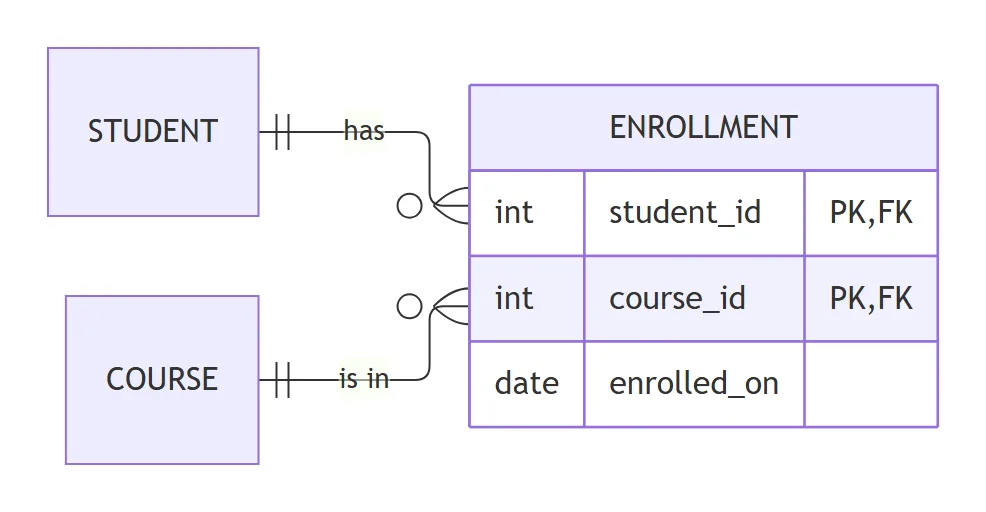
Step 4: many-to-many with a junction table
STUDENT }o--o{ COURSE : takes is a valid many-to-many and fine for a concept sketch. A database
cannot store it directly, so a schema diagram usually shows the junction table, with both foreign
keys forming its primary key:
erDiagram
    direction LR
    STUDENT ||--o{ ENROLLMENT : has
    COURSE ||--o{ ENROLLMENT : "is in"
    ENROLLMENT {
      int student_id PK, FK
      int course_id PK, FK
      date enrolled_on
    }
There is no way to point a line at a column. A::id ||--o{ B::a_id is a parse error, and the
request for links between columns has been open
since April 2020 with 95 thumbs-up.
Mark the columns with PK and FK; if the key is not obvious, put it in the label:
: "customer_id".
Step 5: direction and layout
direction LR on its own line turns the diagram left to right. TB (the default), BT and RL
work too, and so does lower case (direction lr). If you write two, the last one wins, and it may
sit anywhere in the diagram, even at the end. What does not work:
direction TD: there is no TD here. Mermaid adds two tables,directionandTD.erDiagram LRon the first line: adds a table calledLR.erDiagram-v2adds one called-v2.er: layoutDirection: LRin the config: no effect in either version, although the schema lists it.
The grammar finds a direction by looking for the words anywhere in a line. So a relationship
labelled "direction LR" is not drawn at all: the whole line is taken as a direction, its two
tables disappear unless they appear elsewhere, and the diagram turns sideways. Pick another label.
Mermaid 12 changed the layout engine. The 12.3.0 documentation says ER diagrams “are laid out
by ELK rather than Dagre” by default, and our renders agree: in 12.3.0, with either look, the lines
run straight with rounded right-angled corners, as in the figures on this page. In 11.17.2 they are
curves. That answers the common “straight lines” question: in 12 you already have them, and the curve
settings (er: curve, flowchart: curve: linear or step) changed nothing in our tests, even with
the Dagre layout. To get the old layout back, add layout: dagre to the front matter:
---
config:
  layout: dagre
---
erDiagram
    A ||--o{ B : r
nodeSpacing and rankSpacing under er: tightened the 11.17.2 drawing (356 to 256 pixels wide for
three tables) and changed nothing in 12.3.0 with its default ELK layout. minEntityWidth: 300
works in both.
Size is rarely the limit. A chain of 80 tables rendered in 445 ms in 12.3.0 (345 ms in 11.17.2), but it is 14,475 pixels tall: past 20 or so tables, split the schema into several diagrams by area.
Step 6: colours and fonts
Unlike sequence diagrams, ER diagrams take flowchart-style styling, and hex codes work:
erDiagram
    CUSTOMER ||--o{ ORDER : places
    ORDER ||--|{ ORDER_LINE : contains
    style CUSTOMER fill:#fde68a,stroke:#b45309,stroke-width:3px
    classDef audit fill:#fecaca,stroke:#b91c1c
    class ORDER,ORDER_LINE audit
What we measured from the drawn SVG, the same in all three modes:
style A fill:#fde68a,stroke:#b45309,stroke-width:3pxcolours one table;style A,Bseveral. Colour names (gold) and short hex (#ff0) work.fill:rgb(254,202,202)is a lexical error, because the style rule does not accept brackets.classDef hot fill:#fecacawithclass A hot,class A,B hot,class A hot,thickorA:::hotall apply.A:::hot:::thickis a parse error. A class nameddefaultcolours every table.linkStyle 0 stroke:redis a parse error, and a class on a relationship does nothing. To recolour every line, usethemeVariables: lineColororthemeCSS.themeVariablessuch asprimaryColorandprimaryBorderColoronly change the tables withtheme: base.lineColorworks without it.er: fillander: strokeare in the config schema and do nothing.- Font size:
themeVariables: fontSize: 20pxworks.er: fontSizeand a top-levelfontSizechanged nothing.
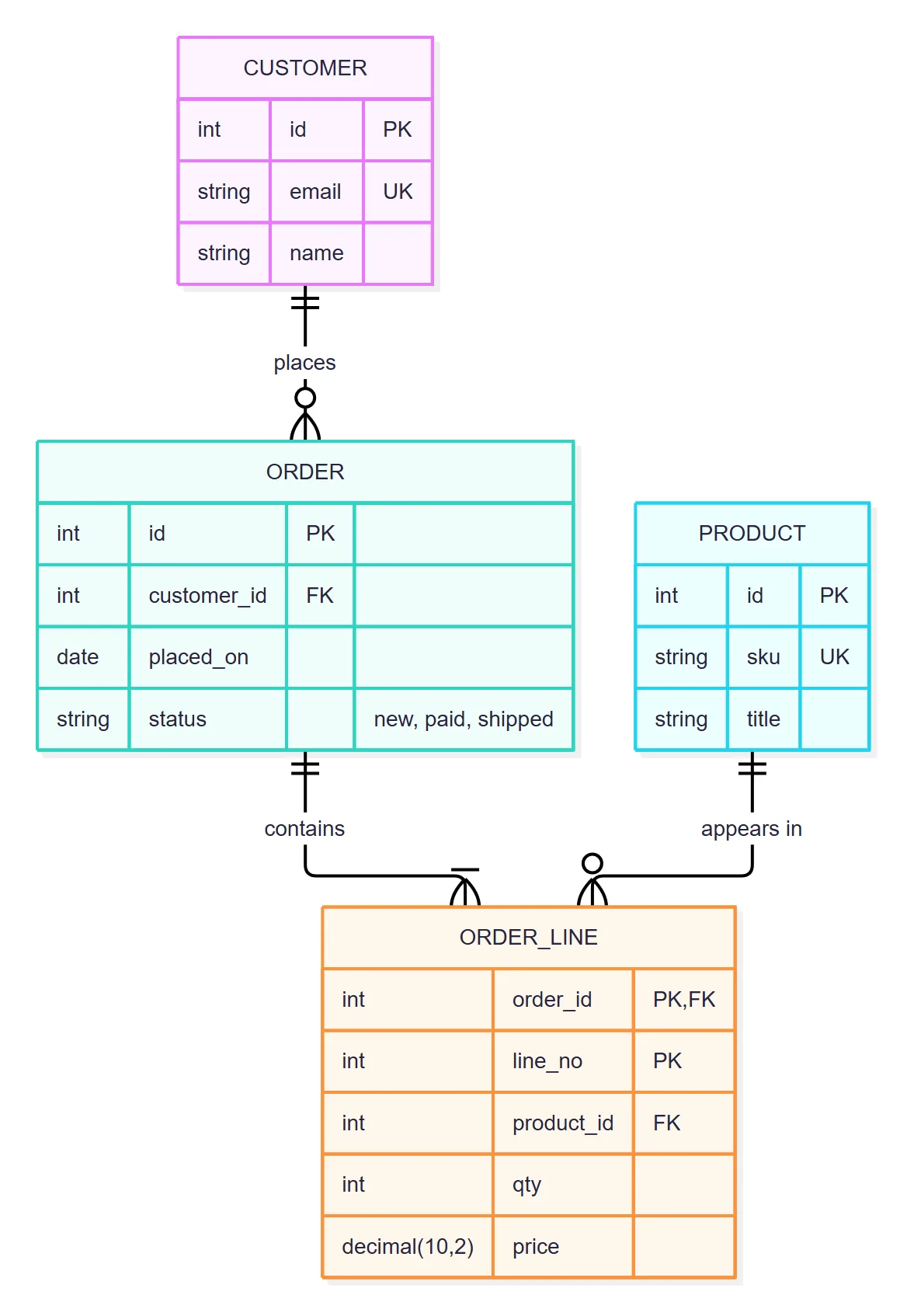
The new default look. Mermaid 12 draws ER diagrams with the redux-color theme and the neo
look unless you set your own, and it gives each table its own colour, as below. Setting any theme, or
look: classic as our apps do, brings back one colour for all tables.
Step 7: group tables with subgraph
Since 11.17, a subgraph draws a labelled frame around tables, as the documentation describes, and
both versions we tested draw it:
erDiagram
    subgraph sales [Sales domain]
      CUSTOMER ||--o{ ORDER : places
    end
    subgraph Catalog
      PRODUCT
    end
    ORDER }o--|| PRODUCT : of
A one-word name is the id and the title; sales [Sales domain] gives a separate title, and a quoted
name with spaces is both. Subgraphs nest, may set their own direction LR, and may be one end of a
relationship (CUSTOMER ||--o{ Billing : owns). group Sales is a parse error, a missing end
fails at the end of the diagram, and subgraph Sales; fails too. The one case where the versions differ: a table
listed in two subgraphs is drawn once with both frames in 12.3.0, while 11.17.2 drew one frame and a
stray box named after the second subgraph.
Lines Mermaid quietly turns into tables
The opening example is not rare. The grammar treats a line made of plain words as a list of table names, so every one of these renders without an error and adds tables nobody asked for:
| Line you wrote | What Mermaid draws |
| ------------------------------ | ------------------------------------------------ | --------------------- | ---------------------------------------------- |
| title Shop schema | Tables title, Shop and schema |
| note for ORDER "text" | Tables note, for and text |
| click ORDER href "https://…" | Tables click, href and the URL |
| direction TD | Tables direction and TD |
| erDiagram LR | A table LR |
| erDiagram-v2 | A table -v2 |
| Order Line | | --o{ Product : lists | Order alone, then Line joined to Product |
| 1TABLE | | --o{ B : r | Tables 1 and TABLE |
| A label "direction LR" | No relationship; the diagram turns left to right |
| NOT NULL after a column | A second column NOT NULL |
For a title, use front matter (title: Shop schema between --- lines), which Mermaid draws above
the diagram. accTitle: and accDescr: add a title and description for screen readers instead.
What Mermaid ER diagrams cannot do
| You want | In Mermaid | What to write instead |
|---|---|---|
| A note on a table | Parse error or extra tables | A column comment, or text around the diagram |
| A legend | Parse error | The decoder above, linked from your docs |
| Indexes | Parse error | A comment: int email UK "indexed" |
| A line to a column | Parse error | PK and FK, the key name as the label |
Inheritance (<|--) | Parse error | PERSON ||--|| EMPLOYEE : "is a" |
| Chen notation (diamonds) | Not supported | Crow’s foot, or a flowchart with diamonds |
| Enum values | enum(...) is a parse error | string status "new, paid, shipped" |
| Default values | Parse error | A comment: int qty "default 0" |
| Clickable tables | Extra tables | A link next to the diagram |
| Two diagrams in one block | Parse error | One erDiagram per code block |
%% comments work on their own line, also inside a table block, but %% at the end of a line is a
parse error, as our Mermaid syntax guide found for seven other types.
An empty erDiagram draws an empty picture without an error.
The error messages, decoded
Mermaid reports where the parser stopped, not what is wrong. The messages we saw most, the same in both versions:
Expecting 'COLON', 'STYLE_SEPARATOR', got 'NEWLINE': a relationship without a label.Expecting 'UNICODE_TEXT', 'ENTITY_NAME', 'WORD', got 'NEWLINE': a colon with no label after it.- A long
Expecting 'EOF', 'NEWLINE', …list pointing after the first word of a label: a label of several words without double quotes. The same list after%%means a comment at the end of a line. Expecting 'ATTRIBUTE_WORD', '?', got 'BLOCK_STOP'inside a block: a column with a name but no type, or an unknown key such asNN.got 'error'instead points at a space inside a type, as indecimal(10, 2).Expecting 'ZERO_OR_ONE', 'ZERO_OR_MORE', 'ONE_OR_MORE', 'ONLY_ONE', 'MD_PARENT': a line end Mermaid does not know, such asnor*.Expecting 'NON_IDENTIFYING', 'IDENTIFYING': the middle of the line is wrong, such as one dash.Lexical error on line 3. Unrecognized text.: here,rgb(...)in a style.No diagram type detected:erdiagramorERon the first line. The keyword is case-sensitive, although the rest of the grammar is not.
MD_PARENT in that list is a fifth end in the grammar, written u (PARENT u--o{ CHILD). It is not
documented, and Mermaid draws no symbol for it.
ER diagrams in Jira, Confluence and Excalidraw
A schema diagram is most useful next to the work that changes the schema. In Jira and Confluence a
mermaid code block shows as code; an app draws it.
- Mermaid Tabs for Jira draws Mermaid in tabs on a work item and on project pages, with Mermaid 12.3.0 and the classic look, so a tab shows what the first figure on this page shows. The migration ticket can carry the schema it changes, as text anyone can edit.
- Excalidraw for Confluence and
for Jira render Mermaid on a whiteboard, or insert it
as shapes to rearrange by hand. We converted every drawable case with mermaid-to-excalidraw 3.6.0,
the version these apps ship, and all of them became separate shapes: each table a rectangle with
its name, its columns as text under a divider line, relationships as arrows with their labels. The crow’s
foot ends survive as Excalidraw’s own cardinality arrowheads (exactly one, zero or one, zero or
many, one or many), dashed lines stay dashed, and
styleandclassDefcolours are kept. Lost on the way: subgraph frames, a relationship drawn to a subgraph, the title andthemeVariablescolours.
For the other diagram types see the syntax guide to all 33 types, the UML cheat sheet for class and state diagrams, the sequence diagram guide and the flowchart guide. Mermaid vs PlantUML draws the same ER diagram in five languages if you are still choosing.
How we tested
We collected Google’s autocomplete for “mermaid er diagram”, “mermaid erdiagram” and “mermaid entity
relationship” (each with a to z appended: 130 phrases, minus the ones about mermaid parties and
costumes) on 18 November 2026, and wrote one or more cases for every question: 253 diagrams. Each was
rendered with mermaid.render in headless Chromium in Mermaid 11.17.2, in 12.3.0 with its defaults,
and in 12.3.0 with look: classic and theme: default, as Mermaid Tabs and our Excalidraw apps
initialise it: 759 renders, with no network requests during the run. From every SVG we read the
tables and their texts, the line ends (marker ids) and line style, labels, frames, positions, fills,
strokes and font sizes, plus the error text for the 48 cases that failed. Every case was also
converted with mermaid-to-excalidraw 3.6.0. Every code block on this page was rendered before
publishing; the figures are Mermaid 12.3.0 renders at twice the pixel density.
Sources
- Mermaid entity relationship diagram docs at the tested tags:
12.3.0
(“Entity relationship diagrams use the
redux-colortheme and theneolook by default, and are laid out by ELK rather than Dagre”) and 11.17.2 (aliases table, keys “PK, FK or UK”, optional types “v11.16.0+”, subgraphs “v11.17.0+”). - The grammar
erDiagram.jison at 12.3.0,
identical at 11.17.2: the undocumented
many,oneandutokens,.-and-., backticks in columns, and the.*direction\s+LRrule that matches anywhere in a line. - The detector
erDetector.ts:
/^\s*erDiagram/, which is whyerDiagram-v2is accepted anderdiagramis not. - The config schema
config.schema.yamlat 12.3.0,ErDiagramConfig:layoutDirection,fill,stroke,fontSize,nodeSpacing,rankSpacingandminEntityWidth, with their defaults. - mermaid-to-excalidraw 3.6.0, as bundled by our Excalidraw apps.
Frequently asked questions
How do I show one-to-many in a Mermaid ER diagram?
Write CUSTOMER ||--o{ ORDER : places. || next to CUSTOMER means exactly one, o{ next to ORDER means zero or more. Use |{ instead of o{ when every customer must have at least one order. The words work too: CUSTOMER one to many ORDER : places, but many on its own means zero or more.
How do I mark a primary key or a foreign key?
Put PK, FK or UK after the column name inside the table block: int id PK, int customer_id FK. A column that is both is int order_id PK, FK. A composite key is PK on each of its columns. A comment in double quotes goes last: string email UK "login". Other words such as NN or NOT NULL are not keys: NN is a parse error and NOT NULL becomes a second column.
How do I make a Mermaid ER diagram go left to right?
Add a line direction LR after erDiagram. TB, BT and RL work too, in lower or upper case. TD does not exist here: it adds tables called direction and TD. erDiagram LR on the first line adds a table called LR, and er layoutDirection in the config changes nothing.
How do I draw a many-to-many relationship?
STUDENT }o--o{ COURSE : takes draws it directly. For a database schema, model the junction table instead: STUDENT ||--o{ ENROLLMENT : has and COURSE ||--o{ ENROLLMENT : "is in", with student_id PK, FK and course_id PK, FK in ENROLLMENT.
Can I add a note or a legend to a Mermaid ER diagram?
No. Note over is a parse error, and note for ORDER "text" is worse: it gives no error and draws three extra tables called note, for and the text. Put the explanation in a column comment, in the table name through an alias, or in the page around the diagram.
How do I change the colour of a table?
style ORDER fill:#fde68a,stroke:#b45309 colours one table, classDef hot fill:#fecaca with class ORDER hot or ORDER:::hot colours several. Hex codes work here, unlike in sequence diagrams; rgb() is a lexical error. themeVariables such as primaryColor only take effect with theme base.
Can a relationship point at a specific column?
No. A line joins two tables, never two columns: A::id ||--o{ B::a_id is a parse error. Mark the columns with PK and FK and name the relationship after the key, for example : "customer_id".