On this page
What is Secret Sentinel?
Secret Sentinel is a security automation app for Atlassian Confluence and Jira that continuously scans your content for leaked credentials — passwords, API keys, tokens, private keys, and database connection strings — and redacts them automatically, before they turn into a breach.
Secret Sentinel is delivered as two separate Forge apps:
- Secret Sentinel for Confluence – protects Confluence pages and comments
- Secret Sentinel for Jira – protects Jira work items and comments
Each app works independently within its product. Optionally, either product’s detections can create Jira security incidents (requires installing both apps on the same Atlassian site).
Built entirely on Atlassian Forge. No external services. No environment variables. No data ever leaves your Atlassian instance.
Both apps carry Atlassian’s Runs on Atlassian badge. Review the exact data flow, requested scopes, stored fields, retention, and product limitations in the Secret Sentinel Trust Center, or use the admin approval kit for a sandbox installation request.
Want to inspect behavior before installing? The safe Secret Scanner Lab shows verified Jira and Confluence fixtures with their precomputed classifications and redactions. It accepts no user content and exposes no production scanner code.
For broader regression evidence, the public benchmark reports aggregate results from the private automated corpus without publishing fixtures, test names, paths, rules, or scanner code. CI-generated reports are accompanied by a Sigstore verification bundle.
Making a product or architecture decision? Use the evidence-backed comparison guides for Jira Automation, DLP, Forge Remote, repository scanning, Jira versus Confluence, and Standard versus Advanced. Each guide records its sources, review date, and claim boundary.
Features
-
Broad, enterprise-grade detection coverage
Scans for 50+ credential types across major cloud providers, CI/CD tools, databases, and SaaS platforms — see What it detects below. Built on secretlint, a maintained open-source secret-scanning engine, not a closed, unauditable pattern list — plus a few real leak shapes we cover ourselves on top of it, like bare JWTs and AWS identifiers, where the library alone leaves a gap. -
Safe, in-place redaction
Secrets are replaced directly inside Confluence pages, comments, inline comments, Jira work item titles, descriptions, and comments — formatting is preserved, nothing else is touched. -
Risk-based severity, not just keyword matching
Every finding is classified by real exploitability — a live, usable secret key is treated differently from a bare identifier that’s harmless without its paired secret — so security teams see fewer, more meaningful alerts. -
Jira incident escalation (optional)
High-risk leaks can automatically open a Jira security incident — configurable project, issue type, priority, and default assignee — for tracking, credential rotation, and remediation. -
Fine-grained enterprise controls, not one-size-fits-all
Override severity and escalation per credential type, exclude specific Confluence spaces, Jira projects, or comments from ever creating an incident, and mark specific known-safe values (e.g. documentation placeholders) as permanently ignored — every override is auditable and redaction is never affected, only which findings escalate. -
Compliance dashboard (Advanced edition)
Aggregated, always-on-hand reporting of detection counts by credential type, severity, and month — built for security and compliance teams who need to demonstrate ongoing monitoring without digging through incident history. -
Custom regex patterns (Advanced edition)
Detect credential formats specific to your own organization — an internal API key prefix, a proprietary token shape — with admin-defined regular expressions, evaluated by a linear-time (ReDoS-safe) regex engine so a pattern can never hang a scan. -
Confluence and Jira support
Available as separate apps for Confluence and Jira, with independent configuration per product, and cross-product escalation when both are installed. -
Enterprise-ready Forge architecture
Runs fully inside Atlassian’s infrastructure with no external services, no data exfiltration, and no environment variables — backed by a rigorously tested codebase (370+ automated scenario tests covering detection, redaction, and escalation behavior).
See it in action
A token pasted into a Jira comment is redacted in place, with a masked marker that names its type:
The same leak opens a security incident with where it was found, what type it was and what to do next:
In Confluence, a connection string in a runbook’s code block is redacted the same way:
Rules per credential type decide severity and escalation; redaction never changes:
What it detects
Secret Sentinel scans for 50+ credential and secret types across the services your teams actually use:
| Category | Examples |
|---|---|
| Cloud infrastructure | AWS access/secret keys, GCP service account key files, HashiCorp Vault tokens |
| Developer platforms | GitHub tokens (classic & fine-grained), GitLab personal access tokens |
| AI & ML platforms | OpenAI, Anthropic, Groq, and Hugging Face API keys |
| Databases | MongoDB, MySQL, and PostgreSQL connection strings |
| Payments & commerce | Stripe live/test secret and restricted keys, Shopify API keys, SendGrid keys |
| Collaboration & productivity | Slack tokens & webhooks, Notion tokens, Linear API tokens, Figma tokens, 1Password tokens |
| DevOps & hosting | Vercel tokens, Cloudflare API keys, Docker tokens, Databricks tokens, Tailscale keys, Grafana tokens |
| Generic & cryptographic | SSH/PEM private keys — RSA, DSA, EC, and modern OpenSSH format — JSON Web Tokens (JWTs), npm tokens, basic-auth credentials, generic password=/token= assignments |
Every finding is classified by actual risk — a paired AWS secret key is treated as a critical, high-severity leak; a bare identifier that isn’t exploitable on its own is flagged at lower severity — so escalation stays proportionate to real risk instead of flooding your team with low-value alerts.
Most of this is secretlint’s own detection — but not all of it. JWTs aren’t covered by any rule in secretlint’s ruleset, and a bare AWS access key ID or account ID (no paired secret) is intentionally not flagged by secretlint’s own defaults, since neither is exploitable alone. Secret Sentinel adds both as its own, tested detections layered on top of the library, at a correspondingly lower severity than a real paired credential — worth catching, without treating it as equivalent to an actual leak.
See the documentation for a full copy-paste example you can run yourself — including a version that exercises all 50+ of these types end to end in one paste.
Editions: Standard and Advanced
Secret Sentinel is available in two editions:
Standard includes full detection and redaction coverage across all 50+ credential types, risk-based Jira incident escalation, and every enterprise-tuning control: per-credential-type severity and escalation overrides, an escalation exclude list (skip specific Confluence spaces, Jira projects, or comments), and a custom per-value ignore list for known-safe strings like documentation placeholders.
Advanced adds two enterprise-focused capabilities on top of Standard:
- Compliance dashboard — aggregated detection counts by credential type, severity, and month, always available for security and compliance reporting without manual log digging.
- Custom regex patterns — admin-defined detection rules for credential formats specific to your organization, evaluated by a linear-time (ReDoS-safe) regex engine so a custom pattern can never hang a scan.
Redaction and Jira escalation behavior are identical on both editions — Advanced only unlocks additional visibility and customization, never a difference in what gets protected.
Benefits
With Secret Sentinel, teams can:
- Prevent credential leaks before they cause incidents
- Eliminate manual secret cleanup in Confluence and Jira
- Enforce consistent security hygiene across teams, across 50+ credential types
- Cut alert fatigue with severity classification based on real exploitability, not keyword matching
- Tune escalation to your organization’s structure — per credential type, per space/project, or per known-safe value — without ever weakening redaction itself
- Give security and compliance teams an always-on-hand view of detection activity with the compliance dashboard (Advanced)
- Extend detection to your own organization’s credential formats with custom regex patterns (Advanced)
- Respond faster to high-risk leaks using existing Jira workflows
- Stay compliant without sending data to third-party services — everything runs inside Atlassian’s own infrastructure
How it works
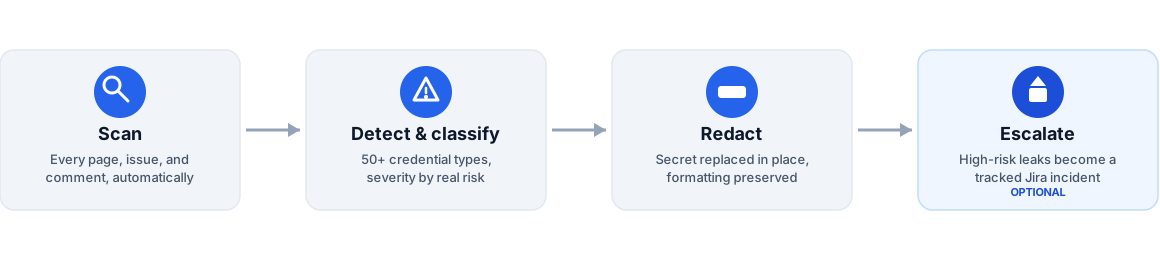
- Content is created or updated in Confluence or Jira
- Secret Sentinel scans the content automatically
- Each finding is classified by severity — a real, exploitable secret versus a low-risk identifier
- Detected secrets are safely redacted in place
- If enabled, high-risk leaks automatically create a Jira security incident for tracking and remediation
All processing happens inside Atlassian infrastructure — nothing is sent to a third-party service.
Research and practical guides
- Secret Sprawl: How to Detect and Prevent It (2026 Data)
- How to Prevent Credential Leaks in Confluence and Jira
- Common Types of Leaked Credentials
- Why .env Files Are a Security Risk
- Offboarding: The Access Nobody Remembers to Revoke
- What to Check Before Installing an Atlassian Marketplace App
- Atlassian Marketplace in 2026: Growth, Ratings and Gaps
- A Practical Guide to Rotating Credentials After a Leak
- Why Private Repositories Still Leak Secrets
- Secret Scanner Accuracy: Precision Is Not Enough
- Zero Trust Stops at the Confluence Page
- Deleting a Leaked Secret Does Not Revoke It
- The Secret Lifecycle Your Jira Workflow Is Missing
- Data Egress Is the Hidden Risk in Atlassian Security Apps
- Per-Secret Encryption Makes Git Reviews Safer
- AI Coding Assistants and the Secret-Sprawl Curve
- A Two-Layer Secret Defense for Git and Atlassian
- Secrets in Jira Issues: What the Research Found
- Why Training Alone Does Not Prevent Secret Leaks
- How Secret Sentinel Detects Secrets: An Open Methodology
- Confluence DLP: What Atlassian Guard Scans and Skips
- Jira Plugins for Developers: 211 Apps Ranked by Installs
- Preventing Sensitive Data Leaks in Confluence and Jira
- SOC 2 and Your Confluence/Jira Data: What Auditors Actually Look For
Evaluation resources
- Jira scanner admin checklist
- GitHub vs Jira secret scanning
- How to build an app approval case
- How to test detection without live credentials
- How to Evaluate a PII or Secret Scanner for Confluence and Jira
Get started
Protect your Confluence and Jira content from credential leaks in minutes.
Frequently asked questions
Which permissions does the app ask for, and why?
In Jira, read and write Jira work (to read new issues and comments and write back the redacted text and the incident), read Jira users and app storage. The Confluence app reads and writes pages and comments for the same reason, reads spaces and users, and writes Jira work to open incidents. Nothing else.
Can it find card numbers and other personal data?
Yes, if you turn it on. Card numbers (with a valid Luhn check digit), IBANs (with a valid checksum) and US Social Security numbers are off by default; switch on Detect for each in Rules. Names, addresses, e-mail addresses and phone numbers are not detected.
How much does it cost?
The Standard edition is free for sites with up to 10 users; larger sites pay per user. Advanced adds custom patterns and the report. Every edition has a free 30-day trial on the Atlassian Marketplace.
What does Secret Sentinel redact?
50+ credential types — cloud keys, GitHub and GitLab tokens, Slack and Stripe keys, AI provider API keys, private keys, database connection strings and more — in Jira work item titles, descriptions and comments and in Confluence pages and comments, replaced in place with a masked marker.
Does any data leave my Atlassian site?
No. Both apps run entirely on Atlassian Forge with no external services; redacted secrets themselves are never stored, logged or displayed — the compliance dashboard keeps only counts.
Can it open a Jira incident for a leak?
Yes, optionally. A leak can create a Jira security incident in the project you choose, with issue type, priority and default assignee; you can escalate only high-severity findings, and override that per credential type.
How do I stop false positives?
Mark an exact harmless value as never flagged (only its hash is stored), exclude spaces or projects from escalation, or lower a credential type's severity — redaction of real secrets is never weakened by escalation settings.
Do I need both the Jira and the Confluence app?
No. Each protects its own product. Install both on the same site if Confluence detections should open Jira incidents.
Get Secret Sentinel
Free up to 10 users. Install it from the Atlassian Marketplace.