nomnoml Syntax: Every Arrow, Shape and Directive, Tested
On this page
- The whole syntax on one screen
- All 18 arrows
- All 25 shapes
- Text inside a box: compartments, lines and escapes
- Names, ids, and boxes you mention twice
- Directives: what each does, and the real default
- Custom styles
- 15 traps we found by running 1.7.0
- Reading the error messages
- Three diagrams to copy
- Where nomnoml runs
- nomnoml in Jira and Confluence
- How we tested
You copy a class diagram from an old wiki page into nomnoml and get
Parse error at line 1 column 5, expected "label" but got ">". The line was [a] _> [b], an arrow
the first syntax list on Google still shows. nomnoml stopped understanding it in version 1.6.0, in May 2023.
The other lists are incomplete rather than wrong: they name directives without saying what they do,
show example values instead of defaults, and skip escapes, ids and errors. So we installed
nomnoml 1.7.0, the current release on npm, read its parser, and ran every arrow, shape and directive
through renderSvg on 27 October 2026. The method is under how we tested.
The whole syntax on one screen
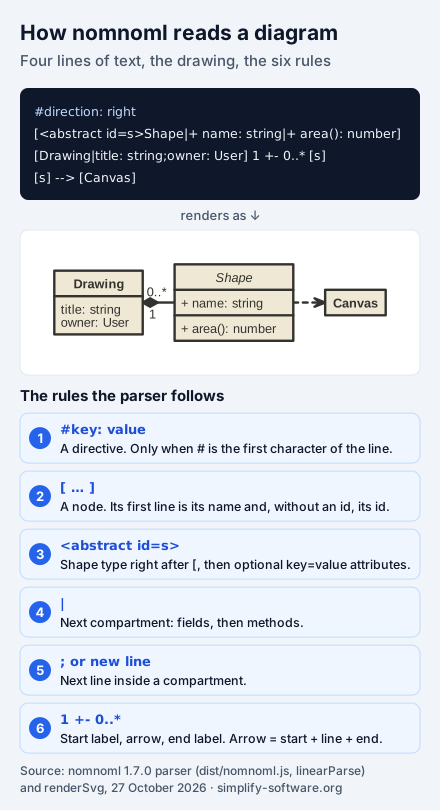
If you remember six things, remember these:
- A box is text in square brackets.
[Order]is a box. Its first line is its name, and the name is also how other lines refer to it. |splits a box into compartments, usually name, fields, methods:[Order|id;total|place()].;or a new line starts the next line inside a compartment.- A link is box, arrow, box, with optional labels on both sides:
[Order] 1 +- 0..* [Line]. - A shape type goes right after the bracket:
[<actor>Shopper],[<database>orders]. - A directive is a line that starts with
#in the first column:#direction: right.
Boxes can contain whole diagrams, too. [<frame>Checkout|[API] -> [Basket]] draws a frame with two
linked boxes inside it, and each level of nesting takes the next colour from #fill.
All 18 arrows
An arrow has three parts: an optional start (<, <:, +, o, o< or (o), a line (- solid,
-- dashed, -/- hidden) and an optional end (>, :>, +, o, >o, ) or o)). The parser glues
the parts together, which is why <-> and +-> work without a list entry of their own. Below are the
18 combinations the nomnoml README lists, each drawn between two boxes.
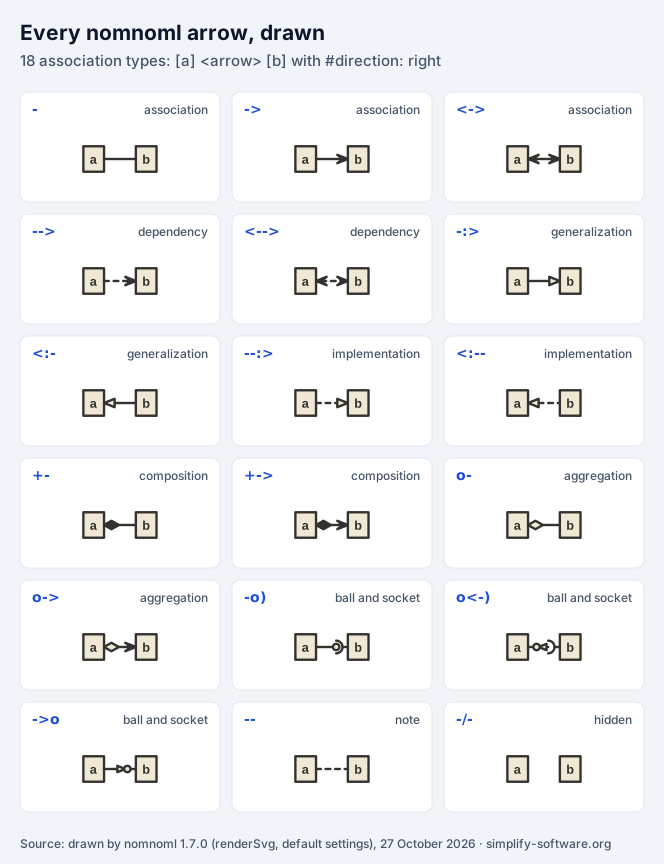
| Write | UML meaning | What 1.7.0 draws |
|---|---|---|
- | association | a plain line |
-> | directed association | a line with an open arrowhead |
<-> | two-way association | arrowheads at both ends |
--> | dependency | a dashed line with an arrowhead |
<--> | two-way dependency | dashed, arrowheads at both ends |
-:> | generalization (inherits from) | a hollow triangle at the parent |
<:- | generalization, written parent first | the same, pointing left |
--:> | implementation (realizes) | a dashed line, hollow triangle |
<:-- | implementation, parent first | the same, pointing left |
+- | composition (owns, lifetime bound) | a filled diamond at the owner |
+-> | composition with direction | a filled diamond and an arrowhead |
o- | aggregation (has, can outlive) | a hollow diamond at the owner |
o-> | aggregation with direction | a hollow diamond and an arrowhead |
-o) | ball and socket | a ball and a cup at the target end |
o<-) | ball and socket, reversed | ball and cup, the other way round |
->o | provided interface | an arrowhead ending in a ball |
-- | note link | a dashed line, no heads |
-/- | hidden link | nothing: the boxes are placed as if linked |
<- works too, because it is just a start and a line, although the lists do not mention it. The
hidden link is more useful than it looks: it pulls two boxes into the same column or row without
drawing anything.
Two arrows from old lists no longer exist. The R package’s syntax page lists _> as a
“weightless edge” and __ as a “weightless dashed” edge, which let two linked boxes sit on the same
level. They came out of nomnoml issue #141 in 2020,
together with a directive the maintainer described there: “I did implement a #gravity: 0 directive
that sets minlen = 0 on every edge.” We installed the old releases to check: _> renders in 1.5.0 and
1.5.3 and gives a parse error from 1.6.0 (May 2023), whose new parser has no _. That includes 1.6.2,
the version the R package itself bundles, so its own page lists edges its renderer rejects. Use
#gravity: 0 instead.
All 25 shapes
The shape type goes between < and > straight after the opening bracket. Most of them come from UML
class, activity, component and use case diagrams.
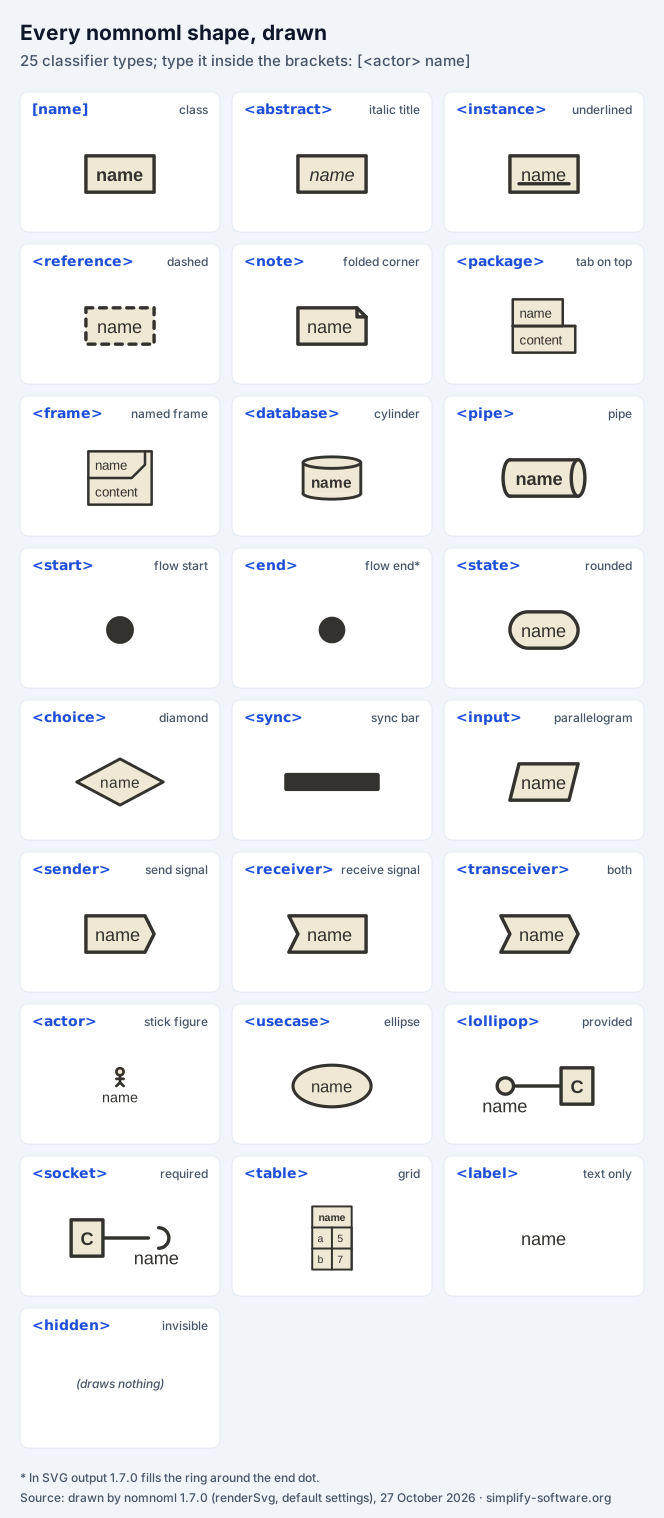
| Type | Draws | Use it for |
|---|---|---|
none, [name] | a box with a bold title | classes, components, anything |
<abstract> | italic title | abstract classes |
<instance> | underlined title | objects in an object diagram |
<reference> | dashed border | a class defined elsewhere |
<note> | folded corner | comments, linked with -- |
<package> | a tab on top | packages, modules; can hold a diagram |
<frame> | name in a corner tag | a bounded context or system; holds a diagram |
<database> | a cylinder | databases, stores |
<pipe> | a horizontal cylinder | queues, streams |
<start> | a filled dot | start of a flow |
<end> | a dot in a ring (see the traps) | end of a flow |
<state> | a rounded box | states, activities |
<choice> | a diamond | decisions |
<sync> | a thick bar | fork and join |
<input> | a parallelogram | input and output in flow charts |
<sender> | a pointed box | send signal |
<receiver> | a notched box | receive signal |
<transceiver> | pointed and notched | send and receive |
<actor> | a stick figure | people and external systems |
<usecase> | an ellipse | use cases |
<lollipop> | a ball | a provided interface |
<socket> | a cup | a required interface |
<table> | a grid | small tables (example below) |
<label> | text only | captions in the diagram |
<hidden> | nothing | an invisible anchor for layout |
The table shape is the odd one: inside it, | separates cells and || ends a row, so
[<table>t|a|5||b|7] draws a title t above two rows, a 5 and b 7.
Text inside a box: compartments, lines and escapes
Inside the brackets, three characters have a job: | starts the next compartment, and ; or a line
break starts the next line. So these two are the same box:
[Order|id: string;total: Money|place();cancel()]

[Order|
  id: string
  total: Money|
  place()
  cancel()
]
To print one of the special characters, put a backslash in front of it: \|, \;, \[, \].
[A|a \| b] prints “a | b”, and [A|list\[0\]] prints “list[0]”. \n is the one escape with a
meaning of its own: it becomes a line break character, but the SVG renderer prints it as a space, so
[two\nlines] shows “two lines” on one line. For a title on two lines use ;: [two;lines] draws
both lines in the title, and the box’s id is the first one, two. Text that is not Latin needs
nothing special; [Задача] -> [完成] renders as typed.
Labels on links follow stricter rules. The text before an arrow may not contain [ ] | < > ; at all,
so [a] x<y -> [b] fails with expected "label" but got "<". Escape it: [a] x\<y -> [b]. The text
after the arrow may contain anything except [, which starts the target box.
Names, ids, and boxes you mention twice
A box’s id is its first line. Write [Order] on one line and [Order|id;total] on another and you get
one box, not two. When the same box appears with different contents, nomnoml keeps the version with
more compartments, in whichever order they come. That is what makes the common style work: describe
each class once in full, then link it by name alone.
[Order|id: string;total: Money|place()]
[Customer|name: string]
[Customer] 1 - 0..* [Order]
When two different boxes need the same name, give them ids. The id goes in the shape tag and other lines refer to it, while the box still shows its name:
[<actor id=buyer>User]
[<actor id=seller>User]
[buyer] -> [<usecase>Pay]
[seller] -> [<usecase>Ship]
An id may only use letters, digits and _, and an attribute value may not contain a space or >.
Directives: what each does, and the real default
The help panel on nomnoml.com and the README show each directive with a value next to it. Those are
examples, not defaults: the panel shows #gutter: 5 and #font: Calibri, while 1.7.0 uses 20 and
Helvetica when you leave them out. The defaults below are read from the 1.7.0 source.
| Directive | Default in 1.7.0 | What it changes |
|---|---|---|
#direction | down | down or right; any other word means down |
#spacing | 40 | distance between ranks, in the layout direction |
#gutter | 20 | space around the whole diagram |
#padding | 8 | space inside each compartment |
#edgeMargin | 0 | gap between a box and the links that touch it |
#gravity | 1 | minimum ranks between linked boxes; whole numbers only, 0 allows the same rank |
#edges | rounded | hard for sharp bends; anything else means rounded |
#bendSize | 0.3 | how round the bends are |
#arrowSize | 1 | scale of arrowheads and diamonds |
#fillArrows | false | true draws open arrowheads as full triangles |
#lineWidth | 3 | stroke width of boxes and links |
#stroke | #33322E | colour of lines and text |
#fill | #eee8d5;#fdf6e3 (repeated) | box colours, one per nesting level, separated by ; |
#background | transparent | the diagram’s background |
#font | Helvetica | font family |
#fontSize | 12 | text size, in points in SVG |
#leading | 1.35 | line height |
#zoom | 1 | scale of the whole drawing |
#title | none | the SVG’s title, and the file name in the web app |
#acyclicer | none | greedy changes how cycles are broken before layout |
#ranker | network-simplex | tight-tree or longest-path give other layouts |
#import | none | include another file; only in the command-line tool |
Three rules apply to all of them. The # must be the first character of the line; an indented
directive is not a directive (see the traps). The last one wins when the same directive appears
twice. And numbers fall back to the default when they are 0 or not a number: #lineWidth: 0 and
#padding: 0 draw exactly what the defaults draw. #edgeMargin and #gravity are the exceptions
where 0 does something, because their defaults are 0 and 1.
#ranker is worth trying when a diagram looks tangled. Its three values are the ways the bundled
layout library, graphre, can assign boxes to levels, and each places the same boxes differently.
Custom styles
A directive whose name starts with a dot defines a shape type of your own:
#.risk: fill=#fde68a stroke=#b45309 dashed title=bold,italic
#.service: visual=roundrect direction=right
[<risk>Single point of failure]
[<service>Checkout|[API] -> [Basket]]
The keys are fill, stroke, visual (which built-in drawing to use, such as class, roundrect,
ellipse, database, rhomb or actor), direction for a nested diagram, and align=left.
title= and body= take a comma-separated list of bold, italic, underline, left and center.
dashed on its own makes the border dashed.
Two limits are not in the docs. The style name may only use letters, digits and _: #.my-box makes
[<my-box> A] fail with expected " " or ">" but got "-". And the empty modifier, which the README
lists next to dashed, has no effect in 1.7.0: a diagram with empty draws exactly the same SVG as
one without it.
15 traps we found by running 1.7.0
Each row is a probe we ran. The middle column is what nomnoml 1.7.0 did.
| You write | What happens | Do this instead |
|---|---|---|
#direction: right (indented) | drawn as the text “#direction: right” in the diagram | start directives in column 1 |
[a] -> [b] // note | parse error: expected "--" or "-/-" | comments only on their own line |
[a] _> [b] or [a] __ [b] | parse error: expected "label" | #gravity: 0 |
[a] x<y -> [b] | parse error: expected "label" but got "<" | escape it: x\<y |
[two\nlines] | SVG: one line, “two lines” | [two;lines] |
#.my-box: … then [<my-box> A] | parse error at the - | #.my_box or #.myBox |
#.box: empty | nothing; empty is ignored | fill= with your background colour |
#lineWidth: 0, #padding: 0 | the defaults, 3 and 8 | use 1 as the smallest value |
#direction: left or up | silently down | only down and right exist |
#edges: straight, #fillArrows: yes | silently the defaults | exactly hard, exactly true |
#gravity: 0.5 | the same as 1 (rounded) | whole numbers |
| the same directive twice | the last one wins | keep one of each |
#import: common.noml in a web page or app | ignored, no error | the command-line tool, npx nomnoml |
| triangles and plain arrows in one diagram | SVG: heads and labels share one colour | see below |
[<end>end] | SVG: looks almost like [<start>] | a label next to it, or <state> |
Indented comments, on the other hand, are fine: the parser strips lines that start with spaces and
//. So you can indent comments inside a nested diagram, just not directives.
The SVG renderer colours every arrowhead the same
This one is easy to miss, because the diagram looks almost right. In SVG output, the arrowheads and the link labels of a diagram all get one fill colour: the colour of the last arrowhead drawn. A generalization triangle is meant to be hollow (filled with the box colour) and an open arrowhead solid (the line colour). Put both in one diagram and one of them comes out wrong.
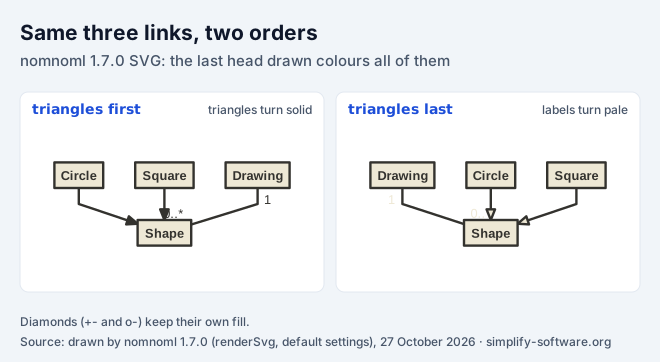
We measured the fill of every head and label in 15 combinations. The pattern:
- Write the triangles last, and the triangles are right, but plain arrowheads turn hollow and labels turn pale.
- Write them first, and arrowheads and labels are right, but the triangles turn solid.
- Diamonds are always right (
+-,o-): the renderer saves and restores the colour around them.
The cause is in drawArrow, which sets the fill without saving and restoring it, while the SVG
backend writes the fill on the group that holds all the links. A diagram with inheritance and no labels
or open arrowheads, like the class diagram below, is not affected. For one that has all three, write
the inheritance links first and accept solid triangles; their shape still reads as inheritance. We
found no issue for this in the nomnoml tracker on 27 October 2026.
<end> has the same cause. It is meant to be a dot in a ring: the code draws a circle in the box colour,
switches to the line colour, and draws a smaller dot. In SVG both come out in the line colour, so an
end looks like a slightly smaller start.
Reading the error messages
nomnoml stops at the first error and names the line, the column, what it expected and what it found. Three messages cover most mistakes:
expected "]" but got end of file: a bracket is not closed somewhere in the source. Count the[and]of nested boxes first.expected "label" but got ...: the parser was reading the text before an arrow and met a character that cannot be there. Either the arrow is not one nomnoml knows, or a label contains[ ] | < > ;without a backslash.expected "--" or "-/-" ...: there is text after a link where a new line was expected, often a comment at the end of a line.
An empty source is not an error; it renders an empty drawing.
Three diagrams to copy
All three were rendered with 1.7.0 and checked for the arrowhead trap.
A class diagram with an abstract class, inheritance, composition and aggregation:
#direction: down
[<abstract>Payment|amount: Money;currency: string|capture();refund(amount)]
[Order|id: string;total: Money|place();cancel()]
[Order] +- [LineItem|sku: string;quantity: int]
[Order] o- [Customer]
[Order] - [Payment]
[Payment] <:- [CardPayment|last4: string]
[Payment] <:- [BankTransfer|iban: string]
A flow chart with a decision and a loop back:
#direction: down
[<start>start] -> [Review the pull request]
[Review the pull request] -> [<choice>Tests pass?]
[Tests pass?] no -> [Fix the build]
[Fix the build] -> [Review the pull request]
[Tests pass?] yes -> [Merge]
[Merge] -> [<end>end]
A component view with a nested diagram, a database and a required interface:
#direction: right
[<frame>Checkout service|
  [API] -> [Basket]
  [Basket] -> [<database>orders]
]
[Checkout service] -o) [Payments gateway]
[<actor>Shopper] -> [Checkout service]
Where nomnoml runs
| Where | What you get | Note |
|---|---|---|
| nomnoml.com | editor with live preview, PNG and SVG download | “purely client-side and uses your browser’s localStorage” (README) |
npm package nomnoml | renderSvg(source) in Node or the browser | 1.7.0; one dependency, graphre |
npx nomnoml file.noml | SVG from the command line | the only place #import works |
| R package nomnoml | diagrams in R Markdown and Shiny | 0.3.0 (November 2023) bundles nomnoml 1.6.2 |
| Atlassian Marketplace | nomnoml in Jira and Confluence | 5 apps found for “nomnoml” on 27 October 2026 |
In the SVG output, each box’s shapes carry a data-name attribute with the box’s name, so a web page
can make a diagram clickable without parsing the drawing.
nomnoml in Jira and Confluence
Neither Jira nor Confluence draws nomnoml on its own. We make two apps that do:
Excalidraw UML & Class Diagrams for Confluence
and for Jira. Their nomnoml editor passes your text to
the same renderSvg of nomnoml 1.7.0 that this guide tested, with nothing changed, so every example
here renders the same way there. That includes the arrowhead trap, so write the inheritance links
first in those apps too.
The difference from nomnoml.com is what happens around the diagram. It is stored with the Confluence page or the Jira issue, its source stays editable (choose Update and change the text), and you can sketch around it in Excalidraw: circle the class a bug report is about, or add a hand-written note next to a link. The same editor has Mermaid for the sequence diagrams nomnoml cannot draw. Everything renders in your browser and is stored in your Atlassian site; the apps make no external calls. Both are free for up to 10 users: install for Confluence or install for Jira.
If your team used nomnoml tabs in Issue Tabs for Jira, those tabs keep working; new tabs there use Mermaid, Graphviz and the other types.
How we tested
- Version. nomnoml 1.7.0 from npm (
npm view nomnoml versionon 27 October 2026), the copy our Excalidraw UML apps ship, with graphre 0.1.3, on Node 24. - Method. For each probe we called
renderSvgand either recorded the error message or compared the SVG with a reference source, after removing the<desc>element in which nomnoml embeds the source text. “Identical” in this guide means byte for byte identical SVG. For the arrowhead trap we walked the SVG and recorded the effective fill of every closed path and every label. - Source code. Defaults, the directive rules and the escape rules come from
getConfig,extractDirectivesandlinearParseindist/nomnoml.jsof 1.7.0. The R package’s bundled version comes from itsinst/htmlwidgets/nomnoml.yamlon GitHub; its version and date from CRAN. For_>we installed nomnoml 1.5.0, 1.5.3 and 1.6.0 from npm and rendered the same two lines. - Not tested. PNG export on nomnoml.com, and versions other than 1.5.0, 1.5.3, 1.6.0 and 1.7.0.
Frequently asked questions
Does nomnoml support sequence diagrams?
No. nomnoml 1.7.0 has 25 shape types (classes, packages, flow chart, use case and component shapes) and no lifeline or message type, so it cannot draw a sequence diagram. Use Mermaid or PlantUML for sequences. The Excalidraw UML apps for Jira and Confluence include both nomnoml and Mermaid in the same editor, so class diagrams and sequence diagrams can sit side by side.
How do I put a line break or a pipe character inside a nomnoml box?
Inside a box, a semicolon or a new line starts the next line, and | starts the next compartment. So [two;lines] draws a title on two lines. To print those characters, put a backslash in front of them: \; \| \[ \]. Do not use \n for a line break: in nomnoml 1.7.0 SVG output it shows as a space.
How do I make a nomnoml diagram go left to right?
Put #direction: right on its own line, starting in the first column. The only values are down (the default) and right. Anything else, such as left or up, is silently ignored and the diagram stays top to bottom. Inside one box you can lay out the nested diagram differently with a custom style, for example #.side: direction=right.
What does "Parse error ... expected label" mean in nomnoml?
The parser found a [ ] | < > or ; where it expected the text before an arrow, so the arrow you typed is not one it knows, or a label contains one of those characters. Common causes are the _> and __ edges from old syntax lists (removed in nomnoml 1.6.0; use #gravity: 0) and a label like x<y. Escape such a character with a backslash: x\<y.
Can I use nomnoml in Jira or Confluence?
Yes, through Marketplace apps: a search for nomnoml on 27 October 2026 returned five, including Excalidraw UML & Class Diagrams for Jira and for Confluence, which render nomnoml 1.7.0 in the browser and keep the source editable. Neither Jira nor Confluence has nomnoml built in.
Is nomnoml still maintained?
Yes, slowly. The latest release on npm is 1.7.0. The GitHub repository, created in June 2014, had its last commit in May 2026, 2,838 stars and 16 open issues and pull requests on 27 October 2026. The R package on CRAN, version 0.3.0 from November 2023, bundles the older nomnoml 1.6.2.