Confluence Graphviz: 14 Apps, 8 Layout Engines, Tested DOT
On this page
- What Confluence Cloud does with DOT
- One graph, eight layout engines
- Five DOT templates for Confluence pages
- Mistakes Graphviz rejects, and the ones it accepts
- Labels in Chinese, Japanese or Korean
- All 14 apps that draw Graphviz in Confluence Cloud
- Three questions that decide the app
- Moving Graphviz macros from Data Center
- Where our app fits
- How we collected the data
An engineer pastes a dependency graph into a Confluence design doc. In the Data Center wiki it was a
picture; in Cloud it is twenty lines of digraph text in a grey box, and the review starts with
“can someone draw this?”.
Confluence Cloud does not draw DOT. This guide shows what each Graphviz layout engine does with the same graph, gives you five templates that render cleanly, lists the mistakes Graphviz accepts without a word, and compares all 14 apps that draw it in Confluence Cloud.
Short answer: install one of the 14 Marketplace apps
that draw DOT. Before you choose, check three things: where the diagram is drawn (in your browser,
or on a server outside Atlassian), whether the page’s PDF and Word export keeps it, and whether the
app is on Forge or on Connect, which Atlassian stops supporting on 31 January 2027. Then pick a
layout engine with one line, layout=dot for most design
docs, and copy a template.
What Confluence Cloud does with DOT
Nothing on its own. Every result for “confluence graphviz” on Google’s first page is a Marketplace listing, a vendor’s documentation, Data Center advice, or a 2012 tutorial for the old wiki markup. A Marketplace search for “graphviz” in Confluence Cloud on 27 October 2026 returned 19 apps; 14 of them draw DOT.
The language itself is the same everywhere. What differs is the app around it: which Graphviz version it runs, where it runs it, and what happens to the diagram when you export the page or remove the app. The DOT you write in this guide works in all of them, so the engines and templates come first.
One graph, eight layout engines
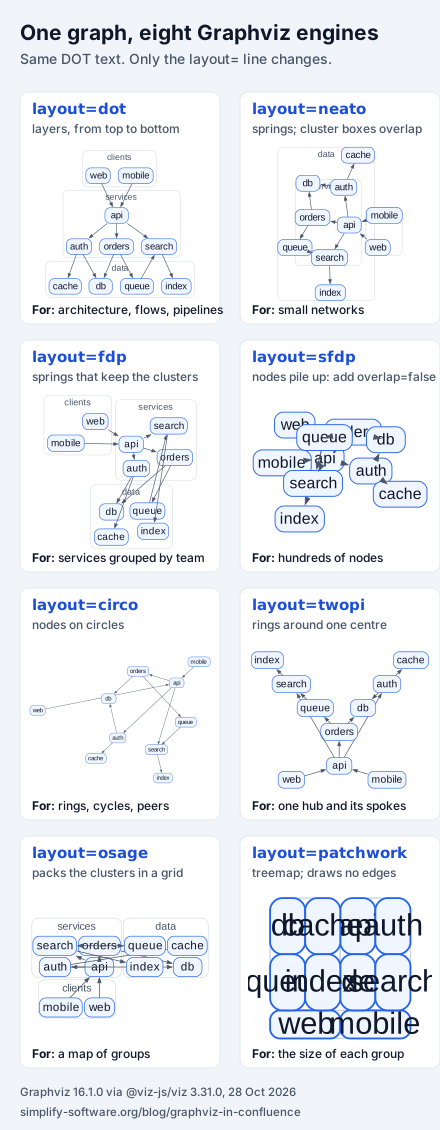
Graphviz has one language and several layout programs. You choose one with a single line at the
top of the graph, such as layout=neato;. We rendered one graph, ten services in three clusters
with eleven edges, through each engine of Graphviz 16.1.0, the release of
3 September 2026, compiled to
WebAssembly. Only the layout= line changed.
| Line | What it draws (Graphviz docs) | Use it in Confluence for | Watch out |
|---|---|---|---|
layout=dot | “hierarchical or layered drawings”, the default | architecture, request flows, pipelines, runbooks | Long chains get tall; add rankdir=LR for wide pages |
layout=neato | a “spring model” layout | small networks without a direction | Ignores clusters: their boxes overlapped in our test |
layout=fdp | “Force-Directed Placement” | services grouped by team | Edges can run across the cluster labels |
layout=sfdp | “Scalable Force-Directed Placement” | graphs with hundreds of nodes | In browser builds, 9 pairs of nodes overlapped until we added overlap=false |
layout=circo | a “circular layout” | rings, cycles, peer-to-peer links | Wide and sparse: our graph came out 672 × 475 points, against dot’s 374 × 370 |
layout=twopi | a “radial layout” | one service and everything around it | Set the centre with root="name", or Graphviz picks one |
layout=osage | “draws clustered graphs” | a map of groups | Edges are drawn but squeezed between packed clusters |
layout=patchwork | “a squarified treemap layout” | the size of each group | Draws no edges at all; names longer than the square overflow it |
Which engines keep your cluster_ boxes matters more than it looks. In our run, dot, fdp, osage and
patchwork drew all three cluster boxes where they belong; sfdp, circo and twopi drew none; neato drew
them, but around nodes it had placed without regard to them, so the boxes overlap.
Five DOT templates for Confluence pages
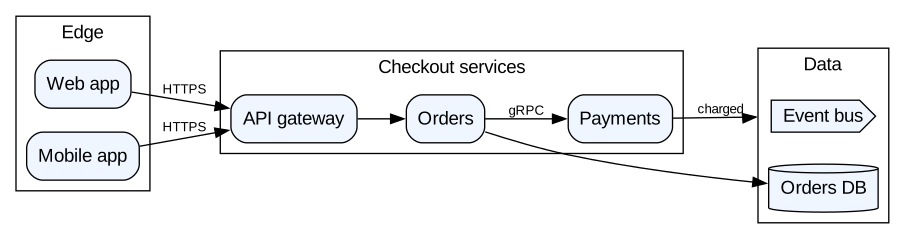
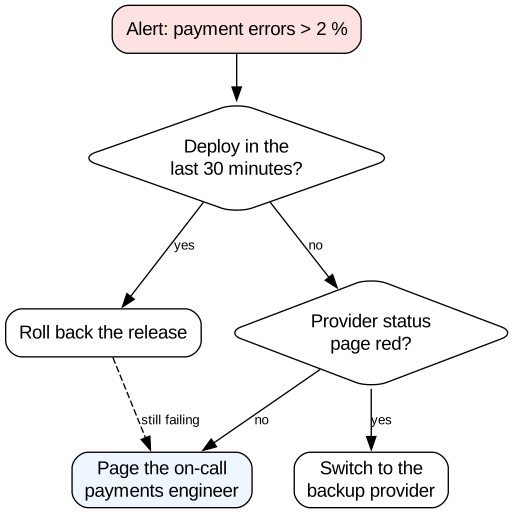
Each template is a page Confluence teams write every week. All five rendered with Graphviz 16.1.0 with no errors and no warnings, and the picture under each one is that output. Paste the text into your app’s Graphviz editor or macro.
1. An architecture diagram for a design doc
Clusters group the services, rankdir=LR keeps the diagram wide enough for a page, and
compound=true with lhead lets an edge end at a cluster rather than at one node.
digraph architecture {
  fontname="Helvetica";
  rankdir=LR;
  compound=true;
  node [shape=box, style="rounded,filled", fillcolor="#EFF6FF", fontname="Helvetica"];
  edge [fontname="Helvetica", fontsize=10];

  subgraph cluster_edge {
    label="Edge";
    "Web app"; "Mobile app";
  }
  subgraph cluster_services {
    label="Checkout services";
    "API gateway"; "Orders"; "Payments";
  }
  subgraph cluster_data {
    label="Data";
    "Orders DB" [shape=cylinder];
    "Event bus" [shape=cds];
  }

  "Web app" -> "API gateway" [label="HTTPS"];
  "Mobile app" -> "API gateway" [label="HTTPS"];
  "API gateway" -> "Orders";
  "Orders" -> "Payments" [label="gRPC"];
  "Orders" -> "Orders DB";
  "Payments" -> "Event bus" [label="charged", lhead=cluster_data];
}
2. A runbook decision flow
Diamonds for questions, labelled edges for answers, and \n to break long labels. On-call pages
are where text diagrams pay off: the next person can fix a step without redrawing anything.
digraph runbook {
  node [fontname="Helvetica", shape=box, style=rounded];
  edge [fontname="Helvetica", fontsize=10];

  alert   [label="Alert: payment errors > 2 %", shape=box, style="rounded,filled", fillcolor="#FEE2E2"];
  deploy  [label="Deploy in the\nlast 30 minutes?", shape=diamond];
  rollback [label="Roll back the release"];
  provider [label="Provider status\npage red?", shape=diamond];
  failover [label="Switch to the\nbackup provider"];
  page    [label="Page the on-call\npayments engineer", style="rounded,filled", fillcolor="#EFF6FF"];

  alert -> deploy;
  deploy -> rollback [label="yes"];
  deploy -> provider [label="no"];
  provider -> failover [label="yes"];
  provider -> page [label="no"];
  rollback -> page [style=dashed, label="still failing"];
}
3. A Jira workflow, documented on the team page
Statuses as nodes, transitions as labelled edges. The dashed edge marks the way back.
digraph workflow {
  rankdir=LR;
  node [shape=box, style="rounded,filled", fillcolor="#F1F5F9", fontname="Helvetica"];
  edge [fontname="Helvetica", fontsize=10];

  "To Do" -> "In Progress" [label="Start"];
  "In Progress" -> "In Review" [label="Open PR"];
  "In Review" -> "In Progress" [label="Changes requested"];
  "In Review" -> "Done" [label="Merge"];
  "In Progress" -> "Blocked" [label="Flag"];
  "Blocked" -> "In Progress" [label="Unblock", style=dashed];

  "Done" [fillcolor="#DCFCE7"];
}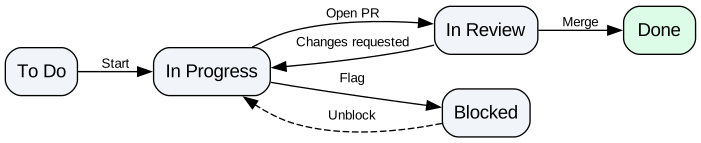
A first draft of this template put “In Progress” and “Blocked” on the same rank with
rank=same; the two labels, Flag and Unblock, were then drawn on top of each other. Letting dot
place Blocked itself fixed it.
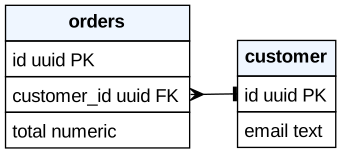
4. A data model with real tables
HTML-like labels give each table its rows, and ports let an edge start at the exact column. The crow’s foot is on the “many” side: many orders, one customer.
digraph data_model {
  rankdir=LR;
  node [shape=plain, fontname="Helvetica"];

  customer [label=<
    <table border="0" cellborder="1" cellspacing="0" cellpadding="4">
      <tr><td bgcolor="#EFF6FF"><b>customer</b></td></tr>
      <tr><td port="id" align="left">id uuid PK</td></tr>
      <tr><td align="left">email text</td></tr>
    </table>>];

  orders [label=<
    <table border="0" cellborder="1" cellspacing="0" cellpadding="4">
      <tr><td bgcolor="#EFF6FF"><b>orders</b></td></tr>
      <tr><td align="left">id uuid PK</td></tr>
      <tr><td port="customer" align="left">customer_id uuid FK</td></tr>
      <tr><td align="left">total numeric</td></tr>
    </table>>];

  orders:customer -> customer:id [dir=both, arrowtail=crow, arrowhead=tee];
}
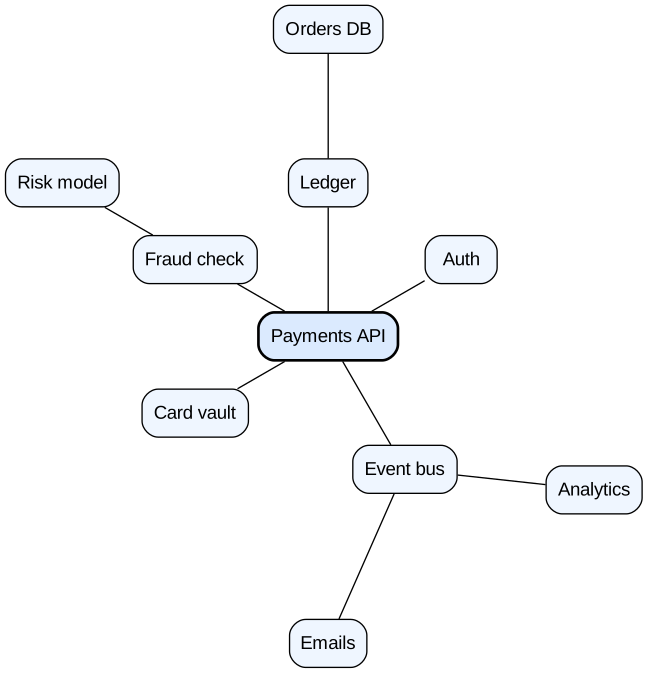
5. Everything one service depends on
layout=twopi with root puts the service in the middle and its dependencies on rings around it.
This is the page you want open during an incident on that service.
graph dependencies {
  layout=twopi;
  root="Payments API";
  ranksep=1.6;
  fontname="Helvetica";
  node [shape=box, style="rounded,filled", fillcolor="#EFF6FF", fontname="Helvetica"];

  "Payments API" [fillcolor="#DBEAFE", penwidth=2];

  "Payments API" -- { "Auth" "Ledger" "Fraud check" "Card vault" "Event bus" };
  "Ledger" -- "Orders DB";
  "Fraud check" -- "Risk model";
  "Event bus" -- { "Emails" "Analytics" };
}
Mistakes Graphviz rejects, and the ones it accepts
We fed common mistakes to Graphviz 16.1.0 and wrote down exactly what came back. The first group at least stops with an error. The second group is worse: the diagram renders, and it is wrong.
| You wrote | What happens | Write instead |
|---|---|---|
graph g { a -> b } | “syntax error in line 1 near ’->’” | digraph for arrows, or a -- b in a graph |
digraph g { a -- b } | “syntax error in line 1 near ’—’” | a -> b |
api-gateway -> db | “syntax error in line 1 near ’-’” | "api-gateway" -> db |
node -> edge | “syntax error in line 1 near ’->’”: both are keywords | "node" -> "edge" |
A missing closing } | “syntax error in line 1”, no position | Count the braces of every subgraph |
v1.2 -> db | Renders. Two nodes, v1 and .2; the edge starts at .2 | "v1.2" -> db |
API Gateway -> db | Renders. A lone API node and an edge Gateway -> db | "API Gateway" -> db |
subgraph payments { … } | Renders with no box: only names starting cluster are boxed | subgraph cluster_payments, or cluster=true inside |
colour=red | Renders black, with no warning: unknown attribute ignored | color=red |
fontname="Helvetica,Arial,sans-serif" | Warning; sizes measured with Times, so boxes fit badly | One font name: fontname="Helvetica" |
splines=ortho with edge labels | “Orthogonal edges do not currently handle edge labels” | xlabel= instead of label= |
image="logo.png" | “No such file or directory”: a browser has no files to read | Use the app’s own image feature, or drop the image |
layout=sfdp on a small graph | Nodes drawn on top of each other in browser builds | Add overlap=false; or overlap=scale; |
The sfdp row deserves a sentence. Graphviz’s
overlap documentation says that “by default, sfdp uses
overlap=“prism0"", and Prism needs a triangulation library that the WebAssembly build does not
include. Graphviz warns “remove_overlap: Graphviz not built with triangulation library” and carries
on. Our test graph had 9 overlapping pairs of nodes; with overlap=false, scale or voronoi it had
none.
Labels in Chinese, Japanese or Korean
The WebAssembly build of Graphviz has no font files, so it estimates the width of each label from built-in tables. For Latin, Cyrillic and Turkish text the estimate was generous in our test; for Chinese, Japanese and Korean it was too small, and the text ran past its box. We drew each label in a box and measured both in Chromium.
| Label | Box width (px) | Text width (px) | Fits? |
|---|---|---|---|
| Payments service | 114 | 98 | yes |
| Платёжный сервис | 125 | 113 | yes |
| Größenänderung | 111 | 95 | yes |
| 支付服务网关 | 79 | 85 | no, 6 px over |
| 支付服务网关与风控中心 | 132 | 156 | no, 24 px over |
| 決済サービスと請求の管理 | 142 | 170 | no, 28 px over |
| 결제 서비스 게이트웨이 | 128 | 147 | no, 19 px over |
Graphviz says so, if your app shows warnings: “no value for width of non-ASCII character”. The fix
is to size the boxes yourself, for example node [width=3]; for the whole graph or width= on one
node. With width=3 every label above fitted. This applies to every app built on this Graphviz
build, ours included.
All 14 apps that draw Graphviz in Confluence Cloud
We searched the Marketplace for “graphviz” in Confluence Cloud on 27 October 2026 and kept every app that draws DOT: 14. Our four Excalidraw apps for Confluence share one Graphviz editor, so they count as one row. Installs, ratings and prices come from the Marketplace API. “Listing says” means the vendor’s words; we did not install the other vendors’ apps.
| App (vendor) | Installs | Rating (reviews) | Price: up to 10 users / per user 11–100 | Where it draws (listing says) | Built on, last release |
|---|---|---|---|---|---|
| Just Add+ Embed Markdown, Diagrams & Code (Modus Create) | 8,025 | 3.4 (56) | free / $0.50 | not stated; Graphviz among 15 diagram types | Forge, Oct 2026 |
| PlantUML Diagrams for Confluence (Stratus Add-ons) | 5,242 | 3.4 (50) | free / $0.70 | not stated; “GraphViz diagrams” next to PlantUML | Forge, Oct 2026 |
| Graphviz Diagrams for Confluence (Appfire) | 605 | 3.7 (11) | free / $1.20 | not stated; “No need to install Graphviz software” | Forge, Sep 2026 |
| Excalidraw, Mermaid, PlantUML Whiteboard (Fulstech) | 230 | 3.1 (6) | free / $0.83 | a Graphviz macro; “external rendering services” documented | Forge, Sep 2026 |
| PlantUML, Mermaid UML, Graphviz (Fulstech) | 89 | none yet | free / $0.13 | not stated | Connect, Jul 2026 |
| Kroki Diagrams for Confluence (Chinese Technical Support) | 45 | 5.0 (1) | free / $0.50 | the Kroki.io server by default | Forge, Mar 2026 |
| Graphviz Cloud (Addteq) | 35 | 2.5 (2) | $3 a month / $0.40 | not stated; images attached to the page | Connect, Mar 2022 |
| Excalidraw Architecture & Sequence Diagrams (Simplify, ours) | 21 | none yet | free / $0.15 | in the browser, Graphviz 16.1.0; no external calls | Forge, Oct 2026 |
| Visualize with Code for Confluence (Utoolity) | 17 | 3.8 (1) | free / $0.20 | “powered by Kroki” | Forge, Mar 2025 |
| Graphviz for Confluence (Chinese Technical Support) | 4 | none yet | free / $0.50 | not stated | Forge, Jun 2026 |
| Graphviz Charts for Confluence (NGPILOT) | 1 | none yet | free / $1.00 | not stated; “11 Layout Engines” to pick from | Forge, Apr 2026 |
| Mermaid, PlantUML & Graphviz Diagrams (Mastero) | not shown | none yet | free / $0.50 | “in your browser”; pinned engine versions | Forge, Sep 2026 |
| JustVision (Sendel) | not shown | none yet | free / $0.34 | an AI diagram tool; DOT is one of its inputs | Forge, Jan 2026 |
| Knowvah Diagrams for Confluence (Knowvah) | not shown | none yet | free / $0.70 | browser and Forge, Graphviz ported to TypeScript | Forge, Sep 2026 |
The two apps with the most installs are not Graphviz apps at all: Just Add+ is a Markdown and diagrams toolkit, and Stratus’s app is built for PlantUML. If DOT is all you need, the field is small: Appfire’s app, with 605 installs, is the only app built for Graphviz alone with more than 50.
Three questions that decide the app
1. Where is the diagram drawn? For a design doc this is a security question. The Kroki app says its “default kroki server is: Kroki.io”, and Kroki’s API documentation shows how a diagram reaches it: in a GET request “your diagram must be encoded in the URL”, in a POST “the diagram source will be sent as the request body”. Either way the text of your architecture leaves Atlassian, unless you point the app at a Kroki server of your own. Knowvah, Mastero and our app say they draw in the browser; most listings say nothing, so ask the vendor.
2. Does the page export keep the diagram? Appfire’s Cloud migration guide, updated on 27 August 2026, says: “In the cloud version, you cannot save a Graphviz diagram as a PDF or Word file, or export to PDF or Word.” Knowvah says “Export a page to PDF or Word and the diagram comes across as a diagram”, Fulstech’s whiteboard “renders saved diagrams in Confluence PDF and Word exports”, and so does ours. If your design docs go to customers or auditors as PDFs, test an export on the first day of the trial.
3. Forge or Connect? Two apps in the table, Addteq’s and Fulstech’s Graphviz app, have no Forge app ID in the Marketplace API. Atlassian’s Connect timeline says “Marketplace apps with a Connect descriptor can no longer be updated”, and end of support moved to 31 January 2027. “Customers who have Connect apps installed won’t lose access to the app”, but an app that cannot be updated will not get the next Graphviz fix. Addteq’s last release was in March 2022.
Moving Graphviz macros from Data Center
Most teams searching for Confluence Graphviz have pages written for Appfire’s Server and Data Center app, the one that needs “Graph Visualization Software (Graphviz) installed on the Confluence server”. Appfire’s migration guide says “All the macros available in the server are supported in the cloud version as well”, and lists what does not move:
- templates as a source, and “File option is not applicable for Confluence cloud”;
- macro nesting, and “Render wiki markup macros in body”;
- the outgoing link in Graph from table;
- PDF and Word export of the diagram, as quoted above;
- URL sources, which “Have to be configured manually from the Global Configuration page”.
If you are moving to another vendor instead, Mastero’s listing says its app “Finds Mermaid, PlantUML and Graphviz macros left by other apps” and converts only the ones you tick. With any other app, the DOT text moves by copy and paste: it is the same language, and the templates above render in all of them.
Where our app fits
Our Excalidraw Architecture & Sequence Diagrams for Confluence
is a whiteboard with a Graphviz editor in it: you write DOT with a live preview, insert the laid-out
graph into an Excalidraw scene, and then circle, annotate and sketch around it by hand. The source
stays editable, the page’s PDF and Word export includes the drawing, and everything runs in your
browser on Forge with no external calls. It draws with the same Graphviz 16.1.0 build we tested
here, so every layout= line above works, and the Chinese, Japanese and Korean width issue applies
too. See the documentation
for the editor.
It is a whiteboard first. If you want a plain diagram macro with no canvas, Appfire’s or Knowvah’s app is quicker to use; if you want to point at the part of the architecture that is changing, ours is built for that. For Jira, the same editor is in Excalidraw Architecture & Dependency Diagrams for Jira.
How we collected the data
- Which apps: Atlassian Marketplace REST API v2,
addons?application=confluence&hosting=cloud&text=graphviz, on 27 October 2026: 19 results. We kept the 14 that draw DOT and left out an image library, a Vega app, a LaTeX app, an SVG library and our Excalidraw Math app, which shares the Graphviz editor of the row above. - Installs, ratings, prices, framework, release: the API’s app record,
versions/latest(release date, and the Forge app ID that Connect apps lack) andpricing/cloud/live(the monthly price for 10 users, and the per-user price of the 100-user tier). Annual prices and discounts are not included. “Not shown” means the API returned no install count. - Engines, errors and widths: Node.js 24 with the npm package
@viz-js/viz3.31.0, which contains Graphviz 16.1.0, the build our apps ship. Overlaps counted from Graphviz’s own JSON output; label widths measured in Chromium with Playwright. - Google’s first page: a search for “confluence graphviz” in Chrome, English, United States, on 27 October 2026.
Prices and listings change. If you spot something out of date, tell us and we will fix it.
Frequently asked questions
Does Confluence Cloud support Graphviz without an app?
No. Confluence Cloud has no DOT macro of its own, so every Graphviz diagram you see on a Cloud page is drawn by a Marketplace app. On 27 October 2026 a Marketplace search for "graphviz" in Confluence Cloud returned 19 apps, 14 of which draw DOT. On Confluence Data Center, Appfire's Graphviz app also needs the Graphviz package installed on the server.
Is there a free Graphviz app for Confluence?
All 14 apps are free for up to 10 users except Addteq's Graphviz Cloud, which charges $3 a month at 10 users. Above 10 users they charge per user: from $0.13 a month (Fulstech, a Connect app) and $0.15 (our Excalidraw app) to $1.20 (Appfire) at 11–100 users. Prices from the Marketplace API, 27 October 2026; annual prices and discounts not included.
How do I change the Graphviz layout engine in Confluence?
Put a layout line at the top of the graph, for example layout=neato; or layout=twopi;. We checked that Graphviz 16.1.0 compiled to WebAssembly gives exactly the same drawing for the line as for the engine option, so it works in any app that passes your DOT to Graphviz unchanged. Some apps, such as NGPILOT and Knowvah, also offer an engine picker.
Why are my Graphviz nodes drawn on top of each other?
Most likely the engine is sfdp. Its default overlap removal is prism0, and Graphviz builds that run in the browser lack the library it needs: our test graph had 9 overlapping pairs of nodes and the warning "Graphviz not built with triangulation library". Add overlap=false; or overlap=scale; and the overlaps are gone.
Do Graphviz diagrams appear in Confluence PDF and Word exports?
Depends on the app. Appfire's Cloud migration guide says "you cannot save a Graphviz diagram as a PDF or Word file, or export to PDF or Word" in the Cloud version. Knowvah, Fulstech's Excalidraw whiteboard and our Excalidraw app say the exported page includes the diagram. Export one test page during the trial.
Can I use the same DOT diagrams in Jira?
Yes, the language is the same. Jira Cloud does not draw DOT either, so it needs an app: Appfire has Graphviz Diagrams for Jira, and our Graphviz Graphs & Vega-Lite Charts in Tabs and Excalidraw Architecture & Dependency Diagrams for Jira use the same Graphviz 16.1.0 build as our Confluence app, so the five templates here render the same way.