Mermaid Architecture Diagram: Syntax, Icons and 158 Tests
On this page
- Copy this: a shop backend with the built-in icons
- The building blocks and what each accepts
- Edges: sides, arrows and labels
- Lines into and out of groups
- Icons: five built in, everything else is a question mark
- When services land on top of each other: align
- Lines that render but draw the wrong thing
- The error messages decoded
- Settings that work, and one that does not
- Architecture diagram, flowchart or C4?
- Architecture diagrams in Confluence and Jira
- How we tested
- Sources
A platform team pastes the AWS example from the Mermaid docs into its runbook. The diagram renders: CloudFront, API Gateway, Lambda, DynamoDB and S3, joined by neat arrows, every icon a blue square with a question mark. No error, no warning. The icons come from a pack the page never registered.
Architecture diagrams (architecture-beta) are Mermaid’s newest way to draw services, groups and the
lines between them. They are also the strictest: two dashes and four capital letters decide every edge,
and several mistakes give a wrong picture instead of an error. To map them, we wrote 158 small
diagrams and rendered each in Mermaid 11.17.2, in 12.3.0 with its defaults, and in 12.3.0
with the classic look our own apps use. All 158 drew exactly the same in the three: same services,
positions, lines, arrowheads and labels. The grammar, architecture.langium, is identical in both
versions.
The short version: start with architecture-beta; give each service an id, one of five icons and a
title, as in service db(database)[Orders DB]; write every edge with a side on both ends, as in
api:R --> L:db; use {group} to reach a group; add align when services pile up; anything beyond
the five icons needs an icon pack registered by the tool that draws the diagram.
Copy this: a shop backend with the built-in icons
Six services in two groups, a line into a group, and only straight edges, the kind that draws as written. It draws the same in Mermaid 11 and 12, and it needs no icon pack, so it works wherever Mermaid does:
architecture-beta
    service browser(internet)[Customer browser]

    group shop(cloud)[Shop backend]
    service web(server)[Web app] in shop
    service api(server)[Orders API] in shop
    service db(database)[Orders DB] in shop
    service invoices(disk)[Invoice files] in shop

    group pay(cloud)[Payment provider]
    service psp(server)[Payments API] in pay

    browser:R --> L:web
    web:R --> L:api
    api:R --> L:db
    api:B --> T:invoices
    api{group}:T --> B:psp{group}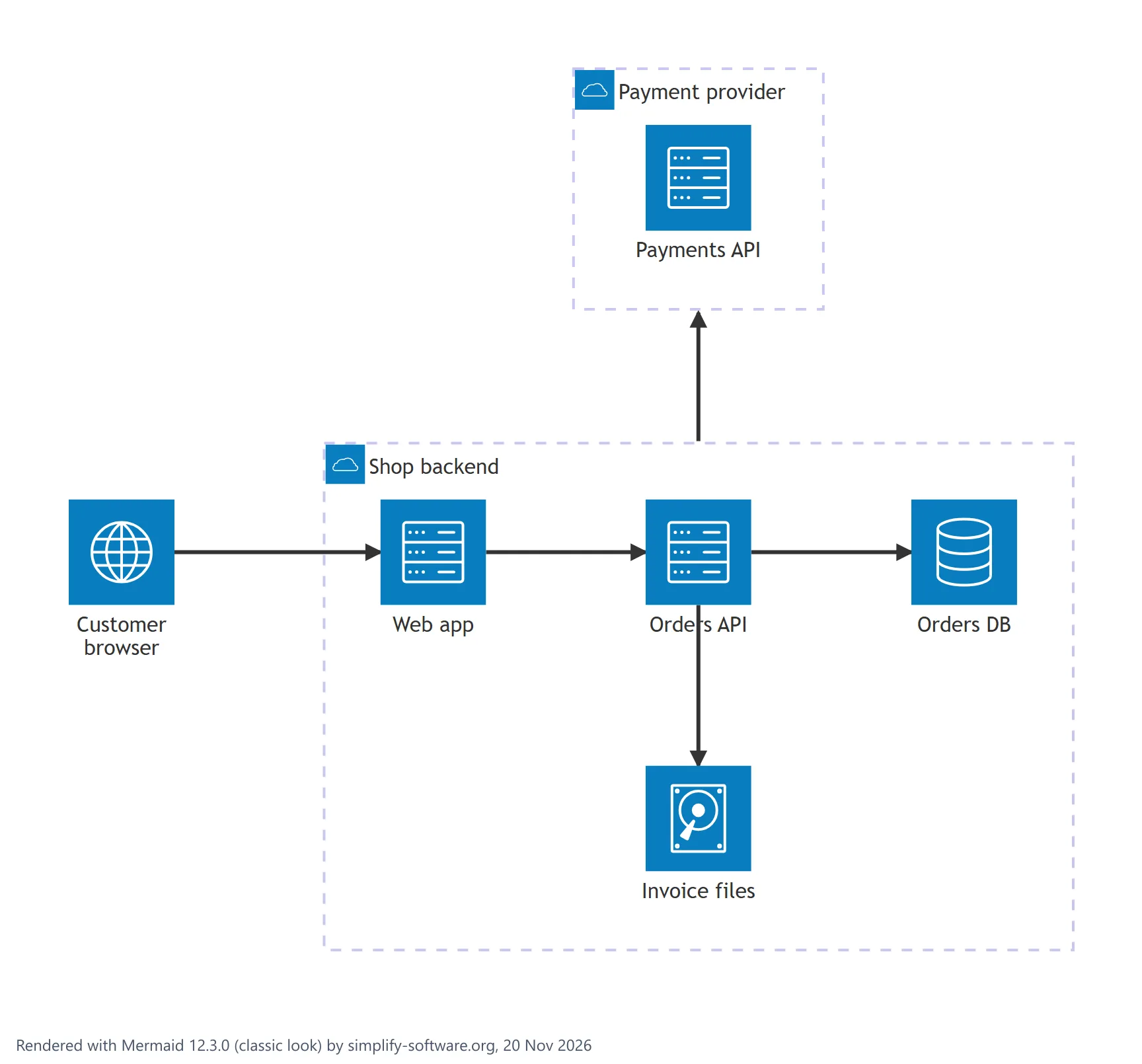
Each line declares one thing. service, group and junction lines create boxes; edge lines join
them. Order is looser than the docs suggest: an edge may come before the services it joins, and a
service may name a group declared further down. A group nested in a parent that comes later is the one
order that fails.
The building blocks and what each accepts
| Block | Write | Fails |
|---|---|---|
| Service | service db(database)[Orders DB] in g | title before icon, empty [], ; at the end |
| Group | group g(cloud)[Shop backend] in parent | parent declared later, in a service |
| Junction | junction j in g | an icon or a title: junction j[Split] |
| Edge | a:R --> L:b | no side, lower case side, ---, ->, .. |
| Align | align column d1 d2 d3 | one member, a group member, commas |
The icon, the title and in are optional on services and groups; arrowheads, a label and {group}
are optional on edges.
What the parser does with names and titles:
- Ids may contain letters, digits, underscores and dashes, and may start with a digit (
1apiworks). A dash at the end, a dot (order.api) or a non-Latin letter (заказ) is an error. The wordsgroup,serviceandincannot be ids, and neither canL, which the grammar reads as a side, likeR,TandB. - Titles in square brackets take spaces, brackets
(...), colons,#,%, emoji and any alphabet. Quotes around a title are dropped,<br>breaks the line, long titles wrap on their own, and**bold**is drawn as plain text. A[inside a title is a lexer error. - A service with no icon (
service a[Only title]) draws an empty square with the title. The grammar also takes text in place of an icon,service a "Text icon"[Title], which the docs do not mention: the text is drawn where the icon would be. - Duplicate ids fail with “The service id [a] is already in use by another node”, also between a group and a service.
Edges: sides, arrows and labels
An edge names a side on both ends. L, R, T and B are the left, right, top and bottom of the
square icon, and the layout places services so that those sides face each other: a:R -- L:b puts b
to the right of a, a:B -- T:b puts it below.
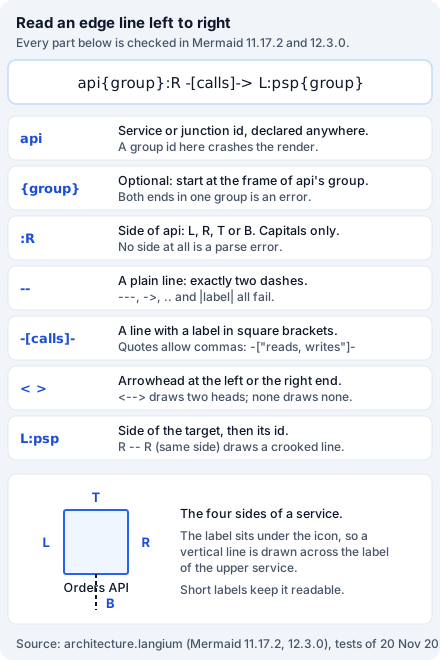
| You want | Write | Tested result |
|---|---|---|
| A plain line | a:R -- L:b | One line, no heads |
An arrow into b | a:R --> L:b | One head at b |
An arrow into a | a:R <-- L:b | One head at a |
| Both ways | a:R <--> L:b | Two heads |
| A label | a:R -[reads]- L:b | Label on the line |
| A label and an arrow | a:R -[reads]-> L:b | Label and one head |
| A label with a comma | a:R -["reads, writes"]- L:b | Label reads, writes |
| Spaces inside | a : R -- L : b | Same as without spaces |
Right angles are not reliable. With two services we drew all eight right-angle pairs (a:R -- T:b,
a:T -- L:b and the rest) and they all came out the same way: b above and to the left of a, the
line entering b from below when a’s side was L or R, and from the right when it was T or B,
whatever side b was given. The docs’ own 90-degree example, db:T -- L:server, ends in the right side
of Server, not the left. Same-side pairs such as a:R -- R:b give the same placement with a slanted
line. Straight pairs, R to L and B to T, are the ones that draw as written; build the picture
from those and use a junction where a line has to turn.
The flowchart habits fail: a --> b without sides (“Expecting token of type ’:’”), lower case
a:r -- l:b, three dashes, a single ->, dotted .. and ..>, a |label| and a : label at the
end. A chain on one line, a:R -- L:b:R -- L:c, is a parse error too: one edge per line.
Two edges between the same pair in the same direction fail with “Can not create second element with ID
a-b”, an error that comes from the layout library, not from Mermaid. The reverse edge, b:R -- L:a,
is a separate edge and draws.
A vertical line crosses a label. The title sits under the icon, so every line that leaves from B
is drawn through that title. In the shop example above the
line to Invoice files runs through “Orders API”. In a bare a:B -- T:b the arrow covers the label A
completely. Short titles keep it readable; there is no option to move the label.
Lines into and out of groups
A group id cannot be used in an edge. b:R --> L:g, where g is a group, does not give a parse error;
it crashes the render with “Cannot read properties of undefined (reading ‘in’)”.
To draw a line to a group, pick a service inside it and add {group}:
architecture-beta
    group shop[Shop backend]
    group pay[Payment provider]
    service api(server)[Orders API] in shop
    service psp(server)[Payments API] in pay
    api{group}:T --> B:psp{group}
The line then starts at the frame of shop next to api and ends at the frame of pay next to
psp. What we found around it:
{group}on one end only works: the line leaves the frame and goes to the service itself.{group}on a service that is in no group is silently ignored: a normal line.- Both services in the same group with
{group}on both ends fails: “The left-hand id [a] is modified to traverse the group boundary, but the edge does not pass through two groups.” - A space before it,
api {group}:T, works.
Groups nest (group inner[Inner] in outer), and three levels drew fine. An empty group draws an empty
frame, and a group without a title draws a frame with no heading.
Icons: five built in, everything else is a question mark
Mermaid draws five icons on its own: cloud, database, disk, internet and server. The docs
add that “Users can use any of the 200,000+ icons available in iconify.design”, once an icon pack is
registered. Registration happens in the JavaScript that runs Mermaid, not in the diagram. Until then,
every other name is drawn as a blue square with a white question mark:
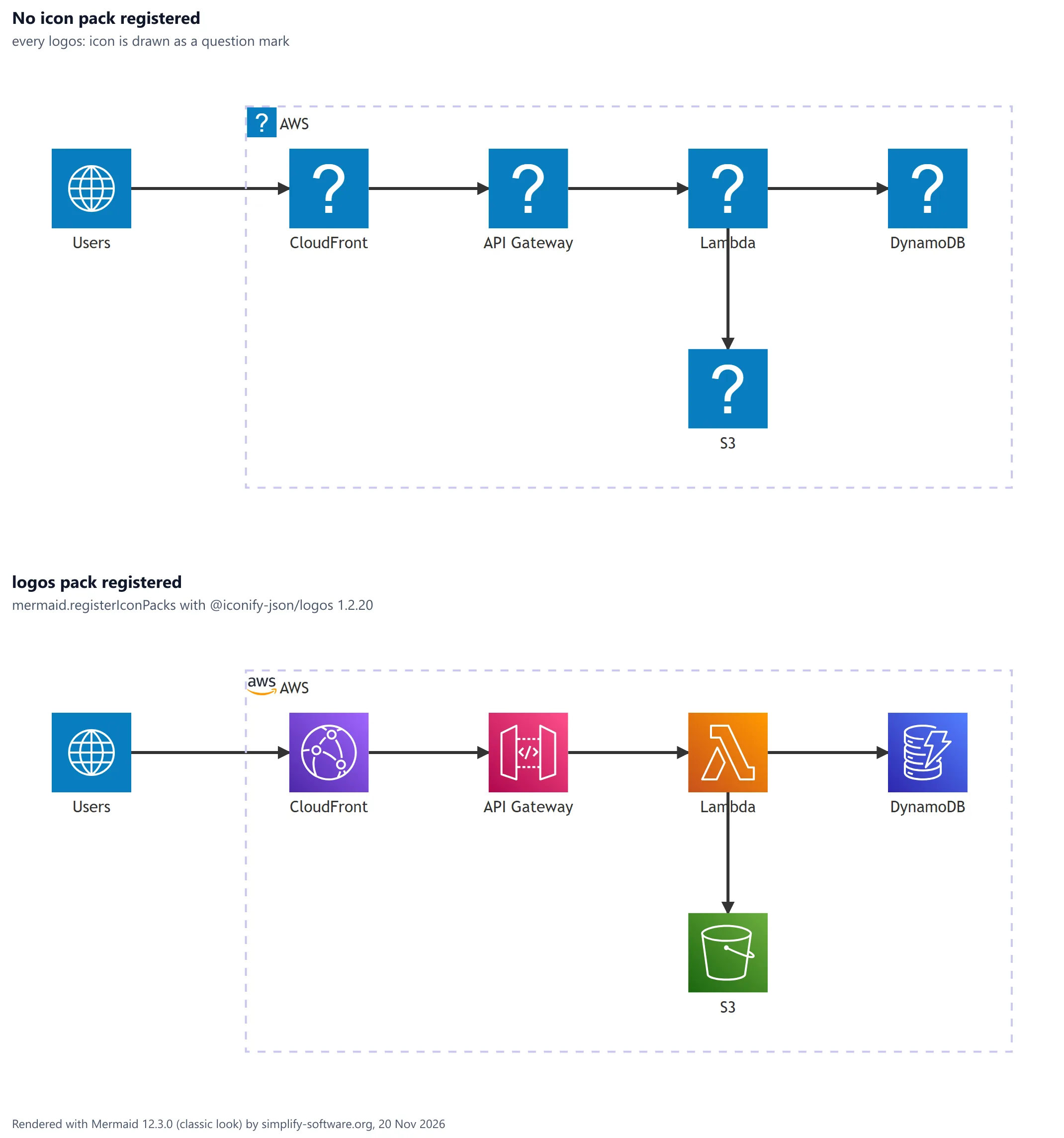
The diagram text for both panels is the same:
architecture-beta
    service users(internet)[Users]
    group aws(logos:aws)[AWS]
    service cdn(logos:aws-cloudfront)[CloudFront] in aws
    service gw(logos:aws-api-gateway)[API Gateway] in aws
    service fn(logos:aws-lambda)[Lambda] in aws
    service table(logos:aws-dynamodb)[DynamoDB] in aws
    service bucket(logos:aws-s3)[S3] in aws
    users:R --> L:cdn
    cdn:R --> L:gw
    gw:R --> L:fn
    fn:R --> L:table
    fn:B --> T:bucket
The bottom panel registered the logos pack from npm before rendering, as the Mermaid icon docs show
“without lazy loading”:
import mermaid from 'mermaid'
import { icons } from '@iconify-json/logos'

mermaid.registerIconPacks([{ name: 'logos', icons }])
The docs also show a loader that fetches the pack from unpkg when a diagram first uses it. Our
renders made no network requests at all: an unknown icon does not trigger a download, it just draws
the question mark. What we checked in the pack, version 1.2.20:
- AWS: 65 icons, among them
aws-lambda,aws-s3,aws-ec2,aws-rds,aws-aurora,aws-dynamodb,aws-api-gateway,aws-cloudfront,aws-sqs,aws-sns,aws-ecs,aws-eks,aws-fargate,aws-route53,aws-vpc,aws-iamandaws-step-functions, plusawsfor the logo. - Other clouds and tools:
azure,google-cloud,kubernetes,docker-icon,postgresql,redis,kafka,rabbitmq-icon,mongodb-icon,elasticsearch,nginx,github-icon,jiraandconfluence. - A misspelt name in a registered pack (
logos:no-such-icon) is also a question mark, with no error. Check each name on icones.js.org, the browser the docs point to. - Icon names may contain letters, digits,
-and:only:(my icon)and(aws.s3)are lexer errors.
Groups take icons too, and the same rule applies: group aws(logos:aws)[AWS] shows a question mark in
the frame heading until the pack is registered.
When services land on top of each other: align
Three databases feeding one report job is a common picture. Written the obvious way, two of the three end up on the same spot, their titles printed over each other. The last line below fixes it:
architecture-beta
    service orders(database)[Orders DB]
    service users(database)[Users DB]
    service stock(database)[Stock DB]
    service report(server)[Report job]
    orders:R --> L:report
    users:R --> L:report
    stock:R --> L:report
    align column orders users stock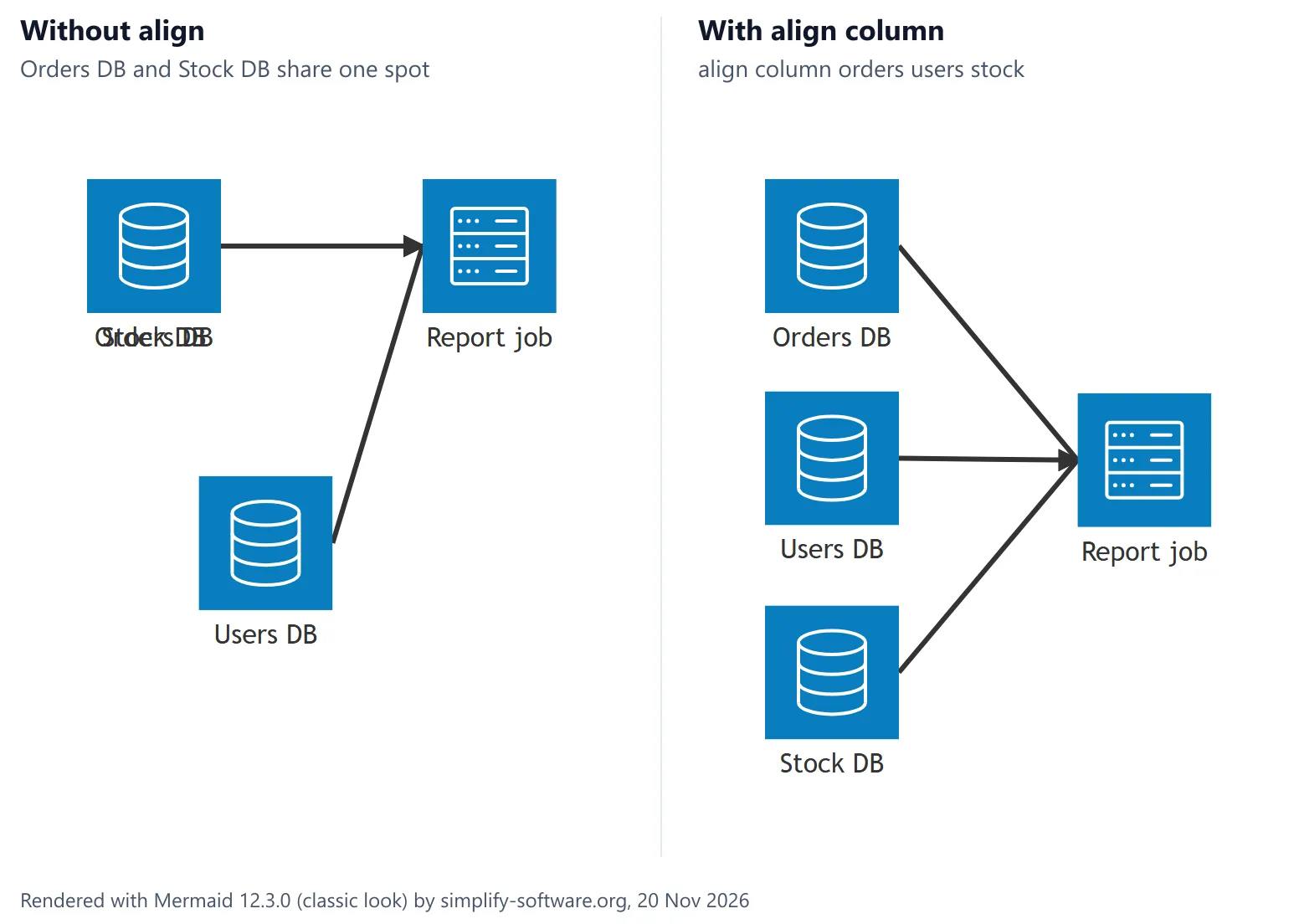
The left panel is the same diagram without the last line. We saw the overlap with three services on
one side in both directions, R --> L and B --> T, in Mermaid 11.17.2 and 12.3.0. The docs call it
a known limitation of the layout and point to align, added in Mermaid 11.16.0:
- Use
align columnwhen the services join the common node through left and right sides, andalign rowwhen they join through top and bottom. The order of the names is the order on the page. - At least two members, all of them services or junctions, separated by spaces. One member is a parse error; a group is refused with “align row references [g], which is not a service or junction”; commas are a lexer error.
alignmay come before the services it names.- The docs warn that an order that contradicts an edge “will fail to render”. In our test it did not
fail: with
a:L --> R:bandalign row a b,astays on the left and the arrowhead hangs pastb, pointing at nothing.
Lines that render but draw the wrong thing
These all render without an error. Each one is worth a second look before a diagram goes into a runbook:
| Line you wrote | What Mermaid draws |
|---|---|
service q(queue)[Queue] | A question mark instead of an icon |
service s3(logos:aws-s3)[S3] with no pack registered | A question mark instead of an icon |
| Three services joined to one node from the same side | Two of them on one spot, titles overlapping |
a:R -- R:b | A slanted line from the right of b into the top of a |
db:T -- L:server, the docs’ right-angle example | Server above and left of DB, the line entering Server’s right side |
a:R -- L:b, b:R -- L:c, c:R -- L:a | Three in a row; the line from c back to a lies on the other two |
a:L --> R:b with align row a b | An arrowhead past b, pointing at nothing |
title Shop backend | Nothing: the title is accepted and not drawn |
a{group}:R --> L:b when a is in no group | A normal line: {group} is ignored |
| A 50-service chain | One very wide, very flat strip, scaled down to fit the page |
Two of these are easy to miss in review. The diagram title is dropped whether it is written as
title ... in the diagram or as title: in the front matter; accTitle: and accDescr: do go into
the SVG’s <title> and <desc> for screen readers, but nothing is drawn. And a circle of edges that
all say “left of” cannot be placed: the edge that closes it is drawn straight back across the
others, so it looks as if it is not there.
The error messages decoded
The architecture parser is a different engine from the flowchart one, so its messages read differently. What each one meant in our tests:
Expecting token of type 'architecture-beta' but found 'architecture': the header without-beta.No diagram type detected:Architecture-betawith a capital A.Expecting token of type ':': an edge without sides,a --> b, a bare id on a line, ordirection LR(architecture diagrams have no direction; the edge sides decide).Expecting token of type 'ARROW_DIRECTION': a lower case side, a side on one end only, or three dashes.Expecting token of type 'ARCH_TITLE': a single dash or->.Lexer error ... unexpected character: ->.<-: dots, either in an id or in an arrow.unexpected character: ->(<-: a space or a dot inside an icon name.unexpected character: ->[<-: an empty title[]or a bracket inside a title.unexpected character: ->#<-or->/<-: a#or//comment, or astyleorclassDefline. Comments start with%%.unexpected character: ->;<-: a semicolon at the end of a line.Expecting token of type 'ID': a reserved word as an id:group,service,in,L.The service [a]'s parent does not exist:innames a group that was never declared.The right-hand id [ghost] does not yet exist: an edge to an id that is never declared.Cannot read properties of undefined (reading 'in'): an edge to a group id. Use{group}.Can not create second element with ID 'a-b': the same edge twice.
Settings that work, and one that does not
Set them in front matter under config: architecture: or in mermaid.initialize:
| Setting | Default | Tested |
|---|---|---|
iconSize | 80 | 40 shrank two services from 361 × 184 px to 223 × 144 px |
idealEdgeLengthMultiplier | 1.5 | 3 stretched a three-service chain from 561 to 800 px wide |
padding | 40 | 80 widened the space inside a group frame |
seed, randomize | 1, false | Defaults: the same text gave the same layout twice |
fontSize | 16 | 24 changed nothing: labels stayed at 16 px |
The defaults come from Mermaid’s config schema at 12.3.0. There is no way to colour one service:
style, classDef, class and click lines all fail to parse. A theme such as dark recolours the
whole diagram. Rendering is fast: a chain of 50 services took 171 ms in 11.17.2 and 174 ms in 12.3.0
in our headless Chromium, and 6 groups of 3 services about 100 ms. The SVG scales down to fit its
container, so a long chain becomes unreadable before it becomes slow: turn it with T and B sides,
or split it.
Architecture diagram, flowchart or C4?
architecture-beta draws a deployment picture: what runs where and what talks to what, with
recognisable icons. It is the right tool when the icons carry meaning, such as an AWS or Azure setup,
and when the picture is small enough that you can say which side each line uses.
A flowchart is better when the diagram has decisions, long chains or
labels on most lines, and when you want to colour one box: flowcharts take classDef and
linkStyle, architecture diagrams take neither. For C4 (context, container and component views), the
C4 model examples cover Mermaid’s C4 diagrams and PlantUML’s C4 library,
which has the person and system shapes built in. The Mermaid syntax guide
lists the first line of all 33 diagram types.
Architecture diagrams in Confluence and Jira
Architecture pictures usually live in a design page or next to the ticket that changes the system.
Neither Confluence nor Jira draws Mermaid itself; a mermaid code block shows as text. An app draws
it, and the icon rule above decides what you see:
- Mermaid Tabs for Jira draws Mermaid in tabs on a work item
and on project pages with Mermaid 12.3.0 and the classic look, the same renderer as the figures on
this page. It does not register icon packs, so use the five built-in icons, as in the shop example;
logos:icons show as question marks. - Excalidraw for Confluence and for Jira render Mermaid on a whiteboard, with the same version and the same five icons. “Insert as shapes”, which turns flowcharts and class diagrams into editable shapes, cannot do that for architecture diagrams: mermaid-to-excalidraw 3.6.0, the converter these apps ship, returns the whole diagram as one picture. Use Insert instead: the diagram stays Mermaid, and reopening its source changes it.
- Confluence Mermaid diagrams: 5 ways, 53 apps compared covers the other routes onto a Confluence page, and free diagram plugins for Confluence compares the free apps.
For other Mermaid types see the class diagram guide, the ER diagram guide and the sequence diagram guide.
How we tested
We wrote 158 diagrams: every construct in the architecture docs, every token in the grammar files
architecture.langium and arch.langium, and the spellings people bring from flowcharts. We also read
the first page of Google for “mermaid architecture diagram” on 20 November 2026 and covered what it
explains. Each diagram was rendered with mermaid.render in headless Chromium in Mermaid 11.17.2, in
12.3.0 with its defaults, and in 12.3.0 with look: classic and theme: default, as Mermaid Tabs and
our Excalidraw apps initialise it: 474 renders, with no network requests during the run. From every
SVG we read the services and their titles, whether the icon was the question mark, the lines,
arrowheads and labels, the group headings, the size, any two services within 20 px of each other, and
the error text for the 52 cases that failed. The icon panel was a second, separate run with the
logos pack registered, because a registered pack stays registered for the page. Every case was
also converted with mermaid-to-excalidraw 3.6.0. Every code block on this page was rendered before
publishing; the figures are Mermaid 12.3.0 renders with the classic look at twice the pixel density.
Sources
- Mermaid architecture docs at the tested tags:
12.3.0
(“Architecture diagrams are in beta”; the five default icons; “groupIds cannot be used for
specifying edges”;
align“v11.16.0+” and its warning about conflicting order; the layout options and the known overlap tracked in #6120) and 11.17.2. - The grammar
architecture.langium at 12.3.0
with its terminals in
arch.langiumandcommon.langium, all three identical at 11.17.2: the service, group, junction, edge and align rules, and the id, icon and title patterns. - Registering icon packs
at 12.3.0: the
registerIconPacksexamples with a loader and without lazy loading. - The config schema
config.schema.yamlat 12.3.0,ArchitectureDiagramConfig: padding, iconSize, fontSize and the layout defaults. - @iconify-json/logos 1.2.20, the icon names listed above, and mermaid-to-excalidraw 3.6.0, as bundled by our Excalidraw apps.
Frequently asked questions
How do I add AWS icons to a Mermaid architecture diagram?
Register an icon pack in the code that runs Mermaid, then write the icon as pack:name, for example service fn(logos:aws-lambda)[Lambda]. With @iconify-json/logos the call is mermaid.registerIconPacks([{ name: "logos", icons }]); the pack has 65 AWS icons, from aws-api-gateway to aws-xray. The pack is registered by the page or app that draws the diagram, not inside the diagram text, so a tool that has not registered it cannot draw it.
Why does my architecture diagram show question marks instead of icons?
Only five icons are built in: cloud, database, disk, internet and server. Any other name, such as queue or logos:aws-s3 without a registered pack, is drawn as a blue square with a question mark. There is no error and no network request, so the diagram looks finished until someone opens it.
Why are two services drawn on top of each other?
When several services connect to one node from the same side, the layout can put two of them on the same spot. In our test three databases joined to a report job with R --> L lines gave two databases on one spot in both Mermaid 11.17.2 and 12.3.0. align column orders users stock (or align row for B --> T lines) spreads them out; it needs Mermaid 11.16.0 or later.
How do I connect a service to a group in a Mermaid architecture diagram?
You cannot use the group id in an edge: b:R --> L:g fails with "Cannot read properties of undefined". Connect to a service inside the group and add {group} after it, as in api{group}:T --> B:psp{group}; the line then starts and ends at the group frames. Both ends inside the same group is an error.
Can I colour or style one service in an architecture diagram?
No. style, classDef, class and click all fail to parse in architecture-beta in Mermaid 11.17.2 and 12.3.0. A theme such as dark recolours the whole diagram; a custom icon is the only per-service visual.
Should I use an architecture diagram, a flowchart or C4?
architecture-beta suits a deployment picture with icons: services, databases, storage and the network between them. A flowchart is better for steps and decisions, and handles labels, colours and long chains well. For the C4 levels (context, container, component), Mermaid C4 or PlantUML C4 have the shapes built in.
How do I put a Mermaid architecture diagram in Confluence or Jira?
Neither draws Mermaid on its own: a mermaid code block shows as text. An app renders it: Mermaid Tabs for Jira on a work item, Excalidraw for Confluence or for Jira on a whiteboard. Both run Mermaid 12.3.0 with the five built-in icons only. Pasting the rendered SVG or PNG as an image also works, but then nobody can edit the text.