Confluence Markdown: 87 Elements Pasted, Imported, Exported
On this page
- Does Confluence support Markdown?
- Paste Markdown into a page: what converts
- The six pastes that break
- What stays as plain text
- Code blocks, Mermaid and PlantUML
- Typing Markdown as you write
- Markdown through the REST API
- Export a page to Markdown
- Before you paste Markdown into Confluence
- Where our apps fit
- How we tested
A developer asks an AI assistant for a runbook, gets a tidy Markdown answer and pastes it into a Confluence page. The headings, the code and the table look right. Two weeks later someone notices that the “before you deploy” checklist is missing. It was there in the chat. It never reached the page, and the editor said nothing.
Confluence Cloud now reads Markdown in more places than most guides say, and loses some of it in ways no guide mentions. So we ran 87 Markdown cases through a Confluence Cloud site three ways and looked at what each one produced.
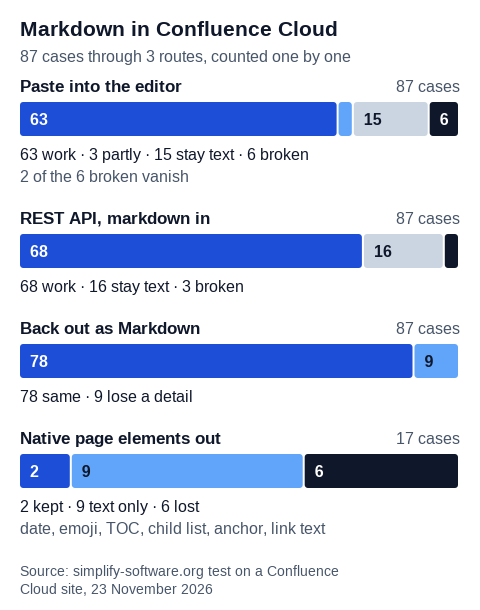
Short answer: pasting Markdown into a Confluence Cloud page works for the everyday parts:
63 of 87 cases became the right element (headings, lists, checklists, quotes, tables, code
blocks, links, images). Sent through the REST API, 68 of 87 did. Footnotes, HTML, math, emoji
codes and Mermaid diagrams stay as text in both. Two pastes vanish entirely: a checklist written as
a numbered list (1. [ ] first) and a nested quote (>> inner). If something is missing, use the
Paste as → Plain text menu at once and fix it by hand. A page can go back out through
Export to Markdown, but dates, emoji, link text and panel types do not survive.
Does Confluence support Markdown?
Partly, and in more ways than two years ago. On a Confluence Cloud site on 23 November 2026:
| Route | What happens | Our result |
|---|---|---|
| Paste Markdown into the editor | converted on paste; a Paste as menu offers Markdown or Plain text | 63 of 87 work, 6 break |
| Type Markdown while writing | shortcuts such as ## , **bold**, [] turn into formatting as you type | all 6 we typed worked |
| REST API with Markdown body | "representation": "markdown" is accepted, but not in the public reference | 68 of 87 work, 3 break |
| Export a page | More actions → Export → Export to Markdown (marked New) | 9 of 87 round trips lose detail |
/markdown or /markup macro | “We couldn’t find any results” | no such command in Cloud |
Import a .md file | no Markdown import in the Create menu | paste or use the API |
Two things do not exist, whatever older answers say. There is no Markdown macro in Confluence
itself, and the /markdown command that a May 2026 guide recommends returned “We couldn’t find any
results” on our site, as did /markup. That dialog lives on in Data Center (Insert → Markup →
Markdown), where Atlassian’s
wiki markup documentation
says Confluence “will convert your markdown to the rich text editor format”.
In every route Markdown is an input or an output, never the stored format. Once a page is converted, you edit it as a Confluence page. Jira takes the same Markdown differently, and its API not at all: the same 87 cases are in our Jira Markdown test.
Paste Markdown into a page: what converts
We pasted all 87 cases as plain text, the way text arrives from an AI chat, a README or a code editor, and published the page. Then we read what Confluence stored.
| Group | Cases | Converted | Stayed as text | Broke or partly |
|---|---|---|---|---|
| Headings (ATX, setext, H7) | 11 | 9 | 2 | 0 |
| Bold, italic, code, breaks | 17 | 12 | 2 | 3 |
| Lists and checklists | 14 | 12 | 1 | 1 |
| Quotes, alerts, rules | 8 | 7 | 0 | 1 |
| Code blocks | 12 | 12 | 0 | 0 |
| Links and images | 9 | 7 | 1 | 1 |
| Tables | 7 | 4 | 1 | 2 |
| Footnotes, HTML, math, TOC | 9 | 0 | 8 | 1 |
The everyday parts are safe: # to ###### headings and the underlined setext style, bold and
italic in both spellings, ~~strikethrough~~, inline code (even with a backtick inside), bullet
lists with -, * or +, numbered lists (a list starting at 3 keeps its 3), lists nested three
deep, - [ ] and - [x] checklists (they become Confluence action items, ticked or not), quotes,
horizontal rules, links, bare URLs, images from a URL, and pipe tables with bold, code and links in
the cells.
Two pleasant surprises. GitHub’s alert syntax, > [!NOTE] and > [!WARNING], became real
Confluence panels on paste: a Note panel and the yellow warning panel. And images came
in as proper Confluence images, not as raw HTML.
After every paste a small menu appears by the cursor. Paste actions offers three AI rewrites (Improve formatting, Improve writing, Fix spelling & grammar) and Paste as, with Markdown selected and Plain text as the other choice. That menu is your undo when a paste goes wrong.
The six pastes that break
Six cases came out wrong, and two of them disappear without a trace. We repeated those two with a real Ctrl+V from the clipboard to rule out our test method: same result.
| You paste | Confluence stores | Do this instead |
|---|---|---|
1. [ ] first and 2. [x] second | nothing: both lines vanish | write checklists with - [ ] |
> outer and then >> inner | nothing: both lines vanish | flatten the quote, or add the inner one by hand |
| code with an escaped pipe in a table cell | an extra column; the cell is split at the pipe | write “a or b”, or fix the cell after pasting |
Not \*italic\* | the backslashes shown, and the word italic anyway | remove the escapes, or use the API |
H~2~O | H2O with the 2 struck through, not lowered | set the subscript in the editor |
YAML front matter between --- lines | a divider and a heading reading “title: Page tags: [a, b]” | delete the front matter before pasting |
The pipe case, for the record: a cell holding `a \| b`, which GitHub renders as one cell
with a | b in it.
Three more came out partly right. A backslash at the end of a line (line one\) stays visible
instead of making a line break; two trailing spaces work. An autolink <https://…> becomes a link
with the < and > still showing. And table alignment (:---:) is dropped: every column is left
aligned.
The vanishing pair is the one to remember. AI assistants write numbered checklists often, and a page without its checklist looks complete. If a paste looks shorter than the source, choose Paste as → Plain text straight away: the raw text comes back and nothing is lost.
What stays as plain text
Fifteen cases were left as the literal characters you pasted. None of them lose content, but readers see the syntax:
- Footnotes (
[^1]), definition lists (Term/: Definition),==highlight==,^superscript^, heading ids ({#install}) and[TOC]. - Emoji codes such as
:rocket:. A real emoji character (🚀) survives. - HTML, all of it:
<b>,<kbd>,<div align="center">,<details>and<br>inside a table cell. An HTML comment (<!-- hidden -->) becomes visible text, so check pasted text for comments that were never meant to be read. - Math in
$…$and$$…$$. - A seventh-level heading (
#######) stays as a paragraph with the hashes. - Reference links (
[the docs][1]with[1]: https://…below) stay unresolved on paste. The API resolves them.
The fix in every case is the editor’s own element: a panel instead of <details>, a table cell
with a line break instead of <br>, the Table of contents macro instead of [TOC].
Code blocks, Mermaid and PlantUML
All 12 code cases converted, including ~~~ fences and four-space indented code. The language
after the fence is kept, with one rename on paste: python became py. js, typescript,
bash, json, yaml and even hcl were stored as written; through the API python stays
python. Pasted code blocks were also set to wide.
A ```mermaid or ```plantuml block is a code block like any other: readers see the source,
not a diagram. Confluence has no built-in Mermaid. Our
Confluence Mermaid guide lists five ways to get a drawing, from Atlassian
Labs’ free viewer to the 22 macros on the Marketplace.
Typing Markdown as you write
Atlassian’s
list of Markdown shortcuts
has 18 rows: **bold**, *italic*, ~~strikethrough~~, `code`, # to ###### followed by
a space, 1. , * , > , ```, --- , [title](url), [] for an action item and <> for a
decision. We typed a heading, bold, italic, strikethrough, inline code and [] on our site, and
each turned into formatting on the spot. This is the most reliable route of all, because you see
every conversion as it happens.
Markdown through the REST API
The quieter news is in the API. On our site, the v2 page endpoint accepted a Markdown body with
"representation": "markdown":
curl -u [email protected]:$API_TOKEN \
  -H 'Content-Type: application/json' \
  -X POST https://your-site.atlassian.net/wiki/api/v2/pages \
  -d '{"spaceId":"YOUR_SPACE_ID","status":"current","title":"Runbook",
       "body":{"representation":"markdown","value":"# Runbook\n\n- [ ] Check backups"}}'
Reading works too: GET /wiki/api/v2/pages/{id}?body-format=markdown returns the page as Markdown,
and POST /wiki/rest/api/contentbody/convert/markdown converts storage format to Markdown and back.
None of this is in Atlassian’s public OpenAPI reference: the body formats it lists are storage
and atlas_doc_format (we checked the published v1 and v2 specifications on 23 November 2026).
It works today, but treat it as undocumented: it can change without notice, so pin a test to it if
a script depends on it.
The API’s converter is not the editor’s. It got 68 of 87 right against paste’s 63: it honours
backslash escapes, resolves reference links, keeps nested quotes, table alignment and escaped
pipes. It is worse in two places: > [!NOTE] alerts stay quotes with the text ”[!NOTE]” in them,
and a numbered checklist keeps its items but silently drops the boxes and their ticks. Front
matter and H~2~O break the same way as on paste.
This is also the route AI agents take. Atlassian’s Rovo MCP server can write Confluence pages in
Markdown, and its issue tracker has the same kind of losses we saw: <details> tags escaped (#53),
checkbox syntax not turned into task lists (#25), and pages with a same-site link refused (#261,
open). Our Confluence MCP server guide covers what else breaks when an agent
edits a page.
Export a page to Markdown
Confluence Cloud now has Export to Markdown in the page’s More actions → Export menu, next to Word and PDF, with a New label. Atlassian’s export documentation did not mention it yet. We measured the export through the API’s Markdown output for the same pages; we did not compare it byte for byte with the menu’s file.
First the round trip. Of the 87 cases that went in through the API, 78 came back as equivalent
Markdown (* lists come back as -, setext headings as #). 9 lost a detail: a list that
started at 3 comes back starting at 1, link and image titles disappear, table alignment is dropped,
a hard line break comes back as a blank line (two paragraphs if you import it again), and an alert
loses its > on the second line.
Then the harder question: what happens to a page that was built in Confluence, not in Markdown? We exported 17 native elements:
| Element on the page | In the Markdown |
|---|---|
| Code block (SQL) | a ```sql fence, intact |
| @mention | @ and the person’s name, intact |
| Info and warning panels | the text only; the panel and its type are gone |
| Expand “Click me” | the hidden text; the expand title is gone |
| Status lozenge DONE | the word DONE, no colour |
| Jira issue macro KAN-6 | the key as plain text, no link |
| Two-column layout | the columns one after another |
| Table with a merged cell | the merge undone, an empty cell added |
| Bullet list inside a table cell | squashed onto one line |
| Colour, underline, sub, sup | plain text (“H2O” loses its subscript) |
| Link to another page | a bare URL; the link text is gone |
| Date (24 Dec 2026) | nothing |
| Emoji (tick) | nothing |
| Table of contents macro | nothing |
| Children display macro | nothing |
| Anchor | nothing |
For a quick copy into Git or an AI prompt that is fine. For an archive or a migration it is not: due dates and status colours are often the point of a page. Check the export of one real page before you rely on it.
Before you paste Markdown into Confluence
- Write checklists as
- [ ], never1. [ ]. - Flatten nested quotes.
- Delete YAML front matter and HTML comments.
- Replace
<br>,<details>and other HTML with plain Markdown or fix them after pasting. - Do not escape characters with backslashes; the editor shows the backslash.
- After pasting, compare the length of the page with the source. If anything is missing, use Paste as → Plain text before you do anything else.
- Mermaid, PlantUML and math stay as text; plan a diagram app for them.
- For many files, use the API, and keep a test that fails if Atlassian changes it.
Where our apps fit
We make diagram apps for Confluence, so read this with that in mind. The three things in a
Markdown file that Confluence leaves as text, Mermaid, PlantUML and LaTeX math, are what they draw.
Excalidraw for Confluence: Whiteboard & Mermaid Diagrams
takes the source of a ```mermaid or ```plantuml block and turns it into a diagram on an
Excalidraw whiteboard on the page, where it stays editable and redraws with Update.
Excalidraw Math does the same for LaTeX
equations, typeset with MathJax. Both draw inside Atlassian, with no outside server, and the page’s
PDF and Word export includes the drawing.
What they do not do: they do not read the code block for you (you paste the source into the app’s editor), and they do not render Markdown itself. If you want a page that stays Markdown, a Markdown macro app is the right tool.
How we tested
- Site: a Confluence Cloud test site of ours, 23 November 2026, pages in a personal space.
- Cases: 87 Markdown snippets in 8 groups, from CommonMark, GitHub Flavored Markdown and common extensions (footnotes, alerts, math, front matter, emoji codes).
- Paste: all 87 pasted as plain text into one page, each separated by a marker paragraph, then published; we read the stored storage format back through the API. The two cases that vanished were repeated with a real Ctrl+V on a new page.
- API: each case sent on its own to the content conversion endpoint with representation
markdown, the result converted back to Markdown; a page created with the whole set throughPOST /wiki/api/v2/pagesmatched. - Export: 17 native elements put on one page through the API and read back with
body-format=markdown. - Typing: six shortcuts typed by hand in the editor.
- Verdicts: “works” means the matching Confluence element (a heading for a heading, an action item for a checkbox); “partly” means converted with a visible leftover or a dropped detail; “broken” means content lost or meaning changed.
- We tested Confluence Cloud only, not Data Center, and the editor of 23 November 2026; Atlassian ships editor changes often, so a case may behave differently later.
Frequently asked questions
Does Confluence allow Markdown?
Yes, in three places, but it never keeps Markdown as the source. Paste Markdown into a Cloud page and the editor converts it: 63 of our 87 test cases came out as the right Confluence element. You can also type Markdown shortcuts as you write, and a page can be exported with Export to Markdown. Once converted, the page is ordinary Confluence content; you cannot switch it back to Markdown and edit it there.
How do I add a Markdown file to a Confluence page?
Open the .md file in any text editor, copy all of it and paste it into the page. Confluence Cloud detects the Markdown and converts it; a Paste as menu next to the cursor lets you switch to Plain text if the result is wrong. There is no Markdown import in the Create menu, and dropping the file on a page only attaches it. For many files, a script can create pages through the REST API with the Markdown as the body, which converts the same way with fewer errors.
How do I get Confluence to render Markdown and keep it as Markdown?
Confluence itself cannot: every route converts the Markdown into its own format. To keep Markdown as the thing you edit, use a Markdown macro app from the Marketplace, which stores the text and renders it on view, or keep the files in Git and publish them to Confluence with a tool such as markdown-confluence.
Can Confluence export a page to Markdown?
Yes. In Confluence Cloud, open the page's More actions menu, then Export, then Export to Markdown; it was marked New on 23 November 2026. In our test of 17 page elements, the text of panels, status lozenges and layouts came out without their formatting, and dates, emoji, the table of contents macro and link text were lost.
Do Mermaid diagrams in Markdown work in Confluence?
No. A ```mermaid block becomes a code block with the language set to mermaid, so readers see the source, not a diagram. The same happens to PlantUML and to LaTeX math between dollar signs, which stays as plain text. To draw them you need an app; ours turn the same Mermaid, PlantUML or LaTeX source into a drawing on the page.
Does Confluence Data Center support Markdown?
Through the editor's Insert, then Markup, then Markdown dialog. Atlassian's Data Center 11 documentation says Confluence "will convert your markdown to the rich text editor format" and that you "will not be able to edit your content using markdown". We tested Confluence Cloud only.