PlantUML Syntax Cheat Sheet: 10 Diagrams, Tested
On this page
- The skeleton
- Sequence diagram
- Class diagram
- Activity diagram
- State diagram
- Component and deployment diagram
- Use case diagram
- ER diagram (information engineering)
- Gantt, mind map and JSON
- Styling: themes and skinparam
- Mistakes that fail silently
- Does PlantUML need Graphviz?
- The same lines in Mermaid
- PlantUML in Jira and Confluence
- How we tested
The class diagram in the architecture docs looks fine on the laptop that wrote it. The CI job builds the same file and the boxes come out in different places. No error, no warning. The runner has no Graphviz, and PlantUML quietly drew the diagram with its built-in layout engine instead.
This is the PlantUML syntax people search for, on one page, with every snippet rendered rather than copied from the docs. We ran it all through PlantUML 1.2026.9 (the current release) on 10 November 2026, plus six common mistakes to see which ones PlantUML actually tells you about.
Short answer: every diagram sits between @startuml and @enduml (Gantt, mind map and JSON have
their own @startgantt, @startmindmap, @startjson). Messages are A -> B : text, class relations
A <|-- B, activities :step;, states [*] --> Open. Tested in PlantUML 1.2026.9: a missing
endif is closed for you with no error, and without Graphviz PlantUML quietly switches layout.
The skeleton
@startuml
title Optional title
' a one-line comment
/' a comment
   over several lines '/
Alice -> Bob : hello
@enduml- One diagram per
@startuml…@endumlpair. A file can hold several pairs. - PlantUML guesses the diagram type from the lines inside, so the same
@startumlstarts a sequence, class or state diagram. \ninside a label breaks the line:Alice -> Bob : line one\nline twogave two lines in our test.
Sequence diagram
@startuml
title Checkout
actor User
participant "Web app" as Web
database Orders
autonumber
User -> Web ++ : Place order
Web -> Orders : INSERT order
Orders --> Web : id 42
alt card accepted
  Web --> User : Order confirmed
else card declined
  Web --> User : Try another card
end
deactivate Web
note right of Orders : one row per order
@enduml| Syntax | Meaning |
|---|---|
participant, actor, database, queue, boundary, control, entity | Participant shapes |
participant "Web app" as Web | A long name with a short alias |
A -> B : text | Message (solid arrow) |
A --> B : text | Reply (dotted arrow) |
A -> B ++ / deactivate B | Start and end an activation bar |
autonumber | Number the messages from here on; the docs: “The keyword autonumber is used to automatically add an incrementing number to messages.” |
alt / else / end | Alternatives; also opt, loop, par, break, critical, group |
note right of X : text | A note; also left of, over X, Y |
Class diagram
@startuml
class Order {
  - id : int
  - total : Money
  + pay() : void
}
interface Payable {
  + pay() : void
}
abstract class Entity
enum Status {
  NEW
  PAID
}
Entity <|-- Order
Payable <|.. Order
Order "1" *-- "many" LineItem : contains
Order o-- Customer
Order --> Status
@enduml| Arrow | Relation |
|---|---|
<|-- | Extension (inheritance) |
<|.. | Implementation of an interface |
*-- | Composition: “The part cannot exist without the whole” |
o-- | Aggregation: “The part can exist independently of the whole” |
--> | Association or dependency |
..> | Dependency (dashed) |
"1" *-- "many" | Multiplicity on either end |
Visibility in front of a member: - private, # protected, ~ package private, + public.
PlantUML draws them as icons (the red square and green circle in the render above).
Activity diagram
@startuml
start
:Receive request;
if (Valid?) then (yes)
  :Process;
  fork
    :Send email;
  fork again
    :Update stock;
  end fork
else (no)
  :Reject;
  stop
endif
while (More items?) is (yes)
  :Pack item;
endwhile (no)
stop
@enduml- Each step is
:text;, with the semicolon. if/else/endif,while/endwhile,repeat/repeat while,fork/fork again/end fork,start,stop,end.- This is the current syntax. The old one, with
(*) --> "First", still rendered in our test, but PlantUML’s docs call it “no longer recommended for new diagrams”, and it needs Graphviz.
State diagram
@startuml
[*] --> Open
Open --> InProgress : start
InProgress --> Review : submit
Review --> InProgress : changes requested
Review --> Done : approve
state Done {
  [*] --> Released
}
Done --> [*]
@enduml
[*] is the start or end point, A --> B : event a transition, and state X { ... } a composite
state with its own start.
Component and deployment diagram
@startuml
package "Frontend" {
  [Web app] as web
}
node "Server" {
  [API] as api
  database "Postgres" as db
}
cloud "Payments" as pay
interface HTTP
web --> HTTP
HTTP - api
api --> db
api ..> pay : HTTPS
@enduml
[Name] is a component; package, node, cloud, database, folder and frame group things;
interface draws the lollipop.
Use case diagram
@startuml
left to right direction
actor Customer
actor "Support agent" as Agent
rectangle Helpdesk {
  usecase "Open ticket" as UC1
  usecase "Attach file" as UC2
  usecase "Close ticket" as UC3
}
Customer --> UC1
UC1 <.. UC2 : <<extend>>
Agent --> UC3
@enduml
left to right direction lays the diagram out sideways, actors on the left. <<extend>> on a dashed
arrow is the usual UML label; <<include>> works the same way.
ER diagram (information engineering)
@startuml
entity Customer {
  * id : int <<PK>>
  --
  name : text
}
entity Order {
  * id : int <<PK>>
  --
  * customer_id : int <<FK>>
}
Customer ||--o{ Order
@enduml
||--o{ reads “exactly one to zero or many”. The other ends: |o zero or one, }| one or many,
}o zero or many. -- inside an entity draws the line under the key.
Gantt, mind map and JSON
These three have their own start and end tags.
@startgantt
Project starts 2026-11-16
[Design] requires 5 days
[Build] requires 10 days
[Build] starts at [Design]'s end
[Test] requires 4 days
[Test] starts at [Build]'s end
@endgantt
@startmindmap
* Release
** Code
*** Review
** Docs
left side
** Support
@endmindmap@startjson
{"service": "api", "replicas": 3, "ports": [80, 443]}
@endjsonThe Gantt chart is written in sentences (requires 5 days, starts at [Design]'s end); the mind
map uses one * per level and left side to switch sides; the JSON diagram draws any JSON you paste.
Styling: themes and skinparam
!theme cerulean(or another built-in theme) at the top. Themes “are included into the library”, so they work offline: ours rendered in a container with no network. A theme from elsewhere needs!theme name from <url>.skinparam classBackgroundColor #EFF6FFchanges one setting;<style>blocks are the newer way.#lightblueafter an element colours that one element.
Mistakes that fail silently
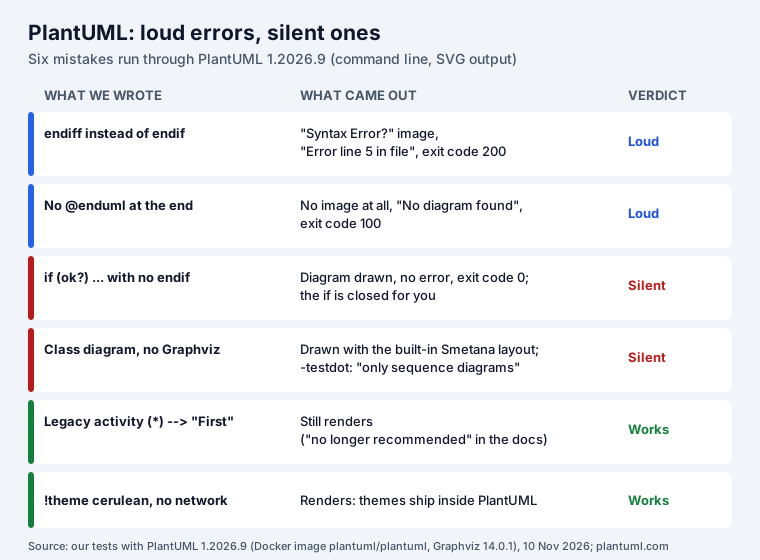
We wrote six common mistakes and ran them through the command-line PlantUML 1.2026.9, rendering SVG. Two failed loudly, two failed silently, two were fine.
- A typo (
endiff) fails properly. The image becomes PlantUML’s error page with the line and “Syntax Error? (Assumed diagram type: activity)”, the command line printsError line 5 in file, and the exit code is 200. Rendering a whole folder with one bad file also exits with 200. - No
@enduml: no image is written at all. The command line printsWarning: no image in /data/t1-no-enduml.pumlandNo diagram found, exit code 100. A tool that ignores the exit code keeps the old image or a broken link. - No
endif: the diagram is drawn as if theendifwere there, with exit code 0 and no warning. Harmless here, but the branch may not end where you meant. - No Graphviz: also silent, see the next section.
- The legacy activity syntax still works.
- A theme with no network works: we ran it in a container with networking switched off.
In CI, let a non-zero exit code fail the build; that catches the first two. The other two only show when someone looks at the picture.
Does PlantUML need Graphviz?
PlantUML’s own page lists the diagrams that need it: “Usecase diagrams”, “Class diagrams”, “Object
diagrams”, “Component diagrams”, “Deployment diagram”, “State diagrams” and “Legacy activity
diagrams”. “For all other diagrams, GraphViz is not needed nor used.” It also has a built-in
alternative, Smetana, “the internal Java port of GraphViz/Dot embedded in PlantUML sources”, which you
switch on per diagram with !pragma layout smetana.
We pointed PlantUML 1.2026.9 at a Graphviz that does not exist. Its own check, -testdot, answered:
Error: Dot executable does not exist
Error: only sequence diagrams will be generated
That is no longer true. The class, state, use case and legacy activity diagrams all rendered, with no
error in the image. The class diagram’s boxes sat at exactly the positions that
!pragma layout smetana gives, not where Graphviz puts them. So without Graphviz you get Smetana’s
layout, silently. It is usually fine, but a diagram can look different on a laptop with Graphviz and
on a CI runner without it. Put !pragma layout smetana in the file if you want the same picture
everywhere, or install Graphviz on both.
Two other ways to avoid the question: the PlantUML server or Docker image (ours came with Graphviz
14.0.1), and @plantuml/core, PlantUML compiled to JavaScript, which we used in Mermaid vs PlantUML
vs D2 vs Graphviz.
One more limit from the FAQ: “PlantUML limits image width and height to 4096.” Set the environment
variable PLANTUML_LIMIT_SIZE for bigger diagrams.
The same lines in Mermaid
If the diagram has to live where Mermaid renders and PlantUML does not (GitHub Markdown, many wikis), most basics carry over.
| Diagram | PlantUML | Mermaid |
|---|---|---|
| Start | @startuml … @enduml | sequenceDiagram, classDiagram, stateDiagram-v2, erDiagram, flowchart TD |
| Message | A -> B : text | A->>B: text |
| Reply | A --> B : text | A-->>B: text |
| Numbering | autonumber | autonumber |
| Alternatives | alt / else / end | alt / else / end |
| Inheritance | A <|-- B | A <|-- B |
| Composition | A *-- B | A *-- B |
| State | [*] --> Open | [*] --> Open |
| ER link | A ||--o{ B | A ||--o{ B : label |
| Activity step | :Process; | A[Process] in a flowchart |
The sequence, class and state lines are tested in our Mermaid cheat
sheet, which also lists the Mermaid lines that break (a semicolon in a
message, a participant called end). Mermaid needs a label on an ER link; the ER and flowchart forms
are drawn in both languages in Mermaid vs PlantUML.
PlantUML in Jira and Confluence
Neither renders PlantUML on its own; a PlantUML block shows as code, and Marketplace apps fill the gap.
Since November 2026 our own diagram apps draw PlantUML too. They ship the same 1.2026.9 release,
compiled to JavaScript (@plantuml/core), with C4-PlantUML 2.14.0 built in, and draw it inside Atlassian with no PlantUML server and no
Graphviz to install:
- Excalidraw UML for Jira and for Confluence put the diagram on a whiteboard you can annotate by hand, and Update redraws it from the source. Examples include sequence, class, activity, use case, state and a C4 container diagram.
- Issue Tabs for Jira keeps a PlantUML diagram in a tab on a work item; Mermaid Tabs and Graphviz Tabs offer the same PlantUML tab next to their own.
!include works for the C4 library only (!include <C4/C4_Container>); any other include is refused,
because nothing is fetched from outside Atlassian. All of these apps are free for up to 10 users. For a side-by-side of the languages, with the same six diagrams in
each, see Mermaid vs PlantUML vs D2 vs Graphviz.
How we tested
- PlantUML 1.2026.9 (
PlantUML version 1.2026.9 / 18d0aae) from theplantuml/plantumlDocker image, with Graphviz 14.0.1, on 10 November 2026; SVG output. Every snippet on this page rendered with no error. - The six mistakes as separate files. For the Graphviz test we set
GRAPHVIZ_DOTto a path that does not exist and compared box positions in the SVG with the same diagram under!pragma layout smetanaand under Graphviz. - PlantUML’s documentation read the same day: sequence, class, activity, Graphviz, Smetana, themes, FAQ and download.
Frequently asked questions
How do I write a comment in PlantUML?
A line that starts with a single quote is a comment: ' this is ignored. For several lines, open with /' and close with '/.
Does PlantUML need Graphviz?
The docs say use case, class, object, component, deployment, state and legacy activity diagrams need it, and "For all other diagrams, GraphViz is not needed nor used." In our test, PlantUML 1.2026.9 with no Graphviz still drew class, state and use case diagrams, using its built-in Smetana layout, and said nothing in the image. Add !pragma layout smetana to choose that layout on purpose.
Why does PlantUML show "Syntax Error?"
PlantUML could not read a line. The image names the line, and the command line prints "Error line N in file" and exits with code 200. Common causes: a misspelt keyword (endiff), a missing closing keyword in a sequence block, or text in a place PlantUML expects an arrow. Some mistakes do not error at all, such as a missing endif.
How do I convert PlantUML to Mermaid?
By hand, diagram by diagram; the basics map closely. @startuml/@enduml go, and you start with the diagram type instead: sequenceDiagram, classDiagram, stateDiagram-v2, erDiagram. Sequence arrows change from -> and --> to ->> and -->>; class relations (<|--, *--, o--), state transitions ([*] --> Open) and ER links (||--o{) stay the same. Activity diagrams become Mermaid flowcharts.
Is PlantUML free?
Yes. PlantUML is open source, and its download page offers it under GPL, LGPL, Apache, BSD, EPL and MIT licences. The LGPL build is the one without Graphviz embedded.
Can I use PlantUML in Jira or Confluence?
Only through a Marketplace app; Jira and Confluence show a PlantUML block as code. Since November 2026 our Excalidraw UML apps (Jira and Confluence) and our Tabs apps for Jira draw PlantUML inside Atlassian, with C4-PlantUML built in and no PlantUML server.