On this page
Legal Hold Desk puts legal holds where your company’s knowledge lives: in Jira and Confluence. Open a matter, see who holds the data, send the hold notices, and stop anything in scope from disappearing. Every step is written to a hash-chained hold log you can verify and hand to counsel.
From the court docket to a matter
The Courts tab searches the public US federal dockets for the party names you watch, once an hour. A new case naming your company shows up with its court and docket number: Open a matter, Link to a matter or mark it Not us.
Who holds the data — in seconds
Teamwork Graph names everyone who created, edited, commented on or was assigned what a matter holds, and why each person is in scope. People who left the company are marked.
Notices custodians acknowledge
Each custodian gets the hold notice as a Jira Service Management request and answers on the portal: I have read and will comply — or objects in their own words for counsel to decide. Reminders go out on day 3 and 7, and the hold is escalated on day 14.
Nothing in scope disappears
The guard watches the spaces and projects in scope. A page someone trashes under hold comes back within seconds, as it was; a move or an edit is recorded. Snapshots let you compare what a page looked like then and now.
A log you can prove
Every action — the matter opened, the scope confirmed, notices sent, a filing in the docket, a deletion caught — is one entry in the hold log, chained by SHA-256 to the one before. Verify chain recomputes them all; Tamper test shows what a changed entry looks like.
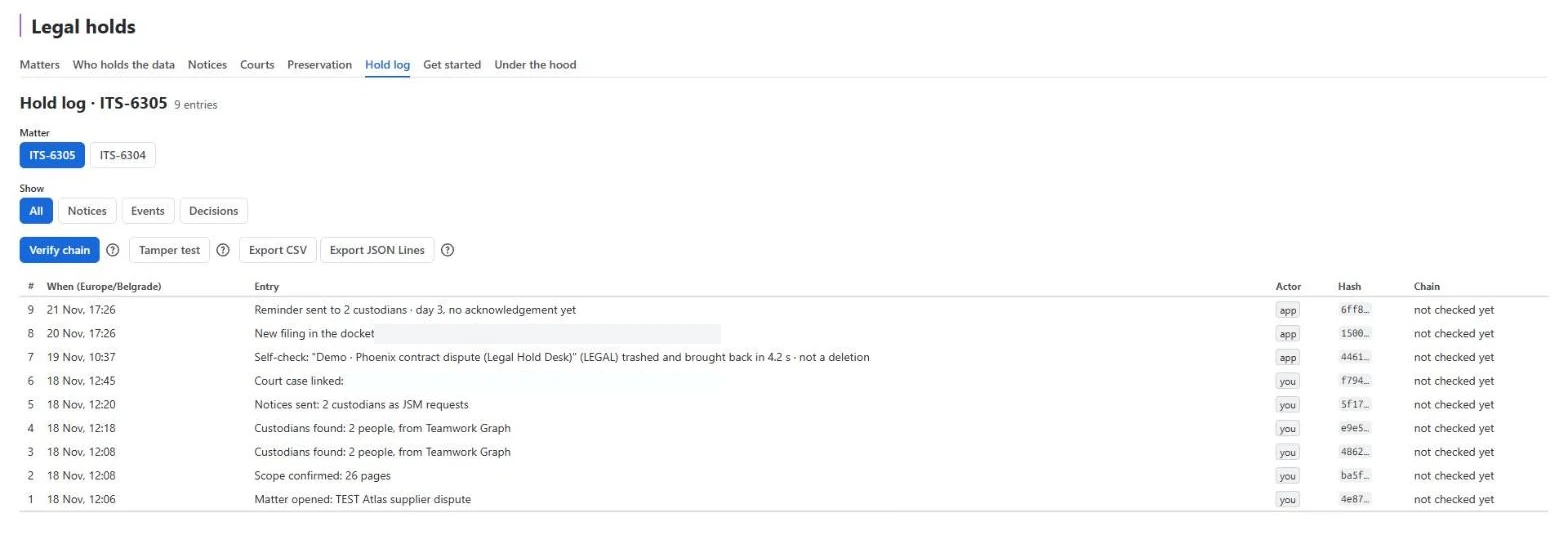
Try it in three minutes
Load the demo matter on the Get started tab: Phoenix, 13 pages written as you in a space you pick, a matter that holds them and a sample court alert, all marked Demo. Then trash one of its pages and watch it come back.
Frequently asked questions
What does a legal hold do in Jira and Confluence?
It keeps the pages and work items a lawsuit needs exactly as they are. Legal Hold Desk watches everything in a matter's scope; if someone trashes, moves or edits it, the app restores it or records the change, and writes every step to a hash-chained hold log.
How does it know who holds the data?
Teamwork Graph names the people who created, edited, commented on or were assigned what a matter holds, checked against Confluence and Jira. Each custodian gets a notice as a Jira Service Management request and acknowledges it on the portal.
Where do court cases come from?
From CourtListener, the Free Law Project's public register of US federal dockets. Once an hour the app searches for the party names you watch, with your own free CourtListener token.
Can the hold log be trusted in court?
Every entry carries the SHA-256 hash of the one before it. Verify chain recomputes them all; a changed entry breaks the chain and says where. Export the log as CSV or JSON Lines, or a chain receipt as PDF.
Does page content leave Atlassian?
No. Page and work item content is never stored — only hashes. Only the party names you watch go to CourtListener; see the privacy policy.
Get Legal Hold Desk
Free up to 10 users. Install it from the Atlassian Marketplace.