Mermaid Class Diagram: Syntax, Arrows and 285 Tested Lines
On this page
- Copy this: a shop model with the parts people use
- The arrows: which end means what
- Members: fields, methods, return types
- Generics: tildes, not angle brackets
- Interfaces, enums and other annotations
- Cardinality and labels
- Namespaces
- Notes
- Direction
- Colours: style, classDef and the order trap
- Lines that draw a class nobody wrote
- Names Mermaid refuses
- The error messages, decoded
- What Mermaid 12 changed
- Class diagrams in Jira, Confluence and Excalidraw
- How we tested
- Sources
A design review opens a class diagram in the pull request. Next to Order sits a box called
-Payment, and nobody wrote a class by that name. The author had typed Order --- Payment, three
dashes instead of two. Mermaid read -- as a link and -Payment as a new class, drew it, and
reported nothing.
The class diagram grammar is strict about arrows and loose about names, so a typo often draws a
wrong picture instead of failing. To see where, we wrote 285 small diagrams and rendered each in
Mermaid 11.17.2, in 12.3.0 with its new defaults, and in 12.3.0 with the classic look that
our own apps use. 283 of 285 drew the same classes, lines, labels and frames in all three; the two
exceptions are namespaces. We also read the grammar, classDiagram.jison, which is identical in
both versions.
The short version: arrows built on a two-character line (<|--, *--, o--, -->, --, ..>,
..|>, ..), tildes for generics, direction LR in capitals, double quotes around cardinality, labels and
notes, and every classDef below the classes it colours.
Copy this: a shop model with the parts people use
Six classes, one of them an interface and one an enum, and five relations with labels and cardinality. Every line is checked:
classDiagram
  class Customer {
    +String name
    +String email
    +placeOrder(Cart cart) Order
  }
  class Order {
    +String id
    -List~LineItem~ items
    +total() Money
    +cancel() bool
  }
  class LineItem {
    +int quantity
    +Money price
  }
  class Payment {
    <<interface>>
    +authorise(Money amount)* bool
  }
  class CardPayment {
    +String last4
    +authorise(Money amount) bool
  }
  class OrderStatus {
    <<enumeration>>
    NEW
    PAID
    SHIPPED
  }
  Customer "1" --> "*" Order : places
  Order "1" *-- "1..*" LineItem : contains
  Order ..> Payment : settled by
  CardPayment ..|> Payment
  Order --> OrderStatus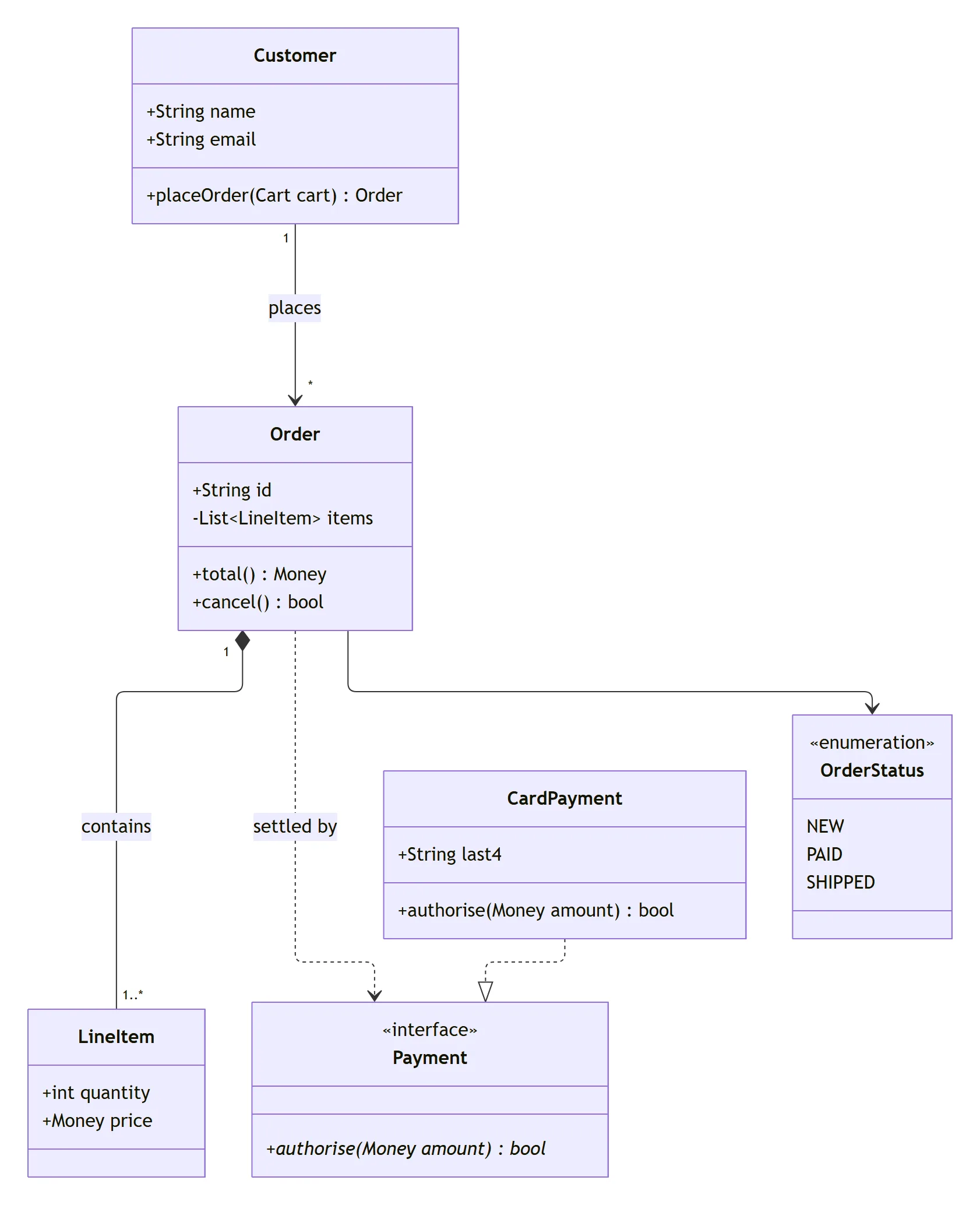
A class is a block of members, one per line. A relation is one line: class, arrow, class, and
optionally a colon and a label. Cardinality goes in double quotes next to the class it describes.
Mermaid adds the colon before a return type itself (total() Money is drawn total() : Money), and
the * after authorise(...) makes the method abstract, drawn in italics.
The arrows: which end means what
Each arrow is two characters of line (-- solid or .. dashed) with an optional symbol at either
end. The symbol is drawn at the class it touches, so Animal <|-- Duck puts the triangle at Animal,
and Duck --|> Animal draws exactly the same picture.
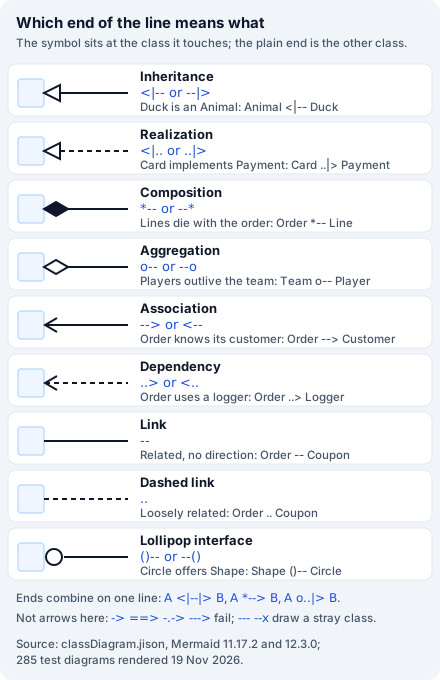
All eight documented relations, their reversed forms, both lollipop forms and arrows with a symbol at each end drew the expected heads in all three renders. What people usually mean:
| You mean | Write |
|---|---|
| Duck is an Animal | Animal <|-- Duck |
| CardPayment implements Payment | CardPayment ..|> Payment |
| Line items live and die with the order | Order "1" *-- "1..*" LineItem : contains |
| Players exist without the team | Team o-- Player |
| An order knows its customer | Order --> Customer |
| An order calls a logger but does not own | Order ..> Logger : uses |
| Two classes are related, no direction | Order -- Coupon |
| A class offers an interface (lollipop) | Shape ()-- Circle |
| A many-to-many association | Student "*" -- "*" Course : takes |
Spaces inside an arrow are tolerated (A <| -- B and A -- > B drew normally), a class may point at
itself (A --> A), and the same relation written twice draws two lines. Each lollipop line draws its
own little circle: Shape ()-- Circle and Shape ()-- Square give two Shape circles, not one.
What does not work: arrows from other diagram types. ->, ==> and -.-> from flowcharts, longer
lines (----, --->, ...>), a chain like A --> B --> C, and the flowchart label form
A <|-- |label| B are all errors. --- and --x are worse: they draw without an error, see
the lines that draw a class nobody wrote.
Members: fields, methods, return types
Members go inside the braces, or one at a time with a colon: Account : +int balance adds a member to
Account and creates the class if it does not exist yet. Two blocks for the same class merge into
one. The visibility marks are + public, - private, # protected and ~ package; Mermaid draws
whatever you write, so a member without one is fine.
| Member line | Drawn as |
|---|---|
+String name | +String name |
+total() Money | +total() : Money |
+add(int a, int b) int | +add(int a, int b) : int |
+getName(): String | +getName() : : String, with the colon doubled |
+name : String | +name : String: a field keeps the text as written |
+String NAME$ | Underlined: $ marks a static field or method |
+area()* double | In italics: * marks an abstract method |
+foo() int$ | Underlined too: $ and * also work after a return type |
+int[] xs | +int[] xs |
+int x = 0 | +int x = 0, plain text, no meaning for Mermaid |
-- or == on a line | A member called --, not a divider |
+**bold** x | +bold x: Markdown is stripped |
%% a comment | Nothing, comments inside a body are ignored |
+Map{} m | Parse error: braces close the block |
class A { +int x } | Works on one line |
{ +int x; +int y } | One member +int x; +int y: ; does not split members |
The most common slip is the TypeScript habit getName(): String. Leave the colon out and Mermaid adds
its own. A block that is never closed fails at the end of the file with got 'EOF_IN_STRUCT', which
points at the last line rather than the brace you forgot.
Generics: tildes, not angle brackets
Mermaid writes generics with tildes, and draws them with angle brackets:
| You write | Drawn as |
|---|---|
class Box~T~ | Box<T> |
-List~LineItem~ items | -List<LineItem> items |
+get() List~T~ | +get() : List<T> |
class Map~K,V~ | Map<K,V> |
+List~List~int~~ grid (member) | +List<List<int>> grid |
class Tree~List~int~~ (class name) | Parse error |
+Map~K,List~V~~ m | +Map~K,List<V~> m: the tildes pair wrongly |
+List<int> ids | +List ids: the type argument disappears |
class Box<T> | Parse error |
class `Box<T>` | Box |
class Box~int~ then class Box~string~ | One class, Box<int> |
The documentation says “generics that include a comma are currently not supported”. In our renders
Map~K,V~ and Map~K, V~ worked in both versions, as class names and as members; it is a comma
inside a nested generic that breaks. Once a class is declared as Box~T~, relations can use plain
Box or Box~T~. Two generic versions of one class cannot coexist: the second declaration is
merged into the first.
Interfaces, enums and other annotations
An annotation is a word in << and >>, drawn above the class name in guillemets. Mermaid does not
check the word: <<interface>>, <<Interface>>, <<enumeration>>, <<service>> and even
<<foo bar>> all draw as written. The three documented placements all work:
classDiagram
  class Payment {
    <<interface>>
    +authorise(Money amount)* bool
  }
  class Mailer <<service>>
  class Auditor
  <<abstract>> Auditor
Two things the documentation does not mention:
- Only the first annotation shows. A class with
<<interface>>and<<abstract>>draws «interface» alone. - The separate line must come after the class.
<<interface>> Shapeaboveclass Shape, or with noclass Shapeat all, stops the render withCannot read properties of undefined (reading 'annotations'), a JavaScript error rather than a parse error, so it does not say which line.
For an enum, list the values as members without visibility marks (NEW, PAID, SHIPPED). Typing
the guillemets yourself, as in «interface», gives an ordinary member that happens to look like one.
Cardinality and labels
Cardinality is any text in double quotes on either side of the arrow, next to the class it belongs
to: Customer "1" --> "0..*" Order. One side is enough (Customer "1" --> Order), long text such as
"one or more" works, and it can be combined with inheritance or a label.
| Line | Result |
|---|---|
Customer "1" --> "*" Order | 1 at Customer, * at Order |
Customer 1 --> * Order | Parse error: the quotes are required |
Customer '1' --> '*' Order | Parse error: single quotes do not count |
A --> B : places many | Label places many, no quotes needed |
A --> B : "places" | Label "places": the quotes are drawn |
A --> B : line1<br/>line2 | A label on two lines |
A --> B : one; two | Lexical error: no semicolons in labels |
A --> B : a:b | Parse error: one colon per relation |
A --> B : | Parse error: a colon needs a label |
A --> B : direction LR | No error, no relation, and no class A |
Unlike ER diagrams, a label of several words needs no quotes, and quotes you add are drawn. The last
row is the strangest: the lexer matches direction LR anywhere on a line, so the relation disappears,
class A with it, and the whole diagram turns left to right.
Namespaces
A namespace draws a frame around the classes declared in it. Classes go inside, relations go outside:
classDiagram
  namespace Shop {
    class Order
    class Cart
  }
  namespace Billing["Billing service"] {
    class Invoice
  }
Order --> Invoice- A relation inside the block is a parse error (
Expecting 'STRUCT_STOP', 'NAMESPACE', 'CLASS', 'NOTE_FOR', 'NOTE', got 'ALPHA'). So is a bare class name withoutclass, and an empty namespace. namespace Billing["Billing service"]sets the label (documented since 11.15).namespace Online Shopwithout brackets gives a frame calledOnlineShop.- A dotted name nests:
namespace a.b.cdraws three frames inside each other, and blocks can also be nested by hand.hierarchicalNamespaces: falsein the class config draws one flat frame per declared namespace instead. - A namespace declared twice merges, and a note inside one works.
style Shop fill:#f00changes nothing: namespaces, like notes, cannot be styled one by one.
The two cases where Mermaid 11 and 12 disagree are both here. A class declared in two namespaces
draws a stray box named after the first namespace in 11.17.2, and one class with two frames in
12.3.0. A relation to a namespace name (Shop --> Customer) crashes 11.17.2 with
ot[l] is not a function and in 12.3.0 adds a class box called Shop. Neither is a way to draw a
line to a frame.
Notes
note for Order "Prices include tax" draws a note joined to Order by a dotted line, and
note "Draft" draws a free note. Several notes for one class are fine. A note for a class that does
not exist draws the note and nothing else.
The documentation shows note "line1\nline2", but in both versions \n is drawn as a backslash and
an n. Use <br> for a new line. The text must be in double quotes (unquoted or single-quoted text
is a parse error), Markdown in it is stripped, and style note is a parse error. If a note’s text
contains the words direction LR, the note disappears and the diagram turns left to right.
Direction
direction LR, RL, BT and TB on a line of their own turn the diagram. It is case-sensitive here,
unlike in ER diagrams:
direction lranddirection Lrare ignored without an error.direction TD, the flowchart spelling, is ignored: the diagram stays top to bottom.classDiagram LRon the first line is a parse error (Expecting 'NEWLINE', got 'ALPHA').- The last direction line wins, and it may be the last line of the diagram.
%% direction LRis a comment and changes nothing;class.layoutDirection: LRin the config changes nothing either.layout: dagreandlayout: elkboth respectdirection LR.
The words direction LR in a class label (class A["direction LR"]) or a note also turn the
diagram, and take the label or note with them. Inside a member (+String direction LR) they are
harmless.
Colours: style, classDef and the order trap
style Order fill:#fde68a,stroke:#b45309,stroke-width:2px colours one class; colour names such as
fill:red work too. For several classes, define a class of styles with classDef and attach it with
:::, cssClass or classDef default:
classDiagram
  class Order:::paid
  class Invoice
  class Refund
  cssClass "Invoice,Refund" paid
  classDef paid fill:#bbf7d0,stroke:#15803d
The rule nobody writes down: classDef must come after the line that attaches it. We tested both
orders for ::: on a class, ::: on a class with a body, cssClass with one class and with a list,
and a classDef naming two classes. Every time the classDef came first, nothing was coloured and
there was no error; every time it came last, it worked. The documentation explains classDef first and
cssClass second, which is the order that fails if you copy it line by line.
The rest of what we found:
rgb() is ignored:fill:rgb(255,0,0)leaves the default colour, without an error. Use hex.class Order paid, the flowchart way to attach a class, creates a new class calledOrderpaid.class A:::hot:::big(two classes) is a parse error, and so is:::in a relation line (A:::hot --> B). Attach the class on its own line.classDef default fill:#fef3c7colours every class.linkStyle 0 stroke:#dc2626from flowcharts creates a classlinkStyle0strokewith a member#dc2626. There is nolinkStylein class diagrams.themeVariablessuch asprimaryColoronly take effect withtheme: base;theme: forestordarkwork as they are.
Mermaid 12.3.0 with its defaults (the redux-color theme and neo look) gives every class its own
pastel fill with a 2 px border. With look: classic, all classes share one colour, as in Mermaid 11.
Lines that draw a class nobody wrote
Every line below looks plausible and renders without an error. These seven lines, in one diagram, give seven boxes, five of which nobody meant to draw:
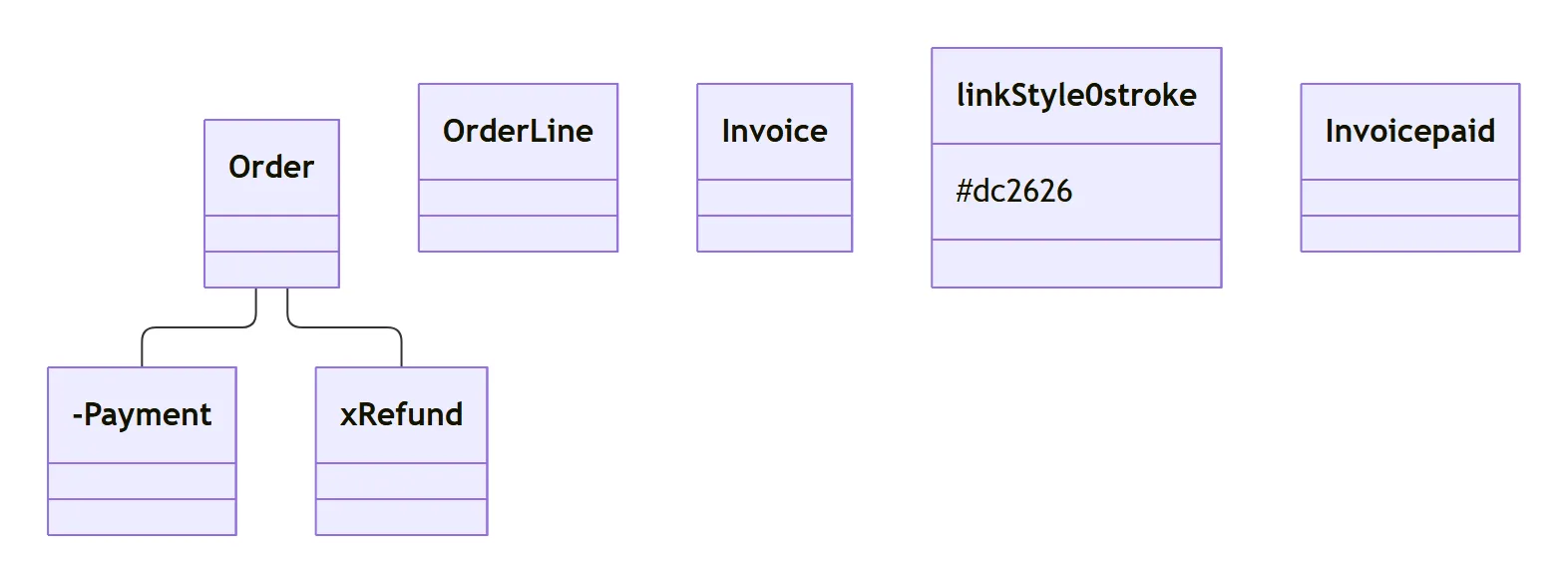
| Line you wrote | What Mermaid draws |
|---|---|
Order --- Payment | A link from Order to a class -Payment |
Order --x Refund | A link to a class xRefund |
class Order Line | One class OrderLine: the space is dropped |
class Invoice paid | A second class Invoicepaid |
linkStyle 0 stroke:#dc2626 | A class linkStyle0stroke with the member #dc2626 |
classDef paid ... first | Nothing coloured |
title Shop model | Nothing: the title is dropped (use front matter title:) |
Order alone on a line | Nothing, not even an empty box |
namespace Online Shop | A frame called OnlineShop |
A --> B : direction LR | No relation, no A, and a left-to-right diagram |
For a title, put title: Shop model in front matter between --- lines; Mermaid draws it above the
diagram. accTitle: and accDescr: add a title and description for screen readers. For a class name
with a space, use a label (class OrderLine["Order line"]) or backticks (`Order Line`).
Names Mermaid refuses
Class names may contain dashes (Order-Line), dots (com.shop.Order), digits at the start (1Order,
or just 42), and letters from any script (Заказ). Backticks allow spaces. A few names fail:
note,link,click,callbackandhrefare keywords:class noteis a parse error withgot 'NOTE'.notes,LinkedListandlinkedListare fine.- A class called just
ofails withgot 'AGGREGATION', becauseois the aggregation end.orderandownerwork. "Order Line"in double quotes,Customer'sand$Orderare parse errors.class Order['Shop order']fails; the label needs double quotes.end,style,class,namespace,direction,call,defaultandclassDefare accepted as class names, which is surprising but harmless.
The error messages, decoded
Mermaid reports the token it did not expect, not the mistake. The ones we saw, identical in both versions:
got 'NOTE',got 'LINK',got 'CLICK',got 'HREF',got 'CALLBACK': a keyword used as a class name.got 'AGGREGATION'afterclass: a class namedo.got 'COMPOSITION': cardinality without quotes.*is read as the composition end.Expecting 'LINE', 'DOTTED_LINE', got 'ALPHA': a one-dash arrow such as->, or-.->.got 'EQUALS': a flowchart thick arrow,==>.got 'DEPENDENCY'after a class name:class Box<T>. The<and>are read as arrows.Expecting 'NEWLINE', 'EOF', 'LABEL', got 'LINE': a chain,A --> B --> C.got 'EOF_IN_STRUCT': a class body or namespace without its closing brace.got 'OPEN_IN_STRUCT': a{inside a member.got 'STYLE_SEPARATOR'::::in a relation line, or two:::classes.got 'PCT': a%%comment afterclass A. After a relation it works.Lexical error ... Unrecognized text: a semicolon at the end of a line or inside a label, or a|label|.Expecting 'acc_title', 'acc_descr', ...withgot 'EOF': an emptyclassDiagram. Withgot 'BRKT'orgot 'PUNCTUATION'on the second line: a#or//comment. Mermaid comments start with%%.got 'CLASS_DIAGRAM': two diagrams in one code block.No diagram type detected:classdiagramin lower case.classDiagram-v2, the old name, still works.
What Mermaid 12 changed
The grammar did not change between 11.17.2 and 12.3.0: the two classDiagram.jison files are
identical, and so were the results of 283 of our 285 cases. What changed is the look. Mermaid 12 draws
class diagrams with the redux-color theme, the neo look and the ELK layout by default: a pastel
colour per class, 2 px borders and right-angled lines. look: classic brings back the Mermaid 11
colours. Speed stayed in the same range: a chain of 30 classes took 340 ms in 11.17.2 and 272 ms in
12.3.0, a chain of 80 took 534 ms and 767 ms. The Mermaid syntax guide covers what
version 12 changed for the other diagram types.
Class diagrams in Jira, Confluence and Excalidraw
A class diagram is most useful next to the code review or the design ticket it explains. In Jira and
Confluence a mermaid code block shows as text; an app draws it.
- Mermaid Tabs for Jira draws Mermaid in tabs on a work item and on project pages, with Mermaid 12.3.0 and the classic look, so a tab shows what the renders on this page show. The refactoring ticket can carry the model it changes, as text anyone can edit.
- Excalidraw for Confluence and
for Jira render Mermaid on a whiteboard, or insert it
as shapes to rearrange by hand. We converted every drawable case with mermaid-to-excalidraw 3.6.0,
the version these apps ship: all 237 became shapes. Each class is a rectangle with its name,
members and annotation as text; relations are arrows with Excalidraw’s own heads (a hollow triangle
for inheritance and realization, a filled or hollow diamond for composition and aggregation, an
arrow for association and dependency, a circle for a lollipop), and dashed lines stay dashed.
Cardinality and labels come across as text, notes as dashed boxes with a dotted arrow, and
styleandclassDefcolours are kept. Lost on the way: the title, the underline of static members and the italics of abstract ones, and namespaces, which become plain rectangles rather than frames. - If your team writes PlantUML, the same Tabs and Excalidraw apps draw it too. The PlantUML syntax cheat sheet has its class syntax, and Mermaid vs PlantUML draws the same diagrams in both.
For the other diagram types see the UML cheat sheet for sequence and state diagrams next to a short class summary, the ER diagram guide for database schemas, the sequence diagram guide and the flowchart guide.
How we tested
We wrote 285 diagrams: every construct in the class diagram documentation, every token in the
grammar, and the spellings people bring from flowcharts, ER diagrams, PlantUML and TypeScript. We
also read the first page of Google for “mermaid class diagram” on 19 November 2026 and covered
everything it explains. Each was rendered with
mermaid.render in headless Chromium in Mermaid 11.17.2, in 12.3.0 with its defaults, and in 12.3.0
with look: classic and theme: default, as Mermaid Tabs and our Excalidraw apps initialise it: 855
renders, with no network requests during the run. From every SVG we read the classes and their texts,
the relation heads (marker ids) and line style, labels, cardinality, frames, sizes, fills, strokes and
font sizes, plus the error text for the 48 cases that failed in 12.3.0 (49 in 11.17.2). Every case
that drew was converted with mermaid-to-excalidraw 3.6.0. Every code block on this page was rendered
before publishing; the figures are Mermaid 12.3.0 renders with the classic look at twice the pixel
density.
Sources
- Mermaid class diagram docs at the tested tags:
12.3.0
(“Class diagrams use the
redux-colortheme and theneolook by default, and are laid out by ELK rather than Dagre”; “generics that include a comma are currently not supported”; the eight relations, lollipop interfaces, annotations, namespace labels and nesting “v11.15.0+”,hierarchicalNamespaces, notes and styling) and 11.17.2. - The grammar
classDiagram.jison at 12.3.0,
identical at 11.17.2: the keyword tokens, the
directionrules and the arrow ends. - The detector
classDetector-V2.ts:
/^\s*classDiagram/, which is whyclassDiagram-v2is accepted andclassdiagramis not. - The config schema
config.schema.yamlat 12.3.0,ClassDiagramConfig, includinghierarchicalNamespacesandhideEmptyMembersBox. - mermaid-to-excalidraw 3.6.0, as bundled by our Excalidraw apps.
Frequently asked questions
How do I show inheritance in a Mermaid class diagram?
Write Animal <|-- Duck. The hollow triangle sits at Animal, the parent; Duck --|> Animal draws the same thing. For a class that implements an interface use the dashed form, CardPayment ..|> Payment. Three dashes (Animal <|--- Duck) are a parse error, and Animal --- Duck gives no error but draws a class called -Duck.
How do I mark a class as an interface or an enum?
Put <<interface>> on the first line inside the class body, write class Payment <<interface>>, or add <<interface>> Payment on its own line after the class exists. The separate line placed before the class is defined crashes the render. For an enum use <<enumeration>> and list the values one per line. Only the first annotation of a class is drawn.
How do I write generics such as List<T>?
Use tildes: class Box~T~, or a member such as -List~LineItem~ items, which Mermaid draws as List<LineItem>. Map~K,V~ works in both 11 and 12, although the docs say commas are not supported. Angle brackets do not work: List<int> in a member is drawn as List, and class Box<T> is a parse error. A nested generic works in a member but not in a class name.
How do I make a Mermaid class diagram go left to right?
Add direction LR on its own line. RL, BT and TB work too, the last one wins, and the line may go anywhere in the diagram. Lower case direction lr and TD are ignored without an error, and classDiagram LR on the first line is a parse error.
How do I add a note to a class?
note for Order "Prices include tax" draws a note joined to Order by a dotted line; note "text" draws a free note. The text needs double quotes. Use <br> for a new line: \n is drawn as the two characters. A note cannot be styled, and style note is a parse error.
How do I change the colour of a class?
style Order fill:#fde68a,stroke:#b45309 colours one class. For several, attach a class with class Order:::paid or cssClass "Order,Invoice" paid and then define it with classDef paid fill:#bbf7d0. The classDef line must come after the line that attaches it; placed first, it colours nothing. rgb() colours are ignored.
How do I group classes in a namespace?
namespace Billing { class Invoice class Payment } with each class on its own line draws a frame around them. Write relations outside the block: a relation inside it is a parse error. namespace Billing["Billing service"] sets a label, and a dotted name such as Shop.Billing nests frames.