Mermaid Sequence Diagram: Syntax, Colours and 30 Traps
On this page
- What you can do, and what you cannot
- A full example: sign-in with SSO
- Participants and actors
- Arrows
- If/else, loops and parallel steps
- Notes, line breaks and long text
- Colours
- Size, fonts and layout
- What Mermaid 12 changed
- 30 lines that break a diagram, or quietly change it
- Sequence diagrams in Jira, Confluence and Excalidraw
- How we tested
- Sources
A developer copies a habit from flowcharts into a sequence diagram: style API fill:#DBEAFE to make
the API box blue. Mermaid answers Parse error on line 9. The feature they want, a colour for one
participant, has been requested since April 2017
and has 475 thumbs-up. It does not exist yet, and a hex code in the two places that do take a colour is
dropped without a word.
This page answers what people search about Mermaid sequence diagrams, and every answer was drawn. We wrote 156 small diagrams, one or more for each question in Google’s autocomplete for “mermaid sequence diagram” (394 phrases on 18 November 2026), and rendered each in Mermaid 11.17.2, 12.3.0 with its new default look, and 12.3.0 with the classic look that our own apps use. All 156 behaved the same in the three: the same text, the same 29 errors. Mermaid 12 only changed how they look.
Short answer: a sequence diagram is the word sequenceDiagram, then one line per message:
sender, arrow, receiver, colon, text.
sequenceDiagram
    actor U as User
    participant API
    participant DB@{ "type": "database" }
    U->>+API: Place order
    API->>DB: Save order
    alt Card approved
        API-->>U: 201 Created
    else Card declined
        API-->>U: 402 Payment required
    end
    deactivate API
->> is a call, -->> a reply. alt … else … end is if/else, loop … end a loop,
par … and … end parallel steps. <br/> breaks a line. Colours come from rect rgb(…) (background),
box (a column) and themeVariables, never from style or classDef. The diagram always runs top to
bottom.
What you can do, and what you cannot
We grouped the questions people search into 26 asks and tested each. Fourteen work as written, seven need a workaround, five are not possible today:
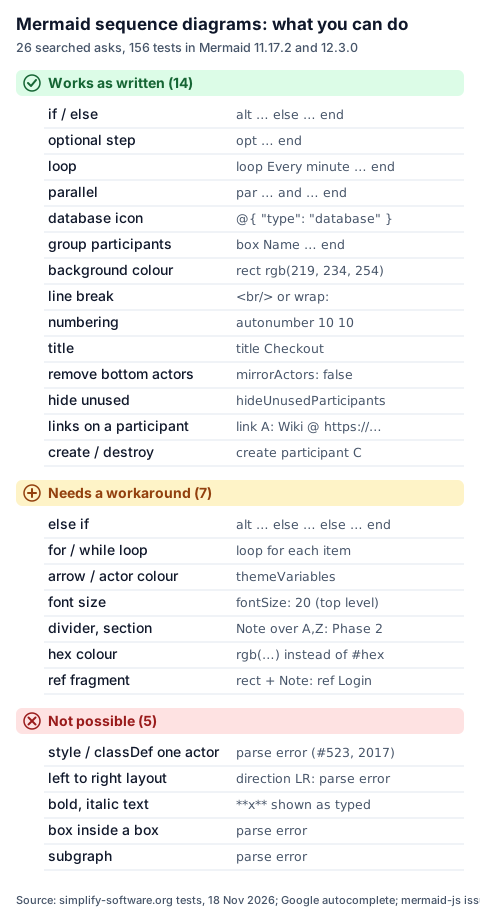
The rest of the page goes through them in the order people ask: a full example first, then participants, arrows, blocks, text, colours, layout and the traps.
A full example: sign-in with SSO
Twelve numbered messages, an actor, a database, a coloured box around our own services, activations and an if/else. It is the flow most web apps run on every visit:
sequenceDiagram
  autonumber
  actor U as User
  participant B as Browser
  participant IdP as Identity provider
  box rgb(239, 246, 255) Our side
  participant App as Web app
  participant DB@{ "type": "database", "alias": "Sessions" }
  end
  U->>B: Open /dashboard
  B->>+App: GET /dashboard
  App->>DB: Look up session
  alt No session
    App-->>B: 302 to IdP /authorize
    B->>+IdP: Sign in (password and MFA)
    IdP-->>-B: 302 back with a one-time code
    B->>App: GET /callback?code=…
    App->>+IdP: POST /token (code and PKCE verifier)
    IdP-->>-App: ID token and access token
    App->>DB: Save session
  else Session found
    Note over App,DB: Skip the sign-in
  end
  App-->>-B: 200 Dashboard
  B-->>U: Show the dashboard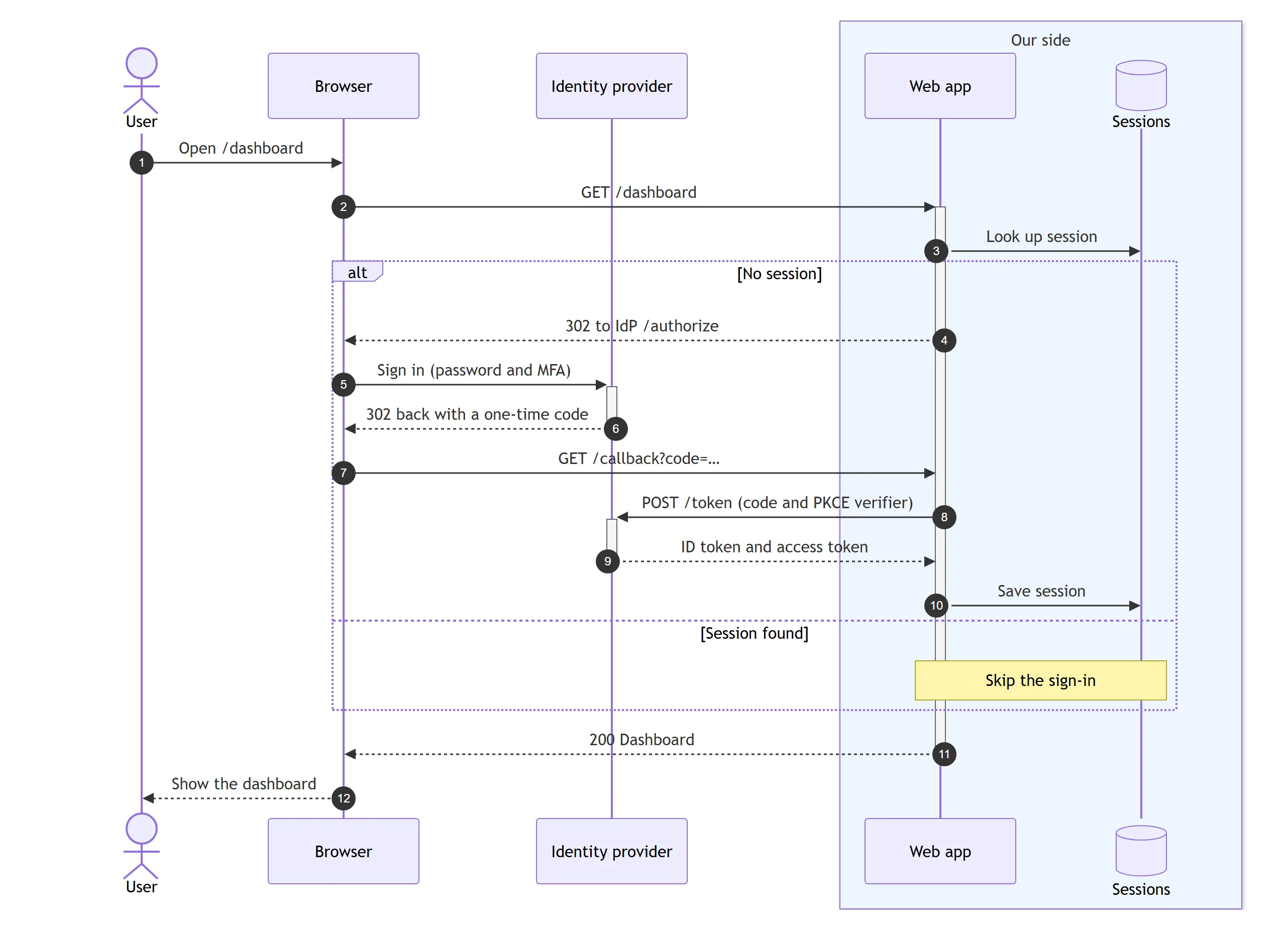
Three things in it are easy to get wrong. The participants are declared in the order they should
appear, because Mermaid otherwise orders them by first use. The box line takes the colour before the
name. And every + that starts an activation has a matching -: one - too many stops the whole
diagram with Trying to inactivate an inactive participant.
Participants and actors
participant API draws a box, actor U a stick figure, and as gives a short id a long label:
participant API as Payments API v2. Names may contain dashes, spaces and non-Latin letters
(participant Касса rendered fine). Double quotes are not needed and not stripped:
participant "Auth Service" shows the quotes in the label. A participant you never declare is created
on its first message.
Six more UML symbols use a JSON block after the name:
participant Gate@{ "type": "boundary" }
participant Rules@{ "type": "control" }
participant Order@{ "type": "entity" }
participant DB@{ "type": "database", "alias": "Orders DB" }
participant Cache@{ "type": "collections" }
participant Jobs@{ "type": "queue" }
All six rendered in both versions, and the keys also worked without quotes (@{ type: database }).
The trap is the spelling: @{ "type": "db" } gives no error, and the participant is not drawn. The
arrow to it ends in empty space.
Other participant questions people ask:
- Order. Declare them in the order you want, before the first message.
- Line break in a name. Only through an alias:
participant A as Alice<br/>Johnson. - Hide unused participants.
hideUnusedParticipants: trueundersequencein the config drops declared participants that never send or receive a message. - Create and destroy.
create participant Con the line before the first message to C starts its column there;destroy Cbefore its last message ends the lifeline there. Only the receiver of a message can be created:create participant Cfollowed byC->>Astops withThe created participant undefined does not have an associated creating message. - Group them.
box Payments … enddraws a labelled column around the participants inside it. Boxes cannot be nested, andsubgraphis a flowchart word: both are parse errors. - There is no
personkeyword. Useactor.
Arrows
Ten arrows cover almost every diagram. Solid lines are calls, dotted lines are replies:
| Write | Draws | Use it for |
|---|---|---|
->> | Solid line, arrowhead | A call or request |
-->> | Dotted line, arrowhead | A reply |
-> --> | Line without a head | A plain link |
<<->> | Heads at both ends (11.0+) | A two-way exchange, a session |
-x --x | Cross at the end | A message lost or refused |
-) --) | Open head | Async: an event, a webhook |
A->>()B | Ends at the centre (11.12.3+) | A signal to a central point |
Mermaid 11.12.3 also added sixteen half arrows; our UML cheat sheet renders all of them in one picture.
An arrow always goes from the participant on the left of the arrow to the one on the right of it. To
point left, write the receiver second: B->>A, not A<-B. <-, <<- and three dashes (--->>) are
parse errors. A message to itself is A->>A: validate, and A->>B: with nothing after the colon is a
legal empty message. The colon itself is not optional: A->>B alone stops with
Expecting 'TXT', got 'NEWLINE'.
Activations are the thin bars on a lifeline. A->>+B starts one on B, B-->>-A ends it, and
activate B / deactivate B on their own lines do the same. They stack: two + in a row draw two
bars side by side.
If/else, loops and parallel steps
Every block starts with a keyword and a label and ends with end:
sequenceDiagram
  loop Every 30 seconds
    Worker->>Queue: Poll
    alt Job found
      Queue-->>Worker: Job 77
    else Queue empty
      Queue-->>Worker: Nothing
    end
  end
  opt Job failed
    Worker->>Alerts: Page on-call
  end
  par Email
    Worker->>Mail: Receipt
  and Webhook
    Worker-)Shop: order.paid
  end
  critical Charge the card
    Worker->>PSP: Capture
  option Timeout
    Worker->>Worker: Retry once
  end
  break Card blocked
    PSP-->>Worker: Stop here
end| You want | Write | Notes |
|---|---|---|
| if/else | alt … else … end | One frame, a dotted line between branches |
| else if | more else lines | else if 404 works but shows [if 404] |
| if, no else | opt … end | |
| loop | loop label … end | The label is free text: write the condition |
| parallel | par … and … end | Nests inside another par |
| must happen | critical … option … end | option lines are optional |
| stop here | break … end | For errors that end the flow |
if, for, while, ref and group are not keywords, and each one is a parse error. A for each item loop is loop For each item; a UML ref fragment has no equivalent, so draw it as a rect with
a note naming the referenced flow. Blocks nest: an alt inside a loop, a break inside a loop and
an alt inside a rect all rendered. A missing end is reported after the last line of the
diagram, not where the block opened.
Notes, line breaks and long text
Note right of API: Retries 3 times
Note left of U: Mobile app
Note over API: One participant
Note over U,API: Spans both, and any between
note in lower case works too. There is no Note over all: Mermaid creates a new participant called
all and puts the note over it. Write the first and the last participant instead.
Text inside messages and notes follows the same rules:
- Line break:
<br/>or<br>.\nis drawn as a backslash and an n. - Long text:
A->>B: wrap:A long message…wraps that one message to the column width;wrap: trueundersequencein the config wraps all of them, andwidth(150 by default) sets how wide a column is. - Semicolon: a
;ends the line, soa; bis a parse error. Write#59;. - Hash:
issue #42draws onlyissue: the rest of the line is read as a comment, with no error. Write#35;42. Entity codes such as#9829;(♥) work the same way. - Bold and italic: not supported.
**bold**and<b>bold</b>both appear exactly as typed. - Comments:
%%on its own line.%%at the end of a message line is printed as part of the message. - Alignment:
noteAlign: leftandmessageAlign: leftundersequencemove the text to the left edge.
Colours
Mermaid gives a sequence diagram colour in three places, and each does a different job:
---
config:
  theme: base
  themeVariables:
    actorBkg: "#EFF6FF"
    actorBorder: "#2563EB"
    signalColor: "#0F172A"
    noteBkgColor: "#FEF3C7"
    noteBorderColor: "#D97706"
---
sequenceDiagram
  box rgb(240, 253, 244) Team A
  participant Web
  participant API
  end
  participant PSP as Card provider
  Web->>API: Pay order 1042
  rect rgb(254, 226, 226)
  API->>PSP: Charge 49.00 EUR
  PSP--xAPI: Declined
  end
  rect rgb(220, 252, 231)
  API->>PSP: Retry with 3-D Secure
  PSP-->>API: Approved
  end
  Note right of PSP: rect = rows, box = columns
  API-->>Web: Paid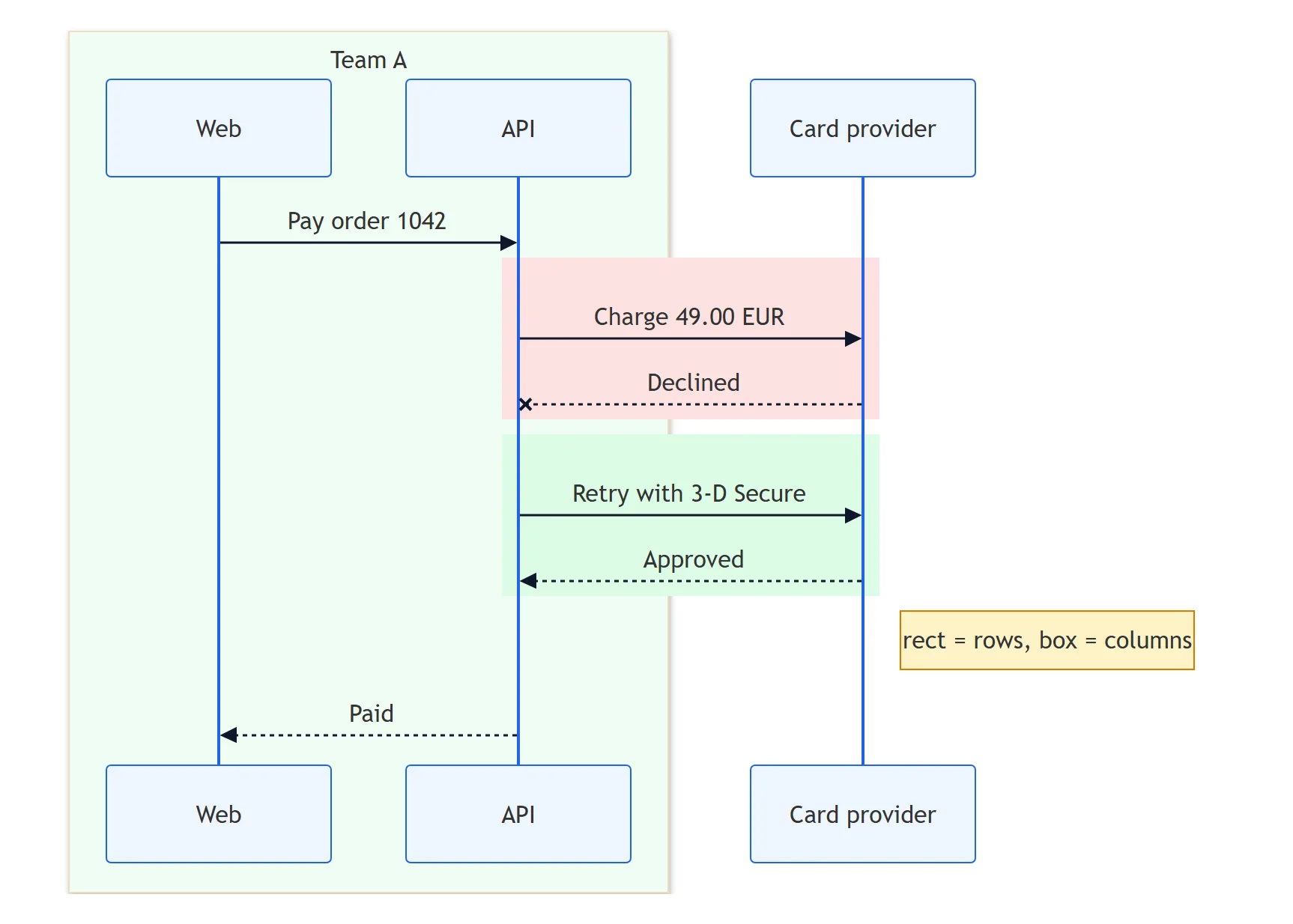
rectcolours the background behind a run of messages. It takesrgb(…),rgba(…)or a CSS colour name such aslightblue, and it nests.boxcolours a column of participants. The colour goes first, then the label;box transparent Aquakeeps a box clear when its label happens to be a colour name.themeVariablescolour every participant, arrow and note at once. They needtheme: basefor the full set;signalColoralone also worked on the default theme. The names that matter:actorBkg,actorBorder,actorTextColor,actorLineColor,signalColor,signalTextColor,noteBkgColor,noteBorderColor,noteTextColor,labelBoxBkgColor,loopTextColorandsequenceNumberColor.
Hex codes fail in rect and box. The documentation warns about box, and rect behaves the
same: rect #DBEAFE drew the default colour and box #DBEAFE Backend lost both its colour and its
label, with no error. Convert to rgb().
One arrow or one participant in its own colour is the request in
issue #523, open since 2017. A
pull request adding style, classDef and class
was open, not merged, on 18 November 2026. Until then the only way is themeCSS with a CSS selector,
for example .messageLine0:nth-of-type(2) { stroke: #DC2626 !important; }, which turned our second
arrow red. It depends on the order of elements in the SVG, so it breaks when the diagram changes;
rect around the message is usually the better signal.
Size, fonts and layout
Font size. The documented settings messageFontSize, actorFontSize and noteFontSize under
sequence did nothing in any of our renders: every text stayed 16 px, whether we set them in front
matter or in an %%{init}%% line. The cause is
issue #3990, open since January 2023: the global
fontSize, 16 by default, overwrites them. Set it at the top level instead:
---
config:
  fontSize: 20
---
sequenceDiagram
  A->>B: Bigger text
That raised messages, participants and notes to 20 px in both versions.
Spacing. actorMargin under sequence (gap between participants, 50 by default) works: 150 made
our two-participant diagram 100 pixels wider. messageMargin: 60 did not change the height at all.
A gap with nothing in it has no syntax: the closest thing is a note.
Bottom participants. Mermaid repeats the participants at the bottom. mirrorActors: false removes
them. The documentation’s table gives the default as false; the config schema says true, and so do our
renders.
Dividers and sections. == Phase 2 ==, --- and ... (other tools’ dividers) are parse errors.
A note across all participants, Note over Web,PSP: Phase 2, or a rect per phase does the job.
Left to right. Not possible. direction LR and sequenceDiagram LR are parse errors; a sequence
diagram is always vertical.
Big diagrams. A diagram with 200 messages between 8 participants rendered in 0.3 seconds and drew all 200.
Title and accessibility. title Checkout on its own line, title: Checkout and a front matter
title all drew the title above the diagram. accTitle: and accDescr: lines land in the SVG’s
title and desc for screen readers.
Numbers. autonumber numbers every message, autonumber 10 10 starts at 10 and counts in tens,
decimals work (autonumber 1.1 0.1), and autonumber off pauses numbering until the next
autonumber 5.
Links. link API: Runbook @ https://… or links API: {"Repo": "https://…"} add a menu to a
participant. A javascript: address was dropped, and click is a flowchart word.
What Mermaid 12 changed
Mermaid 12 drew the same text, arrows and errors as 11.17.2 for all 156 diagrams. It changed the
look: sequence diagrams now default to the neo look and the redux-color theme. Participants get
coloured borders and soft shadows, and the diagram grows taller, by 46 pixels in 100 of our 127
drawable cases and by 27 to 80 in the rest.
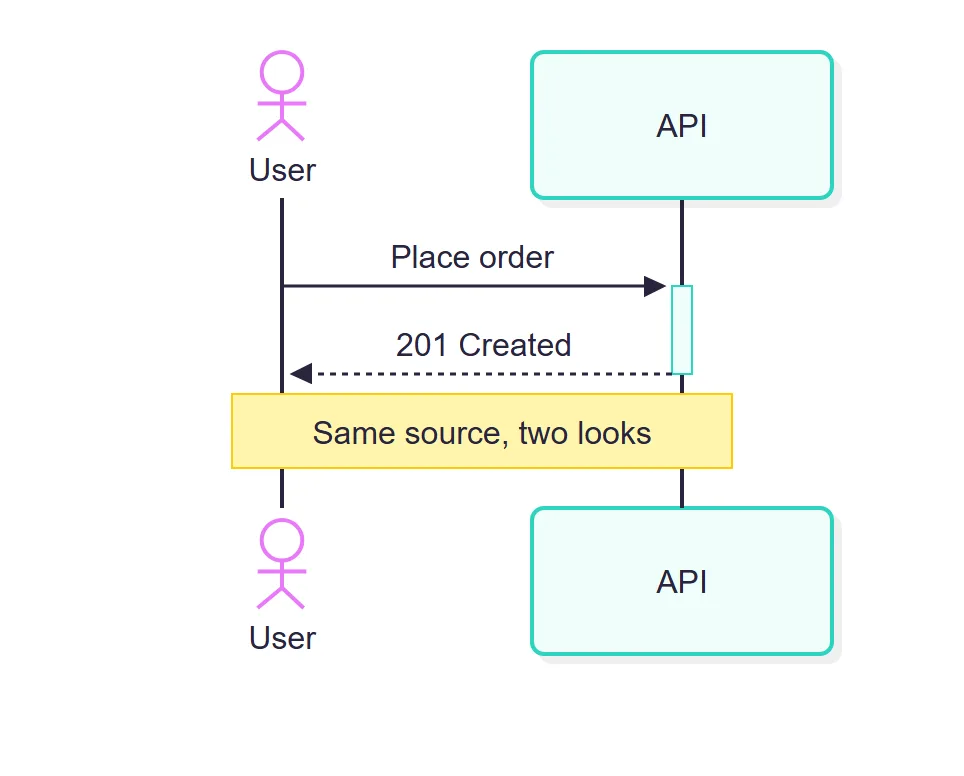
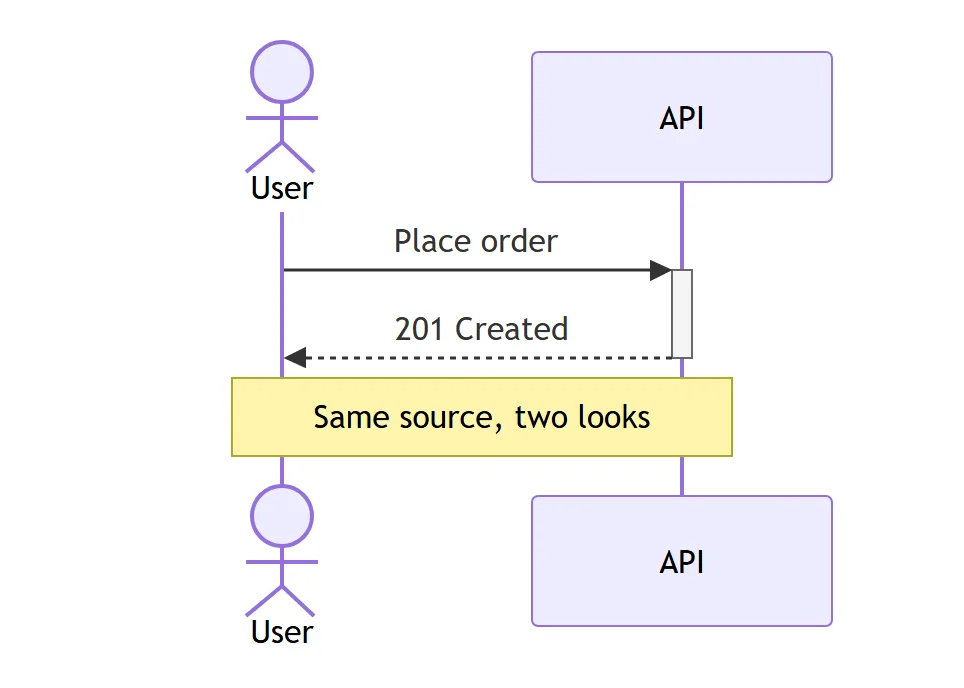
To get the Mermaid 11 drawing back, name both in the front matter:
---
config:
  theme: default
  look: classic
---
30 lines that break a diagram, or quietly change it
Each line was tested on its own in a two-participant diagram. Errors are quoted from Mermaid 12.3.0; 11.17.2 gave the same.
| Line | What happens |
|---|---|
SequenceDiagram or sequencediagram | No diagram type detected: the keyword is case-sensitive |
A->>B without a colon | Expecting 'TXT', got 'NEWLINE' |
A->>B: a; b | Parse error: ; ends the line. Write #59; |
A->>B: issue #42 | Draws issue. No error |
A->>B: x %% note | Draws x %% note |
A->>B: one\ntwo | Draws \n as text. Use <br/> |
A->>B: **bold** | Draws the asterisks |
participant DB@{ "type": "db" } | DB is not drawn. No error |
box #DBEAFE Backend | No colour and no label. No error |
rect #DBEAFE | Default colour. No error |
Note over all: text | Adds a participant called all |
style A fill:#f96 | Parse error |
classDef hot fill:#f96 | Parse error |
A:::hot->>B: x | Parse error |
direction LR | Parse error |
sequenceDiagram LR | Parse error on line 1 |
subgraph Backend | Parse error. Use box |
box inside a box | Parse error |
B<-A: x or B<<-A: x | Parse error. Write A->>B |
A--->>B: x | Parse error: two dashes at most |
if, for each, while | Parse error. Use alt, loop |
ref Login or group Auth | Parse error |
== Phase 2 ==, ---, ... | Parse error |
A block without end | Parse error reported on the last line |
A->>end: x | Parse error: end cannot be a participant |
B-->>-A with no activation | Trying to inactivate an inactive participant (B) |
create participant C then C->>A | The created participant undefined does not have … |
person U | Parse error. Use actor |
Two sequenceDiagram lines in one block | Parse error: one diagram per code block |
sequence: messageFontSize: 20 | Ignored, text stays 16 px. Use top-level fontSize |
Two more surprised us in the other direction: a participant declared twice with different aliases
keeps the last alias, and destroy B with no message after it is simply ignored.
Sequence diagrams in Jira, Confluence and Excalidraw
A mermaid code block in Jira or Confluence shows as code. To see the diagram you need an app.
- Mermaid Tabs for Jira draws Mermaid diagrams in tabs on a work item and on project pages, with Mermaid 12.3.0 and the classic look: the figures on this page are what a tab shows in the light theme. A sequence diagram of an API call sits next to the bug it explains, and its source stays editable as text.
- Excalidraw for Confluence and
for Jira turn Mermaid text into a diagram on a
whiteboard, or insert it as shapes you can move and restyle. We converted all 127 drawable diagrams
with mermaid-to-excalidraw 3.6.0, the version these apps ship. Every one became separate shapes:
participants as rectangles (stick figures stay figures), messages as arrows with their text, frames
as lines with their labels, and
rectandboxkeep their colours. Three things do not survive: the database, queue and other UML symbols become plain rectangles, crosses and open async heads become ordinary arrowheads, andthemeVariablescolours are dropped.
For other diagram types, see the Mermaid syntax guide to all 33 types, the UML cheat sheet for class and state diagrams, and Mermaid vs PlantUML if you are choosing a language.
How we tested
We collected Google’s autocomplete for “mermaid sequence diagram”, “mermaid sequence” and
“sequencediagram mermaid” (each with a to z appended: 394 phrases, minus the ones about sequin
dresses and Stardew Valley) on 18 November 2026, and wrote one or more cases for every
question: 156 diagrams in all. Each was rendered with mermaid.render in headless Chromium in
Mermaid 11.17.2, in 12.3.0 with its defaults, and in 12.3.0 with look: classic and theme: default,
at the default strict security level and with no network requests during the run. From every SVG we
read the participants, messages, arrowheads, notes, frames, colours, font sizes, links and sequence
numbers, plus the error text for the 29 that failed. Every case was converted with
mermaid-to-excalidraw 2.2.2 and 3.6.0. Every code block on this page was rendered before publishing;
the figures are Mermaid 12.3.0 renders at twice the pixel density.
Sources
- Mermaid sequence diagram docs at the tested tags:
12.3.0
(adds “Sequence diagrams use the
redux-colortheme and theneolook by default”) and 11.17.2. - The grammar
sequenceDiagram.jisonand the config schemaconfig.schema.yaml(SequenceDiagramConfig:mirrorActorsdefault true,hideUnusedParticipants,wrap,messageAlign) at [email protected]. - Mermaid issues #523 (styling sequence diagram
components, open since 2017-04-20) and #3990
(default fontSize overwrites sequence font sizes, open since 2023-01-13), and pull request
#7542 (
styleandclassDeffor sequence diagrams, open). - mermaid-to-excalidraw 2.2.2 and 3.6.0.
- Our renders, 18 November 2026: 156 cases in Mermaid 11.17.2 and 12.3.0.
Frequently asked questions
How do I write if/else in a Mermaid sequence diagram?
Use alt with a condition, else for each other branch, and end. For else if, add another else line: alt 200, else 404, else 500, end draws three branches in one frame. There is no if keyword: if ok gives a parse error. For a step that may not happen at all, use opt condition and end.
How do I change colours in a Mermaid sequence diagram?
rect rgb(219, 234, 254) colours the background of the messages inside it, and box with a colour name or rgb() colours a column of participants. For participants, arrows and notes, set themeVariables such as actorBkg, signalColor and noteBkgColor with theme base. Hex codes do not work in rect or box: # starts a comment, so the colour is dropped without an error. There is no style or classDef for one participant.
How do I change the font size in a Mermaid sequence diagram?
Set fontSize at the top level of the config, for example config fontSize 20 in the front matter. The sequence settings messageFontSize, actorFontSize and noteFontSize are ignored, because the global fontSize, 16 by default, overwrites them. This has been an open Mermaid issue (#3990) since January 2023.
How do I add a line break in a Mermaid sequence diagram?
Write <br/> or <br> inside a message, a note or a participant alias. \n is drawn as the two characters. For long messages, start the text with wrap: or set sequence wrap true in the config, and Mermaid breaks the line to fit the column width.
Can a Mermaid sequence diagram go left to right?
No. A sequence diagram always runs top to bottom with participants as columns. direction LR and sequenceDiagram LR both give a parse error. If you need a horizontal flow, draw a flowchart LR instead.
How do I show a database in a Mermaid sequence diagram?
Write participant DB@{ "type": "database" } and add as Orders DB or an alias field for a readable name. boundary, control, entity, collections and queue work the same way. Check the spelling: an unknown type such as "db" gives no error, and the participant is not drawn at all.
How do I remove the participants at the bottom of a sequence diagram?
Set sequence mirrorActors false in the front matter. Mermaid draws the participants at the top and the bottom by default; the documentation table says the default is false, but the config schema and our renders say true.