Mermaid in Jira: 16 Apps Compared and 7 Tested Templates
On this page
- What Jira does with a mermaid code block
- Seven templates for Jira work, tested on Mermaid 11 and 12
- Seven errors you will hit, and the fix
- Mermaid 12 changed the picture, not the text
- Where the diagram lives decides what you keep
- All 16 Mermaid apps for Jira, side by side
- Which kind of app fits your team
- How we collected the data
A developer pastes a sequence diagram from a GitHub pull request into a Jira bug. On GitHub it was a diagram. In Jira it is a dozen lines of grey code, and the reviewer scrolls past it.
Jira Cloud has no Mermaid renderer. This guide gives you seven diagrams that work in any Jira Mermaid app, the errors people hit and their fixes, and the one question that decides which app to install: where it keeps your diagram.
Short answer: Jira Cloud shows ```mermaid as plain code; you need one of the
16 Marketplace apps that draw it. If your team already
writes Mermaid in descriptions, pick an app that draws those code blocks: the text stays in Jira even
if you remove the app. If you want diagrams on project pages or several per issue, pick a panel or tab
app, and know that its data lives in the app. Check which Mermaid version it states: 12 changed how
diagrams look. Then copy a template.
What Jira does with a mermaid code block
Nothing. Atlassian’s editor
supports markdown
“to add headings, lists, code blocks, and more”, so ```mermaid becomes a code block, and a
code block shows text.
That is the gap with the tools next to Jira. GitHub draws Mermaid in “GitHub Issues, GitHub Discussions, pull requests, wikis, and Markdown files”. GitLab’s Markdown docs say: “GitLab supports Mermaid version 11.” Atlassian’s own Bitbucket does not: BCLOUD-21675, “Implement Mermaid diagrams as part of Markdown”, has 310 votes and has been “Gathering Interest” since February 2022. We searched Atlassian’s public tracker for “mermaid” in the Jira, Jira Service Management and Confluence Cloud projects on 27 October 2026 and found no request to render it in Jira.
So every Mermaid diagram you see in a Jira issue is drawn by an app. The text you write is the same for all of them, which is why the templates come first.
Seven templates for Jira work, tested on Mermaid 11 and 12
Each template below is a job Jira teams do every week. We ran every one through the real Mermaid
parser, versions 11.17.2 and 12.2.0, and all fourteen runs passed. Paste the text into your app’s
editor, or into a description code block with the language mermaid if your app draws those.
1. A workflow, for the “how does this ticket move” question
stateDiagram-v2
    direction LR
    ToDo: To Do
    InProgress: In Progress
    InReview: In Review
    [*] --> ToDo
    ToDo --> InProgress: Start work
    InProgress --> InReview: Open pull request
    InReview --> InProgress: Changes requested
    InReview --> Done: Approved and merged
    Done --> [*]
State names cannot contain spaces, so give each one an id (InProgress) and a label
(InProgress: In Progress). Use it on the epic that changes a workflow, before the Jira admin edits
the real one.
2. A bug report that shows where the request died
sequenceDiagram
    actor User
    participant Web as Web app
    participant API as Orders API
    participant DB as Database
    User->>Web: Click "Pay"
    Web->>API: POST /orders
    API->>DB: INSERT order
    DB-->>API: Timeout after 30 s
    API-->>Web: 500 Internal Server Error
    Note over Web,API: Expected 201 Created
Solid arrows (->>) are calls, dashed ones (-->>) are answers. The Note is where you put the
expected result, so the reader does not have to find it in the text.
3. A release plan that skips weekends
gantt
    title Release 4.2
    dateFormat YYYY-MM-DD
    excludes weekends
    section Build
    API changes        :a1, 2026-11-02, 5d
    UI changes         :a2, after a1, 4d
    section Release
    Code freeze        :milestone, m1, after a2, 0d
    Regression testing :t1, after a2, 3d
    Rollout            :after t1, 1d
after a1 chains tasks, so moving the first date moves the plan. excludes weekends keeps five-day
tasks at five working days. Gantt text in a ticket is a sketch: the dates do not follow the Jira
issues they describe.
4. An epic’s scope, including what is out
mindmap
  root((Checkout redesign))
    Payments
      Apple Pay
      Saved cards
    Cart
      Promo codes
    Out of scope
      Gift cards
Indentation is the structure. Tabs and spaces both worked in our test, but stay with one.
5. The architecture around a ticket
flowchart LR
    U([Customer]) --> W[Web app]
    W --> A[Orders API]
    A --> Q[(Queue)]
    Q --> P[Payment worker]
    P -->|PROJ-142: no retry| S{{Payment provider}}
Brackets choose the shape: ([ ]) stadium, [( )] database, {{ }} hexagon. A Jira key on an edge
label points the reader at the ticket that changes that arrow.
6. An incident timeline for the post-mortem
timeline
    title Incident INC-311
    09.12 : Alert fires : Error rate 4%
    09.20 : On-call acknowledges
    09.41 : Roll back release 4.1.3
    10.05 : Error rate back to 0.1%
Write times as 09.12, not 09:12. The colon separates the time from the events, and 09:12 is a
parse error (below).
7. The branches behind a fix
gitGraph
    commit id: "4.1.3"
    branch PROJ-142-retry
    checkout PROJ-142-retry
    commit id: "Add retry"
    commit id: "Tests"
    checkout main
    merge PROJ-142-retry tag: "4.1.4"
    commit id: "Next"
Branch names may contain the Jira key and hyphens. tag: marks the release that shipped the fix.
Seven errors you will hit, and the fix
We wrote each mistake into the parser on purpose. All of them fail the same way on Mermaid 11.17.2 and 12.2.0, and each fix passed on both.
| You wrote | What happens | Write instead |
|---|---|---|
A[Pay (card)] --> B in a flowchart | Parse error: brackets inside a label | A["Pay (card)"] --> B |
start --> end | Parse error: end closes a subgraph | start --> End, or start --> e1[end] |
09:12 : Alert fires in a timeline | Parse error: the first colon ends the time | 09.12 : Alert fires, or 09#58;12 |
A->>B: retry; then fail in a sequence | Parse error: ; ends the line | A->>B: retry#59; then fail |
A -- > B | Parse error: an arrow cannot contain a space | A --> B |
| The fence lines pasted into an app’s editor | “No diagram type detected” | Paste from the first diagram line; drop ``` |
{code:mermaid} from old Jira wiki markup | “No diagram type detected” | Remove the {code} lines |
These did not break anything in our test, so do not waste time on them: # in a label
(Fix #42), %, curly quotes, <br> for a line break, and a Jira key such as PROJ-142 in a
label or a branch name.
Mermaid 12 changed the picture, not the text
Mermaid 12.0.0 came out on 10 September 2026, and 12.2.0 on 13 October. The release notes are blunt: “This is a breaking release”. Two changes reach Jira:
- New layout and look. “Existing flowcharts, state and class diagrams will re-lay out and recolour.” ELK, a different layout engine, is now the default for flowchart, state, class, ER, requirement and use case diagrams. Mind maps keep their old layout.
- Newer browsers only. Mermaid 12 targets “ES2024, Safari 17.4+”. A colleague on an older Safari may see an error where everybody else sees a diagram.
Every Jira app bundles its own copy of Mermaid, so the version is the app’s choice. Three listings
state one: Apportunity says Mermaid 12.1, NGPILOT’s Mermaid Plus says v12, and 9ByNight says 11.16.
Our Mermaid Tabs runs 12.1.0, and our Excalidraw app 11.17. The others do not say.
Mermaid Live, where many people draft, is built on 12.2 (its source asks for
mermaid ^12.2.0). That is why a diagram drawn there can come out with different shapes, or not at
all, in Jira.
Two things follow. A type that is new in 12, such as the use case diagram (usecase-beta), fails
on Mermaid 11 with “No diagram type detected”. And if you want the same picture everywhere, put this
front matter above the diagram. Mermaid 12’s notes name these three keys to keep the old look, and
the block parsed on both versions in our test:
---
config:
  layout: dagre
  look: classic
  theme: default
---
flowchart LR
    A --> B
Where the diagram lives decides what you keep
Apps that look alike in a screenshot keep your diagram in very different places, and you find out which when you change apps. There are four.
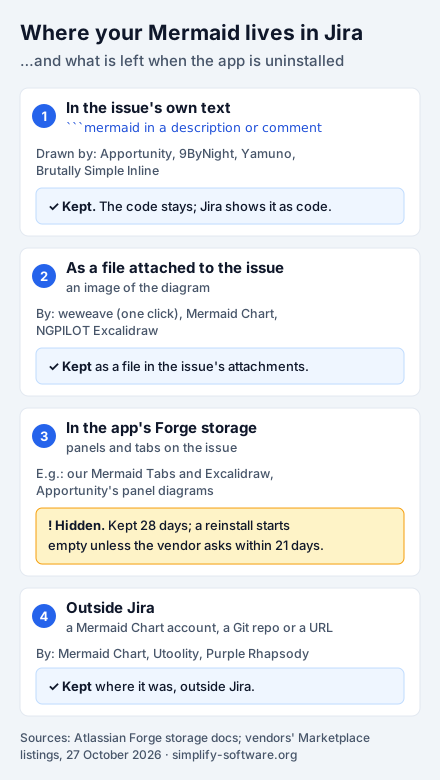
1. In the issue’s own text. Apportunity, 9ByNight, Yamuno and Brutally Simple Inline say they
draw ```mermaid blocks found in descriptions and comments. The diagram is ordinary Jira
text: it is in the issue history, it moves with the issue, and it stays if the app goes. One
vendor puts it plainly: “Uninstall the app and the text stays.” The price is that the source sits in
the middle of the description, and every reader without the app sees code.
2. As a file on the issue. weweave adds a diagram to the description “as attachment” in one click, NGPILOT’s Excalidraw saves “each diagram as an attachment on the issue”, and the official Mermaid Chart app adds diagrams that are “viewable as an attachment”. An attached image stays when the app goes, but check whether the app can still edit it from its source.
3. In the app’s storage. Panel and tab apps keep diagrams in their own storage, which is what lets them show several per issue, or diagrams on a project page. On Forge that storage has a clock. Atlassian’s storage documentation says hosted storage “retains data for 28 days after uninstallation”, and a reinstall does not bring it back: the developer must get your consent and “submit a recovery request within 21 days of uninstallation”. Our own Mermaid Tabs and Excalidraw apps work this way. If a diagram matters, keep its source in a description too, or export it before you change apps.
4. Outside Jira. The official app “requires a Mermaid Chart account”: diagrams are made and stored there, and Jira shows them. Utoolity and Purple Rhapsody can load the source from a URL, such as a file in your Git repository. That is the right choice when the diagram’s real home is the repository, and a question for your security review when it is not: the source lives outside Atlassian.
All 16 Mermaid apps for Jira, side by side
We searched the Marketplace for “mermaid” in Jira Cloud on 27 October 2026 and kept every app that draws Mermaid: 16, two of them ours. Installs and prices come from the Marketplace API. “Listing says” means the vendor’s words; we did not install the other vendors’ apps.
| App (vendor) | Installs | Rating (reviews) | Price: up to 10 users / per user 11–100 | Keeps the diagram (listing says) | Mermaid (listing says) | Built on, last release |
|---|---|---|---|---|---|---|
| Mermaid for Jira (Mermaid Chart) | 932 | 2.4 (3) | free app, any size | in a Mermaid Chart account (account required) | not stated | Forge, Nov 2025 |
| Mermaid Charts & Diagrams (weweave) | 572 | 5.0 (2) | free / $0.26 | several per issue; one click adds it to the description | not stated | Forge, Oct 2026 |
| Markdown Rich Text Editor (Fulstech) | 298 | 2.1 (14) | free / $1.21 | Markdown text in Jira fields, Description included | not stated | Forge, Sep 2026 |
| Apportunity: Mermaid Diagrams (Apportunity) | 146 | 5.0 (1) | free / $0.40 | draws code blocks in descriptions and comments; own panel | 12.1 | Forge, Oct 2026 |
| Mermaid Diagrams for Jira (9ByNight) | 98 | 3.0 (3) | free / $0.50 | draws code blocks in descriptions and comments | 11.16 | Forge, Sep 2026 |
| Excalidraw Whiteboard & Mermaid (Simplify, ours) | 56 | none yet | free / $0.15 | Excalidraw scene in Forge storage; Mermaid becomes shapes | 11.17 (our code) | Forge, Oct 2026 |
| Capable Diagrams (Capable) | 25 | none yet | free / $0.75 | “in your Atlassian environment”; 20+ formats | not stated | Forge, Oct 2026 |
| Visualize with Code (Utoolity) | 23 | none yet | free / $0.20 | inline, or from a URL (Git, Amazon S3) | not stated | Forge, Dec 2025 |
| Mermaid Tabs (Simplify, ours) | 22 | none yet | free / $0.25 | tabs on issues and project pages, Forge storage | 12.1 (our code) | Forge, Oct 2026 |
| Versatile Mermaid Renderer (Purple Rhapsody) | 7 | none yet | free / $0.15 | in the app, or linked from a public URL | not stated | Forge, May 2025 |
| Mermaid for Jira Cloud (Fulstech) | 6 | 1.9 (2) | $5 a month / $0.88 | not stated | not stated | Connect, Aug 2020 |
| Macro Pack (Warsaw Dynamics) | 6 | none yet | free / $0.63 | raw text, attachments, URLs, GitHub, GitLab, Bitbucket | not stated | Forge, Oct 2026 |
| Mermaid Plus Diagrams (NGPILOT) | 5 | none yet | free / $0.50 | “saved directly to the Jira issue” | v12 | Forge, Oct 2026 |
| Excalidraw Diagrams plus Whiteboards (NGPILOT) | 3 | 5.0 (1) | free / $0.99 | attachment on the issue, SVG preview | not stated | Forge, Oct 2026 |
| Brutally Simple Inline Mermaid (B. Wojcik) | 2 | none yet | free / $0.15 | code blocks in the description; text stays on uninstall | not stated | Forge, Sep 2026 |
| Mermaid for Jira Cloud (Yamuno) | 2 | none yet | free app, any size | draws code blocks; editor diagrams “stored on the issue” | not stated | Forge, Oct 2026 |
Three things the table shows.
The most installed app is the one that takes your diagrams out of Jira. Mermaid Chart’s own app has 932 installs, the most of any, and a 2.4 rating from three reviews. It is free, but it is a window into a Mermaid Chart account: the right pick if your team already works there, and a second service to approve if not.
Most of the market is new and small. Ten of the 16 apps have fewer than 30 installs, and nine have no review yet. Ours are among them. Install counts tell you little here; a 15-minute trial on a real issue tells you more.
One app is frozen. Fulstech’s Mermaid for Jira Cloud is a Connect app last released in August 2020. Since March 2026 Connect apps can no longer be updated, and Connect support ends on 31 January 2027. Fulstech’s Markdown editor, a different app, is on Forge.
Which kind of app fits your team
- Your team already writes Mermaid in tickets (from GitHub, from an AI assistant, from Mermaid Live): an app that draws code blocks in descriptions and comments. Nothing to migrate, nothing lost if you switch.
- You want diagrams beside the ticket, several per issue, or on the project page: a panel or tab app. Our Mermaid Diagrams & Mind Maps in Tabs for Jira puts each diagram in its own tab on an issue or a project page, draws with Mermaid 12.1, and copies a whole tab set to another issue as a template. Each tab can also hold BPMN, Graphviz, LaTeX, Vega-Lite or WaveDrom. It does not draw code blocks in descriptions, and its tabs live in Forge storage, with the 28-day rule above.
- You want to sketch around the diagram: our Excalidraw Whiteboard & Mermaid Diagrams for Jira turns Mermaid text into Excalidraw shapes you can move, restyle and annotate, with the source still editable. It is a whiteboard first, so for a plain diagram a tab or code block app is quicker.
- The diagram’s real home is a repository or Mermaid Chart: an app that loads it from there.
- You need PlantUML, D2 or draw.io as well: one of the multi-format apps (Capable, Macro Pack, Visualize with Code) instead of one app per format.
Whatever you pick, test it with the seven templates above on a real issue during the trial, and open that issue on the oldest browser your team uses.
How we collected the data
- Which apps: Atlassian Marketplace REST API v2,
addons?application=jira&hosting=cloud&text=mermaid, on 27 October 2026: 23 results. We kept the 16 that draw Mermaid and left out a report builder, a service desk app, our Portal Banners, and our other four Tabs apps, which draw Mermaid in any tab but are listed for BPMN, LaTeX, Graphviz and nomnoml. - Installs, ratings, prices, framework, release: the API’s app record,
versions/latest(release date, and the Forge app ID that Connect apps lack) andpricing/cloud/live(the monthly price for 10 users, and the per-user price of the 100-user tier). Discounts and annual prices are not included. - Features and Mermaid versions: each vendor’s listing text, quoted. For our two apps, the version in our own source code.
- Templates and errors: Node.js with jsdom,
mermaid.parse()from the npm packages[email protected]and[email protected]. Parsing checks the syntax, not the layout or colours. - Native support and storage rules: Atlassian’s documentation and public tracker, GitHub’s and GitLab’s documentation, and Mermaid’s release notes, read on 27 October 2026 and linked above.
Prices and listings change. If you spot something out of date, tell us and we will fix it.
Frequently asked questions
Does Jira support Mermaid diagrams without an app?
No. Jira Cloud turns ```mermaid into a code block and shows the text as code. GitHub draws the same block as a diagram in issues and pull requests, and GitLab supports Mermaid 11, but Jira needs a Marketplace app. On 27 October 2026 a search of Atlassian's public tracker found no Jira Cloud request to render Mermaid; the Bitbucket one, BCLOUD-21675, had 310 votes and the status "Gathering Interest".
Is there a free Mermaid app for Jira?
Two apps are free for any number of users: Mermaid for Jira Cloud by Yamuno, and the official Mermaid for Jira by Mermaid Chart, which needs a Mermaid Chart account. 9ByNight says version 3 of its app "remains free forever". Thirteen more are free up to 10 users and charge per user above that, from $0.15 to $1.21 a month at 11–100 users; one old Connect app charges $5 a month even for 10 users. Prices from the Marketplace API, 27 October 2026.
Why does a diagram from Mermaid Live fail or look different in Jira?
Mermaid Live is built on Mermaid 12.2, and Jira apps bundle their own copy of Mermaid, some still on 11. Mermaid 12 lays flowcharts, state, class and ER diagrams out with ELK and draws them in a new look, so the same text gives a different picture. Diagram types new in 12, such as usecase-beta, fail on 11 with "No diagram type detected". Pin the old look with the front matter in this guide, and check which version your app states.
What happens to my Mermaid diagrams if we uninstall the app?
It depends on where the app keeps them. A mermaid code block in a description or comment is Jira's own text and stays, shown as code. A diagram attached as a file stays in the attachments. A diagram in the app's Forge storage disappears from the issue: Atlassian keeps the data 28 days, and a reinstall starts empty unless the vendor files a recovery request within 21 days of the uninstall.
How do I add a Mermaid diagram to a Jira issue?
Install an app first. With an app that reads code blocks, type ``` in the description, choose or type mermaid as the language and paste the diagram. With a panel or tab app, open the issue's Apps menu, add the app's panel, and write the diagram in its editor. Start from one of the seven templates in this guide.
Can I use the same Mermaid diagrams in Confluence?
Confluence Cloud does not draw Mermaid either, so it needs an app of its own. Several vendors make both: weweave and Mermaid Chart have Confluence versions, and our Excalidraw Whiteboard & Mermaid Diagrams comes for Jira and for Confluence. The text itself is portable: the same source renders anywhere the Mermaid version matches.