Mermaid Syntax: All 33 Diagram Types, Tested in v11 and v12
On this page
A diagram in a README stops rendering after a small edit. The diff is one line: someone added
%% TODO: rename at the end of flowchart LR. In a sequence diagram the same comment would have been
harmless, and in a block diagram it would have been drawn as three boxes.
Mermaid’s syntax looks uniform, one keyword and then lines, but each of its 33 diagram types has its own parser, and the shared rules are not shared everywhere. So we tested them. We rendered every example in the official docs, then added six common pieces of syntax to one working example of each built-in type, in Mermaid 11.17.2 and 12.3.0 (the latest release, checked on 17 November 2026): 2,412 renders in a headless browser, each read back from the SVG. This page is the result: the syntax every diagram shares, the first line each type needs, and where the shared rules stop working.
Short answer: every Mermaid diagram has the same shape. Optional front matter, a keyword line that
names the type, then one statement per line. Comments are lines that start with %%:
---
title: Release flow
config:
  theme: forest
---
flowchart LR
    %% a comment on its own line
    A[Write it] --> B[Render it]
The keyword is case-sensitive (Flowchart fails). Keep %% comments on their own line. Put settings in
front matter, which must start on the very first line. The rest depends on the type: see
the table and the chart.
The three parts of a diagram
- Front matter (optional). YAML between two
---lines, first thing in the text. It holdstitleandconfig(theme, look, layout and per-type settings). The docs say the triple dash “MUST be the only character on the first line”, and they mean it: with one blank line or two spaces before it, a flowchart and a sequence diagram fail withParse error on line 1, and a pie chart renders without an error but ignores the whole block. - The keyword line.
flowchart LR,sequenceDiagram,gantt. Some keywords take more on the same line: a direction (flowchart TD,timeline TD,agentflow-beta TB) or, forpie, a title andshowData. - The body. One statement per line. Indentation is for you in most types; in
mindmap,treeView-betaandkanbanit is the structure.
Whitespace is forgiving everywhere we looked: Windows line endings (CRLF), tabs instead of spaces, blank lines before the keyword and an indented keyword line changed nothing in any of the 31 types we could measure (C4 aside, see how we tested).
All 33 diagram types and their first line
The official docs have a page for 33 types. 32 are built in; ZenUML is not (“ZenUML is not bundled with
mermaid”, the docs say: load @mermaid-js/mermaid-zenuml and register it). Mermaid 12.3.0 drew
525 of 541 examples from those pages; the 16 it could not draw were all ZenUML. Mermaid 11.17.2 drew
489: it also lacks agentflow-beta and usecase-beta, both new in 12.
| Diagram | First line | Also accepted | Fails |
|---|---|---|---|
| Flowchart | flowchart LR | graph LR, flowchart-elk | flowchart-v2, Flowchart |
| Sequence | sequenceDiagram | sequence, sequencediagram | |
| Class | classDiagram | classDiagram-v2 | ClassDiagram |
| State | stateDiagram-v2 | stateDiagram | |
| Entity relationship | erDiagram | er, entityRelationshipDiagram | |
| User journey | journey | userJourney | |
| Gantt | gantt | ||
| Pie | pie | pie title Pets | Pie |
| Quadrant chart | quadrantChart | quadrant | |
| Requirement | requirementDiagram | requirement | |
| Git graph | gitGraph | gitgraph | |
| C4 | C4Context | C4Container, C4Component, C4Dynamic, C4Deployment | c4context |
| Mind map | mindmap | mindmap-beta (draws “-beta”) | |
| Timeline | timeline | timeline TD | timeline-beta (draws “-beta”) |
| ZenUML | zenuml | needs the plugin | |
| Sankey | sankey | sankey-beta | |
| XY chart | xychart | xychart-beta | xyChart |
| Block | block | block-beta | |
| Packet | packet | packet-beta | |
| Kanban | kanban | kanban-beta (draws “-beta”) | |
| Architecture | architecture-beta | architecture | |
| Radar | radar-beta | radar | |
| Treemap | treemap-beta | treemap | |
| Venn | venn-beta | venn | |
| Ishikawa (fishbone) | ishikawa-beta | ishikawa, Ishikawa-beta | fishbone |
| Cynefin | cynefin-beta | cynefin | |
| Railroad | railroad-ebnf-beta | railroad, railroad-beta | |
| Tree view | treeView-beta | treeView, treeview-beta | |
| Wardley map | wardley-beta | wardley | |
| Use case (new in 12) | usecase-beta | usecase | |
| Agent flow (new in 12) | agentflow-beta | agentflow | |
| Swimlane | swimlane-beta LR | swimlane, swimlanes-beta | |
| Event modeling | eventmodeling | eventmodeling-beta |
Every spelling was tested in both versions, with the same result. Three rows deserve a second look.
-beta is required for architecture, radar, venn, cynefin, tree view, Wardley maps, use case and agent
flow, optional for sankey, xychart, block, packet and treemap, and wrong for kanban, timeline and
mind map, where it gives no error at all: kanban-beta draws a column called “-beta”, timeline-beta
a period, mindmap-beta a node.
The rest of a diagram is type by type. We have tested guides for the most used ones: flowchart, sequence, class and state, gantt, timeline and mind map. The smallest working version of the common types:
sequenceDiagram
    Alice->>Bob: Ready to deploy?
    Bob-->>Alice: Yes, go
classDiagram
Animal <|-- Dog
Animal : +String name
Dog : +bark()stateDiagram-v2
[*] --> Draft
Draft --> Review
Review --> [*]erDiagram
CUSTOMER ||--o{ ORDER : places
ORDER ||--|{ LINE-ITEM : containsgantt
dateFormat YYYY-MM-DD
Design :a1, 2027-01-04, 5d
Build :after a1, 10dpie title Bugs by severity
"Critical" : 4
"Major" : 11
"Minor" : 23gitGraph
commit
branch feature
commit
checkout main
merge featurexychart
title "Tickets closed"
x-axis [Jan, Feb, Mar]
bar [42, 51, 38]The rules that are not the same everywhere
Mermaid’s own syntax page warns that “unknown words and misspellings will break a diagram, while parameters silently fail”. Which words break which diagram is not on that page. We took the first working example of each of the 32 built-in types and added one thing at a time:
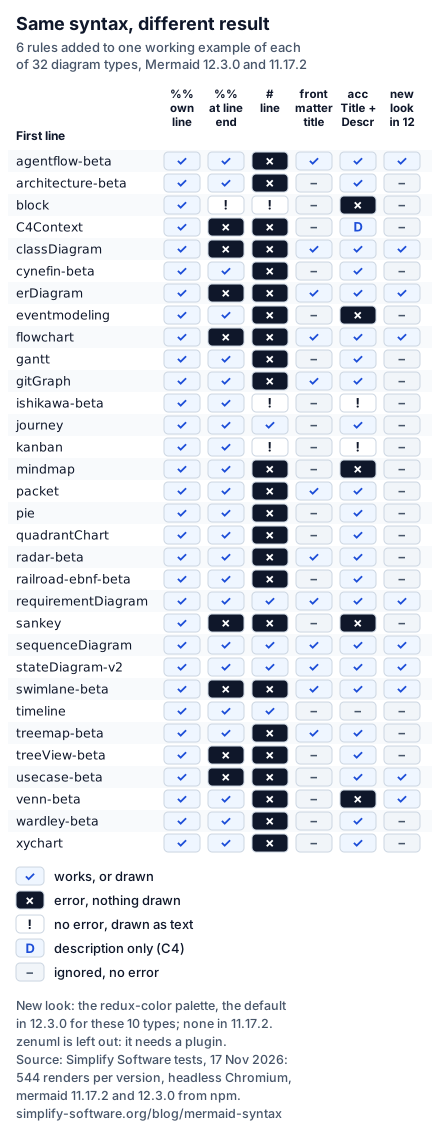
Read across a row before you paste a habit from one type into another.
Comments
%% at the start of a line is the one comment that works in every type. In flowchart, pie and sequence
diagrams we also tried it with no space after it, with braces in it, and above the keyword line: ignored
every time.
%% after code on the same line is a different story. Eight types reject it; a flowchart says
Parse error on line 1: flowchart LR %% trailing comment ... Expecting 'NEWLINE', got 'NODE_STRING'.
A block diagram is worse: no error, and the comment is drawn as three blocks, %%, trailing and
comment.
# is a comment character in only five types: sequence, state, requirement, timeline and journey. In 24
types a # line is an error (a mind map says There can be only one root, because the line becomes a
second root). In kanban, block and Ishikawa diagrams it is drawn: a column, a row of blocks, a cause
named ”# a hash line”.
Titles
A front matter title: is drawn above the diagram in 12 types. In the other 20 it is ignored without an
error. Several of those have a title of their own inside the diagram, which is the one to use:
pie title …, and a title line in gantt, timeline, xychart, quadrantChart and journey.
Accessibility lines
accTitle: and accDescr: give screen readers a name and a description: Mermaid writes them into the
SVG’s <title> and <desc>. That worked in 23 types. Five reject the lines (block, eventmodeling,
mindmap, sankey, venn). Ishikawa and kanban draw them as visible text. C4 keeps only the description,
and a timeline reads both and writes neither. Where they fail, describe the diagram in the text around
it instead.
Keyword case
Every keyword is case-sensitive except Ishikawa’s. Flowchart LR, SequenceDiagram and PIE all stop
with No diagram type detected matching given configuration for text: …, an error that names neither
the problem nor the fix.
Front matter and directives
Front matter is YAML, so YAML’s rules apply on top of Mermaid’s:
| What you write | What happens (both versions) |
|---|---|
A tab to indent theme: | tab characters must not be used in indentation |
theme: [forest (unclosed bracket) | unexpected end of the stream within a flow collection |
An opening --- and no closing one | Diagrams beginning with --- are not valid. |
confg: instead of config: | No error; the setting is ignored |
theme: forrest | No error; the default theme is drawn |
A blank line before the first --- | Flowchart and sequence: Parse error on line 1; pie: no error, front matter ignored |
--- with a trailing space | Works |
The old way to configure one diagram is a directive, %%{init: {...}}%%. The docs have called
directives deprecated since 10.5.0 (“Please use the config key in frontmatter”), but both versions
still honour them, and a directive beats front matter. With theme: forest in front matter and
%%{init: {'theme': 'dark'}}%% below it, a pie chart was drawn exactly as with the directive alone.
If a theme refuses to change, look for a directive further down.
Some settings cannot be changed from inside a diagram at all. The docs call them secure: the limits
below are among them, and only the page that loads Mermaid (mermaid.initialize) can raise them.
What Mermaid 12 changed in the way diagrams look
Mermaid 12.0.0 (released 10 September 2026) introduced “a new redux-color / neo default appearance”
and the ELK layout engine as the default. The release notes warn that “existing flowcharts, state and
class diagrams will re-lay out and recolour”. The top of the config schema still says theme: 'default';
the new defaults sit lower down, in each diagram’s own section (the flowchart’s says redux-color and
neo), so which diagrams changed is not obvious from the docs.
We checked every base diagram for the new palette. In 12.3.0, 10 of 32 types draw it by default: flowchart, sequence, class, state, ER, requirement, use case, agent flow, swimlane and Venn diagrams. The other 22 keep the Mermaid 11 colours, and 15 of them (gantt, pie, timeline, kanban, packet, quadrant, radar, sankey, journey and six more) produced a byte-identical SVG in 11.17.2 and 12.3.0. So a page mixing a flowchart and a pie chart now shows two styles side by side.
The release notes give three settings to keep the old look: layout: dagre, theme: default and
look: classic. They bring back the colours, the font and the layout, but not the size. Mermaid 12 also
added minNodeWidth, default 120: “Labels narrower than this are widened to it”. With only the three
settings, our two-node flowchart came out 426 pixels wide instead of 205, every box 180 wide. A fourth
line fixes it:
---
config:
  layout: dagre
  theme: default
  look: classic
  flowchart:
    minNodeWidth: 0
---
flowchart LR
    A --> B
With it, a two-node flowchart, a five-node decision flowchart and a state diagram (with state: in
place of flowchart:) came out at exactly their Mermaid 11 sizes. Set the same keys in
mermaid.initialize to change a whole site. look: handDrawn is the other look;
the docs list it for flowchart, state, class, ER, requirement, use case and agent flow diagrams, and
among the types we could compare it also changed block, kanban, mind map, Venn, swimlane and Ishikawa
diagrams, and changed nothing in gantt, pie, timeline and ten others.
Limits that stop big diagrams
Two defaults stop large diagrams, and they fail in different ways:
maxTextSize, 50,000 characters. A 49 KB flowchart rendered (in 2 to 4 seconds). At 51 KB there is no error: the diagram is replaced by a box readingMaximum text size in diagram exceeded. Automated checks that only look for exceptions will pass it.maxEdges, 500 links. 500 rendered. 501 threwEdge limit exceeded. 500 edges found, but the limit is 500.(it counts 500 even when there are 501) and adds that you cannot raise it from inside the diagram. A sequence diagram with 501 messages rendered: its messages did not count as edges.
Both can only be raised in mermaid.initialize, by whoever hosts the renderer. On GitHub, Confluence or
Jira that is not you, so split the diagram.
Error messages, decoded
| Message | Usual cause | Fix |
|---|---|---|
No diagram type detected matching given configuration | Keyword misspelled or in the wrong case, a missing -beta, or ZenUML without its plugin | Copy the first line from the table |
Parse error on line 1 | Text before the front matter, or a %% comment after the keyword | Front matter on line 1; comments on their own line |
Expecting 'NEWLINE', got 'NODE_STRING' | Something after the keyword that the type does not expect | Move it to its own line |
Lexer error ... unexpected character: ->#<- | A # comment in a type that has none | Use %% |
There can be only one root | A mind map line at root indentation (often a comment or accTitle) | Use %%; indent children |
Maximum text size in diagram exceeded (drawn) | More than 50,000 characters | Split the diagram |
Edge limit exceeded | More than 500 links | Split, or raise maxEdges in mermaid.initialize |
When you are not sure which version a tool runs, render a diagram that is only the word info: it draws
the version number (v11.17.2, v12.3.0).
Mermaid in Jira and Confluence
GitHub renders mermaid code blocks in issues, pull requests and Markdown files. Jira Cloud and
Confluence Cloud show the same block as code, so the syntax above needs an app; our comparison of Confluence options
and the Jira apps list them. Ours are two:
- Mermaid Diagrams & Mind Maps in Tabs for Jira keeps Mermaid text in tabs on Jira issues and project pages, so a flowchart or sequence diagram sits next to the work it describes, as text anyone can edit.
- Excalidraw for Confluence and Excalidraw for Jira turn Mermaid text into a diagram on a whiteboard; the source stays with it, so you can reopen and change it.
Both draw diagrams in your browser, inside Atlassian. The rules on this page apply there too, because they are Mermaid’s rules, not the app’s.
How we tested
- Versions: mermaid 11.17.2 and 12.3.0 from npm, in headless Chromium (Playwright), each diagram
through
mermaid.renderwith the default settings and strict security. Pages served locally; the only outside request in the run came from the docs’ image-shape example, which links an image by URL. - Docs examples: every
mermaidcode block on the 33 syntax pages at tag 12.3.0: 541 blocks, each rendered in both versions. - Rules: for each of the 32 built-in types, the first docs example that renders, with its front
matter and comments removed, plus 16 single changes (comments, front matter, accessibility lines,
keyword case, whitespace, themes, look). A second render of each base checked that the output is
stable; gitGraph commit ids are random, and C4 carried
accDescrfrom one render into the next in our page, so its whitespace cells were not counted. - Keywords and limits: 77 keyword spellings, 49 and 51 KB flowcharts, 500 and 501 edges, 501
sequence messages, directive against front matter,
info. - Reading results: the error message, or the SVG’s size, drawn text,
<title>and<desc>, and a hash of the SVG with the render id removed.
Not tested: the Mermaid versions inside GitHub, GitLab, Obsidian or Notion; the tiny build; loose security and click handlers.
Sources
- Mermaid docs at 12.3.0
and 11.17.2:
Diagram syntax,
Configuration,
Directives,
ZenUML, and the config schema
(
maxTextSize50000,maxEdges500). - Mermaid 12.0.0 release notes, 10 September 2026.
- GitHub Docs, Creating diagrams.
- VS Code Marketplace, Markdown Preview Mermaid Support.
- Our test scripts and results, 17 November 2026.
Frequently asked questions
What is Mermaid syntax?
Mermaid syntax is the plain-text language the Mermaid library turns into diagrams. Every diagram starts with a keyword that names its type, such as flowchart, sequenceDiagram or gantt, followed by one statement per line. Optional YAML front matter between --- lines above the keyword sets a title and configuration.
Is Mermaid a coding language?
Not a programming language: it has no variables, loops or logic. It is a small description language, like Markdown for diagrams. Each diagram type has its own grammar, which is why a line that works in a flowchart can break a pie chart.
Is Mermaid built into VS Code?
No. VS Code's built-in Markdown preview does not draw Mermaid blocks. An extension adds it, for example Markdown Preview Mermaid Support, which describes itself as adding Mermaid support to VS Code's builtin markdown preview. GitHub, by contrast, renders mermaid code blocks in issues, pull requests, wikis and Markdown files without any setup.
Is Mermaid syntax case-sensitive?
The keyword is. Flowchart, SequenceDiagram or PIE fail with No diagram type detected matching given configuration in 31 of the 32 built-in types we tested; only ishikawa-beta accepted capitals. Front matter settings are case-sensitive too, and Mermaid ignores a misspelled setting without any error.
How do I add a comment in Mermaid?
Start a line with %%. A %% line works in all 32 built-in diagram types. Do not put %% after code on the same line: that breaks flowcharts, class, ER, C4, sankey and three other types, and a block diagram draws the comment as blocks. A line starting with # is a comment only in sequence, state, requirement, timeline and journey diagrams.
How do I add a title to a Mermaid diagram?
Put title in YAML front matter above the keyword, between two --- lines. Only 12 of the 32 types draw it, among them flowchart, sequence, class, state, ER and gitGraph. Pie, gantt, timeline, xychart, quadrantChart and several others have their own title line inside the diagram and quietly ignore the front matter title.