Mermaid Flowchart: Syntax, 53 Shapes and 15 Traps, Tested
On this page
- The first line: direction
- Nodes: brackets and the 53 named shapes
- Arrows and lines
- Text inside nodes
- Subgraphs, swimlanes and collapsed groups
- Colours and styling
- What Mermaid 12 changed for flowcharts
- If/else, loops and parallel steps
- 15 lines that break a flowchart, or quietly lie
- From Mermaid to Excalidraw shapes
- Mermaid flowcharts in Jira and Confluence
- Sources
The architecture page looked fine on Friday. On Monday it says Lexical error on line 1. Unrecognized text. Someone pasted a flowchart from a guide that writes flowchart td, and Mermaid only accepts the
direction in capitals. The line looks right, which is why it takes ten minutes to find.
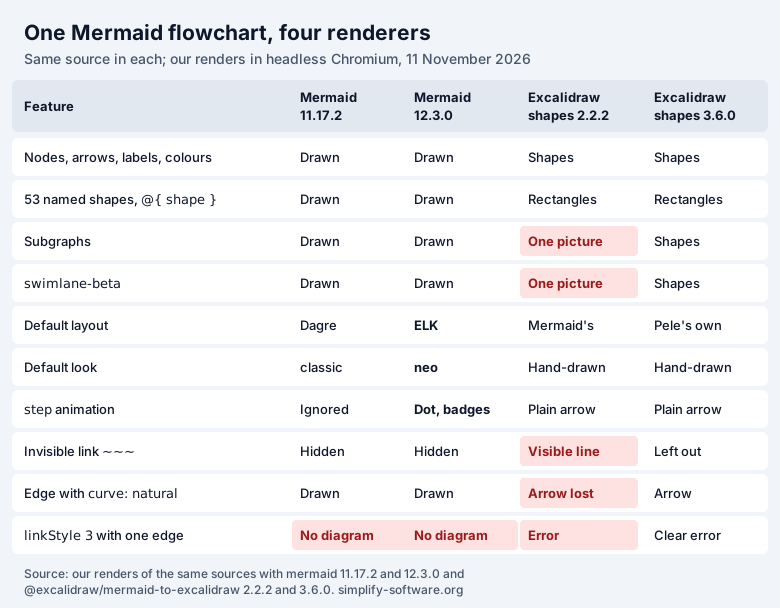
This page answers the questions people type about Mermaid flowcharts, one by one, and every answer was drawn, not copied from the docs. We ran 98 small flowcharts through Mermaid 11.17.2 and 12.3.0 (the latest, 3 November 2026) in a headless browser on 11 November 2026, and converted them to Excalidraw shapes with two versions of the converter Excalidraw uses.
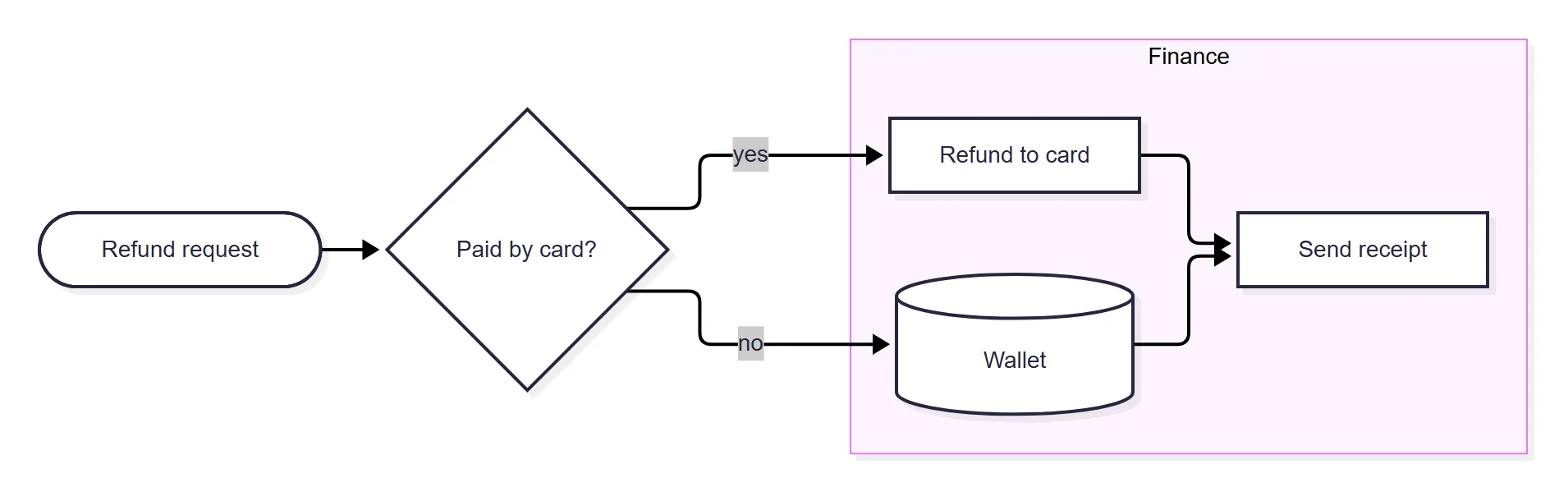
Short answer: a flowchart is flowchart LR (or TD) followed by one link per line:
flowchart LR
  A([Refund request]) --> B{Paid by card?}
  B -->|yes| C[Refund to card]
  B -->|no| D[(Wallet)]
The brackets pick the shape, the arrow picks the line, |text| labels it. Since Mermaid 12
(September 2026) the same code is drawn with ELK layout, square edges and wider, white boxes. Write the
direction in capitals, never name a node end, and quote labels that contain brackets.
The first line: direction
| You write | Direction |
|---|---|
flowchart TD | Top to bottom |
flowchart TB | Top to bottom, identical to TD |
flowchart BT | Bottom to top |
flowchart LR | Left to right (“horizontal”) |
flowchart RL | Right to left |
flowchart | No direction: drawn top to bottom |
flowchart td | Lexical error, in 11 and in 12 |
TD vs TB: no difference. Our TD and TB renders had the same node positions in both versions.
flowchart vs graph: graph TD is the older keyword and drew the same as flowchart TD in our
test; new features are documented under flowchart, so use that. A title goes in front
matter above the first line (---, title: Refund flow, ---), and %% starts a comment line.
Nodes: brackets and the 53 named shapes
The classic shapes come from the brackets around the text:
| Code | Shape | Use it for |
|---|---|---|
A[Text] | Rectangle | A step |
A(Text) | Rounded rectangle | A softer step, an event |
A([Text]) | Stadium | Start or end |
A[[Text]] | Subroutine | A call to another flow |
A[(Text)] | Cylinder | A database |
A((Text)) | Circle | A connector or state |
A>Text] | Flag (asymmetric) | A signal or note |
A{Text} | Diamond | A decision, yes or no |
A{{Text}} | Hexagon | Preparation |
A[/Text/] | Parallelogram | Input or output |
A[\Text\] | Parallelogram, other slant | Output |
A[/Text\] | Trapezoid | Manual operation |
A[\Text/] | Trapezoid, upside down | Manual operation |
A(((Text))) | Double circle | Stop |
Since Mermaid 11.3 there is a second syntax that names the shape: A@{ shape: doc, label: "Invoice" }.
We parsed the shape list out of Mermaid’s source at both tags: 53 shapes, the same 53 in 11.17.2 and
12.3.0, each with a short name and aliases (cyl, db, database and cylinder are one shape).
Here is every one, drawn by Mermaid 12.3.0 with its short name as the label:
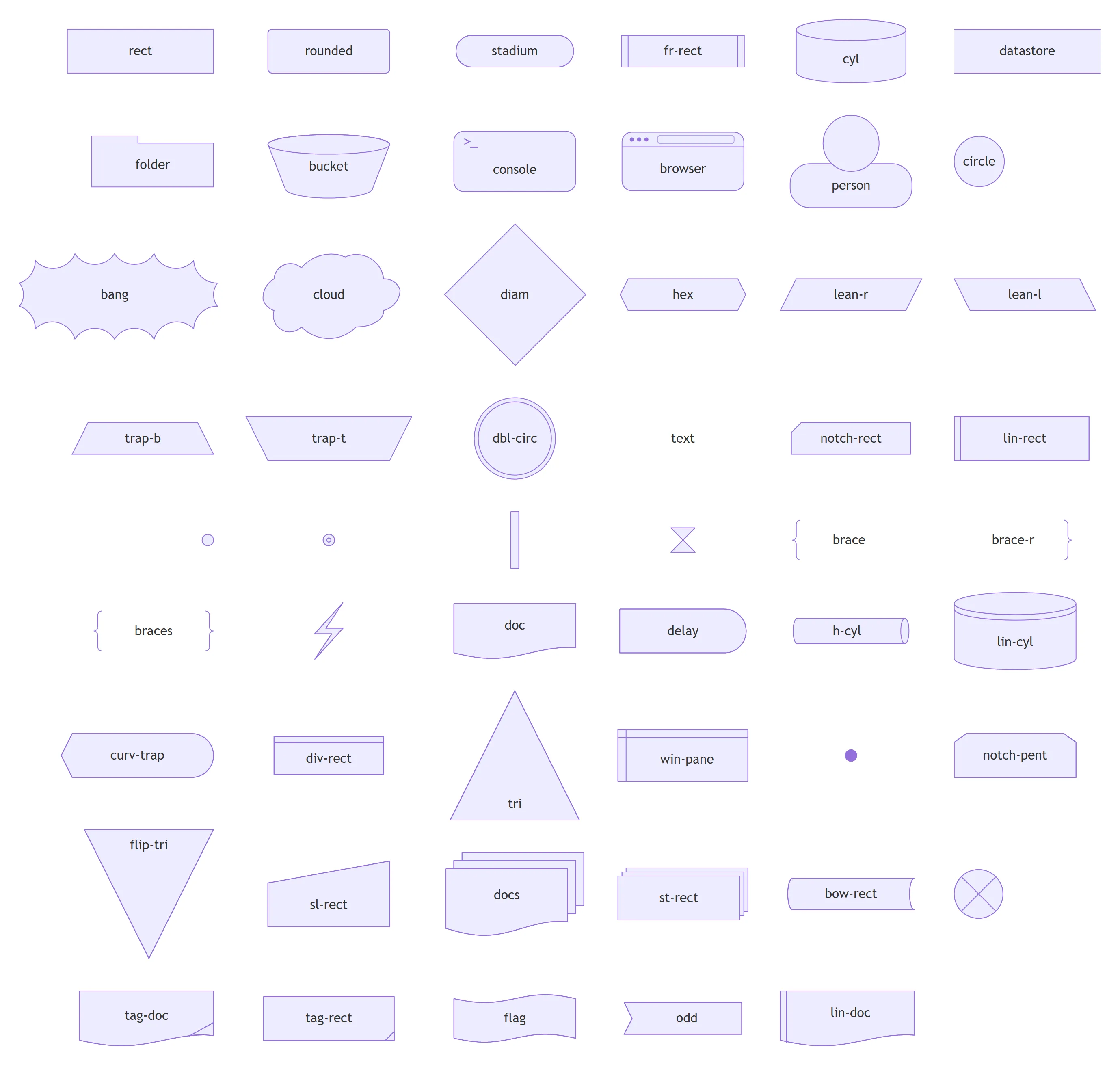
Every short name with the meaning Mermaid’s source gives it and the other names it accepts:
| Short name | Meaning | Also accepted |
|---|---|---|
rect | Process | proc, process, rectangle |
rounded | Event | event |
stadium | Terminal Point | terminal, pill |
fr-rect | Subprocess | subprocess, subproc, framed-rectangle, subroutine |
cyl | Database | db, database, cylinder |
datastore | Data Store | data-store |
folder | Folder | directory |
bucket | Bucket | none |
console | Console | none |
browser | Browser | none |
person | Person | none |
circle | Start | circ |
bang | Bang | none |
cloud | Cloud | none |
diam | Decision | decision, diamond, question |
hex | Prepare Conditional | hexagon, prepare |
lean-r | Data Input/Output | lean-right, in-out |
lean-l | Data Input/Output | lean-left, out-in |
trap-b | Priority Action | priority, trapezoid-bottom, trapezoid |
trap-t | Manual Operation | manual, trapezoid-top, inv-trapezoid |
dbl-circ | Stop | double-circle |
text | Text Block | none |
notch-rect | Card | card, notched-rectangle |
lin-rect | Lined/Shaded Process | lined-rectangle, lined-process, lin-proc, shaded-process |
sm-circ | Start (no label) | start, small-circle |
fr-circ | Stop (no label) | stop, framed-circle |
fork | Fork/Join (no label) | join |
hourglass | Collate (no label) | collate |
brace | Comment | comment, brace-l |
brace-r | Comment Right | none |
braces | Comment with braces on both sides | none |
bolt | Com Link (no label) | com-link, lightning-bolt |
doc | Document | document |
delay | Delay | half-rounded-rectangle |
h-cyl | Direct Access Storage | das, horizontal-cylinder |
lin-cyl | Disk Storage | disk, lined-cylinder |
curv-trap | Display | curved-trapezoid, display |
div-rect | Divided Process | div-proc, divided-rectangle, divided-process |
tri | Extract | extract, triangle |
win-pane | Internal Storage | internal-storage, window-pane |
f-circ | Junction (no label) | junction, filled-circle |
notch-pent | Loop Limit | loop-limit, notched-pentagon |
flip-tri | Manual File | manual-file, flipped-triangle |
sl-rect | Manual Input | manual-input, sloped-rectangle |
docs | Multi-Document | documents, st-doc, stacked-document |
st-rect | Multi-Process | procs, processes, stacked-rectangle |
bow-rect | Stored Data | stored-data, bow-tie-rectangle |
cross-circ | Summary (no label) | summary, crossed-circle |
tag-doc | Tagged Document | tagged-document |
tag-rect | Tagged Process | tagged-rectangle, tag-proc, tagged-process |
flag | Paper Tape | paper-tape |
odd | Odd | none |
lin-doc | Lined Document | lined-document |
Three things the docs do not show you:
- Seven shapes draw no label at all, even when you give one:
sm-circandfr-circ(start and stop dots),fork,hourglass,bolt,f-circ(the junction dot) andcross-circ. Put the text on the link instead. - A wrong name stops the diagram.
@{ shape: queue }fails withNo such shape: queue.in both versions; there is no queue shape.h-cyl(a horizontal cylinder) is the nearest. - Shapes for people and systems exist:
person,browser,console,folder,bucketandcloudare in the list. A decision isdiam, a documentdoc, several documentsdocs, a junction where lines mergef-circ, and a fork or join barfork.
Icons: U@{ icon: "fa:user", label: "User" } needs an icon pack registered by the page that
renders the diagram (Mermaid’s icon docs).
Without one we got a blue square with a question mark. The old fa:fa-user inside a label needs Font
Awesome’s CSS on the page; without it only the word “User” appeared.
Arrows and lines
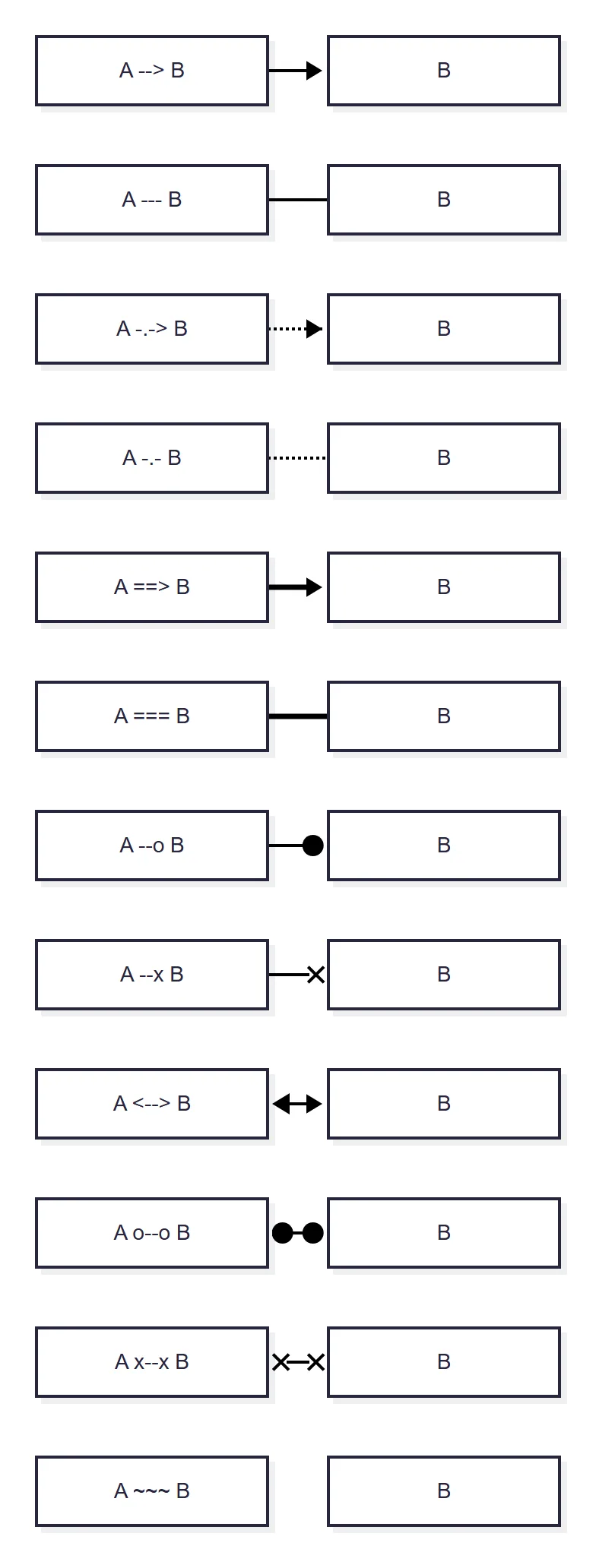
- Labels:
A -->|yes| BandA -- yes --> Bare the same. Dotted and thick links take text the same way:A -. maybe .-> B,A == always ==> B. - Longer links: each extra dash should make the link span one more rank. In Mermaid 11,
A ----> Cput C one level below B. In Mermaid 12 the extra dashes did nothing: ELK placed B and C side by side. Withlayout: dagrein front matter, 12 drew C one level lower again. - Chains and fan-out:
A --> B --> Cis two links on one line.A & B --> C & Dis four. - Reverse arrows do not exist.
B <-- Ais a parse error (Expecting 'LINK'). WriteA --> B, or<-->for both ends. - Invisible links:
A ~~~ Badds no line but keeps the two nodes next to each other. It is the closest thing to nudging positions, because Mermaid has no x/y for nodes.
Edge ids give a link its own settings. Put an id before the arrow, then attach settings with @{ }:
flowchart LR
  A e1@--> B
  A e2@--> C
  e1@{ animate: true }
  e2@{ curve: linear }
animate: true (or animation: fast / slow) makes the dashes move. curve sets one link’s shape;
for all links set it in front matter (config:, flowchart:, curve: linear). Mermaid 12.3.0
accepts basis (the default), bumpX, bumpY, cardinal, catmullRom, linear, monotoneX, monotoneY,
natural, step, stepAfter, stepBefore and rounded. For straight lines use linear, for right angles
step.
Text inside nodes
- Brackets, slashes and quotes: quote the whole label.
A[Call f(x)]is a parse error;A["Call f(x)"]works. Inside quotes, write a double quote as#quot;. - Symbols: entity codes work in labels:
#9829;is ♥,#35;is #. Unicode and emoji work as they are:A[Заявка] --> B[申请 ✅]drew fine. - Line breaks:
A[First line<br>second line], or a Markdown string in backticks inside quotes, which also gives bold and italic:A["`**Bold** and _italic_`"]with a real new line inside for a second line. - Wrapping and width: Mermaid wraps long labels itself. In 12 the text area is 120 px wide by
default (
wrappingWidth) and every node is at least that wide (minNodeWidth, new in 12), so a node that says “A” is 152 px wide. SetminNodeWidth: 0in front matter for snug boxes: our “A” went from 152 to 41 px. - The word end: a node called
endin lowercase breaks the flowchart (start --> endis a parse error), becauseendcloses a subgraph.End,ENDor a label such ase[end]all work.
Subgraphs, swimlanes and collapsed groups
flowchart TB
  subgraph Frontend
    UI --> API
  end
  subgraph backend [Back end]
    API --> DB
  end
Frontend --> backend- A subgraph name with a space needs an id:
subgraph Back endis a parse error,subgraph backend [Back end]works. - Subgraphs nest, and you can link to a whole subgraph by its id (
Frontend --> backend). direction LRas the first line inside a subgraph turns it sideways, unless one of its nodes is linked from outside. Then the direction is ignored; the docs say so, and both versions did it in our test. Settingflowchart.inheritDir: truedid not change that. What worked: link to the subgraph itself (X --> S), not to a node inside it.- Collapse a group (since 11.17.0):
one@{ view: collapsed }draws the subgraphoneas one node with its title, and links that crossed its edge point at that node. It worked in both versions.
Swimlanes are their own diagram type, swimlane-beta, added in Mermaid 11.16.0 and still in beta
(docs).
Each top-level subgraph becomes a lane, and the docs warn the syntax may still change:
swimlane-beta LR
  subgraph Customer
    a[Ask for refund]
    f[Get money back]
  end
  subgraph Support
    b[Check order] --> c{Within 30 days?}
  end
  subgraph Finance
    d[Pay back]
  end
  a --> b
  c -->|yes| d
  c -->|no| a
  d --> f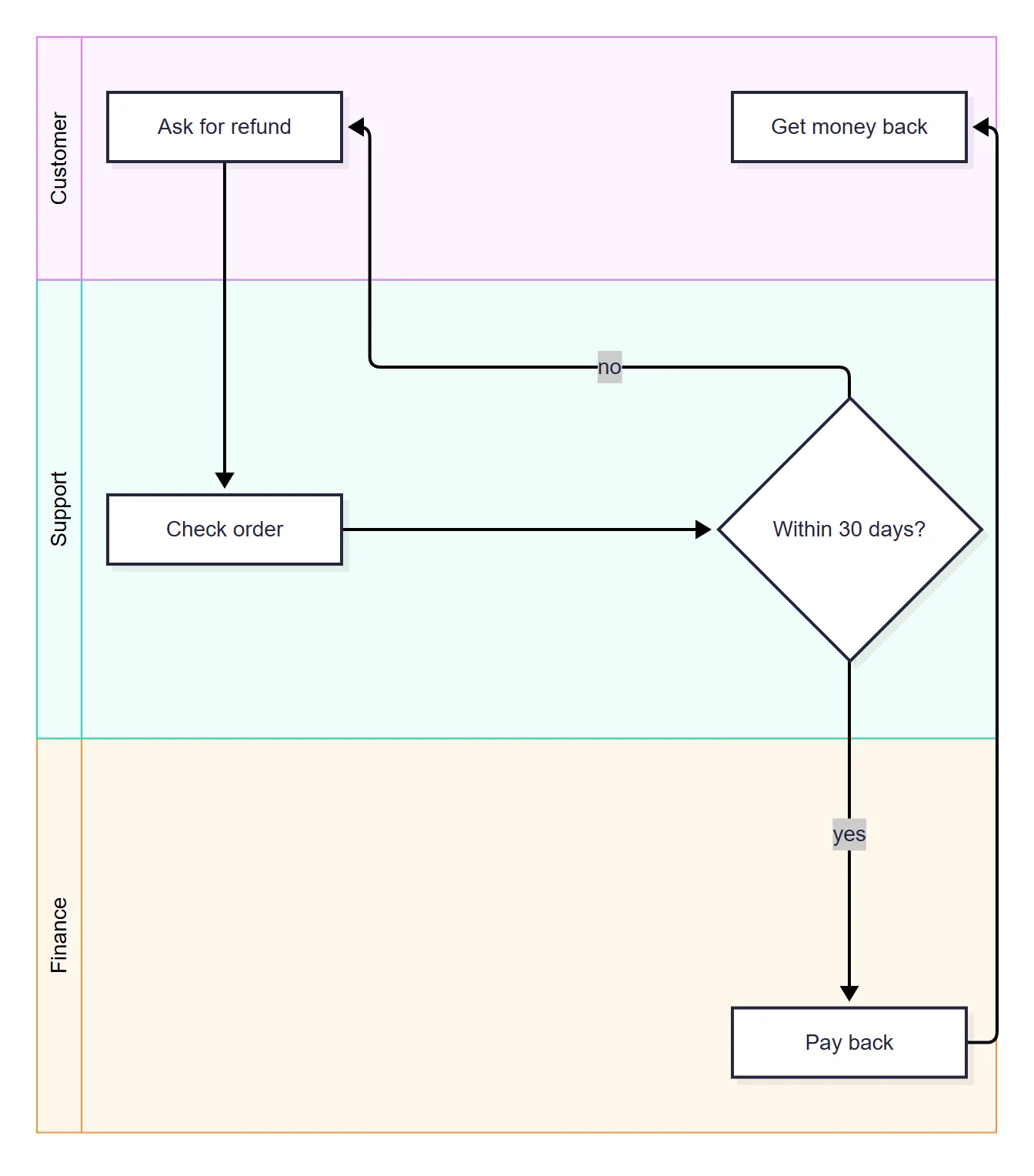
Before 11.16 the usual workaround was a plain flowchart with one subgraph per team. It draws separate
boxes of different sizes side by side, not bands that run across the whole diagram. A legend works the same way: a small subgraph called Legend with one sample node per
class, linked with ~~~ so no lines show.
Colours and styling
flowchart LR
  A:::bad --> B --> C
  classDef bad fill:#fee2e2,stroke:#b91c1c
  classDef ok fill:#dcfce7
  class B,C ok
  style C stroke-width:3px
linkStyle 0 stroke:#d00,stroke-width:3pxstylestyles one node,classDefdefines a class,:::orclassattaches it.classDef defaultrestyles every node at once.font-size:24pxworks instyletoo.linkStylecounts links from 0 in the order they appear, andlinkStyle defaultsets them all. A number past the last link kills the whole diagram: one link andlinkStyle 3gaveCannot set properties of undefined (setting 'style')in both versions.- Themes: in front matter (
config:,theme: forest), or the older first line%%{init: {"theme": "dark"}}%%; both worked in 11 and 12. The 12.3.0 schema lists default, base, dark, forest, neutral, neo, neo-dark, redux, redux-dark, redux-color (the new default for flowcharts) and redux-dark-color. - Hand-drawn look:
look: handDrawnin front matter. In 12 it keeps the white fill of the new theme; addtheme: defaultfor the familiar sketch with hatching. - Clicks:
click A "https://example.com" "Tooltip" _blankmakes a node a link. Callbacks such asclick A call fn()only run where the page setssecurityLevel: 'loose'; the default is strict.
What Mermaid 12 changed for flowcharts
Mermaid 12.0.0 came out on 10 September 2026. The syntax did not change: every source on this page
parsed the same in 11.17.2 and 12.3.0. The drawing did. From the 12.3.0 flowchart docs: flowcharts
“use the redux-color theme and the neo look by default, and are laid out by ELK rather than Dagre.”
The same source in both:
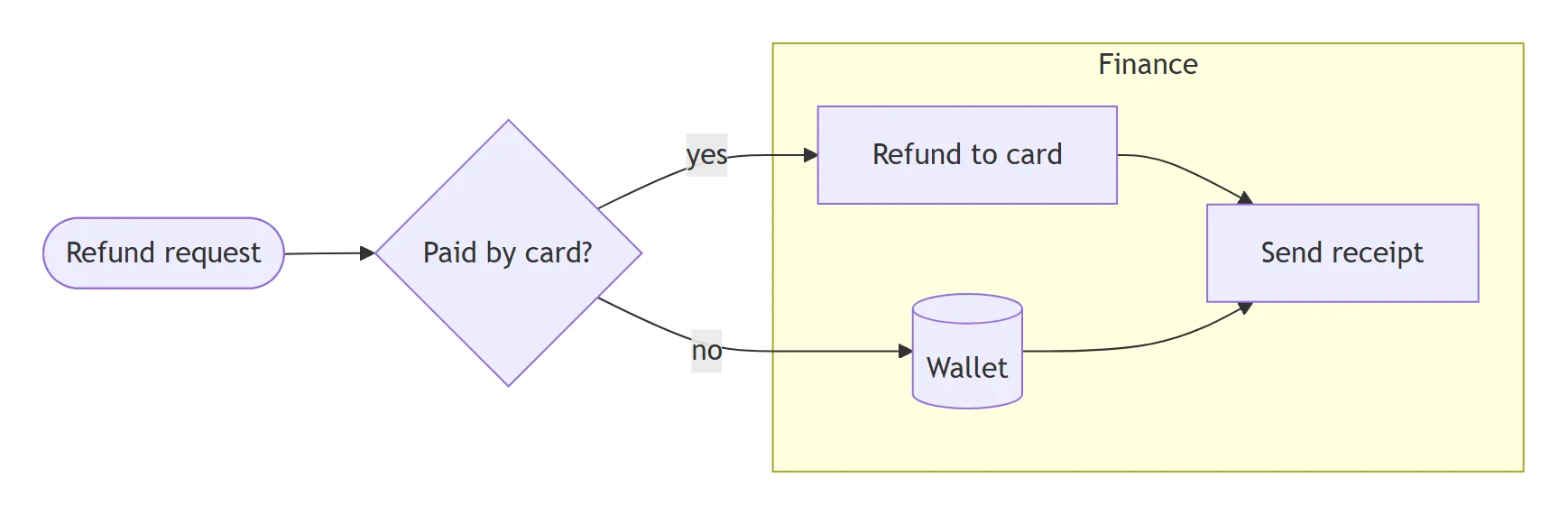
| Default (flowchart) | 11.17.2 | 12.3.0 |
|---|---|---|
| Layout | Dagre | ELK, bundled |
| Theme and look | default, classic | redux-color, neo |
| Node fill, link | Lilac #ECECFF, 1 px grey | White, 2 px black |
| Label text | 16 px | 14 px |
| Text width before a wrap | 200 px | 120 px |
| Smallest node | Fits the text | 120 px of text area (minNodeWidth) |
To get the old drawing back, put this front matter above the flowchart (the docs give the same three keys):
---
config:
  theme: default
  look: classic
  layout: dagre
---
flowchart LR
  A --> B
One silent change to watch: extra dashes in a link (---->) no longer push a node further down under
ELK, as described in the arrows section; layout: dagre brings that back. Two older settings behave
differently now. flowchart: defaultRenderer: elk was removed in 12 (use
layout: elk), and layout: elk in 11 needs the separate @mermaid-js/layout-elk package: without
it, our 11.17.2 render quietly used Dagre and gave no warning.
Step-by-step animation (12.3.0): give links a step number and a dot travels along them in order,
which shows a request moving through a system. stepNumbers: true adds a numbered badge to each link,
so the order reads in a screenshot or a PDF too. With reduced motion turned on in the operating system,
the docs say the dot is hidden. Mermaid 11 ignores step without an error.
---
config:
  flowchart:
    stepNumbers: true
---
flowchart LR
  Client e1@--> API
  API e2@--> Cache
  Cache e3@-->|miss| DB
  DB e4@--> API
  API e5@--> Client
  e1@{ step: 1 }
  e2@{ step: 2 }
  e3@{ step: 3 }
  e4@{ step: 4 }
  e5@{ step: 5 }
If/else, loops and parallel steps
Flowcharts have no if or for keywords. A decision is a diamond with labelled links, a loop is a
link back:
flowchart TD
  A[Take next item] --> B[Process item]
  B --> C{More items?}
  C -->|yes| A
  C -->|no| D([Done])
Parallel work is a fan-out and a fan-in with &; a fork bar shows it explicitly:
flowchart LR
  A[Build] --> F@{ shape: fork } --> B[Unit tests] & C[Lint] & D[Security scan]
  B & C & D --> J@{ shape: fork } --> E[Deploy]
Notes are not part of the flowchart syntax. The closest are the text shape (a label with no box) and
brace-r (a curly brace comment) linked to the step with -.-.
15 lines that break a flowchart, or quietly lie
The first eight stop the diagram with an error. The last seven draw something without a word, which is worse. All 15 behaved the same in Mermaid 11.17.2 and 12.3.0.
| You write | What happens | Write instead |
|---|---|---|
flowchart td | Lexical error on line 1. Unrecognized text. | flowchart TD |
start --> end | Parse error on line 2 | start --> End |
A[Call f(x)] | Parse error on line 2 | A["Call f(x)"] |
B <-- A | Parse error on line 3, Expecting 'LINK' | A --> B |
subgraph Back end | Parse error on line 3 | subgraph backend [Back end] |
@{ shape: queue } | No such shape: queue. | a name from the 53, e.g. h-cyl |
linkStyle 3 with fewer links | Cannot set properties of undefined (setting 'style'), nothing is drawn | count links from 0 |
| 501 links | Edge limit exceeded. 500 edges found, but the limit is 500. | split it, or raise maxEdges in the page |
A---oB | A link to B ending in a circle | A--- oB |
dev---xray | A node called ray, link ending in a cross | dev--- xray |
style A fill:#fff6b6 for a missing id | Extra yellow boxes appear, one per id | style ids that exist |
| More than 50,000 characters | One red box: Maximum text size in diagram exceeded | split the diagram |
direction LR in a linked subgraph | Direction ignored | link to the subgraph, not inside it |
layout: elk in Mermaid 11 | Dagre layout, no warning | add @mermaid-js/layout-elk, or use 12 |
@{ icon: "fa:user" } with no icon pack | A blue “?” square | register the icon pack |
Two notes on the table. The edge limit message counts 500 when the source has 501, and the limit
cannot be lifted from inside the diagram: %%{init: {"maxEdges": 1000}}%% gave the same error plus
You cannot set this config via configuration inside the diagram as it is a secure config. And the
missing-id row is in a popular guide on Google’s first page: its example styles A, B and C in a
diagram whose nodes are Start, Medium and End, so the rendered diagram has two extra boxes.
From Mermaid to Excalidraw shapes
Excalidraw’s “Mermaid to Excalidraw” turns a flowchart into shapes you can drag and restyle. It is a library, mermaid-to-excalidraw, and it changed underneath in October 2026: version 3.0 stopped using Mermaid. Its README now says diagrams “are parsed and laid out by Pele”, a separate Mermaid renderer published in Obsidian’s GitHub organisation, and warns that converted diagrams look different from v2 as a result.
We sent 97 of our test flowcharts (all but the 50,000-character one) through 2.2.2 (still the version in the @excalidraw/excalidraw 0.18.1
npm package) and 3.6.0 (4 November 2026, already in Excalidraw’s main branch):
- Subgraphs and swimlanes: 2.2.2 turned all 10 of our flowcharts with subgraphs or lanes into
one picture. The nine with subgraphs logged
SubGraph element not found: the converter looks up each group by its plain id, and current Mermaid prefixes ids with the diagram’s own id. It is reported in issue #107, still open.swimlane-betais a type 2.2.2 does not convert at all. 3.6.0 turned all 10 into boxes, lanes and arrows. - Named shapes (
doc,cyl,person…) became plain rectangles in both. The 14 bracket shapes keep their form where Excalidraw has one: circles, the diamond. - Invisible links
~~~became a visible line in 2.2.2; 3.6.0 leaves them out. - A link with
curve: naturaldisappeared in 2.2.2 (two links in, one arrow out); 3.6.0 kept it. - Errors are Mermaid’s in 2.2.2. In 3.6.0 they come from Pele and read better: the linkStyle trap
says
The index 3 for linkStyle is out of bounds.
Mermaid flowcharts in Jira and Confluence
Jira and Confluence show a mermaid code block as code. To see the flowchart, you need an app; all 16
Mermaid apps for Jira are compared in Mermaid in Jira, and Confluence options
in Mermaid in Confluence. What ours do with the syntax on this page:
- Mermaid Tabs for Jira draws the diagram in a tab on the work
item with Mermaid 12.1.0 and the classic look, so you get ELK layout with the familiar boxes.
swimlane-betaworks there; the step animation needs 12.3.0 and does not. - Our Excalidraw apps for Confluence and Jira put a flowchart on a whiteboard in two ways. Insert draws it with Mermaid 11.17.2 and keeps the source, so you can change the code later. Insert as shapes uses mermaid-to-excalidraw 2.2.2, so today a flowchart with subgraphs or lanes arrives as one picture, as described above. Use Insert for grouped flowcharts until the apps move to the 3.x converter.
For sequence, class and state diagrams, see the Mermaid UML cheat sheet, and for how Mermaid compares with PlantUML, D2 and Graphviz on the same six diagrams, see Mermaid vs PlantUML.
Sources
- Mermaid flowchart docs at the tested tags: 12.3.0 and 11.17.2.
- Mermaid’s config schema (defaults for
wrappingWidth,minNodeWidth,curve,stepNumbers) and shape registry (rendering-elements/shapes.ts) at the same tags, in the mermaid-js/mermaid repository. - Swimlanes docs, Mermaid 12.3.0.
- mermaid-to-excalidraw: README of 3.6.0 and issue #107.
- Our renders: 98 flowcharts in Mermaid 11.17.2 and 12.3.0 and two converter versions, headless Chromium, 11 November 2026, no network requests during the run.
Frequently asked questions
Is Mermaid flowchart free?
Yes. Mermaid is open source under the MIT licence, so the library, the syntax and the official live editor cost nothing. Paid products are built on top of it, such as hosted editors and apps for Jira or Confluence, but the flowchart itself needs none of them.
How do I make a Mermaid flowchart horizontal?
Write flowchart LR on the first line for left to right, or flowchart RL for right to left. TD and TB both mean top to bottom and gave identical drawings in our test. The direction must be in capitals: flowchart lr is a lexical error in Mermaid 11 and 12.
Can ChatGPT or another AI write a Mermaid flowchart?
Yes, language models write Mermaid well because it is plain text. Check what they give you against the traps on this page: lowercase directions, a node called end, brackets inside labels and linkStyle numbers that point past the last link are the mistakes we saw break a whole diagram.
How do I add a line break inside a Mermaid flowchart node?
Put <br> in the label, for example A[First line<br>second line]. Or use a Markdown string, the label in backticks inside quotes, and press Enter where the new line should start. Long labels also wrap on their own: after 120 px of text in Mermaid 12, after 200 px in Mermaid 11.
What is the difference between graph and flowchart in Mermaid?
graph is the older keyword and flowchart the current one. Both drew the same diagram in our test, in Mermaid 11.17.2 and 12.3.0. The docs and new features use flowchart, so write that.
How do I change the colour of one node in a Mermaid flowchart?
Add style A fill:#fde68a,stroke:#b45309 on its own line, or define a class once with classDef warn fill:#fde68a and attach it with A:::warn or class A,B warn. Check the id: style on an id that is not in the diagram does not fail, it adds a new coloured box.
Why does my Mermaid flowchart say Parse error?
Usually one of four things: a node called end in lowercase, unquoted brackets inside a label such as A[Call f(x)], a reversed arrow such as B <-- A, or a subgraph name with a space and no id. Each has a fix in the traps table on this page.