Confluence Mermaid Diagrams: 5 Ways, 53 Apps Compared
On this page
- Does Confluence support Mermaid?
- Five ways to put a Mermaid diagram on a Confluence page
- Six Mermaid templates for Confluence pages
- When the diagram does not draw
- All 22 Mermaid macros for Confluence Cloud
- Same job, 0 to 17 permissions
- Free at any size, or free up to 10 users
- Two Connect apps, and the end of Connect
- Which Mermaid version you get
- Which way to pick
- The other 31 apps that render Mermaid
- Where our app fits
- How we counted
You paste a Mermaid block from a GitHub README into a Confluence page, and Confluence shows you the code. There is no Mermaid button anywhere in the editor, so you go to the Marketplace and find 88 apps that mention Mermaid.
We went through all of them. 53 really render Mermaid in Confluence Cloud and have at least 10 installs. Below are the five ways to get a diagram on a page, and every one of those apps with its price, rating, platform and the permissions it asks for, as of 4 November 2026.
Short answer: Confluence Cloud has no built-in Mermaid. The free way Atlassian offers is an app: Atlassian Labs’ Mermaid diagrams viewer draws the diagram from a code block on the same page and asks for one permission, read pages. If you want an editor with a live preview inside the macro, pick one of the 22 Mermaid macros: 8 are free at any size, 13 are free up to 10 users. If your team already pays for draw.io, it can turn Mermaid into editable shapes with Arrange > Insert > Mermaid.
Does Confluence support Mermaid?
Not by itself. Confluence Cloud’s code block highlights code, it does not render it, and there is
no Mermaid macro in the editor’s / menu until you install an app. GitHub, GitLab and Notion render
a mermaid block in place; Confluence does not, which is why so many teams hit this on their first
architecture page.
Atlassian’s own answer is an app. Mermaid diagrams viewer is published by Atlassian Labs, is open source and costs nothing. Its listing explains the idea: keep the Mermaid source on the page as a normal code block, and the app draws it. “The app does not store or egress any data (it does not even have permissions)”, the listing says; the Marketplace today shows one scope for it, View pages. It is also the most installed Mermaid macro (7,746 installs), with a low rating: 3.0 stars from 26 reviews.
Five ways to put a Mermaid diagram on a Confluence page
| Way | Cost | Edit the diagram later | Where the source lives | Best for |
|---|---|---|---|---|
| 1. An image from mermaid.live | free | redraw outside, attach again | nowhere in Confluence | a one-off diagram, no app allowed |
| 2. Code block + Mermaid diagrams viewer | free | edit the code block | the page, as a code block | teams that want text in the page, for free |
| 3. A Mermaid macro | free to $575 a year for 50 | in the macro’s editor, preview | inside the macro | most teams |
| 4. A diagram editor or whiteboard you have | what you already pay | as shapes, or as Mermaid text | inside that app’s diagram | draw.io, Gliffy or Excalidraw teams |
| 5. From Git or Markdown | free up to 10, then $235+ | in the repository | your Git repository | docs as code |
1. Export an image from mermaid.live (no app)
- Open mermaid.live, paste the code and fix it until it draws.
- Export as SVG (sharp at any zoom) or PNG.
- In Confluence, drag the file onto the page.
It works on every plan and in every export, because it is just an image. The catch is the source: nothing on the page remembers the Mermaid text. Paste it into a collapsed code block under the image, or the next person to change the diagram starts from zero.
2. A code block and the free Atlassian Labs viewer
- Install Mermaid diagrams viewer from the Marketplace (a site admin does this once).
- On the page, add a code block and write the Mermaid in it.
- Type
/, search for “mermaid” and insert the macro. The diagram appears on the page.
These are the steps in the app’s README. The diagram is only as current as the code block, so you edit text, not a picture, and Confluence’s page history keeps every version. Formatting the code block is up to you; you can collapse it so readers see only the diagram.
3. A dedicated Mermaid macro
Type /mermaid (or the app’s name), paste or write the code in the macro’s editor, check the
preview and publish. Every macro in the table below
works this way; they differ in the editor (plain text, highlighting, a live preview, click to edit),
in templates, export, AI, and in what they cost from the 11th user.
4. Inside a diagram editor or whiteboard you already have
If draw.io is already on your site, you do not need another app. draw.io’s own guide: click
“Arrange > Insert > Mermaid”, or the + in the toolbar. Its default turns the Mermaid into
editable draw.io shapes and connectors; the “Image” option instead makes “a single non-editable SVG
image”. Gliffy’s listing also has a “Mermaid editor”. The Excalidraw apps, ours among them, put a
Mermaid diagram on a hand-drawn whiteboard, where you can sketch notes and arrows around it.
5. From a Git repository or a Markdown page
If the diagram already lives in a repository, render it from there. Git and Markdown apps such as
Just Add+, Git for Confluence and the Elevatic “Include from” apps render Mermaid inside Markdown or
.mmd files from GitHub, GitLab, Bitbucket or Azure, so the diagram on the page follows the
repository. You pay for a whole Git integration, though: $235 to $585 a year for 50 users.
Six Mermaid templates for Confluence pages
Confluence pages need different diagrams than tickets: the system on an architecture page, the
path through a decision, who does what during an incident, the tables behind a feature, a plan and
an owner map. Each template below parses in Mermaid 11.17.2 and 12.2.0 (we ran mermaid.parse on
both, method at the end). Paste it into a code block or a macro and change the names.
Architecture overview for a design page: two groups, a database, a dotted line for async events.
flowchart LR
  subgraph Client
    web[Web app]
    mobile[Mobile app]
  end
  subgraph Platform
    api["API gateway"]
    auth[Auth service]
    orders[(Orders DB)]
  end
  web --> api
  mobile --> api
  api -->|token check| auth
  api -->|SQL| orders
  api -. events .-> queue{{Message queue}}
Decision flow for a policy or an ADR page: diamonds for questions, labelled answers.
flowchart TD
  q1{Data leaves Atlassian?}
  q1 -->|yes| q2{Vendor has a DPA?}
  q1 -->|no| ok[Approve]
  q2 -->|yes| review[Security review]
  q2 -->|no| no[Reject]
  review --> ok
Incident runbook: numbered steps and the two branches the on-call person chooses between.
sequenceDiagram
  autonumber
  participant P as PagerDuty
  participant O as On-call
  participant S as Status page
  P->>O: Alert: checkout errors over 5%
  O->>O: Check the dashboard
  alt Bad deploy
    O->>O: Roll back
  else Provider outage
    O->>S: Post an incident
  end
  O-->>P: Resolve
Data model for a feature spec: keys and the cardinality between tables.
erDiagram
  CUSTOMER ||--o{ ORDER : places
  ORDER ||--|{ ORDER_LINE : contains
  PRODUCT ||--o{ ORDER_LINE : "is in"
  CUSTOMER {
    uuid id PK
    string email
  }
  ORDER {
    uuid id PK
    uuid customer_id FK
    date created_at
  }
Onboarding plan for a team space: 30, 60 and 90 days, weekends excluded, a milestone at the end.
gantt
  title First 90 days
  dateFormat YYYY-MM-DD
  excludes weekends
  section Days 1-30
  Laptop and accounts :a1, 2026-11-02, 2d
  Shadow on-call :a2, after a1, 10d
  section Days 31-60
  First feature :b1, 2026-12-01, 15d
  section Days 61-90
  Own a service :c1, 2026-12-22, 20d
  Review with manager :milestone, m1, 2027-01-29, 0d
Ownership map for a space home page: which team owns which part.
mindmap
  root((Payments))
    Checkout
      Team Lynx
      Runbook page
    Refunds
      Team Otter
    Fraud rules
      Team Lynx
      Weekly review
When the diagram does not draw
Most “it shows the code” or “syntax error” moments come from four mistakes. We fed each one to Mermaid 11.17.2 and 12.2.0; both versions give the same message.
| What you pasted | What Mermaid says | Fix |
|---|---|---|
| the whole block, fence lines included | No diagram type detected matching given configuration | paste only the lines between the fences |
A → B or A –-> B from a chat or a document | Lexical error on line 2. Unrecognized text. | retype the arrow as --> with plain hyphens and > |
a node named end | Parse error on line 2 | End, or an id with a label: e1[end] |
A[Pay (card)] | Parse error on line 2 | quote the label: A["Pay (card)"] |
Curly quotes in a label (A[“Start”]), a # in a label and no-break spaces in the indent all
parsed fine. The arrows are the ones to watch: a chat app or a word processor that turns -> into
→ or -- into – breaks the diagram, and the two characters look almost the same on screen.
All 22 Mermaid macros for Confluence Cloud
These are the apps whose main job is a Mermaid macro, with 10 or more installs, most installed first. “Free” is how far the free tier goes; “50 users a year” is the annual price for a 50-user site from the Marketplace pricing API. “Permissions” is the number of scopes the app’s current Forge version asks for; Connect apps do not list them there.
| App | Installs | Rating | Free | 50 users a year | Platform | Permissions |
|---|---|---|---|---|---|---|
| Mermaid diagrams viewer | 7,746 | 3.0 (26) | any size | $0 | Forge | 1 |
| Mermaid Diagrams for Confluence | 6,161 | 4.0 (23) | up to 10 users | $200 | Forge, Connect modules | 3 |
| Mermaid Chart for Confluence | 4,078 | 2.8 (20) | any size | $0 | Forge, Connect modules | 3 |
| Mermaid Charts & Diagrams for Confluence | 2,163 | 4.6 (15) | up to 10 users | $115 | Forge, Connect modules | 1 |
| Mermaid | 944 | 5.0 (4) | any size | $0 | Forge | 1 |
| Mermaid for Confluence | 802 | 3.7 (3) | up to 10 users | $100 | Connect | not listed |
| Mermaid Integration for Confluence | 580 | 4.1 (7) | up to 10 users | $100 | Forge | 4 |
| Apportunity: Mermaid Diagrams Macro for Confluence | 460 | 3.8 (4) | up to 10 users | $170 | Forge | 17 |
| Mermaid Diagrams Integration for Confluence | 447 | 2.8 (10) | up to 10 users | $100 | Forge | 9 |
| Mermaid Diagrams for Confluence (Pro) | 209 | 5.0 (4) | any size | $0 | Forge | 10 |
| Mermaid Macros for Confluence | 125 | 5.0 (3) | up to 10 users | $125 | Forge | 0 |
| PlantUML, Mermaid UML, Graphviz for Confluence | 90 | none | up to 10 users | $65 | Connect | not listed |
| Mermaid Charts — Easy Inline Edit | 64 | 5.0 (2) | any size | $0 | Forge | 1 |
| Merfluence | 63 | 5.0 (2) | any size | $0 | Forge | 0 |
| Mermaid AI Diagrams for Confluence | 54 | 5.0 (1) | up to 10 users | $575 | Forge | 0 |
| Mermaid Macro for Confluence | 43 | none | up to 10 users | $250 | Forge | 0 |
| Diagram Lens - Mermaid charts for Confluence (FREE) | 38 | none | any size | $0 | Forge | 1 |
| CloudScript Mermaid Diagrams for Confluence | 35 | 3.5 (5) | no | $100 | Forge | 1 |
| Mermaid Plus Diagrams & AI Agent for Confluence | 23 | none | up to 10 users | $250 | Forge | 6 |
| Mermaid Viewer for Confluence | 18 | 5.0 (1) | up to 10 users | $75 | Forge | 1 |
| Mermaid Diagrams | 11 | 5.0 (1) | any size | $0 | Forge | 10 |
| Mermaid Diagram Editor for Confluence | 10 | 5.0 (8) | up to 10 users | $150 | Forge | 2 |
What stands out:
- The two most installed are free and the lowest rated. Mermaid diagrams viewer (3.0 from 26 reviews) and the official Mermaid Chart app (2.8 from 20). Mermaid Chart is free in Confluence, but you “create and edit diagrams by signing in” to a Mermaid account, and its listing points to a “7-day free trial on the Plus tier”. Readers without an account still see existing diagrams.
- The best rated with real review counts are paid from the 11th user: weweave’s Mermaid Charts & Diagrams (4.6 from 15, $115 a year for 50 users) and Stratus’ Mermaid Diagrams (4.0 from 23, $200).
- Free up to 10 users is the norm. 13 of the 22 cost nothing on a site of 1 to 10 users and then bill the whole site: Atlassian charges apps “based on the number of users on your site”, so a 50-user site pays the 50-user price even if five people draw. The median is $120 a year for 50 users; the range is $65 to $575.
- One is paid from the first user: CloudScript ($10 a year at 10 users, $100 at 50).
Same job, 0 to 17 permissions
A Forge app has to declare what it may read and change in your Confluence, and the Marketplace API lists those scopes for each app. For an app that draws a diagram from text, the spread is wide:
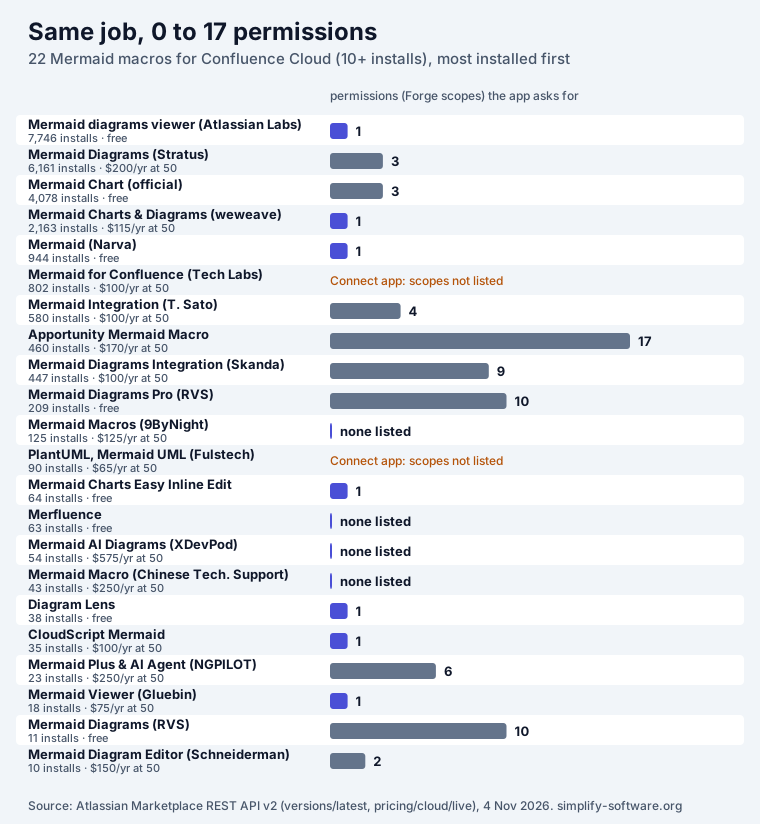
11 of the 20 Forge macros ask for one permission or none. The extra scopes usually pay for a feature, and the listings say which: Apportunity (17) “finds every Mermaid code block” across your pages and turns them into diagrams, which needs search and write access; the RVS apps (10) sync from Git and use Rovo AI; Skanda (9) imports from public URLs and stores a PNG on save so the diagram survives exports. If you do not need that feature, a macro with one scope does the same drawing. A security review goes faster when the list is short, and for some companies the scope list decides whether an app gets approved at all.
Free at any size, or free up to 10 users
The 8 free-at-any-size macros are Mermaid diagrams viewer, Mermaid Chart (with a Mermaid account), Narva’s Mermaid, RVS’ Mermaid Diagrams and its Pro edition, Easy Inline Edit, Merfluence and Diagram Lens. Merfluence says it has “No scopes, no external network, no backend”; Diagram Lens says it works “without requiring an external diagram account or remote renderer”.
The 13 “free up to 10 users” apps follow an option Atlassian gave vendors in 2021, a 1 to 10 user tier at any price “including $0.00”. It suits a small team, and it changes the day you add the 11th user. Plan for that bill before diagrams spread across your spaces, because removing the app later leaves macros that no longer render.
Two Connect apps, and the end of Connect
Atlassian ends support for Connect apps on 31 January 2027. Its own wording: end of support means “use at your own risk”, and “Only critical or security-related bugs will be addressed”. Customers “won’t lose access to the app” on that day, but nothing new gets built on Connect.
Two of the 22 macros are Connect apps: Mermaid for Confluence by Tech Labs (802 installs, last release 19 December 2024) and Fulstech’s PlantUML, Mermaid UML, Graphviz, whose listing opens with “This plugin is deprecated” and points to the vendor’s newer whiteboard app. Several others are Forge apps that still carry Connect modules (marked “Forge, Connect modules” above); they have moved to Forge hosting and the vendor still has to move the rest.
Which Mermaid version you get
Each app ships its own copy of Mermaid, and a diagram that draws on mermaid.live can fail in an app that is a major version behind. Few listings say which version they bundle. Apportunity names “Mermaid 12.1”, CloudScript offers “Mermaid 12, 11” per diagram, and NGPILOT’s Mermaid Plus says “Mermaid v12”. We say ours: the Excalidraw apps ship Mermaid 11.17. Mermaid 12 changed the default look and layout, so check one of your real diagrams in the app before you commit, especially newer types such as architecture or block diagrams. Our Mermaid in Jira guide lists what Mermaid 12 changed and the syntax errors both versions reject.
Which way to pick
| Your situation | Pick |
|---|---|
| Any team size, must stay at $0, text in the page is fine | Mermaid diagrams viewer (Atlassian Labs) |
| Any team size, $0, want an editor with a preview | Narva’s Mermaid, Merfluence or Diagram Lens |
| Your team already uses Mermaid Chart outside Confluence | Mermaid Chart for Confluence (sign in with your Mermaid account) |
| Up to 10 users, want the best-rated editor | weweave’s Mermaid Charts & Diagrams, or Stratus’ Mermaid Diagrams |
| You already pay for draw.io or Gliffy | their Mermaid insert, no new app |
| Diagrams live in a repository | a Git or Markdown app (way 5) |
| Security review counts every scope | one of the 11 Forge macros with one permission or none |
| You want Mermaid next to sketches, notes and arrows | an Excalidraw whiteboard app |
The other 31 apps that render Mermaid
Mermaid is also one feature among many in bigger apps. Most installs are here, because draw.io and Gliffy count.
Diagram editors with a Mermaid insert (15). draw.io (60,136 installs, $1,010 a year for 50 users), Gliffy (15,637, $1,900), Warsaw Dynamics’ PlantUML, Swagger, drawio.xml, Mermaid (3,075, $315), ZenUML (872, free), Capable (388, $500), draw.io Zero Egress (222, $1,210), Capable Diagrams (178, $375), Visualizer (158, $290), ZenUML Diagrams (148, $220), x-draw (120, $250), All-In-One Diagrams (52, free), Diagramly (46, $290), Kroki Diagrams (45, $250), Ultimate Design (21, free) and Visualize with Code (17, $100). All of them are free up to 10 users or free outright. Their scope lists are longer because they do much more: 24 for draw.io, 27 for Gliffy, 73 for the ZenUML family.
Whiteboards with Mermaid (5). Fulstech’s Excalidraw, Mermaid, PlantUML whiteboard (230, $415), our three Excalidraw apps for Confluence (73, 32 and 31 installs, $75 each) and NGPILOT’s Excalidraw & Mermaid (17, $500).
Git, Markdown and AI apps (11). Just Add+ (7,946, $250), Git for Confluence (1,075, $585), the three Elevatic “Include from” apps for Bitbucket, GitHub and GitLab ($235 each), Markdown Macro+ (132, free), Markdown Macro (21, $300), Enhanced Markdown (17, $300), Capable Markdown (12, $375), HTML Template Macro (52, $150), and AI Assistant for Confluence (752, free), which renders the flowcharts and timelines it writes with Mermaid.
Where our app fits
Mermaid Diagrams & Excalidraw Whiteboard for Confluence is one of the whiteboard apps. You insert a Mermaid flowchart, sequence, class, state or ER diagram, a Gantt chart, mind map or timeline from text onto an Excalidraw whiteboard inside a page macro, and draw around it: notes, arrows, images, shape libraries. Insert as shapes turns the diagram into ordinary Excalidraw shapes you can move and restyle one by one; Update redraws it from new text and keeps its size; LaTeX math, Graphviz and Vega-Lite charts go on the same canvas. It asks for three scopes (View pages, View spaces, app storage), keeps diagrams in Atlassian, is free up to 10 users and costs $75 a year for 50.
What it does not do: it is not a code-block renderer, there is no real-time co-editing (it warns when someone else saved first instead), no AI, and it ships Mermaid 11.17, not 12. If all you need is a Mermaid diagram from text, a one-scope macro from the table is simpler. If your diagrams need handwritten notes, arrows to “this box is the slow one” and a sketch next to the flowchart, try it on the Marketplace. The same whiteboard is in Confluence with Excalidraw, with every other way to draw by hand.
How we counted
- Source: the Atlassian Marketplace REST API v2 on 4 November 2026: a search for “mermaid” in
Confluence Cloud apps (88 results), then each app’s listing, latest cloud version
(
versions/latest?hosting=cloud) and live cloud prices (pricing/cloud/live). - In scope: apps whose name, tagline, summary, highlights or details mention Mermaid and that render it, with at least 10 installs: 53 apps, 117,074 installs in all. Excluded: one app that names Mermaid only as an alternative.
- Groups: a Mermaid macro is an app whose main job is Mermaid (22). The others are diagram editors (15), whiteboards (5) and Git, Markdown or AI apps (11).
- Free: “any size” is the payment model
free; “up to 10 users” is a paid app whose 10-user annual tier costs $0; “no” is a price on every tier. - Price: the annual commercial tier for 50 users.
- Platform: Connect when the latest version deploys as Connect; “Forge, Connect modules” when it
is a Forge app whose scopes still include Connect ones (
*:connect-confluence). - Permissions: the number of scopes in the latest version’s
cloud.appScopes. - Quotes about billing, the $0 tier and Connect come from Atlassian’s billing for cloud apps, its 2021 post on the $0 1 to 10 user tier, the Connect end of support announcement and the January 2027 date; the whiteboard limit from CONFCLOUD-81548; draw.io’s steps from its Mermaid guide. Everything else is quoted from the apps’ own listings.
Frequently asked questions
Is Mermaid supported in Confluence?
Not out of the box. A Mermaid code block in Confluence Cloud shows the text, not a diagram, and Atlassian does not ship a Mermaid macro in Confluence itself. Atlassian Labs publishes a free app, Mermaid diagrams viewer, that draws the diagram from a code block on the same page. Every other way goes through a Marketplace app or an image you make outside Confluence.
How do I add Mermaid code in Confluence?
With the free Atlassian Labs app: add a code block to the page, write the Mermaid in it, then type "/", search for "mermaid" and insert the macro; the diagram appears on the page. With a dedicated Mermaid macro you type /mermaid (or the app's name) and paste the code into the macro's editor instead. Without any app, draw the diagram on mermaid.live, export it as SVG or PNG and attach the image.
Is there a free Mermaid plugin for Confluence?
Yes, several. 8 of the 22 Mermaid macros we priced are free at any site size, led by Atlassian Labs' Mermaid diagrams viewer (7,746 installs) and the official Mermaid Chart app (4,078). Mermaid Chart is free in Confluence but you create and edit diagrams by signing in to a Mermaid account. 13 more macros are free up to 10 users; from the 11th user the whole site pays, $120 a year for 50 users for the median one.
Do Mermaid diagrams show up in Confluence PDF and Word exports?
It depends on the app. Six listings say the diagram survives the page's PDF or Word export: Mermaid Diagrams (Stratus), Mermaid Integration, Mermaid Diagrams Integration (Skanda), Mermaid Macros (9ByNight), Apportunity and CloudScript. An image you attach yourself always exports, because it is just an image. Test with one real page before you roll an app out.
Can I use Mermaid on a Confluence whiteboard?
Not on Atlassian's own whiteboards. An open Atlassian request (CONFCLOUD-81548, "Gathering Interest") says Confluence Cloud whiteboards do not currently support "either UML diagramming natively or third-party macro integration". Apps that put Mermaid on a whiteboard of their own, such as the Excalidraw apps, work inside a page macro instead.
Which Mermaid version do Confluence apps use?
Each app bundles its own copy, so it differs per app and most listings do not say. Apportunity names Mermaid 12.1, CloudScript lets you choose Mermaid 12 or 11 per diagram, and NGPILOT's Mermaid Plus says v12. Our Excalidraw apps ship Mermaid 11.17. If a diagram from mermaid.live breaks in Confluence, a version gap is the first thing to check.
Is it safe to install a Connect Mermaid app in 2026?
It keeps working for now, but Atlassian ends support for Connect apps on 31 January 2027 and says end of support means "use at your own risk". Two of the 22 Mermaid macros are Connect apps: Mermaid for Confluence by Tech Labs (last release December 2024) and Fulstech's PlantUML, Mermaid UML, Graphviz, whose listing says "This plugin is deprecated".