Jira Ticket: What It Is, Its Parts, and How to Write One
On this page
“Can you raise a ticket for that?” is said in every company that uses Jira, usually to someone who has never opened it. Five minutes later there is a ticket called “Bug” with no description, and two days later someone asks what it was about.
Below is what a Jira ticket actually is, taken apart on a real one from our Jira Cloud test site: which parts matter, how a ticket moves from To Do to Done, how a help desk ticket differs from a developer’s ticket, and a template for writing one that nobody has to ask about.
Short answer: a Jira ticket is a work item: one piece of work with a key (like PAY-11), a summary, a work type (bug, story, task, request), a status that moves through a workflow, a reporter and an assignee, and a history of every change. Atlassian called it an “issue” for years and now calls it a work item; “ticket” is what people say. Write it so a stranger can act on it: what is wrong or what to do, how to check it, and who asked.
One real ticket, taken apart
This is PAY-11, a bug in the Payments Platform space on our test site, as Jira showed it on 5 November 2026:
Behind that screen, Jira’s REST API returned 91 fields for this one ticket. 37 had a value and 22 could be edited on it. Most of the rest belong to features the team does not use. The parts that make a ticket useful are few:
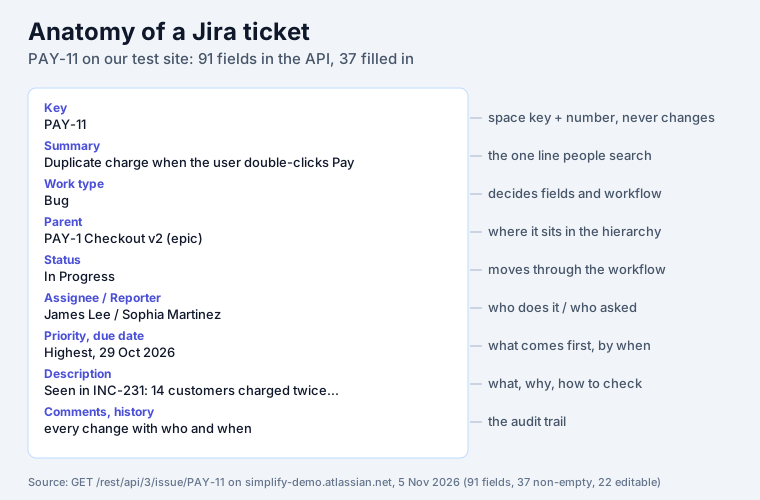
| Part | PAY-11 | What it is for |
|---|---|---|
| Key | PAY-11 (internal id 10031) | the name people say and link to; space key plus a running number |
| Summary | Duplicate charge when the user double-clicks Pay | the line that shows on boards, in search and in notifications |
| Work type | Bug | decides which fields and which workflow the ticket gets |
| Parent | PAY-1 Checkout v2 (an epic) | where it sits; see epic vs story vs task |
| Status | In Progress | where it is in the workflow |
| Assignee | James Lee | the one person doing it now |
| Reporter | Sophia Martinez | who asked, and who gets asked when something is unclear |
| Priority | Highest | what to pick up first |
| Due date | 29 Oct 2026 (overdue) | the date someone is waiting for |
| Labels | incident | a free tag for filters |
| Estimate, time | 5 story points; 1d estimated, 1d logged, 4h left | planning and time tracking |
| Description | Seen in INC-231: 14 customers charged twice… | what is wrong, why it matters, how to check |
| Comments | 4 | the conversation, kept with the work |
| History | every change, with who and when | the audit trail (“due date changed from 14 Oct to 29 Oct”) |
The summary does the most work for the least effort. It is what people scan on a board and what search matches first, and it goes into every notification email. “Duplicate charge when the user double-clicks Pay” tells a reader what broke and where; “Bug in checkout” does not.
Ticket, issue or work item?
The same thing, three names. “Ticket” is the everyday word. Atlassian’s documentation said “issue”
for most of Jira’s life and now says work item (and “work type” for issue type). The rename is
only on the surface. When we created test tickets through Jira’s REST API on 5 November 2026, the
errors still said “Issue type is a sub-task but parent issue key or id not specified”, and JQL still
uses issuetype, issuekey and parent. Search for either word; both lead to the same page in the
docs.
How a ticket moves
A ticket’s status changes through transitions defined by its workflow. PAY-11’s workflow has five statuses, and each belongs to one of three status categories that every Jira report understands:
| Status | Status category | What it means on this team |
|---|---|---|
| To Do | To Do | accepted, nobody working on it |
| In Progress | In Progress | someone is on it (the assignee) |
| In Review | In Progress | code written, waiting for a review |
| QA | In Progress | being tested |
| Done | Done | finished |
The category matters more than the name. Boards colour by it, and the done count in reports and JQL
(statusCategory = Done) uses it. One trap is worth knowing: “Done” in the status and “resolved” are
different things. On the same site, a third of the tickets in a Done status had no resolution, so a
resolved >= -7d search never found them. Our Jira status report
explains the fix, and Jira deadlines covers what Jira counts as overdue.
The whole workflow, with the rules on each transition: Jira workflow.
How to create a ticket
Select Create at the top of Jira. In November 2026 the dialog looked like this on our site:
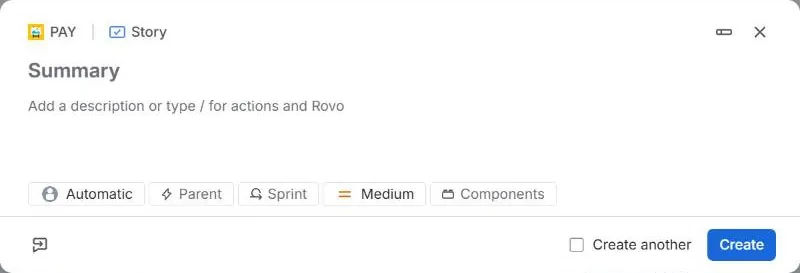
- Check the space and work type at the top, and change them before typing: the type decides the fields.
- Write the summary as one line: what is wrong, or what to do.
- Add the description (the template is below).
- Set the quick fields you know: assignee (or leave Automatic), parent (the epic it belongs to), sprint, priority.
- Select Create. The ticket gets the next key in the space.
A template for tickets people can act on
Paste this into the description and delete what does not apply. It works for bugs and tasks alike.
What is wrong / what to do
  One or two sentences. For a bug: what happens, and what should happen.

Why it matters
  Who is affected, how many, since when. (PAY-11: "14 customers charged twice on Oct 12")

How to check
  Steps to reproduce, or how we will know it is done.

Links
  The incident, the support request, the design, the conversation.
For a Definition of Done as ticked items, see Jira checklist. Three habits on top of the template: one ticket per problem (split “fix login and the footer”), the assignee is one person, and the reporter answers questions. A ticket written this way also reads well to an AI agent, which only has the text to go on; see our guide to Jira MCP.
A developer’s ticket vs a help desk ticket
When people say “ticket” they often mean a help desk request, which in Atlassian’s world lives in Jira Service Management. It is the same kind of work item underneath, with three differences:
| Jira ticket (software or business space) | Help desk ticket (Jira Service Management) | |
|---|---|---|
| Who raises it | someone with a Jira licence | anyone: customers use a portal or email and need no licence |
| What the requester sees | the Jira work item | a portal page with the request and its status |
| Clock | due date, if someone sets one | SLA timers such as time to first response and time to resolution |
On our test site, the IT help desk’s request HELP-3 carries two SLAs, “Time to first response” and “Time to resolution”, that Jira counts down on their own. If you are choosing between the two products, our Jira vs Jira Service Management comparison prices both for a real desk. For tasks outside software, see our Jira task management guide.
Seeing your tickets
A ticket nobody looks at is a ticket nobody fixes. Jira’s board shows one project’s tickets by status. When a team wants other views, our ticket boards add them inside Jira: Kanban Status Board (columns by status with WIP limits and swimlanes), Deadline Tracker (columns from Overdue to two weeks out) and Priority Board (columns by priority, drag to reprioritize). Each is free for up to 10 users.
Sources
- Our Jira Cloud test site, 5 November 2026: PAY-11 through
GET /rest/api/3/issue/PAY-11(fields, names, changelog), its edit metadata and transitions, the PAY workflow statuses, the Create dialog, and the HELP service space’s SLA fields. - Atlassian Support: What are work types?.
- Wikipedia: Jira (software) for the name and the 2002 launch.
Frequently asked questions
What is a Jira ticket?
A Jira ticket is one piece of work recorded in Jira: a bug, a task, a story or a request. Atlassian now calls it a work item (it used to be called an issue). Every ticket has a key such as PAY-11, a one-line summary, a work type, a status that moves through a workflow, people (reporter and assignee) and a history of every change.
Is a Jira ticket the same as an issue or a work item?
Yes. Ticket is what most people say, issue was Atlassian's word for years, and work item is the current name in Jira Cloud. The old name is still everywhere under the hood: on our test site in November 2026 the REST API answered with errors such as "Issue type is a sub-task but parent issue key or id not specified", and JQL still uses issuetype and issuekey.
What does Jira stand for?
Nothing; it is not an acronym. Wikipedia says the name "comes from the last two syllables of Gojira, the Japanese name for Godzilla." Atlassian launched Jira in 2002 as issue tracking software.
What is Jira used for?
Tracking work that moves through steps. Software teams use it for bugs, stories and sprints; business teams for tasks and projects; help desks, in Jira Service Management, for requests from employees or customers. The common part is the ticket: one record per piece of work, with an owner, a status and a history.
How do I create a ticket in Jira?
Select Create at the top of Jira. The dialog opens with the space and work type at the top (change them there), a Summary line and a description box. Below are quick fields: assignee, parent, sprint, priority and components. Write a summary that says what is wrong or what to do, add the details to the description, and select Create. The new ticket gets the next key in that space, for example PAY-30.
Is Jira difficult to learn?
Creating and moving tickets takes minutes. What takes longer is the setup around them: work types, workflows, fields and permissions, which an admin usually owns. A new team member needs three things: how to find their tickets (a board or a saved filter), what each status means in their workflow, and how the team writes a good ticket.