Jira vs Jira Service Management: Who Pays, What You Get
On this page
A request comes in by email: “my laptop will not connect to the VPN”. Someone forwards it to the IT lead, who copies it into Jira, assigns it to themselves and replies by hand when it is fixed. It works for ten requests a week. At a hundred, people start asking “did anyone see my ticket?”, and the IT lead starts asking Atlassian’s sales page whether they need “Jira” or “Jira Service Management”.
The answer comes down to one question: do the people who ask for help have Jira licences? Below is the licensing math for one real-sized desk in both products, from the price lists Atlassian published on 5 November 2026, the features side by side from Atlassian’s own pages, and screenshots of both sides of a service desk on our test site.
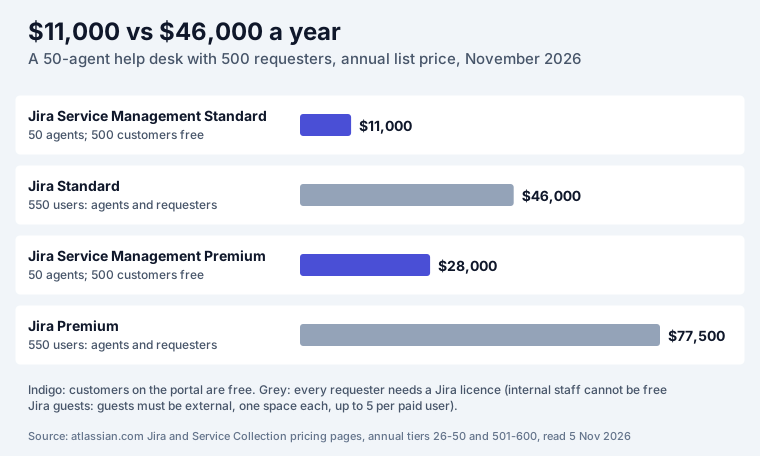
Short answer: Jira is for teams that do planned work; Jira Service Management (JSM) is for teams that take requests from people outside the team. The money is in the licence model: in JSM only agents pay, and customers who raise requests in the portal or by email are free and unlimited. In Jira every person who logs in is a paid user. A desk with 50 agents and 500 requesters costs $11,000 a year on JSM Standard and $46,000 a year on Jira Standard. If your requesters already have Jira, plain Jira can work; if they do not, JSM is cheaper and has the portal, queues and SLAs built in.
The 50-agent desk, priced in both products
The setup: an internal IT and HR desk with 50 people who work on requests and 500 employees who raise them. We typed both numbers into Atlassian’s own pricing calculators on 5 November 2026.
| Plan | Licences needed | Monthly billing | Annual billing |
|---|---|---|---|
| JSM Standard | 50 agents (customers free) | 50 × $22.18 = $1,109 a month | $11,000 (tier 26 to 50) |
| JSM Premium | 50 agents (customers free) | 50 × $56.07 = $2,803.50 a month | $28,000 |
| Jira Standard | 550 users (agents and requesters) | 550 × $7.74 = $4,257 a month | $46,000 (tier 501 to 600) |
| Jira Premium | 550 users | 550 × $13.12 = $7,216 a month | $77,500 |
| Jira Standard, agents only | 50 users, requesters email in | 50 × $9.70 = $485 a month | $4,850 |
The last row is the setup from the opening: Jira for the 50 people doing the work, and requests arriving some other way (email to a shared inbox, a form outside Jira, chat). It is the cheapest line and the one that does not scale: no portal, no request status for the person who asked, no SLA clock, and someone copying messages into Jira by hand.
Three details from the price pages change the math in real cases:
- Per-person prices fall with size, and differ by billing. Monthly JSM Standard is $26.90 per agent for up to 10 agents and averages $22.18 at 50; monthly Jira Standard is a flat $9.70 per user up to 100 users and $7.74 on average at 550. Annual billing is a tier price, so 26 agents cost the same $11,000 as 50.
- Jira guests do not cover employees. Jira Standard includes free guests, but Atlassian’s guest page says guests “must be external to your organization”, can join “a single Jira business or software space per site”, and are capped at 5 guests per paid user. They cannot act as service agents. Your 500 colleagues are not guests.
- The licence counts are independent. JSM’s FAQ: “You don’t need to have the same number of Jira and Service Collection licenses.” If the whole company already has Jira, the desk only adds 50 JSM agents.
The pricing page is no longer called “Jira Service Management pricing”. The old URL now opens Service Collection pricing, and the Standard plan there includes Customer Service Management, Assets and Rovo agents. Atlassian’s FAQ says CSM “doesn’t add to your bill”, so the prices above are what a JSM-only desk pays.
Who pays: agents and customers
This is the whole difference in licensing, in Atlassian’s words from the pricing FAQ:
- An agent is “a user who can work on tickets and communicate directly with your customers”. Agents see the portal, queues, reports and SLA metrics, write customer-facing and internal comments and manage the knowledge base.
- A customer is “anyone who creates requests through the customer portal or by email”. Customers create, comment on and track their own requests and add attachments and other participants.
- In between: Jira users who are not agents can still add internal comments and watch tickets, so a developer can help on a ticket without an agent licence.
That is what a customer sees: a portal with request types, no Jira screens at all. The agent sees the same requests as Jira work items in a queue, with the SLA countdown in the last column:
Features side by side
From Atlassian’s Jira and Service Collection pricing pages and their compare tables, read on 5 November 2026. “Jira” means the Standard plan unless a row says otherwise.
| Feature | Jira | Jira Service Management |
|---|---|---|
| Free plan | up to 10 users | up to 3 agents, unlimited customers |
| Who needs a licence | everyone who logs in | agents only |
| Customer portal / help center | no | yes, unlimited portals on every plan; branded URL from Standard |
| Requests by email and chat | no portal or customer channel listed | portal, email, Microsoft Teams, Slack, embedded widget |
| Request types and forms | forms | request types with forms, workflows and queues |
| Queues | boards and saved filters | queues for triage, on every plan |
| SLA timers | no | yes (“queues and SLAs” on every plan) |
| Knowledge base | no | embedded, articles suggested to customers |
| Approvals | Premium and up | approval work types; change approvals and CAB on Premium |
| Assets (CMDB) | 1,000 objects per month | 5,000 objects on Standard, 50,000 on Premium |
| Alerts and On-call schedules | no | yes, from Free (200 SMS a month on Free) |
| Incident and problem management | no | major incidents, stakeholder updates and PIRs on Premium |
| Automation steps (Standard) | 400 per user per month | 3,000 per user per month |
| Rovo credits (Standard) | 25 per user per month | 250 per user per month |
| Free trial of paid plans | 7 days | 14 days, extendable to 30 |
| Uptime SLA | 99.9% on Premium | 99.9% on Premium |
Two rows deserve a second look. Automation: JSM Standard includes 3,000 steps per agent per month against Jira’s 400, which matters because Atlassian starts billing usage beyond allowances on 3 December 2026. On-call: alerts, schedules and escalation are in JSM from the Free plan; in Jira there is nothing comparable.
Which one for which team
| Your team | Pick | Why |
|---|---|---|
| Software team, sprints, bugs from QA and product | Jira | everyone who files work is on the team and licensed anyway |
| Marketing, design or ops team planning its own work | Jira | projects, boards and timelines; no outside requesters |
| IT help desk for employees | JSM | hundreds of requesters, portal, SLAs, approvals for access and purchases |
| HR, legal, facilities taking requests | JSM | free customers, request types per need, private requests |
| Support team for paying customers | JSM | email and portal channels, SLAs you report on; the CSM features are included |
| DevOps team on call for production | JSM | alerts, on-call schedules and incidents from the Free plan |
| Small team, under 10 people, requests only from each other | Jira Free | free for 10 users; see what the Jira Free plan includes |
| Developers who fix what the help desk escalates | both | JSM for the desk, Jira for the developers; link the work items across projects |
The last row is the most common real setup. The desk works in JSM, a request that needs a code fix gets a linked Jira work item, and developers who are not agents still comment internally on the ticket. You pay JSM for the agents and Jira for the developers, and nobody pays for the 500 people who asked.
Jira Service Desk vs Jira Service Management
If a guide talks about “Jira Service Desk”, it is describing the same product under its old name. Atlassian’s announcement, published in November 2020, reads: “Today, we’re excited to announce Jira Service Management, the next generation of Jira Service Desk.” The portal, queues and SLAs carried over; incident, change and asset management came on top. A second rename followed in May 2024 on the Jira side: Atlassian merged Jira Software and Jira Work Management into one product called Jira. So in 2026 there are two products to choose from, Jira and Jira Service Management, and the Service Collection is the package JSM is now sold in.
What JSM leaves to apps
JSM’s portal and SLA reporting cover the basics. Two gaps are common, and we build an app for each:
- Telling customers something before they ask. The portal has no built-in place for a maintenance notice or an outage banner. Portal Banners shows a notice in the portal header, under it or in the footer, for all service desks or chosen ones, with start and end dates so a maintenance notice appears and disappears on its own.
- A weekly SLA report you can send. JSM shows SLA timers per request; the weekly picture (compliance against a goal, breaches, the requests close to breach, change from last week) takes work. SLA Reports builds weekly and monthly reports from JSM’s own SLA fields, with an export to CSV.
Both are free for up to 10 users and cost $150 a year at 50 agents on the Marketplace price list. Before you set SLA goals, try our SLA trust simulator, which shows how many customers see a breach at a given compliance level. For holidays in SLA calendars, see Jira holidays; for SLA setups to copy and what stops the timer, Jira SLA examples; for the portal itself, our help desk portal best practices.
Sources
- Atlassian Jira pricing and Service Collection pricing (the old JSM pricing URL redirects there), calculators set to 50 and 550 users, monthly and annual, compare tables and FAQs, read on 5 November 2026.
- Atlassian Support: Manage guest access in Jira and Invite guests to Jira.
- Atlassian: Introducing Jira Service Management (November 2020) and Welcome to the next era of Jira (1 May 2024).
- Atlassian Support: How Rovo credits work (billing beyond allowances from 3 December 2026).
- Screenshots: our Jira Service Management test site, 5 November 2026. App prices: Atlassian Marketplace pricing API, same day.
Frequently asked questions
Are Jira and Jira Service Management the same?
No. They run on the same platform and share work items, workflows and automation, but they are separate products with separate licences. Jira is for teams that plan and do work: projects, sprints, boards. Jira Service Management adds what a help desk needs on top: a customer portal, request types, queues, SLAs, a knowledge base, alerts and on-call. Its big licensing difference is that only agents need a licence; the people who raise requests are free.
What is the difference between Jira Service Desk and Jira Service Management?
Only the name and the scope. Atlassian announced Jira Service Management in November 2020 as "the next generation of Jira Service Desk". The old service desk features (portal, queues, SLAs) are all still there; the new product added incident management, change management and asset management on top. If you find a guide about Jira Service Desk, the portal and SLA parts still apply.
How much does Jira Service Management cost?
On 5 November 2026 Atlassian's pricing page (now the Service Collection page) showed Free for up to 3 agents, and Standard at $26.90 per agent per month for up to 10 agents on monthly billing, falling to $22.18 on average at 50 agents. Annual billing is by tier: $2,700 a year for 6 to 10 agents and $11,000 for 26 to 50. Premium is $61.60 per agent per month at small sizes. Customers who raise requests are free at every size.
Do customers need a Jira Service Management licence?
No. Atlassian's pricing FAQ says "Customers are free and don't require a Service Collection license. Anyone can create a service request, and you'll never be limited to how many customers can access Service Collection." A customer can raise, comment on and track requests in the portal or by email. Only people who work on requests (agents) need a licence.
Can I use plain Jira as a help desk?
For a team that only takes requests from colleagues who already have Jira licences, yes: a project with a request work type, a board and a filter works. It stops working when the requesters do not have Jira. Every person who logs in to Jira is a paid user, and Jira's free guests must be external to your company, can join only one space and are capped at 5 per paid user. There is also no portal, no SLA timer and no request queue in Jira.
Is Jira being phased out?
No. This question shows up next to every Jira search, but Atlassian is not retiring Jira Cloud. What did change: Jira Software and Jira Work Management became one product called Jira in May 2024, Jira Service Desk became Jira Service Management in 2020, and Atlassian has announced an end of life for its self-managed Data Center products. Jira Cloud and Jira Service Management Cloud are both current products.