Atlassian MCP Troubleshooting: Disconnects, 502s, Limits
On this page
Your agent read four tickets this morning. Now the fifth call says “The app is not installed on this instance”. Nobody uninstalled anything. You press Reconnect, it says connected, and the next call fails the same way.
Many Atlassian MCP failures look like something they are not. This page goes symptom by symptom: what causes it, what fixes it, and where that comes from. Everything was read or run on 24 November 2026. Where Atlassian has not confirmed something, it says not confirmed.
Short answer: check rovo.status.atlassian.com first. If MCP is
operational, use https://mcp.atlassian.com/v2/mcp, clear the authentication (not just reconnect) and
sign in again. One sign-in covers one site. The 20-worklog cap is solved in v2 by
listJiraIssueWorklogs. For 429, run fewer calls at once; we found no number in Atlassian’s docs.
| Symptom | Likely cause | First thing to do |
|---|---|---|
| Asks you to sign in several times a day | old address, or a refresh token that was refused | move to v2, clear authentication |
| 403 “The app is not installed on this instance” | the grant lost its scopes | clear authentication, connect |
| “Session not found” | the MCP session ended, the token may still be good | reconnect, then sign in |
| 502, 503, a hang, “upstream connect error” | Atlassian’s side | status page, then wait |
| Only one site, or the wrong account | one grant is one site | one entry per site |
| 20 worklogs, or 5 search results | embedded field cap, or a paging bug | use the paged tool, count first |
| 429 | too many calls at once | fewer parallel calls |
Looking for one exact error message, the list of 2026 outages, or the setup for your client? Those are in our Jira MCP server guide.
Is it you or Atlassian? Three checks
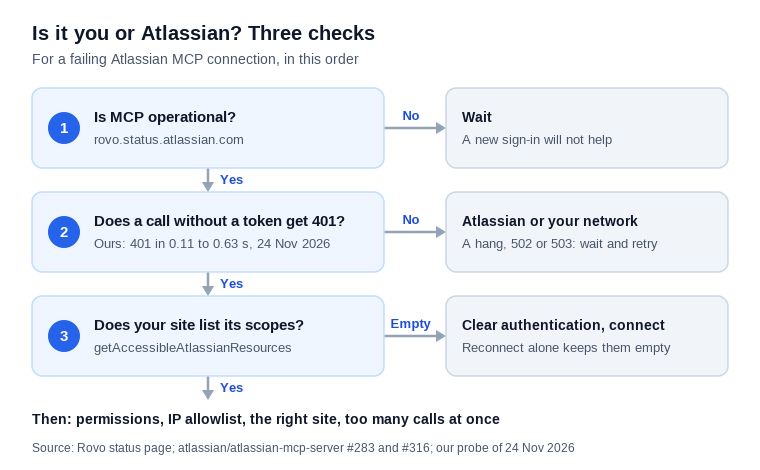
1. The right status page. MCP is a component of rovo.status.atlassian.com. On 23 November 2026 sign-in requests failed or timed out, and the Rovo page opened an incident at 15:19 UTC, resolved at 20:45. The person who reported it on GitHub (#316) was looking at status.atlassian.com, saw nothing there at 15:43, and had seen failures on and off for a day. A green page does not prove it is you.
2. A call without a token. The server should refuse it at once:
curl -s -o /dev/null -w "%{http_code} %{time_total}s\n" -X POST https://mcp.atlassian.com/v2/mcp
curl -s -o /dev/null -w "%{http_code} %{time_total}s\n" \
  https://auth.atlassian.com/.well-known/oauth-authorization-server
On 24 November the first gave us 401 in 0.11 to 0.63 seconds: the server is up and reachable. The second gave 200: sign-in is up. On 23 November users got 503 from it. If either hangs or answers 5xx, no sign-in will fix it.
3. Your scopes. Ask the agent to call getAccessibleAtlassianResources and show the result. Your site
should be there with a list of scopes. An empty list means the grant is broken, whatever the client says.
Asks you to sign in again and again
Cause 1: an old address. Atlassian tracked “prompts for reauthorization multiple times per day”
(ECO-1262, 82 votes) and closed it as fixed on 30 March 2026, asking
people to use /v1/mcp instead of /v1/sse. Version 2 replaces both, and v1 sign-ins do not carry over.
Fix: remove the old entry, add https://mcp.atlassian.com/v2/mcp, sign in once.
Cause 2: the refresh token is refused. Codex users see unauthorized_client: refresh_token is invalid after a
few idle days (#260, open). Another commenter never
stayed signed in for more than 24 hours. The reason is not confirmed; the reporter asks whether two entries
with the same address invalidate each other. Fix: sign in again. If you have two entries for the same site,
keep one.
Cause 3: the browser step never returns. Atlassian’s table says “Browser blocking pop-ups or blocked redirect URI”; the fix is “Allow http://localhost:3334 in browser and firewall settings”. Your client may use another port; the address is in the sign-in URL.
Cause 4: cached client details. After the move to v2, “Any incompatible clients will need to clear cached clientIds or .well-known credentials”, says Atlassian’s upgrade page.
| Client | Clear the sign-in completely |
|---|---|
| Claude Code | /mcp → Atlassian → Clear authentication, then connect; or claude mcp logout atlassian |
| Claude (web, desktop) | Disconnect the connector in settings and connect again. An old v1 install shows as a “Custom Web” connector: remove it |
| Codex | codex mcp logout atlassian, then codex mcp login atlassian |
mcp-remote | Stop stray mcp-remote processes, delete its ~/.mcp-auth folder, start again. This signs out every server it holds |
| Cursor, after a sign-in | If old tools stay, Atlassian suggests clearing the tool cache or adding v2 by hand (#281) |
No browser at all. If an organization admin allows it, an
API token avoids
the sign-in. “Some MCP tools may not be available”, and domain allowlists do not apply to it. If v2 answers “Failed
to fetch accessible products: 401” with a scoped token, a reply on
#285 says to add the read:account scope. The issue
is still open, so treat that as not confirmed. For jobs, a service account is better; the
Jira MCP guide compares the four sign-ins.
Keeps disconnecting: 403 or “Session not found”
403 “The app is not installed on this instance”. It reads like an admin problem. In
#283 (open) it is the sign-in: the site is listed, but
its scopes are missing or empty, and every call fails. One user’s logs show two versions of it: short ones that
cleared within 1 to 10 minutes, and long ones that did not. Of about 1,550 calls in a month, 209 got this 403 (13%).
- Fix: clear authentication, then connect and accept the consent screen again. In that log, Reconnect left the scopes empty and a new consent restored them, once for only about an hour.
- Short ones: wait a minute and retry once before you sign in again.
- Cause: not confirmed. Atlassian linked the first report to its 22 October incident; the reporter says the problem is older than that and separate.
403 straight after a good sign-in. Atlassian’s README lists other reasons: an IP allowlist, missing scopes, app permissions or another policy. “Confirm the denial reason before changing an IP allowlist.” Hosted AI clients can call from their provider’s addresses, so being on your VPN may not be enough.
“Session not found” (404, code -32001). The MCP session ended while the token may be fine. Reconnecting starts a new one; in a January report that held for a few hours at a time. Atlassian said in March it had improved session handling (#41).
No error, just nothing. Atlassian’s troubleshooting page: “If your token expires, your session will silently fail.” An agent may then answer from memory. Ask it which tool it called and what came back.
502, 503 and timeouts
Cause: in the cases we found, the server side. On 24 July 2026 one user found authenticated calls hanging in 70 to 80% of attempts with some 502s, while calls without a token got a 401 in 0.16 seconds. It came back on its own and was not on the status page. On 23 November the 503 came from the sign-in service, and existing sessions failed too.
Fix:
- Run the two curl checks above. If they fail, stop: reinstalling and new tokens will not help.
- Wait and retry with a pause. Claude Code retries a dropped remote server up to five times by itself, starting at one second and doubling.
- Do not remove a working connector during an incident. In October and November people could not sign in again until it ended.
- One ticket hangs but others work? Reports tied 60-second timeouts to tickets with many embedded images (#145). Atlassian closed it on 6 November as inactive and not reproduced, so not confirmed. Ask for one work item by key instead of a whole sprint.
Several sites, or two accounts
Cause: “With OAuth 2.1, access tokens are typically consented for a specific cloud ID (site)”, and the server checks each call against it (Configure OAuth 2.1). For another site you sign in again. ECO-1259 asks for several sites in one connection: In Progress, 125 votes on 24 November 2026, no date given.
Workarounds, none of them tested by us:
- One
mcp-remoteentry per site. Its README documents--resourcefor “different Atlassian tenants”. The example there has an old address; this one has v2:
{
  "mcpServers": {
    "jira-site-a": {
      "command": "npx",
      "args": ["-y", "mcp-remote", "https://mcp.atlassian.com/v2/mcp",
        "--resource", "https://site-a.atlassian.net/"]
    },
    "jira-site-b": {
      "command": "npx",
      "args": ["-y", "mcp-remote", "https://mcp.atlassian.com/v2/mcp",
        "--resource", "https://site-b.atlassian.net/"]
    }
  }
}- Sign in to each from a terminal first, one at a time, then start the AI client. A commenter on ECO-1259 who runs five sites this way says the client’s startup timeout otherwise opens a new consent window for each retry. The site is not preselected on the consent screen: pick the one that matches, or both entries end up on the same site.
- One custom connector per site in your AI client. Another commenter there reports four sites this way.
- An API token. It is not bound to one site, so “Clients and tools must explicitly pass the cloudId where needed”.
Wrong account. An older report (#23) had a personal
entry answering as the work account. Atlassian called it mcp-remote behavior and suggested a token per connection.
Check who you are with atlassianUserInfo.
Agent on the wrong site or project? Atlassian’s README suggests lines like these for AGENTS.md. They also save
calls:
When connected to atlassian-rovo-mcp:
- **MUST** use Jira project key = YOURPROJ
- **MUST** use cloudId = "https://yoursite.atlassian.net" (do NOT call getAccessibleAtlassianResources)
- **MUST** use `maxResults: 10` or `limit: 10` for ALL Jira JQL and Confluence CQL search operations.
Only 20 worklogs, or 5 results
Worklogs. getJiraIssue and JQL search return the worklog field inside the work item, which is capped at 20. A
ticket with 32 entries came back with total: 32, 20 entries and no way to the rest
(#180). Time added up from it is too low.
Fix: v2. The issue was closed as implemented on 6 November 2026: “The listJiraIssueWorklogs tool supports paging
through issues with more than a single page of worklogs.” Atlassian’s
tool list has it: “Paginated worklogs (logged
time) for a Jira work item.” An older request, ECO-1431, still says
Gathering Interest. Say it plainly to the agent:
Use listJiraIssueWorklogs for PAY-11 and page until you have every entry.
Compare the count with worklog.total before you add up the time.
For a team’s whole month, a script on the REST API is better: GET /rest/api/3/worklog/updated, then
POST /rest/api/3/worklog/list with up to 1,000 ids. Comments have the same answer in v2: listJiraIssueComments is
paged.
Search returns 5. In August 2026 users on v1 reported searchJiraIssuesUsingJql returning 5 work items a call and
skipping the rest while saying there is no next page
(#221, open). Two of them page safely with
maxResults: 5. Whether v2 does it is not confirmed. Ask the agent for the total first and compare.
429 and rate limits
The number: not confirmed. We read the English docs and the product page on 24 November 2026 and found none. A community answer gives 500 calls an hour on Free, 1,000 on Standard, and 1,000 plus 20 per user up to 10,000 on Premium and Enterprise. Another user quoted the same Enterprise figure from Atlassian’s documentation in July. Plan with them, but do not count on them.
What people hit is a burst. #171 (open): 429 at
about 20 parallel calls, with 348 calls in the week, and a Retry-After header. In September a reply asked for a
support ticket; no figure followed in the issue.
Fix:
- Run calls one after another, or a few at a time. Parallel subagents each make their own.
- Wait for
Retry-Afterwhen your client shows it, then retry once. A model that cannot see it will guess. - Cut calls: pin the
cloudId, limit results, and do not list projects or sites each time. - Update the client. A July Cursor report showed hundreds of requests on connect and retries without a pause; support answered that the version was very old and it believed later ones were fixed (thread).
- 429 during sign-in is different: in March it was an incident (#111).
Rovo credits are a separate limit with a price: see what Jira MCP costs. Jira’s REST API has quotas of its own; our Jira limits page has Jira’s other numbers.
Report it so it gets fixed
Send the UTC time, the endpoint (/v2/mcp), client and version, the tool, the full error and the Atl-Request-Id
header if you have it. Remove tokens. Check the
issue list first. Atlassian’s
changelog says its support portal moves: maintenance from
27 to 30 November 2026, and from 30 November requests go to Atlassian Support. v2 now also has a submitMcpFeedback
tool, which sends only what you approve.
Where Agent Ready fits
Agent Ready is our Jira app. Its MCP tools run on the same Atlassian service, so an outage or an expired sign-in stops them too. What it changes is how much a dropped connection costs:
- One call for the context.
start-issuechecks the work item, claims it and returns the spec and the project’s brief together, with keys masked. The agent does not rebuild them call by call. - The state is in Jira. The claim, the questions, the plan, each
report-progressstep and the receipt show on the work item, where a person can see how far the agent got before it lost the connection. - Ready work needs fewer lookups. The checks hold back work with no acceptance criteria or no repository before an agent starts. Our free skill for writing Jira tickets gets tickets there.
Sources
Read on 24 November 2026.
- Atlassian Support: Troubleshoot and verify your setup, Configure OAuth 2.1, Configure authentication via API token, Upgrade from v1 to v2, Supported tools.
- Atlassian: MCP changelog, atlassian-mcp-server README and its issues #23, #41, #111, #145, #171, #180, #221, #260, #281, #283, #285 and #316; the Rovo status page; ECO-1259, ECO-1262 and ECO-1431 on jira.atlassian.com.
- Atlassian Community: unstable connection, hangs and 502, worklog limit, and the two rate limit threads above.
- Claude Code: Connect to tools via MCP. mcp-remote README.
- Our probe: three calls without a token to
mcp.atlassian.comand one toauth.atlassian.com, 24 November 2026, 13:41 UTC.
Frequently asked questions
Why does Atlassian MCP keep disconnecting?
Often the sign-in grant went stale, not the network. Signs are a 403 that says "The app is not installed on this instance" or empty scopes on your site. Clear the authentication in your client and connect again; Reconnect alone did not help in the logs a user published. That bug (#283) was open on 24 November 2026.
How do I connect Atlassian MCP to multiple sites?
One OAuth sign-in covers one site. Atlassian has a request for several (ECO-1259, In Progress, 125 votes on 24 November 2026). Until then, run one mcp-remote entry per site with --resource https://your-site.atlassian.net/, add one custom connector per site, or use an API token and pass the cloudId on each call.
Why does Jira MCP return only 20 worklogs?
getJiraIssue and JQL search return the worklog field embedded in the work item, which Jira caps at 20. Version 2 has a separate paged tool, listJiraIssueWorklogs. Connect to https://mcp.atlassian.com/v2/mcp and ask the agent to use it.
What is the Atlassian MCP rate limit?
Not confirmed. On 24 November 2026 we found no number in the English docs or on the product page. Community posts quote 500 calls an hour on Free, 1,000 on Standard and up to 10,000 on Premium and Enterprise. One user got 429 after about 20 parallel calls, well below that.
How do I stop Atlassian MCP from asking me to sign in again?
Use the v2 address, sign in again once, and keep one entry per site. If an organization admin allows API tokens, a token or a service account needs no browser sign-in. API tokens also skip the domain allowlist, so give one few scopes and a short expiry.