Jira Task Management: A Tested Setup and 7 Filters to Copy
On this page
The marketing team runs on a spreadsheet and a chat channel. Someone says “IT already has Jira, let’s just use that”, and the first space they create is a copy of the developers’ one: fourteen work types, a sprint backlog and statuses called Code Review. Two weeks later they are back on the spreadsheet.
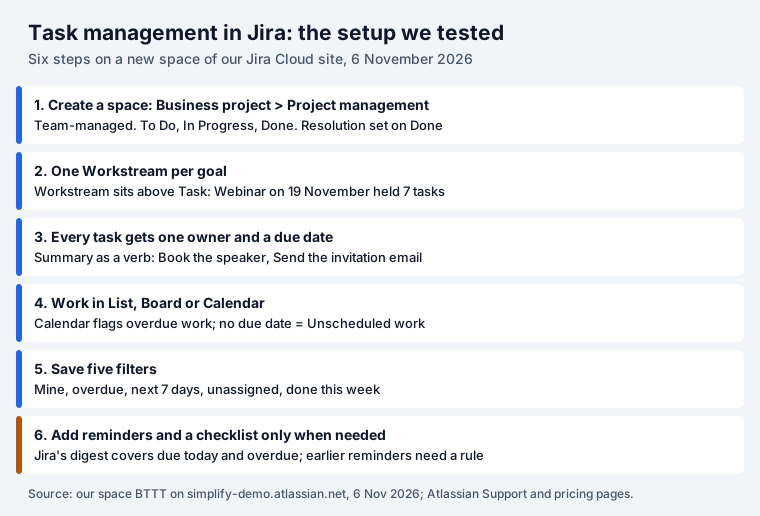
The fix is a space made for tasks. We built one on our own Jira Cloud site on 6 November 2026 with the template Jira offers today, filled it with the work for a webinar, and tested the views and filters below on it.
Short answer: create a space from Business project, Project management. It comes with Workstream, Task and Sub-task and three statuses. Give every task one owner and a due date, work from the List or Calendar, and save five filters: mine, overdue, the next 7 days, unassigned and done this week. It is free for up to 10 users.
Jira for tasks is not a separate product any more
Until 2024 Atlassian sold Jira Work Management for business teams next to Jira Software. Then it merged them: “We’ve taken the best of Jira Work Management and Jira Software to make a single project management tool ready to help any team go from good to great. And (throwback alert!) we’re calling it, simply, Jira.” The licensing page confirms that Jira Work Management subscriptions “can no longer be purchased, but all Jira Work Management features are accessible through a Jira subscription.”
What survived is the space type. A business space has the task views (List, Calendar, Timeline, Forms, Approvals); ours had no sprint or code tabs. That is the one to create.
Step 1: create the space
In Jira, open Spaces, Templates. On our site the panel offered Work requests, Development requests, Kanban, Scrum, Personal tasks (“Create your to-do list”) and Business project (“Manage tasks with due dates”). Business project opened Create space with the template Project management, “Plan and deliver business projects.”
Under Show more, three choices were already made:
- How your space is managed: Team-managed. We kept it; the template preview labels it “Team-managed space”.
- Key: BTTT, made from the name. It prefixes every task (BTTT-1, BTTT-2), so a short key is easier to say out loud.
- Access: Open. Decide this before you add anything confidential.
The next screen, “Bring your team along”, came pre-filled with four people we had worked with, with the role Member. We chose Skip, to have the space ready before anyone joined it.
Step 2: what the template creates
We read the new space back through Jira’s REST API:
| What | Project management template (team-managed business space) |
|---|---|
| Work types | Workstream (above Task), Task, Sub-task |
| Statuses | To Do, In Progress, Done |
| Resolution | Set to “Done” automatically when a task moves to Done |
| Views | Summary, Board, List, Calendar, Timeline, Approvals, Forms, Docs, Reports |
Three statuses are enough for most task work. The automatic Resolution matters more than it looks: Jira’s “resolved” searches and reports rely on it, and in company-managed spaces it is easy to get wrong (our Jira workflow guide shows how). If you script space creation: our REST call with Atlassian’s older task-tracking template key gave a company-managed space with only Task, Sub-task, To Do and Done, so use the screen above.
Step 3: write tasks people can finish
We filled the space with the work for a webinar: one Workstream, Webinar on 19 November, with seven tasks under it.
- One owner. A task with two owners has none. Leave it unassigned on purpose, then find it with the unassigned filter below.
- A due date. Without one, the task never shows up as late. On our calendar it went to a side panel instead (below).
- A summary that starts with a verb: Book the speaker, Send the invitation email, Post the recording. “Speaker” is a topic; “Book the speaker” is a task.
- A sub-task only for a separate piece with its own owner. We added Review the landing page copy under Write the landing page, owned by someone else. Steps that one person ticks off belong in a checklist instead.
- Priority with meaning. Our site’s five priorities carry Atlassian’s descriptions:
| Priority | Description on our Jira site |
|---|---|
| Highest | This problem will block progress. |
| High | Serious problem that could block progress. |
| Medium | Has the potential to affect progress. |
| Low | Minor problem or easily worked around. |
| Lowest | Trivial problem with little or no impact on progress. |
How a task differs from a story, an epic or a sub-task, with the hierarchy rules we tested, is in epic vs story vs task.
Step 4: pick a view
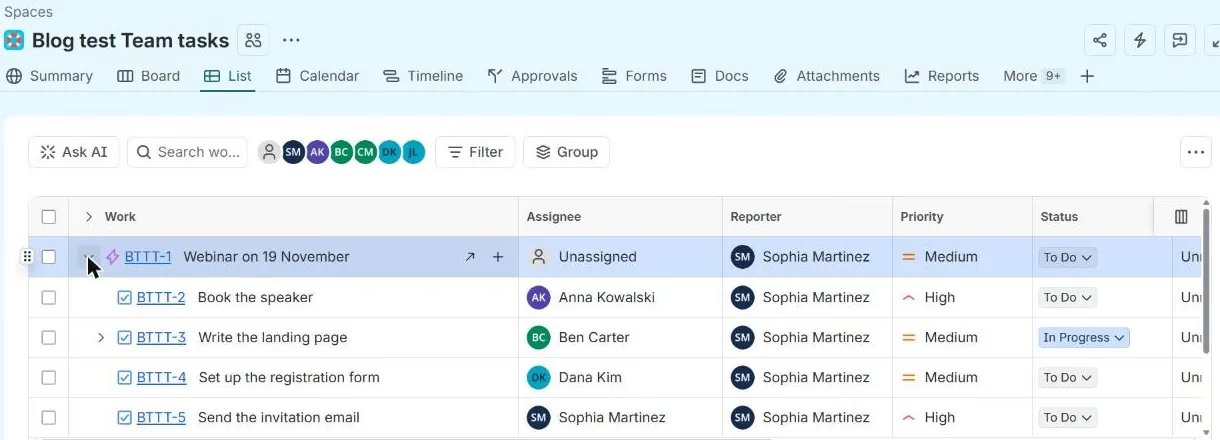
List is the spreadsheet the team just left, so it is the easiest start. The Workstream row folds its tasks, and you can change the assignee, priority or status in the cell:
Calendar is the view for work with dates. It showed things the list did not:
- Done work is struck through (BTTT-7, 3 November).
- Overdue work is red with a clock (BTTT-2, due 4 November, still To Do).
- Work without a due date goes to Unscheduled work: “Drag each work item onto the calendar to set a due date for the work.” That panel is a free weekly check for tasks nobody dated.
Board suits work that moves through stages. If you use it, read our Jira kanban board guide first: a WIP limit there only warns, and done items leave the board after 14 days. Timeline shows workstreams as bars, useful when one goal depends on another.
Step 5: save five filters (and two extra)
Filters are where Jira beats a spreadsheet. We ran each of these on the webinar space on Friday 6
November; replace BTTT with your space key.
| Filter | JQL | Returned |
|---|---|---|
| My open tasks | project = BTTT AND assignee = currentUser() AND statusCategory != Done ORDER BY duedate ASC | BTTT-5 |
| Overdue | project = BTTT AND duedate < startOfDay() AND statusCategory != Done ORDER BY duedate ASC | BTTT-2 |
| Due in the next 7 days | project = BTTT AND duedate >= startOfDay() AND duedate <= endOfDay("+7d") AND statusCategory != Done | BTTT-9, 3, 4, 5 |
| Unassigned | project = BTTT AND assignee IS EMPTY AND statusCategory != Done AND issuetype != Workstream | BTTT-6, BTTT-8 |
| Done this week | project = BTTT AND statusCategory = Done AND resolved >= -7d ORDER BY resolved DESC | BTTT-7 |
| No due date | project = BTTT AND duedate IS EMPTY AND statusCategory != Done AND issuetype != Workstream | BTTT-8 |
| Urgent | project = BTTT AND priority in (Highest, High) AND statusCategory != Done ORDER BY duedate ASC | BTTT-2, BTTT-5 |
Notes from the run:
- The overdue filter did not list BTTT-7, which was due on 3 November but done.
statusCategory != Doneis what keeps finished work out; a status name would break when someone renames Done. issuetype != Workstreamkeeps the goal itself out of the unassigned and undated lists.- The space is called a space, but JQL still says
project.space = BTTTfails.
Save each one (Filters, Save as) and put the useful ones on a dashboard. When exactly a due date counts as overdue, with 17 JQL comparisons tested, is in our Jira deadlines guide.
Step 6: reminders and checklists, only when needed
- Due dates. Since 2025 Jira sends each person a digest of their work due today or overdue. It sends nothing before the date. For “due in 3 days” reminders, use the automation rule in the deadlines guide or our automation recipes, and mind the step cost.
- Repeated steps. A webinar has the same twelve steps every time. A checklist template on the task is lighter than twelve sub-tasks.
Where our apps fit
Three of our apps answer the questions a task space raises, each free for up to 10 users:
- Deadline Tracker puts work from several spaces into columns by due date (Overdue, Today, 1-3 Days, 4-7 Days, 1-2 Weeks). Drag a card to another column and the due date changes in Jira.
- Team Checklist adds checklists to work items, with a validator that can stop a move to Done while items are open.
- Kanban Status Board shows a space as columns by status, with WIP limits, swimlanes and sums.
How we tested
- Our Jira Cloud site, 6 November 2026 (a Friday). Space BTTT, “Blog test Team tasks”, created through Spaces, Templates, Business project, Project management; invitations skipped.
- Work types and statuses read with
GET /rest/api/3/project/BTTT?expand=issueTypesand/project/BTTT/statuses. Tasks BTTT-1 to BTTT-9 created through the REST API with owners, due dates and priorities; BTTT-3 moved to In Progress and BTTT-7 to Done. - Filters run with
GET /rest/api/3/search/jql. Priorities from/rest/api/3/priority/search. - For comparison, space TT created with
POST /rest/api/3/projectand the template keycom.atlassian.jira-core-project-templates:jira-core-simplified-task-tracking.
Sources
- Our Jira Cloud site, 6 November 2026: spaces BTTT and TT, work items BTTT-1 to BTTT-9.
- Atlassian: Welcome to the next era of Jira (1 May 2024), Jira Work Management licensing, Jira pricing.
- Our earlier tests: Jira deadlines (the due date digest and the overdue rule), Jira checklist.
Frequently asked questions
Can Jira be used for task management?
Yes. Since 2024 Jira includes what used to be Jira Work Management, a version for business teams. Create a space from Business project, Project management: you get Workstream, Task and Sub-task, three statuses (To Do, In Progress, Done) and List, Board, Calendar and Timeline views. It is free for up to 10 users.
Can I use Jira for personal task management?
You can. The template list includes Personal tasks, described as "Create your to-do list", and the Free plan covers up to 10 users. Jira is heavier than a to-do app, so it pays off when your personal tasks live next to team work that is already in Jira.
Is it difficult to learn Jira?
The task setup in this guide uses three statuses, three work types and five saved filters, and takes an afternoon. What makes Jira feel hard is a space built for someone else, with many work types, custom workflows and sprint words. Start small and add fields only when someone asks for them.
What do P1, P2, P3 and P4 mean in Jira?
Not by default. Our Jira Cloud site has five priorities with Atlassian's descriptions: Highest, "This problem will block progress"; High, "Serious problem that could block progress"; Medium; Low; and Lowest. Teams that say P1 to P4 usually map them onto these, or an admin renames them.
Does Jira remind people about due dates?
Partly. Since 2025 Jira sends each person a digest of their work items due today or overdue, which they control under personal notification settings. It sends nothing before the due date; for that you need an automation rule or an app. Our Jira deadlines guide has the rule to copy.
What is the difference between Jira Work Management and Jira?
There is no longer a separate product. Atlassian combined them in 2024: "we're calling it, simply, Jira." Jira Work Management subscriptions "can no longer be purchased, but all Jira Work Management features are accessible through a Jira subscription." Business spaces still exist as a space type.
Keep reading
- Jira, JSM and the Marketplace · 11 minDeveloper Burnout: 2026 Research, Causes and Warning Signs
- Jira, JSM and the Marketplace · 18 minJira Deadlines: Due Date JQL, Reminders, the Day Rule (2026)
- Jira, JSM and the Marketplace · 8 minJira Status Report: Weekly Template and 6 Tested JQL Queries
- Free toolBusiness days calculator