Jira Epic vs Story vs Task: The Hierarchy, Tested
On this page
Sprint planning, ten minutes in. Someone asks whether “Add Apple Pay” should be an epic or a story, someone else says it is really a task, and the conversation turns into a debate about Jira instead of the work. Most teams have it once a quarter.
The rules are simpler than the debate. Below are Atlassian’s own definitions, the three levels of Jira’s hierarchy, and the parent rules we tested on our Jira Cloud site on 5 November 2026 with Jira’s exact error messages. One rule did not behave the way the docs suggest.
Short answer: an Epic groups related work toward a larger goal (level 1). A Story, a Task and a Bug are the work itself and sit on the same level (level 0): a story describes value for a user, a task is work that is not a user feature, a bug is a problem. A Sub-task breaks one of them into smaller pieces (level -1) and always needs a parent. Story vs task is a choice of meaning, not of mechanics; Jira treats them the same. Levels above Epic, such as Initiative, need Premium.
The definitions, in Atlassian’s words
From Atlassian’s support page What are work types?, read on 5 November 2026:
| Work type | Level | Atlassian’s definition | Example from our test project |
|---|---|---|---|
| Epic | 1 | “A big user story that needs to be broken down.” Epics “group together bugs, stories, and tasks” | PAY-1 Checkout v2 |
| Story | 0 | “A user story is the smallest unit of work that needs to be done.” | PAY-4 Apple Pay and Google Pay on the checkout page |
| Task | 0 | “A task represents work that needs to be done.” | PAY-7 Migrate card tokens to the new vault |
| Bug | 0 | “A bug is a problem which impairs or prevents the functions of a product.” | PAY-11 Duplicate charge when the user double-clicks Pay |
| Sub-task | -1 | “A subtask is a piece of work that is required to complete a task.” It can break down “bugs, stories or tasks”. | PAY-28, under PAY-4 |
Notice what the definitions do not say: nothing makes a story bigger than a task. Both are level 0. Teams that use both usually draw the line by audience. If the person who benefits is a user (“as a shopper I can pay with Apple Pay”), it is a story. If it is the team or the system (a migration, a dependency upgrade, a report), it is a task.
The three levels
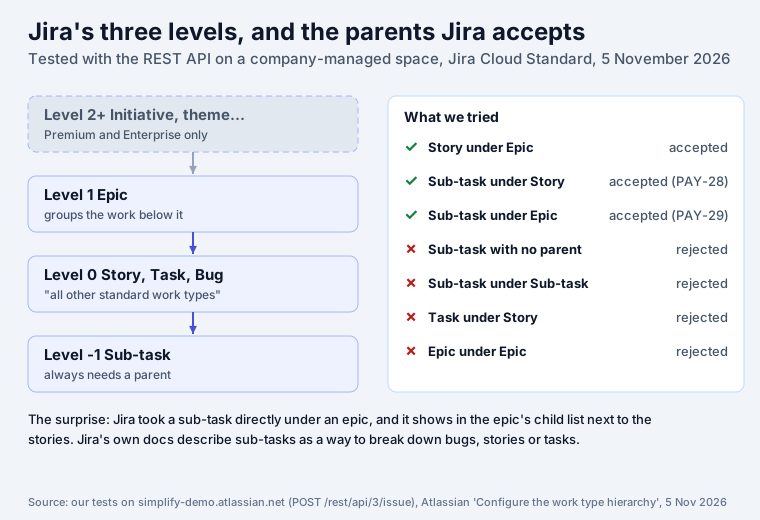
Atlassian’s page Configure the work type hierarchy: “By default, Jira is set up with three levels of work type hierarchy: a level for larger pieces of work (level 1, by default called Epic), a level for standard work items (level 0, called Story), and a level for smaller pieces of work (level -1, called Subtask).” This is the settings page on our site, which runs Jira Standard:
Three things on that page decide a lot:
- Level 0 is “All other standard work types”. Story, Task, Bug and any type you add yourself are all level 0. You cannot make Story a level above Task.
- More levels need Premium. “Try Jira Premium to expand the hierarchy beyond the epic level.” The Create Level button is greyed out on Standard. Atlassian’s pricing table lists “Expandable Work Type Hierarchy” for Premium and Enterprise.
- Changes are site-wide and final. They “apply to all company-managed spaces in your site”, and Atlassian warns that changing the structure “will break existing parent and child relationships” and “cannot be undone”.
The parent rules, tested
We created test work items in a company-managed space on our site through Jira’s REST API on 5 November 2026 and recorded Jira’s answers word for word:
| We tried | Jira’s answer | Result |
|---|---|---|
| Story under an epic | created (the project’s stories already sit under epics) | accepted |
| Sub-task under a story (PAY-4) | created as PAY-28 | accepted |
| Sub-task with no parent | “Issue type is a sub-task but parent issue key or id not specified.” | rejected |
| Sub-task under a sub-task | “Parent issue ID: ‘10080’ / Key: ‘PAY-28’ can not be sub-task.” | rejected |
| Task under a story | “Please select valid parent issue.” | rejected |
| Epic under an epic | “Please select valid parent issue.” | rejected |
| Sub-task directly under an epic | created as PAY-29 | accepted |
The first six match the docs: a sub-task needs a parent and cannot have children (“A subtask can’t have any child work items”), and a parent must be exactly one level up. The last one is the surprise. Jira created a sub-task with an epic as its parent, and the epic’s Child work items list shows it next to the stories:
Atlassian’s docs describe sub-tasks as a way to break down “bugs, stories or tasks”, and JQL
parent = PAY-1 now returns PAY-29 along with eight level-0 items. If your automation or reports
assume that an epic’s children are all stories, tasks or bugs, check for sub-tasks with
issuetype in subTaskIssueTypes() AND parent in (epics you care about). We tested this through the
API only; the Create dialog may not offer it.
Which one to use: a rule of thumb
| If the work… | Use | Example |
|---|---|---|
| takes more than one sprint and has a goal people can name | Epic | Checkout v2: one-page checkout, +8% conversion on mobile |
| gives a user something they can see or do, fits in a sprint | Story | Apple Pay and Google Pay on the checkout page |
| is needed but no user sees it directly | Task | Migrate card tokens to the new vault |
| is something broken | Bug | Duplicate charge when the user double-clicks Pay |
| is one step of the above that someone else does, or you track apart | Sub-task | Write the migration script; test it on staging |
| is a step the same person ticks off | a checklist item, not a work item | “Update the changelog” |
| groups several epics for a quarter or a year | a level above Epic (Premium) or a label | Payments 2027 |
Two habits keep the hierarchy useful. First, every story, task and bug gets an epic as parent, or a deliberate “no epic” for small fixes; then an epic’s progress bar means something (Checkout v2 showed “11% Done” on our site). Second, keep sub-tasks for real hand-offs. A story with twelve sub-tasks assigned to the same person is a checklist in disguise, and it fills the board. Native action items and checklist apps, tested: Jira checklist. For a team that only needs tasks, our Jira task management guide shows a smaller setup.
Work types in team-managed spaces
The same levels apply. On our site the team-managed space KAN has Epic (level 1), Task and Story (level 0) and Subtask (level -1), the same structure with the type called “Subtask” instead of “Sub-task”. The hierarchy settings page itself governs company-managed spaces.
Planning the levels in practice
Once the levels are clear, the next questions are what to do first and what “done” means:
- Order the stories. Our RICE and WSJF calculator scores a backlog item from reach, impact, confidence and effort, and Priority Board shows a project’s work in columns by priority so you can drag it into order.
- Checklists instead of sub-tasks. Team Checklist adds a checklist panel to any work item with one level of sub-items, templates such as Definition of Done, and a workflow validator that blocks Done until every item is ticked. It is free for up to 10 users.
- Write each one well. What goes into a good work item, field by field, is in our Jira ticket explainer.
Sources
- Atlassian Support: What are work types? and Configure the work type hierarchy, read on 5 November 2026; Jira pricing compare table for the Premium hierarchy.
- Our tests:
POST /rest/api/3/issueon our Jira Cloud test site (company-managed space, Standard plan), 5 November 2026; work types and hierarchy levels fromGET /rest/api/3/issuetype/project; priorities fromGET /rest/api/3/priority; screenshots from the same session. - Ron Jeffries, Essential XP: Card, Conversation, Confirmation, 30 August 2001.
Frequently asked questions
What is the difference between an epic, a story and a task in Jira?
An epic is a large piece of work that groups other work items: Atlassian's docs say epics "group together bugs, stories, and tasks to show the progress of a larger initiative". A story is a piece of work described from the user's side, small enough for a sprint. A task is a piece of work that is not a user feature, such as a migration or a report. Stories and tasks sit on the same level of Jira's hierarchy; the difference is what they describe, not how Jira treats them.
Which is bigger, an epic or a story?
An epic. In Jira's default hierarchy the epic is level 1 and stories, tasks and bugs are level 0, so an epic is the parent of stories, never the other way round. On our test site, Jira refused to put an epic under another epic ("Please select valid parent issue") and refused a task under a story.
What comes first, the epic or the story?
Usually the epic, as the goal ("Checkout v2"), and then the stories that deliver it. In practice teams also go the other way: a story grows too big during refinement and becomes an epic with smaller stories under it. Jira allows both; a story can be given an epic as parent at any time.
What are the hierarchy levels in Jira?
Three by default: level 1 for larger pieces of work (Epic), level 0 for standard work items (Story, Task, Bug and any other standard type) and level -1 for smaller pieces of work (Sub-task). On Premium and Enterprise, admins can add levels above Epic, such as Initiative. You see and rename the levels under Settings, Work items, Work type hierarchy.
What are the 3 Cs of agile user stories?
Card, Conversation and Confirmation, from Ron Jeffries in 2001. The card is "a token representing the requirement", the conversation is how the requirement is actually communicated between the customer and the developers, and the confirmation is "the acceptance test". In Jira the work item is the card, comments and meetings are the conversation, and acceptance criteria in the description are the confirmation.
What is P1, P2, P3, P4 in Jira?
Priority names, not hierarchy levels. Jira Cloud's default priorities are Highest, High, Medium, Low and Lowest (the five on our test site). Many teams rename them to P1 to P4 or P5, where P1 is the most urgent. Priority says what to do first; the hierarchy says what belongs to what.
Should I use sub-tasks or a checklist?
Sub-tasks when the parts are real work items: different assignees, their own status on the board, time logged separately. A checklist when the parts are steps one person ticks off inside a work item, such as a definition of done. Sub-tasks cost a work item each and fill the board; checklist items do not.
Keep reading
- Jira, JSM and the Marketplace · 11 minDeveloper Burnout: 2026 Research, Causes and Warning Signs
- Jira, JSM and the Marketplace · 18 minJira Deadlines: Due Date JQL, Reminders, the Day Rule (2026)
- Jira, JSM and the Marketplace · 8 minJira Status Report: Weekly Template and 6 Tested JQL Queries
- Free toolRICE & WSJF calculator