Jira MCP: Connect Claude, Cursor or VS Code to Jira Safely
On this page
A developer types “what’s blocking the checkout release?” into their editor, and the AI answers with three Jira work items, their assignees and the comment that explains the hold-up. Nobody opened Jira. That is what an MCP connection to Jira does, and why the questions after “how do I set it up?” are “what can it change?”, “what does it cost?” and “where does my data go?”.
We connected a test client to our own Jira Cloud site through Atlassian’s official server on 5 November 2026, ran read-only calls first, wrote one comment on a test work item, then revoked access and checked what still worked. The steps for each AI client are below, marked where they come from Atlassian’s documentation rather than from our test.
Short answer: use Atlassian’s official Rovo MCP server at https://mcp.atlassian.com/v2/mcp.
Add that URL to Claude, Cursor, VS Code or Copilot, sign in once and pick the site. Every tool call
runs as you, with your Jira permissions, and the results go to your AI client’s model provider.
It needs a paid Jira plan; single-product reads and writes use no Rovo credits, search costs 1 to
10 credits a call. Grant only Jira, start read-only, keep delete tools off, and revoke in two places
when you are done.
What MCP is, in one paragraph
The Model Context Protocol is an open standard for giving AI clients tools. An MCP server describes its tools (for example “search Jira with JQL”), the AI client shows them to the model, and the model decides when to call one. Atlassian runs the server for Jira itself; its README calls it “a cloud-hosted bridge that gives your AI tools secure, real-time access to Jira, Confluence, Jira Service Management, Bitbucket, Compass, Loom”. You install nothing on your Jira site. (Atlassian’s own desktop app, Rovo Desktop, is a different thing; our Jira desktop app guide sorts out what runs where.)
Set it up in your AI client
All steps from Atlassian’s README and support pages, read on 5 November 2026. We tested the server with our own minimal client, not by clicking through each IDE.
Claude Code. Run one command in your terminal:
claude mcp add --transport http atlassian https://mcp.atlassian.com/v2/mcpThen type /mcp in a Claude Code session to sign in.
Claude Desktop and Claude.ai. Settings, then Extensions, Browse extensions, Plugins, and search for Atlassian.
VS Code with GitHub Copilot. Open the Extensions view, search for @mcp Atlassian and select
Install. GitHub Copilot CLI is on Atlassian’s list of supported clients too; give it the same
server URL.
Cursor. Open the Atlassian plugin for Cursor and select Add to Cursor. The plugin includes Atlassian’s prompts (“skills”) for common Jira tasks.
Any other client. Most clients accept a JSON entry. This is the .mcp.json file from
Atlassian’s own repository:
{
  "mcpServers": {
    "atlassian": {
      "type": "http",
      "url": "https://mcp.atlassian.com/v2/mcp"
    }
  }
}
Two endpoint notes. The old Server-Sent Events URL (/v1/sse) stopped being supported after 30 June
2026; use /mcp. And Atlassian’s sign-in page still showed a banner on 5 November: “Support for
legacy Atlassian MCP endpoints will be removed in March 2027.” New setups should use /v2/mcp.
What you approve when you sign in
The first tool call opens an Atlassian consent screen. Two of them, in fact, on the flow we tested:
The first screen asks which apps the client may use. We left only Jira checked. That choice is real: with Confluence unchecked, the server offered our client 20 tools: 15 for Jira work items, plus user info, the site list, search, fetch and a formatting guide, and none that read or write Confluence pages. The second screen asks for the site (one site per authorization) and showed the scopes: View jira-work, Update jira-work and View me.
The newer /v2/mcp sign-in has a clearer screen with three switches, Read, Write and
Search, described as “Let AI agents view your existing work”, “create and update work on your
behalf” and “search broadly across your work”:
Unchecking Write gives you a read-only agent, which is the right way to start. (Our own test client could not finish this newer flow: Atlassian answered “Incorrect request parameters” twice. Clients that Atlassian supports handle it; the v2 tool details below come from Atlassian’s docs.)
What the tools can do
Atlassian groups the tools into permission groups that an admin can allow or block. For Jira, from the Supported tools page on 5 November 2026:
| Group | Scope | Tools | Examples | Default |
|---|---|---|---|---|
read_jira | read:jira:agent-interface | 27 | get a work item, list projects, boards, sprints, filters, comments, worklogs, changelog | on |
search_jira | search:jira:agent-interface | 1 | search work items with JQL | on |
write_jira | write:jira:agent-interface | 15 | create and edit work items, transition, comment, log work, manage sprints, create boards | on |
delete_jira | delete:jira:agent-interface | 3 | delete a work item, a comment or an attachment, “Cannot be undone” | off until an admin enables it |
manage_jira | manage:jira:agent-interface | 6 | create or update a project, read workflows, change screens | off until an admin enables it |
read_jsm, write_jsm | read:jsm / write:jsm:agent-interface | 10 + 6 | search requests by SLA, create a request, approve or decline approvals | on |
Version 2 does not send all tools at once. It exposes a few “Primary” tools and a discover tool
the agent uses to find the rest, plus three execution paths (executeRead, executeWrite,
executeDestructive) that clients can use to ask you before anything changes. Gateways that need the
full list can use https://mcp.atlassian.com/v2/mcp?tools=all.
What we saw on our own site
Our test site is a Jira Cloud site with demo projects. With Jira-only access we ran, in order:
| Call | Result | Time |
|---|---|---|
| List tools | 20 tools, 14 marked read-only, 6 that write | |
| Accessible sites | 1 site, scopes read:jira-work, write:jira-work | 1.6 s |
| JQL: overdue work in one project | 9 work items, 20,412 characters of JSON | 1.3 s |
| Get one work item | 13 fields, 5,474 characters | 0.4 s |
| Search “duplicate charge double click” | 2 results: the bug, and a security ticket quoting one of its comments | 0.6 s |
| Add a comment to a test work item | comment created | 0.7 s |
Three findings matter for safety:
- The agent’s comment carries your name and nothing else. In Jira the comment looked exactly like one we typed ourselves. Nothing marks it as written by an AI.
- The grant is broader than the tools. Under Connected apps, Atlassian described what our authorization allowed: “Create and edit issues in Jira, post comments as the user, create worklogs, and delete issues.” The server keeps its delete tools off by default, but the permission itself includes deletion.
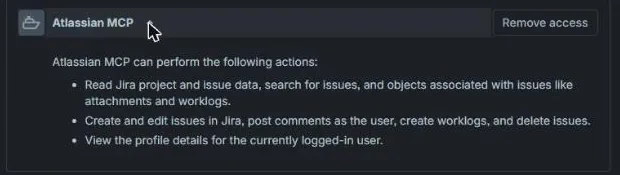
- Revoking takes two steps. After Remove access on the Connected apps page, every Jira call failed at once with “The app is not installed on this instance”. But the server still answered a profile call with the old token. Only after we revoked the token itself did every call return 401 Unauthorized. In a real client, also sign out or remove the server there.
Where your data goes
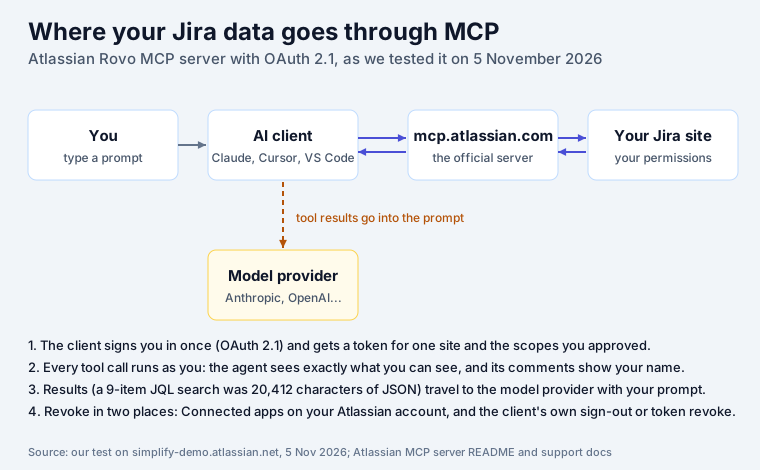
Atlassian’s side is encrypted (“HTTPS (TLS 1.2 or later)”) and respects your permissions and your organization’s IP allowlist. The part teams forget is the last hop: whatever a tool returns becomes part of the prompt and goes to the model provider your client uses, under that provider’s terms. That includes descriptions and comments, so a password pasted into a comment last year can reach an AI provider today. Atlassian’s troubleshooting notes add a practical twist: “Hosted AI clients can send requests from the AI provider’s outbound IP addresses rather than the user’s corporate network or VPN”, so an IP allowlist may block a hosted client even when you are on the VPN.
What it costs
From Atlassian’s pricing page and How Rovo credits work, 5 November 2026:
| Item | Cost |
|---|---|
| The server itself | included in Standard, Premium, Enterprise; not listed on Free |
| Installing, single-product lookups, writes | free (no Rovo credits) |
Search and context calls (search, getTeamworkGraphContext) | “1-10 Rovo credits per call” for most |
| Included credits, Jira | 25 / 70 / 150 per user per month (Standard / Premium / Enterprise) |
| Beyond the allowance, from 3 December 2026 | $0.01 per credit; extra usage is on by default |
A 20-person Standard site gets 500 credits a month, pooled across the organization and shared with Rovo Chat and agents. An agent that searches 100 times a day can use that up in a week. Set a spending limit under Atlassian Administration, Usage, Meters, before December.
Safety checklist
- One site, one product. On the consent screen, uncheck Confluence and Compass unless the agent needs them. They really are left out.
- Start read-only. On the newer consent screen, uncheck Write. Add it later for the agent that needs it.
- Keep delete and admin tools off.
delete_jiraandmanage_jiraare off by default; leave them off. - Confirm every write. Use a client that asks before
executeWriteandexecuteDestructivecalls, and agree on a marker for AI comments, since Jira will show only your name. - Treat Jira text as untrusted input. Atlassian’s README warns that prompt injection “can instruct the agent to exfiltrate data or make unintended changes”. A work item description can contain instructions.
- Keep secrets out of Jira. Tool results go to the model provider. Find and remove keys in descriptions and comments before you connect an agent.
- Admins: decide on domains. By default Atlassian allows its list of supported AI domains; you can block the whole list (not single entries) and add trusted domains in the Rovo MCP server settings.
- Watch the audit log. Atlassian says every tool call is recorded under Insights, Audit log (filter “Rovo MCP User Actions”). We did not check this on our site.
- Cap the credits. Set a spending limit before usage billing starts on 3 December 2026.
- Revoke when done. Connected apps on the Atlassian account, and sign out in the client. Our guide to revoking OAuth access in Atlassian Cloud has the admin side.
Keep secrets out of what the agent reads
Point 6 is where our own app fits. Secret Sentinel scans Jira summaries, descriptions and comments when they are created or edited and replaces credentials in place with a masked marker, so an API key pasted into a comment is gone before any agent can read it. It runs inside Atlassian and is free for up to 10 users. Why this matters more with AI in the loop: AI coding assistants and the secret-sprawl curve and data egress in Atlassian security apps.
Sources
- Atlassian: atlassian-mcp-server README and its
.mcp.json, Get started with the Atlassian MCP server, Supported tools, Understand Atlassian MCP server, read on 5 November 2026. - Atlassian: Jira pricing compare table and How Rovo credits work.
- Our test: a minimal MCP client connected to our Jira Cloud test site on 5 November 2026 with
Jira-only access through the
/v1/mcpendpoint (the token issued for it was not accepted on/v2/mcp); read-only calls first, one comment on a test work item, then Remove access and token revocation. Screenshots from that session.
Frequently asked questions
Is Jira MCP free?
The official Atlassian Rovo MCP server has no separate price, but it needs a paid plan: Atlassian's pricing table lists "Rovo MCP Server" for Standard, Premium and Enterprise and not for Free. Calls that read or write one product, such as looking up a work item or adding a comment, use no Rovo credits. Search and cross-product context calls use Rovo credits, "1-10 Rovo credits per call" for most of them. From 3 December 2026 Atlassian bills usage beyond your allowance at $0.01 per credit, with extra usage on by default.
How do I set up MCP for Jira?
Point your AI client at https://mcp.atlassian.com/v2/mcp and sign in. In Claude Code: claude mcp add --transport http atlassian https://mcp.atlassian.com/v2/mcp, then run /mcp. In VS Code with GitHub Copilot: search the Extensions view for @mcp Atlassian and install. In Cursor: Add to Cursor on cursor.com/marketplace/atlassian. In Claude Desktop: Settings, Extensions, Browse extensions, Plugins, search Atlassian. The first call opens an Atlassian sign-in where you pick the site and what the agent may do.
What does the Atlassian MCP server do?
It lets an AI client read and change your Jira, Confluence and other Atlassian data through tools: get a work item, search with JQL, list sprints and boards, create and edit work items, add comments and worklogs, move work through the workflow, and more. Every call runs with your own Jira permissions. Tools that delete work items or change project settings are off until an admin turns them on.
Is the Jira MCP server safe?
It is as safe as the agent you connect and the access you grant. Atlassian's own README warns that language models "are vulnerable to prompt injection" and that such attacks "can instruct the agent to exfiltrate data or make unintended changes". Grant the least access (one site, only Jira, read-only if you can), keep delete and admin tools off, confirm every write, keep secrets out of Jira text, and revoke access when you are done.
Does the AI see everything in Jira?
It sees what you can see, because every call runs as you. Whatever a tool returns, including descriptions and comments, goes into the conversation and is sent to the model provider of your AI client. In our test, a search for a bug also returned a security ticket that quoted one of its comments, so any secret pasted into a comment would have travelled with it.
How do I disconnect an AI client from Jira?
Two steps. Remove the app under Connected apps in your Atlassian account (id.atlassian.com, manage profile, Connected apps; it is listed as Atlassian MCP), and sign out or remove the server in the AI client. In our test, removing the app stopped Jira calls at once, but the server still answered a profile call with the old token until the token itself was revoked.
Can I use MCP with Jira Data Center?
Not with Atlassian's official server, which connects to Atlassian Cloud sites only. Community MCP servers exist for self-hosted Jira and usually use a personal access token, which carries all of that person's access with no consent screen. We did not test them.
Keep reading
- Secrets and security · 3 minData Privacy and Google Calendar Sync: What OutSync Accesses
- Secrets and security · 4 minCommon Types of Leaked Credentials (and the Fastest-Growing One)
- Secrets and security · 4 minWhy .env Files Are a Security Risk — Even After You Delete Them
- Free toolAPI key leak checker