Jira Deadlines: Due Date JQL, Reminders, the Day Rule (2026)
On this page
- What a Jira due date is, and where it shows
- When does it become overdue? We tested 17 queries
- Due date JQL that works
- The reminder Jira sends on its own, since 2025
- A reminder before the due date: the rule to copy
- Moving a deadline, and seeing all of them at once
- 20 Marketplace apps for Jira deadlines, measured
- Sources
On 13 October 2026 someone asked the Atlassian Community to make Jira treat the due day as inclusive: a task due on the 13th “should become overdue on 14 October, not on 13”. The question is older than Jira Cloud. The field holds a date with no time, the request to give it one was filed in December 2006 and closed, and nothing in the documentation says at what moment “overdue” begins.
So we measured it, on a Jira Cloud site, at 22:38 on the due day, with 17 queries. This guide gives the answer, the JQL that follows from it, the reminder Jira has been sending on its own since 2025 without a line of documentation, a rule for the reminders it does not send, and the 20 Marketplace apps that sell into the gaps, with their installs and prices.
Short answer: a Jira due date is a calendar day. Jira compares it with the day of whatever
you compare it to, never the time, so a work item is overdue from the day after its due date:
duedate < startOfDay() AND statusCategory != Done, and duedate < now() returns exactly the
same list. Jira itself reminds people of work items due today or overdue, by a per-user
digest (Personal settings → Digests) that admins
cannot switch off. Nothing native fires before a due date; for that, copy the
automation rule below or subscribe to a filter.
To see every project’s deadlines on one board and move them by drag and drop, that is what
Deadline Tracker is for.
What a Jira due date is, and where it shows
The Due date field is a date. Not a date and time: the suggestion to store a time, JRACLOUD-11770, was created on 15 December 2006, gathered 51 votes and was closed as “Answered”; a 2013 duplicate, JRACLOUD-32778, was closed “Won’t Do”. Everything below follows from that one fact.
Three things trip people up before they ever write a query, all from Atlassian’s own pages:
- Permission. “Only users with the schedule work items permission can populate the Due date field”, and an admin must grant it to at least one group or space role (Schedule a work item).
- Layout. In a company-managed space you open a work item, select Configure at the bottom and drag Due date into the layout; in a team-managed space “the due date needs to be configured for each work type”. And “Jira’s backlogs will only display values from the system Due Date field, and can’t work with a custom Due Date field” (Add the due date field).
- Cards. A board shows up to three extra fields on its cards, set under Board settings → Layout → Card layout, separately for backlog and board (Customize cards). Business-space cards print the date as “dd / MMM” with no year, which someone asked Atlassian to change in 2023; the request timed out.
Once set, the date appears in four native places: the work item, the List view with its
Due date filter (“Now overdue”, “Due in next N days”, “Between”), the Calendar, which draws
each item from Start date to Due date and shows “Red work items with a clock icon are overdue”,
“Green work items with a tick icon are done”
(JSM calendar docs),
and board cards, where the same Customize cards page offers a query-based card colour with the
sample due <= "24h": a thin coloured strip for anything due within a day, no app needed.
When does it become overdue? We tested 17 queries
The documentation gives one overdue example, duedate < now() and status not in (closed, resolved),
and one for “due by the end of today”, due < endOfDay(). It does not say what happens on the due
day itself, when now() is a time and the field is not.
We ran the comparisons on a Jira Cloud site on 30 October 2026 at 22:38, in the user’s time zone (Europe/Belgrade), with 39 open work items that had a due date: 33 due before that day, one due that day (call it PAY-25), five due later. Every query was parsed with Jira’s strict JQL validation first; then we counted results and checked whether PAY-25, the one due that day, was among them.
| JQL | Results | Due today included? |
|---|---|---|
duedate < now() | 33 | no |
duedate < startOfDay() | 33 | no |
duedate < endOfDay() | 33 | no |
duedate <= now() | 34 | yes |
duedate <= endOfDay() | 34 | yes |
duedate < endOfDay("+1") | 34 | yes |
duedate < startOfDay("+1") | 34 | yes |
duedate = startOfDay(), = endOfDay(), = now() | 1 | yes |
duedate > now(), > startOfDay() | 5 | no |
duedate >= now(), >= startOfDay() | 6 | yes |
duedate < "0d" | 33 | no |
duedate <= "0d" | 34 | yes |
duedate <= "1d" | 35 | yes, plus the one due tomorrow |
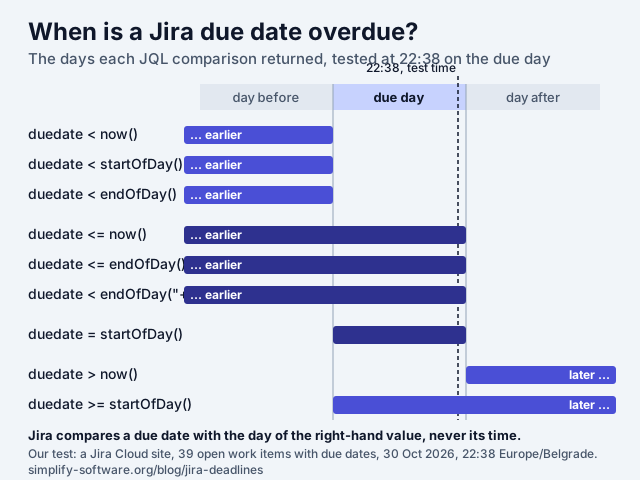
The rule that fits every row: Jira compares the due date with the day of the right-hand value and
ignores its time. < means “before that day”, <= means “on or before it”. On the same day,
now(), startOfDay() and endOfDay() are interchangeable, and endOfDay("+1") means tomorrow.
Three consequences:
- A work item is overdue from the day after its due date, at midnight. The 13 October question is already how JQL behaves; what the asker saw on the board is a display choice, not the data.
- Atlassian’s example for “due by the end of today” leaves today out.
due < endOfDay()returned 33 items in our test and dropped PAY-25. Writeduedate <= endOfDay()orduedate < endOfDay("+1"). - There is no “overdue since 17:00”. If your deadline has a time, put it in a Date/Time custom field, which the same functions support (“Created, Due, Resolved, Updated, custom fields of type Date/Time”), or treat the due day as the last working day and set it one day earlier.
Time zone: now() and the startOf… functions ran in the test user’s zone. If your team spans
zones, the moment a card turns red differs by up to a day between people; the date itself does not.
Due date JQL that works
Twelve queries, all accepted by Jira Cloud’s strict parser on 30 October 2026. due and duedate
are the same field; statusCategory != Done catches every done-like status without naming them.
-- Overdue, oldest first
duedate < startOfDay() AND statusCategory != Done ORDER BY duedate ASC

-- Due today
duedate = startOfDay() AND statusCategory != Done

-- Due in the next 3 days, today included
duedate >= startOfDay() AND duedate <= endOfDay("+3d") AND statusCategory != Done

-- Due in 4 to 7 days
duedate >= startOfDay("+4d") AND duedate <= endOfDay("+7d") AND statusCategory != Done

-- The next two weeks, by date then priority
duedate >= startOfDay() AND duedate <= endOfDay("+14d") AND statusCategory != Done
  ORDER BY duedate ASC, priority DESC

-- This calendar week, Monday to Sunday (endOfWeek() ends on Saturday by default)
duedate >= startOfWeek("+1d") AND duedate <= endOfWeek("+1d") AND statusCategory != Done

-- Due by the 15th of next month
duedate <= endOfMonth("+15d") AND statusCategory != Done

-- Overdue and nobody owns it
duedate < startOfDay() AND statusCategory != Done AND assignee IS EMPTY

-- Mine, due in the next 3 days
duedate <= endOfDay("+3d") AND statusCategory != Done AND assignee = currentUser()

-- Past the date but not resolved (resolution-based projects)
duedate < startOfDay() AND resolution IS EMPTY

-- No deadline at all (JQL never returns empty fields unless you ask)
duedate IS EMPTY AND statusCategory != Done AND type != Sub-task

-- For a reminder rule: due in the next 3 days, has an assignee, grouped by person
duedate <= endOfDay("+3d") AND duedate >= startOfDay() AND statusCategory != Done
  AND assignee IS NOT EMPTY ORDER BY assignee, duedate
Two things JQL will not do:
- Find moved deadlines.
duedate CHANGED AFTER startOfWeek("-1w")andduedate CHANGED FROM EMPTYboth come back with “History searches do not support the ‘duedate’ field.” The change is in each work item’s history, but you cannot search for it. (Automation’s Field value changed trigger does fire on Due date, “All system and custom fields are supported”, so a rule can log or comment the change as it happens.) - Count business days. The functions step in days, weeks and months. Automation smart values
have
plusBusinessDays, “Monday to Friday, 9am to 6pm”, with no holidays; for a deadline in working days with your own holidays, use the business days calculator and set the date it gives you.
The reminder Jira sends on its own, since 2025
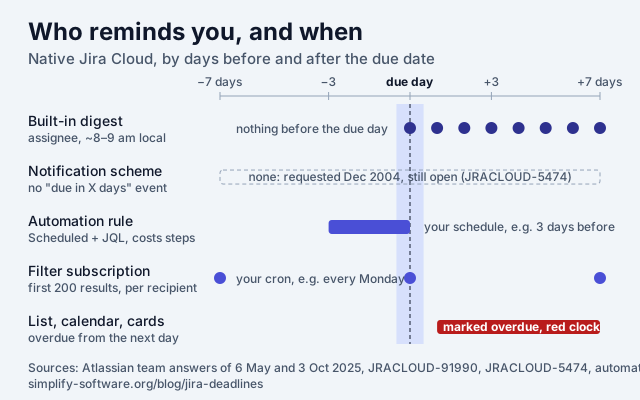
In May 2025 a Jira admin asked the Community why users “are suddenly getting ‘you have work items that are overdue’ emails” and how to stop them. The accepted answer came from Phong Hong Nguyen of the Atlassian team the same day: “Navigate to Notification Settings → Digests → Due or overdue work items.” Asked in October 2025 whether an admin could turn it off for a project or an organization, the same person answered: “Due date notifications are personalised alerts. Each user receives a unique notification detailing their specific work items due today or overdue. Therefore, due date notifications should always be user-controlled and not disabled by admins.” (the thread)
What we know about it, and from where:
- When and to whom. “Users will receive daily notifications at around 8-9am local time through email and the in-app drawer”, for their own due-today and overdue work items, says the suggestion JRACLOUD-91990, “Allow Admins to disable ‘Due Date/Overdue Alerts’ Notifications for Jira site”, created 17 January 2025 and still “Gathering Interest” with 77 votes. The only admin-side switch it names is turning off all outgoing mail.
- Where the switch is. On our own site on 30 October 2026: Personal settings → Digests → “Due or overdue work items”, with Email and In app ticked by default, next to “Your weekly update”. The support page Manage your Jira personal settings does not mention Digests at all; the Community answer is the documentation.
- What it does not do. Nothing before the due day, nothing to anyone but the person the work item is assigned to, as far as Atlassian has described it, and no wording of your own. One vendor’s listing adds that “Jira’s daily digest stops after 7 days overdue”; that is the vendor’s claim, which we did not test.
- The 21-year-old gap. A notification event for “due in X days”, which would let a notification scheme email anyone before a deadline, is JRACLOUD-5474, created 10 December 2004, 57 votes, “Gathering Interest”. Every “approaching deadline” app on the Marketplace exists because of it.
A reminder before the due date: the rule to copy
Jira Automation fills the gap for a price in steps. The rule has three parts, each from Atlassian’s trigger and smart value documentation:
-
Trigger: Scheduled, every day at 8:00, with a JQL. “You can also choose to enter a JQL query. If you do, actions in this flow will execute on the work items included in the query.”
duedate >= startOfDay() AND duedate <= endOfDay("+3d") AND statusCategory != Done AND assignee IS NOT EMPTY -
Action: Send email to the Assignee. Atlassian marks the plain action deprecated and points to Send customized email, “a branded email from a custom email address”, which the Free plan caps at 100 emails in 24 hours. Subject and body:
{{issue.key}} is due {{issue.duedate.mediumDate}} {{issue.key}} {{issue.summary}} Due: {{issue.duedate.fullDate}} · Status: {{issue.status.name}} {{issue.url}}mediumDateprints “Nov 1, 1979”,fullDate“Thursday, November 1, 1979”; both are in Atlassian’s format table.{{issue.duedate.compareTo(now)}}is there too if you want a branch for “already overdue”. -
Nothing else. No lookup, no condition: the trigger’s JQL already picked the work items, and a day with no matches runs only the trigger. Matching items get a mail every morning until the date passes or the item is done; for a single mail, change the first clause to
duedate = startOfDay("+3d").
What it costs. Atlassian bills automation by the step from 3 December 2026 (“An automation step is a single executed part of an automation flow”, and “the trigger execution itself is charged as one step” even with no match, How is my usage calculated). By that definition a daily run is 1 step for the trigger plus 1 for each work item it emails. Ten reminders a day is about 330 steps a month, our arithmetic: more than twice the Jira Free allowance of 150 steps a month for the whole site, and a small part of Standard’s 400 per user. The automated reports guide has the same arithmetic for weekly digests.
The cheaper alternative is a filter subscription: save the JQL as a filter, Details → New subscriptions, pick a group and a cron. Each member gets their own list, “evaluated with the recipient as the current user”, and “only the first 200 results of a filter are sent” (Manage filters). No steps, no wording of your own, and a weekly cadence at best for most teams.
Two more rules worth having, both straight from Atlassian:
- Due date follows the sprint. Trigger Field value changed (Sprint) → Edit work item, Due date
=
{{issue.Sprint.endDate.jiraDate}}, or{{issue.sprint.last.endDate.jiraDate}}when an item has been through several sprints (Atlassian KB, May 2025). - “Due Friday” means Friday.
{{now.withNextDayOfWeek("FRI").jiraDate}}sets the coming Friday;{{now.plusBusinessDays(5).jiraDate}}adds five working days, Monday to Friday, no holidays.
Moving a deadline, and seeing all of them at once
Rescheduling is a field edit, so bulk edit, the calendar (drag an item to another day and “The calendar will automatically fill in the issue’s due date field with this date”) and automation all work. What Jira lacks is one place for every project’s deadlines: the list and calendar live inside a space, a dashboard needs a gadget per filter, and a saved filter is a list, not a board.
That is the gap we built Deadline Tracker for. It puts the work items that are overdue or due in the next two weeks, across all projects you can see or the ones you pick, on one board with five columns: Overdue, Today, 1-3 Days, 4-7 Days and 1-2 Weeks, the same windows as the JQL above. Drop a card on a column and the due date changes in Jira, as you, with your permissions; Undo restores the exact previous date, which JQL cannot even find. It filters by people and groups, saves views, adds a dashboard gadget and exports the board as CSV. It does not send reminders: for those, use the digest and the rule above.
20 Marketplace apps for Jira deadlines, measured
Method: the Marketplace REST API on 30 October 2026, Jira Cloud searches for “deadline”, “due date”, “reminder” and “overdue”, 25 results each; 56 apps matched a name or summary about reminders, deadlines, due dates, overdue work, calendars or date gadgets. We kept the 20 whose listing is about due dates or reminders and left out time-in-status, worklog reminders, checklists, SLA and approval tools. Installs, stars and reviews are the Marketplace’s own counts; prices are Atlassian’s live pricing for 10 users a month and per user a month at 100 users; “Connect” apps run on the framework Atlassian stops supporting on 31 January 2027. Descriptions are the vendors’ own words, not our test.
| App | Vendor | Installs | Stars (reviews) | 10 users | Per user, 11–100 | Platform | Last release |
|---|---|---|---|---|---|---|---|
| My Reminders for Jira | Atlassian Labs | 3,431 | 3.5 (79) | Free | Free | Forge | 30 Apr 2026 |
| Reminder for Jira (Follow-Ups, Deadlines & Notifications) | Teamlead | 1,179 | 4.5 (32) | $2.00 | $0.35 | Connect | 20 Oct 2026 |
| Issue Calendar for Jira | ALDEVA DIGITAL | 1,139 | 3.8 (17) | $0 | $0.45 | Forge | 18 Oct 2026 |
| Notification Assistant for Jira - Email | Modus Create | 1,134 | 4.4 (57) | $0 | $2.00 | Forge | 30 Oct 2026 |
| Reminders for Jira | The Starware | 706 | 4.4 (20) | $0 | $0.40 | Forge | 26 Oct 2026 |
| Inbox for Jira (smart notifications) | Rixter AB | 372 | 4.4 (22) | $0 | $1.00 | Forge | 4 Sep 2026 |
| Three Dimensional Date Gadgets | Akeles Consulting | 221 | 4.2 (8) | $0 | $0.20 | Forge | 11 Aug 2026 |
| Boomerang: Reminders for Jira Issues | SaaSJet Studios | 199 | 4.4 (9) | $1.00 | $0.15 | Connect | 2 Jul 2025 |
| Simple Reminder – Email Notifications | Simple | 142 | 4.9 (15) | $0 | $0.25 | Forge | 6 Jul 2026 |
| Countdown Utilities: Gadgets and Fields | Dacha | 114 | 3.8 (4) | $0 | $0.41 | Forge | 28 Jun 2026 |
| Easy Reminder for Jira | Shinetech Software | 80 | – (0) | Free | Free | Connect | 9 Aug 2025 |
| e-Reminders for Jira | BugsIO Solutions | 76 | 2.9 (9) | $5.00 | $0.50 | Connect | 3 Oct 2022 |
| Deadline Tracker: Due Date & Overdue Board for Jira (ours) | Simplify | 48 | – (0) | $0 | $0.10 | Forge | 21 Oct 2026 |
| Remind Me For Jira | Betasoftware | 19 | – (0) | Free | Free | Forge | 22 Apr 2025 |
| AI Reminders for Jira and Rovo | DSR Corporation | 14 | 5.0 (1) | $0 | $0.25 | Forge | 1 Oct 2026 |
| HeadsUp: AI Reminders and Notifications for Jira | Seibert | 9 | – (0) | $3.00 | $0.30 | Forge | 27 Oct 2026 |
| Due Date Alerts | addressHQ | 4 | – (0) | $0 | $0.20 | Forge | 18 Feb 2026 |
| Deadline Defender for Jira | Halverton and Company | 3 | 5.0 (2) | $0 | $0.45 | Forge | 15 May 2026 |
| Overdue Digest for Jira (Weekly Reminder) | Myriastra Studio | 1 | – (0) | $4.00 | $0.80 | Forge | 2 Sep 2026 |
| Deadline Guard for Jira | FunAMP | 0 | – (0) | $5.00 | $0.50 | Forge | 13 Aug 2026 |
What the table says, read with the sections above:
- Reminders before the due date are the crowded lane, and the most installed one is Atlassian’s own free Labs app with the lowest rating in the top ten (3.5 stars over 79 reviews). The listings of Reminder for Jira, Reminders for Jira, Simple Reminder, Boomerang and Due Date Alerts all describe time-based or JQL-based mails; Due Date Alerts’ listing is the most specific, “at 7 days, 3 days, 1 day before due dates, plus overdue alerts”, and its “Jira has no built-in notification for approaching due dates” is still true, for approaching. Two of the five run on Connect.
- Digests and inboxes (Inbox for Jira, Overdue Digest) compete with the free 2025 digest; Overdue Digest’s whole pitch is the window the native one supposedly stops at.
- Calendars and gadgets (Issue Calendar, Three Dimensional Date Gadgets, Countdown Utilities) add what the native calendar lacks: cross-project views, month breakdowns and countdown fields.
- Audit and hygiene are the newest niches: Deadline Defender (“See the original deadline, every push, who made it, and when”, the thing JQL cannot search), Deadline Guard (moves due dates off weekends and holidays). Both have under five installs; the need is real, the market has not noticed.
- One board for every project’s deadlines is ours alone in this set, free up to 10 users and $0.10 per user after that.
If a free, native route exists for what you need, use it first: the digest for “due today or overdue”, a filter subscription for a weekly list, the rule above for “three days before”. Install an app for the things Jira has refused for twenty years: reminders on your schedule with your words, a history of moved dates, or one board across projects.
Sources
Every quote above was read on 30 October 2026: Atlassian Support pages JQL functions, Schedule a work item, Customize cards, Manage your Jira personal settings, Use the calendar, automation triggers, date and time smart values, automation usage and Manage filters; the public suggestions JRACLOUD-11770, JRACLOUD-32778, JRACLOUD-5474, JRACLOUD-91990, JWMCLOUD-8 and JWMCLOUD-591; the Community thread of 6 May 2025 with the Atlassian team’s answers; the Marketplace REST API for the 20 apps; and our own JQL test, whose 17 queries and counts are in the table above. The suggestion numbers and page titles are given so you can check every claim yourself.
Frequently asked questions
How do I set a deadline in Jira?
Fill the Due date field of the work item, when creating it or later. The field holds a calendar day, no time. If you cannot see it, a space admin adds it to the layout (open a work item, Configure at the bottom, drag Due date in; team-managed spaces need it per work type), and you need the Schedule work items permission to fill it.
When does a Jira work item become overdue?
The day after its due date. Jira compares a due date with the day of the other side, not the time: in our test at 22:38 on the due day, duedate < now() still left the work item out, and duedate <= now() included it. So the query for overdue is duedate < startOfDay() AND statusCategory != Done, and the due day itself never counts.
Does Jira send due date reminders?
Since 2025, yes, for the due day and after it: each user gets a personal digest of their work items due today or overdue, by email and in the in-app drawer, at about 8 to 9 am local time. It is switched on by default under Personal settings, Digests, "Due or overdue work items", and admins cannot turn it off for everyone. Nothing native fires before the due date; for that you need an automation rule or a filter subscription.
Why is the due date not visible in my Jira project?
It is not in the layout, or you lack the permission. In a company-managed space, open a work item, select Configure at the bottom and drag the Due date field into the layout; in a team-managed space, do it for every work type. On board cards, add it under Board settings, Layout, Card layout (up to three extra fields). The backlog shows only the system Due date field, never a custom date field.
Can I find Jira work items whose due date was moved?
Not with JQL: Jira answers "History searches do not support the duedate field" to duedate CHANGED. Each work item keeps the change in its history, and a Marketplace app can collect those changes across a project. If you move dates yourself on the Deadline Tracker board, Undo restores the exact previous date.
What JQL shows what is due this week?
duedate >= startOfDay() AND duedate <= endOfDay("+7d") AND statusCategory != Done for a rolling week. For the calendar week, endOfWeek() ends on Saturday by default and startOfWeek() starts on Sunday, so a Monday-to-Sunday week is duedate >= startOfWeek("+1d") AND duedate <= endOfWeek("+1d").