Jira Status Report: Weekly Template and 6 Tested JQL Queries
On this page
It is Thursday afternoon and the status report is due at five. You open last week’s page, copy it, and start clicking through the board to count what moved. Halfway through you notice the “Done this week” list from your saved filter is shorter than what the team actually shipped.
That is not your memory. On the Jira Cloud site we tested, a third of the work in a Done status had
no resolution date, so the classic resolved >= -7d query could never find it. Below is a weekly
status report built from six JQL queries that we parsed and ran on that site, a rule for the
colour, and where to put the result so that writing it takes ten minutes, not an hour.
Short answer: a Jira status report is six saved searches plus three lines only a person can
write. Count finished work with statusCategory = Done AND statusCategoryChangedDate >= startOfWeek(),
not resolved: done work without a resolution has no resolved date. Add in progress, blocked,
overdue, due in the next seven days and new this week, then put the lists on a Confluence page with
the Jira work items macro (type /jira). The template and all six queries are below.
The template
Copy this into Confluence, an email or Slack. The {{...}} lines are where the JQL lists go; the
rest is yours to write.
Weekly status: <project or team>, week of <date>
Status: Green | Amber | Red - <one sentence why>

Done this week (<count>)
  {{query 1: done this week}}

In progress (<count>)
  {{query 2: in progress}}

Blocked (<count>) - and who can unblock it
  {{query 3: blocked}}

Overdue (<count>) and due in the next 7 days (<count>)
  {{query 4: overdue}}
  {{query 5: due next 7 days}}

New this week (<count>) - scope that arrived after planning
  {{query 6: new this week}}

Risks: <what could make next week Amber or Red>
Decisions or help needed: <from whom, by when>
Keep the order. Readers skim the first two lines and the asks at the end; everything in between is evidence.
The six queries
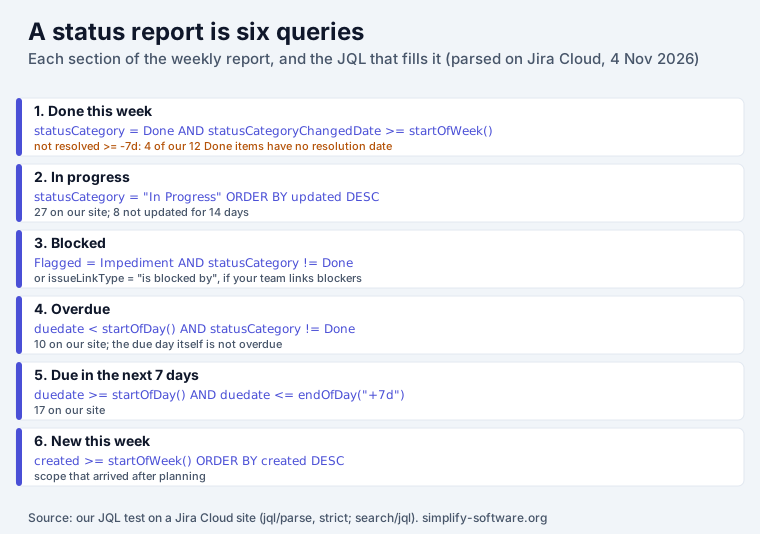
Add project = KEY AND (or your board’s filter) in front of each one. Every query below passed
Jira Cloud’s strict parser (/rest/api/3/jql/parse?validation=strict), and we ran each against
our demo site on 4 November 2026; the counts in the notes are from that run.
1. Done this week
statusCategory = Done AND statusCategoryChangedDate >= startOfWeek() ORDER BY statusCategoryChangedDate DESCThis counts work by the moment it moved into a Done-category status. It finds done work whether or not the workflow set a resolution, and work that was reopened drops out, because it is no longer in the Done category. See the two traps for why the usual queries get this wrong.
2. In progress
statusCategory = "In Progress" ORDER BY updated DESCUsing the status category instead of status names keeps the query working across workflows with “In Review”, “QA” or “Testing”. On our site it returned 27 work items. To find the ones that look alive but are not, add a stale check:
statusCategory = "In Progress" AND updated <= -14d8 of the 27 had not been updated for two weeks. Those belong in the report too, as a question.
3. Blocked
Flagged = Impediment AND statusCategory != DoneFlagging is the quickest way to mark a blocker on a board card. If your team links blockers instead, use:
issueLinkType = "is blocked by" AND statusCategory != DoneBoth parsed. Our demo site returned none for either, which is the usual answer on teams that do not use either habit; the report is a good reason to start one.
4. Overdue
duedate < startOfDay() AND statusCategory != Done ORDER BY duedate ASCThe due day itself is not overdue: Jira due dates have no time, and in our
Jira deadlines test duedate < now() and duedate < startOfDay() returned
the same work items late on the due day. 10 on our site.
5. Due in the next 7 days
duedate >= startOfDay() AND duedate <= endOfDay("+7d") AND statusCategory != Done ORDER BY duedate ASCThe quotes in endOfDay("+7d") are needed: without them Jira’s parser stops with “The character ’+’ is a
reserved JQL character”. 17 on our site.
6. New this week
created >= startOfWeek() ORDER BY created DESCWork that arrived after the week was planned. If it is large next to the done list, that is the
status report’s real story. For a sprint, sprint in openSprints() AND created >= -7d keeps it to
work added to the current sprint.
Two traps that undercount or overcount done work
Trap 1: done work without a resolution. resolved is the resolution date. A work item gets one
only when its workflow sets a resolution on the way to Done, and many team-managed and hand-built
workflows do not. On our test site, statusCategory = Done returned 12 work items and
statusCategory = Done AND resolution = EMPTY returned 4 of them. Any report built on
resolved >= -7d silently misses a third of the done work there. The status category change date
does not depend on the resolution.
Trap 2: reopened work counted as done. status CHANGED TO Done DURING (startOfWeek(), now())
looks right and is common advice. On our site it returned PAY-12, which was moved to Done on Monday
and back to QA later that week: counted as done, still not done. If you prefer CHANGED, add
AND statusCategory = Done.
Check your own site in one minute: run statusCategory = Done AND resolution = EMPTY. If it returns
anything, do not count done work by resolved.
The status colour: a rule you can defend
The colour is judgement, but a rule makes it consistent from week to week. Write yours down once. A starting point:
| Status | When |
|---|---|
| Green | nothing blocked for more than 2 days, overdue work is under 10% of open work, the next milestone date holds |
| Amber | something blocked for 3 days or more, or overdue work is 10% or more of open work, or the next milestone needs a decision |
| Red | the next milestone date will be missed without a change of scope, people or date |
The thresholds are ours, not a standard; change them to fit the team. What matters is that “Amber” means the same thing in week 12 as it did in week 3, and that the sentence after the colour says why.
Where to put it
A Confluence page (best for history). Edit the page, type /jira and choose Jira work
items, then paste a query. Display options sets “the columns and number of work items”, and
Total work item count shows only the number, linked to the search in Jira, which is right for
the count in each heading. The macro always shows live results, so copy the page each week (or use
a page per week) if you want last week’s report to stay last week’s.
A Jira dashboard (best for a live view). Save each query as a filter and add a Filter Results gadget per section. Good for the team; less good for a manager who wants a written summary.
An email (best for people outside Jira). A filter subscription emails a saved search on a schedule, and an automation rule can send a digest. Our guide to automated Jira reports compares the six native ways and their limits, including the automation price change on 3 December 2026.
Writing the parts Jira cannot
Every list above comes out of Jira. The colour, the risks and the asks do not, and that is where a status report earns its time. Two habits help:
- Write the asks first. If the report needs a decision, it goes in line two, not paragraph six.
- Explain the numbers that moved. “Overdue went from 4 to 10 because the payment provider’s API change landed mid-sprint” is the sentence a manager reads; the list is the evidence.
If the writing is the slow part, Report Assistant, our Jira app, has a Rovo agent that drafts your daily, weekly or monthly report from your own Jira activity (work you were assignee or reporter of, your comments and the time you logged), in a template you set, and rolls weeks up into months. It reads Jira as you, so it sees only what you can see. It does not post anywhere by itself: you edit the draft and copy it into Slack, Confluence or an email. It needs Rovo on the site, and it writes your own report, not the team’s colour.
How we tested
- Site: simplify-demo.atlassian.net, a Jira Cloud demo site with sample projects, in the owner’s browser, on 4 November 2026, 19:20 Central European Time.
- Parsing:
POST /rest/api/3/jql/parse?validation=strictfor all queries on this page; none returned an error. - Counts:
GET /rest/api/3/search/jql, first 100 results, for each query. The numbers describe a demo site and will differ on yours; the two traps are about how the fields work and will not. - Documentation: Atlassian’s Display Jira work items in a list for the Confluence macro, read the same day.
Frequently asked questions
How do I create a status report in Jira?
Jira has no status report button. Build one from saved searches: one JQL query per section (done this week, in progress, blocked, overdue, due next week, new this week), then show them on a Confluence page with the Jira work items macro (type /jira), on a dashboard with Filter Results gadgets, or in a scheduled email. Add three lines a person writes: the status colour, the risks and the asks.
What should a weekly status report include?
An overall status (Green, Amber or Red) with one sentence why, what was finished, what is in progress, what is blocked and by whom, what is overdue or due next week, what new work arrived, and the decisions or help you need. The numbers come from Jira; the colour, risks and asks are judgement and should be written by a person.
Why does "resolved >= -7d" miss work that was done this week?
Because resolved is the resolution date, and a work item only has one if its workflow sets a resolution. On our Jira Cloud test site, 4 of 12 work items in a Done status had no resolution, so no resolved query can ever find them. statusCategory = Done AND statusCategoryChangedDate >= startOfWeek() counts by the move into the Done category instead.
Why not use "status CHANGED TO Done" for the done list?
It also counts work that was reopened. On our test site it returned PAY-12, which was moved to Done on Monday and back to QA later in the week. If you use it, add AND statusCategory = Done to keep only work that is still done.
How do I show a Jira status report in Confluence?
Edit the page, type /jira and choose Jira work items, then paste a JQL query from the template. Display options sets the columns and the number of work items, and Total work item count shows just the number, linked to the search in Jira. Make a copy of the page each week if you want the history; the macro always shows live results.
Can a status report be generated automatically from Jira?
The lists can: filter subscriptions email a saved search on a schedule, and automation rules can send a digest or create a Confluence page. The judgement cannot: the status colour, the risks and the asks need a person. Our guide to automated Jira reports compares the six native ways, and a Rovo agent such as our Report Assistant can draft the text from your Jira activity for you to edit.