Jira Markdown: 87 Elements Pasted and Sent Through the API
On this page
- Does Jira support Markdown?
- Paste Markdown into a work item: what converts
- Checklists stay text
- The five pastes that break
- What stays as plain text
- Code blocks, Mermaid and PlantUML
- Markdown through the REST API
- Markdown to Jira wiki markup
- Wiki markup is not a lossless round trip
- Getting Markdown out of Jira
- Before you paste Markdown into Jira
- Where our apps fit
- How we tested
A developer asks an AI assistant to write up a bug, gets a tidy Markdown answer and pastes it into a Jira work item. It looks right. Then a script files the next ten bugs the same way through the API, and every heading turns into a numbered list, every italic word turns bold, and every strikethrough sinks into subscript.
Jira Cloud has two different answers to Markdown, depending on how it arrives. So we ran the same 87 Markdown cases we used for our Confluence Markdown test through a Jira Cloud site, and read back what Jira stored.
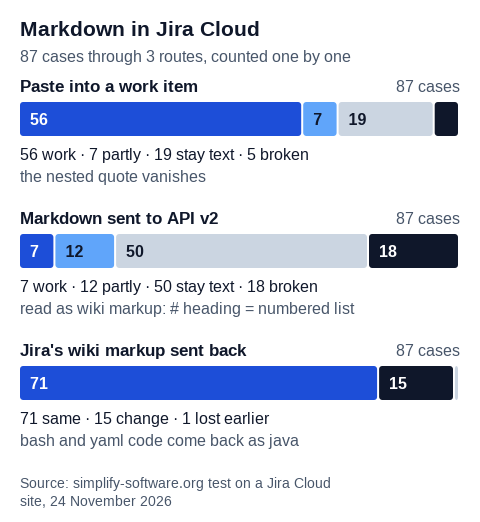
Short answer: pasting Markdown into a Jira Cloud description or comment works for the
everyday parts: 56 of 87 cases became the right element (headings, bold, lists, quotes, code
blocks with their language, links, images, tables). Checklists do not: - [ ] todo stays as text.
Sent through the REST API, Markdown fails: v3 rejects a plain string, and v2 reads it as Jira
wiki markup, where only 7 of 87 came out right and 18 changed meaning (# Title became a
numbered list). For scripts, convert to wiki markup first; the table below shows each element as
Jira itself writes it. There is no way to get Markdown back out of Jira.
Does Jira support Markdown?
As a way in, yes. As a format, no. On a Jira Cloud site on 24 November 2026:
| Route | What happens | Our result |
|---|---|---|
| Paste into a description or comment | converted on paste; a Paste options menu offers Markdown or plain text | 56 of 87 work, 5 break |
| Type Markdown while writing | ## , **bold**, - , 1. , > , ``` and [] turn into formatting | Atlassian’s shortcuts |
| REST API v3 with a Markdown string | rejected: “not valid Atlassian Document Format (ADF) content” | 0 of 87 |
| REST API v2 with a Markdown string | accepted, but read as wiki markup | 7 of 87 work, 18 break |
| Get Markdown out | no export; v2 returns wiki markup, v3 returns ADF | no Markdown route |
Atlassian’s Markdown and keyboard shortcuts page puts the limit plainly: “You can copy raw markdown into the Atlassian editor but you can’t convert content from it into raw markdown.” Once pasted, a description is Jira content. Confluence now has Export to Markdown and an undocumented Markdown body in its API; Jira has neither.
Paste Markdown into a work item: what converts
We pasted all 87 cases as plain text into the description of a new work item, the way text arrives from an AI chat, a README or a code editor, saved it, and read the stored content back through the API. A real Ctrl+V from the clipboard gave the same result for every case, and so did a paste into a comment.
| Group | Cases | Converted | Stayed as text | Broke or partly |
|---|---|---|---|---|
| Headings (ATX, setext, H7) | 11 | 9 | 2 | 0 |
| Bold, italic, code, breaks | 17 | 10 | 4 | 3 |
| Lists and checklists | 14 | 10 | 4 | 0 |
| Quotes, alerts, rules | 8 | 5 | 0 | 3 |
| Code blocks | 12 | 12 | 0 | 0 |
| Links and images | 9 | 7 | 0 | 2 |
| Tables | 7 | 3 | 1 | 3 |
| Footnotes, HTML, math, TOC | 9 | 0 | 8 | 1 |
The everyday parts are safe: # to ###### headings and the underlined setext style, bold and
italic in both spellings, ~~strikethrough~~, inline code (even with a backtick inside), bullet
lists with -, * or +, numbered lists with 1. or 1) (a list starting at 3 keeps its 3),
lists nested three deep, quotes, a list inside a quote, horizontal rules, links, reference links,
email links and images from a URL. Pipe tables arrive with a real header row and with bold, code
and links in the cells. A bare URL or <https://…> becomes a smart link.
After the paste a small clipboard icon appears by the cursor. Its Paste options menu has two entries: Use Markdown, ticked, and Use plain text. That menu is the undo when a paste goes wrong: it puts back the raw characters you pasted.
Checklists stay text
The case most people care about fails quietly. - [ ] todo and - [x] done become a bullet list
that reads ”[ ] todo” and “[x] done”: brackets, no boxes, nothing to tick. Nested and numbered
checklists do the same. Confluence turns the same paste into ticked and unticked action items, so a
checklist that worked on a page stops working when it moves to the work item.
Jira’s own action items exist, but only from the keyboard: type [] then Space in the description.
We tested what those action items can and cannot do (no JQL, no progress on the board, no block on
Done) in our Jira checklist test. If the checklist is a team rule rather
than a reminder, it needs a checklist app.
The five pastes that break
Five cases came out wrong, and one of them disappears without a trace.
| You paste | Jira stores | Do this instead |
|---|---|---|
> outer and then >> inner | nothing: both lines vanish | flatten the quote before pasting |
| a table without outer pipes | header right, but “Ana” and “Dev” arrive as “na |” “ev” | add the outer pipes: | Ana | Dev | |
| an image inside a link | the image, with a stray [ above and ](link below it | paste the image, then add the link |
Not \*italic\* | the backslashes shown, and the word italic anyway | remove the escapes |
YAML front matter between --- lines | a divider and a heading reading “title: Page tags: [a, b]” | delete the front matter before pasting |
The nested quote is the one to remember: Confluence loses it the same way. If a paste looks shorter than the source, choose Use plain text at once and fix it by hand.
Seven more came out partly right. A backslash at the end of a line (line one\) makes a break
but stays visible. An ordinary line break inside a paragraph is kept as a break, where Markdown
would join the two lines into one (Confluence joins them). <https://…> becomes a link with the
< and > still showing. GitHub alerts, > [!NOTE] and > [!WARNING], become plain quotes with
”[!NOTE]” in them; Confluence makes real panels from them. Table alignment (:---:) is dropped.
And a code cell holding `a \| b` shows a \\| b, two backslashes where the reader expects
none.
What stays as plain text
Nineteen cases were left as the characters you pasted. Readers see the syntax:
- Checklists:
- [ ], nested- [ ]and1. [ ](above). - Footnotes (
[^1]), definition lists,==highlight==,H~2~Oandx^2^, heading ids ({#install}),[TOC]and a seventh-level heading (#######). - Single tildes:
~deleted~stays as it is. Two tildes strike through. - Emoji codes such as
:rocket:. A real emoji character (🚀) survives. - HTML, all of it:
<b>,<kbd>,<div align="center">,<details>, an HTML comment and<br>inside a table cell. Check pasted text for comments that were never meant to be read. - Math in
$…$and$$…$$.
Code blocks, Mermaid and PlantUML
All 12 code cases converted, including ~~~ fences and four-space indented code, and the language
after the fence was kept exactly as written: python, js, typescript, bash, json, yaml,
even hcl. Pasted code blocks wrap long lines.
A ```mermaid or ```plantuml block becomes a code block like any other: readers see the
source, not a diagram. Jira has no built-in Mermaid. Mermaid in Jira
compares the apps that draw it; ours, Mermaid Tabs for Jira,
draws Mermaid and PlantUML in a tab on the work item from the same source you would have pasted.
Markdown through the REST API
This is where Markdown goes wrong in Jira, and where AI agents and scripts send it. Jira Cloud has two versions of the work item API, and neither takes Markdown.
REST API v3 wants Atlassian Document Format, a JSON tree. A description sent as a plain string was refused with 400 and “The field value is not valid Atlassian Document Format (ADF) content.”
REST API v2 accepts a string, and reads it as Jira’s older wiki markup. We sent all 87 cases
to POST /rest/api/2/issue as the description and read the result:
| Markdown you send | What Jira v2 makes of it |
|---|---|
# Heading 1 | a numbered list item: # is a numbered list |
## Heading 2 | a numbered list nested two deep |
*italic* | bold: * is bold in wiki markup |
**bold** | bold, with a stray * on each side |
__bold__ | italic, with stray underscores |
~~deleted~~ | subscript, with stray tildes: ~ is subscript |
--- between paragraphs | an em dash (—), not a rule |
Claim.[^1] | two broken attachment placeholders |
- [ ] todo | a bullet reading ”[ ] todo” |
1. one | the text “1. one” |
- nested item | a flat list: nesting needs ** in wiki markup |
```python | the backticks and the code as plain lines |
[Atlassian](https://…) | brackets shown, only the URL linked |
> A quote | the text ”> A quote” |
| a pipe table | a table with no header and --- | --- as a data row |
Seven of 87 came out right: _italic_, - and * bullets, a bare URL, a real emoji, two
trailing spaces for a line break, and backslash escapes. Eighteen changed meaning, which is worse
than staying as text, because the result looks deliberate.
The fix is to send Jira what it reads. Convert Markdown to wiki markup and send it to v2, or build ADF for v3. A v2 call with wiki markup looks like this:
curl -u [email protected]:$API_TOKEN \
  -H 'Content-Type: application/json' \
  -X POST https://your-site.atlassian.net/rest/api/2/issue \
  -d '{"fields":{"project":{"key":"KAN"},"issuetype":{"name":"Task"},
       "summary":"Checkout fails on Safari",
       "description":"h2. Steps\n# Open checkout\n# Pay with Apple Pay\n\n{code:bash}npm test{code}"}}'
Markdown to Jira wiki markup
Rather than trust a converter, we let Jira write the table. We pasted the 87 cases into the editor, then read the same description through API v2, which returns it as wiki markup:
| Markdown | Jira wiki markup (as Jira returns it) |
|---|---|
# Heading 1 … ###### | h1. Heading 1 … h6. |
**bold** or __bold__ | *bold* |
*italic* or _italic_ | _italic_ |
***both*** | *_both_* |
~~deleted~~ | -deleted- |
`code` | {{code}} |
- item / * item | * item |
1. item | # item |
nested - item | ** item |
| a bullet under a number | #* item |
> quote | {quote}quote{quote} |
--- | ---- |
```python fence | {code:python}…{code} |
| fence without a language | {noformat}…{noformat} |
[text](https://…) | [text|https://…] |
 | !https://…/a.png|width=…,height=…,alt="alt"! |
| a pipe table | ||Head||Head|| then |cell|cell| |
Together, a short bug report in wiki markup that Jira reads correctly through v2:
h2. Steps
# Open checkout
# Pay with Apple Pay
#* Safari 18 only

{quote}Payment failed{quote}

||Name||Role||
|Ana|Dev|

{code:python}print("hi"){code}

See [Atlassian|https://www.atlassian.com]
Wiki markup is not a lossless round trip
Reading wiki markup out of Jira and writing it back is how most scripts move descriptions between sites. We sent Jira’s own wiki markup of the 87 pasted cases back through v2 and compared the result with the original. 71 came back the same, 15 of 87 changed, and one was already lost on paste:
- Code languages.
bashandyamlblocks came back marked as java.typescript,hcl,mermaidandplantumlcame out of Jira as{noformat}and came back with no language.python,jsonandjssurvived. - Text that wiki markup reads as syntax. A literal
~deleted~came back as subscript, and a literal####### Seven hashesas a numbered list nested seven deep. - Structure. A numbered list starting at 3 restarts at 1, a second paragraph inside a list item becomes a line break, and escaped characters change.
- Tables. Every header cell gains bold text; the two tables that were already damaged on paste got worse.
If a migration script copies descriptions as wiki markup, check the code blocks afterwards. ADF is the format Jira stores, so copying it through API v3 avoids this conversion altogether.
Getting Markdown out of Jira
There is no Export to Markdown in Jira Cloud, and the API has no Markdown output. A script can read the description as wiki markup (v2) or ADF (v3) and convert that to Markdown itself, with the same care about code languages and tables as in the round trip above.
Before you paste Markdown into Jira
- Replace
- [ ]checklists with action items ([]then Space) or a checklist app. - Flatten nested quotes (
>>); they vanish. - Give every table outer pipes.
- Delete YAML front matter, HTML comments and footnotes.
- Remove the
[!NOTE]and[!WARNING]markers; the alerts arrive as plain quotes. - For a script: never send Markdown to the API. Convert to wiki markup for v2, or build ADF for v3.
Where our apps fit
Two of the gaps above are the ones our Jira apps fill. A pasted checklist stays text, and Jira’s action items cannot block Done or show up in JQL. Team Checklist for Jira keeps a shared checklist on the work item with progress, templates such as a Definition of Done, JQL fields and a workflow check that stops Done while items are open. And a pasted Mermaid or PlantUML block stays as code; Mermaid Tabs for Jira draws it in a tab next to the description. Neither app converts Markdown: for that, Jira’s paste is the best tool you have.
How we tested
On 24 November 2026, on a Jira Cloud site with a standard test account, we used 87 Markdown cases in 8 groups (the same corpus as our Confluence test), separated by marker paragraphs so each result could be read on its own:
- Paste: the whole corpus pasted as plain text into the description of a new work item, saved,
and read back as ADF through
GET /rest/api/3/issue/{key}. Repeated with a real Ctrl+V from the clipboard, and into a comment: identical for all 87 cases. - API v3: the corpus as a plain-string description in
POST /rest/api/3/issue: refused. - API v2: the corpus as the description in
POST /rest/api/2/issue, read back as ADF. - Wiki markup: the pasted description read through API v2, sent back unchanged as a new work item through v2, and compared with the original, ignoring ids and table layout attributes.
“Works” means the matching Jira element with nothing extra. “Partly” means the element with a detail lost or stray characters shown. “Broken” means content lost or meaning changed. Typing shortcuts were not re-tested; they are Atlassian’s list. Jira Data Center was not tested.
Sources: our test notes and the verdict for every case; Atlassian Support, Markdown and keyboard shortcuts (Jira Cloud), read on 24 November 2026.
Frequently asked questions
Does Jira support Markdown?
On input only. Paste Markdown into a description or comment in Jira Cloud and the editor converts it: 56 of our 87 test cases became the right Jira element. Markdown shortcuts also work as you type. Jira never stores Markdown and cannot give it back: Atlassian's own help page says you can copy raw Markdown in but "can't convert content from it into raw markdown".
How can I convert Markdown to Jira format?
For a person, paste it into the Jira editor: that converts it for you, and a Paste options menu next to the cursor switches to plain text if the result is wrong. For a script, do not send Markdown to the API. REST API v3 rejects a plain string, and v2 reads the string as wiki markup, where # is a numbered list and *text* is bold. Convert the Markdown to wiki markup first (the table in this article shows each element) and send that to v2, or build Atlassian Document Format for v3.
How do I format text in Jira?
Use the toolbar, the / menu, keyboard shortcuts such as Ctrl+B, or Markdown as you type: ## and a space for a heading, **bold**, `code`, - for a bullet, 1. for a numbered list, > for a quote, ``` for a code block and [] then Space for an action item. The older wiki markup (h2., *bold*, {code}) is what Jira's v2 API reads and returns; the editor no longer accepts it as you type.
Does Markdown work in Jira comments?
Yes, the same way as in the description. We pasted all 87 cases into a comment and into a description on the same site and Jira stored exactly the same result for every case.
Why does my Markdown checklist not turn into checkboxes in Jira?
Because pasted task lists stay text. "- [ ] todo" becomes a bullet that reads "[ ] todo", with no box to tick. Jira's own action items appear only when you type [] followed by Space in the editor. For a checklist the team has to finish before Done, use a checklist app.
Can Jira render Mermaid diagrams from Markdown?
No. A ```mermaid block pasted into Jira becomes a code block with the language set to mermaid, so readers see the source. PlantUML and $math$ behave the same way. Drawing them needs an app, such as our Mermaid Tabs for Jira.