Jira Workflow: Statuses, Transitions and the Resolution Trap
On this page
- Two real workflows, taken apart
- Status categories: the three colours every report reads
- Transitions: one-way, and sometimes a loop
- Rules: who may move, what must be filled in, what Jira changes
- The Resolution trap
- Who can change a workflow, and the limits
- Before you publish a workflow change
- Seeing the workflow on a board
- Sources
The board says Done. The “Open work items” filter still lists the ticket, the Created vs Resolved chart does not count it, and the help desk’s SLA keeps ticking. Nobody touched the ticket after it was closed. The workflow closed it without saying why.
We read two workflows from our Jira Cloud site through the REST API on 5 November 2026, every status, transition and rule, and moved test work items through them to see what each step really does.
Short answer: a Jira workflow is a set of statuses (the steps), transitions (the one-way moves between them) and rules on those transitions (who may move, what must be filled in, what Jira changes). Every status belongs to one of three categories, To do, In progress or Done, which boards and reports use. The trap: Done is a status, but “resolved” is the Resolution field. On our site 4 of 12 work items in a Done status had no Resolution, so Jira still counted them as open.
Two real workflows, taken apart
The software team’s workflow (space PAY, “Software Simplified Workflow”) has five statuses and five global transitions: any work item can go to any status. The rules sit on the transitions:
| Transition | From | To | Status category | Rule on the transition |
|---|---|---|---|---|
| To Do | any status | To Do | To do | post function: clears Resolution |
| In Progress | any status | In Progress | In progress | post function: clears Resolution |
| In Review | any status | In Review | In progress | post function: clears Resolution |
| QA | any status | QA | In progress | post function: clears Resolution |
| Done | any status | Done | Done | validator: Team Checklist “checklist is done”; post function: sets Resolution to Done |
| Create | (start) | To Do | To do | validator: Create work items permission |
The help desk’s workflow (space HELP, “Service Request Fulfilment”) has eight statuses and directed transitions: each one starts from named statuses only.
| Transition | From | To | Rule on the transition |
|---|---|---|---|
| Create issue | (start) | Waiting for support | validator: Create work items permission |
| Respond to customer | Waiting for support, Pending | Waiting for customer | screen |
| Respond to support | Waiting for customer | Waiting for support | none |
| Escalate | Waiting for support | Escalated | screen |
| Pending | Waiting for support, In Progress | Pending | screen |
| Cancel request | Waiting for support, Waiting for customer, Pending, In Progress | Canceled | screen |
| Resolve this issue | open statuses | Resolved | screen with the Resolution field; no post function |
| Back to in progress | Resolved | In Progress | screen; post function: clears Resolution |
Resolved and Canceled both lead on to Closed, the third status in the Done category.
This is the same help desk workflow in Jira’s workflow editor:
The two styles answer different questions. Global transitions keep a small team fast: drag a card anywhere. Directed transitions encode a process: a request cannot reach Closed without being resolved or canceled first, and “Respond to support” only exists while the team waits for the customer.
Status categories: the three colours every report reads
Atlassian’s rule: “All statuses, even custom statuses you create yourself, must belong to one of
three status categories – To do, In progress, or Done. These categories are represented by the
colors grey, blue, and green respectively”. In PAY, In Review and QA are both In progress, so a
board shows them blue and a “done this week” search that uses statusCategory = Done ignores them,
which is what you want.
Two consequences people miss. Renaming a status renames it everywhere: “the name will be updated in every workflow (and every space) that uses it.” And “Reports are based on status names, so renaming statuses can also impact how reports are displayed.”
Transitions: one-way, and sometimes a loop
“For a work item to move between two statuses, a transition must exist. Transitions are one-way. To move a work item back and forth, you need two separate transitions.” That is why the help desk needs both “Respond to customer” and “Respond to support”.
Transitions “can also loop, so the work item’s status stays the same”, which is how admins add a button that opens a screen or runs a rule without moving the item. PAY’s global transitions behave the same way: on a work item in To Do, Jira still offered the To Do transition.
Rules: who may move, what must be filled in, what Jira changes
Jira calls them conditions, validators and post functions. On our two workflows:
- A validator on Create checks the Create work items permission.
- A validator from our Team Checklist app sits on PAY’s Done transition. It blocks Done until every checklist item is ticked. Our test item had no checklist, and the move went through.
- Post functions on PAY set the Resolution to Done when an item enters Done and clear it on every other transition.
The help desk’s “Resolve this issue” has no post function. It relies on its screen asking for the Resolution. That difference is the whole next section.
The Resolution trap
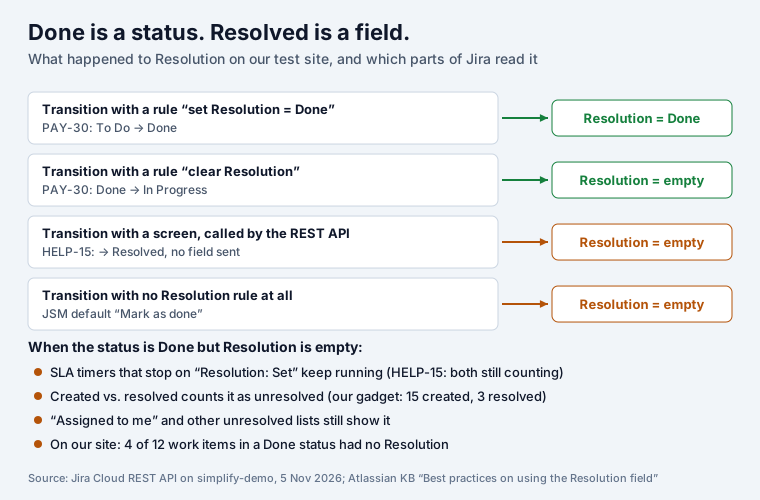
We moved test item PAY-30 from To Do to Done and back. The history shows Jira doing exactly what the rules say: Resolution set to Done, then cleared.
Then we resolved help desk request HELP-15 through the transition API without sending a Resolution. Jira accepted it: status Resolved, Resolution empty, and both SLA timers still running. Atlassian’s knowledge base explains why: “It is still possible to transition the issue to Resolve without any resolution using Jira Cloud API directly. Issue transition API is not expected to respect the screens.”
Why it matters, in Atlassian’s words: “Jira considers that the lifecycle of an issue has come to an end when the “Resolution” field has a value.” Tickets “will only appear in the ‘resolved’ series of reports, such as ‘Created vs Resolved,’ if the “Resolution” field is set, regardless of the ticket’s status.”
Run the two checks from the same article. Both should return nothing:
statusCategory = Done AND resolution IS EMPTY
statusCategory != Done AND resolution IS NOT EMPTY
On our site the first returned 4 of 12 work items, all in the help desk; the second returned none. The fix is a post function on every transition into a Done status that sets the Resolution, and one on every transition out that clears it, like PAY has. Atlassian’s advice is to let either the workflow or an automation rule manage the Resolution, “not both, to prevent conflicts.” Rules that move work, and what each costs in steps, are in our Jira automation examples. What the missing Resolution does to SLA timers is in our Jira SLA examples.
Who can change a workflow, and the limits
- In company-managed spaces: “Site admins” and “Users with edit workflows permission for the space”. In team-managed spaces: site admins and space admins.
- Built-in workflows are read-only: “you can copy them and use them as a base to create your own.”
- An active workflow can be edited and published with Update workflow, but its name cannot change while it is in use.
- Our site’s Workflows page showed: “We’ve introduced a limit of 200 statuses per workflow. These limits will be enforced starting in September 2026.”
- Rovo can explain a workflow: type
/explain-workflowin Rovo Chat. Atlassian notes that it can read validator rules “including rules enabled by third-party apps”, parameters included.
Before you publish a workflow change
- Every status you add has the right category. In Review in Done would close half your sprint.
- Every transition into a Done status sets the Resolution, and every way back clears it.
- Every status can be left. A status with no outgoing transition is where work goes to die.
- Required fields on a transition screen are also required for scripts: add a validator, because the API skips screens.
- Run the two JQL checks after publishing, and again after the next import.
Seeing the workflow on a board
A workflow is easier to follow as columns. Kanban Status Board shows a space’s work items in one column per status and makes a drag run the real workflow transition, as the user: statuses the item cannot reach are blocked while dragging, and required fields are named. Work types that share the same statuses share one board.
To stop items reaching Done half-finished, Team Checklist adds the validator we found on PAY: “Team checklist is done” blocks a transition until every item is ticked, a real Definition of Done. Both apps are free for up to 10 users.
What a single ticket goes through on its way is in Jira ticket explained, and the epic, story and sub-task rules are in Jira epic vs story vs task. How columns map to these statuses on a board, and what a WIP limit does there, is in our Jira kanban board guide.
Sources
- Our Jira Cloud site, 5 November 2026:
POST /rest/api/3/workflowsfor the PAY and HELP workflows (statuses, transitions, validators, post functions), test items PAY-30 and HELP-15, JQL counts, the Workflows page and the workflow editor. - Atlassian Support: Understand workflows, What is a workflow status?.
- Atlassian knowledge base: Best practices on using the “Resolution” field in Jira Cloud (updated 11 March 2026).
Frequently asked questions
What is a Jira workflow?
The path a work item takes from created to finished. Atlassian defines it as "a set of statuses and transitions that a work item moves through". Statuses are the steps (To Do, In Review, Done), transitions are the moves between them, and rules on the transitions decide who may move an item, what must be filled in, and what Jira changes on the way.
What are the three parts of a Jira workflow?
Statuses, transitions and rules. The workflow editor's toolbar has exactly those three buttons: Add status, Add Transition, Add Rule. Every status also belongs to one of three status categories (To do, In progress, Done), which is what boards and reports group by.
What are typical workflow steps in Jira?
A software team's workflow on our test site has five: To Do, In Progress, In Review, QA, Done. A service desk workflow has more, because the customer is part of it: Waiting for support, Waiting for customer, Pending, In Progress, Escalated, then Resolved, Canceled or Closed.
What is the difference between a status and a resolution?
The status says where a work item is; the Resolution says why it ended (Done, Won't Do, Duplicate). Atlassian: "Jira considers that the lifecycle of an issue has come to an end when the Resolution field has a value." An item in Done with no resolution still counts as unresolved in filters, reports and SLAs.
Can I edit the default Jira workflow?
Not the built-in ones: "You can't edit the built-in workflows, but you can copy them and use them as a base to create your own." In company-managed spaces site admins and people with the edit workflows permission can edit; in team-managed spaces site and space admins can.
How many statuses can a Jira workflow have?
Our site's Workflows page showed a notice in November 2026: "We've introduced a limit of 200 statuses per workflow. These limits will be enforced starting in September 2026." Far fewer is better: every status is a column, a filter value and a place work can get stuck.