Jira Kanban Board: WIP Limits, Done Column and Scrum, Tested
On this page
The In Progress column has nine cards. Someone set a WIP limit of four on it months ago, and nobody has noticed since, because nothing stops the fifth card or the ninth. The board looks the same as it did before the limit, apart from a small icon you have to hover over.
We tested what Jira Cloud’s kanban board really does on our own site on 6 November 2026: a WIP limit, the Done column, and the settings around them.
Short answer: a Jira kanban board is columns mapped to workflow statuses, with no sprints. A WIP limit is a Min or Max per column in Board settings. It only warns: our column limited to 2 took a 4th and a 5th item without a word. Done work leaves the board after 14 days by default, counted from when it was done. For a limit people actually see, make it visible and talk about it at stand-up.
Set up a kanban board in Jira
Create a space from the Kanban template (Spaces, Create space, Templates). Atlassian describes the default layout: “The default columns on a kanban board are Backlog, Selected for Development, In Progress, and Done.” Each column holds one or more workflow statuses, and the board shows a work item only while “it’s status maps to one of the board’s columns”.
Three settings decide how the board behaves, and all three sit under the board name, More actions (•••), Board settings:
- Columns and statuses: which status sits in which column, the column limits, and the kanban backlog. A status left in Unmapped statuses hides its work items from the board and the backlog.
- General: the board filter (on our board
project = "WEB" ORDER BY Rank ASC) and the sub-filter. A kanban board ships with the sub-filterfixVersion in unreleasedVersions() OR fixVersion is EMPTY, which drops released work. - Swimlanes: the horizontal rows, covered below.
The right-most column matters more than its name. Atlassian: “Jira only considers work items in the right-most column of your board as complete.” Map Done, Won’t do and Cancelled there, or the reports will count them as unfinished. How statuses and transitions fit together is in our Jira workflow guide.
WIP limits: how to set them, and what Jira does when you go over
Atlassian calls column limits “a crucial part of kanban, so that you can ensure that work is continually flowing through the pipeline”. To set one on a company-managed board, open Board settings, Columns and statuses. Under Column constraints pick Issue count (or the count without subtasks), then type a Min or Max under each column.
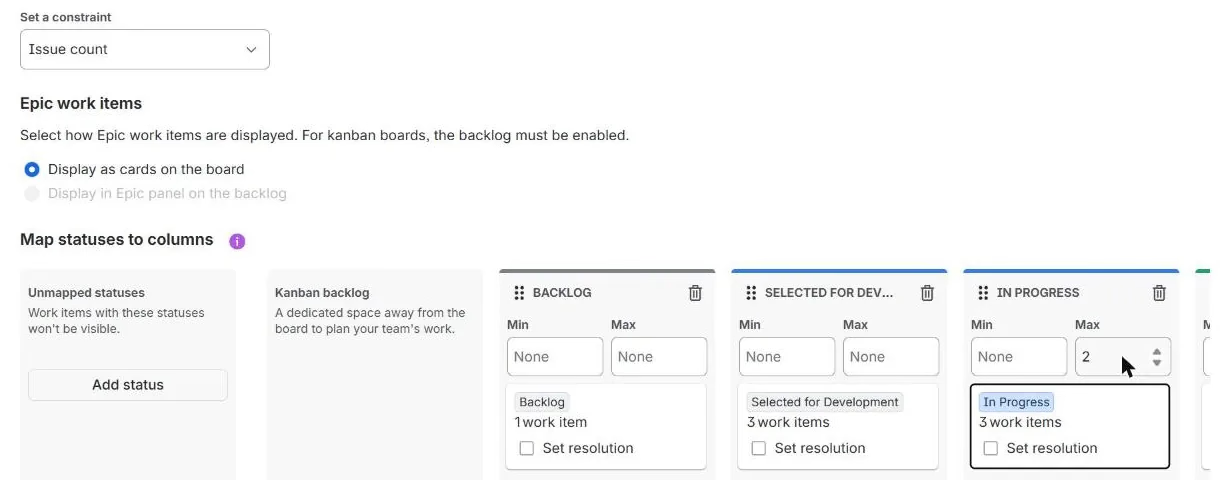
On the new board view the board’s own Configure columns dialog only maps statuses; it has no limit fields. Right-clicking a column header did nothing. The limit lives in Board settings.
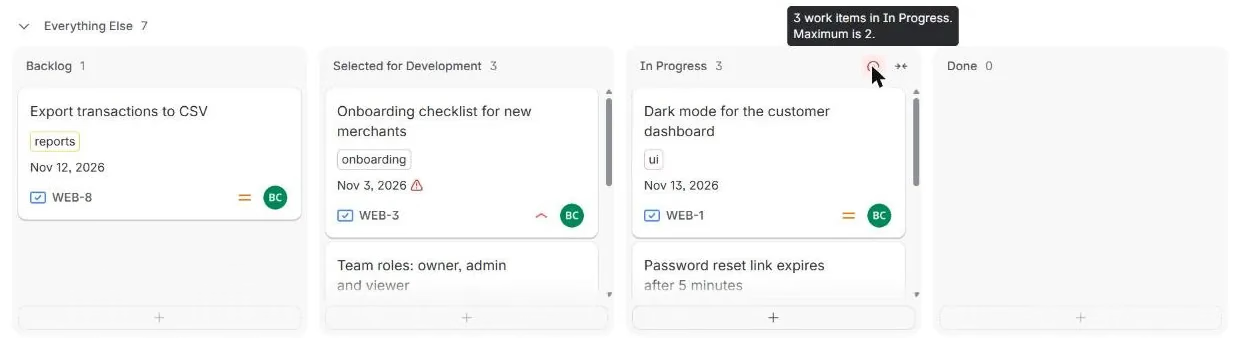
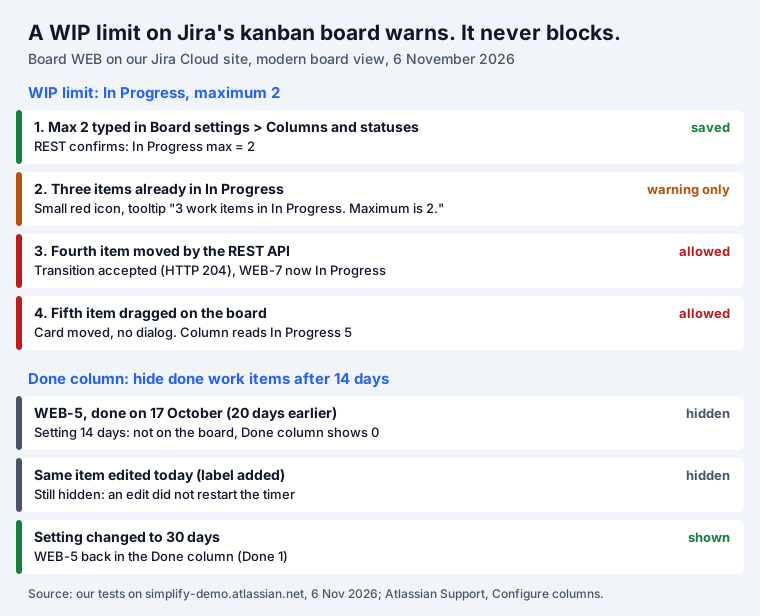
We set Max 2 on In Progress, which already held three work items, and then tried to push more in:
| Step | What Jira did |
|---|---|
| Max 2 saved, 3 items in the column | Small red icon; tooltip “3 work items in In Progress. Maximum is 2.” |
| 4th item moved through the REST API | Accepted, HTTP 204. WEB-7 now In Progress |
| 5th item dragged on the board | Moved, no dialog or warning. Header reads In Progress 5 |
| A quick filter hides some of the cards | The limit still counts them (Atlassian’s docs) |
Atlassian’s page still describes the classic look: a “Red column header” when the “maximum number of work items exceeded” and a yellow one when the minimum is not met. On the new board view we saw neither. The header kept its colour, the limit value was not printed, and the only sign was the icon. Either way, the docs are clear that the limit is a signal, not a gate: “These values don’t have any impact on the number of work items displayed in the columns.”
Two details worth knowing before you set the number:
- The count includes hidden cards. “Column constraints apply to the total number of work items in a column, regardless of whether they are hidden by a quick filter.”
- Subtasks count unless you say otherwise. Choose “Work item count, excluding subtasks” if a story with five subtasks should count as one piece of work.
How to pick the number
The Kanban Guide (version 2025.5) does not give a formula. It says “Kanban system members must explicitly control the number of work items in a workflow from started to finished” and that, ideally, “the system would operate neither above nor below the agreed upon control.” In practice that means: count what is in the column today, set the Max a little below it, and look at the board together when the icon appears. A limit nobody talks about is a number in a settings page. Because Jira will not stop the extra card, the conversation is the enforcement.
Where Done items go
On our board WEB-5 was in Done, resolved on 17 October, with no fix version. The Done column said 0. Three things can hide a finished work item on a kanban board.
1. The hide-done timer. Atlassian: “If you don’t have the sprints feature enabled, these work items are automatically removed from the board after 14 days.” On the new board view the setting is in the slider icon on the board, View settings, Hide done work items after, with Never, 1 day, 7 days, 14 days, 30 days and 60 days.
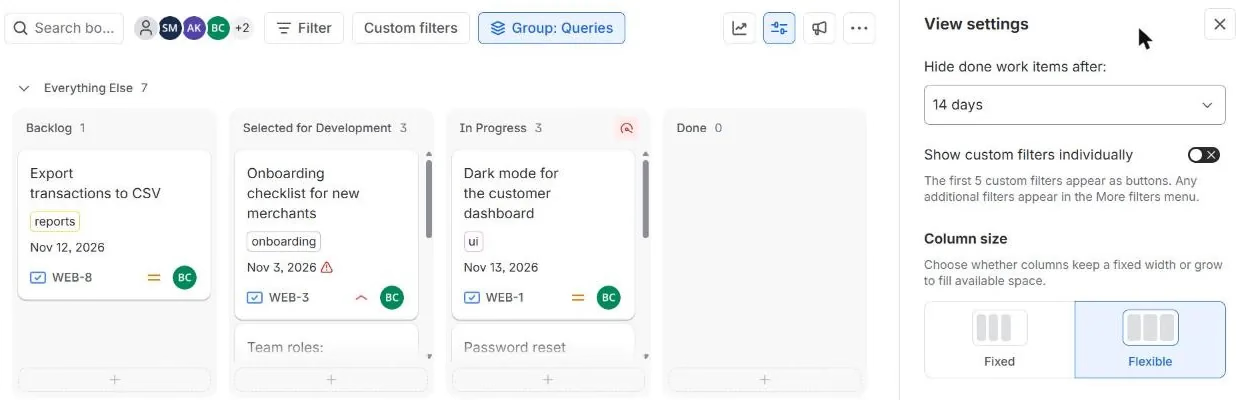
Atlassian’s knowledge base, written for the classic board, says “any edits to a work item reset the “complete” timer”, so an old item comes back when someone touches it. We tested that on the new board: we added a label to WEB-5 and reloaded. It stayed hidden. With the setting at 30 days it was back. The new board counts from when the item was done (20 days earlier), not from the last edit.
2. The release sub-filter. “The default Kanban subfilter will remove any work belonging to a Fix version that has been Released.” Releasing is how kanban teams clear Done on purpose.
3. Status category, not column. “Unlike Jira’s scrum boards, Kanban boards use status category to determine whether a work item is complete.” A status in the Done category is treated as done for the timer even if you mapped it to a middle column.
If people ask “where did my ticket go?”, check those three in that order. To keep a longer history
in view, a dashboard with a filter on resolved >= -30d is better than
stretching the board.
Swimlanes
A swimlane is “a horizontal categorization of work items”. Board settings, Swimlanes offers “Queries, Stories, Assignees, Epics, Spaces or No Swimlanes”. Query swimlanes come with two rows:
- Expedite, “based on the following JQL query: priority = Blocker”. Change it to
priority = Highestif your site has no Blocker priority (ours runs Highest to Lowest). - Everything Else, which “is always at the bottom of the screen, and cannot be deleted”.
Two traps: “The JQL ‘ORDER BY’ clause is not used by the swimlane, as it defaults to order by rank”, and with Epics swimlanes “any parent work items that aren’t part of the board’s current filter will be hidden from the board.”
Atlassian’s own swimlane examples are written with space = "coffee hub". On our site that query
fails with Field 'space' does not exist. Jira’s screens now say space, but JQL still says
project.
The kanban backlog
The first column works as a backlog while it holds a few cards. When it holds fifty, the team scrolls past them every morning. Atlassian’s answer is the kanban backlog: “you’ll get a bigger backlog in a dedicated space where you can create and rank work items for your team”. To enable it, “drag and drop an existing status on the panel” called Kanban backlog in Columns and statuses. You need to be a Jira or board admin. With the backlog on, epics can also move from the board into the backlog’s epic panel.
Kanban vs scrum in Jira
Both are boards over the same work items. The difference is how work enters the board and what you measure.
| In Jira | Kanban board | Scrum board |
|---|---|---|
| Rhythm | Continuous flow | Sprints, fixed length, one month or less |
| How work comes in | Pulled when capacity frees up | Planned at sprint planning |
| Capacity control | WIP limits per column | Sprint commitment |
| Backlog | Optional (kanban backlog) | Product backlog plus sprint backlog |
| Reports to watch | Cumulative flow, cycle time, Throughput | Velocity, sprint burndown |
| Done work leaves | After the hide-done period, or on release | When the sprint is completed |
| Roles | None required | Product Owner, Scrum Master, Developers |
The rows come from Atlassian’s own comparison (“Fixed-length sprint cycles” against “Continuous flow”, “WIP limits for active workflow stages” against “Sprint commitment and team capacity”) and the 2020 Scrum Guide, where sprints “are fixed length events of one month or less”. Pick kanban when requests arrive all the time and priorities change mid-week: support, operations, platform teams. Pick scrum when you can plan a useful increment and review it every two weeks.
The reports that show flow
The Kanban Guide names four metrics as the minimum: WIP, “The number of work items started but not finished”; Throughput, “The number of work items finished per unit of time”; Work Item Age; and Cycle Time, “The elapsed time between when a work item started and when a work item finished.”
Jira’s Cumulative flow diagram (Reports) draws them from your column mapping. Atlassian’s reading rule is the useful part: “If your chart contains an area that is widening vertically over time, the column that equates to the widening area will generally be a bottleneck.” A healthy chart rises evenly, with only the Done band growing.
Where our app fits
Jira’s limit is easy to miss, and the board shows one view per board. Our Kanban Status Board shows a project as columns by status, where a column over its WIP limit turns red and reads, for example, 2 of 1. Like Jira, it warns and does not block. You can split it into swimlanes by assignee, epic, priority or project and sum Story Points or estimates per column. Dragging a card runs the real workflow transition with your permissions, and it works without Jira Software. It is free for up to 10 users.
If your team runs tasks rather than software, our Jira task management guide shows a tested setup with the filters to copy.
How we tested
- Our Jira Cloud site, 6 November 2026, board 5 “WEB board”, a company-managed kanban board on the new board view, 8 work items (WEB-1 to WEB-8), no subtasks.
- Limit set in Board settings, Columns and statuses; checked through
GET /rest/agile/1.0/board/5/configuration. The 4th item moved withPOST /rest/api/3/issue/WEB-7/transitions, the 5th (WEB-3) dragged in the browser. - Hide-done: WEB-5 resolved 17 October; label added through the REST API; board reloaded at 14 and 30 days.
- Afterwards we removed the limit, set the timer back to 14 days and moved WEB-3 and WEB-7 back to Selected for Development.
Sources
- Our Jira Cloud site, 6 November 2026: board WEB, work items WEB-3, WEB-5, WEB-7.
- Atlassian Support: Configure columns, Monitor work in a kanban space, Configure swimlanes, What is a board in software spaces?, What is the cumulative flow diagram?.
- Atlassian knowledge base: Kanban board shows or hides completed work unexpectedly in Jira Cloud (updated 26 September 2025).
- Atlassian Agile Coach: Kanban vs. Scrum.
- The Kanban Guide, version 2025.5 (May 2025).
- The 2020 Scrum Guide.
Frequently asked questions
How do I set a WIP limit in Jira?
On a company-managed board: board name, More actions (•••), Board settings, Columns and statuses. Choose a constraint (Issue count, or the count without subtasks) and type a Min or Max under each column. Atlassian also describes Set column limit in a column's More actions menu; on the new board view we tested, that menu was not there and Board settings was the way in. You need to be a space or board admin.
Does Jira enforce WIP limits?
No. On our board a column limited to 2 took a fourth item through the REST API and a fifth by drag and drop, with no dialog. Jira only shows a signal: Atlassian's docs describe a red column header, and the new board view we tested shows a small red icon with the tooltip "3 work items in In Progress. Maximum is 2."
Why do Done items disappear from my Jira kanban board?
Three reasons. The board hides done work after a set time: 14 days on our board, changeable under View settings, Hide done work items after (Never, 1, 7, 14, 30 or 60 days). The default kanban sub-filter hides anything in a released version. And the board only shows statuses mapped to a column. Atlassian says edits restart the timer on the classic board; on the new board our edit did not bring the item back.
What is the difference between a kanban board and a scrum board in Jira?
A scrum board plans work in sprints, fixed-length cycles of one month or less, and measures velocity and burndown. A kanban board has no sprints: work is pulled as capacity frees up, WIP limits control the flow, and the reports to watch are cycle time, throughput and the cumulative flow diagram. Done work leaves a scrum board when the sprint closes and a kanban board after the hide-done period.
Can a Jira kanban board have a backlog?
Yes. In Board settings, Columns and statuses, drag a status onto the Kanban backlog panel. The work items in that status move off the board into a separate Backlog view where you can rank them, which keeps a long list of ideas out of the team's way. You need to be a Jira or board admin.
Can I use sprints on a kanban board?
Not on a kanban board itself; sprints belong to scrum boards. Team-managed spaces let you switch the Sprints feature on, which turns the board into a sprint board. If you want a fixed review rhythm without sprints, keep the kanban board and hold a regular replenishment meeting.