Jira Sprints: Start, Complete and What Counts, Tested
On this page
The team moved the last story to Released on Friday afternoon and closed the sprint on Monday. The velocity chart now says the sprint delivered zero points. Released is green and counts as done in every search, but it is not the last column on the board, and the sprint looks only at the last column.
We ran sprints on a Jira Cloud scrum board on 11 November 2026 to see what Jira really counts: starting, completing, the sprint report, deleting and parallel sprints.
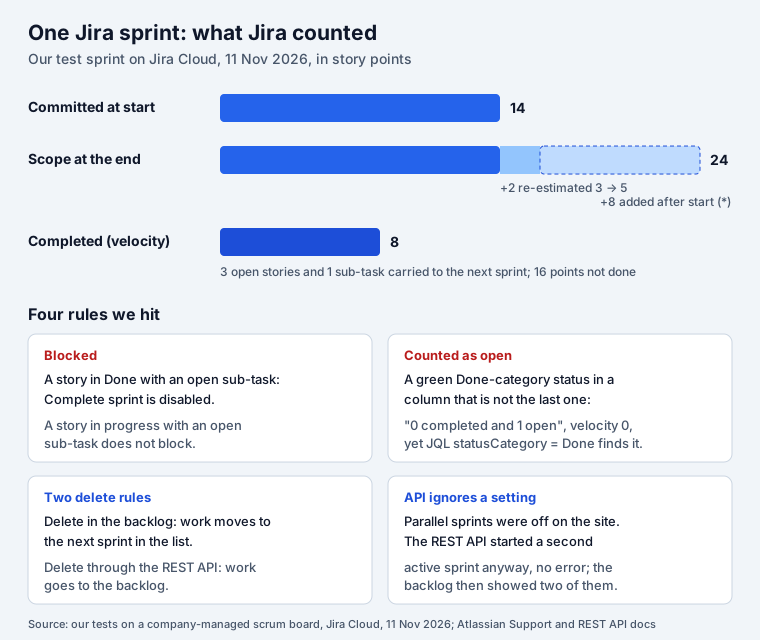
Short answer: a Jira sprint is a fixed time box, usually two weeks, planned in the backlog of a
scrum board. When you complete it, only work in the board’s last column counts as done.
Everything else moves to a future sprint, a new sprint or the backlog, and keeps the old sprint in
its history. A Done story with an open sub-task blocks completion. Work added after the start
gets a * in the sprint report and does not raise the commitment the velocity chart uses.
What a sprint is in Jira
The Scrum Guide defines sprints as “fixed length events of one month or less to create consistency”, and “A new Sprint starts immediately after the conclusion of the previous Sprint.” Jira follows that model with a few rules of its own:
- Scrum boards only. Atlassian: “Only Scrum teams can use sprints.” A kanban board has no sprints; Atlassian points kanban teams to releases instead. In a team-managed space, sprints are a feature you switch on in Space settings, Features.
- A sprint belongs to a board, not a space. The board’s filter decides which work items the sprint report shows, so two boards can see the same sprint differently.
- Two weeks to start with. Atlassian: “If you haven’t run sprints before, we recommend using a fixed two-week duration for each sprint.”
- Sprint goal. The Scrum Guide calls it “the single objective for the Sprint”. In Jira it is an optional field on the start dialog, shown under the sprint name in the backlog and on the sprint report.
| Space type | Where sprints live | Reports | Parallel sprints |
|---|---|---|---|
| Company-managed | Backlog of a scrum board | Sprint report, burndown, velocity | One toggle for all company-managed spaces, Jira admin |
| Team-managed | Backlog, once the Sprints feature is on | Burnup, sprint burndown | Create a sprint while one runs |
Create and start a sprint
In the Backlog, select Create sprint. A new list appears above the backlog. Drag work items into it, or use + Create under the sprint. Dates are optional until you start.
To start: Start sprint on the sprint, check the name, pick a Duration, set the dates, add a goal, then Start.
Two details we saw on our board:
- The planned start date is replaced. We had planned the sprint for 16 November. The dialog showed today, 11/11/2026 8:38 AM, with “Planned start date: 11/16/2026, 10:00 AM” in small print underneath. The end date stayed at 27 November. Atlassian explains why: “Reports rely on the start date of your sprint to calculate scope, velocity, and burndown.” A start in the past would turn all your planning into scope creep. Check the end date before you press Start: ours was now a 16-day sprint.
- Sub-tasks follow their parent. A sub-task created under a story that was already in the sprint joined the sprint on its own. The backlog header still said “5 work items”, because it counts stories, not sub-tasks.
Adding or removing work after the start is fine, but Atlassian says it “is considered to be a scope change and will be reflected in some reports like the Burndown Chart.” We added an 8-point story after the start to see how the reports treat it (next sections).
What counts as done: the last column
This is the rule behind most “my velocity is wrong” questions. Atlassian: “Work items are considered as complete once they have been moved to the last column on the board. Work items in any other column will be considered incomplete (or “open”).”
The status colour and the status category do not matter. We tested it:
- In Board settings, Columns and statuses, we added a column Released with the category Done. On our board (simplified workflow) Jira placed it before Done, not after, so Done stayed the last column.
- We moved a 2-point story to Released. It showed green in the backlog.
- We opened Complete sprint.
“0 completed work items and 1 open work item.” The velocity chart recorded the sprint as 2
committed, 0 completed, and the story moved to the next sprint. Yet a JQL search for
sprint = "SPR Sprint 2" AND statusCategory = Done found the same story. Two parts of Jira, two
answers.
If your workflow has a status after Done (Released, Deployed, Verified), put it in the same last column as Done, or make it the last column. A column can hold several statuses.
Complete a sprint
You need the Manage Sprints permission or Jira admin rights. Then Complete sprint in the backlog or on the active sprint’s board. With several active sprints, select one first; Atlassian notes the button “will not appear until you select one of the sprints.”
A Done story with an open sub-task blocks it
Atlassian writes: “Before you can complete a sprint, all sub-tasks must be marked as Done.” Our test was narrower than that sentence. We closed a story (SPR-2) while its sub-task was still To Do:
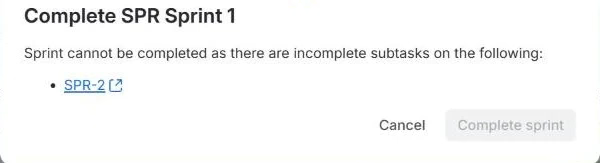
“Sprint cannot be completed as there are incomplete subtasks on the following: SPR-2”. The button stayed grey until we closed the sub-task. But another story, SPR-4, was In Progress with an open sub-task, and that did not block anything: the open story and its sub-task simply moved to the next sprint. So the block is about a parent in Done with children that are not.
Where the unfinished work goes
Our dialog said “3 completed work items and 4 open work items” (three stories and one sub-task) and offered:
- SPR Sprint 3 and SPR Sprint 4, the future sprints;
- New sprint;
- Backlog.
Our other active sprint was not in the list. In team-managed spaces Atlassian says the same: “you can’t directly move these incomplete work items to another active sprint.” Move them to the backlog first, then into the running sprint.
A box “Create a retrospective for this sprint” was ticked by default. It creates a Confluence page, so untick it if you do not want one.
After completion, each moved story had both sprints in its Sprint field: SPR Sprint 1 (closed) and SPR Sprint 3 (future). Done stories kept only Sprint 1. Jira does not stamp a “completed in sprint” date on the work item; the closed sprint in the Sprint field is the record.
Work items from another board are not carried
A sprint can hold work items that its board does not show. We put a work item from a different space (on a kanban board) into our sprint through its Sprint field. It never appeared on the scrum board or in the sprint report. When we completed the sprint, it was not moved to the next sprint: it kept only the closed sprint and stayed in the backlog. Atlassian describes this for sprints shared between boards: “Any incomplete work items from other boards will be moved to the Backlog instead.”
Read the sprint report
Reports, Sprint Report, then pick the sprint. Ours after completion:
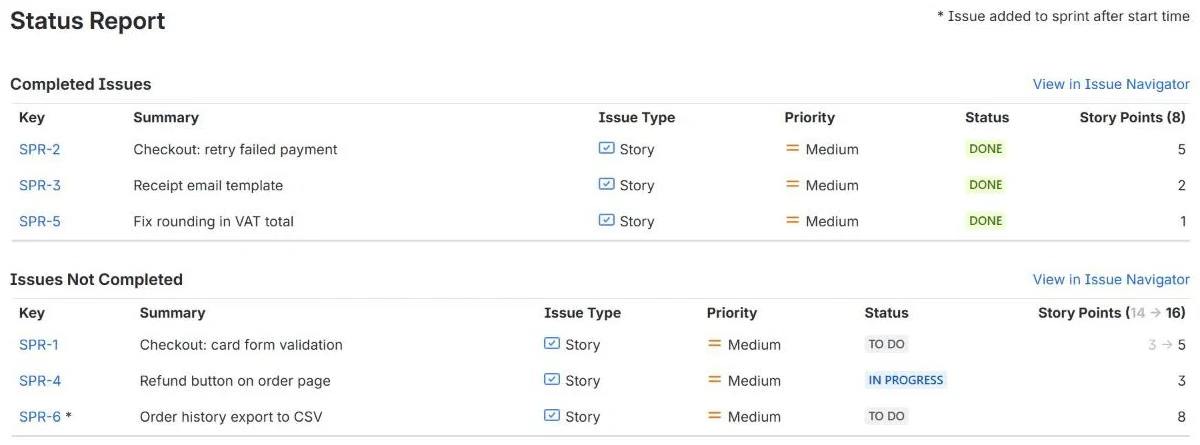
The legend at the top right reads ”* Issue added to sprint after start time”. How to read the rest, with Atlassian’s words and what we saw:
| You see | It means | Our sprint |
|---|---|---|
* after a key | “Work items added after the sprint starts are indicated with an asterisk.” | SPR-6, added after the start |
3 → 5 | “story point estimation was adjusted during the sprint” | SPR-1 re-estimated mid-sprint |
(14 → 16) in a header | The group’s points at the start and at the end | Not completed: 14 at start, 16 at the end |
| Not in the report | “Estimates on subtasks are not included in the sprint report” | Our sub-tasks were not listed at all |
The velocity chart uses the commitment at the start. For our sprint it read 14 committed, 8 completed: SPR-1 counted at its starting 3 points and the added 8-point story did not count as committed. If you add work mid-sprint, velocity will not show it as planned, only as done if the team finishes it.
The sprint report also draws a burndown: Atlassian describes a grey guideline that “stays flat during non-working days” and a red line for remaining work. Ours ran to the planned end date even though we closed the sprint early.
Two active sprints: parallel sprints
By default a board runs one sprint at a time. Atlassian: “If you want to have more than one active sprint at a time, you’ll need to enable parallel sprints.” For company-managed spaces it is one toggle for the whole site: Settings, Jira apps, Jira configuration, “Parallel sprints for company-managed spaces”, which needs the Administer Jira permission. Atlassian lists the catches: “The Velocity Chart will not show the velocity per team” and “The current implementation assumes that the teams perform estimation identically, which is unlikely in practice.”
What we did not expect: parallel sprints were off on our site (Jira’s board configuration
data reported parallelSprints: false), and the REST API still started a second sprint. POST /rest/agile/1.0/sprint/{id} with "state": "active" returned 200, and the backlog showed two
running sprints, each with its own Complete sprint button. Atlassian’s REST reference lists the
rules for starting a sprint (future state, a start date and an end date) and says nothing about
parallel sprints. If a script or an automation starts your sprints, check for an active one first.
Delete or reopen a sprint
The two delete paths in Jira do different things, and both match their own documentation:
| How you delete | Atlassian says | What happened to our work items |
|---|---|---|
| Backlog, sprint menu (•••), Delete sprint | “moved to the next sprint in the list” | Both stories moved to the next planned sprint |
REST API, DELETE /rest/agile/1.0/sprint/{id} | “all open issues in the sprint will be moved to the backlog” | All four items went to the backlog, although a planned sprint came next |
The confirmation in the backlog only asks “Are you sure you want to delete sprint SPR Sprint 4?”, without saying where the work goes. Atlassian adds that if you delete an active sprint, the work items “will keep their status in their new sprint.” A completed sprint is deleted elsewhere: Reports, Sprint Report, pick the sprint, More actions, Delete sprint.
To reopen a completed sprint, use the same More actions menu on its sprint report. Atlassian’s conditions: “If another sprint is already active, you’ll need to enable parallel sprints before reopening a completed sprint”. The reopened sprint gets back the work it held when it closed, except that “work items in an active sprint are not moved during the reopen sprint process.”
Sprint JQL to copy
Sprints are searchable through the Sprint field and three functions. These ran on our site:
| To find | JQL |
|---|---|
| Work in running sprints | sprint in openSprints() |
| Work planned for later sprints | sprint in futureSprints() |
| Work carried over and waiting | sprint in closedSprints() AND sprint in futureSprints() |
| Work carried into the running sprint | sprint in closedSprints() AND sprint in openSprints() |
| One sprint by name | sprint = "SPR Sprint 2" |
| Work in no sprint at all | project = SPR AND sprint is EMPTY |
Add project = KEY to the first four: on our site sprint in openSprints() OR sprint in futureSprints() returned work from every scrum space. The carried-over query returned the three
stories waiting in a planned sprint after a completed one.
sprint is EMPTY returned nothing in our space, although two work items sat in the backlog. Work
that leaves a completed sprint for the backlog keeps that sprint in its Sprint field, so it is not
empty. To list the backlog of a scrum space, use project = KEY AND (sprint is EMPTY OR sprint not in (openSprints(), futureSprints())) AND statusCategory != Done. It returned our two backlog
items, the story and its sub-task.
Team-managed spaces
The same rules hold, with three differences from Atlassian’s Enable sprints page:
- Sprints are a feature to switch on (Space settings, Features), after the backlog. When you switch them on, “All work items on your team-managed board will be sent to the backlog with the same status as the column they were in.”
- Parallel sprints need no admin: “Select Create sprint while a sprint is already in progress.”
- The reports are the burnup report and the sprint burndown chart; the classic Sprint Report page is for company-managed boards.
Plan the next sprint with real capacity
A sprint goes wrong before it starts when the team commits to more than the people present can do. Two things help:
- The free sprint capacity calculator takes the sprint’s working days, each person’s days off, holidays and meeting time, and gives the hours and story points the team can take on.
- Our Workload & Capacity Planner for Jira shows each person’s remaining estimate hours per week against their weekly capacity (green, amber, red), and has a Sprints view with the backlog, active and future sprints in Jira’s order, where you drag work between sprints. Move a story from an overloaded week before you press Start.
For ordering the backlog before planning, see the Jira backlog, tested. If your team does not need time boxes at all, the Jira kanban board covers WIP limits and the Done column on a board without sprints. People on leave are the most common reason a sprint misses its commitment: the ghost resource problem.
How we tested
Jira Cloud site, 11 November 2026, signed in as a site admin. A new company-managed scrum space
with the default simplified workflow (To Do, In Progress, Done), nine work items with story points
and two sub-tasks, and five sprints. Parallel sprints were off for the site. We started, completed
and deleted sprints in the backlog and the board, and through the Jira Software REST API
(/rest/agile/1.0/sprint). Sprint report and velocity numbers were read in the reports and from the
data behind them; JQL ran through /rest/api/3/search/jql. Atlassian’s pages were read the same
day: What is a sprint?,
Start a sprint,
Complete a sprint,
View and understand the sprint
report,
What are parallel
sprints?,
Delete a sprint,
Reopen a sprint, the
Jira Software REST API sprint
reference and the
Scrum Guide.
Frequently asked questions
How long should a Jira sprint be?
Two weeks is the usual choice and the one Atlassian recommends for a first sprint: "we recommend using a fixed two-week duration for each sprint." The Scrum Guide only sets a ceiling: sprints are "fixed length events of one month or less". Keep the length fixed, or the velocity chart compares sprints of different sizes.
What happens to unfinished work when a Jira sprint is completed?
Jira asks where to move it: an existing future sprint, a new sprint, or the backlog. An active sprint is not offered. Work counts as finished only in the board's last column, so anything else moves, whatever its status colour. The moved work items keep the closed sprint in their Sprint field next to the new one, which is how you find carried-over work later.
Can I have two active sprints in Jira?
Yes, with parallel sprints. In company-managed spaces a Jira admin turns them on in Settings, Jira apps, Jira configuration; in a team-managed space you create a sprint while one is running. Atlassian warns that the velocity chart then "will not show the velocity per team." In our test the REST API started a second active sprint even while parallel sprints were off.
What happens when you delete a sprint in Jira?
It depends on how you delete it. From the backlog menu, Atlassian says work items "are moved to the next sprint in the list", and that is what we saw. Through the REST API, Atlassian's reference says "all open issues in the sprint will be moved to the backlog", and that is also what we saw. The confirm dialog in the backlog does not say where the work goes. A completed sprint is deleted from its sprint report instead.
Why can't I complete my sprint in Jira?
Three common reasons. You need the Manage Sprints permission or Jira admin rights. A work item in the Done column with an open sub-task blocks it: our dialog said "Sprint cannot be completed as there are incomplete subtasks on the following" and listed the story. And with several active sprints, the Complete sprint button only appears after you pick one sprint.
How do I find work carried over from a previous sprint?
Search with JQL: sprint in closedSprints() AND sprint in futureSprints() finds work that was in a completed sprint and now waits in a planned one. Swap futureSprints() for openSprints() to find it in the running sprint. Add project = KEY to stay in one space.
Keep reading
- Jira, JSM and the Marketplace · 10 minJira Velocity and Burndown Charts: What They Count, Tested
- Jira, JSM and the Marketplace · 11 minJira Labels vs Components: When to Use Each, Tested
- Jira, JSM and the Marketplace · 8 minJira Timeline: Why Bars Are Missing and What It Shows
- Free toolSprint capacity calculator