Jira Fix Version: What Release Does to Unfinished Work
On this page
Release day. You open version 1.1, select Release, and Jira asks what to do with the unfinished work. You pick “move it to 2.0”, because that sounds tidy. Next week a customer asks whether saved cards shipped in 1.1. The story says its fix version is 2.0. It shipped in 1.1. The release moved it.
We did exactly this on our Jira Cloud test site on 14 November 2026 and logged every step.
Short answer: In Jira a version and a release are the same thing. You create versions on a space’s Releases page and put work into one with the Fix versions field: “the version that the work on the work item is released in.” Affects versions only records where a bug was found; it does not add the item to the version. When you release a version with open work, Jira offers Move unresolved work items to another version, or Ignore. It decides “unresolved” by the resolution field, not the status. So a story in a green Released status with no resolution counts as unfinished and gets moved. On our site the release page said 4 of 6 done; the dialog said 3 unresolved.
Fix version, affects version, release
Three words people search as if they were different things. Two of them are one thing.
| Term | What it is | Puts the item in the release? | JQL |
|---|---|---|---|
| Version, or release | A named point in time in one space: name, dates, status, driver | not a field | the value you search |
| Fix versions field | The version that will ship (or shipped) this work | yes | fixVersion |
| Affects versions | The versions where a bug shows up | no | affectedVersion |
Atlassian’s own page on the release burndown says it plainly: Jira has no separate release entity, and “a version is equivalent to a release.” The versions page explains the second field: “Entering a version in the Affects versions field on a work item does not add the work item to the version, but using the field enables you to search for work items that affect particular versions.”
Atlassian’s tutorial is blunter about Affects versions: it “isn’t used very often in Jira.” Our two software test spaces agree. The edit screen had Fix versions and no Affects versions at all.
Each version has one of three statuses: Unreleased (“an open package”), Released (“a bundled package”) and Archived (“a historical snapshot of a package”). Versions belong to one space. Two spaces can each have a 1.0, and that matters in JQL (below).
One version’s life, logged
Our test space is a company-managed scrum space with 12 work items. Before the test it had no versions. We created four (1.0, 1.1, 2.0, 2.1), gave them work and then took version 1.1 through its whole life. Times are from the site’s change log, Central European Time.
1. Create
The Releases feature has to be on first. A space admin switches it on under Space settings, Features. Atlassian: “When you enable the releases feature: A new Fix versions field will be added to your work types. A new Releases tab will be added to the space navigation.”
Then Releases, Create version. You give a name, a start date, a release date, a description and a driver. You need “Space admin or Manage versions permissions to create a version” (Atlassian).
What Jira did:
- We gave 1.1 a planned release date of 10 November, four days in the past. The version came back marked overdue at once, and the Releases list showed the date in red.
- The order of versions is the order you create them in, until someone drags them. The Releases page lists the newest at the top, so 1.0 sat at the bottom. Remember that for JQL.
- Versions created through the API have no driver. The page showed “Unassigned”.
2. Plan
At 00:43 we put six work items into 1.1 through the Fix versions field. You can do the same from the work item, from the version’s page (Add work items) or by dragging items onto a version in the backlog’s Versions panel (Atlassian).
| Work item | Status | Status category | Resolution |
|---|---|---|---|
| SPR-4 | In Progress | In Progress | none |
| SPR-5 | Done | Done | Done |
| SPR-6 | Done | Done | Done |
| SPR-8 | To Do | To Do | none |
| SPR-9 | Released | Done | none |
| SPR-10 | Done | Done | Done |
SPR-10 got two fix versions, 1.1 and 2.0. The field takes several (“You can select more than one version”). SPR-9 is the interesting one. Its workflow has a green Released status that sets no resolution. Many teams have a status like this. We explain why it happens in Jira status categories.
One trap while planning: if versions are selected in the backlog’s Version filter, new work items join them silently. Atlassian: “Work item created while versions are selected in the Version filter will automatically be added to those versions.”
3. Watch
The version’s page showed “4 of 6 done”: Done 4, In progress 1, To do 1. It counts by status category, so SPR-9 is done. The REST API agreed: 4 done, 1 in progress, 1 to do.
The same API has a second count. unresolvedIssueCount returned 3 unresolved of 6. That one reads the
Resolution field. Two numbers for one version, and the release button uses the second.
The release page can also warn about work marked done that still has an open pull request, unreviewed code or a failing build, if Jira is connected to your development tools (Atlassian). For a forecast of the ship date, the Version Report and the Release Burndown are covered in Jira reports. Both need a scrum board and estimates.
4. Release
At 00:45 we opened 1.1, selected its status (Unreleased) and then Release. The dialog said:
Release 1.1. This release contains 3 unresolved work items.
The link behind “3 unresolved work items” opened this search:
project = "SPR" AND fixVersion = "1.1" AND resolution = UnresolvedThat is the whole rule. No resolution means unresolved, whatever the status says. Below it, a required choice:
- Move unresolved work items to a version you pick. This was preselected, and Release stayed greyed out until we picked a version. The list offered only unreleased versions (1.0 and 2.0).
- Ignore unresolved work items. They stay in the released version.
The release date was prefilled with the planned date (10 November), not today. And Create release notes was ticked by default. We unticked it, chose 2.0 and pressed Release.
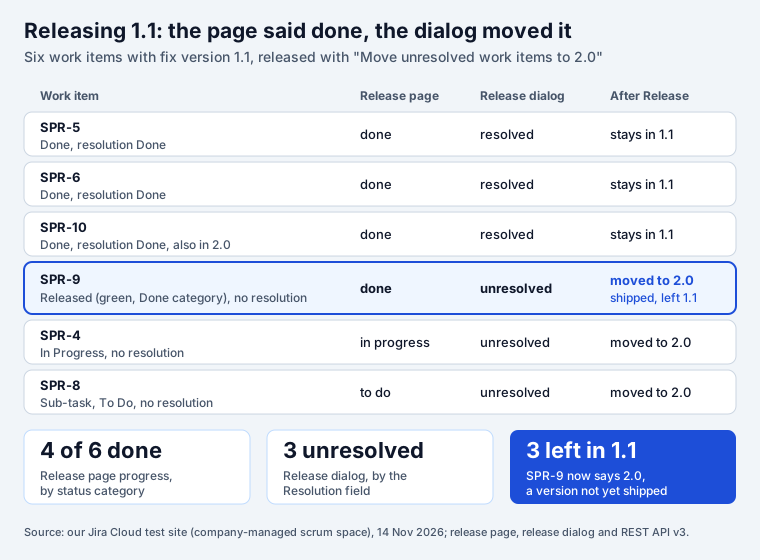
What Jira did, within about five seconds:
- SPR-4, SPR-8 and SPR-9 lost 1.1 and got 2.0. SPR-9 went first.
- Version 1.1 kept three work items: SPR-5, SPR-6 and SPR-10.
- Each move landed in the item’s history as an ordinary edit by the person who released, in two parts: Fix Version 1.1 removed, Fix Version 2.0 added. Nothing says “moved by a release”.
So the release notes for 1.1, its Version Report and any filter on fixVersion = "1.1" now leave out a
story that customers already have. The fix is simple once you know: set a resolution in every status
that means shipped, or check the list behind the link before you choose Move.
On a company-managed kanban board you can also release from the board’s Release menu. Atlassian: “Work items will disappear from the board once all their fix versions have been released.” That is the kanban board’s default sub-filter at work, which we tested in Jira kanban board.
5. After the release
The version’s status read Released. Then we checked what changes and what can be undone.
- Unrelease does not undo the moves. We unreleased 1.1. SPR-9 still said 2.0.
- Ignore really ignores. We put SPR-8 back into 1.1 and released it again through the API without a move target. SPR-8 stayed in the released 1.1, still unresolved.
- Releasing out of order is allowed. 1.1 was released while 1.0 was not. Jira did not object.
- The moved items can be found. History search works on the fix version field:
fixVersion WAS "1.1" AND fixVersion != "1.1"It returned exactly SPR-4, SPR-8 and SPR-9. The more obvious
fixVersion CHANGED FROM "1.1" TO "2.0" returned 0, because the history holds two separate changes,
not one. More on history searches in JQL WAS and CHANGED.
If your team writes notes from the version, do it after this check. Jira builds them from the work items in the version, grouped by work type (Atlassian). Our release notes template shows how to turn that list into notes a customer will read.
6. Archive
Archiving hides an old version “from reports or other parts of your project”. We released 1.0 and then archived it. What still worked:
fixVersion = "1.0"still found its three work items.fixVersion in releasedVersions(SPR)still counted them. Archived versions count as released in JQL.- The Version Report is the exception: it “shows ‘Released’ versions but not ‘Archived’ versions” (Atlassian).
Delete is different. Jira asks whether to move the work items to another version or remove the reference. Merge moves all items from one version into another. We did not test either.
Before you press Release: five checks
Run these in the work item search. Replace ABC and 1.1 with your space and version.
- What the dialog will call unresolved:
project = ABC AND fixVersion = "1.1" AND resolution = Unresolved - Shipped but unresolved (these get moved if you choose Move):
project = ABC AND fixVersion = "1.1" AND resolution = Unresolved AND statusCategory = Done - Also planned for the next version (they will count in both):
project = ABC AND fixVersion = "1.1" AND fixVersion = "2.0" - Sub-tasks: they carry their own fix version and their own resolution. In our test a To Do sub-task was moved with the rest.
- After the release, what moved:
fixVersion WAS "1.1" AND fixVersion != "1.1"
If check 2 returns anything, fix the resolution first or choose Ignore. Then release.
fixVersion in JQL: the docs against our site
Atlassian documents four functions for versions in JQL functions and the field itself in JQL fields. We ran each one before and after the releases.
| Query | Atlassian says | What we saw |
|---|---|---|
fixVersion = earliestUnreleasedVersion(SPR) | “The version at the bottom of the list is considered the ‘earliest.’” | 1.0, the oldest. After we dragged a new 2.1 to the bottom, 2.1 became “earliest” although 2.0 was still open. |
fixVersion = latestReleasedVersion(SPR) | “determined by the ordering assigned to the versions, not by actual Version Due Dates” | 1.1, although 1.0 was released later and has the later release date. |
fixVersion in releasedVersions(SPR) | versions that have been released; the space is optional | 6 items in 1.0 and 1.1, archived 1.0 included. Without the space it searches every space. |
fixVersion in unreleasedVersions() | versions not released yet | Without a space it also returned PAY-1 from another space. |
fixVersion > "2.0" | “use the version order that has been set up by your space admin, not a numeric or alphabetic order” | After the drag, fixVersion < "1.0" found the item in 2.1. Order, not numbers. |
fixVersion = "1.0" | search by name or id; “better to search by version ID” | 4 items: 3 in our space and PAY-1 from another space with its own 1.0. fixVersion = 10000 (the id) gave the 3. |
fixVersion = 1.0 | “full-stops are reserved characters and need to be surrounded by quote-marks” | Worked without quotes on our site. Quote anyway. |
fixVersion != "1.1" | not equal | Dropped items with no version and items that had 1.1 plus another version. Add OR fixVersion is EMPTY if you need them. |
fixVersion ~ "1" | ~ is unsupported for this field | No error, 0 results. A silent zero. |
fixVersion like "1", fixVersion = "1.*" | no wildcard for versions | “‘like’ is a reserved JQL word”; “The value ‘1.*’ does not exist for the field ‘fixVersion’.” |
affectedVersion WAS "1.0" | WAS and CHANGED unsupported for this field | “History searches do not support the ‘affectedVersion’ field.” fixVersion WAS works. |
People search for “fix version contains” and “fix version wildcard”. There is no such thing. List the
versions with fixVersion in ("1.1", "1.2"), or use one of the four functions. For every other query
we tested on Jira Cloud, see the JQL cheat sheet.
Fix version questions from the search box
The field is missing. Turn on the Releases feature for the space. If it is on, the field may not be on the screen for that work type; Atlassian points to the screen settings, and a Jira admin changes them. Affects versions is often missing the same way.
The field is there but I cannot change it. “You need the ‘Edit work items’ permission to add a work item to a version” (Atlassian). Creating or releasing a version needs more: Space admin or Manage versions.
Bulk change. Search for the work items, select them, and use bulk edit to set or add a fix version. On the backlog, drag several items onto a version in the Versions panel; hold Ctrl or Command to select more than one.
Across spaces. A version belongs to one space. Two spaces can share a name, and JQL by name finds
both, as our PAY-1 showed. Add project = ABC or search by id.
Best practice. Name versions so their order is obvious, keep the list in release order (JQL follows it), set a resolution in every status that means shipped, and release before you write the notes.
Seeing a release as a board
Jira shows a version as a list on its page and as a progress bar in the backlog. If your team wants the release on a board, our Priority Board and the other ticket boards can add a board tab by fix version, next to tabs by label or component. The Kanban Status Board can show fix versions on every card. Neither changes how Jira releases a version.
For the human side of a release, Team Checklist starts every space with a Release checklist template. Put it on the work item that tracks the release, and its “Team checklist is done” validator keeps that work item out of Done until every step is ticked. It does not lock Jira’s Release button; the checklist and the version are separate things.
Writing many version searches like the ones above? JQL Blocks builds JQL from blocks.
How we tested
- Site: our Jira Cloud test site (Standard plan), 14 November 2026, about 00:40 to 00:55 CET.
- Space: a company-managed scrum space with 12 work items and a custom green Released status that sets no resolution. No versions existed before.
- We created versions 1.0, 1.1, 2.0 and 2.1 in that space and a version 1.0 in a second space, set fix versions through the REST API without notifications, released 1.1 through the dialog in the browser, and released, archived, unreleased and reordered the others through REST API v3.
- Every JQL query was checked with the JQL parse endpoint in strict mode and run through the search endpoint. Counts are from that site on that day.
- Not tested: approvals, release stages, the kanban board’s Release menu, merge and delete.
Sources
- Atlassian Support, What is a version?
- Atlassian Support, Enable releases and versions
- Atlassian Support, Create a version
- Atlassian Support, Release a version
- Atlassian Support, Use the release page to check the progress of a version
- Atlassian Support, View and manage versions
- Atlassian Support, Configure versions in a scrum space
- Atlassian Support, View and understand the version report
- Atlassian Support, View and understand the release burndown report
- Atlassian Support, JQL functions and JQL fields
- Atlassian Support, Create release notes
- Atlassian Developer, REST API v3: Project versions
- Atlassian, Learn versions with Jira
Frequently asked questions
What is the difference between fix version and affects version in Jira?
Fix versions is the release that will contain the change. Setting it puts the work item into that version, so it shows on the Releases page, in release notes and in the version reports. Affects versions records the releases where a bug was found. Atlassian: it "does not add the work item to the version". On our test spaces the Affects versions field was not even on the edit screen, and JQL cannot search its history.
What is the difference between a fix version and a release in Jira?
None in the data. Jira has no separate release object. You create a version on the Releases page, and work items join it through the Fix versions field. Atlassian's release burndown page says it directly: "a version is equivalent to a release". Releasing is a status change of the version, from Unreleased to Released.
Can a work item have more than one fix version?
Yes. The field takes several versions, and Atlassian says so: "You can select more than one version." Such an item counts in each version. On our site one story sat in a released and an unreleased version at once, so it matched both fixVersion in releasedVersions() and fixVersion in unreleasedVersions(). It also dropped out of fixVersion != "1.1", because one of its values was 1.1.
Why can't I see or edit the Fix versions field?
Three common reasons. The Releases feature is off in that space: switching it on adds the Fix versions field to the work types. The field is not on the screen for that work type, which a Jira admin changes in the screen settings. Or you lack the permission: Atlassian says you need Edit work items to add a work item to a version, and Manage versions to create one.
What happens to unresolved work items when you release a version?
Jira asks. The release dialog counts work items in the version with no resolution and offers "Move unresolved work items to" another unreleased version, or "Ignore unresolved work items". Move takes the old version off those items and adds the new one. It goes by the Resolution field, not by the status, so an item in a green status without a resolution is moved too.
Can you undo a release in Jira?
You can unrelease the version: its status goes back to Unreleased. Work items the release moved stay where they were moved. On our site the story moved to 2.0 still said 2.0 after we unreleased 1.1. Find them with fixVersion WAS "1.1" AND fixVersion != "1.1" and set them back by bulk edit.
How do I find work items in released versions with JQL?
fixVersion in releasedVersions(ABC) for one space, or releasedVersions() for every space. For the next release use fixVersion = earliestUnreleasedVersion(ABC), and for the last one fixVersion = latestReleasedVersion(ABC). Both go by the order of versions on the Releases page, not by name or date. Archived versions still count as released.
Keep reading
- Jira, JSM and the Marketplace · 12 minJira Prioritization Plugins: 17 Apps Compared by Method
- Jira, JSM and the Marketplace · 10 minJira Gantt Chart: 12 Gantt Features Tested on the Timeline
- Jira, JSM and the Marketplace · 13 minJQL Sprint Queries: Current, Previous, Next and Dates
- Free toolRICE & WSJF calculator