Jira Backlog: Sort by Priority, Rank and Missing Items
On this page
- What the Jira backlog is
- Rank decides the order, Priority does not
- Can you sort the Jira backlog by priority?
- Why work items are missing from your backlog
- The backlog as one JQL query
- Backlog, sprint, board: which is which
- Backlog refinement in Jira, step by step
- Apps for the backlog
- Where our app fits
- How we tested
- Sources
The product owner opens the backlog on Monday, finds the refund bug that support has been chasing, and sets its priority to Highest. The red double arrow appears. The item stays exactly where it was, ninth of ten, below two items marked Low and Medium. At sprint planning the team takes the top six and the refund bug waits another two weeks.
Nothing was broken. In Jira the backlog has an order of its own, and Priority is not it. We tested how that order works on a Jira Cloud scrum board on 7 November 2026, along with the questions people search for most: sorting by priority, ranking that is disabled, and items that do not show up.
Short answer: the Jira backlog is ordered by Rank, not by Priority. Changing Priority does not move an item; dragging it does. If you sort the board filter by priority, the backlog follows, but Jira switches manual ranking off. Sub-tasks, epics and items in the Done column are not listed in the Backlog section. To see the backlog by priority without losing your order, keep the board on Rank and use a second view.
What the Jira backlog is
The 2020 Scrum Guide defines the product backlog as “an emergent, ordered list of what is needed to improve the product”. The word that matters is ordered. The guide makes ordering the Product Owner’s job (“Ordering Product Backlog items”) and sizing the developers’ job (“The Developers who will be doing the work are responsible for the sizing”).
Jira gives that list a screen. Which screen you get depends on the board:
| Board | Where the backlog lives | What it shows |
|---|---|---|
| Scrum, company-managed | Backlog tab | Active and future sprints on top, then the Backlog section |
| Kanban, company-managed | Backlog tab, once an admin enables it | Backlog and Selected for Development sections |
| Team-managed software space | Backlog, added from the space navigation | Backlog list, sprint lists (with Sprints on) or the Board list |
| Kanban without a backlog | The first column of the board | Every card in that column |
On a kanban board Atlassian is frank about the first-column habit: it works “as long as there are only a few work items in your backlog. As your backlog grows, viewing and scrolling through these work items can become difficult.” How to switch the kanban backlog on is in our Jira kanban board guide. In a team-managed space you add it yourself: select + in the space navigation, then Backlog, then Add to navigation. Turning it off later moves every item back onto the board, “placed in the appropriate column based on their current status”.
Rank decides the order, Priority does not
Every work item on a Jira Software board has a Rank: a text value such as 0|i000e0: that Jira
compares to sort the list. The backlog, the board columns and any JQL that ends in ORDER BY Rank all
read the same value. Priority is a separate field that the backlog only displays as an icon.
We checked this on our scrum board, PAY, with five new tasks:
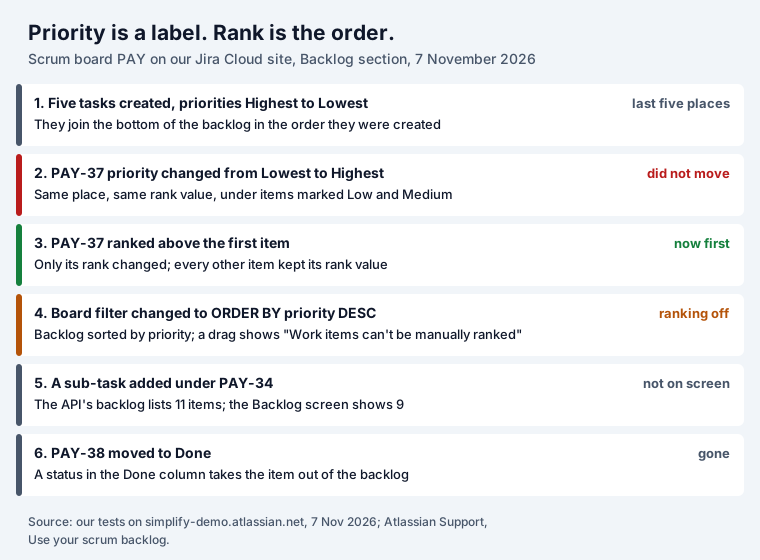
- New items from the API or an automation land at the bottom. Our five tasks, created through the REST API with priorities Highest, Low, Medium, Lowest and High, took the last five places in creation order. Items made in the Create dialog behave differently: Atlassian says they go “under the currently selected work item, or at the top of the backlog if no work item is selected”.
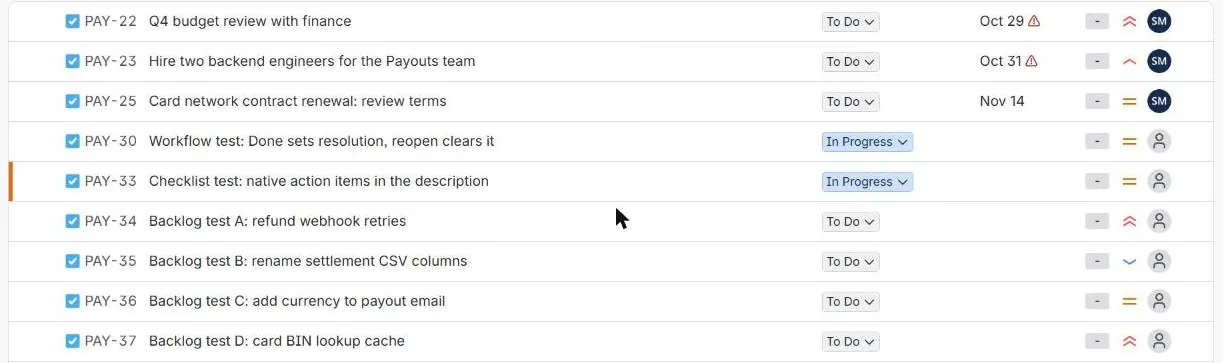
- Priority does not move anything. We changed PAY-37 from Lowest to Highest. It kept its place, ninth of the ten items on screen, with the same rank value, below PAY-35 (Low) and PAY-36 (Medium):
- Ranking moves it. One rank call (the API’s version of a drag) put PAY-37 above the first item. Its
rank became
0|i000dz:i, a value between its new neighbours, and no other item changed. That is why ranking is cheap: Jira rewrites one value, not the whole list.
In the backlog you rank by dragging, or by right-clicking an item to send it “to the top or the bottom
of the Backlog”. The API moves up to 50 items in one call
(PUT /rest/agile/1.0/issue/rank), and Atlassian’s API reference ties ranking to the schedule
issue permission, so someone who can edit a field may still be unable to reorder.
So which one should drive planning? Use Priority for urgency that other people read: support, an incident queue, a filter for “all Highest bugs”. Use Rank for “what we do next”. When the two disagree, the team works from Rank, because that is what the top of the backlog shows.
Can you sort the Jira backlog by priority?
The backlog follows the board’s saved filter. Change the filter’s ordering and the backlog changes
with it. We set the PAY board’s filter to project = "PAY" ORDER BY priority DESC. The Backlog
section came back sorted Highest, High, Medium, Low. Then we tried to drag an item:
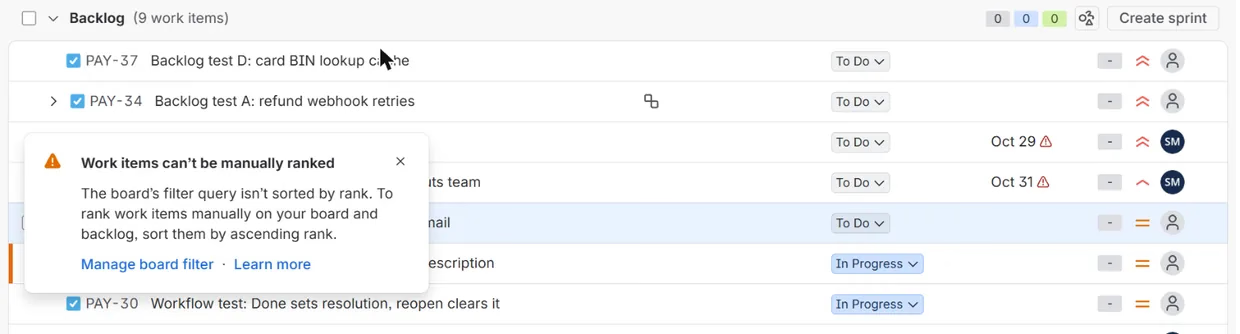
Nothing moved. Jira’s message: “Work items can’t be manually ranked. The board’s filter query isn’t
sorted by rank. To rank work items manually on your board and backlog, sort them by ascending rank.”
This is the “jira ranking is disabled” people search for: once the filter is ordered by anything
else, manual ranking is off on that board and on its backlog. The fix is the one in the message: end
the filter with ORDER BY Rank ASC again, which is what we did.
Three ways to get the priority view without breaking the board:
- Rank in priority order once. Drag the Highest items to the top and the Lowest to the bottom. You do it once; after that, new urgent items are ranked by whoever triages them.
- A second view sorted by priority. Run the backlog query below, ordered by priority and then by rank, as a saved filter. You read it by priority; the board stays on Rank.
- Group instead of sort. A board that shows one column per priority and keeps the rank inside each column gives you both at once. That is what our Priority Board does (more below).
Why work items are missing from your backlog
Atlassian lists four conditions. An item is in the scrum backlog only if “the work item isn’t a subtask, the work item matches the board’s saved filter, the work item’s status maps to one of the board’s columns (but not the Done column), and there’s at least a status being mapped to the right-most column.” The last one surprises people: “If you map all the statuses to the first (To Do) column, you won’t see any work items in the Scrum backlog.”
The checklist we use when someone says “my item disappeared”:
| What you see | Usual cause | Where to look |
|---|---|---|
| A sub-task is not listed | Sub-tasks are never listed on their own in the scrum backlog | Expand the parent (arrow and sub-task icon) |
| An epic is not listed | Epics are shown in the epic panel, not as backlog rows | Epic filter, then the panel toggle |
| A Done item is gone | Its status maps to the Done column | Board settings, Columns |
| An item in To Do is gone | Its status is not mapped to any column, or it is in a sprint | Columns (Unmapped statuses), then the sprint lists |
| Items from one project are missing | The board’s saved filter does not match them | Board settings, General, filter query |
| The whole backlog is empty | Every status is mapped to the first column | Map a status to the right-most column too |
| No Backlog tab at all | Kanban backlog not enabled, or team-managed backlog not added | Board settings, or + in the space navigation |
Two of these we saw happen. Moving PAY-38 to Done took it out at once (the API’s count went from 11 to 10).
A sub-task we added under PAY-34 showed up in the API’s backlog endpoint, which then listed 11 items,
while the Backlog screen said 9 work items: Jira’s REST endpoint
/rest/agile/1.0/board/{id}/backlog includes sub-tasks and the screen does not. If a script or an
app counts your backlog, it may not agree with the number on the screen.
The kanban backlog has its own rule: an item is visible only if its status “maps to the kanban backlog column and the next column on the kanban board”. Unlike the scrum backlog, it shows a sub-task “slightly indented after its parent task” and lets you move it on its own.
The backlog as one JQL query
There is no “backlog” keyword in JQL, but you can rebuild the scrum backlog. This query returned exactly the ten items of our Backlog section, in the same order:
project = PAY
  AND sprint is EMPTY
  AND statusCategory != Done
  AND issuetype not in (Epic)
  AND issuetype not in subTaskIssueTypes()
ORDER BY Rank ASC
Without the two issuetype lines the result also had three epics and a sub-task. Replace PAY with
your project and check two things before you trust it: that your Done column holds only statuses of
the Done category, and that the board filter has no extra conditions (a label, a component). If it
does, add them here too.
With the query you can save the backlog as a filter, put it on a dashboard, subscribe a stakeholder
to it, or export it: in Jira’s work item search (All work), More actions, Export.
Change the last line to ORDER BY priority DESC, Rank ASC for the priority view from the previous
section. More queries for planning are in our Jira epic vs story vs task
and Jira dashboard guides.
Backlog, sprint, board: which is which
| Term in Jira | What it is | How items get there |
|---|---|---|
| Backlog (section) | Not-started work in no sprint, ordered by Rank | Created there, or moved back from a sprint |
| Sprint (future) | A planned timebox, not started yet | Dragged from the backlog, or the divider moved |
| Sprint (active) | What the team committed to now; shown on the board | Started with Start sprint |
| Selected for Development | The kanban backlog’s “ready” section, on the board | Dragged up from the Backlog section |
| Board | Work in progress, columns by status | Sprint started (scrum) or selected (kanban) |
The Scrum Guide’s sprint backlog is narrower than Jira’s sprint: it is “composed of the Sprint Goal (why), the set of Product Backlog items selected for the Sprint (what), as well as an actionable plan for delivering the Increment (how)”. Jira’s sprint holds the items and the goal; the plan is up to the team.
Work goes back to the backlog when a sprint ends. Atlassian: “If the sprint has incomplete work items”, you choose Backlog, any future sprint or a new sprint, and a work item counts as complete only “once they have been moved to the last column on the board”. All sub-tasks must be Done before the sprint can be completed.
One more rule from Atlassian: while a sprint is active “you can still plan subsequent sprints in the backlog, but you won’t be able to start them until the active sprint is completed”, unless parallel sprints are switched on. And starting a sprint needs space admin rights “for all spaces that match the board’s filter”.
Backlog refinement in Jira, step by step
The Scrum Guide describes refinement as “the act of breaking down and further defining Product Backlog items into smaller more precise items”, adding “a description, order, and size”. In Jira that maps onto four things you can do without leaving the backlog:
- Order. Drag, or right-click and send to the top or the bottom. Items “deemed ready for selection” should sit at the top before sprint planning.
- Split. Right-click, Split work item. Atlassian lists what does not travel: “work log, comments, work item history, and links”, and the new item’s status returns “to the first step of the corresponding workflow”. The original is linked to the new one.
- Size. Select an item and press E to edit; J and K move through the list. Story Points are available only on stories and epics by default.
- Edit in place. Summary, assignee, estimate, parent and priority can be changed on the row. Bulk changes go through the checkboxes and Edit.
A quick filter per epic, label or assignee keeps a long backlog readable. If refinement turns into a debate about what is an epic and what is a story, our epic vs story vs task guide has the rules we tested.
Apps for the backlog
Jira’s own backlog does ordering well and stops there. To see what teams add on top, we searched the Atlassian Marketplace API on 7 November 2026 for Jira Cloud apps about the backlog (ten searches, from “backlog” and “prioritization” to “wsjf” and “story map”). Of 159 results, 71 have the backlog as their main job; the rest are portfolio, roadmap, portal or security tools that only mention it.
| What the app does | Apps | Installs | Largest three by installs |
|---|---|---|---|
| Story maps | 9 | 8,345 | Easy Agile TeamRhythm (3,291), Story Maps for Jira (2,649), DevSamurai (1,915) |
| Estimation and planning poker | 19 | 6,756 | Agile Poker (1,769), Magic Estimations (1,479), DevSamurai (768) |
| Scoring: RICE, WSJF, ICE, custom, pairwise | 20 | 3,692 | Foxly (1,305), Backlog Prioritization Lite (1,195) and Pro (775) |
| Ordering, views and export | 9 | 227 | Priority Board (56), Sort by any Field (51), Flexible Table (50) |
| Refinement and hygiene, including AI writers | 14 | 215 | MyAgileCopilot (78), AI Scrum Assistant (65), Backlog Refinement (42) |
| Total | 71 | 19,235 |
Three things stand out. Story maps and estimation take 79% of the installs: teams buy help with what to build and how big it is, not with the list itself. Scoring apps are many and small; 16 of the 20 have fewer than 100 installs. And ordering tools barely register (227 installs across nine apps, ours included), which fits what we found above: Rank already orders the backlog, and what people search for is how to see it by priority without breaking that order. 57 of the 71 apps are free, or free for up to 10 users.
If you only want scores, try them before you install anything: our RICE & WSJF calculator runs both methods on the same list in your browser.
Where our app fits
Priority Board answers the sorting problem from this article without touching your board filter. It shows a project as one column per priority, plus a No priority column while some items have none. Dragging a card to another column sets the real Priority field, as you; dragging it up or down changes its Rank, so the order you set inside a column is the order your Jira backlog and boards show. A Sprints view lists the backlog and the active and future sprints in Jira’s order and lets you drag between them.
It does not score items: there is no RICE or WSJF inside. For that, our free RICE & WSJF calculator ranks a list both ways in your browser and suggests a Jira priority for each item. Priority Board is free for up to 10 users; install it from the Atlassian Marketplace.
How we tested
- Our Jira Cloud site, 7 November 2026, board 4 “PAY board”, a company-managed scrum board with
filter
project = "PAY" ORDER BY Rank ASC, five columns (To Do, In Progress, In Review, QA, Done) and one active and two future sprints. - Work items PAY-34 to PAY-38 created with
POST /rest/api/3/issue, sub-task PAY-39 under PAY-34. Order read fromGET /rest/agile/1.0/board/4/backlogand from the Backlog screen after a reload. - Priority changed with
PUT /rest/api/3/issue/PAY-37; rank changed withPUT /rest/agile/1.0/issue/rank; PAY-38 moved to Done with its workflow transition. - Board filter changed to
ORDER BY priority DESC, a drag tried in the browser, then the filter restored. Not tested: mapping every status to the first column and the Create dialog placement; both are quoted from Atlassian.
Sources
- Our Jira Cloud site, 7 November 2026: board PAY, work items PAY-34 to PAY-39.
- Atlassian Support: Use your scrum backlog, Use your kanban backlog, Enable the backlog (team-managed spaces).
- Atlassian Support: Complete a sprint (company-managed spaces).
- Atlassian Marketplace REST API v2 (
/rest/2/addons,distribution.totalInstalls, Cloud price lists), read 7 November 2026; our grouping by main job. - Atlassian developer documentation: Jira Software Cloud REST API, Issue (rank and backlog endpoints).
- The 2020 Scrum Guide.
Frequently asked questions
What is a backlog in Jira?
The list of work your team has not started yet, kept in the order you plan to do it. On a scrum board the Backlog view shows your sprints at the top and the Backlog section below; on a kanban board it shows Backlog and Selected for Development. The 2020 Scrum Guide calls the product backlog an "emergent, ordered list of what is needed to improve the product". Jira keeps that order in a field called Rank.
How do I sort my Jira backlog by priority?
Not on the backlog itself without giving up manual ordering. If the board filter ends in ORDER BY priority, the backlog shows items by priority but dragging stops: Jira says "Work items can't be manually ranked" and asks for the filter to be sorted by ascending rank. Two ways that keep your order: drag the items into priority order once (each move sets Rank), or look at the backlog grouped by priority in another view, such as a JQL list ordered by priority, while the board stays on Rank.
What is the difference between rank and priority in Jira?
Rank is the position of a work item in the backlog and on the board. Priority is a field with values such as Highest, High, Medium, Low and Lowest. They are independent: on our board an item changed from Lowest to Highest kept its exact place and rank value. Only a drag, Move to top or bottom, or the rank API changes Rank.
Why are some work items not showing in my Jira backlog?
Atlassian lists four conditions for the scrum backlog: the item is not a sub-task, it matches the board's saved filter, its status is mapped to a column other than Done, and at least one status is mapped to the right-most column. Items in a sprint show in that sprint, epics show in the epic panel, and items in a status mapped to the Done column leave the backlog.
Why does my backlog not show sub-tasks?
The scrum backlog does not list sub-tasks on their own; they stay under their parent, which gets a sub-task icon and an expand arrow. On our board the API's backlog endpoint returned 11 items including two sub-tasks while the Backlog screen said 9 work items. The kanban backlog is different: it shows a sub-task indented under its parent and lets you move it on its own.
What is the difference between the backlog and a sprint in Jira?
The backlog holds work that is not in any sprint yet. A sprint holds the items your team committed to for one timebox; on the Backlog view the active and future sprints sit above the Backlog section, and you move items by dragging them across. When you complete a sprint, Jira asks where unfinished items go: the backlog, a future sprint or a new sprint.
Can I export the Jira backlog to Excel?
Run the backlog as a JQL query (the query is in this article) in Jira's work item search, check that it returns the same items in the same order, then use More actions, Export. On our board the query matched the Backlog section item for item.
Keep reading
- Jira, JSM and the Marketplace · 11 minDeveloper Burnout: 2026 Research, Causes and Warning Signs
- Jira, JSM and the Marketplace · 18 minJira Deadlines: Due Date JQL, Reminders, the Day Rule (2026)
- Jira, JSM and the Marketplace · 8 minJira Status Report: Weekly Template and 6 Tested JQL Queries
- Free toolRICE & WSJF calculator