Confluence PlantUML: 24 Apps and Where Your Diagram Goes
On this page
- Why PlantUML needs a server, and what the server sees
- How we sorted the apps
- Apps that say the diagram is processed outside Atlassian
- Apps that name a public server
- Apps with the Runs on Atlassian badge
- The rest: no badge, no server named
- All 24 apps in one table
- C4 diagrams without a server
- How to choose
- Where our apps fit
- How we collected the data
An architect pastes a sequence diagram into a Confluence page: the login flow, with the token service, the user store and the internal hostnames in the arrows. The macro turns it into a neat picture. What nobody on the page can see is where that text went to become a picture.
PlantUML is a Java program. For years the easy way to show it in a wiki was to send the diagram text to a PlantUML server and put the returned image on the page. Many Confluence apps still do that. Others now run the engine in the reader’s browser and send nothing anywhere. The listings look alike, so we sorted all of them.
Short answer: 24 listings draw PlantUML in Confluence Cloud (20 November 2026). Only 10 carry the Runs on Atlassian badge, which Atlassian gives to Forge apps that send no data out, and they hold 388 of 11,795 installs (3.3%). Six vendors say in their own privacy answers that the diagram is processed outside Atlassian, among them the most installed app (5,182 installs). If your diagrams name internal systems, pick a badge app; the table has installs, prices and what each vendor says.
Why PlantUML needs a server, and what the server sees
PlantUML’s official engine runs on Java. A Confluence page cannot run Java, so an app has three
choices: run a server of its own, call someone else’s (the public plantuml.com server or
kroki.io), or run a JavaScript build of the engine in the browser. The third became practical
recently: PlantUML now publishes @plantuml/core on npm, “compiled to JavaScript with TeaVM”,
which “Renders UML and many other diagrams entirely in the browser, with no server and no Java”.
When a server draws the diagram, it gets the full text. The PlantUML text encoding page describes how the text travels: it is “Encoded in UTF-8”, “Compressed using Deflate algorithm” and “Reencoded in ASCII using a transformation close to base64”, and “The goal of such an encoding is to facilitate communication of diagrams through URL”. That is compression, not encryption. Anyone who has the URL, including a server log or a proxy, can decode it back to your diagram. The server page adds that PlantUML “saves the diagram’s source code in the generated PNG”, so the image carries the source too.
For a class diagram of a public library this does not matter. For a deployment diagram with hostnames, an authentication flow or a C4 model of a payments system, it is worth knowing.
How we sorted the apps
The Marketplace gives two signals on every listing’s Privacy & security tab.
The Runs on Atlassian badge. Atlassian applies it automatically. Its developer documentation says the program “helps customers identify Forge apps that can benefit enterprise customers with strict data privacy requirements” and sets the rule: “Your app must not egress data, with the exception of egress for analytics purposes.” The badge is checked from the app’s manifest, so it is the strongest signal on the page. Atlassian also warns that the controls “do not prevent misuse of access granted to the app”, so it is not a security audit.
The vendor’s own answers. Each vendor fills in whether the app processes or stores end-user data outside Atlassian and what data it touches. These are self-declared, but they are the vendor’s words on the record.
We read both for every Confluence Cloud listing that mentions PlantUML, plus the listing text for the name of a server. That gave four groups.
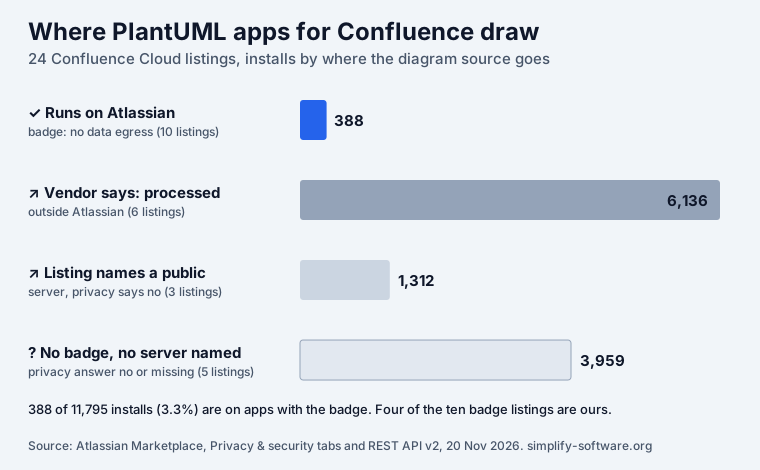
The chart is lopsided. The apps that keep the diagram inside Atlassian are mostly new and small; the large, established apps grew up when a server was the only way to draw PlantUML.
Apps that say the diagram is processed outside Atlassian
Six vendors answer “yes” to processing end-user data outside Atlassian. In their own words:
- PlantUML Diagrams for Confluence (Stratus Add-ons, 5,182 installs): “Cloud version of “PlantUML diagrams for confluence” use our servers for diagram generation.” It also says data is not stored outside Atlassian, and the vendor holds SOC 2. This is the most installed app in the group and a mature one (PDF export, a bug bounty); its privacy tab adds that “Due to egress concerns, GitHub and GitLab integrations are disabled for now”.
- PowerPlantUML (Skylab Ventures, 431): lists “PlantUML code” as the data it accesses. It is a Connect app, last released in May 2022.
- Excalidraw, Mermaid, PlantUML Whiteboard (Fulstech, 227): lists “Diagram and macro content” and says “External rendering and editor services are documented”.
- Capable Diagrams (Capable, 177): “Diagram source sent to Capable’s diagram rendering service (on by default; admins can turn it off)”. The off switch is a real option for teams that want this app’s wide format list.
- Simple PlantUML (Dutch Beginners, 96): “App processes PlanUML diagram text to create diagram image”; the listing adds “Uses latest version of PlantUML server”.
- PlantUML SVG (Grovr, 23): “The content inputted into the macro”. A Connect app.
None of this is hidden. A vendor that runs its own server can secure it well, and Stratus, for one, publishes a trust centre and a DPA. The point is that your diagram text leaves the Atlassian cloud, and your security review should know.
Apps that name a public server
Three listings answer “no” to processing data outside Atlassian, yet their own text names a public server:
- PlantUML for Confluence (Instant) (AppsFoundry, 1,169 installs, free): diagrams appear “either using the default PlantUML server or your custom URL”. The custom URL is a good feature: point it at your own PlantUML server and the text stays in your network.
- PlantUML Macro for Confluence (97): “A macro which integrates plantuml.com on Confluence page”.
- Kroki Diagrams for Confluence (46): “The default kroki server is: Kroki.io”, and the reader is asked to make sure “Kroki.io can be accessed from your web explorer”.
The two statements can both be true. If the reader’s browser fetches the image straight from
plantuml.com or kroki.io, the app’s own back end never touches the diagram, but the diagram
text still leaves for a public server inside the image URL. We did not install these apps to
watch the traffic; ask the vendor before you rely on either reading.
Apps with the Runs on Atlassian badge
Ten listings carry the badge, and all of them say in the listing that the engine runs in the browser or inside Atlassian:
- PlantUML for Confluence Cloud (Narva, 129 installs, free): “Data never leaves your Atlassian environment” and “no external data egress permissions”.
- Our four Excalidraw listings (253 installs in all; more below).
- Mermaid & PlantUML Diagrams (Eriksen Labs, 4): “There is no PlantUML server, the source is sent nowhere, and nothing is fetched from the web”; C4, ArchiMate and Kubernetes libraries.
- PlantUML Diagrams by Bitwerf: “no server and no data egress”; C4, AWS, Azure, Google Cloud, Kubernetes and ArchiMate libraries.
- PlantUML Editor (Dortus, 1, free): “Diagrams are drawn in the reader’s browser by the PlantUML engine”; C4-PlantUML built in.
- Mermaid, PlantUML & Graphviz Diagrams (Mastero, 1): “rendering happens in your browser and nothing is sent outside Atlassian”.
- UML, PlantUML & Graphviz Diagrams (Puzari Tech): “the official PlantUML engine compiled to JavaScript and Graphviz in WebAssembly, all inside your browser”.
The trade-off is age. Most of these apps are weeks or months old, with few installs and fewer reviews. A server app with 5,000 installs has met more odd diagrams than an app with four. If you pick a badge app, try your largest real diagram before you roll it out.
The rest: no badge, no server named
Five listings neither carry the badge nor name a server. Three answer “no” to processing data outside Atlassian: Flowchart & PlantUML Diagrams (Toshihiro Sato, 537), PlantUML Diagrams for Confluence (Pro) (RVS Softek, 191, free), whose listing says “Content stays inside your Confluence site”, and UML for Confluence Cloud (Vico, 153). Two show no answers at all: PlantUML, Swagger, drawio.xml, Mermaid (Warsaw Dynamics, 3,031), a 30-macro pack, and Versatile PlantUML Renderer (47), a Connect app last released in February 2022.
A Forge app without the badge declares at least one outside connection in its manifest or misses another rule; the Marketplace does not say which. Ask the vendor what the connection is for. It may be harmless, such as a Git import you never use.
All 24 apps in one table
Installs and prices from the Marketplace REST API on 20 November 2026, sorted by installs within each group. “Free to 10” means free up to 10 users, then the whole site pays.
| App (vendor) | Installs | Price | Where the diagram is drawn |
|---|---|---|---|
| PlantUML Diagrams for Confluence (Stratus Add-ons) | 5,182 | free to 10 | vendor’s servers (privacy answer) |
| PowerPlantUML (Skylab Ventures) | 431 | free to 10 | outside Atlassian (privacy answer); Connect |
| Excalidraw, Mermaid, PlantUML Whiteboard (Fulstech) | 227 | free to 10 | outside Atlassian (privacy answer) |
| Capable Diagrams (Capable) | 177 | free to 10 | Capable’s renderer, admin can turn it off |
| Simple PlantUML (Dutch Beginners) | 96 | paid | PlantUML server (privacy answer and listing) |
| PlantUML SVG (Grovr) | 23 | paid | outside Atlassian (privacy answer); Connect |
| PlantUML for Confluence (Instant) (AppsFoundry) | 1,169 | free | public PlantUML server or your own URL |
| PlantUML Macro (Chinese Technical Support) | 97 | free to 10 | plantuml.com (listing) |
| Kroki Diagrams (Chinese Technical Support) | 46 | free to 10 | kroki.io (listing) |
| PlantUML for Confluence Cloud (Narva) | 129 | free | inside Atlassian, badge |
| Mermaid Diagrams & Excalidraw Whiteboard (Simplify, ours) | 94 | free to 10 | in the browser, badge |
| PlantUML Diagrams: UML & C4, Excalidraw (Simplify, ours) | 54 | free to 10 | in the browser, badge |
| Excalidraw Architecture & Sequence (Simplify, ours) | 53 | free to 10 | in the browser, badge |
| Excalidraw Math Equations & LaTeX (Simplify, ours) | 52 | free to 10 | in the browser, badge |
| Mermaid & PlantUML Diagrams (Eriksen Labs) | 4 | free to 10 | in the browser, badge |
| PlantUML Editor (Dortus) | 1 | free | in the browser, badge |
| Mermaid, PlantUML & Graphviz (Mastero) | 1 | free to 10 | in the browser, badge |
| PlantUML Diagrams by Bitwerf (Bitwerf) | 0 | paid | inside Atlassian, badge |
| UML, PlantUML & Graphviz (Puzari Tech) | 0 | free to 10 | in the browser, badge |
| PlantUML, Swagger, drawio.xml, Mermaid (Warsaw Dynamics) | 3,031 | free to 10 | not stated |
| Flowchart & PlantUML Diagrams (Toshihiro Sato) | 537 | free to 10 | not stated; privacy answer “no” |
| PlantUML Diagrams for Confluence (Pro) (RVS Softek) | 191 | free | “Content stays inside your Confluence site” |
| UML for Confluence Cloud (Vico) | 153 | paid | not stated; privacy answer “no” |
| Versatile PlantUML Renderer (Purple Rhapsody Tech) | 47 | paid | not stated; Connect |
C4 diagrams without a server
C4 is where the question of the server comes up most, because a C4 container diagram is a map of your system. In C4-PlantUML the diagram starts with an include:
@startuml
!include <C4/C4_Container>
Person(user, "Customer")
System_Boundary(shop, "Shop") {
  Container(web, "Web app", "React")
  Container(api, "Orders API", "Go")
  ContainerDb(db, "Orders DB", "PostgreSQL")
}
Rel(user, web, "Uses", "HTTPS")
Rel(web, api, "Calls", "JSON")
Rel(api, db, "Reads and writes")
SHOW_LEGEND()
@enduml
The angle brackets mean PlantUML’s standard library, which lists C4 with its source in the
plantuml-stdlib/C4-PlantUML repository. On a server, the include is resolved there. In the
browser, the library must ship inside the app, and an include of a URL would mean a request to
GitHub from every reader’s browser.
In our apps, the C4-PlantUML 2.14.0 library is bundled. !include <C4/C4_Context>,
C4_Container, C4_Component, C4_Dynamic, C4_Deployment and C4_Sequence are drawn from that
copy, and the same files pasted as raw.githubusercontent.com links are matched to it. Every
other include is refused with “External includes are not supported”, so the page never fetches
anything. The Eriksen Labs, Bitwerf, Dortus and Puzari listings also say C4 is built in. For the
same system drawn at three C4 levels in C4-PlantUML, Mermaid and Graphviz, see
C4 model examples.
How to choose
- Your diagrams name internal systems, or your security team reviews apps: pick a badge app, and test your largest real diagram first. If you need a mature app with a server, choose one that lets you point it at your own PlantUML server, such as the Instant app’s custom URL.
- You need Git sync of
.pumlfiles: RVS Pro imports from GitHub, GitLab and Bitbucket, and Versatile from private GitHub repos. Check whether the Git fetch goes through the vendor. - You want free at any size: Instant (public server by default), RVS Pro, Narva and Dortus. Narva and Dortus carry the badge.
- You want to annotate the diagram: our apps put it on an Excalidraw whiteboard, where you draw around it (below).
- You are moving from Data Center: RVS Pro says it migrates Avono and Stratus Data Center diagrams; Stratus has a Cloud version of the same app.
For the PlantUML syntax itself, with ten diagram types rendered and the mistakes that fail silently, see the PlantUML syntax cheat sheet. For every diagram app in Confluence, priced, see Confluence free diagram plugins.
Where our apps fit
We make four of the ten badge listings, so read this with that in mind. They are one product, an Excalidraw whiteboard for Confluence, in four listings that differ only in the first diagram type offered: PlantUML Diagrams: UML & C4, Mermaid Diagrams & Excalidraw Whiteboard, Architecture & Sequence and Math & LaTeX.
PlantUML in them runs the official engine compiled to JavaScript (@plantuml/core, release
1.2026.9) and is loaded only when a PlantUML diagram is drawn. The diagram lands on the whiteboard,
where you can add hand-drawn notes and arrows; Update redraws it from the source. Mermaid, LaTeX
math, Graphviz, Vega-Lite and WaveDrom work the same way. Scenes are stored in your site, the last
10 versions are kept, and the page’s PDF and Word export includes the drawing. Free up to 10 users,
then $0.15 per user a month.
What they do not do: no Git sync of .puml files, no includes beyond C4, no themes fetched from a
server, no live co-editing. If you need Git sync, RVS Pro or Versatile fits better.
For Jira, the same engine draws PlantUML in PlantUML Diagrams for Jira, on a whiteboard on the work item, and in PlantUML Diagrams in Tabs, as a tab.
How we collected the data
- Which apps: Confluence Cloud listings that mention PlantUML in their name, tagline or summary, from our Marketplace search snapshot of 20 November 2026 (searches such as “plantuml”, “plantuml diagrams”, “uml”, “c4”), plus our own two listings that draw PlantUML but were not in those results. We left out a deprecated Fulstech app whose listing asks users to move to the newer one, and Just Add+, a Markdown macro pack. That leaves 24 listings.
- Installs, prices, framework, release: Atlassian Marketplace REST API v2 (
addons/{key},versions/latest,pricing/cloud/live), 20 November 2026. Our four listings count as four. - Badge and privacy answers: each listing’s Privacy & security tab, read the same day. Quotes are the vendor’s own words; “not stated” means neither the answers nor the listing say.
- Runs on Atlassian: Atlassian developer documentation, read 20 November 2026.
- We did not install the other vendors’ apps or inspect their network traffic. If a vendor’s answer changes, we will update this page.
Frequently asked questions
Does Confluence support PlantUML?
Not on its own. Confluence Cloud has no PlantUML macro, and a PlantUML block in a code macro shows as text. You need a Marketplace app; 24 Confluence Cloud listings drew PlantUML when we checked on 20 November 2026.
Do PlantUML apps for Confluence send my diagram to a server?
Many do. The PlantUML engine is Java, so the classic way is to send the text to a PlantUML server and get an image back. Of 24 listings, 6 say in their Privacy & security answers that the diagram is processed outside Atlassian, and 3 more name a public PlantUML or Kroki server in the listing text. 10 carry the Runs on Atlassian badge, which Atlassian gives only to Forge apps that do not send data out.
How do I check whether a Confluence app sends data outside Atlassian?
Open the listing on the Marketplace and go to Privacy & security. Look for the Runs on Atlassian badge and for the answer to whether the app processes end-user data outside Atlassian. Then read the listing text for a server name such as plantuml.com or kroki.io, because the two do not always agree.
Can I draw C4 diagrams in Confluence without a PlantUML server?
Yes, with an app that runs the PlantUML engine in the browser and ships the C4-PlantUML library inside it. Write !include <C4/C4_Container> and the C4 macros. Our Excalidraw apps for Confluence ship C4-PlantUML 2.14.0 and refuse any other include, so nothing is fetched from the web; several other badge apps say they bundle C4 too.
Is there a free PlantUML app for Confluence?
Four of the 24 are free at any size: PlantUML for Confluence (Instant), PlantUML Diagrams for Confluence (Pro), PlantUML for Confluence Cloud (Narva) and PlantUML Editor (Dortus). Most others are free up to 10 users. Of the four free ones, Narva and Dortus carry the Runs on Atlassian badge; the Instant app uses the public PlantUML server unless you set your own.
Can I use PlantUML in Jira?
Only through an app as well. Our PlantUML Diagrams for Jira draws PlantUML on an Excalidraw whiteboard on a work item, and PlantUML Diagrams in Tabs keeps a diagram in a tab; both run the engine inside Atlassian with C4 built in.