Jira Automation Examples: 8 Rules and Their Cost in Steps
On this page
The team lead adds one more rule: “comment when a ticket reaches Done”. It works. Three weeks later the site has used half its automation allowance, and that rule is the biggest line. It fires on every status change and stops at its condition 250 times a month.
From 3 December 2026 Atlassian bills automation by the step. We built three rules on our Jira Cloud site on 5 November 2026 and read their cost from the audit log. Below are eight rules to copy, each with its price in steps.
Short answer: a Jira automation rule is a trigger (what starts it), optional conditions (checks) and actions (what it changes). Every trigger, condition and action that runs costs one of your plan’s monthly automation steps: 150 for a whole Jira Free site, 400 per user on Standard. Put conditions inside the trigger where you can: on our site the same comment rule cost 2 steps that way and 3 with the condition after the trigger.
The allowance and the price
Atlassian’s rules, from its page on how usage is calculated: “An automation step is a single executed part of an automation flow, including triggers, conditions, actions, branches, and loops.” Allowances are pooled per organization and refresh monthly. “On December 3, 2026, extra usage billing takes effect.”
| Plan | Jira automation steps a month | Jira Service Management |
|---|---|---|
| Free | 150 per subscription | 1,250 per subscription |
| Standard | 400 per user | 3,000 per user |
| Premium | 750 per user | 6,500 per user |
| Enterprise | 1,000 per user | 9,500 per user |
| Over the allowance | $0.50 per 1,000 extra steps, or flows stop if extra usage is off | same |
What counts, in Atlassian’s words:
- A trigger is one step, and “Conditions set inside the trigger, such as work item transitioned to Done, are part of that one step and don’t add steps.”
- “A condition that evaluates to false still counts as one step when it runs.”
- A branch is one step “plus the steps in the path that runs”. A loop over three sub-tasks with one action each “counts as four steps total”.
- Free: “Log action, Create variable, Create lookup table, Re-fetch work item data, and Lookup work items”. Use Rovo spends Rovo credits instead; “Use Cursor and Use GitHub Copilot, count as automation steps.”
Three rules we built, and what the audit log said
All three ran on test work items in one space, limited to the label automation-test, and were
switched off after the test.
| Rule | Trigger | Condition | Action | Steps a run (audit log) |
|---|---|---|---|---|
| A | Work item transitioned, To status Done | after the trigger: labels = automation-test | comment | 3 |
| B | Work item transitioned, To status In Review, with labels = automation-test inside the trigger | none | comment | 2 |
| C | Work item created | after the trigger: labels = automation-test | comment | 3 |
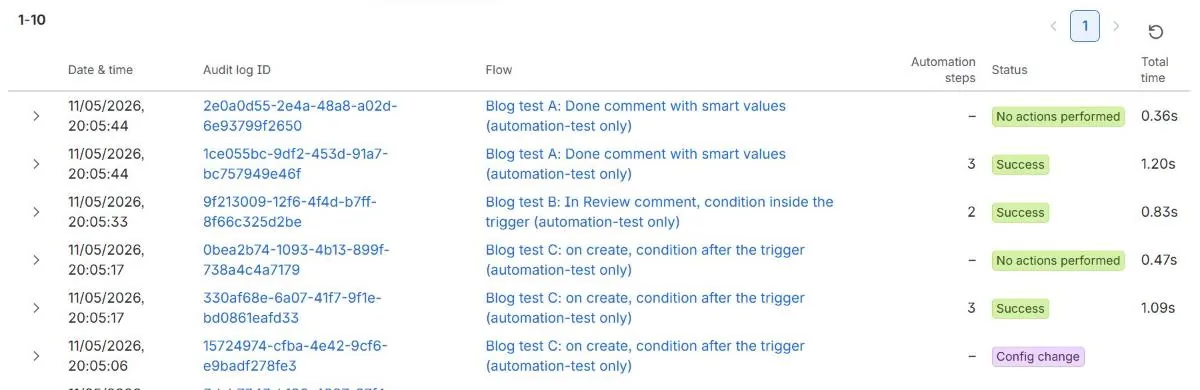
Two things the log showed:
- Inside the trigger is cheaper. B did the same work as A with one step less. Across a month the difference grows with every transition that does not match, as the chart below shows.
- The false conditions were not billed on our site. For the work item without the test label, A and C stopped at their condition with status “No actions performed”, and the log marked them “Non-billable automation steps”. Atlassian’s page says such a condition “still counts as one step”. We saw this on 5 November, before extra usage billing starts, so we price the recipes below by the documentation, not by the log. Check your own audit log after 3 December.
Eight rules to copy, priced in steps
“Steps a run” follows Atlassian’s counting rules. “A month” assumes a 10-person team that creates 200 work items a month (60 bugs, 20 Highest), moves 150 to Done out of 400 transitions, opens 80 pull requests and works 22 days, and charges 2 steps for every run that stops at its condition.
| # | Rule | Trigger | Condition | Action | Steps a run | A month |
|---|---|---|---|---|---|---|
| 1 | Comment or notify on Done | Work item transitioned, To status Done | inside the trigger | Add comment or Send email | 2 | 300 |
| 2 | Assign new bugs | Work item created | type = Bug | Assign to the triage person | 3 | 460 |
| 3 | Due date on Highest work items | Work item created | priority = Highest | Edit due date {{now.plusBusinessDays(2)}} | 3 | 420 |
| 4 | In Progress when a pull request opens | Pull request created (needs the dev tool connected) | none | Transition to In Progress | 2 | 160 |
| 5 | Daily overdue email | Scheduled, workdays at 9:00 | none | Lookup work items (free), Send email | 2 | 44 |
| 6 | Close the parent when the last sub-task is done | Work item transitioned, To status Done (sub-tasks) | branch to parent, “all sub-tasks done” | Transition parent to Done | 4 | per run |
| 7 | Close sub-tasks when the parent is done | Work item transitioned, To status Done | none | branch over sub-tasks, Transition each | 2 + one per sub-task | per run |
| 8 | AI summary on Highest requests | Work item created | priority = Highest | Use Rovo (credits), Add comment | 3 + Rovo credits | 420 |
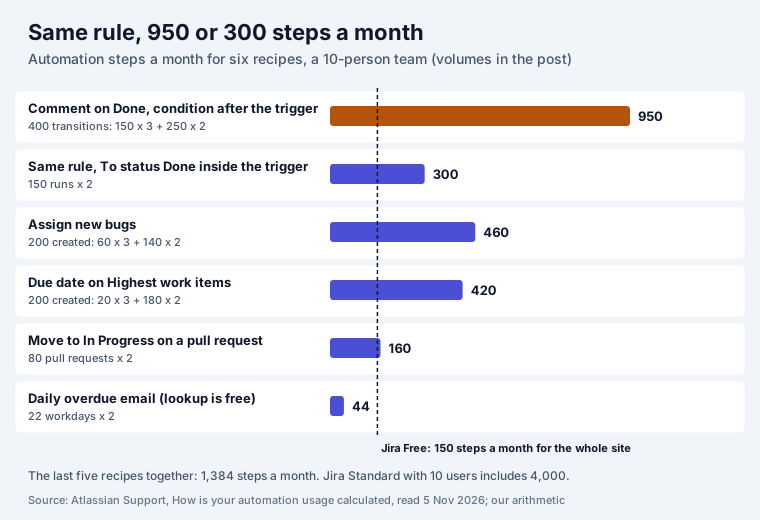
What the arithmetic says:
- On Jira Free, automation is a few dozen runs a month. 150 steps is 75 runs of a two-step rule. Recipe 2 alone would use three times that.
- On Standard with 10 users, 4,000 steps cover all five efficient recipes (1,384) with room left. Rule 1 written the slow way would use almost a quarter of it by itself.
- Event triggers beat schedules that poll. Recipe 5 costs 44 steps a month because Lookup work items is free; an hourly “anything new?” rule costs 730 even when it finds nothing.
Smart values, and what they printed
Smart values are placeholders that Jira fills in when the rule runs. This is what our three rules printed on test work item PAY-31 at 20:05 on Thursday 5 November 2026:
| Smart value | Printed |
|---|---|
{{issue.key}} | PAY-31, shown as a link card with the summary and status |
{{issue.summary}} | Automation test: labelled item |
{{issue.status.name}} | Done |
{{initiator.displayName}} | Sophia Martinez (the person who moved it) |
{{issue.priority.name}} | Medium |
{{issue.labels}} | automation-test |
{{issue.duedate}} | 2026-11-12 |
{{issue.duedate.format("dd MMM")}} | 12 Nov |
{{now.format("dd MMM yyyy")}} | 05 Nov 2026 |
{{now.plusBusinessDays(2).format("EEE dd MMM")}} | Mon 09 Nov (Thursday plus two working days) |
{{now.plusBusinessDays(5).format("EEE dd MMM")}} | Thu 12 Nov |
{{issue.comments.size}} | 2 (the comments the other two rules had added) |
{{issue.created.format("HH:mm")}} | 19:05, although it was 20:05 in Belgrade |
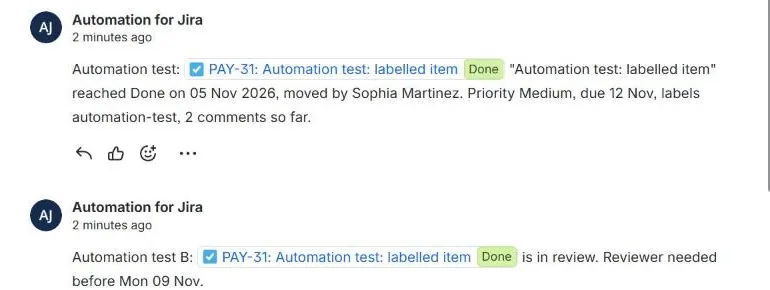
The last row is the trap: the time came out in UTC, an hour behind the Central European time on the screen. A comment that tells customers “created at 19:05” is wrong for everyone not on UTC. Test any time you print in a comment on a test work item before the rule goes live.
Two more things we saw in the builder: rules are now called flows, a flow holds up to 65 steps (“1/65 added”), and the comment action has “Prevent duplicates by only adding this comment once to a particular work item” switched on by default, so a rule that should comment on every run needs it turned off.
Before you switch a rule on
- Scope it. Limit it to the spaces it is for, and test on a label like ours first.
- Put the status in the trigger, not in a condition after it, whenever the trigger offers it.
- Prefer events to schedules, and use Lookup work items (free) instead of a branch where a list is enough.
- Read the audit log after the first runs. It shows the steps of every run and every failure.
- Check Usage once a month: Jira Settings, System, Global automation, Usage.
Rules our apps make easier
Several of these rules are better with a field to test or a board to watch.
Team Checklist adds JQL fields such as
teamChecklistOpen and teamChecklistComplete, usable in automation conditions and JQL lookups,
and its settings page has three copy-ready automation rules: a progress comment on every transition,
move to Done when the checklist is complete, and a daily email about overdue items. Our
Jira checklist guide tests both the native action items and the app.
Recipe 3 sets due dates; Deadline Tracker then shows every work item in columns from Overdue to two weeks out, and our Jira deadlines guide explains what Jira itself counts as overdue. Both apps are free for up to 10 users.
For reports sent on a schedule, automated Jira reports compares filter subscriptions, automation digests and Atlassian Analytics, with what each costs in steps. Rules that move work through statuses depend on the workflow behind them: our Jira workflow guide shows why a rule should set the Resolution when it moves work to Done.
Sources
- Our Jira Cloud site, 5 November 2026: three flows in the flow builder and the automation REST API, test work items PAY-31 and PAY-32, the audit log, the comments the flows wrote.
- Atlassian Support: How is your automation usage calculated (allowances, what counts as a step, extra usage price, where to see usage).
Frequently asked questions
What is Jira automation?
A rule builder inside Jira Cloud. Each rule, now called a flow, has a trigger (the event that starts it), optional conditions (checks that decide whether to go on) and actions (what it changes). It runs as the user "Automation for Jira" and needs no code. Atlassian's example: "Trigger: Work item transitioned... Condition: Status is Done... Action: Send notification".
Is Jira automation free?
Every plan includes some. Atlassian counts automation in steps, and each plan has a monthly allowance: Jira Free 150 steps for the whole site, Standard 400 per user, Premium 750 per user, Enterprise 1,000 per user. From 3 December 2026, extra use is billed at $0.50 per 1,000 steps, or the flows stop when extra usage is turned off.
What counts as an automation step?
Each trigger, condition, action, branch and loop that runs. A condition set inside the trigger is part of the trigger's one step. Lookup work items, Log action, Create variable, Create lookup table and Re-fetch are free. Use Rovo spends Rovo credits instead of steps. On our site a rule that ran three components showed "3" in its audit log.
What are smart values in Jira automation?
Placeholders in double braces that Jira fills in when the rule runs, such as {{issue.key}}, {{issue.summary}} or {{now.plusBusinessDays(2)}}. They work in comments, emails, field values and JQL. On our test site {{now.plusBusinessDays(2).format("EEE dd MMM")}} on Thursday 5 November printed "Mon 09 Nov", skipping the weekend.
Why is my automation rule not running?
Check the audit log first: every run is listed with its status and steps. The usual causes are a scope that does not include the space, a condition that is never true, the rule being disabled, or the actor lacking permission. If your site uses up its step allowance with extra usage turned off, flows stop until the allowance resets.
Where can I see how many automation steps I use?
In Jira, go to Settings, then System, then Global automation, then Usage, to see the flows that use the most steps. Organization admins see the total under Atlassian Administration, Usage, Meters, Automation steps. Each flow's audit log shows the steps per run.