Jira Labels vs Components: When to Use Each, Tested
On this page
A new support engineer files three bugs on Monday. One gets the label Checkout, one checkout,
one check-out. On Friday the dashboard filter shows two of them, the label picker shows three
spellings, and nobody owns any of it. The team had a field built for exactly this, Components, and
nobody had set it up.
Labels and components both group work items. They differ in who controls the list, where it exists and what Jira does with it. We tested both on our Jira Cloud site on 10 November 2026, through the work item view and the REST API, including the answers that other pages give without testing them.
Short answer: use components for the fixed parts of one company-managed space (Checkout,
Billing, Mobile): a space admin keeps the list and each component can have a lead and a default
assignee. Use labels for free tags that cross spaces or come and go. Labels cannot be renamed,
deleted or contain spaces. In JQL, labels != x and component != x skip items with no value:
add OR labels is EMPTY.
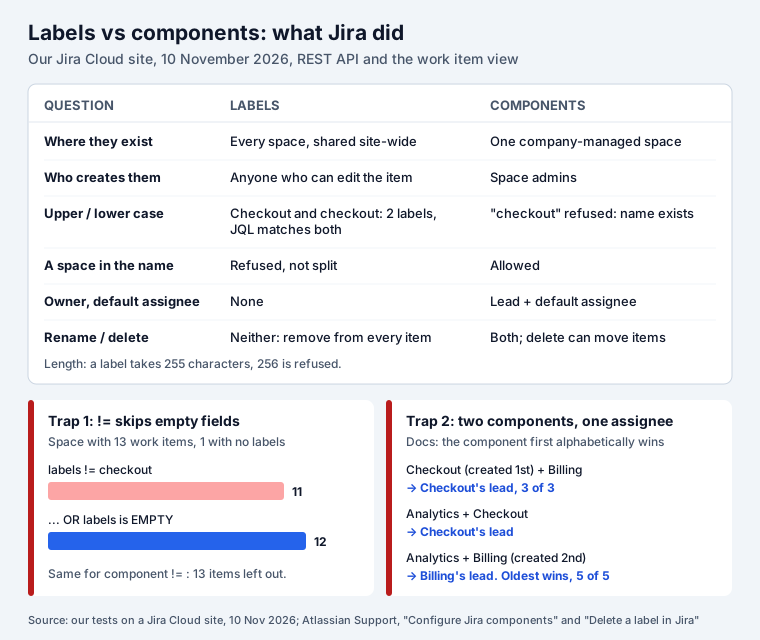
Labels vs components at a glance
| Labels | Components | |
|---|---|---|
| Where they exist | Every space on the site, one shared list | One company-managed space each |
| Who creates them | Anyone who can edit the work item, by typing | Space admins, on the Components page |
| Values per work item | Many | Many |
| Owner | None | Component lead |
| Default assignee | None | Space default, space owner, component lead or unassigned |
| Spaces in the name | Refused | Allowed |
| Upper and lower case | Two labels, JQL matches both | A second name in another case is refused |
| Rename | No | Yes |
| Delete | No: remove it from every item | Yes, with an option to move the items |
| Team-managed spaces | Yes | No (Atlassian), see the test below |
Every “tested” cell comes from a test below. Two rows contradict what most pages on this topic say: a label with a space is refused, not split into two labels, and with two components the assignee does not come from the first one in alphabetical order.
What labels are for
A label is a tag. There is no list to maintain: the first person who types migration-2027 on a
work item creates the label, and from then on it appears in the label picker of every space on the
site. That is the whole appeal and the whole problem.
Good uses:
- Work that crosses spaces: a customer escalation that touches the web app, the API and support, a compliance audit, a release train.
- Temporary campaigns:
cleanup-q4,hackathon,needs-design-review. When the campaign ends, the label stops being added and drops out of sight. - Tags you do not control: people who are not space admins can still group their own work.
What you give up: nobody owns the list. On our site of a few dozen people, the label list had grown to 40 entries before this test.
Spaces: refused, not split
Many guides, and Google’s AI answer for this query, say that a label with a space becomes two
labels, front and end. On Jira Cloud it did not. Typing front end in the Labels field offered
“front end (New label)”, and choosing it showed a red message, “Labels can’t have spaces.”:
Nothing was saved: the work item’s labels stayed empty. The REST API refuses it too, with
The label 'front end' can't contain spaces. Use hyphens (front-end) and agree on them.
Case: two labels, one search
We added Checkout to a work item while another item already had checkout. Jira kept both: the
label list returned checkout and Checkout as two entries, and the picker showed Checkout
next to the lower-case one. JQL ignores the difference. labels = checkout, labels = Checkout
and labels = CHECKOUT each returned the same two work items.
So searches survive inconsistent case, but the picker does not, and people keep choosing the wrong spelling. Agree on lower case.
No partial match, 255 characters
labels ~ checkoutreturned 0 items from the search API, with no error. The strict JQL parser explains why:The operator '~' is not supported by the 'labels' field.There is no “contains” search for labels; list the spellings withlabels in (checkout, check-out).- A 255-character label saved; 256 characters was refused with “exceeds the maximum length for a single label of 255 characters”.
Rename and delete: you cannot
Atlassian’s support article on labels says it plainly: “While you can’t directly edit labels in Jira Cloud, you can remove an existing one and add a new one instead.” The rename is two bulk changes:
- Search
labels = old-label, then Bulk change > Edit > Change Labels > Add to existing with the new label. - Search again, Bulk change > Edit > Change Labels > Find and remove these with the old label.
Deleting works the same way. “Labels can’t be deleted from Jira via UI and/or database, but you can completely remove labels from your instance”, by removing them from every work item. Two catches from the same article and our test:
- You only remove it from the items you can see. Atlassian recommends doing it as a site admin.
- The label can linger. Atlassian mentions “index/cache replication”. Our 255-character test label was still in the label list 20 minutes after we removed it from its only work item.
What components are for
Components divide one space into its standing parts. Atlassian’s description: “Jira components help you group work items in your space around product features, departments, or workstreams.” Only space admins create them; “Everyone else in the space can view, search for, and link work items to Jira components.”
That control is the point. A component list is short and stable, so filters and reports built on it keep working. Two things labels cannot do:
- An owner. Each component can have a component lead, and JQL can find work by owner:
component in componentsLeadByUser("<account ID>")returned exactly the 5 work items in our lead’s component. - Routing. A component’s default assignee “will override the space’s overall default assignee”. In our space the default was Unassigned; a work item created with the Checkout component went straight to Checkout’s lead.
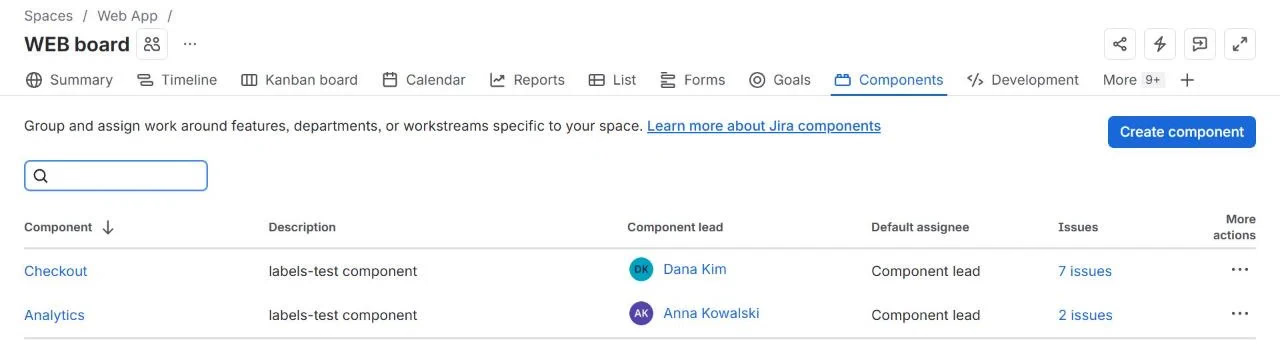
Names are unique per space and case does not make a new one: creating checkout next to Checkout
failed with “A component with the name checkout already exists in this project.” Spaces in names are
fine: Front end saved.
Two components, which assignee?
Atlassian’s page answers this: “If someone creates a work item with more than one component, and the default assignees for those components are different people, then Jira assigns the work item to the default assignee of the component that is first alphabetically.”
We created three components in this order: Checkout (lead Dana), Billing (lead Ben), Analytics (lead Anna), each with the component lead as default assignee. Then we created work items with two components each and no assignee:
| Work item | Components | Alphabetical rule says | Jira assigned |
|---|---|---|---|
| WEB-15 | Checkout, Billing | Ben (Billing) | Dana (Checkout) |
| WEB-16 | Billing, Checkout | Ben (Billing) | Dana (Checkout) |
| WEB-17 | Checkout, Billing | Ben (Billing) | Dana (Checkout) |
| WEB-19 | Analytics, Checkout | Anna (Analytics) | Dana (Checkout) |
| WEB-20 | Analytics, Billing | Anna (Analytics) | Ben (Billing) |
5 of 5 went to the component created first, whatever the names and whatever order we listed them in. We created these items through the REST API; the rule may differ in other paths, but do not count on alphabetical order. If two components can meet on one item, give them the same default assignee or let a triage step assign.
Deleting a component
Delete offers to move the work items to another component or to unlink them. We deleted Billing and moved its items to Checkout. The items now showed Checkout, but their assignee stayed Ben, Billing’s lead. The default assignee only applies when a work item is created, not when its component changes.
JQL: the trap in != for both
This is the one that quietly breaks dashboards. Our Web App space had 13 work items; one had no labels at all.
| JQL | Items |
|---|---|
project = WEB | 13 |
project = WEB AND labels != checkout | 11 |
project = WEB AND labels not in (checkout) | 11 |
project = WEB AND labels is EMPTY | 1 |
project = WEB AND (labels != checkout OR labels is EMPTY) | 12 |
!= and not in only match items that have some label. The item with none disappears from “every
item except checkout”. Components behave the same: component != Checkout returned 2 items while
13 had no component at all. Write the full form:
project = WEB AND (component != Checkout OR component is EMPTY)Two more facts for queries: component names are matched without case too (component = checkout
found the Checkout items), and a component name that is also a JQL word needs quotes.
Team-managed spaces: components that hide
Atlassian is clear: “Jira components are only available in company-managed spaces, and are scoped to the space they’re created in.” Team-managed spaces show no Components page and no Components field.
The API is less strict. In our team-managed space, POST /rest/api/3/component created a component
and a work item could be created with it (KAN-5). The work item view showed no Components field, but
the item got the component lead as its assignee, and component = Checkout found it. If a script or
an import writes components into a team-managed space, people will see assignments they cannot
explain. In team-managed spaces, use labels, or a custom select field the space admin controls.
Compass components
Company-managed spaces can switch from Jira components to Compass components, which come from Atlassian’s Compass catalogue of services and libraries. Atlassian suggests them “if you want to group work items around pieces of your software architecture”. A space uses one kind or the other, and creating a Jira component requires the space to be on Jira components.
Which one, by situation
| Situation | Use |
|---|---|
| Parts of one product that a lead owns (Checkout, API, Mobile) | Component, with a default assignee |
| Routing new bugs to the right person without triage | Component |
| A customer, campaign or audit across several spaces | Label |
| Tags that people add for themselves, short-lived | Label |
| A fixed list in a team-managed space | Custom select field (or labels with rules) |
| Releases | Fix version, not a label |
| Bigger pieces of work | Epics: see epic vs story vs task |
And a few rules that keep labels usable:
- Lower case and hyphens only:
front-end,customer-acme. - Write the agreed labels in the space’s description or a Confluence page.
- Once a quarter, search
labels is not EMPTY ORDER BY labelsand merge the near-duplicates with the two-step bulk change above.
Seeing work by label or component
Jira’s search groups by neither. Our Kanban Status Board for Jira adds view tabs by component and by label (or any select field), so a board can show columns Checkout, Payments API, Ledger and None side by side, with the cards’ labels and components on them. Moving a card between status columns runs the real workflow transition. For a ranked backlog by priority instead, see the Jira backlog, tested.
How we tested
Jira Cloud site, 10 November 2026, signed in as a site admin. One company-managed space (Web App,
default assignee Unassigned) and one team-managed space. Work items, labels and components created
through the REST API (/rest/api/3/issue, /rest/api/3/component), JQL run through
/rest/api/3/search/jql and checked with /rest/api/3/jql/parse in strict mode; the label with a
space was also tried in the work item view. Atlassian’s pages were read the same day: What are Jira
components?,
Configure Jira
components,
Bulk editing labels in Jira
Cloud and Delete a
label in Jira.
Frequently asked questions
What is the purpose of labels in Jira?
Labels are free tags. Anyone who can edit a work item can add one, a new label is created the moment someone types it, and the same label works in every space on the site. Use them for things that cut across spaces or come and go: a customer name, a release train, a cleanup campaign. They have no owner and no default assignee.
What is the purpose of components in Jira?
Components split one company-managed space into parts such as Checkout, Billing or Mobile. A space admin keeps the list, so people pick from it instead of typing. Each component can have a lead and a default assignee, so new work items reach the right person without triage.
How do I rename or delete a label in Jira?
You cannot do either directly. Atlassian's workaround for a rename is two bulk changes: add the new label to every item that has the old one, then remove the old one. A label disappears when no work item carries it any more, but it can stay in the label list for a while after that: ours was still there 20 minutes later.
Are Jira labels case-sensitive?
Half. Jira stores Checkout and checkout as two separate labels and shows both in the picker, but JQL ignores case: labels = checkout, labels = Checkout and labels = CHECKOUT returned the same items in our test.
Can I use components in a team-managed space?
Not in the interface: Atlassian says Jira components are only available in company-managed spaces, and the team-managed work item view has no Components field. Through the REST API we could still create a component in a team-managed space and put a work item in it. The item got the component's default assignee and JQL found it, but nobody can see the component on the work item.
Why does my JQL with != miss work items?
Because != and not in only match items that have a value. labels != checkout left out the work item with no labels in our test, and component != Checkout left out all 13 items with no component. Add OR labels is EMPTY (or OR component is EMPTY) and put the whole condition in brackets.