Mermaid Mindmap: Syntax, Colours, Layout and Traps, Tested
On this page
A product manager asks an AI assistant for a mind map of the next release and pastes the answer into a
Mermaid block. It fails with There can be only one root. No parent could be found for ("classDef urgent fill:#f00").
The outline has one root. The real problem is that mind maps do not understand classDef at all, and
the error message points somewhere else.
This page answers the questions people type about Mermaid mind maps, and every answer was drawn, not copied from the docs. We rendered 57 small mind maps with Mermaid 11.17.2 and 12.3.0 (the latest, 3 November 2026) in a headless browser on 12 November 2026, and converted each one with the two versions of the library Excalidraw uses for Mermaid.
Short answer: a mind map is mindmap and an indented outline with one root:
mindmap
  root((Checkout v2))
    Payments
      Card refunds
      Wallet top-up
    Risk
      Fraud rules
    Release
      Feature flag
Indentation decides the parent, brackets decide the shape. Colours come from the theme, by top-level
branch, or by level with colorBy: depth since 12.2.0. Mind maps take no classDef, style, click or
direction lines: each of them fails as a “second root”. ::icon() draws nothing in either version.
A mindmap is an outline
The first line is mindmap. Every line after it is a node, and its indentation compared with the lines
above decides where it hangs. The first node is the root. In Mermaid’s own words, the actual indentation
“does not really matter only compared with the previous rows”.
What that means in practice, tested in both versions:
- Spaces or tabs both work, as long as you use one of them. Our outline indented with tabs drew the same tree as the one with spaces.
- Mixing them breaks it. A root indented with two spaces and a child indented with one tab failed
with
There can be only one root. No parent could be found for ("A"): one tab counts as less than two spaces, so the child sits left of the root. - Uneven steps are forgiven. A node indented less than its sibling but more than its parent is attached to the nearest line above with a smaller indent. Our ragged outline drew the same tree as the tidy one.
- One root only. A second line at the root’s indent fails with the “only one root” error, and so does any line indented less than the root.
- No root at all (just
mindmap) is a parse error:Expecting 'SPACELINE', 'SPACELIST', …. %%starts a comment line, as everywhere in Mermaid.
The root does not need to be indented: mindmap followed by Root at the left margin worked. Depth is
not limited in practice: a chain of 12 levels drew 12 nodes in a tall column.
The six node shapes
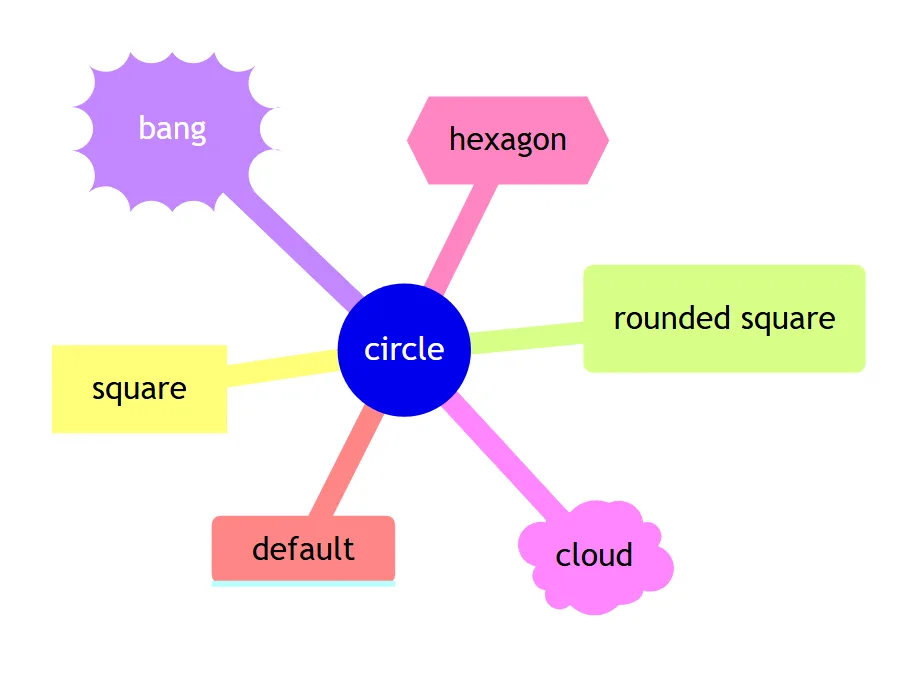
The text before a bracket is the node’s id, the text inside is its label, and the brackets pick one of six shapes. A line with no brackets gets the default shape: a box with a coloured underline.
| Shape | Write |
|---|---|
| Square | id[text] |
| Rounded square | id(text) |
| Circle | id((text)) |
| Bang | id))text(( |
| Cloud | id)text( |
| Hexagon | id{{text}} |
| Default | text |
The flowchart shapes are not available. d{diamond} is a lexical error, s([stadium]) a parse
error, and the newer A@{ shape: diamond } syntax a lexical error, in 11.17.2 and 12.3.0. The docs
promise “more shapes will be added”, but in 12.3.0 the list is still the six above.
Ids do not have to be unique. Two nodes both written myId[…] drew as two separate nodes.
Text inside nodes
- A line break:
First line<br/>second line, or a Markdown string. - Bold and italic: put the label in a Markdown string, backticks inside double quotes:
id["`**Bold** and *italic*`"]. Both were drawn as bold and italic. Press Enter inside the string for a new line. - Long labels wrap at 200 px, the
maxNodeWidthdefault. Setmindmap: maxNodeWidth: 400in the front matter for wider nodes. - Parentheses need quotes.
Call f(x) nowis a parse error, because(starts a shape.a["Call f(x) now"]works. - Square brackets eat text.
Array [1, 2]does not fail: Mermaid readsArrayas the id and draws a square node that says only 1, 2. Quote it:a["Array [1, 2]"]. - Emoji and other scripts work: 🚀, Cyrillic and Chinese labels drew as written.
- HTML entities work in quoted labels:
#9829;became ♥. - The word
endis a normal node here. In a flowchart it breaks the diagram; in a mind map it does not.
A title: in the front matter is accepted and not drawn: our mind map with title: Q3 plan had no title
anywhere in the SVG. Put the title in the root node instead. accTitle: and accDescr: lines, which give
other diagrams an accessible title, fail in a mind map with the “only one root” error.
Colours
By default every top-level branch gets its own colour and everything under it inherits it. The root has a colour of its own.
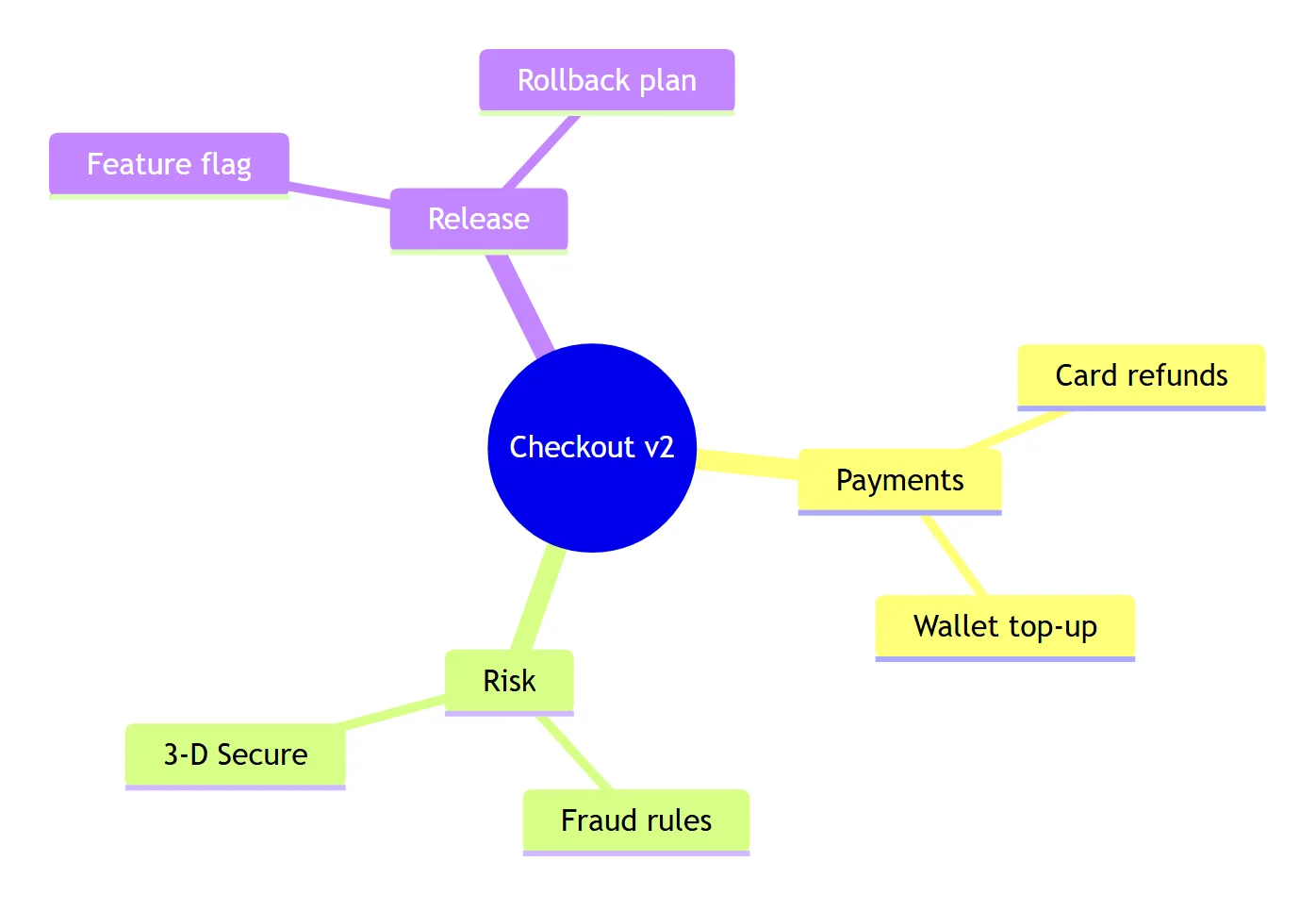
How many colours before they repeat
There are 11 branch colours. In our test with 14 top-level branches, branches 1 to 11 each had their own colour and branches 12, 13 and 14 repeated the colours of 1, 2 and 3. The Mermaid docs give the same count for depth colours: “Deeper levels repeat those eleven colors”.
Colour by level instead of by branch (Mermaid 12.2.0+)
---
config:
  mindmap:
    colorBy: depth
---
mindmap
  root((Checkout v2))
    Payments
      Card refunds
    Risk
      Fraud rules
Now every node at the same distance from the root shares a colour across branches. The docs add that depth “counts parent-child relationships, not spaces”, and our ragged outlines agreed.
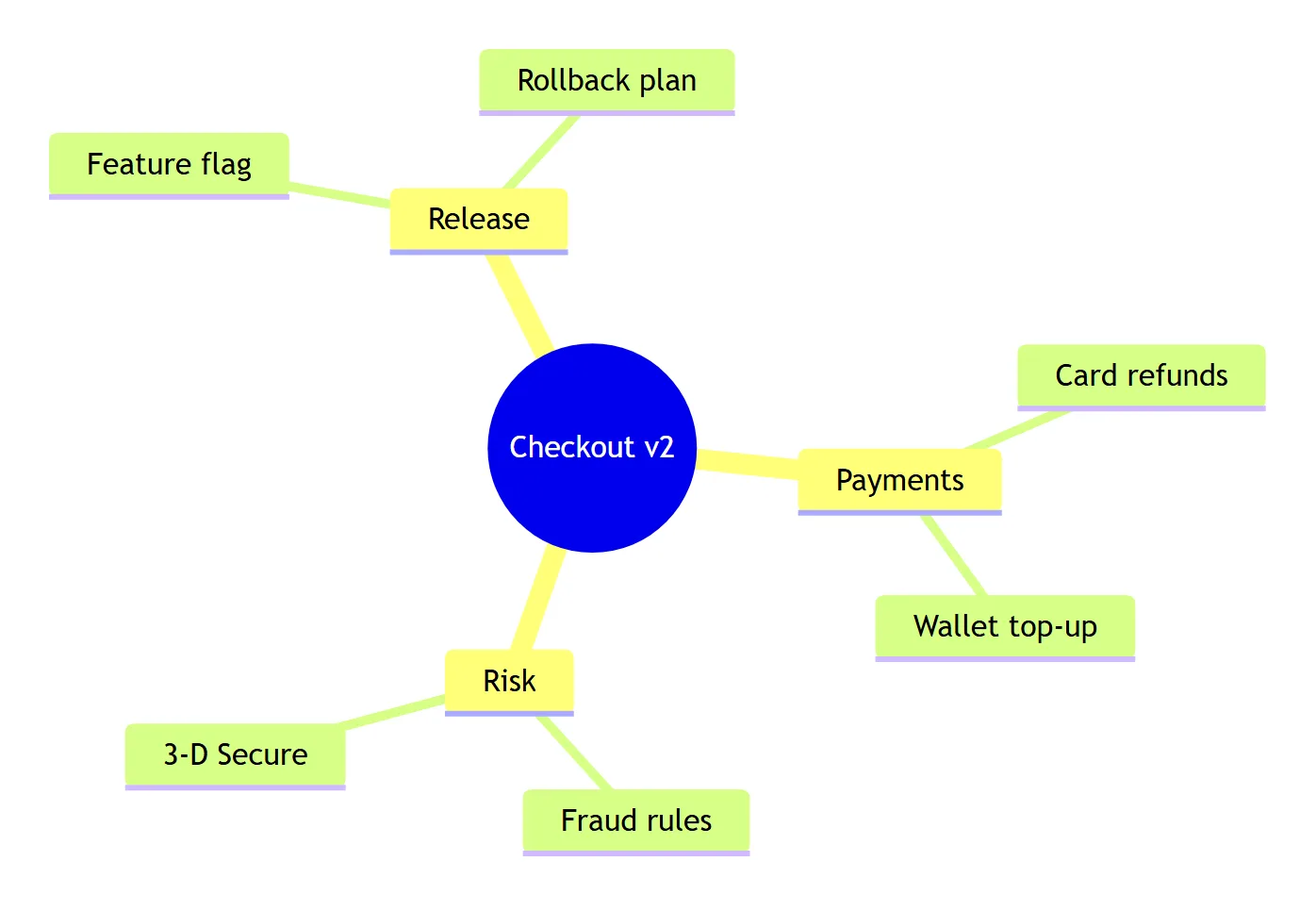
In Mermaid 11.17.2 the same source draws branch colours without a warning. Check the version of whatever renders your diagrams before relying on it.
Your own colours
Use the base theme and set the colour scale. The root uses git0, the first branch cScale1, the
second cScale2, and so on:
---
config:
  theme: base
  themeVariables:
    git0: '#374151'
    cScale1: '#2563EB'
    cScale2: '#16A34A'
    cScale3: '#D97706'
---
mindmap
  root((Checkout v2))
    Payments
    Risk
    Release
We read the fills back from the rendered SVG. One catch: the scale starts at 1, not 0. In our first
test we set cScale0 to cScale3 and no root colour: the three branches took cScale1, cScale2 and
cScale3, cScale0 was used nowhere we could see, and the root kept the base theme’s orange until we set
git0.
With colorBy: depth, cScale1 is depth 1 and cScale2 depth 2; set the matching cScaleLabel1,
cScaleLabel2 for readable text. In Mermaid’s neo look, also set useGradient: false, as the docs
explain, or every node gets the same background.
Themes and classes
theme: dark, forest, neutral and base all gave different fills in both versions, and the
%%{init: {'theme': 'forest'}}%% line at the top does the same as the front matter.
To colour one node, you need CSS from the page owner. :::urgent large on the line under a node adds the
classes urgent and large to it; we found them on the node in the SVG. But the mind map has no way to
define what they look like: a classDef urgent fill:#f00 line or a style a fill:#f00 line stops the
whole diagram with There can be only one root. If you cannot add CSS to the page, a flowchart is the
better choice for per-node colour.
Layout and “left to right”
The default layout is called cose-bilkent: branches spread all around the root. It is stable: we drew
the same mind map five times in each version and got the same positions every time.
Mermaid has a second layout for mind maps, tidy-tree, which puts the branches in rows on both sides of the root:
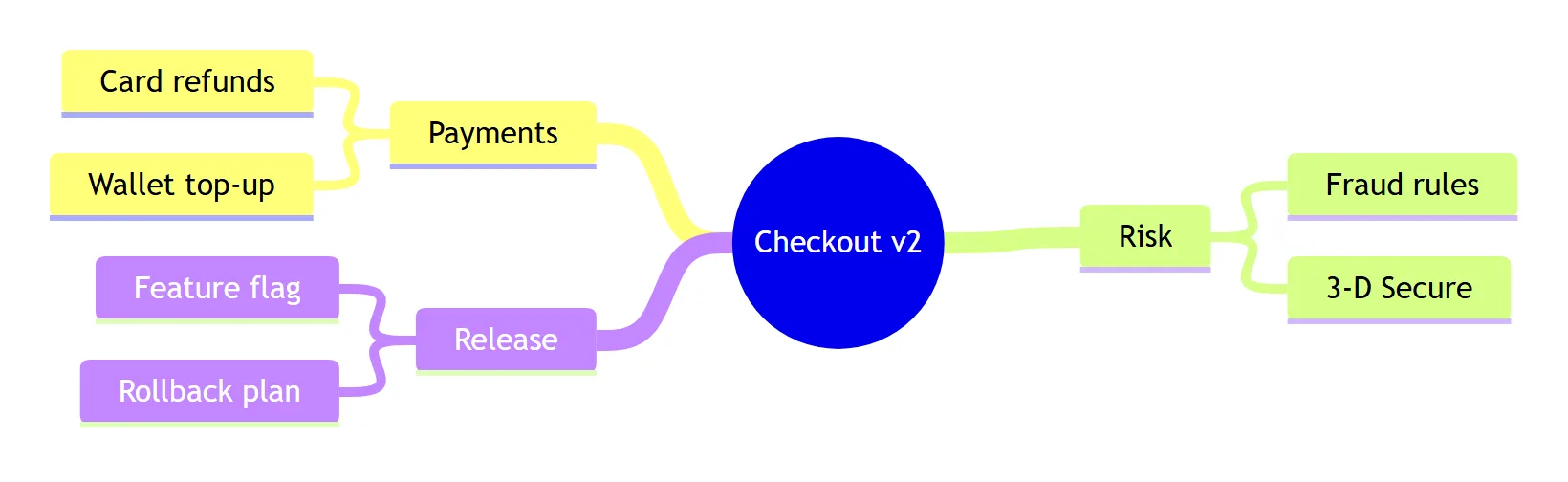
The catch: layout: tidy-tree in the front matter does nothing on its own. Without the layout package, both
versions drew the default layout, the same size to the pixel, with no warning. The site that renders the
diagram has to add @mermaid-js/layout-tidy-tree (1.0.1, September 2026) and register it:
import mermaid from 'mermaid'
import tidyTree from '@mermaid-js/layout-tidy-tree'
mermaid.registerLayoutLoaders(tidyTree)
After that, the same source drew the tidy tree in both versions. Setting
mindmap: layoutAlgorithm: tidy-tree instead of layout: tidy-tree had no effect even with the package
registered.
A third option, layout: elk, is reported broken for mind maps since 11.17: Mermaid
issue #8674 (open) says it fails with
Cannot read properties of null (reading 're'). We did not test ELK here.
There is no direction. direction LR under mindmap is read as a node at the root’s level and fails
with There can be only one root. No parent could be found for ("Root"). If you need a strict
left-to-right tree, see the flowchart version further down.
Spacing is mindmap: padding, default 10. At 40 our ten-node mind map grew from 630 × 443 to 1164 × 632
pixels in 12.3.0: the padding is inside each node, so the nodes get bigger and push each other apart.
Icons and links
Icons are not drawn
The docs show ::icon(fa fa-book) on the line under a node and say the icon fonts must be added by
“the site administrator or the integrator”. We tested fa fa-book and mdi mdi-skull-outline in both
versions, with Mermaid’s default strict and with loose security. The SVG had no icon markup at
all: no <i> element, no class name, nothing for Font Awesome to style. The node drew without an icon
and without an error.
The reason is in Mermaid’s code: the mind map parser stores the icon on the node and passes it to the
renderer, but in the 12.3.0 bundle only the icon and architecture shapes draw a node’s icon, and the six
mind map shapes do not. Issue
#7615 (open, April 2026) reports the missing icons and
blames the missing font; our test says loading the font would not bring them back. Use an emoji in the
label (Ship it 🚀) until this is fixed.
Links work only as HTML
Mind maps have no click statement. A click a "https://example.com" line fails with “There can be only
one root”, and Mermaid’s request for it, issue #4099,
has been open since February 2023. A Markdown link inside a Markdown string,
a["`[Docs](https://example.com)`"], is shown as the plain text [Docs](https://example.com).
What does work is HTML inside a quoted label:
mindmap
  Root
    a["<a href='https://example.com'>Docs</a>"]
Both versions kept the <a href> in the SVG with the default strict security level. Mermaid cleans the
HTML on the way: an <img onerror=…> in a label lost its onerror. Whether the link opens depends on
where the SVG is shown; an image tag, for example, makes nothing clickable.
What a mindmap line accepts
Everything above in one chart. The middle group is the one to watch: no error, but not what you wrote.
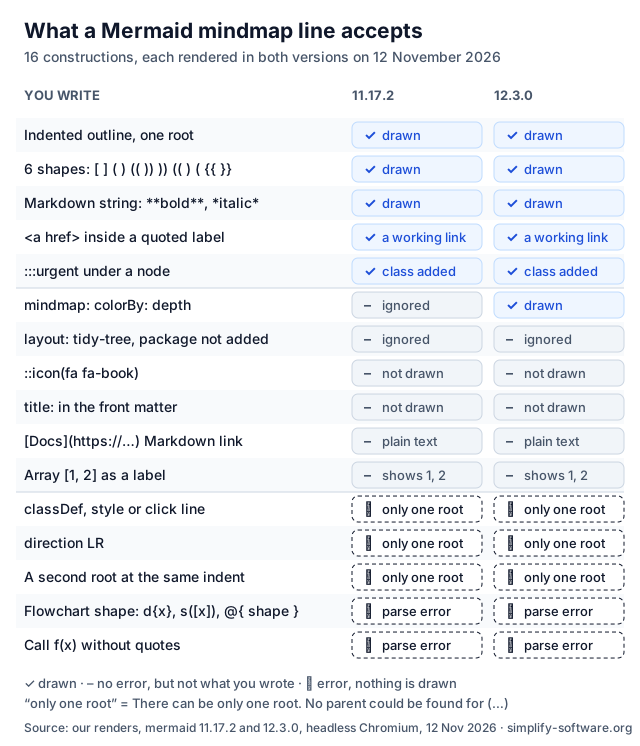
Lines that break a mindmap, and the fix
All of these behaved the same in Mermaid 11.17.2 and 12.3.0.
| You write | What happens | Write instead |
|---|---|---|
classDef urgent fill:#f00 | There can be only one root. No parent could be found for (…) | :::urgent plus CSS on the page |
style a fill:#f00 | The same “only one root” error | a theme or cScale colours |
click a "https://…" | The same “only one root” error | a["<a href='https://…'>Docs</a>"] |
direction LR | The same “only one root” error | layout: tidy-tree, or a flowchart |
accTitle: Q3 plan | The same “only one root” error | describe the map in the page text |
| A second line at the root’s indent | The same “only one root” error | indent it under the root |
| Root with spaces, child with a tab | The same “only one root” error | indent with one kind only |
d{diamond} | Lexical error on line 3. Unrecognized text. | d{{hexagon}} or another of the six |
s([stadium]) | Parse error on line 3 | s(rounded) |
A@{ shape: diamond } | Lexical error on line 3. Unrecognized text. | one of the six bracket shapes |
Call f(x) now | Parse error on line 3 | a["Call f(x) now"] |
mindmap with no nodes | Parse error on line 2 | add a root |
Array [1, 2] | A node that says 1, 2, no error | a["Array [1, 2]"] |
::icon(fa fa-book) | No icon, no error | an emoji in the label |
layout: tidy-tree alone | The default layout, no error | register @mermaid-js/layout-tidy-tree |
colorBy: depth in Mermaid 11 | Branch colours, no error | Mermaid 12.2.0 or later |
Seven different mistakes, one message. When a mind map says “There can be only one root”, read the line in the brackets: it is the line Mermaid could not place, and more often than not it is a statement mind maps do not support, not an outline problem.
Mindmap or flowchart?
A mind map is the fastest way to write a tree: no arrows, no ids, just indentation. Switch to a flowchart when you need what mind maps lack: a fixed direction, a colour per node, links on click, or arrows between branches. The same tree as a left-to-right flowchart:
flowchart LR
  root((Checkout v2)) --- P[Payments] & R[Risk] & L[Release]
  P --- P1[Card refunds] & P2[Wallet top-up]
  R --- R1[Fraud rules]
  L --- L1[Feature flag]
  style R1 fill:#fde68a
  click L1 "https://example.com/flags"
Each & joins several nodes in one line, --- draws a line without an arrowhead, and style and
click work here. The Mermaid flowchart guide covers the rest, including the
traps of that syntax.
Mind maps in Jira, Confluence and Excalidraw
Jira and Confluence show a mermaid code block as code, so a mind map needs an app. What ours do with it:
- Mermaid Tabs for Jira draws the mind map in a tab on the work
item with Mermaid 12.1.0. We ran our 57 mind maps through 12.1.0 as well: 55 drew exactly as in
12.3.0, and the two that differ are the
colorBy: depthones, which need 12.2.0. In the app you get branch colours for now. - Our Excalidraw apps for Confluence and Jira put a Mermaid mind map on a whiteboard with Mermaid 11.17.2 and keep the source, so you can change the outline later and draw around it. Insert as shapes does not split a mind map into shapes: we sent every test mind map Mermaid could draw through mermaid-to-excalidraw 2.2.2 (the version in the apps) and 3.6.0 (the newest, 4 November 2026), and both returned one picture for every one of them. The 3.6.0 README lists flowcharts, sequence, class, ER and state diagrams, Gantt charts, quadrant charts and timelines as converted to shapes; mind maps are not on the list.
For more Mermaid syntax, see the Mermaid UML cheat sheet for sequence, class and state diagrams, and Mermaid vs PlantUML for how Mermaid compares with other diagram languages.
Sources
- Mermaid mindmap docs at the tested tags: 12.3.0 and 11.17.2, and the tidy-tree layout docs.
- Mermaid’s config schema (
colorBy,padding,maxNodeWidth,layoutAlgorithmdefaults) and the mind map parsermindmapDb.tsat the same tags, in the mermaid-js/mermaid repository. - Mermaid issues #7615 (icons), #4099 (click) and #8674 (ELK).
- @mermaid-js/layout-tidy-tree 1.0.1 on npm.
- mermaid-to-excalidraw README, version 3.6.0.
- Our renders: 57 mind maps in Mermaid 11.17.2 and 12.3.0 (and 12.1.0, the version in Mermaid Tabs), plus three with the tidy-tree layout registered, converted with mermaid-to-excalidraw 2.2.2 and 3.6.0, headless Chromium, 12 November 2026, no network requests during the run.
Frequently asked questions
How do I change the colours of a Mermaid mindmap?
Pick a theme (default, dark, forest, neutral or base) in the front matter, or use the base theme and set themeVariables cScale0 to cScale11: each top-level branch takes the next one. Since Mermaid 12.2.0, mindmap colorBy depth gives every level its own colour instead of every branch. classDef and style lines do not work in a mindmap; they stop the diagram with "There can be only one root".
Can a Mermaid mindmap go left to right?
There is no direction setting for mindmaps: direction LR is read as a second root and fails. The default layout spreads branches all around the root. The tidy-tree layout puts them in rows on both sides of the root, which is the closest you get. For a strict left-to-right tree, write it as flowchart LR.
Why are my Mermaid mindmap icons not showing?
In our test of Mermaid 11.17.2 and 12.3.0, a node with ::icon(fa fa-book) got no icon markup at all, with the strict and the loose security level. Loading Font Awesome on the page cannot help when there is nothing in the SVG to style. Put an emoji in the label instead.
Can I add a link to a mindmap node?
There is no click syntax for mindmaps: a click line fails with "There can be only one root", and a Markdown link stays plain text. An HTML link inside a quoted label, a["<a href='https://example.com'>Docs</a>"], was kept as a working link in both versions.
Is the Mermaid mindmap still experimental?
The Mermaid 11 docs called it experimental. The Mermaid 12.3.0 docs no longer do, and the mindmap code gained new options in 12.2.0 (colorBy). The icon syntax is the part the older docs called experimental, and it is the part that does not draw today.
Can ChatGPT or another AI write a Mermaid mindmap?
Yes, an indented outline is easy for a language model. Check the result for the lines that break a mindmap: classDef, style, click, direction, flowchart shapes such as {text} and parentheses in labels without quotes. Each of them stops the whole diagram.