Mermaid Timeline: 6 Templates, the Colon Fix and 25 Traps
On this page
An on-call engineer writes up last night’s incident as a Mermaid timeline: 09:12 : Alert fires,
09:18 : On-call acknowledges. It fails with Parse error on line 2 ... got 'INVALID'. Quoting the time
fails the same way. 09#colon;12 works, and nothing in the error says so.
This page answers what people search about Mermaid timelines, and every answer was drawn, not copied from the docs. We rendered 86 small timelines in Mermaid 11.17.2 and 12.3.0 (the latest release on 16 November 2026) in a headless browser, read every box, colour and error back from the SVG, and converted each one with the two versions of the library Excalidraw uses for Mermaid. Both Mermaid versions gave the same result for all 86.
Short answer: a timeline is the word timeline, an optional title, then one line per time period
with its events after colons:
timeline
    title Product roadmap 2027
    section Q1
        January : SSO for all plans
        March : Audit log export
    section Q2
        April : Mobile app beta
              : Offline mode
        June : Public API v2
A period ends at its first colon, so a time such as 10:30 breaks it: write 10#colon;30.
timeline TD makes it vertical (11.14.0+). Colours come from cScale0…cScale11, one per section.
Mermaid never sorts or checks the periods: they are text, drawn in the order you write them.
Six timelines to copy
Each of these rendered without an error in both versions. Change the words, keep the punctuation.
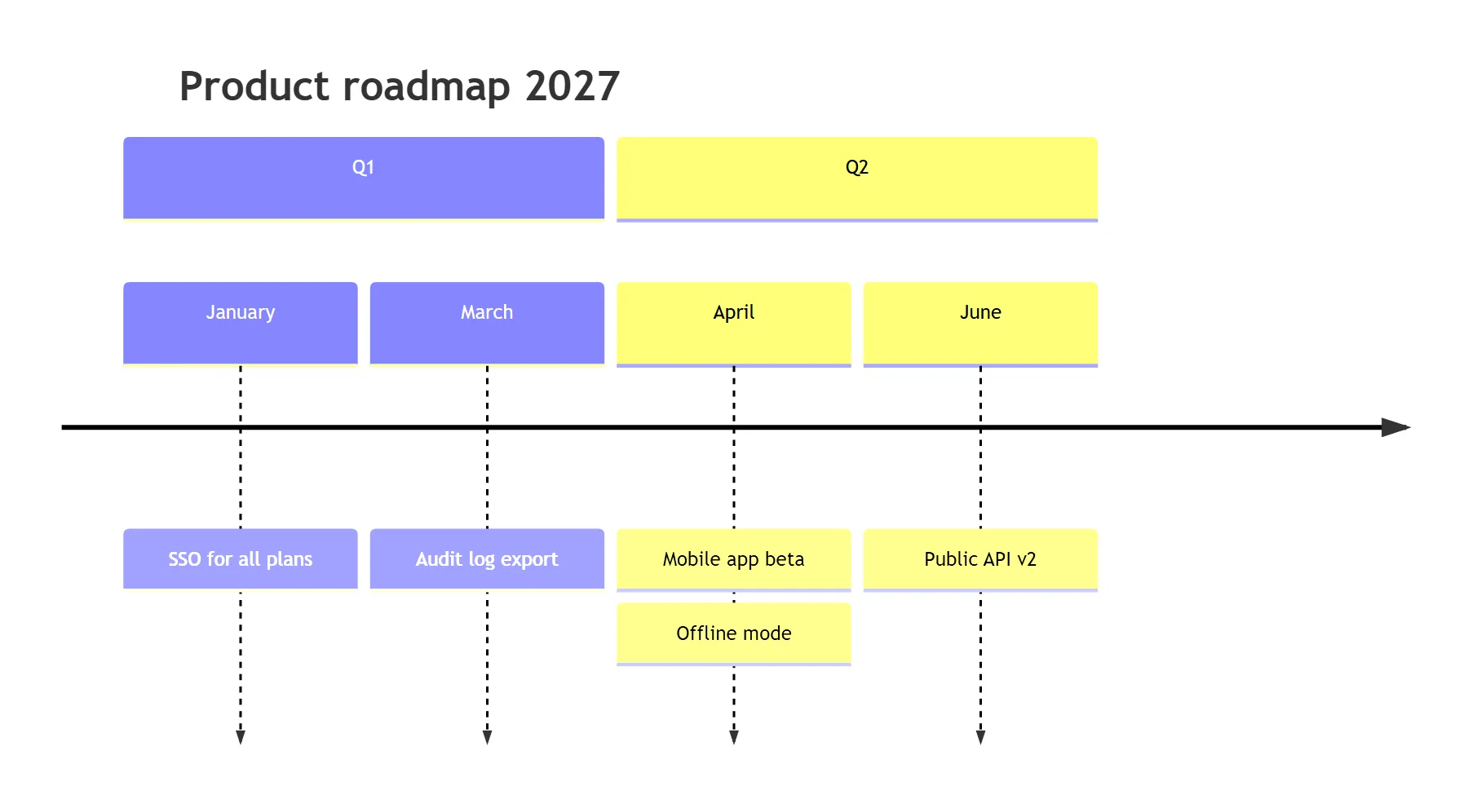
1. Product roadmap by quarter
The short answer’s roadmap. Sections group periods and give each group one colour:
2. Incident log with clock times
Times are the case the parser handles worst, so this template writes every colon in a period as
#colon;. In events, a colon with no space after it (v4.2.1, https://…) needs nothing.
timeline
    title INC-142, 12 March 2027 (UTC)
    09#colon;12 : Error rate alert fires
    09#colon;18 : On-call acknowledges
    09#colon;31 : Bad deploy found
               : Rollback started
    09#colon;44 : Error rate back to normal
    10#colon;30 : Status page closed
3. Release history
No sections, so each release gets its own colour. Several events per period go on one line, separated
by ::
timeline
    title Release history
    v1.0 : Boards : Comments
    v1.1 : Dark mode
    v2.0 : Automation rules : Webhooks : API tokens
    v2.1 : Audit log
4. Project phases, top to bottom
timeline TD stacks the periods down the page with their events beside them. It reads better on a
narrow page, and it keeps long timelines legible (more on that under Size).
This one has no sections on purpose: in a vertical timeline, a section bar can cover the last row of the
section above it (below). The phase goes into the period name instead:
timeline TD
    title Website relaunch
    Discovery, week 1 : Interviews : Analytics review
    Discovery, week 2 : Sitemap
    Build, week 3 : Design system
    Build, week 5 : Templates : Content migration
    Launch, week 6 : Redirect test : Go live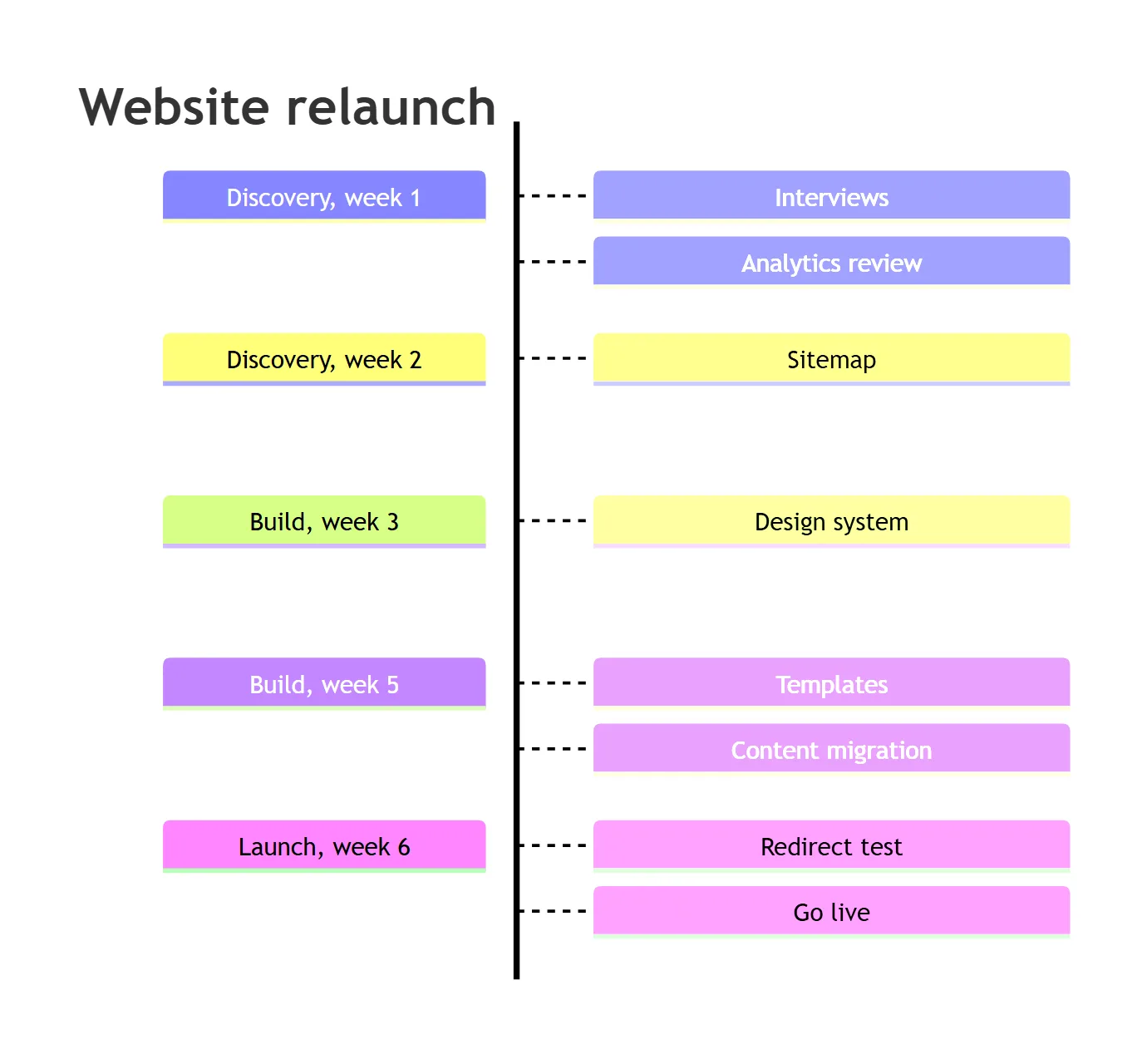
5. Company history
Long event text wraps on its own. <br> forces a break, in a period, an event or a section name:
timeline
    title Company history
    section Early years
        2019 : Founded in Utrecht<br>by two engineers
        2020 : First 100 customers
    section Growth
        2022 : Series A : Office in Berlin
        2024 : 1,000 customers
6. First 90 days of a new hire
Periods do not have to be dates. Any text works, as long as it does not start with a keyword (see traps):
timeline
    title Onboarding plan
    Day 1 : Laptop and accounts : Meet the team
    Week 1 : First pull request
    Day 30 : Owns one service
    Day 60 : On-call shadow
    Day 90 : On-call rotation
The syntax in four rules
- The first line is
timeline, in lower case, optionally followed byLRorTD.TimelineandTIMELINEgiveNo diagram type detected matching given configuration. - A period is everything before the first colon. Then each
:starts an event. More events for the same period can go on the following lines, each starting with:. Indentation is free: tabs, spaces or none. section Namestarts a group that lasts until the nextsection. Sections do not nest.title,section,accTitleandaccDescrare keywords, read in any case, at the start of any line. A period that starts with one of these words is not a period (trap 12 and 7).
What the docs say in one sentence is worth repeating: “Both time period and event are simple text, and
not limited to numbers.” Mermaid does not parse, sort or check dates. 2027-03-31 written before
2026-12-01 stays first.
Colons, hashes and line breaks
Most failed timelines break on one of three characters. The grammar explains why: a period stops at the
first : or #, an event starts with a colon followed by whitespace, and a # inside a period turns
the rest of the line into a comment. These are our renders, the same in 11.17.2 and 12.3.0:
| You write | Mermaid draws | Write instead |
|---|---|---|
10:30 : Stand-up | Parse error on line 2 ... got 'INVALID' | 10#colon;30 : Stand-up |
"10:30" : Stand-up | the same parse error | 10#colon;30 or 10#58;30 |
Monday : Stand-up at 10:30 | one event, “Stand-up at 10:30” | fine as it is |
2027 : Note: text | two events, “Note” and “text” | 2027 : Note#colon; text |
2027 : "Note: text" | two events, with the quotes shown | #colon;, not quotes |
section Phase 1: build | Cannot read properties of undefined (reading 'events') | section Phase 1#colon; build |
Sprint #4 : Login page | a period “Sprint”, the event is gone | Sprint 4 : Login page |
Sprint 4 : Fix #123 | one event, “Fix #123” | fine as it is |
section Sprint #4 | a section “Sprint #4” | fine as it is |
A<br/>B | the text A<br/>B | A<br>B |
R#amp;D, 50#37;, #9829; | R&D, 50%, ♥ | entity codes work in events |
2002:LinkedIn | a parse error | 2002 : LinkedIn, spaces both sides |
Two of these deserve a second look. Sprint #4 produces no error and a timeline that looks fine, with
every event of that period missing. And <br/>, the form most Markdown writers type, is not a line
break in a timeline: only <br> is.
Typographic colons are another way out: the ratio sign ∶ (U+2236) and the fullwidth colon :
(U+FF1A) look close to a colon and pass as text. They are different characters, though, so a reader who
copies 10∶30 copies something that is not a time. #colon; draws a real colon.
Mermaid’s tracker has the colon problem open since May 2025, as issue #6557, “Timeline Diagram syntax does not permit timestamps”.
Vertical timelines
timeline TD (Mermaid 11.14.0+) puts each period on its own row, events to the right, and sections as
bars across the full width (template 4 above). In 12.3.0 the period boxes are 210 pixels wide and the
event boxes 310, so a vertical timeline is about 690 pixels wide whatever its length.
Sections and TD do not mix well. In 3 of the 5 vertical timelines with sections we rendered, the
bar of the next section was drawn over the last period of the section above it, hiding that period or
its last event. In our first draft of template 4, “Content migration” disappeared under the “Launch”
bar. The cause is in timelineRendererVertical.ts: a section’s height is the row spacing times its
number of periods, minus two row gaps, so the next bar starts too early. The same file gives every row
the height of the tallest stack of events in the whole timeline, which is why one period with several
events spreads all the others apart. None of the vertical timelines without sections overlapped, and
no left-to-right one did. Until it is fixed, drop the sections in a TD timeline and name the phase in
the period, as in template 4. Look closely at its picture and you will see one more quirk of the
vertical renderer in 12.3.0: from the third row on, the event boxes take a different colour from their
period.
Only LR and TD exist. timeline TB, timeline BT and timeline RL give no error: the second word
becomes a period called “TB”, “BT” or “RL” at the start of a left-to-right timeline. Lower case td
works, because the timeline grammar ignores case after the first word.
If your renderer is older than 11.14.0, timeline TD is not a direction there either. The
gantt post shows how to read the Mermaid version GitHub, GitLab
and other tools run, with a one-word info block.
Colours and themes
Without sections, every period gets its own colour, and its events a lighter shade of it. With sections, every section gets one. The palette has 12 colours: the 13th period takes the first colour again.
Which 12 depends on the theme, and the theme matters more than the docs suggest. The Mermaid 12.3.0
timeline page lists redux-color as “(the default)”. In our renders a timeline without a theme drew
exactly the default theme’s colours, and the 12.3.0 config schema still says default: 'default'.
So pick a theme on purpose:
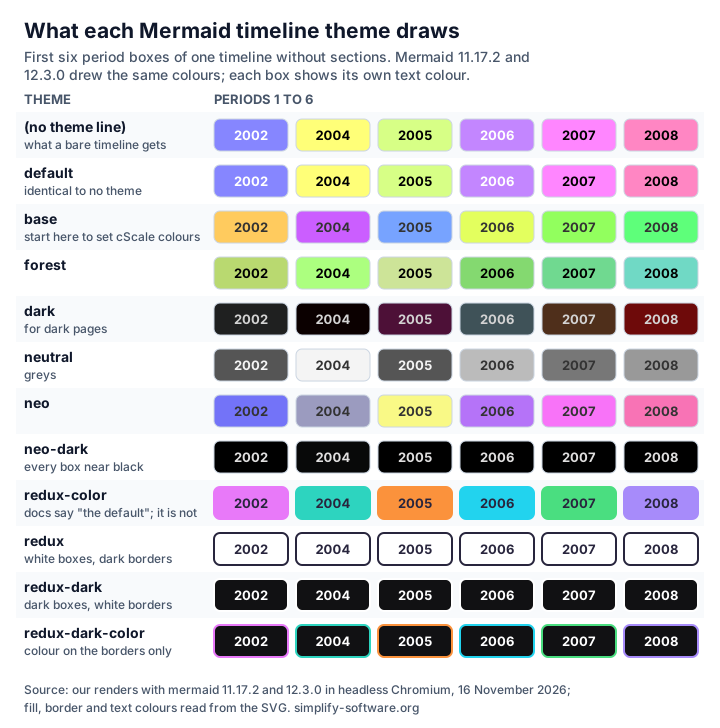
Note redux, redux-dark, redux-dark-color and neo-dark: their boxes are all the same colour.
redux-dark-color puts its colours on the borders only, and redux and redux-dark have none. On a
white page, redux-color and base give the clearest colours without any changes.
Your own colours
Set cScale0 to cScale11 for the boxes and cScaleLabel0 to cScaleLabel11 for their text, in the
front matter. With the base theme, nothing else changes underneath:
---
config:
  theme: base
  themeVariables:
    cScale0: '#2563EB'
    cScaleLabel0: '#ffffff'
    cScale1: '#16A34A'
    cScaleLabel1: '#ffffff'
    cScale2: '#D97706'
    cScaleLabel2: '#ffffff'
---
timeline
    title Product roadmap 2027
    section Q1
        January : SSO for all plans
    section Q2
        April : Mobile app beta
    section Q3
        July : Public API v2
Q1 came out #2563EB, Q2 #16A34A, Q3 #D97706, each with white text. Without cScaleLabel, the
label keeps the theme’s text colour, which may not suit the colour you chose.
One colour for everything
---
config:
  timeline:
    disableMulticolor: true
---
timeline
    2002 : LinkedIn
    2004 : Facebook
    2005 : YouTube
Every period then takes the first colour, cScale0, so set that one to choose it. The option is
ignored when the timeline has sections: they keep their own colours. Mind the docs here too: their
initialize example sets disableMulticolor: false under a sentence about disabling it. It has to be
true. The old %%{init: {"timeline": {"disableMulticolor": true}}}%% line does the same as the front
matter.
There is no classDef, style or :::class for a single box. classDef and style lines are parse
errors, and :::red is shown as part of the text.
Size, fonts and long timelines
Font. themeVariables fontSize: 20px makes the text 20 pixels and the boxes taller;
fontFamily: Georgia, serif changes the font. The font size worked in TD timelines too.
Box width cannot be set. The config schema lists timeline keys such as width (“Width of actor
boxes”) and taskFontSize, copied from the sequence diagram. The timeline renderer reads four keys only:
leftMargin, padding, useMaxWidth and disableMulticolor. We set width: 300 and taskFontSize: 30:
the SVG came out 1190 × 534 pixels, the same as without them. The box width is written into the code as
150 pixels, plus padding. Mermaid’s issue
#5858, “Timeline does not honor width
configuration”, has been open since September 2024. What padding: 200 does is add white space round
the diagram, 1190 × 534 to 1490 × 834 pixels in our test, with the boxes unchanged.
Long timelines shrink. A left-to-right timeline is one row. Each period adds 200 pixels, and the SVG
is scaled down to fit the page. With 14 periods, on a page 1,584 pixels wide, each box was already
half size, 94 × 34 pixels. With 40, the SVG was 8,390 pixels wide, and at 1,584 pixels on screen each
box was 36 × 13 pixels: unreadable. The same 40
periods with timeline TD came out 690 pixels wide and 2,642 tall, every box full size. Past about a
dozen periods, go vertical or split the timeline by year.
Many events stack. 20 events under one period made a column 1,514 pixels tall. That is fine in a vertical page, odd in a row of short periods.
25 lines that break a timeline, or change it
All 25 behaved the same in Mermaid 11.17.2 and 12.3.0. The first ten stop with an error; the other fifteen draw something, just not what you wrote.
Errors
| # | You write | What happens | Write instead |
|---|---|---|---|
| 1 | 10:30 : Stand-up | Parse error ... got 'INVALID' | 10#colon;30 : Stand-up |
| 2 | "10:30" : Stand-up | the same parse error | 10#colon;30 |
| 3 | 2002:LinkedIn or 2002 :LinkedIn | Parse error on line 2 | 2002 : LinkedIn |
| 4 | 2002 : : LinkedIn or 2002 : | Parse error on line 2 | no empty events |
| 5 | : First event before any period | Cannot read properties of undefined (reading 'events') | a period first |
| 6 | section Phase 1: build | the same reading 'events' error | section Phase 1#colon; build |
| 7 | Section 8 : Housing act | the same reading 'events' error: “Section” starts a section | Housing act (Sec. 8) : … |
| 8 | click 2002 "https://…" | Parse error on line 3 | put the link in the page text |
| 9 | classDef red fill:#f00 or style … | Parse error | cScale colours |
| 10 | TIMELINE or Timeline | No diagram type detected matching given configuration | timeline |
No error, wrong result
| # | You write | What Mermaid draws | Write instead |
|---|---|---|---|
| 11 | Sprint #4 : Login page | a period “Sprint” with no event | Sprint 4 : Login page |
| 12 | Title IX : Passed in 1972 | no period; the diagram title becomes “IX : Passed in 1972” | 1972 : Title IX passed |
| 13 | timeline TB, BT or RL | an extra period “TB”, left to right | timeline TD |
| 14 | 2027 : Note: text | two events, “Note” and “text” | Note#colon; text |
| 15 | A<br/>B | the text <br/> | A<br>B |
| 16 | **bold**, _italic_ or a Markdown string | the asterisks, underscores and backticks as text | plain text |
| 17 | <a href="…">docs</a> | the tag as text, no link | the link in the page text |
| 18 | LinkedIn:::red or ::icon(fa fa-book) | the suffix as text, no class, no icon | an emoji in the label |
| 19 | 2002 : LinkedIn %% note | “LinkedIn %% note” | the comment on its own line |
| 20 | accTitle: and accDescr: | accepted, then left out of the SVG | describe the timeline next to it |
| 21 | title: in the front matter | no title drawn | a title line in the timeline |
| 22 | a section inside a section | two sections side by side | <br> in one section name |
| 23 | timeline: width: 300 or taskFontSize | nothing changes | themeVariables: fontSize |
| 24 | 40 periods left to right | boxes of 36 × 13 pixels | timeline TD, or split it |
| 25 | section lines in a timeline TD | the next section bar covers the last period above it | no sections; phase in the period |
Number 20 is the one to know if your diagrams have to be accessible. A flowchart or gantt with
accTitle gets a <title> element in its SVG, and screen readers announce it. We rendered the same
lines in all three: the timeline was the only one whose SVG had neither the title nor the description.
Put the description in the surrounding text, or in the alt of an exported image.
Number 12 hides well. The grammar reads title, section, accTitle and accDescr at the start of a
line in any case, when a space follows, so “Title IX” and “Section 8” are taken as keywords (“Titles” and
“Sections review” are fine). Put another word first.
Timeline, gantt or flowchart?
- Timeline: what happened or will happen, in order, with no maths. Roadmaps by quarter, release history, incident logs, onboarding plans. The periods are labels; nothing is computed.
- Gantt: tasks with start dates and lengths that depend on each other. Mermaid computes the dates, skips weekends and draws the bars to scale. See our Mermaid gantt guide.
- Flowchart: when the order branches, loops or waits on a decision. See the flowchart guide.
One more thing a timeline is not: Jira’s timeline view. That is Jira’s own Gantt-style plan of work items, with real dates and dependencies, and it has its own guide.
Timelines in Jira, Confluence and Excalidraw
Jira and Confluence show a mermaid code block as code. To see the diagram you need an app.
- Mermaid Tabs for Jira draws a Mermaid diagram in a tab on the work item, timelines included, with Mermaid 12. Since all 86 cases on this page came out the same in 11.17.2 and 12.3.0, the templates above draw the same way in a tab. An incident timeline next to the incident itself is the natural use: the log stays with the ticket.
- Excalidraw for Confluence and for Jira turn Mermaid text into a diagram on a whiteboard and keep the source, so you can edit the timeline later and draw around it. Whether Insert as shapes gives separate boxes depends on the converter library: in our test, mermaid-to-excalidraw 2.2.2 returned every timeline as one picture, and 3.6.0, the newest, returned rectangles, ellipses and arrows you can move one by one.
For the other diagram types, see the mind map guide, the UML cheat sheet and Mermaid in Jira.
How we tested
We wrote 86 small timelines, one for each question people search next to “mermaid timeline” (Google
autocomplete, 16 November 2026) and one for each rule in the timeline grammar, plus 25 follow-up cases
(escapes in titles and sections, keyword-led periods, vertical layouts with and without sections).
Each was rendered with mermaid.render in Mermaid 11.17.2 and 12.3.0 in headless Chromium, default
strict security level, with no network requests during the run. From each SVG we read the boxes (text,
size, fill and text colour) and the errors, and we converted each source with
mermaid-to-excalidraw 2.2.2 and 3.6.0. The roadmap rendered five times per version gave one layout. The
accessibility check rendered the same accTitle and accDescr lines in a flowchart, a gantt and a
timeline. Every code block on this page was rendered again before publishing. The figures are
Mermaid 12.3.0 renders at twice the pixel density.
Sources
- Mermaid timeline docs at the tested tags: 12.3.0 and 11.17.2 (the 11.17.2 page still calls the timeline “an experimental diagram”).
- The timeline grammar
timeline.jison,timelineDb.js,timelineRenderer.tsandsvgDraw.jsat [email protected] (identical to 11.17.2), and the config schemaconfig.schema.yamlat the same tag. - Mermaid issues #6557 (colons in timestamps), #5699 (traditional timestamps), #5858 (width ignored) and #7134 (gaps in a timeline).
- mermaid-to-excalidraw 2.2.2 and 3.6.0.
- Our renders, 16 November 2026: 86 cases and 25 follow-ups in Mermaid 11.17.2 and 12.3.0.
Frequently asked questions
How do I put a colon in a Mermaid timeline?
Write it as #colon; or #58;, for example 09#colon;12 : Alert fires. A plain colon ends the time period, so 09:12 : Alert fires stops with a parse error, and quotes do not help. Inside an event a colon is fine as long as no space follows it: Stand-up at 10:30 works, but Note: text splits into two events.
How do I make a Mermaid timeline vertical?
Write timeline TD on the first line (Mermaid 11.14.0 or later). Periods then run down the page with their events to the right. LR is the default. Only LR and TD exist: timeline TB, BT or RL gives no error, it adds a period called TB, BT or RL.
How do I change the colours of a Mermaid timeline?
Set themeVariables cScale0 to cScale11 in the front matter, and cScaleLabel0 to cScaleLabel11 for the text. Each section takes the next colour, or each period when there are no sections. timeline disableMulticolor true gives every period one colour, but only when there are no sections. After 12 colours the palette starts again.
How do I change the font size of a Mermaid timeline?
Set themeVariables fontSize, for example 20px, in the front matter. The boxes grow with the text. The timeline taskFontSize and width settings in the config schema are ignored by the timeline renderer: the boxes stay 150 pixels plus padding wide whatever you set.
Does Mermaid sort the dates in a timeline?
No. A period is plain text, so 2027-03-31, Q1 and Sprint 12 are all labels, drawn left to right in the order you write them. A date written out of order stays out of order, and Mermaid never checks that it is a date.
Can a Mermaid timeline have subsections?
No. A section inside a section is read as the next section at the same level, without an error. For a second level, put it in the section name with a line break, such as section 2027<br>first half, or use one period per subsection.
Should I use a timeline or a gantt chart?
Use a timeline to tell what happened, or will happen, in order: a release history, an incident log, a roadmap by quarter. Use a gantt when tasks have start dates and lengths and depend on each other, because a gantt computes the dates and a timeline never does.