Mermaid Gantt Chart: Syntax, Examples and 26 Tested Traps
On this page
- Step 1: one task
- Step 2: title, dateFormat and sections
- Step 3: ids and after
- Step 4: done, active, crit
- Step 5: milestones
- Step 6: excludes weekends
- Step 7: vertical markers
- Step 8: the axis
- Step 9: the today marker
- Step 10: links on tasks
- Colours: the theme variables recipe
- 26 mistyped lines, and what Mermaid did
- When a timeline fits better
- Where it renders
- Gantt charts in Jira and Confluence
- Sources
A team lead pastes a release plan into a Markdown file. It renders, it looks right, and it goes into the sprint review. Two weeks later someone notices that “Docs” ends six days after the release it was supposed to finish before. Nothing was red. Mermaid drew exactly what the text said, and the text said something other than what the author meant.
This page builds one plan, the release of version 4.2 in January 2027, one keyword at a time. At every step it shows the dates Mermaid computed, not the dates we expected. We rendered every snippet in a headless browser with Mermaid 11.17.2, 12.1.0 and 12.3.0 (the latest, 3 November 2026) on 14 November 2026, read the computed start and end of every task, and tried 26 common mistakes to see which ones Mermaid reports.
Short answer: a Mermaid gantt chart is the word gantt and one line per task:
Name :tags, id, start, length. Tags (done, active, crit, milestone, vert) come first, the
start is a date or after <id>, the length is a duration such as 3d. This is the finished plan:
gantt
  title Release 4.2
  dateFormat YYYY-MM-DD
  axisFormat %d %b
  tickInterval 1week
  weekday monday
  excludes weekends
  todayMarker off

  section Build
  Spec          :done, spec, 2027-01-04, 3d
  API           :active, api, after spec, 5d
  UI            :ui, after spec, 6d
  section Test
  QA            :crit, qa, after api ui, 4d
  Code freeze   :vert, freeze, 2027-01-18, 0d
  section Ship
  Release       :milestone, rel, after qa, 0d
  Release notes :notes, after qa, 2d
The same dates in all three versions. 17 of our 26 mistyped lines drew a chart with no error at all, so check the dates, not only that it renders.
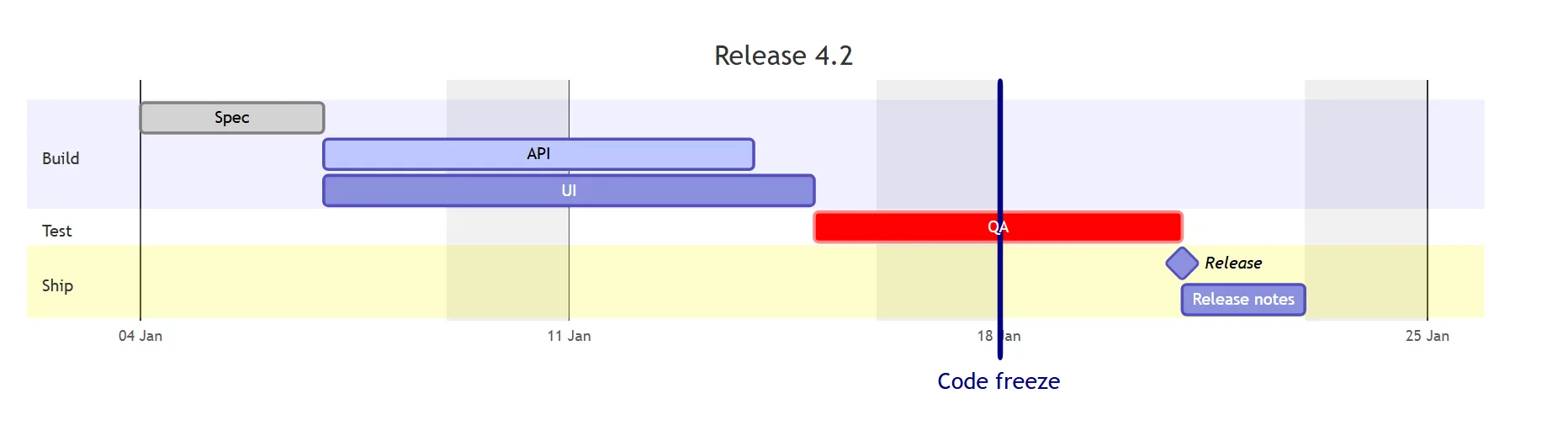
These are the dates Mermaid computed for the plan, read from its own task list after parsing. They were the same in 11.17.2, 12.1.0 and 12.3.0:
| Task | The line says | Mermaid computed (working days) |
|---|---|---|
| Spec | done, spec, 2027-01-04, 3d | Mon 4 to Wed 6 Jan |
| API | after spec, 5d | Thu 7 to Wed 13 Jan |
| UI | after spec, 6d | Thu 7 to Thu 14 Jan |
| QA | after api ui, 4d | Fri 15 to Wed 20 Jan, weekend skipped |
| Code freeze | vert, 2027-01-18, 0d | A line on Mon 18 Jan |
| Release | milestone, after qa, 0d | A diamond on Thu 21 Jan |
| Release notes | after qa, 2d | Thu 21 to Fri 22 Jan |
Internally a task ends at 00:00 of the next day: Spec “ends” Thu 7 Jan 00:00, which is why API starts on Thursday. Move Spec’s date and the whole plan moves with it.
Step 1: one task
gantt
  Spec :2027-01-04, 3d
That is a complete chart. Mermaid computed Mon 4 Jan, 00:00 to Thu 7 Jan, 00:00: three days, and the
bar stops where Thursday begins. Without a dateFormat line Mermaid reads dates as YYYY-MM-DD.
The part before the colon is the name, the part after it is the data. One item is read as the end (a length or a date). A start is optional, because “a task start date defaults to the end date of the preceding task”, as the Mermaid docs put it.
Step 2: title, dateFormat and sections
gantt
  title Release 4.2
  dateFormat YYYY-MM-DD
  section Build
  Spec :spec, 2027-01-04, 3d
  section Ship
  Release notes :2d
section Build starts a band; every task below it belongs to it until the next section. A section
needs a name: a bare section line drew an empty chart in our test, without an error.
Release notes has no start, so it starts when Spec stops: Thu 7 Jan.
dateFormat only describes how you write dates. It does not change the axis (that is axisFormat,
step 8). dateFormat DD.MM.YYYY with 04.01.2027 works, so does D MMM YYYY with 4 Jan 2027.
Step 3: ids and after
gantt
  dateFormat YYYY-MM-DD
  section Build
  Spec :spec, 2027-01-04, 3d
  API  :api, after spec, 5d
  UI   :ui, after spec, 6d
  section Test
  QA   :qa, after api ui, 4d
The id is the item right before the start. after spec starts API where Spec stops (Thu 7 Jan).
after api ui waits for the later of the two: UI stops at Wed 13 Jan, API at Tue 12, so QA starts
Wed 13 Jan.
Two rules that cost time when you break them:
- Ids may contain letters, digits,
_and-. A dot ends the id: with:spec.1, …andafter spec.1, Mermaid looked forspecand put the task on today’s date. - An id that does not exist does not stop the chart either.
after a9started the task on today’s date (14 November 2026 in our run). Since 12.1.0 the browser console logsGantt: the "after" statement references unknown task id(s): a9. 11.17.2 says nothing.
Order of lines does not matter for after: a task may point at an id that is defined further down.
until: stop when another task starts
gantt
  dateFormat YYYY-MM-DD
  section Build
  Code freeze :milestone, freeze, 2027-01-15, 0d
  Fix bugs    :2027-01-06, until freeze
until (Mermaid 10.9.0+) ends Fix bugs where Code freeze starts: Wed 6 to Fri 15 Jan. Combine both ends
with after spec, until freeze. Do not combine until with excludes (step 6): the weekend days are
added on top. In a draft of our plan, Docs :after spec, until rel ended on Wed 27 Jan, six days after rel. The bug
is open as mermaid #5867.
Step 4: done, active, crit
gantt
  dateFormat YYYY-MM-DD
  section Build
  Spec :done, spec, 2027-01-04, 3d
  API  :active, api, after spec, 5d
  QA   :crit, qa, after api, 4d
  Hotfix :crit, active, hot, 2027-01-08, 1d
The docs say it plainly: tags “are optional, but if used, they must be specified first”. We tested what happens when they are not:
| You write | Result in 11.17.2, 12.1.0 and 12.3.0 |
|---|---|
:done, spec, 2027-01-04, 3d | Grey done bar |
:spec, done, 2027-01-04, 3d | Error Cannot read properties of undefined (reading 'type') |
:DONE, spec, 2027-01-04, 3d | The same error: tags are lower case |
:crit, done, … or :crit, active, … | Both apply: a done or active bar with a red border |
The default colours: done is light grey, active is light blue, crit is red, a plain task is blue.
Step 5: milestones
gantt
  dateFormat YYYY-MM-DD
  section Test
  QA      :qa, 2027-01-15, 4d
  section Ship
  Release :milestone, rel, after qa, 0d
A milestone is a diamond. It still needs a length: :milestone, rel, 2027-01-21 without one stopped with
Invalid date:rel, because Mermaid reads the last item as the end and the id as the start. The docs
place the diamond at “initial date + duration / 2”, so 0d puts it exactly on the day and 1d half a day
later. crit, milestone draws a red diamond, which is the closest thing to a milestone colour.
Step 6: excludes weekends
gantt
  dateFormat YYYY-MM-DD
  axisFormat %a %d
  tickInterval 1day
  excludes weekends
  todayMarker off
  section Build
  Spec, 5d :spec, 2027-01-04, 5d
  Code, 3d :after spec, 3d
With excludes weekends, 5d means five working days. The bar stops at the end of Friday, the weekend
stays empty and after spec starts on Monday. Without the line, Code would start on Saturday and stop at
the end of Monday. What else we tested:
| Line | What Mermaid did |
|---|---|
weekend friday (11.0.0+) | Friday and Saturday off: Thu + 3d works Thu, Sun, Mon |
weekend sunday | Parse error: only friday and saturday are accepted |
excludes sunday, monday | Works: days of the week by name |
excludes weekends 2027-12-24 2027-12-31 | Holidays: a 5d task from Thu 23 Dec works 23, 27, 28, 29, 30 Dec |
A second excludes line | Added to the first (11.16.0+), handy with a %% comment per group |
includes 2027-01-09 | That Saturday counts as a working day again |
excludes weekdays | Ignored. Nothing excluded, no warning |
| All seven days excluded | Error Failed to find a valid date that was not excluded by excludes after 10,000 iterations. |
A fixed end date, 2027-01-07, 2027-01-12 | Not extended: an end you write is kept |
2027-01-08 14:00, 16h | Ends Saturday 06:00: hours are not moved past a weekend (#7062) |
The 10,000 limit came with 11.15.0, which fixed a freeze when every date was excluded (CVE-2026-41150).
An excludes date in YYYY-MM-DD works even when your dateFormat is different.
Step 7: vertical markers
gantt
  dateFormat YYYY-MM-DD
  section Build
  Code        :code, 2027-01-04, 10d
  Code freeze :vert, freeze, 2027-01-11, 0d
vert (Mermaid 11.7.0+) draws a line across the whole chart with its name under the axis. “Unlike
milestones, vertical markers don’t take up a row”, the docs say. Use it for a code freeze, a holiday or a
deadline. crit, vert draws it red.
Step 8: the axis
gantt
  dateFormat YYYY-MM-DD
  axisFormat %d %b
  tickInterval 1week
  weekday monday
  section Build
  Spec :2027-01-04, 40d
axisFormat uses d3 time codes, not the dateFormat letters: %d %b printed “04 Jan”, %a %d
“Mon 04”, W%W the week number (“W01”), %b %Y “Feb 2027”. tickInterval takes a number and
millisecond, second, minute, hour, day, week or month.
| Line | What we saw |
|---|---|
tickInterval 1week | Ticks on Sundays (“Sun 10, Sun 17…”): the docs’ default |
tickInterval 1week + weekday monday | Ticks on Mondays |
tickInterval 1decade | Ignored without a word, default ticks |
tickInterval 1second over 20 days | Ignored, console warning “would generate 1728000 ticks” |
topAxis | Error u.TopAxis is not a function in all three versions |
Front matter config: gantt: topAxis: true | Works: dates above and below |
The topAxis keyword is in the grammar, but the grammar calls TopAxis() while the code exports
enableTopAxis(). Use the config line until that is fixed.
Step 9: the today marker
Mermaid draws a red line on today’s date by default. In a plan that you paste into a document, that line
moves every day. todayMarker off removes it; todayMarker stroke-width:4px,stroke:#DC2626,opacity:0.8
styles it.
Step 10: links on tasks
gantt
  dateFormat YYYY-MM-DD
  section Build
  Spec :spec, 2027-01-04, 3d
  click spec href "https://example.com/spec"
The docs say clicks are “disabled when using securityLevel='strict'”. In our test that is only half
true. A click … href link worked in strict mode: clicking the bar opened the URL. Mermaid only
cleans the URL first: javascript:alert(1) became about:blank. click spec call myFunction() did
nothing in strict mode and ran the function in loose mode. Whether a link works in your tool depends on
the tool: many viewers show the SVG as a picture, and a picture has no links.
Colours: the theme variables recipe
Mermaid has no colour keyword for a task. You change the colours of each status through theme variables:
---
config:
  theme: base
  themeVariables:
    taskBkgColor: "#BFDBFE"
    taskBorderColor: "#2563EB"
    activeTaskBkgColor: "#FDE68A"
    activeTaskBorderColor: "#D97706"
    doneTaskBkgColor: "#BBF7D0"
    doneTaskBorderColor: "#16A34A"
    critBkgColor: "#FECACA"
    critBorderColor: "#DC2626"
---
gantt
  dateFormat YYYY-MM-DD
  axisFormat %d %b
  todayMarker off
  section Status
  Done     :done, d1, 2027-01-04, 2d
  Active   :active, a1, after d1, 3d
  Critical :crit, c1, after a1, 2d
  Plain    :after c1, 2d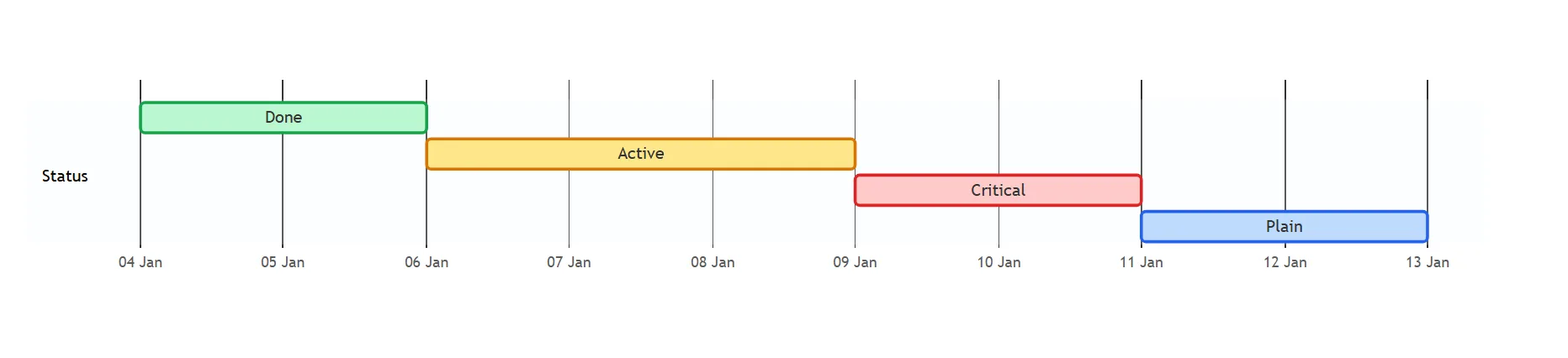
Every variable took effect in all three versions. theme: dark and theme: forest change the whole
palette; the older %%{init: {"theme": "forest"}}%% line still works too.
One task in its own colour
themeCSS: "#spec { … }" does not work: Mermaid prefixes every id with the diagram’s id, so the bar
is <diagram id>-spec, and the page that renders the chart picks that prefix. Match the end of the id
instead. This turned only the Spec bar purple, in all three versions:
---
config:
  themeCSS: '[id$="-spec"] { fill: #A78BFA; }'
---
gantt
  dateFormat YYYY-MM-DD
  section Build
  Spec :spec, 2027-01-04, 3d
  Code :code, after spec, 3d
Pick an id that no other task ends with (-spec would also match api-spec). Some tools drop
themeCSS for safety, so check it where the chart will live.
Size is configuration as well. barHeight, barGap, fontSize, sectionFontSize and leftPadding
go in the same gantt: block (with barHeight: 30 our one-task chart grew from 113 to 125 pixels), and
useWidth: 600 made the chart 600 pixels wide instead of the width of its container. displayMode: compact puts tasks that do not overlap into one row.
26 mistyped lines, and what Mermaid did
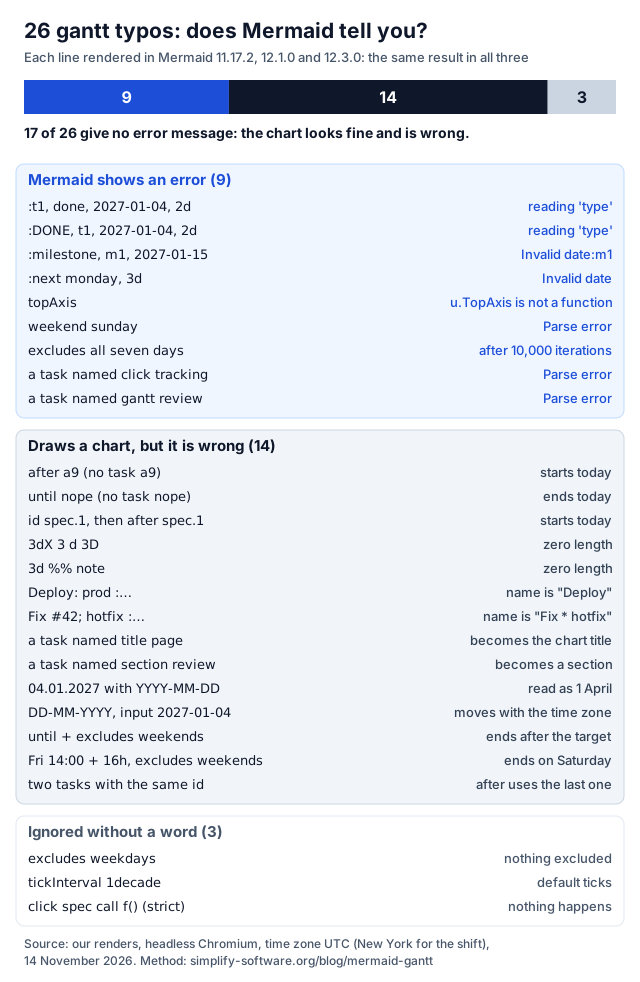
The nine errors are the friendly ones: you see them. The other 17 are why a gantt chart should be read, not only rendered. The fixes for the silent ones:
| You write | What you get | Write instead |
|---|---|---|
Deploy: prod :2027-01-04, 1d | A task called “Deploy” | Deploy#58; prod :2027-01-04, 1d |
Fix #42; hotfix :… | A task called “Fix * hotfix” | Fix #35;42 hotfix :… or Fix 42 |
Spec :2027-01-04, 3d %% note | Zero length | The comment on its own line |
3dX, 3 d, 3D | Zero length | 3d (lower case, no space) |
title page :…, section review :… | The title or a new section | Title page :…: any word that is not a keyword |
click tracking :…, gantt review :… | Parse error | Rename the task |
04.01.2027 with dateFormat YYYY-MM-DD | 1 April 2027 | A date that matches dateFormat |
dateFormat DD-MM-YYYY with 2027-01-04 | Right in UTC, Sun 3 Jan 19:00 in New York | A date that matches dateFormat |
Two tasks with the id a1 | after a1 follows the second | Unique ids |
The #42; trap comes from Mermaid’s entity syntax: # + a number + ; is a character code, and 42 is
*. The date traps come from a fallback in the code: when a date does not match dateFormat, Mermaid
hands it to the browser’s new Date(). 2027-01-04 is then read as midnight UTC, which is the evening
before in New York, and 04.01.2027 is read the American way, as April.
Two more facts from the same run. A duration of 1d is a calendar day, not 24 hours: in Berlin, a task
from 27 March 2027 12:00 with 1d ended at 12:00 the next day (23 hours, the clocks go forward), with
24h at 13:00. And a chart with only dateFormat HH:mm and times puts them on today’s date, which is
fine for a deployment runbook and wrong for a plan.
When a timeline fits better
A gantt computes dates. Sometimes you only want events in order: a product history, the steps of an
incident. That is Mermaid’s timeline (9.4.0+):
timeline
  title Product history
  section 2025
    Q1 : Idea : First users
    Q3 : Beta
  section 2026
    Q1 : 1.0 launch
    Q4 : 2.0 : Dark mode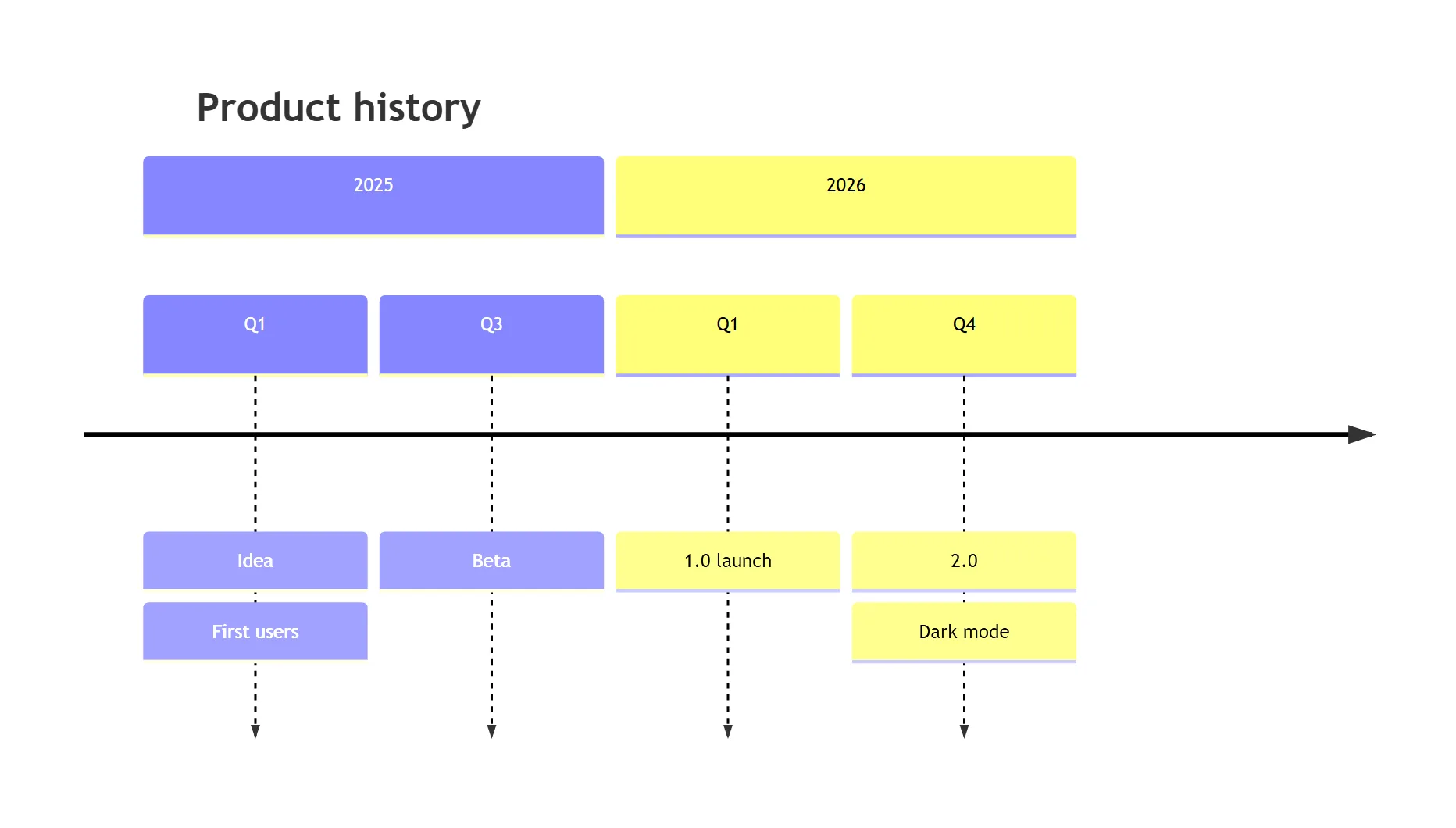
Each line is period : event : event. The period is plain text, so Mermaid never checks or sorts it:
2027-01-04, Q1 and Sprint 12 are all just labels, drawn in the order you write them.
| Timeline line | Result |
|---|---|
timeline TD | Top to bottom (11.14.0+; LR is the default) |
timeline BT | No error: “BT” becomes the first period |
09:12 : Alert fires | Parse error: the first colon ends the period |
"09:12" : Alert fires | Parse error as well |
09#58;12 : Alert fires | Works, shows 09:12 |
A second line : Q2 GA under a period | Another event for the same period |
click … or classDef … | Parse error: timelines have neither |
| 14 periods without sections | One row, scaled down to fit the width |
Colours work like a mind map’s: cScale0 to cScale11 (with cScaleLabel0… for the text) colour the
sections, or each period when there are no sections, and timeline: disableMulticolor: true makes them
all one colour. The mindmap post has the same theme recipe in more detail.
Pick a gantt when tasks have lengths and depend on each other. Pick a timeline when the story is the order of events, and when you want no date maths at all.
Where it renders
- GitHub draws
mermaidcode blocks in issues, pull requests, discussions, wikis and Markdown files. It does not print its Mermaid version. Its docs suggest a block with the single wordinfo, which renders the version (“v12.3.0” in our 12.3.0 test). Check it before you usevert(11.7.0+), multipleexcludeslines (11.16.0+) ortimeline TD(11.14.0+). - GitLab: the docs say “GitLab supports Mermaid version 12”, and GitLab’s
package.jsonon 14 November 2026 pinned[email protected]. We tested 12.1.0 and 12.3.0, on either side of it, with the same dates. - Jira and Confluence show a
mermaidblock as code. You need an app; see the next section and our guide to Mermaid in Jira. - Obsidian, VS Code previews, Notion: each bundles its own Mermaid version, which we did not test.
The
infoblock works there too.
Gantt charts in Jira and Confluence
- Mermaid Tabs for Jira draws a Mermaid diagram in a tab on the work item, Gantt and timeline included, with Mermaid 12. Every snippet on this page gave the same dates in 12.1.0 and 12.3.0, so it draws the same chart there. A plan in a tab sits next to the work it plans. The dates are text you type: the chart does not follow the work item’s own dates.
- Excalidraw for Confluence puts a Mermaid Gantt on a whiteboard and keeps the text, so you can change the plan later and draw notes and arrows around it. Whether Insert as shapes splits it into shapes depends on the converter library: in our test, mermaid-to-excalidraw 2.2.2 returned one picture for the plan, and 3.6.0 (the newest) returned rectangles, lines, a diamond and text.
For the other Mermaid diagram types, see the flowchart guide, the mind map guide and the UML cheat sheet. If you want a gantt view that follows real work items rather than text, that is Jira’s own timeline; which Gantt features it has and lacks is in our Jira Gantt chart scorecard.
Sources
- Mermaid gantt and timeline docs at the tested tag: gantt.md and timeline.md, [email protected].
- The gantt grammar
gantt.jison,ganttDb.js(date fallback, unknown ids, the 10,000 limit,enableTopAxis) andganttRenderer.jsat the same tag, in mermaid-js/mermaid. - Mermaid release notes: timeline in 9.4.0,
untilin 10.9.0,weekendin 11.0.0,vertin 11.7.0, timeline direction in 11.14.0, theexcludeslimit in 11.15.0, severalexcludeslines in 11.16.0, unknown-id warnings in 12.1.0. - Mermaid issues #5867 (until with excludes) and #7062 (hours over a weekend).
- GitHub docs, Creating diagrams; GitLab docs, Mermaid, and GitLab’s package.json.
- mermaid-to-excalidraw 2.2.2 and 3.6.0.
- Our renders: 92 gantt and 23 timeline cases in Mermaid 11.17.2, 12.1.0 and 12.3.0, then 17 follow-up cases, every code block of this page, headless Chromium, time zone UTC (Berlin and New York for the time zone cases), 14 November 2026, no network requests during the run. Dates read from Mermaid’s own task list after parsing.
Frequently asked questions
How do I change the colors of a Mermaid gantt chart?
Use the base theme and set theme variables in the front matter: taskBkgColor and taskBorderColor for normal tasks, activeTaskBkgColor for active, doneTaskBkgColor for done and critBkgColor and critBorderColor for crit. For one task, add themeCSS with a selector on the end of its id, [id$="-spec"] { fill: #A78BFA; }, because Mermaid prefixes every id. A crit milestone or crit vertical marker turns red.
How do I exclude weekends in a Mermaid gantt chart?
Add the line excludes weekends. Durations then count working days only: a 5d task that starts on a Monday stops at the end of Friday, and the next task starts on Monday. Add weekend friday for a Friday and Saturday weekend, specific dates such as excludes 2027-12-24 for holidays, and includes for a Saturday you work. Hours are not moved past a weekend, and fixed end dates are not extended.
How do I add a milestone to a Mermaid gantt chart?
Write the tag first, then an id, a date or after, and a duration: Release :milestone, rel, after qa, 0d. The duration is required. Without it Mermaid stops with Invalid date:rel, because it reads the id as the start date. The diamond sits at the start date plus half the duration, so use 0d to put it exactly on the day.
Should I use a gantt or a timeline in Mermaid?
Use a gantt when tasks have dates and lengths and depend on each other: Mermaid computes the dates for you. Use a timeline for a story of events in order, such as a product history or an incident log: the periods are plain text, so Mermaid does not compute or check any date.
Why does my Mermaid gantt task start today?
Because an after or until points at an id Mermaid cannot find, so it falls back to today. Common causes are a typo, an id that contains a dot (spec.1 is read as spec), or a task without an id. Since Mermaid 12.1.0 the browser console shows a warning that names the unknown id, but the chart still draws.
Can ChatGPT write a Mermaid gantt chart?
Yes, and it usually gets the shape right. Check four things before you trust the dates: status tags come before the id, every milestone has a duration, no task name starts with a keyword such as title, section or click, and no comment sits at the end of a task line. Each of these breaks a chart in a way the 26 tests on this page show.