Jira Status Categories: Keys, JQL and What Counts as Done
On this page
- The three categories, and a hidden fourth
- Which category each status is in
- Who decides “done”: category, column or resolution
- statusCategory in JQL: what works and what fails
- statusCategoryChangedDate: the date that never lies about done
- “In Progress” does not mean someone is working on it
- Choosing the category when you add a status
- Seeing categories on a board, and searching by them
- How we tested
- Sources
A team adds a Released status after Done. The board shows it green. The “done this week” filter counts the work, the sprint report calls it open, and the Created vs Resolved chart ignores it. Three parts of Jira, three answers, because each one reads something different: the status category, the board column or the Resolution field.
We read the status categories of our Jira Cloud test site through the REST API on 14 November 2026,
mapped every status to its category and ran every way of writing statusCategory in JQL.
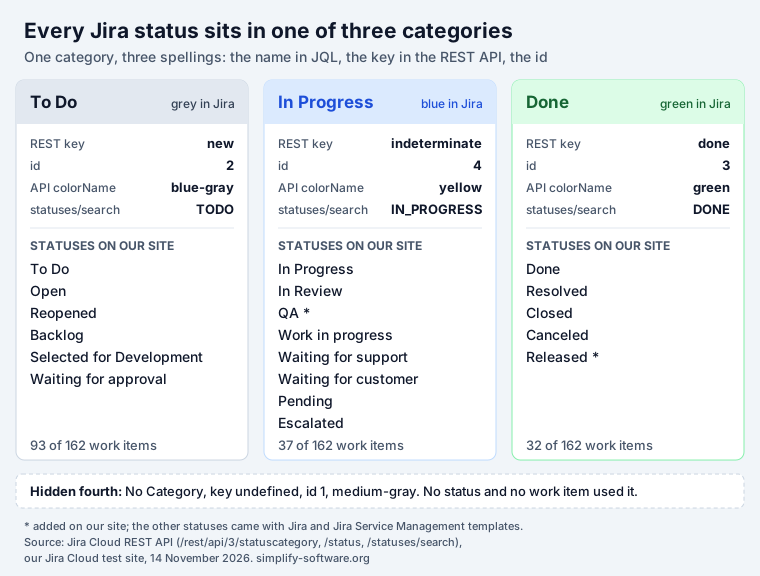
Short answer: every Jira status belongs to one of three status categories. To Do (grey, API
key new, id 2) is work not started. In Progress (blue, key indeterminate, id 4) is work under
way. Done (green, key done, id 3) is work that needs nothing more. You cannot add a category or
change the colours. JQL accepts the name, the key or the id: statusCategory != Done finds
unfinished work in every workflow. The catch: Kanban boards and JQL judge “done” by category, scrum
boards by the last column, and reports and SLAs by the Resolution field.
The three categories, and a hidden fourth
GET /rest/api/3/statuscategory on our site returned four categories. Each has a name, a key and an
id, and Jira accepts different ones in different places:
| Category | JQL name | REST key | id | Jira shows | API colorName | statuses/search |
|---|---|---|---|---|---|---|
| To Do | "To Do" | new | 2 | grey | blue-gray | TODO |
| In Progress | "In Progress" | indeterminate | 4 | blue | yellow | IN_PROGRESS |
| Done | Done | done | 3 | green | green | DONE |
| No Category | "No Category" | undefined | 1 | none | medium-gray | none |
Three things in this table trip people up.
The colours in the API are old. Atlassian’s rule for the screen is clear: the categories “are
represented by the colors grey, blue, and green respectively, so you’ll always see statuses shown in
one of these colors (this can’t be customized).” The API still answers blue-gray and yellow. Code
that paints statuses from colorName shows In Progress in yellow, while Jira itself shows it blue.
There are three spellings. The older endpoints use new, indeterminate and done. The newer
GET /rest/api/3/statuses/search returns TODO, IN_PROGRESS and DONE. JQL takes the names, the
old keys and the ids, but not the new spelling (see the JQL section).
Atlassian’s own API example is wrong. The REST reference shows a sample response with the keys
in-flight and completed and an id of 9. On a real site GET /rest/api/3/statuscategory/in-flight
returns 404: “The status category with key ‘in-flight’ does not exist”. /statuscategory/done and
/statuscategory/3 both work.
The fourth category, No Category, is a leftover. No status on our site used it, and
statusCategory = "No Category" found 0 of our 162 work items.
Which category each status is in
Atlassian’s list of default statuses
explains what each one means but not which category it belongs to. Our site has 19 statuses, most of
them created by the templates of its 12 spaces. This is the category of each, read from
GET /rest/api/3/status:
| Status | Category | Where it came from on our site |
|---|---|---|
| To Do | To Do | software and business templates |
| Open | To Do | service management, customer service, classic |
| Reopened | To Do | service management, classic workflow |
| Backlog | To Do | company-managed kanban template |
| Selected for Development | To Do | company-managed kanban template |
| Waiting for approval | To Do | service management |
| In Progress | In Progress | most templates |
| In Review | In Progress | software templates |
| Work in progress | In Progress | service management |
| Waiting for support | In Progress | service management |
| Waiting for customer | In Progress | service management, customer service |
| Pending | In Progress | service management |
| Escalated | In Progress | service management, customer service |
| QA | In Progress | added by us |
| Done | Done | software, business, service, customer service |
| Resolved | Done | service management, classic workflow |
| Closed | Done | service management, classic workflow |
| Canceled | Done | service management |
| Released | Done | added by us |
Two choices in the service management template surprise people. Waiting for customer and Pending are In Progress, even though nobody on the team is working on the request. And Waiting for approval is To Do: an item that already passed triage and waits for a manager counts as not started. Canceled is Done, so a canceled request is “finished” for every category-based search.
The number of statuses per space ranged from 2 (a classic business space with To Do and Done) to 13 (the IT service space). The software spaces had 4 or 5.
Who decides “done”: category, column or resolution
This is the question behind most “my numbers do not match” threads. Jira has three different judges, and each feature listens to one of them:
| Part of Jira | Judges “done” by | Atlassian’s words |
|---|---|---|
JQL statusCategory, list and board colours | Status category | “Status categories impact how work items are visualized in lists, reports, and boards.” |
| Kanban board, hiding completed work | Status category | “Kanban boards use status category to determine whether a work item is complete.” (KB) |
| Scrum board: Complete sprint, velocity | The last board column | “Work items are considered as complete once they have been moved to the last column on the board.” (Complete a sprint) |
Created vs Resolved, resolved, SLAs | Resolution field | “Jira considers that the lifecycle of an issue has come to an end when the “Resolution” field has a value.” (KB) |
| Strikethrough keys, “Unresolved” filters | Resolution field | “Once a work item is resolved (that is, the work item’s Resolution field is filled in), references to that work item show the key in strikethrough text.” |
| Service team-managed spaces | Status category | “The resolution field doesn’t exist in service team-managed spaces … Instead, you can use the statusCategory field (a work item is resolved when statusCategory = Done).” (JQL fields) |
On our site the three judges disagreed:
- Category vs name.
statusCategory = Donefound 32 work items,status = Doneonly 23. The other 9 sat in Resolved and Released. - Category vs resolution. Only 26 work items had a Resolution, and
statusCategory = Done AND resolution IS EMPTYreturned 6: four in Resolved, one in Released and one in Done. For “done this week”, the category date found 15 work items andresolvedfound 14. Over 30 days it was 32 against 26. - Category vs column. Our scrum board for the SPR space has the columns To Do, In Progress,
Released and Done. Released is green, but it is not the last column, so
Complete sprint called our Released story open while
statusCategory = Donefound it.
The fixes are small. Put every Done-category status in the last column of a scrum board (Atlassian: “make sure they’re mapped to the right-most column in your board settings”). Make every transition into a Done status set a Resolution and every way out clear it, as our Jira workflow guide shows. Then these two checks from Atlassian’s knowledge base should both return nothing:
statusCategory = Done AND resolution IS EMPTY
statusCategory != Done AND resolution IS NOT EMPTY
statusCategory in JQL: what works and what fails
Atlassian’s JQL fields reference
has no entry for statusCategory. It appears once, in a note under Resolution. So we tested it: each
query below went through POST /rest/api/3/jql/parse with strict validation and then through a count
on our 162 work items.
These all work, and each line returned the same count:
statusCategory = "To Do"        statusCategory = new             statusCategory = 2       → 93
statusCategory = "In Progress"  statusCategory = indeterminate   statusCategory = 4       → 37
statusCategory = Done           statusCategory = done            statusCategory = 3       → 32
Names are not case-sensitive: "to do", "in progress" and DONE all worked. IN, NOT IN, !=
and IS EMPTY work too. statusCategory != Done, statusCategory not in (Done) and
statusCategory in ("To Do", "In Progress") all returned 130.
These fail, with the error Jira gives:
| Query | Error |
|---|---|
statusCategory = Todo | The value 'Todo' does not exist for the field 'statusCategory'. |
statusCategory = IN_PROGRESS | The value 'IN_PROGRESS' does not exist for the field 'statusCategory'. |
statusCategory ~ Done | The operator '~' is not supported by the 'statusCategory' field. |
statusCategory > "To Do" | The operator '>' is not supported by the 'statusCategory' field. |
statusCategory WAS Done | History searches do not support the 'statusCategory' field. |
statusCategory CHANGED | History searches do not support the 'statusCategory' field. |
One trap: the count endpoint POST /rest/api/3/search/approximate-count answered 0, with no
error, for every failing query above. A script or gadget that does not validate the JQL first
reports “nothing to do” instead of “your query is wrong”.
For history, use status names. status WAS and status CHANGED are supported, so list the statuses
of the category you mean:
status CHANGED TO (Done, Resolved, Closed, Released) DURING (startOfWeek(), now())
status WAS IN ("In Progress", "In Review") BEFORE startOfWeek()
On our site the first returned 16 and the second 25. Add AND statusCategory = Done to the first
one if reopened work should not count. Our
JQL WAS and CHANGED guide has the rest of the history operators.
statusCategoryChangedDate: the date that never lies about done
statusCategoryChangedDate holds the moment a work item last moved into a different category. A
move inside a category leaves it alone: PAY-8 went from In Progress to In Review, QA and back to In
Review, and its date stayed at the move from To Do to In Progress. Three more things we saw:
- It is never empty.
statusCategoryChangedDate is EMPTYreturned 0. On items that never moved, such as SPR-1 and SPR-8, it equals the created time to the minute. - It does not need a Resolution. Released item SPR-9 had no Resolution but a change date of
11 November, 09:06, so it shows up in a “done this week” list that
resolvedmisses. - It has no history.
statusCategoryChangedDate WAS "2026-11-01"fails with the sameHistory searches do not supporterror.
Queries we use, with our counts:
statusCategory = Done AND statusCategoryChangedDate >= startOfWeek()
  ORDER BY statusCategoryChangedDate DESC                       → 15, finished this week
statusCategory = "In Progress" AND statusCategoryChangedDate <= -7d
                                                                 → 34, started over a week ago
statusCategory != Done ORDER BY statusCategory, priority DESC   → To Do first, then In Progress
ORDER BY statusCategory sorts To Do, In Progress, Done, in workflow order rather than by id. More
weekly report queries built on these fields are in our Jira status report guide.
“In Progress” does not mean someone is working on it
The service management template puts waiting statuses in In Progress. On our site 13 work items in service spaces were In Progress, and 12 of them were in Waiting for customer, Waiting for support, Pending or Escalated. Only one was in a status that means someone is working on it.
If “in progress” in your reports should mean active work, split the category by name:
statusCategory = "In Progress"
  AND status NOT IN ("Waiting for customer", "Waiting for support", "Pending", "Escalated")
The same goes the other way for Waiting for approval, which sits in To Do. A list of “not started”
work that uses statusCategory = "To Do" includes requests already waiting on a manager.
The control chart ignores categories altogether: it counts time in the board columns you tick, so a Done-category column such as Released can still add to cycle time. Tested in Jira cycle time.
Choosing the category when you add a status
The category is set per status, when the status is created. In the workflow editor Atlassian’s steps are: “Create a new status . Choose a New status name and Status category”. On a company-managed board with the simplified workflow, a new column asks for “a name for the new column and select its category”, and a new status is created to match.
Statuses are shared. Atlassian warns that a renamed status is renamed “in every workflow (and every space) that uses it”, and that “Reports are based on status names”. Before you add a status, check the Statuses page for one that already exists with the right category.
Four questions to ask before you pick:
- Can work be finished here? Then Done, and the status needs a Resolution on the way in.
- Is it the last step on a scrum board? If a Done-category status is not in the last column, sprints will carry it over.
- Is someone waiting rather than working? In Progress is still right for reports that count open work, but give it a name you can exclude, like Waiting for customer.
- Has it started? A queue, a triage or an approval step before work begins is To Do.
Seeing categories on a board, and searching by them
Kanban Status Board shows a project with one column per workflow
status, coloured by status category, and dragging a card runs the real transition. Its throughput
chart counts the issues finished each week. JQL Blocks has a Status category
block you can turn around with NOT, and writes the JQL as you build, so statusCategory != Done needs
no typing. To write or check a query by hand, use our free JQL builder or the
JQL cheat sheet.
How we tested
- Site: our Jira Cloud test site (Standard plan) with 162 work items in 12 spaces: software (scrum, kanban, team-managed), business, IT service management and customer service.
- Reads only, 14 November 2026:
GET /rest/api/3/statuscategoryand/statuscategory/{idOrKey},GET /rest/api/3/status,GET /rest/api/3/statuses/search,GET /rest/api/3/project/{key}/statuses,GET /rest/agile/1.0/board/{id}/configuration,POST /rest/api/3/jql/parse?validation=strict,POST /rest/api/3/search/approximate-countandPOST /rest/api/3/search/jql. Nothing on the site was changed for this post. - QA and Released were added to the site in earlier tests. Counts depend on the day:
startOfWeek()starts on Sunday by default.
Sources
- Atlassian Support: What is a workflow status?, Add statuses to a Jira workflow, What are work item statuses, priorities, and resolutions?, Configure columns, Complete a sprint, JQL fields.
- Atlassian knowledge base: Kanban board shows or hides completed work unexpectedly, Best practices on using the “Resolution” field in Jira Cloud.
- Jira Cloud REST API v3: Workflow status categories.
- Our Jira Cloud test site, 14 November 2026 (method above). Related tests on the same site: Jira sprint, Jira kanban board, Jira workflow.
Frequently asked questions
What are the three status categories in Jira?
To Do, In Progress and Done. Atlassian: "All statuses, even custom statuses you create yourself, must belong to one of three status categories". To Do is work not started, In Progress is work started but not finished, and Done is work that needs nothing more. The REST API also returns a fourth, "No Category", which no status on our test site used.
Can I add a custom status category in Jira?
No. Jira Cloud has exactly three categories you can choose from, and you pick one of them each time you create a status ("Choose a New status name and Status category"). If you need a finer split, such as waiting versus working, make it with statuses and search with status names, as shown in the JQL section of this post.
Can I change the status category colours?
No. Atlassian says the colours are grey, blue and green "(this can't be customized)". The REST API still reports older colour names: blue-gray for To Do, yellow for In Progress and green for Done. That is why old forum answers call In Progress yellow.
What does the indeterminate status category mean?
It is the API key of In Progress. The REST API names the categories new (To Do, id 2), indeterminate (In Progress, id 4) and done (Done, id 3). JQL accepts all three forms: statusCategory = indeterminate, statusCategory = "In Progress" and statusCategory = 4 returned the same 37 work items on our site.
What is statusCategoryChangedDate in Jira?
The date a work item last moved into a different status category. Moves between two statuses of the same category do not change it. It is never empty: on items that never moved, it equals the created date. statusCategory = Done AND statusCategoryChangedDate >= startOfWeek() lists what was finished this week, with or without a resolution.
What is the difference between a status and a status category?
A status is a step in one workflow, such as In Review or Waiting for customer, and each team can have its own. A status category is one of three buckets every status is put in. Search by status when the step matters, and by category when you only care whether work is not started, under way or finished, across workflows.
Why does a work item in a Done status still show as unresolved?
Because "resolved" is the Resolution field, not the category. On our site 32 work items were in a Done-category status and 6 of them had no Resolution, so Created vs Resolved and "Unresolved" filters still counted them as open. Fix the workflow so every transition into Done sets a Resolution.
Keep reading
- Jira, JSM and the Marketplace · 9 minJira Workflow: Statuses, Transitions and the Resolution Trap
- Jira, JSM and the Marketplace · 12 minJira Prioritization Plugins: 17 Apps Compared by Method
- Jira, JSM and the Marketplace · 10 minJira Gantt Chart: 12 Gantt Features Tested on the Timeline
- Free toolJQL builder