Jira SLA Examples: Goals, Conditions and Calendars, Tested
On this page
The team lead sets “first response within 8 hours” on the help desk, and on Monday the report shows half the weekend’s requests breached. Nobody was slow. The goal ran on the wall clock, because nobody picked a calendar.
We set up SLAs on our own Jira Service Management Cloud site, raised five test requests on 5 November 2026 and watched what each action did to the timers. Here are the configurations, the results, and the examples worth copying.
Short answer: a Jira SLA has three parts. A goal says how long, per group of requests picked
by JQL (for example priority = Highest gets 15 minutes, everything else 45). Each start, pause and
stop condition says when the clock runs. A calendar says which hours count. In our tests a reply to
the customer stopped the first-response timer at once, but an internal note and the reporter’s own
comment did not, and a request moved to Resolved without a Resolution kept breaching for 19 days.
The two SLA setups on our site
Jira Service Management creates two SLAs for a new service space: Time to first response and Time to resolution. These are the definitions we read from our two spaces:
| Space | SLA | Start | Pause | Stop | Goals |
|---|---|---|---|---|---|
| IT Help Desk | Time to first response | Issue Created | none | Comment: For Customers; Entered Status: Waiting for customer; Resolution: Set | priority = Highest 15m; all remaining 45m; no calendar |
| IT Help Desk | Time to resolution | Issue Created; Resolution: Cleared | none | Resolution: Set | priority = Highest 1h; all remaining 3h; no calendar |
| Payments Support | Time to first response | Issue Created | none | Comment: For Customers; Entered Status: Waiting for customer; Resolution: Set | priority = Highest 2h; all remaining 8h; Sample 9-5 Calendar |
| Payments Support | Time to resolution | Issue Created; Resolution: Cleared | none | Resolution: Set | priority = Highest 4h; all remaining 16h; Sample 9-5 Calendar |
This is the goals list as Jira shows it for Payments Support. Goals are checked from top to bottom, and the first JQL that matches decides the target:
Three rules from Atlassian’s documentation explain everything that follows. For start conditions, “If you add multiple conditions, the SLA measures the time when a work item meets either of the conditions.” For stop conditions, “SLA measurement will be stopped as soon as any one of the conditions specified here are met.” And for goals, “If priority changes, timers adjust the remaining goal time based on the new priority.”
Five test requests, and what each one did
All five were raised through the JSM REST API and labelled sla-test. Times are from Jira’s own SLA
data for each request.
| Request | What we did | What the timer did |
|---|---|---|
| HELP-12 | raised it as the agent, for herself; changed priority to Highest; posted a public comment | the goal switched from 45m to 15m when priority changed; the comment did not stop first response, which breached at 18:57 |
| HELP-13 | moved it to Waiting for customer with “Respond to customer” | first response completed, met, 0m; time to resolution kept running |
| HELP-14 | raised it on behalf of a portal customer; replied to the customer; resolved it; reopened it | the reply stopped first response (met); resolving stopped time to resolution (met); reopening started a new cycle at the full 3h |
| HELP-15 | raised it for the same customer; added an internal note; then resolved it through the API without a Resolution | the internal note did not stop first response; after “resolving”, status Resolved, Resolution empty, both timers still running |
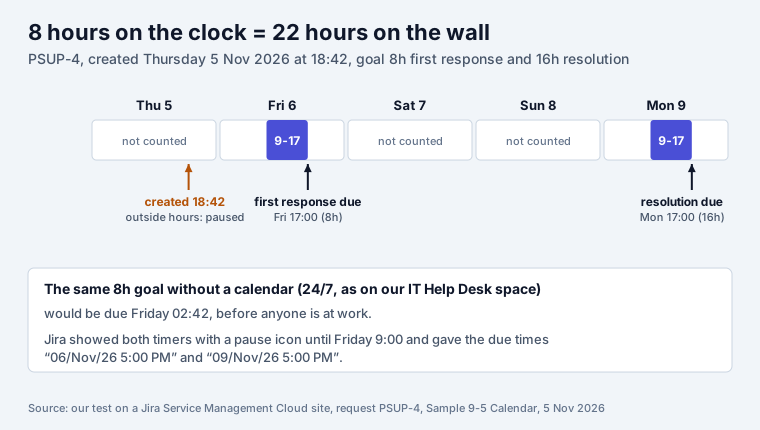
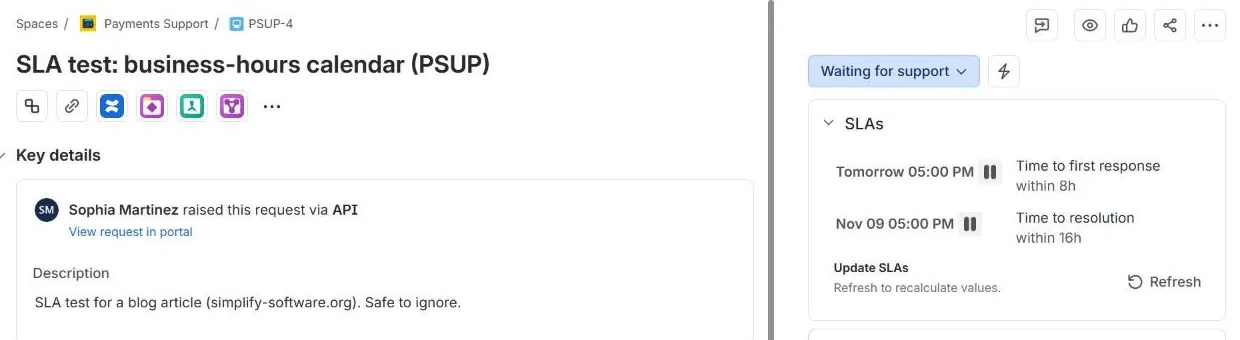
| PSUP-4 | raised it in Payments Support at 18:42 on Thursday 5 November | outside calendar hours: both timers paused; first response due 17:00 on Friday, resolution due 17:00 on Monday |
Here is HELP-12 a few minutes later. The only comment is the reporter’s own, and the first-response timer is red:
What the five requests teach:
- Who comments matters. “Comment: For Customers” fired for an agent’s reply to a customer (HELP-14) and not for the reporter commenting on her own request (HELP-12). If agents raise requests for themselves to log phone calls, their first-response timer only stops on a status or a resolution.
- Internal notes never count. HELP-15 kept running after the note. That is the intent: the customer heard nothing.
- A status can stop the clock. “Entered Status: Waiting for customer” ended HELP-13’s first response in 0 minutes. Moving a request to Waiting for customer with no real question in it meets the goal on paper only.
- Priority changes move the goal. HELP-12 got 15 minutes instead of 45 the moment it became Highest, as Atlassian documents.
- Reopen means start again. HELP-14 now has two Time to resolution cycles. Reports that count cycles count it twice.
The 19-day breach: Resolved is not the same as resolved
Before our tests, the IT Help Desk already had seven requests in the Resolved status. Three had the Resolution field set to Done, and their SLAs were met in 4 minutes. The other four had no Resolution, and their Time to resolution was still running: 27,790 minutes, about 19 days, against a 3-hour goal.
HELP-15 shows how that happens. The “Resolve this issue” transition asks for the Resolution on its screen, but a call to the transition API skips the screen. Atlassian says the same in its knowledge base: “Issue transition API is not expected to respect the screens.” Imports, scripts and automation rules that move requests to Resolved without sending a Resolution all leave the timer running, because the stop condition is “Resolution: Set”, not a status.
Two JQL searches from the same Atlassian article find the damage on any site:
statusCategory = Done AND resolution IS EMPTY
statusCategory != Done AND resolution IS NOT EMPTY
Both should return nothing. On our site the first returned 4 of 12. The fix lives in the workflow, not in the SLA: our Jira workflow guide shows the rule that sets the Resolution on the way to Done and clears it on the way back.
Calendars: 8 hours on the clock, 22 on the wall
PSUP-4 arrived at 18:42 on a Thursday. Payments Support uses the Sample 9-5 Calendar, so Jira paused both timers until Friday 9:00, and the 8-hour first-response goal fell due at 17:00 on Friday. The 16-hour resolution goal needed Friday plus Monday:
On the request itself, Jira shows both timers with a pause icon while the calendar is closed:
From Atlassian’s calendar page: a new calendar is “preset from 09:00 to 17:00 (9am-5pm)”, a day can have several slots (“to add a lunch break, add a time slot for before lunch… and after lunch”), and you can “Enter any holidays if required.” Our Jira holidays guide has the 2027 US and UK dates and what in Jira ignores them.
Five SLA examples to copy
Each line is one goal. Put the most specific JQL first, because the first match wins.
| Example | SLA | Goal JQL | Target | Calendar | Why |
|---|---|---|---|---|---|
| Outage line | Time to first response | priority = Highest | 15m | none (24/7) | the one queue someone watches at night |
| Normal requests, office hours | Time to first response | all remaining work items | 8h | 9 to 5 with holidays | stops weekend requests from breaching before Monday |
| Fix within a working day | Time to resolution | priority in (Highest, High) | 8h | 9 to 5 with holidays | the goal people can actually keep |
| Everything else | Time to resolution | all remaining work items | 40h | 9 to 5 with holidays | one working week |
| Do not count the customer’s time | Time to resolution | same goals, plus a pause condition | pause on “Status: Waiting for customer” so their silence is not yours |
The last row is a change to our test setup, which had no pause conditions. Atlassian’s own example for pausing is exactly this: “It may be used, for example, when you are waiting for a customer to respond.” Pause (the clock waits) is different from stop (the cycle ends): with a pause, the time already spent still counts when the customer answers.
Checking SLAs week by week
The request view tells an agent what is due. It does not tell the team lead how last week went. SLA Reports builds weekly and monthly reports from the same SLA fields Jira keeps on each request, with each SLA’s calendar and without paused time: compliance per SLA, request type and priority, every breach and the requests close to breach, and the change from the previous week. It is free for up to 10 users and the data stays in your Atlassian site.
If you are deciding what goal to promise in the first place, our free SLA trust simulator shows how often a goal is missed for a given volume and team. Still choosing a product? Jira vs Jira Service Management explains why only JSM has SLA timers and what an agent seat costs.
Sources
- Our Jira Service Management Cloud site, 5 November 2026: SLA definitions of two service spaces, five test requests (HELP-12 to HELP-15, PSUP-4) through the JSM REST API, their SLA cycles, and the seeded IT Help Desk requests.
- Atlassian Support: Set up SLA conditions, Set up SLA goals, Set up SLA calendars.
- Atlassian knowledge base: Best practices on using the “Resolution” field in Jira Cloud (updated 11 March 2026).
Frequently asked questions
What is an SLA in Jira?
In Jira Service Management an SLA is a timer on each request. It has goals (a time target per group of requests, picked by JQL), conditions (what starts, pauses and stops the timer) and a calendar (which hours count). Jira shows the time left on the request and marks it breached when the goal passes. Jira Software alone has no SLA timers.
What does a 4 hour SLA mean?
Four hours of counted time, not four hours on the wall clock. With a 9 to 5 weekday calendar, a request that arrives at 16:00 uses one hour that day and is due at 12:00 the next working day. Without a calendar the timer runs 24/7 and the same request is due at 20:00.
What is the difference between an SLA and a KPI?
An SLA is a promise for each request, such as "first response within 8 working hours". A KPI measures how the team does overall, such as the share of requests that met that promise last month. In Jira the SLA lives on the request; the KPI is a report built from many requests.
Why is my SLA still running after I resolved the request?
Usually because the request reached a Resolved status but the Resolution field stayed empty, and the SLA stops on "Resolution: Set", not on a status. On our test site four seeded requests in Resolved had no resolution and their Time to resolution had been running for 19 days. Check with the JQL statusCategory = Done AND resolution IS EMPTY.
Do internal comments stop the first response SLA?
No. The default stop condition is "Comment: For Customers". In our test an internal note left the timer running, while a reply to the customer stopped it at once. A comment from the request's own reporter did not stop it either.
Does reopening a request restart the SLA?
With the default Time to resolution, yes, and from zero. "Resolution: Cleared" is a start condition, so reopening starts a new cycle with the full goal. Our reopened test request showed two cycles: the first met, the second starting again at 3 hours.
Can a Jira SLA skip weekends and holidays?
Yes, through an SLA calendar: working days, time slots per day and a list of holidays. Atlassian presets new calendars to 09:00 to 17:00. Each goal picks its own calendar, so a Highest priority goal can run 24/7 while the rest run on office hours.
Keep reading
- Jira, JSM and the Marketplace · 11 minDeveloper Burnout: 2026 Research, Causes and Warning Signs
- Jira, JSM and the Marketplace · 18 minJira Deadlines: Due Date JQL, Reminders, the Day Rule (2026)
- Jira, JSM and the Marketplace · 8 minJira Status Report: Weekly Template and 6 Tested JQL Queries
- Free toolSLA trust simulator