JQL Dates: Formats, Relative Dates and startOfDay() Tested
On this page
- The formats Jira accepts
- Relative dates count hours, not days
- Two traps with numbers: no unit, and no quotes
- Never use = on created, updated or resolved
- Due dates have no time
- All eight start and end functions
- Which day does the week start on?
- Ready-made periods
- Sprint dates are not dates in JQL
- Check a query before you save it
- How we tested
The stand-up filter says created >= -1d. At 9:30 on Friday it shows one new bug, and the team
moves on. The bugs that came in on Thursday before 9:30 are not on the screen. -1d does not mean
“yesterday”. It means “the last 24 hours, counted back from this minute”.
Jira’s date handling has about six rules like that, and they are scattered across a dozen pages of Atlassian’s reference. We put them on one page and measured each on a live Jira Cloud site on Friday 13 November 2026, at 10:45 in the morning, with the profile time zone set to Central Europe.
Short answer: write dates year first: created >= "2026-11-01". For calendar periods use the
functions, startOfDay(-1), startOfWeek(), startOfMonth(-1); for rolling periods use -7d or
-2w. Always give a unit (-3000 without one means a moment in 1970), never use = on
created or updated, and remember that the week starts on Sunday unless your admin changed it.
The formats Jira accepts
There are four, and Jira lists them itself when you get one wrong. Our created > "11/01/2026"
came back with:
Date value '11/01/2026' for field 'created' is invalid. Valid formats include: 'yyyy/MM/dd HH:mm', 'yyyy-MM-dd HH:mm', 'yyyy/MM/dd', 'yyyy-MM-dd', or a period format e.g. '-5d', '4w 2d'.
| Written | Result |
|---|---|
"2026-11-01" and "2026/11/01" | Works, midnight at the start of the day |
"2026-11-1" | Works, one-digit days are fine |
"2026-11-12 23:00" | Works, a time in 24-hour form |
"11/01/2026" | Error |
"1 Nov 2026" | Error |
"2026-11-01T09:00" | Error, there is no ISO T |
The time is read in your time zone. Atlassian’s field reference says results “will be relative to your configured time zone (which is by default the Jira server’s time zone)”. Two people in different countries can run one saved filter and get different lists.
Relative dates count hours, not days
-1d, -2w, -4h and -30m are periods counted back from now. The units are w, d, h
and m, and on the start and end functions also M (months) and y (years). On our site, at
10:45 on Friday:
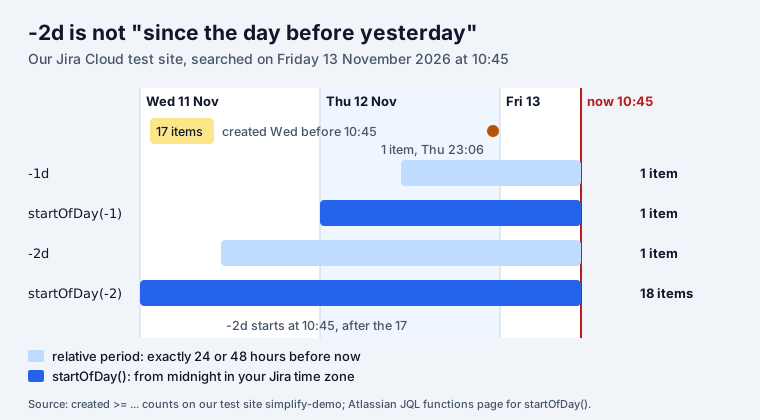
The same gap shows up over a week: created >= -1w found 65 work items, created >= startOfDay(-7) found 74. Use a period when you mean “the last N hours or days”, like an SLA or a
“stale for two weeks” check (updated <= -2w). Use a function when you mean a calendar day, week
or month, like a stand-up or a monthly report.
Two traps with numbers: no unit, and no quotes
Atlassian’s reference says the default unit is minutes, and that “if you omit the quote-marks, the number you supply will be interpreted as milliseconds after epoch (1970-1-1)”. Both are true, and together they make a quiet mess:
| Query | What Jira read | Found |
|---|---|---|
created >= -3000 | 3 seconds before 1 January 1970 | all 162 |
created >= "-3000" | 3,000 minutes ago, about two days | 10 |
created >= -3d | 3 days ago | 39 |
No error, no warning. A filter with a missing d returns the whole site, and a dashboard gadget on
it shows a number that looks plausible. Always write the unit; then quotes do not matter
(due <= 7d and due <= "7d" both found 48).
Never use = on created, updated or resolved
These fields hold a date and a time. A date without a time means midnight, so = only matches
work items created at exactly 00:00:
| Query | Found |
|---|---|
created = "2026-11-11" | 0 |
created >= "2026-11-11" AND created <= "2026-11-11" | 0 |
created >= "2026-11-11" AND created < "2026-11-12" | 17 |
The last one is the form for “on this day”: from midnight, to before the next midnight.
Due dates have no time
The due date is a plain date. Atlassian: “the due date relates to the date only (not to the time)”.
So due = "2026-11-20" works (2 work items on our site), and due = startOfDay() finds what is due
today (5). Adding a time does not fail, it quietly finds nothing: due = "2026-11-20 10:00"
returned 0.
| You want | JQL |
|---|---|
| Overdue and open | due < startOfDay() AND statusCategory != Done |
| Due today | due = startOfDay() |
| Due this week | due >= startOfWeek() AND due <= endOfWeek() |
| Due in the next 7 days | due >= startOfDay() AND due <= 7d |
| No due date yet | due is EMPTY AND statusCategory != Done |
due < now() and due < startOfDay() both returned 20 open, overdue items for us. They differ in
one case: on the day itself, after midnight, due < now() already counts today’s work as overdue.
More on how Jira treats deadlines is in Jira deadlines.
All eight start and end functions
startOfDay, startOfWeek, startOfMonth, startOfYear and the matching endOf functions work
on created, due, resolved, updated and date custom fields. Each takes an optional shift in
brackets:
| Function | Means |
|---|---|
startOfDay() | today at 00:00 |
startOfDay(-1) | yesterday at 00:00 (no unit: the function’s own, days) |
startOfDay("-36h") | today at 00:00, minus 36 hours |
startOfWeek(-1) | the first day of last week |
startOfMonth(-1) | the 1st of last month |
endOfWeek() | the last moment of this week |
endOfDay("+3d") | the end of the day three days from now |
startOfYear() | 1 January at 00:00 |
Only one shift per function. startOfWeek("-1w +1d") fails with Duration for function 'startOfWeek' should have the format (+/-)n(yMwdm), e.g -1M for 1 month earlier. There is also no
quarter function: startOfQuarter() returns Unable to find JQL function 'startOfQuarter()'.
Two more date functions are handy for personal filters: currentLogin() (the start of your current
session) and lastLogin() (your previous one), as in updated > lastLogin().
Which day does the week start on?
Sunday, by default. Atlassian’s functions page: “this function considers Sunday to be the first day of the week when ISO8601 for the Date Picker is disabled in Look and feel settings.” A Jira admin can switch to ISO weeks there. Without that, shift by a day:
| Last week, starting | JQL | Found |
|---|---|---|
| Sunday (Jira default) | created >= startOfWeek(-1) AND created < startOfWeek() | 51 |
| Monday | created >= startOfWeek("-6d") AND created < startOfWeek("+1d") | 50 |
| Monday, fixed dates | created >= "2026-11-02" AND created < "2026-11-09" | 50 |
The one-item difference on our site was a work item created on Sunday 1 November: in a Sunday week it belongs to last week, in a Monday week to the week before.
Ready-made periods
| Period | JQL |
|---|---|
| Today | created >= startOfDay() |
| Yesterday | created >= startOfDay(-1) AND created < startOfDay() |
| This week | created >= startOfWeek() |
| Last week (Sunday start) | created >= startOfWeek(-1) AND created < startOfWeek() |
| This month | created >= startOfMonth() |
| Last month | created >= startOfMonth(-1) AND created < startOfMonth() |
| This year | created >= startOfYear() |
| The last 30 days, rolling | created >= -30d |
| A quarter | created >= "2026-10-01" AND created < "2027-01-01" |
| Resolved in the last 7 days | resolved >= -7d |
| Untouched for two weeks | updated <= -2w AND statusCategory != Done |
Swap created for resolved or updated as needed. To ask when something changed (moved to
Done last month, reassigned this week) you need CHANGED with DURING or AFTER, covered in
JQL WAS and CHANGED.
Sprint dates are not dates in JQL
One date people ask for is missing from Jira entirely: the sprint’s start and end. sprint in openSprints() tells you a work item is in a running sprint, not when that sprint ends. Our app
JQL Blocks adds Sprint start date, Sprint end date and Sprint
complete date as real Jira fields, so "Sprint end date" < now() AND statusCategory != Done
works in a filter, a board or Automation.
Check a query before you save it
Paste any date query into the free JQL builder: it flags day-first dates and spells out each clause in words (“Created is on or after the start of yesterday”). For every other field, operator and function, see the JQL cheat sheet.
How we tested
- Site: our Jira Cloud test site, 162 work items, profile time zone Europe/Belgrade (CET).
- When: Friday 13 November 2026, from 10:45. Relative results depend on the minute you run them; the work items in the timeline were created on 11 and 12 November.
- How: each query through
POST /rest/api/3/jql/parse?validation=strict, then counted withPOST /rest/api/3/search/approximate-count. - Reference: Atlassian’s JQL fields page (created, due, resolved, updated) and JQL functions page (startOfDay to endOfYear, currentLogin, lastLogin), read the same day.
Frequently asked questions
What date format does JQL use?
Year first: "yyyy-MM-dd" or "yyyy/MM/dd", optionally with a time as "yyyy-MM-dd HH:mm". 11/01/2026, 1 Nov 2026 and 2026-11-01T09:00 are all errors. Relative periods such as -7d, -2w or "-4h" work too.
How do I search for work items created yesterday in JQL?
created >= startOfDay(-1) AND created < startOfDay(). Do not use created >= -1d: that means the last 24 hours, so in the morning it misses most of yesterday.
How do I find work items created last week in Jira?
created >= startOfWeek(-1) AND created < startOfWeek() for a week that starts on Sunday, Jira's default. For a Monday week: created >= startOfWeek("-6d") AND created < startOfWeek("+1d").
Why does created = "2026-11-11" return nothing?
A date without a time means midnight, and created holds the exact time, so = matches only work items created at 00:00. Use a range: created >= "2026-11-11" AND created < "2026-11-12". Due dates are different: they have no time, so due = "2026-11-20" works.
Is there a startOfQuarter function in JQL?
No. Jira answers "Unable to find JQL function 'startOfQuarter()'". Write the quarter as dates, for example created >= "2026-10-01" AND created < "2027-01-01", or use startOfMonth(-2) on the last month of a quarter.
Which time zone does JQL use?
Yours. Atlassian says results are relative to your configured time zone, which by default is the server's. So startOfDay() is midnight where your Jira profile says you are, and two people in different zones can get different results from one saved filter.