Jira Story Points: What They Mean and Which Field Counts
On this page
Refinement, Thursday. The story says “Saved cards”, the description is one line, and someone asks for a number. Three people say 5, one says 13, and the product owner types 8 into the first field that looks right. Two weeks later the sprint report says the team committed to nothing.
That happened on our own Jira Cloud site, in a sprint holding 63 points. So we took one story from a vague draft to a sized, estimated work item and checked every step on the site on 14 November 2026.
Short answer: a story point is a team’s relative size for a piece of work, not a unit of time. Jira has two fields for it. Company-managed scrum boards count the field chosen in Board settings > Estimation, usually Story Points. Team-managed spaces use Story point estimate, and only after someone turns on Estimation in Space settings > Features. A number in the field your board does not read is stored and never counted. Jira accepts any number, including 0.5 and -2; the Fibonacci scale is your team’s rule, not Jira’s.
The story goes through five stations: write it, size it, find the field, enter the number, and see what Jira counts. Then come the JQL and a troubleshooter for the field that is not there.
Station 1: write the story
Here is the draft as it reached refinement.
Summary: Saved cards
Description: Add saved cards to checkout. Use the new payment provider API.
Nobody can size this. It names no user, gives no reason and says nothing about when it is done. It also hides two pieces of work: saving a card, and paying with one.
The usual fix is the three-part sentence. Mike Cohn traces it to “agile coach Rachel Davies at a UK company, Connextra, in the early 2000s”, and the Agile Alliance glossary dates it to 2001 and calls it the “Connextra format”. Here is the story rewritten, with the saving part split off.
Summary: Pay with a saved card at checkout
As a returning customer, I want to pay with a card I saved on an earlier order, so that I can check out without typing my card details again.
Acceptance criteria
- Given I have one saved card, When I open checkout, Then that card is selected and shows its brand and last four digits.
- Given I pay with a saved card, When my bank asks for 3-D Secure, Then I see the bank’s check and come back to checkout after it.
- Given my saved card has expired, When I open checkout, Then it is marked expired and cannot be chosen.
Not in this story: saving a card (its own story), deleting cards.
Three things changed. The summary says what a person can do, so the backlog reads like a list of outcomes. The “so that” says why, which tells the team what they can trade away. And the criteria say when it is done, which is what makes it possible to size. Bill Wake’s INVEST checklist from 2003 puts it in two letters: “A good story can be estimated” and “Good stories tend to be small.”
In Jira the sentence and the criteria both go into the Description. There is no template field for stories. More criteria to copy, in both rule and scenario form: acceptance criteria examples. Where a story sits between an epic and a sub-task: Jira epic vs story vs task.
Station 2: size it
Atlassian’s own definition: “Story points are a subjective unit of measurement that doesn’t correlate to any amount of time.” A point only means something next to other stories your team has already finished.
So the team compares. These are our example reference stories, not a standard:
| Reference story (finished) | Points | Why it got that size |
|---|---|---|
| Show the card brand icon in the summary | 1 | one screen, no new logic |
| Retry a failed payment once | 3 | provider call, error states, a test case |
| Apple Pay and Google Pay on checkout | 8 | two providers, device testing, unknowns |
| Pay with a saved card (the new story) | 5 | more than retry (3-D Secure, expiry), less unknown than wallets |
The number is a team agreement, which is how it started. Ron Jeffries writes that in Extreme Programming, stories were first estimated in “Ideal Days”, with a “load factor” that “tended to be about three: three real days to get an Ideal Day’s work done”. People outside the team kept reading the days as calendar days. “So, as I recall it, we started calling our “ideal days” just “points”.” His verdict today: “I like to say that I may have invented story points, and if I did, I’m sorry now.” He adds that using them “to predict “when we’ll be done” is at best a weak idea”.
The Scrum Guide does not mention story points at all. We searched the 2020 text: no “story”, no “estimate”, no “velocity”. It asks for a size on each backlog item (“details, such as a description, order, and size”) and says who gives it: “The Developers who will be doing the work are responsible for the sizing.” Points, hours or T-shirt sizes all fit that sentence.
What Jira accepts as a point
The Fibonacci scale (1, 2, 3, 5, 8, 13) is popular because the gaps grow with the size, so nobody argues about 12 versus 13. Jira does not know about it. We created stories with odd values on our site, and Jira saved every number:
| Typed into Story Points | Jira did | Backlog shows |
|---|---|---|
| 3 | saved | 3 |
| 0 | saved | 0 |
| nothing | left empty | - |
| 0.5 | saved | 0.5 |
| -2 | saved | -2 |
| 1000 | saved | 1,000 |
| XL, or 2,5 | refused: Operation value must be a number | nothing saved |
In the work item view the field is a number box: typing “XL” left it empty. Atlassian’s team-managed page says the same for the other field: “Story point estimates must be numerical but can include decimal points.”
The sprint total was 1,001.5: 3 + 0 + 0.5 - 2 + 1000. A negative or a typo in the thousands goes straight into the sprint total and the velocity chart. If your team uses a fixed scale, check for values outside it with JQL (below). Turning points into a range of hours from your own sprints: the free story points to hours calculator.
Station 3: find the field
Our site has both fields, side by side:
| Story Points | Story point estimate | |
|---|---|---|
| Who reads it | company-managed scrum boards | team-managed spaces |
| Where it is chosen | Board settings > Estimation > Estimation method | Space settings > Features > Estimation > Story points |
| Field type on our site | a plain number field, cf[10035] | Jira’s story points type, cf[10016] |
| Work types by default | “story or epic-type work items” (Atlassian) | “all standard-level work types” once Estimation is on |
| JQL name | "Story Points" | "Story point estimate" |
The custom field numbers differ from site to site, so look yours up before you copy a cf[...]
query. For company-managed boards, Atlassian notes that the estimation setting “can only be changed
for company-managed scrum teams”. For team-managed spaces: “Estimation isn’t enabled by default”,
and once it is, “the Story point or Original estimate fields are automatically added to your work
items.” Without it, the space measures work by “work item count”. On our site neither team-managed
space had turned it on, so no work item there had an estimate field at all.
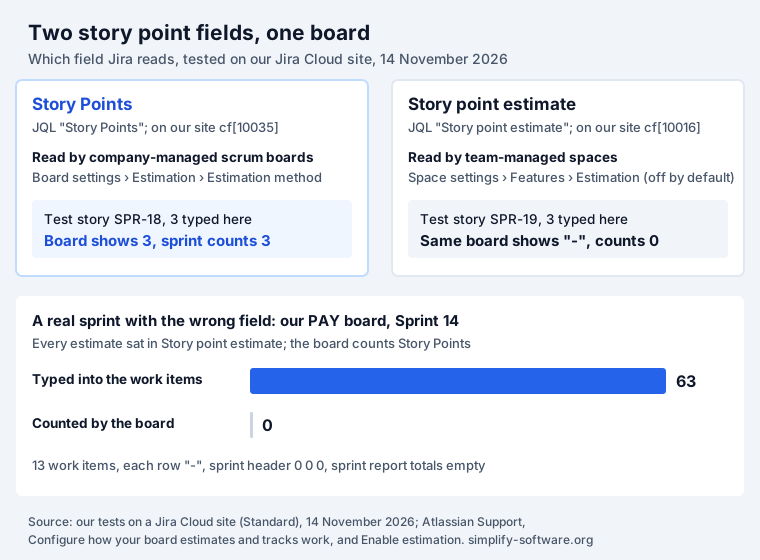
The two worlds do not mix. Atlassian’s KB on custom boards over a team-managed space: in the board’s estimation settings “you will not see Story Point Estimate as an option - only Story Points can be used”, and the two are “functionally incompatible”. The public request for one story point field across both space types was opened in October 2018, has 180 votes and the status “Under Consideration”.
Station 4: enter the number
Open the story and type the number into the field your board reads. Two details from our site:
- An empty estimate hides. On a story with no estimate, Story Points sat under the collapsed More fields section as “Add story points”. Open that section before you decide the field is missing.
- Not every work type takes it. Through the REST API, Story Points was accepted on a story and
an epic. On a task and a bug Jira answered
Field 'customfield_10035' cannot be set. It is not on the appropriate screen, or unknown.That is the default Atlassian describes: “By default, story points can only be assigned to story or epic-type work items”. A Jira admin can change it. The same message is what a CSV import or a script gets when the field is not on the screen.
One test surprised us. We put 2 points on a task through the board’s own estimation endpoint, which
accepted it. Afterwards the task’s view had no Story Points field, its backlog row showed a dash, and
the backlog total ignored it. Only JQL found it: key = SPR-26 AND "Story Points" = 2 returned the
task. A stored estimate nobody can see is worth a search before a migration.
Station 5: see what Jira counts
Now the story is in a sprint. Here is the sprint that started this article, from our PAY board on 14 November 2026:
Every row shows a dash and the sprint header reads 0, 0, 0. Yet the work items held 63 points: PAY-4 alone shows “Story point estimate: 8” in its details. The space is company-managed, the board counts Story Points, and the points had been entered into Story point estimate. The sprint report data for the sprint had no estimate on any work item and empty totals. The burndown and velocity charts read the same field.
Where Jira adds the board’s field up, and where it does not:
- Backlog and board: a total per sprint, split by status category.
- Sprint report, burndown, velocity: the board’s estimation field, counted for work in the board’s last column. Commitment, completed and re-estimates, tested: Jira velocity and burndown charts.
- Sub-tasks: their points count nowhere, not even in the parent: Jira subtasks.
- Epics: no built-in total of the epic’s story points. The request to sum story points for an epic’s work items has 659 votes and the status “Not Being Considered”.
- Kanban boards: a points badge on kanban cards is a request with 447 votes, “Gathering Interest” since 2013.
- Dashboards: the most voted story point request of all, summing Story Points in the Two Dimensional gadget, has 854 votes and has been open since 2011. Which reports do use an estimate: Jira reports.
We counted 358 suggestions and bugs on jira.atlassian.com with “story point” in the title on 14 November 2026. Most ask for one thing: add the points up in one more place.
Story points in JQL
Field names with spaces go in quotes, as in the JQL cheat sheet. We ran these over our seven test stories (values 3, 0, 0.5, -2, 1000 and two with no Story Points, one of which held 3 in Story point estimate).
| Query (add your project) | Found | Note |
|---|---|---|
"Story Points" is EMPTY | 2 | the unestimated ones |
"Story Points" = 0 | 1 | 0 is a value, not empty |
"Story Points" < 1 | 3 | -2, 0 and 0.5 |
"Story Points" != 3 | 4 | leaves out the 2 empty ones |
("Story Points" != 3 OR "Story Points" is EMPTY) | 6 | brackets matter: without them the OR ran across the whole site |
"Story Points" is EMPTY AND "Story point estimate" is EMPTY | 1 | truly unestimated, in both fields |
cf[10035] < 0 | 1 | negatives; use your own field number |
"Story Points" = XL | 0 | no error, just nothing |
Sorting puts empty values at the end of ORDER BY "Story Points" ASC and at the top of DESC. To
list the open stories that still need a size: type = Story AND statusCategory != Done AND "Story Points" is EMPTY.
Story points not showing: a troubleshooter
| You see | Cause | Fix |
|---|---|---|
| The work item shows a number, the board shows a dash and the sprint 0 | the number is in the field the board does not read | Board settings > Estimation: pick the field that holds the numbers, or copy them over |
| No estimate field on any work item, team-managed space | Estimation is off by default | Space settings > Features > Estimation, then Story points |
| No Story Points field on one story | an empty field sits under More fields | open the More fields section |
| No Story Points on tasks or bugs, company-managed space | by default only stories and epics have it | a Jira admin adds the field to those work types |
| Import or script fails with “cannot be set … not on the appropriate screen” | the field is not on that work type’s screen | same as above, then import again |
| Reports on a custom board over a team-managed space show no points | a custom board reads Story Points, the space uses Story point estimate | use the space’s own board, as Atlassian’s KB advises |
| Sub-task points missing from the sprint total | sub-task estimates are ignored | estimate the parent; see Jira subtasks |
| A JQL filter for “not 3 points” misses some stories | != leaves out empty values | add OR "Story Points" is EMPTY inside brackets |
Where our apps fit
Story point totals per column on Jira’s kanban board are a public request with 122 votes. Kanban Status Board sums Story Points, an original or remaining estimate, or any other number field under each column, next to WIP limits. Its sibling Workload & Capacity Planner does the same per person, and its settings list Story point estimate as well as other number fields, so it can read whichever field your space uses.
Before a story is sized at all, it needs criteria. Agent Ready checks each Jira work item for acceptance criteria and an estimate, among other things, and says what is missing before a person or an AI agent picks it up.
How we tested
- Site: our Jira Cloud test site (Standard plan), 14 November 2026, about 01:20 to 01:35 CET.
- Spaces: two company-managed scrum spaces whose boards estimate in Story Points, and two team-managed spaces with estimation off. We changed no settings.
- Created for the test: nine work items in one company-managed space (seven stories, one epic, one
task), all labelled
storypoints-test, and moved the seven stories into an empty future sprint. Values were set through REST API v3 and the board’s estimation endpoint; one entry was tried in the browser. - The PAY sprint was not set up for this article. Its work items were created through the API weeks earlier, with their points in Story point estimate.
- Field types, contexts and board settings were read through the REST and Agile APIs; sprint totals from the backlog and the board’s sprint report data. JQL counts are from the search endpoint.
- Votes and statuses are from the public jira.atlassian.com API on the same day.
- Not tested: turning Estimation on in a team-managed space, and changing a board’s estimation field, as both change settings.
Sources
- Atlassian Support, What are story points?
- Atlassian Support, Configure how your board estimates and tracks work
- Atlassian Support, Enable estimation (team-managed spaces)
- Atlassian KB, Story points not showing in custom board for a team-managed Jira project (updated 3 July 2026)
- Ken Schwaber and Jeff Sutherland, The Scrum Guide (November 2020)
- Ron Jeffries, Story Points Revisited (23 May 2019)
- Mike Cohn, User story template: what it is and why it works so well
- Agile Alliance, Role-feature-reason (glossary)
- Bill Wake, INVEST in Good Stories, and SMART Tasks (2003)
- Atlassian, public suggestions: JRACLOUD-94950, JRACLOUD-62109, JRACLOUD-90636, JRACLOUD-86517, JRACLOUD-94957
- Our tests on a Jira Cloud site, 14 November 2026 (method above)
Frequently asked questions
What is the difference between Story Points and Story point estimate in Jira?
They are two separate fields. Team-managed spaces estimate with Story point estimate once the Estimation feature is on. Company-managed scrum boards count the field chosen in Board settings, Estimation, usually Story Points. A number typed into the field your board does not read is stored but not counted: on our site a story with 3 in Story point estimate showed a dash on a company-managed board. Atlassian's KB calls the two "functionally incompatible". The request to merge them has 180 votes and has been under consideration since 2018.
Why is the story points field missing in Jira?
Four usual causes. In a team-managed space, estimation is off until someone turns on Space settings, Features, Estimation. In the work item view, an empty field sits under the collapsed More fields section. In a company-managed space, Story Points is by default only on stories and epics, so tasks and bugs do not show it. And on a board built over a team-managed space, reports read Story Points while the work items hold Story point estimate.
How do I add story points in Jira?
Open the work item and type a number in Story Points or Story point estimate, whichever your space uses; when the field is empty, look under More fields. In the backlog you can also edit the estimate on the row. If neither field exists, a space admin turns on Estimation (team-managed) or a Jira admin adds Story Points to the work type's screen (company-managed).
Do Jira story points use the Fibonacci sequence?
Only if your team does. Jira stores any number. On our site it accepted 0, 0.5, -2 and 1000 and refused only text ("Operation value must be a number"). The 1, 2, 3, 5, 8, 13 scale is a team convention that makes big items visibly rough; Jira neither offers it nor checks it.
Can I convert story points to hours in Jira?
Not in Jira, and Atlassian says points do not correlate to any amount of time. What you can do is measure your own range: divide the hours your team actually had by the points it finished over a few sprints. Our free story points to hours calculator does that and shows the spread, not one number.
Is there a user story template in Jira?
Not as a field. A story is a work item with a summary and a description, and the template lives in the description: "As a [user], I want [goal], so that [reason]", followed by acceptance criteria. The three-part sentence comes from Connextra, a UK company, around 2001. Keep the acceptance criteria as Given, When, Then lines or a checklist.
How do I find work items without story points in JQL?
Use "Story Points" is EMPTY, or "Story point estimate" is EMPTY in a team-managed space. EMPTY and 0 are different: an item estimated at 0 does not match EMPTY. Note that "Story Points" != 3 leaves out empty items; write ("Story Points" != 3 OR "Story Points" is EMPTY) with the brackets.
Keep reading
- Jira, JSM and the Marketplace · 12 minJira Prioritization Plugins: 17 Apps Compared by Method
- Jira, JSM and the Marketplace · 10 minJira Gantt Chart: 12 Gantt Features Tested on the Timeline
- Jira, JSM and the Marketplace · 13 minJQL Sprint Queries: Current, Previous, Next and Dates
- Free toolStory points to hours calculator