Jira Holidays: Where to Set Them, and What Ignores Them
On this page
- Where Jira uses holidays, and where it ignores them
- Set holidays on a board
- Holidays in Jira Service Management SLA calendars
- 2027 public holidays, US and UK, with files to import
- What still ignores holidays
- Make automation skip holidays
- Plan the sprint around holidays
- Public holidays are not vacations
- A 2027 checklist
- Sources
Your sprint runs through Thanksgiving week. On Monday the burndown shows the team “stalled” for two days, a customer’s ticket breached its SLA on Thursday while the support team was at home, and the rule that creates the month-end report fired on Christmas Eve. None of that is a bug. Jira just keeps holidays in fewer places than most teams assume.
We went through Atlassian’s documentation and its public tracker to map every place, wrote the 2027 holidays out as files Jira Service Management can import, and counted what is still missing.
Short answer: Jira Cloud has no site-wide holiday calendar. Holidays work in two places:
each company-managed board’s Working days (used by five reports and two gadgets) and each
Jira Service Management SLA calendar (which pauses SLA timers and can import an .ics file).
Everything else ignores them: team-managed boards, the timeline, Plans, due dates and JQL, and
automation’s business days. Ten open Atlassian requests to change that have 3,145 votes. The 2027 US
and UK holidays are below, as files.
Where Jira uses holidays, and where it ignores them
| Part of Jira | Knows your holidays? | Where you set them | Source |
|---|---|---|---|
| Burndown, Sprint, Epic, Version, Control Chart | yes | each company-managed board, Working days | Configure working days |
| Sprint Health and Burndown gadgets | yes | the board the gadget reads | same page |
| JSM SLA timers | yes | each service space, SLA calendar | Set up SLA calendars |
| Team-managed boards | no setting | nowhere | JRACLOUD-85664 |
| Days-in-column dots on cards | no | nowhere | JRACLOUD-85653 |
| Timeline | no | nowhere | JRACLOUD-91655 |
| Plans (working days, auto-schedule) | no | nowhere | JRACLOUD-88154, JRACLOUD-88065 |
| JQL date ranges, due dates | no | nowhere | JRACLOUD-22506 |
| Automation business days | weekends only | nowhere | Atlassian KB, AUTO-971 |
| A person’s vacation | no | nowhere (an app or a workaround) | JRACLOUD-90363 |
So a holiday you add to a board changes how its charts read, and a holiday you add to an SLA calendar stops the clock on tickets. Neither list reaches the other, and neither one moves a due date, shifts a bar on the timeline or stops a scheduled rule.
Set holidays on a board
Atlassian’s steps, for a company-managed board:
- Go to your board, select more (•••), then Configure board.
- Select Working days.
- Under Standard working days, tick the days your team works.
- Under Non-working days, pick a date with the date picker and select Add date. Repeat for every holiday.
- Check the board’s Region and Timezone; the reports cut days in that time zone.
You need to be a space admin for the board’s location or the board’s administrator. What changes: “Working days are reflected in these reports and gadgets: Burndown Chart, Sprint Report, Epic Report, Version Report, Control Chart” and the “Sprint Health Gadget, Burndown Gadget”. On those charts a holiday no longer looks like a day the team did nothing.
Three limits to plan around:
- One board at a time. There is no import and no shared list. A company with 12 boards and the 12 US federal days off in 2027 adds 144 dates by hand, and again every year. Setting non-working days for many boards at once is JRACLOUD-91091, open since 2013 with 242 votes.
- Company-managed boards only. Team-managed boards have no Working days page at all. JRACLOUD-85664, “Configure working days in team-managed projects”, has 592 votes, the most of any request in this area, and is still “Gathering Interest” seven years after it was opened.
- Reports only. The card’s days-in-column dots (JRACLOUD-85653, 474 votes) and the timeline (JRACLOUD-91655, 382) still count holidays as working days.
Holidays in Jira Service Management SLA calendars
SLA calendars are the one place in Jira where holidays change what happens to work. From Atlassian’s steps: in a service space go to SLAs, select the calendar icon at the top right, Add calendar, name it and pick its time zone, set the working days and time slots (“By default … the hours are preset from 09:00 to 17:00”), then “Enter any holidays if required” and save. The calendar then appears in the Goals section of each SLA.
You do not have to type the holidays. A knowledge base article describes an import: in the calendar, “Under Holidays, click Import to upload your .ICS file”. It sets three rules for the file:
- every event has the mandatory fields “SUMMARY and DTSTART”;
- “Single-day events (multi-day events may not be supported)”;
- validate the file first if the import fails.
That is why a calendar exported from Outlook or Google can fail: a Christmas break stored as one event from 24 to 28 December is a multi-day event. Our files below have one event per day off.
The catch is the same as on boards: one list per calendar, one calendar per space. Sharing SLA calendars across service projects is JSDCLOUD-1315, “Future Consideration” since 2014, with 254 votes. A team with support in New York and London needs a calendar per office in every service space, each with its own time zone and holidays.
2027 public holidays, US and UK, with files to import
Most teams set up next year’s holidays in November and December. Here are 2027’s, taken from the
official lists and written as .ics files that follow Atlassian’s import rules (one single-day
event per date, each with SUMMARY and DTSTART). Use the files for JSM SLA calendars, and the tables
for board non-working days, which you add by hand.
US federal holidays 2027 (.ics, 12 dates), from the US Office of Personnel Management:
| Date | Day | Holiday |
|---|---|---|
| 2027-01-01 | Fri | New Year’s Day |
| 2027-01-18 | Mon | Birthday of Martin Luther King, Jr. |
| 2027-02-15 | Mon | Washington’s Birthday |
| 2027-05-31 | Mon | Memorial Day |
| 2027-06-18 | Fri | Juneteenth National Independence Day (observed, Sat 19 June) |
| 2027-07-05 | Mon | Independence Day (observed, Sun 4 July) |
| 2027-09-06 | Mon | Labor Day |
| 2027-10-11 | Mon | Columbus Day |
| 2027-11-11 | Thu | Veterans Day |
| 2027-11-25 | Thu | Thanksgiving Day |
| 2027-12-24 | Fri | Christmas Day (observed, Sat 25 December) |
| 2027-12-31 | Fri | New Year’s Day 2028 (observed, Sat 1 January 2028) |
Three of 2027’s holidays fall on a weekend, and OPM’s rule moves the day off: for a Saturday holiday “the preceding Friday will be treated as a holiday”, for a Sunday one “the following Monday”. The last row is the one most lists miss: 1 January 2028 is a Saturday, so Friday 31 December 2027 is a day off in 2027. OPM’s 2027 table has 11 rows; your 2027 calendar needs 12.
UK bank holidays 2027, from GOV.UK, which publishes a separate list for each nation: England and Wales (.ics, 8), Scotland (.ics, 9), Northern Ireland (.ics, 10).
| Date | Day | Holiday | England & Wales | Scotland | Northern Ireland |
|---|---|---|---|---|---|
| 2027-01-01 | Fri | New Year’s Day | yes | yes | yes |
| 2027-01-04 | Mon | 2nd January (substitute day) | yes | ||
| 2027-03-17 | Wed | St Patrick’s Day | yes | ||
| 2027-03-26 | Fri | Good Friday | yes | yes | yes |
| 2027-03-29 | Mon | Easter Monday | yes | yes | |
| 2027-05-03 | Mon | Early May bank holiday | yes | yes | yes |
| 2027-05-31 | Mon | Spring bank holiday | yes | yes | yes |
| 2027-07-12 | Mon | Battle of the Boyne (Orangemen’s Day) | yes | ||
| 2027-08-02 | Mon | Summer bank holiday (Scotland) | yes | ||
| 2027-08-30 | Mon | Summer bank holiday | yes | yes | |
| 2027-11-30 | Tue | St Andrew’s Day | yes | ||
| 2027-12-27 | Mon | Christmas Day (substitute day) | yes | yes | yes |
| 2027-12-28 | Tue | Boxing Day (substitute day) | yes | yes | yes |
Christmas Day and Boxing Day 2027 fall on Saturday and Sunday, so the days off are Monday 27 and Tuesday 28 December. A UK team that types “25 December” into its board loses the real holiday and gets a Saturday it already had off.
Two things a single list cannot do. Memorial Day (31 May) and the Spring bank holiday fall on the same Monday in 2027, but most other dates differ, so a board shared by a US and a UK team cannot be right for both; give each team its own board, or pick the list of the team the reports are for. And US states, Canadian provinces and German Länder add their own days: check the official list of each place your people work.
What still ignores holidays
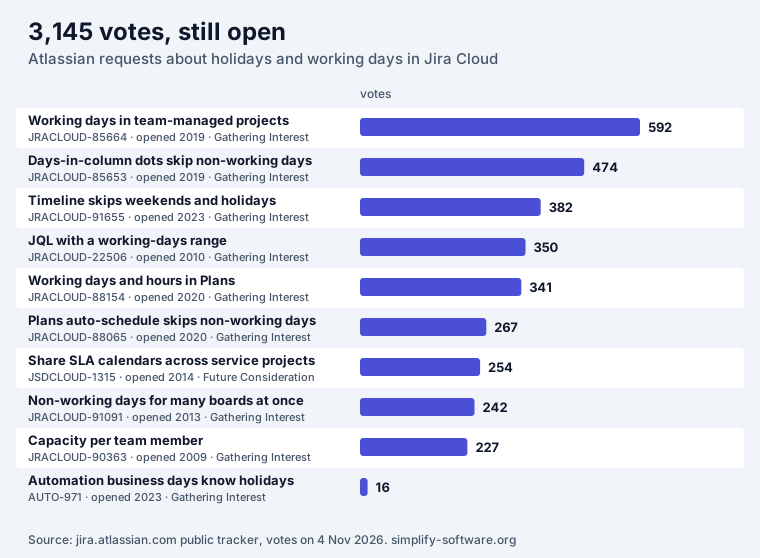
All ten requests are open. Nine are “Gathering Interest” and one is “Future Consideration”; none is scheduled. The oldest, capacity per team member, dates from 2009. What that means in practice:
- Timeline and Plans. Bars run across weekends and holidays, and Plans’ auto-schedule places work on them (JRACLOUD-88065); working days and hours in Plans are JRACLOUD-88154. Lower the team’s capacity for a holiday week yourself.
- Due dates and JQL. Relative dates such as
duedate <= 5dhave no working-day form, so “due within 5 working days” cannot be written in JQL (JRACLOUD-22506, open since 2010). - Automation. Smart values like
plusBusinessDaysskip Saturdays and Sundays only. Atlassian’s own article on a “2nd business day of the month” rule says: “This will not consider any non-working holidays (for example, if Tuesday is the 2nd business day of the month but is a public holiday, the task will still be created).”
Make automation skip holidays
Until AUTO-971 ships, put the dates in the rule. In any scheduled rule, add a {{smart values}}
condition right after the trigger:
- First value:
{{now.jiraDate}} - Condition: Does not match regular expression
- Regular expression, for the US 2027 list:
2027-01-01|2027-01-18|2027-02-15|2027-05-31|2027-06-18|2027-07-05|2027-09-06|2027-10-11|2027-11-11|2027-11-25|2027-12-24|2027-12-31On those dates the rule stops at the condition. The operator is one of the ten the condition
offers (“Equals”, “Contains regular expression”, “Does not match regular expression” and others),
and {{now.jiraDate}} is the same date form Atlassian’s own business-day example compares. Two
things to check: the time zone of the rule’s schedule (a rule that runs at 00:30 UTC fires on the
previous evening in New York), and the list itself, which you update once a year. If you need
“the next working day after a holiday”, the condition can only skip, not move; run the rule daily
and let it act on the first day that passes.
Plan the sprint around holidays
Board working days fix the charts, not the plan. Before planning, count what the team really has:
- The sprint capacity calculator takes the sprint length, holidays and each person’s days off and gives the hours left, in the browser.
- The business days calculator counts working days between two
dates, skipping weekends and the holidays you paste in
YYYY-MM-DDform, so the dates from the tables above go straight in.
A two-week sprint with Thanksgiving and the Friday after loses 2 of 10 days, 20% of capacity. If the board’s working days know about it but the sprint plan does not, the burndown will look right and the sprint will still be late.
Public holidays are not vacations
A board’s non-working day applies to everyone on the board. Personal leave, the day one developer is out, is a different problem, and Jira has no place for it at all: per-person capacity is the 2009 request JRACLOUD-90363. Teams usually log leave as a “Vacation” work item, keep a shared calendar outside Jira, or use an app. Our guide to tracking team vacations in Jira walks through the workarounds, and seven leave apps compared covers the apps.
OutSync, ours, is one of them: leave requests and approvals inside Jira and Confluence, who is out on the board, and a Google Calendar the team can see. Its Advanced edition adds public-holiday calendars by region. It does not write into board working days or SLA calendars; those stay Jira’s own settings, filled in as above.
A 2027 checklist
- Download the
.icsfile for each country or nation your support teams work in. - In every service space, open each SLA calendar, Import the file under Holidays, and check the time zone.
- List your company-managed boards and add each holiday under Working days > Non-working days.
- For team-managed boards, decide whether their reports matter enough to move to company-managed.
- Add the holiday condition to scheduled automation rules that should not run on days off.
- Lower capacity for holiday weeks in Plans and in sprint planning.
- Put a reminder in your calendar for next November: none of these lists carries over to 2028.
For the people side, who is off when, our team holiday calendar 2027 is a free Excel template with the same US and UK holidays by region.
Sources
- Atlassian: Configure working days, Set up SLA calendars, Import .ICS files into SLA calendars, Schedule work items creation with automation and Jira automation conditions, read on 4 November 2026.
- Requests: the public tracker at jira.atlassian.com, searched for working days, non-working days and holidays; votes and status as of 4 November 2026, linked above.
- Holidays: the US Office of Personnel Management’s
federal holidays for 2027
and GOV.UK’s bank holidays data for the three UK lists. The
.icsfiles hold exactly these dates, one all-day event each.
Frequently asked questions
Does Jira have a holiday calendar?
Not a site-wide one. Jira Cloud keeps holidays in two separate places: the Working days settings of each company-managed board, which five reports and two gadgets use, and each Jira Service Management SLA calendar, which pauses SLA timers. Nothing else in Jira reads either list, and you fill them in one board and one calendar at a time.
How do I add holidays to a Jira board?
On a company-managed board: open the board, select more (•••), then Configure board > Working days. Under Non-working days pick a date and select Add date, once per holiday. You need to be a space admin or the board admin. Team-managed boards have no Working days setting; the request to add one (JRACLOUD-85664) has 592 votes and has been open since 2019.
Can I import holidays into Jira?
Only into Jira Service Management SLA calendars. Under Holidays, Import takes an .ics file; Atlassian's knowledge base asks for single-day events with SUMMARY and DTSTART, because multi-day events may not be supported. Board non-working days have no import: each date is added by hand. Our 2027 US federal and UK bank holiday files are built to Atlassian's rules.
Do Jira Service Management SLAs pause on public holidays?
Yes, if the SLA goal uses a calendar that lists the holiday. The SLA counts only the calendar's working hours, so a holiday on that calendar stops the clock. Each calendar belongs to one service space, and calendars cannot be shared across spaces (JSDCLOUD-1315, 254 votes, open since 2014), so every space needs its own list.
Does Jira automation skip holidays?
No. Smart values such as plusBusinessDays and firstBusinessDayOfMonth skip only weekends. Atlassian's own article says a rule built on them "will not consider any non-working holidays" and links the request AUTO-971. A workaround is a {{smart values}} condition with "Does not match regular expression" on {{now.jiraDate}} and a list of your holiday dates; the post has the 2027 US list to paste.
Why can't I set working days in a team-managed project?
Team-managed boards do not have the Working days settings that company-managed boards have. Atlassian's request to add them, JRACLOUD-85664, is "Gathering Interest" with 592 votes since March 2019. If holidays matter for your reports, use a company-managed board for that team.
How do I show who is on vacation in Jira?
Jira has no built-in absence calendar, so personal leave needs a workaround (a "Vacation" work item, a shared calendar) or an app. Public holidays and personal leave are separate problems: board non-working days apply to the whole board, not to one person. Our guide to tracking team vacations in Jira and our comparison of leave apps cover the personal side.