Confluence MCP Server: 67 Tools, Setup and What Breaks
On this page
You ask an agent to fix one date in the release runbook. It does, and the page it publishes has lost its table layout. Or it publishes the page from a copy it read an hour ago, and a colleague’s edits since then are gone. Both are open bug reports against Atlassian’s MCP server, filed in October and November 2026.
The Confluence MCP server is good at reading. Writing is where you need to know what the tools do.
Short answer: Atlassian’s MCP server at https://mcp.atlassian.com/v2/mcp connects Claude, Cursor, Codex,
VS Code and other AI clients to Confluence Cloud. It has 67 Confluence tools: 26 read, 40 write and one
CQL search. The write group can also change page permissions and turn on public links, and Atlassian has no
per-space limit yet. 6 of 9 reported edit bugs that lose page content are still open. Let agents read freely.
Let them write as suggestions or comments a person accepts, and check the version diff after any direct
edit. On Data Center use the open-source sooperset/mcp-atlassian.
Is there an MCP server for Confluence?
Two kinds, and which one you use depends on where your Confluence runs.
| Question | Atlassian MCP server (official) | sooperset/mcp-atlassian (open source) |
|---|---|---|
| Confluence Cloud | Yes | Yes |
| Data Center | No (Cloud only) | Yes, Confluence 6.0 and later |
| Runs | At Atlassian, https://mcp.atlassian.com/v2/mcp | On your machine or server (uvx, Docker, pip) |
| Sign-in | OAuth 2.1 in the browser, or an API token if an admin allows | API token on Cloud, personal access token on DC |
| Confluence tools | 67 | Part of 98 for Jira and Confluence |
| Limit to spaces | Not yet (coming as a Guard policy) | CONFLUENCE_SPACES_FILTER |
| Read-only switch | Admin blocks Write for Confluence | READ_ONLY_MODE |
| Who supports it | Atlassian | Its maintainers; “Not an official Atlassian product.” |
The official server is the default for Cloud. It runs as the person who signs in, so the agent sees what that person may see in Confluence, and it serves Jira, Jira Service Management, Bitbucket and other Atlassian apps from the same connection. Our Jira MCP guide covers the sign-in, API tokens, service accounts and outages; this page covers what is specific to Confluence.
sooperset/mcp-atlassian had 6,140 stars and 1,463 forks on GitHub on 21 November 2026, and was updated the day
before. It is the usual choice on Data Center and for teams that want to filter spaces themselves.
Set it up in your AI client
Every client uses the same address. From Atlassian’s Get started page, read 21 November 2026:
| Client | What to do |
|---|---|
| Claude Code | claude mcp add --transport http atlassian https://mcp.atlassian.com/v2/mcp, then /mcp |
| Claude Desktop | Settings → Extensions → Browse extensions → Plugins → Atlassian, or the config below |
| Codex CLI | codex mcp add atlassian --url https://mcp.atlassian.com/v2/mcp |
| VS Code/Copilot | “Add to VS Code” quick install on the Get started page |
| Cursor | Atlassian plugin on the Cursor Marketplace → Add to Cursor |
| Windsurf | Cascade → MCP servers → Add custom server, serverUrl set to the address |
| Anything else | Server URL https://mcp.atlassian.com/v2/mcp |
{ "mcpServers": { "atlassian": { "url": "https://mcp.atlassian.com/v2/mcp" } } }Then sign in when the client opens the browser, and pick the site. Two details catch people out:
- Old addresses. Guides from 2025 give a
/v1address. Atlassian’s upgrade page says: “On March 1, 2027 any existing utilization of v1 will automatically start to expose and utilize v2 tools”, and clients may need to clear cached client IDs. Move to/v2/mcpnow and sign in again. - Gateways see two tools, not 67. v2 offers “discovery and execute” tools by default. An MCP gateway that
needs the full list should use
https://mcp.atlassian.com/v2/mcp?tools=all.
The 67 Confluence tools, by what they can change
Atlassian’s Supported tools page lists them in three permission groups. An admin can allow or block each group per app in Atlassian Administration → Connectors → Atlassian MCP server → Permissions. We sorted the tools by what they can do to your pages:
| What it does | Group | Tools | Examples |
|---|---|---|---|
| Read content and history | Read | 26 | getConfluenceContent (pages, live docs, whiteboards, databases), versions, diffs, comments |
| Search | Search | 1 | searchConfluence with CQL |
| Leave a trace for people | Write | 8 | comments and replies, addConfluenceContentSuggestions, reactions, labels, task status |
| Change content | Write | 10 | create, updateConfluenceContent, copy, move, archive, restore a version, status, attachments |
| Change who can see the page | Write | 6 | enableConfluencePublicLink, replaceConfluenceContentPermissions, restrictions |
| Spaces and instructions | Write | 2 | create a space, set space instructions for agents |
| Personal: star, watch | Write | 10 | star or watch pages, spaces and labels |
| Generate visuals (beta) | Write | 4 | infographics and interactive visualizations, which will cost Rovo credits |
Three things stand out:
- Sharing is a write tool.
enableConfluencePublicLinkturns on “the external public link (anonymous share) for a page”.replaceConfluenceContentPermissionsreplaces “all content-level permission grants with the supplied set. Grants absent from the request are removed.” Both sit in the same Write group as adding a comment. If Write is on for Confluence, an agent can share a page as widely as the person it works for. - There is no delete. The closest tool is
archiveConfluenceContent, and archiving can be undone. In Jira, delete and admin tools exist but are “disabled by default”; Confluence has no group marked that way. - Suggestions exist.
addConfluenceContentSuggestionsadds “suggested edits to a page, live doc, or blog post. People can review them, then accept or discard them.” It is the safest way to let an agent change text.
What breaks when an agent edits a page
The read tools rarely get complaints. The write tools do. We read every issue on Atlassian’s MCP server repository: 231 issues from August 2025 to 19 November 2026, 46 of them about Confluence. We put each in one group by hand.
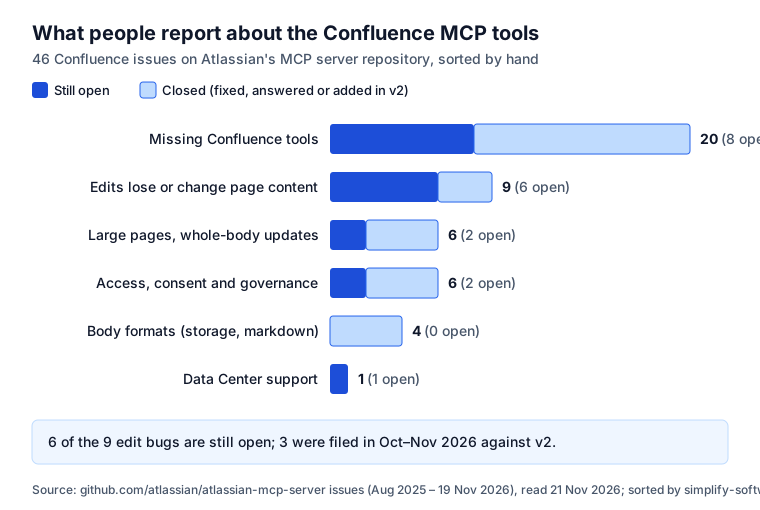
Most “missing tool” requests were answered by v2: blog posts, attachments, move, copy, templates, folders, databases and whiteboards are all on the tool list now. The edit bugs are different. These were open on 21 November 2026:
| Issue | Filed | What happens |
|---|---|---|
| #313 | 16 Nov 2026 | A full-body update with an old snapshot token “silently overwrites newer edits” |
| #269 | 12 Oct 2026 | A one-paragraph edit “drops table layout and non-breaking spaces on the whole page” |
| #270 | 12 Oct 2026 | A small edit on a large page changes its fragment links, so in-page links break |
| #261 | 29 Sep 2026 | A markdown update is refused on any page with a link to another page on the same site |
| #227 | 28 Aug 2026 | Saving a draft “silently discards any body containing a media node” |
| #126 | 27 Mar 2026 | Adding content under one heading removed images and the table of contents elsewhere |
Two older ones were closed: #60, where editing through MCP lost “all ADF-rich content” (19 reactions), and #54, where inline comments lost their anchors (12). Large pages are their own problem: the update tool takes the whole body in one call, a 50–70 KB page has to fit in the model’s context, and #106 (11 reactions) and #210 are still open.
Why it happens: a Confluence page is stored as a rich document with macros, layouts, anchors and comment marks. An agent reads a simplified version, changes it and writes it back. Anything the round trip does not carry is lost. v2’s granular edits help, but #269 and #270 are granular edits too.
Let agents write without losing pages
- Prefer suggestions and comments. Ask the agent to use
addConfluenceContentSuggestionsor a comment. A person accepts the change in Confluence, and nothing is rewritten behind their back. - Check the diff after any direct edit. The agent can call
diffConfluenceContentVersionsand show you what changed; a person can open the page history.restoreConfluenceContentVersionputs the old version back. - One small page beats one big one. Edits on short pages lose less, and the whole body fits in the call.
- Re-read just before writing. #313 is about a stale copy; an agent that reads, waits and writes can overwrite people.
- Block Write for Confluence if agents only need context. In the Permissions tab, use Edit details to allow Read and Search for Confluence and block Write. Coding agents usually only need to read the spec.
- Keep secrets off pages. Whatever a tool returns goes to your AI client’s model provider. A password on an old page now travels too; our secret sprawl study shows how they spread.
Keep an agent out of some spaces
This is the most requested control. “Restrict MCP to certain spaces and projects” (#79, 28 reactions) has been open since February 2026. On 11 August 2026 Atlassian wrote that it is “adding a dedicated MCP rule to Atlassian’s Data Security Policies (DSP)” that can “restrict access at the space or project level”, and that “DSP is a feature of Atlassian Guard”.
Until that rule reaches your site, and if you do not have Guard:
- The account is the limit. The agent sees what the signed-in person sees. For jobs, an API token or service account that can open only the spaces it needs keeps the rest out.
- Space instructions are guidance, not a fence.
setConfluenceSpaceInstructionstells agents how to behave in a space; nothing stops them reading elsewhere. - The open-source server filters.
sooperset/mcp-atlassianhasCONFLUENCE_SPACES_FILTER, “Limit to specific Confluence spaces”, plusREAD_ONLY_MODEandENABLED_TOOLS. You run it and you hold the token.
Confluence Data Center
Atlassian’s server is Cloud only. On issue #16, open since November 2025, Atlassian wrote on 26 June 2026 that “Data Center and self-managed (server-side) deployments aren’t supported” and that adding them is a roadmap decision it could not confirm.
On Data Center, run sooperset/mcp-atlassian inside your network with a personal access token. Its README lists
Confluence Server/Data Center as “Supported (v6.0+)”. Turn on READ_ONLY_MODE first and add write tools one by
one, since the token holder’s permissions are the only fence.
What it costs
Atlassian lists the tools that use Rovo credits: “Enriched Teamwork Graph (TWG) API and tool calls, including
unified search and context tools”, naming getTeamworkGraphContext, searchAtlassian and search. Reading
pages, writing and CQL search with searchConfluence are not named, though the list says it is not complete. For the enriched calls Atlassian
says “the vast majority” cost 1 to 10 credits each. The four beta visual tools are free during beta; “once
generally available, a typical request will use 15 to 30 Rovo credits”. The credit price and plan limits are
in the cost section of our Jira MCP guide.
For an agent that reads specs, a CQL search plus getConfluenceContent avoids every tool Atlassian names as
credit-using.
Where Agent Ready fits
A coding agent that works a Jira ticket needs the Confluence page with the decisions, and it only reads one if it thinks to search. Agent Ready, our Jira app, attaches it: installed in Jira and Confluence, it adds the pages linked to the work item and the pages that mention its key to the agent’s brief. It reads as the person the agent works for, takes up to 5 pages and the first 4,000 characters of each, masks passwords and keys, and removes lines that look like orders to an AI agent. It asks Confluence only for read and search permissions, so it never edits a page. The Claude and Confluence guide shows one work item with and without its page.
Checklist
- Use
https://mcp.atlassian.com/v2/mcp; move off/v1before 1 March 2027. - Decide per app: Read and Search on, Write for Confluence only if agents must edit.
- Remember that Write includes public links and page permissions.
- Ask agents for suggestions or comments, not rewrites, on pages people rely on.
- After any direct edit, read the diff.
- Limit spaces through the account until Atlassian’s Guard policy arrives.
- On Data Center, run the open-source server read-only first.
Sources
- Atlassian Support, read 21 November 2026: Supported tools, Get started, Upgrade from v1 to v2, Understand Atlassian MCP server, Configure Atlassian MCP server permissions.
- GitHub, atlassian/atlassian-mcp-server issues: all 231 issues read on 21 November 2026; #16, #54, #60, #79, #106, #126, #210, #227, #261, #269, #270, #313. Our grouping of the 46 Confluence issues is in our research notes.
- sooperset/mcp-atlassian README and configuration docs, read 21 November 2026.
- Agent Ready: Agent Ready in Confluence.
Frequently asked questions
Is there an MCP server for Confluence?
Yes. Atlassian runs one at https://mcp.atlassian.com/v2/mcp for Confluence Cloud, together with Jira and its other apps. It has 67 Confluence tools: 26 to read, 40 to write and one CQL search. For Data Center there is no official server; the open-source sooperset/mcp-atlassian covers it.
How do I set up MCP for Confluence?
Point your AI client at https://mcp.atlassian.com/v2/mcp and sign in with your Atlassian account. In Claude Code run claude mcp add --transport http atlassian https://mcp.atlassian.com/v2/mcp, then /mcp. Claude Desktop, VS Code, Cursor and Codex install Atlassian from their plugin or extension lists. The same connection serves Jira.
Does the Confluence MCP server work with Data Center?
No. Atlassian said on 26 June 2026 that the server supports Atlassian Cloud only and that Data Center support is a roadmap decision it could not confirm. Teams on Data Center use sooperset/mcp-atlassian, which supports Confluence Server and Data Center 6.0 and later with a personal access token, on their own machine or server.
Is the Confluence MCP server free, or what does it cost?
Atlassian names Rovo search and context tools as the ones that use Rovo credits, mostly 1 to 10 a call; reading, writing and CQL search are not named. The new infographic and visualization tools are expected to use 15 to 30 credits a request once they leave beta.
Can I limit the MCP server to some Confluence spaces?
Not with a setting today. An admin can turn Read, Write and Search on or off for Confluence as a whole. Atlassian is adding a space and project rule to Data Security Policies, a feature of Atlassian Guard. Until then the limit is what the signed-in account may see; the open-source server has CONFLUENCE_SPACES_FILTER.
Can an AI agent delete Confluence pages through MCP?
Atlassian's server has no Confluence delete tool; the closest is archiveConfluenceContent, which can be undone. But the write tools can replace a page's whole body, change who may view it and turn on a public link, and the Write switch covers all of them.