Jira API Token: Create, Scope, Expiry, Revoke (2026)
On this page
The integration ran for two years. In May 2026 it started to answer 401. Nobody changed the script. Somebody had, long ago, pasted its token into a Jira comment “for the next person”. Two problems, one token: it had expired, and it had been readable by everyone with access to that project.
A Jira API token has three days that matter: the day you create it, the day it expires and the day it leaks. This post walks through each one, with Atlassian’s own rules, quoted, and our count of how many sit in public code.
Short answer: Create a Jira API token at
id.atlassian.com/manage-profile/security/api-tokens. Choose Create API token with scopes,
give it a name, an expiry of 1 to 365 days and only the scopes the script needs. A scoped
token only works through the gateway, https://api.atlassian.com/ex/jira/{cloudId}; a classic token
works on https://your-site.atlassian.net. Both go in a Basic header as email:token. For anything
shared, such as a pipeline, use a service account token instead, so the script does not die when
a person leaves. When a token leaks, Revoke it first and clean up after.
Which credential to use
“API token” is one of seven ways into Jira. They differ in who the request acts as, what it can reach and who can switch it off. The strictest choices come first.
| Credential | Acts as | Reaches | Lifetime | How to switch it off |
|---|---|---|---|---|
| Forge app | The app, or the user | Only the scopes in the app’s manifest, approved at install | No secret to leak | Uninstall the app |
| OAuth 2.0 (3LO) app | Each user who consents | The scopes on the consent screen, through api.atlassian.com | Short access token; refresh token ends after 90 idle days | The user removes the app; an admin can only uninstall it |
| Service account token (scoped) | A bot account, not a person | Its scopes, and only what its groups and roles allow; gateway only, Basic or Bearer | 1 to 365 days | Admin, Directory, Service accounts; “up to 10 minutes” to take effect |
| Service account OAuth 2.0 client credentials | A bot account | Its scopes; Bearer token | Access token valid 60 minutes | Admin, Directory, Service accounts |
| Scoped API token | You | Only the app and scopes you picked, and only what you can see; gateway only | 1 to 365 days (admin policy may differ) | You, at id.atlassian.com; admin with Guard Standard |
| Classic API token (without scopes) | You | Everything your account can do, on every site, in Jira, Confluence, Bitbucket, Align | 1 to 365 days (admin policy may differ) | You, at id.atlassian.com; admin with Guard Standard |
| Personal access token (PAT), Data Center only | You | Everything your user can do on that one site; Bearer token | Never expires unless set; admins can cap it | You, or an admin, in the site |
Sources: Atlassian’s pages on API tokens, service account tokens, OAuth 2.0 (3LO), the 12 November 2026 changelog and personal access tokens, read on 14 November 2026.
How we would choose, strict option first:
- Building something other people install? A Forge app or an OAuth app. Atlassian says plainly that “Apps that collect API tokens or instruct customers to create individual 3LO apps don’t comply” with its rules (basic auth page). From its 12 November 2026 changelog, the Marketplace scanner will report apps “authenticating to Atlassian APIs using user API tokens instead of app-based authentication” under Requirement 11, as Critical.
- A pipeline, a sync job, anything that must outlive a person? A service account with a scoped token, or with OAuth client credentials. The cost: an organization admin has to create it, you must switch the base URL to the gateway and find the cloud ID, and the free allowance is five service accounts per organization. It is worth it. A personal token dies with the person’s account, and while it lives it acts with all of that person’s access.
- A script you run yourself this week? A scoped API token with a short expiry, such as 7 or 30 days. The cost: you will create a new one more often.
- A classic token only when the tool you use cannot call
api.atlassian.com. Atlassian’s page says the same: “If you need to use an app that does not currently support API token with scopes, you can create a token without scopes.”
Day 1: create the token
Open id.atlassian.com/manage-profile/security/api-tokens. If you log in with a password or a Google account, Atlassian first emails you a one-time code. We saw this ourselves on 14 November 2026: the page sent us to “Verify your identity” before it showed anything. After 30 idle minutes it asks again. Single sign-on and service accounts skip this step.
- Select Create API token with scopes.
- Give it a name that says what uses it: “GitHub Actions, release notes, read only”.
- Pick the expiry. “Token expiration is 1 to 365 days.”
- Pick the app (Jira or Confluence) and the scopes. A read-only report needs a read scope such as
read:jira-work; a script that creates work items also needswrite:jira-work. Atlassian’s Jira scopes list names the scope each endpoint needs. - Select Create, then Copy to clipboard. “You can’t recover the API token after you’re done with this step.” Paste it straight into a password manager or your CI secrets store.
Scopes are set for good. For service accounts Atlassian writes: “Once you create an API token, you can’t modify its scopes.” To change them, create a new token and revoke the old one.
Then call Jira with it. A scoped token goes through the gateway, a classic token to the site:
# scoped token: cloud ID in the path, gateway host
curl -s -u "[email protected]:$JIRA_API_TOKEN" \
  "https://api.atlassian.com/ex/jira/$CLOUD_ID/rest/api/3/myself"

# classic token: your site's own address
curl -s -u "[email protected]:$JIRA_API_TOKEN" \
  "https://your-site.atlassian.net/rest/api/3/myself"
Read the token from an environment variable or a secrets store, as above. Never type it into the command itself: it would land in your shell history.
Finding the cloud ID. Atlassian’s service account page says: open admin.atlassian.com and take “the string after /s/ in your admin URL”. It adds a warning worth repeating: “Avoid using your Organization ID, as this will result in errors like 404 Not Found”.
Scopes do not limit Forge apps. One quiet sentence on Atlassian’s page: “a Forge app may act using its own granted app permissions, even when the Jira API request was made with an API token that has specific scopes.” A JQL search with a Forge JQL function, for example, runs the app with the app’s own access.
Day 365: the token expires
The rule today, from Atlassian’s token page: “After December 15, 2024, we set new API tokens to expire in one year by default.” And for the old ones: “These API tokens will expire between March 14 and May 12, 2026.” That is why so many quiet integrations broke last spring. Nothing in the code changed; the calendar did.
What page 1 of Google leaves out: the 365 days are a default, not a law. An organization admin can change them in an authentication policy (Atlassian Administration, Security, User security, Authentication policies). Atlassian’s policy page says: “You can set the token to never expire or set a different expiration date in an authentication policy. You can set the token to expire between 1 to 365 days.” The “Never expires” option arrived after customers asked for it (ID-8790, closed as done in July 2025).
We would not use it. Atlassian’s own page puts it well: “API tokens with an infinite lifespan pose a data security risk.” Set the policy to 90 days or less for people, and use service accounts for the jobs that need to run unattended. The cost is a rotation every quarter, so put it in a calendar. Admins get no expiry alerts yet: the request, ID-8781, had 146 votes and was still gathering interest on 14 November 2026.
Two known bugs if your policy says “Never expires”: in the scoped token form the date you pick is cleared at once (ID-9149). Atlassian’s workaround is to set the policy to 365 days, create the token, and set it back.
The same policy has a switch to block members “from creating a new or using an existing API token”. It takes effect slowly: “It can take up to 10 minutes to complete the update.”
Token not working: the checks in order
- Expired? On Cloud you see each token’s expiry date on the token page. Make a new one.
- Scoped token on the site URL? A scoped token must call
api.atlassian.com/ex/jira/{cloudId}. Sent toyour-site.atlassian.net, it fails with 401. - Organization ID instead of cloud ID? You get 404.
- Wrong email? Basic auth needs the email of the account that owns the token, as
email:token, then base64. - CAPTCHA? After several failed logins, “you cannot use Jira’s REST API to authenticate with
the Jira site.” The response carries
X-Seraph-LoginReason: AUTHENTICATION_DENIED. Stop the retries before you change anything else. - Blocked by policy? An admin may have blocked API tokens for your authentication policy, or for external users.
- 401 on some projects only? That is permissions, not the token. The token can never see more than its account.
Are tokens without scopes going away?
Search for scopes and Google suggests “jira api tokens without scopes are being deprecated”. Here is the whole record we could find. On 29 May 2025 a developer posted a screenshot of the token page with the note “API tokens without scopes are being deprecated” and asked for a date (Atlassian Developer Community). No date was given. On 9 July 2025 another wrote: “The API token deprecation message disappeared.” On 14 November 2026 Atlassian’s help page still offers both kinds. So: no end date has been announced. The direction is clear, though. Atlassian recommends scopes, and its Marketplace scanner will flag apps that use user tokens. Treat a classic token as debt.
The day it leaks: the first 15 minutes
Most leak news is about GitHub, and Atlassian tokens leak there too: we counted, below. But a token in a Jira comment or a Confluence runbook is the same leak with a smaller audience, and it sits there for years. Here is the order we would follow, by the clock.
Minute 0. Do not start by deleting the comment. Deleting the text does not stop the token. Anyone who copied it, any integration that indexed it, any backup, still has it. Revoking does. More on this in deleting a leaked secret does not revoke it.
Minute 1. Revoke it. At id.atlassian.com, API tokens, select Revoke next to the token, or Revoke all API tokens if you cannot tell which one it is. “When you revoke a token it no longer works and we permanently remove it from your account.” Have your email open: you may need the one-time code first. An organization admin with Guard Standard can do it for any managed account from Atlassian Administration, Insights, API token activity, which shows “when they were created, when they expire, and the last time the token was used” (revoke user API tokens). Note the last-use time before you click: a revoked token is deleted, row and all. For a service account token, an admin revokes it under Directory, Service accounts. Atlassian warns: “It takes up to 10 minutes for the token to be revoked.”
Minute 2. Work out the blast radius. A classic token could do everything its account can do, on every site and product the account belongs to. A scoped token could do only its scopes. If the last use came after the leak, read the audit log for what changed in that window.
Minute 5. Clean up the copies. Now redact the comment or the page. In Confluence, earlier page
versions still hold the text. Look for the same value in git history, CI logs and .env files.
Minute 10. Replace it. Create a scoped token, or better a service account token, with the shortest expiry you can live with. Put it in the secrets store and update the integration. Test one call.
Minute 15. Write it down. One ticket: what leaked, where, when it was revoked, what it could reach, what the logs showed. Then the part that prevents the next one: who else pastes tokens into tickets, and why. A practical guide to rotating credentials after a leak covers the longer follow-up.
How many Atlassian tokens are public: our count
Atlassian API tokens start with ATATT3, and a common longer prefix is ATATT3xFfGF0. On 14 November 2026 we asked GitHub’s code search API how many files contain those
strings. We kept counts only. We never printed, stored or tested a token value:
trying a found token would be using someone else’s credential.
- 4,824 files contain
ATATT3; 2,836 containATATT3xFfGF0. - 253 of those are files named
.env; 324 containJIRA_API_TOKEN=ATATT3; 15 sit in.github/workflows. - We took the first 1,000 results for
ATATT3xFfGF0, removed duplicates (739 unique files) and checked the matched fragment for a full-length token shape:ATATT3followed by at least 180 token characters. 290 files (39 %) had one. The rest were mostly documentation with a cut or dotted placeholder.
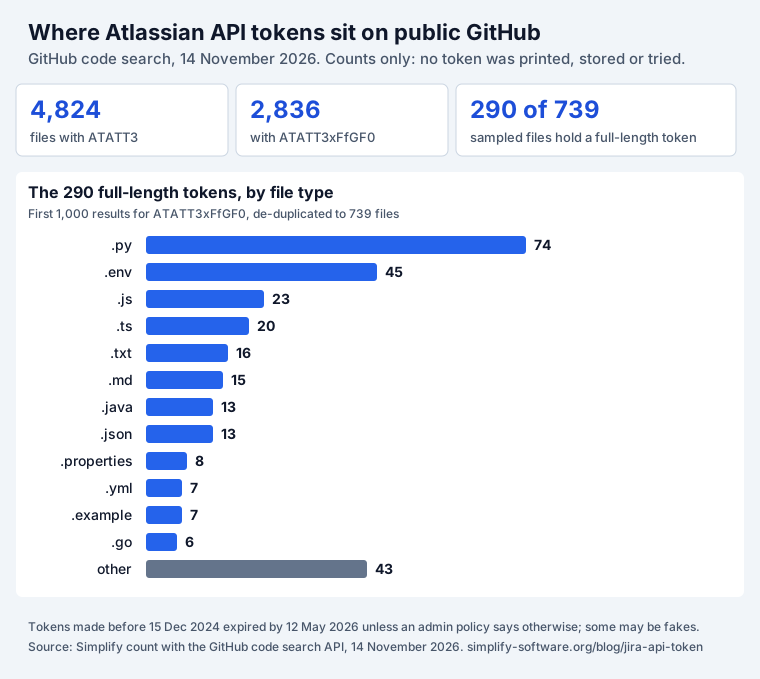
Read these numbers with care. GitHub’s totals are estimates. We do not know how many of the 290
still work: tokens made before 15 December 2024 have expired unless a policy said “Never expires”,
and some will be test values. What the chart does show is where people put them: scripts first,
then .env files. A .env file is the place a token is meant to live, and also the file people
commit by mistake. envseal, our open-source CLI, keeps each value in .env encrypted so
a committed file shows no token.
The Basic header hides the prefix
The ATATT3 prefix is what lets a scanner find a token. Paste a Basic header and the prefix is gone.
Here is a fake token, [email protected]:ATATT3xFfGF0EXAMPLE-NOT-A-REAL-TOKEN, as it appears in a
header:
Authorization: Basic bWVAZXhhbXBsZS5jb206QVRBVFQzeEZmR0YwRVhBTVBMRS1OT1QtQS1SRUFMLVRPS0VONo ATATT in sight. A scanner has to recognize the header itself and decode it. In our
test of 1,400 fake leaks, Secret Sentinel found
0/50 Atlassian tokens in Jira comments and 0/50 Basic headers on 1 November 2026, when it ran on
secretlint. After it moved to our keysnitch engine it found 50/50 of each on 14 November. Ask any
scanner you use for both shapes, and test it with fake values.
Keep tokens out of Jira and Confluence
The leak in our opening story was a comment, and that is the gap most teams cannot see. Secret Sentinel scans Jira summaries, descriptions and comments, and Confluence pages and comments, when they are created or edited. It replaces a credential in place with a masked marker and can open a Jira incident. It does not revoke the token for you: that is still Minute 1 above. It runs on Atlassian Forge with no external service.
To check a snippet before you paste it anywhere, our free API key leak checker runs the same keysnitch rules in your browser. Nothing you paste leaves the page.
If the token is for an AI agent, think twice. An agent with a classic token has all of your access. Atlassian’s MCP server signs in with OAuth and the scopes you approve by default, and takes a service account or a scoped token only if an admin allows it; our Jira MCP guide compares the options and tested OAuth, and how to revoke OAuth access covers the way out. Agent Ready is our app for the Jira side of that work: it checks whether a work item is ready to hand to an agent.
Sources
- Atlassian Support: Manage API tokens for your Atlassian account, Manage API tokens for service accounts, Authentication policy settings, Block user API token access, Understand user API tokens, Revoke user API tokens, all read on 14 November 2026.
- Atlassian Developer: Basic auth for REST APIs, OAuth 2.0 (3LO) apps, changelog entries of 12 November 2026.
- Atlassian Data Center: Using personal access tokens.
- Public tickets: ID-8790 (indefinite expiry, done), ID-8781 (expiry alerts for admins, 146 votes), ID-9149 (scoped token date cleared), read on 14 November 2026. The deprecation note: Atlassian Developer Community thread.
- Our data: GitHub code search API, 14 November 2026, counts and per-file booleans only; the scanner test of 1 and 14 November 2026 in the secret sprawl post.
Frequently asked questions
Do Jira API tokens expire?
Yes, on Atlassian Cloud. Since 15 December 2024 a new token expires after 1 to 365 days, one year by default. Tokens made before that date were given an end date too and expired between 14 March and 12 May 2026. An organization admin can change the rule in an authentication policy, to a shorter limit or to "Never expires". On Data Center, a personal access token never expires unless you or an admin set a limit.
Are Jira API tokens without scopes being deprecated?
Not on a date anyone has announced. In May 2025 the token page showed "API tokens without scopes are being deprecated"; by July 2025 that message had disappeared, and on 14 November 2026 Atlassian's help page still offers both kinds. What did change: Atlassian recommends scoped tokens, and its Marketplace scanner will flag Forge apps that authenticate with user API tokens as a critical finding.
What is the difference between a Jira API token and a personal access token?
An API token belongs to your Atlassian account and works on Jira Cloud, Confluence Cloud, Bitbucket Cloud and Jira Align, sent with your email in a Basic header. A personal access token (PAT) is made inside one Jira or Confluence Data Center site, from your profile, and is sent alone as a Bearer token. A PAT has no scopes: it can do whatever your user can do on that site.
Can an admin see or revoke my API tokens?
On Cloud, yes, for managed accounts with Atlassian Guard Standard: Atlassian Administration, Insights, API token activity lists each token with its creation date, expiry and last use, and has a Revoke button. Admins can also block members from creating or using API tokens in an authentication policy. Nobody can create a token for you.
Why does my API token return 401?
The usual causes, in the order we would check them: the token has expired; a scoped token is sent to your-site.atlassian.net instead of api.atlassian.com/ex/jira/{cloudId}; the cloud ID is really the organization ID; the email in the Basic header is not the account that owns the token; too many failed logins have triggered a CAPTCHA; or an admin has blocked API tokens for your policy.
Where can I see my Jira API token after I created it?
Nowhere. Atlassian shows the value once, at creation, and cannot recover it. If you lost it, revoke it and create a new one. Keep the new one in a password manager or a secrets store, not in a ticket, a page or a .env file in git.