Jira Desktop App for Windows and Mac: What Exists in 2026
On this page
The new developer’s laptop has Jira in one of thirty browser tabs. “Isn’t there an app for this?” Someone searches, finds a “Desktop App for Jira” in the Microsoft Store with five ratings, and asks IT whether it is safe. IT does not know either, because Atlassian has never made one for Windows.
We checked every option on 5 November 2026 against Atlassian’s, Microsoft’s and Google’s own pages, the Marketplace API and our own Jira Cloud site. Here is what exists, what each choice asks of your data, and what to install for which need.
Short answer: there is no official Jira desktop app for Windows or Mac. Atlassian ended the Jira Cloud for Mac app and never made one for Windows; a request for one has 1,091 votes. For Jira in its own window, install it from the browser: Edge or Chrome on Windows, Chrome on Mac, two clicks, free. Atlassian’s official extras are the mobile app, the Teams and Outlook apps, and Rovo Desktop, an AI chat in beta. Desktop clients in the stores are made by third parties: check where your data goes before you sign in.
Every option, in one table
| Option | Made by | Windows | Mac | What it is | Status, November 2026 |
|---|---|---|---|---|---|
| Jira Cloud in a browser | Atlassian | yes | yes | the full product; Edge, Chrome, Firefox, Safari supported | the supported way |
| Chrome “Install page as app” | yes | yes | the same Jira page in its own window with an app icon | browser feature, free | |
| Edge “Install this site as an app” | Microsoft | yes | not checked | the same, with Start menu, taskbar and Alt+Tab | browser feature, free |
| Jira Cloud for Mac | Atlassian | no | was | a native Mac client for Jira Cloud | “Support has ended” |
| Rovo Desktop | Atlassian | yes | yes | an AI chat that uses your Atlassian work as context | beta; needs access to Rovo |
| Jira Cloud mobile app | Atlassian | no | no | Jira on iOS and Android | official |
| Jira Cloud for Microsoft Teams | Atlassian | in Teams | in Teams | search, create and update work items from Teams; Jira tabs | official |
| Jira Cloud for Outlook | Atlassian | in Outlook | in Outlook | create and view work items from email | official, Cloud only |
| Desktop App for Jira + Desktop Connector for Jira | third party (Infosysta, Futurate) | yes | yes | a separate client; needs an add-on on your Jira site | about 700 installs; free up to 10 users |
| Starlie | third party | no | yes | a native Mac client for Jira Cloud and self-hosted Jira | new; 7-day trial |
| Jira Data Center | Atlassian | yes | evaluation only | the self-managed server edition, not a desktop app | Data Center support ends 28 March 2029 |
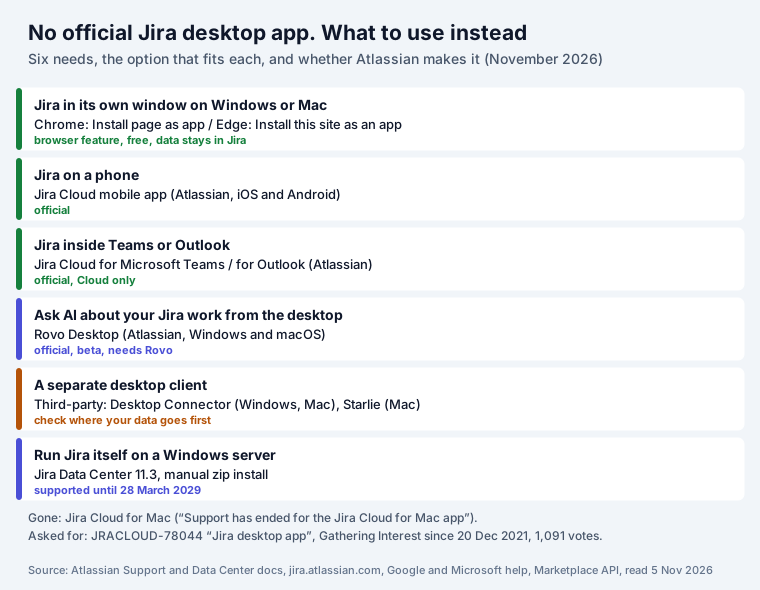
What happened to the Mac app, and why there is no Windows one
Atlassian once had a native client, Jira Cloud for Mac. Its support page now carries one line: “Support has ended for the Jira Cloud for Mac app. Continue moving your work forward with Jira via your web browser.” There was never a Windows counterpart.
People still ask. Atlassian’s public request JRACLOUD-78044, titled simply “Jira desktop app”, was opened on 20 December 2021. On 5 November 2026 it had 1,091 votes and 348 watchers, the status “Gathering Interest” and no response from Atlassian.
What Atlassian did ship for the desktop is Rovo Desktop, for Windows (x64 and ARM installers) and macOS (Apple Silicon and Intel). Its page says: “Rovo Desktop is the best way to access Rovo from your Windows or macOS device. It’s a dedicated spot to chat, manage agents, and complete tasks”. It is in beta, needs an Atlassian account with access to Rovo, and can be given access to your screen and microphone. Atlassian presents it as a place to chat, run agents and complete tasks, not as a Jira client with boards and work item screens. How AI tools reach Jira, and the safety checklist for them, is in our Jira MCP guide.
Jira in its own window, in two clicks
This is what most people searching “Jira for Windows” want: Jira out of the tab pile, with its own icon. Both big browsers can do it for any site.
Microsoft Edge (Windows): open your Jira site, then Settings and more, More tools, Apps,
Install this site as an app. Microsoft’s own wording: “you can install any website” this way.
The window then appears “In the Taskbar (where it can be pinned)”, “In the Start menu” and “When
switching between apps with Alt+Tab”, and can start at login (“Auto-start on device login” on
edge://apps). It is listed in Windows’ Add or remove programs, like any app.
Google Chrome (Windows, Mac, Linux): open your Jira site, then the More menu, “Cast, save, and share”, Install page as app. To remove it, open the app’s More menu, “Uninstall [app name]”, Remove.
What you get, and what you do not: we checked our Jira Cloud site’s page code. It has no web app manifest and registers no service worker, so Jira Cloud is not a progressive web app. The installed window is the same Jira page without the browser’s tabs and address bar. It does not work offline, adds no features, and signs in with the same Atlassian account as the browser. That is also why it is the safest option: nothing new sees your data. Apps you add to Jira from the Marketplace, ours included, run inside these pages and work the same way in that window.
Atlassian’s apps for Microsoft users
Jira is not a Microsoft product; it is made by Atlassian. “Is Jira Microsoft?” is common enough to appear in Google’s questions. What Atlassian does make for Microsoft users:
- Jira Cloud for Microsoft Teams. From Atlassian’s guide: “The Jira Cloud app appears in the left
toolbar in Microsoft Teams”. Install it from Apps in Teams, type
Configureto connect your site,Findto search. You can “Use Edit to update fields such as the assignee and status”, comment, get notifications and pin Jira tabs in channels and meetings. “Search results respect your Jira permissions”. - Jira Cloud for Outlook. An Outlook add-in to create, view and send work items from email; Atlassian marks its articles “Cloud Only”.
- The Jira Cloud mobile app for iOS and Android, which since the Opsgenie move also carries on-call alerts: “Your work in the Opsgenie mobile app has been moved into the Jira Mobile app.”
Third-party desktop clients: what they ask for
Two show up when you search. We read their listings and the Marketplace API; we did not install or sign in to either.
Desktop App for Jira (Microsoft Store) with Desktop Connector for Jira. The Store listing, by Infosysta DWC-LLC, had 5 ratings averaging 4.6. Its description says: “To activate this app, please install the Desktop App for Jira add-on from the Atlassian Marketplace on your Jira instance”. That add-on, Desktop Connector for Jira (Windows and Mac) by Futurate, had about 700 installs and 24 reviews averaging 3.7, and is free up to 10 users ($292.50 a year at 15 users). On Jira Cloud it is a Forge app asking for three permissions:
| Permission (scope) | How the Marketplace describes it |
|---|---|
read:app-system-token | “Access and interact with your data from outside of Atlassian” |
read:jira-work | “Read Jira project and issue data, search for issues, and objects associated with issues like attachments and worklogs” |
read:jira-user | “View user information in Jira that the user has access to, including usernames, email addresses, and avatars” |
The first line is the one to ask about: the client reads Jira from outside Atlassian through the add-on. That can be fine, but it is a data decision for your admin, who has to approve the add-on on the site anyway. Our guide to app data egress shows what to check on a listing.
Starlie (Mac). A newer native Mac client listed on the Marketplace in June 2026, with no recorded installs yet. Its listing says: “Credentials stay in your macOS Keychain. Requires macOS 15 or later. 7-day trial.” It signs in with OAuth 2.0 and bills you itself, not through Atlassian.
Questions to ask any third-party client: Who makes it and where is it based? Does it sign in through Atlassian’s own login page (OAuth) or ask for an API token? Where does it cache work items? What happens to your data if you stop paying? Can your admin revoke it in one place?
Installing Jira itself on Windows: Data Center
Two of the three “Jira for Windows” videos on Google’s first page install Jira Data Center, the server edition a company runs itself. If that is what you need, four facts from Atlassian’s Jira 11.3 documentation:
- Windows is supported, macOS is not. The supported platforms page lists Microsoft Windows as “Supported” and macOS as “Limited”: “you can evaluate Jira 11.3 on this platform, but you can’t run a production site on it.” The install guide adds: “We don’t support installing Jira on OSX.”
- No installer any more. “Starting from Jira 10, we only support using this manual installation
method”, a zip file. Videos with a Windows
.exeinstaller show older versions. - The steps: download Jira, create the installation directory, create the home directory, check the ports, start Jira, then the setup wizard: database, application properties, licence, administrator account, email.
- An end date. Atlassian’s documentation banner reads: “Data Center support ends on March 28, 2029.”
For a team that just wants to use Jira, Jira Cloud needs no install at all and is free for up to 10 users; our Jira Free plan guide lists every limit and what the 11th user costs.
What to install, by need
| You want | Use |
|---|---|
| Jira out of the tab pile, with its own icon | Edge or Chrome: install the site as an app |
| Jira on your phone, with notifications | the Jira Cloud mobile app |
| To work on Jira items without leaving Teams | Jira Cloud for Microsoft Teams |
| To turn emails into work items | Jira Cloud for Outlook |
| To ask an AI about your Jira work | Rovo Desktop (beta), or an MCP client |
| A different interface, offline or many sites | a third-party client, after your admin checks its data path |
| To run Jira on your own Windows server | Jira Data Center, manual zip install, until March 2029 |
Sources
- Atlassian Support: Use Jira Cloud for Mac, Get started with Rovo Desktop, Supported browsers for Atlassian cloud apps, Get started with Jira Cloud and Microsoft Teams, Move to Jira Service Management operations as a responder, a Jira Cloud for Outlook knowledge base article.
- Atlassian Data Center documentation (Jira 11.3): Supported platforms, Installing Jira applications on Windows.
- Atlassian’s public tracker: JRACLOUD-78044.
- Google Chrome Help: Use progressive web apps. Microsoft: Install, manage, or uninstall apps in Microsoft Edge, Use Progressive Web Apps in Microsoft Edge.
- Microsoft Store listing of Desktop App for Jira; Atlassian Marketplace REST API v2 for Desktop Connector for Jira and Starlie (installs, reviews, scopes, prices), 5 November 2026.
- Our Jira Cloud site, 5 November 2026: the page code checked for a web app manifest and a service worker (none).
Frequently asked questions
Is there a Jira app for Windows?
Not from Atlassian. Jira Cloud runs in the browser; Atlassian supports Edge, Chrome and Firefox on Windows. To get Jira in its own window with a taskbar icon, use Edge (Settings and more, More tools, Apps, Install this site as an app) or Chrome (More, Cast, save, and share, Install page as app). The "Desktop App for Jira" in the Microsoft Store is made by a third party.
Is there a Jira app for Mac?
Not any more. Atlassian's support site says "Support has ended for the Jira Cloud for Mac app" and points to the browser. Safari, Chrome and Firefox on Mac are supported, and Chrome can install Jira as a window. Third-party Mac clients exist, such as Starlie, which signs in with OAuth and keeps credentials in the macOS Keychain.
Is Jira a Microsoft product? Is there a Microsoft version of Jira?
No. Jira is made by Atlassian. What Atlassian does make for Microsoft users are the Jira Cloud app for Microsoft Teams (search, create and update work items from chats, Jira tabs in channels and meetings) and the Jira Cloud for Outlook add-in (create and view work items from email).
How do I install Jira on Windows?
You install Jira Data Center, the self-managed edition, not a desktop app. Since Jira 10 Atlassian supports only the manual method: download the zip, create the installation and home directories, check the ports, start Jira and run the setup wizard. Windows is a supported platform for Jira 11.3, macOS only for evaluation, and Data Center support ends on 28 March 2029.
Will Atlassian make a Jira desktop app?
There is no announcement. The public request JRACLOUD-78044, "Jira desktop app", has been open since 20 December 2021 with the status Gathering Interest, 1,091 votes and 348 watchers on 5 November 2026. Atlassian has shipped Rovo Desktop for Windows and macOS, but it is an AI chat app in beta, not a Jira client.
Is it safe to use a third-party Jira desktop app?
Check two things before you sign in: where your data goes and what the app is allowed to do. The Desktop Connector add-on that the Microsoft Store app needs asks Jira for read:app-system-token, which the Marketplace describes as "Access and interact with your data from outside of Atlassian", plus reading work items and user profiles. Ask your Jira admin; on most sites they must approve the add-on anyway.