Data Privacy and Google Calendar Sync: What OutSync Accesses
On this page
The one permission this feature needs, named exactly
Vague language like “calendar access” invites more suspicion than it resolves. Here’s the
literal, specific permission: OutSync’s optional Google Calendar sync requests exactly one
OAuth scope, https://www.googleapis.com/auth/calendar. That scope grants the ability to
create, read, update, and delete events on calendars the connected account has access to. It’s
the same scope any application that actually creates calendar events — not just reads
free/busy status — has to request; there’s no officially narrower scope that still permits
creating an event.
Why Google calls this “Sensitive,” and what that tier actually means
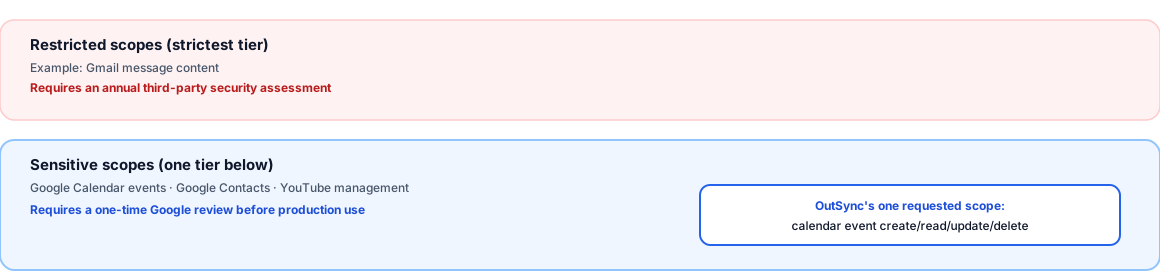
Google’s own developer documentation splits elevated-access scopes into two tiers, and it’s worth being precise about which one this is. The stricter tier, Restricted, covers things like reading Gmail message content — scopes reserved for genuinely core-identity data types, requiring an annual third-party security assessment to maintain. The Sensitive tier is one step below that, and Google’s own docs name Calendar access as a direct example: “examples of sensitive scopes include reading events stored in Google Calendar, storing a new contact in Google Contacts, or deleting a YouTube video.” Calendar sync sits in the same tier as a handful of other common productivity-app permissions — elevated, but not the strictest classification Google has.
What “Sensitive” requires, concretely
Google’s own verification requirements for a Sensitive scope are specific, not a rubber stamp: a developer must “prepare a detailed justification for each requested sensitive scope, as well as an explanation for why a narrower scope isn’t sufficient,” and separately prepare “a video that fully demonstrates how a user initiates and grants access to the requested scopes and shows, in detail, the usage of the granted sensitive and restricted scopes in the app.” Google states plainly that “sensitive scopes require review by Google before any Google Account can grant access” to a production app — this isn’t optional paperwork, it’s a gate a production app has to pass.
The verification outcome
Google has approved OutSync’s Sensitive-scope verification for .../auth/calendar, and the
OAuth client is published in Google’s Production status. That gate — “sensitive scopes
require review by Google before any Google Account can grant access” — has been cleared: the
scope is available to any Google Account connecting OutSync, not limited to a pre-approved
test list the way it was before submission. The justification and demo video Google reviewed
described exactly what’s on this page: one scope, used to create/update/delete the leave-sync
events described above, nothing broader.
What the scope does not cover
Worth being explicit about the boundary too: this OAuth scope grants Google Calendar access specifically — it has nothing to do with Gmail, Google Drive, Google Contacts, or any other Google Workspace product, and OutSync’s own OAuth consent screen requests only this one scope, nothing broader “just in case.” The Forge-trust piece in this series covers the rest of the architecture — what OutSync’s own OAuth relay does and doesn’t see, and why this is the one integration that costs OutSync the “Runs on Atlassian” badge.
Related reading
Frequently asked questions
What exact Google permission does OutSync request?
One OAuth scope: https://www.googleapis.com/auth/calendar. This grants create/read/update/delete access to events on calendars the connected account can access — the same scope any app that creates or manages calendar events needs to request; there is no narrower official scope that still allows creating events.
Is that a "Sensitive" or "Restricted" Google scope?
"Sensitive" — Google's own documentation gives "reading events stored in Google Calendar" as a direct example of a sensitive-scope activity, one tier below the stricter "Restricted" category (used for scopes like reading Gmail message content). Sensitive scopes require Google's review before any Google Account can grant access to a production app.
Has OutSync completed Google's verification process?
Yes — Google approved OutSync's Sensitive-scope verification, and the OAuth client is published in Google's Production status. This scope is available to any Google Account connecting OutSync now, not limited to a pre-approved test list.