Confluence Excalidraw: 12 Apps and Where Your Drawing Lives
On this page
Someone sketched the new checkout flow at excalidraw.com during a call, and now it has to go into the design doc. The quick way is a screenshot. Three weeks later the flow changes, nobody has the original, and the picture on the page is redrawn from scratch, or left wrong.
Confluence Cloud does not draw Excalidraw by itself. There are four ways to put a drawing on a page that stays editable, and twelve Marketplace apps that put the Excalidraw editor in Confluence. They look alike in the Marketplace; they differ in what they cost at your team size, what they are allowed to touch, and where your drawing ends up.
Short answer: with no app, export from excalidraw.com with Embed scene switched on and attach the PNG: anyone can open it again at excalidraw.com and edit it. For drawing on the page itself, pick one of the 12 apps and check where it keeps the drawing: in the macro on the page and in attachments it stays with the page; in the app’s own storage it is deleted 28 days after the app is uninstalled. Two apps are free at any size; the others are free up to 10 users and cost $75 to $575 a year for 50.
Four ways to get Excalidraw into Confluence
| Way | Editable later | Who can see it | Cost | Good for |
|---|---|---|---|---|
| PNG or SVG with Embed scene, attached to a page | yes, at excalidraw.com | page readers | free | a few diagrams, no app approval |
| An excalidraw.com share link on the page | yes, by anyone with the link | anyone with the link | free | a quick look during a meeting, not a spec |
| Confluence whiteboards | yes, in Confluence | Confluence permissions | included in Confluence | stickies, planning, Jira work items |
| A Marketplace app with the Excalidraw editor | yes, on the page | Confluence permissions | free to $4,120 a year | teams that draw every week |
1. Export with the scene inside. In excalidraw.com, open Export image and switch on Embed scene. Excalidraw’s tooltip says what it does: “Scene data will be saved into the exported PNG/SVG file so that the scene can be restored from it.” The developer docs add the cost: “This will increase the image size.” Attach the PNG to the page and show it with the image macro. To change it, download the attachment, drop it onto excalidraw.com, edit, export again and upload it as a new version of the same attachment, so the page and its history stay intact. Forget the switch and you have a picture: Excalidraw answers “This image does not seem to contain any scene data. Have you enabled scene embedding during export?”
2. A share link. Excalidraw encrypts a shared scene in your browser and puts the key after the
# in the link. Its
end-to-end encryption post explains that
“Anything that’s added after the # doesn’t get sent to the server” and that “The server would just
store the encrypted blob”. That keeps the drawing from Excalidraw’s server, not from people: the link
is the key. Pasted into a Confluence page, it can be opened by everyone who reads the page and
anyone they send it to, and Confluence permissions no longer apply. Fine for a meeting; not for an
architecture diagram.
3. Confluence whiteboards. Atlassian’s own canvas: “Confluence whiteboards are included with
Confluence”, with “a mix of whiteboard capabilities based on your Confluence edition”, and you can
“Convert stickies and shapes into Jira work items”
(Atlassian). It is a good planning
board. It is not Excalidraw: no hand-drawn style, no .excalidraw files, no Excalidraw libraries.
4. An app. The editor opens on the page, the drawing is saved with Confluence permissions, and the page’s readers see it without leaving Confluence. The rest of this guide is about choosing one.
What each app is allowed to touch
Every Confluence Cloud app on Forge asks for a list of permissions, called scopes, when you install
it. The Marketplace publishes that list for each app, and it tells you more than the listing text
does: an app without storage:app cannot keep anything in Atlassian’s app storage, an app without
attachment scopes cannot write files to your pages, and an app without page write scopes cannot
change a page through the API. We read the scopes of all 12 apps on 31 October 2026.
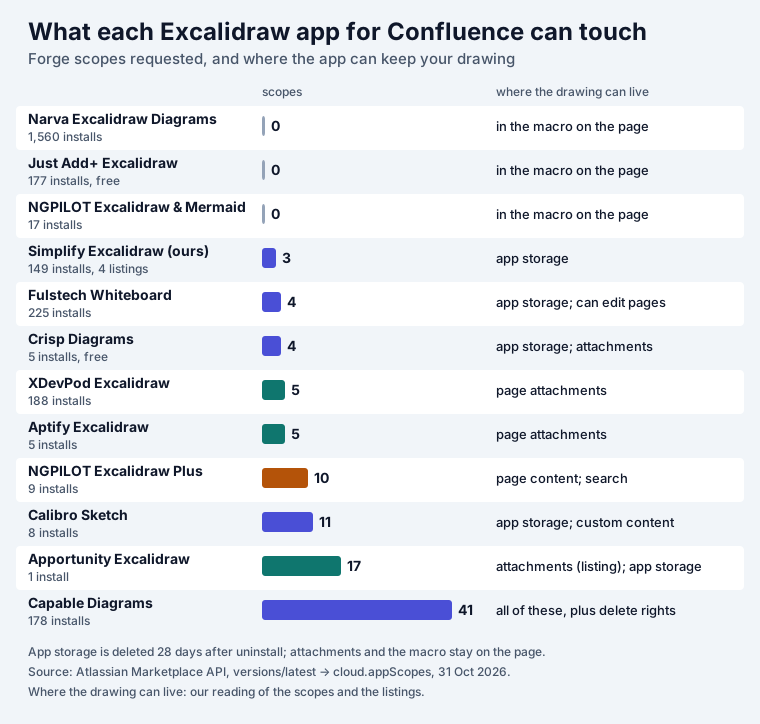
Three things stand out.
The most installed app asks for nothing. Narva’s app, with 1,560 installs, has an empty scope list, and so do Just Add+ and NGPILOT’s Excalidraw & Mermaid. With no storage and no page or attachment scopes, the only place left for the drawing is the macro’s own data, saved with the page. Narva’s listing says “Save the drawing in Confluence”; the scopes say where.
More scopes is not worse, but it should be explained. Capable Diagrams asks for 41, including
delete:attachment and delete:custom-content, because it is a toolbox: a draw.io-compatible editor,
BPMN, 20-plus text diagram types, importers from other apps and templates. Calibro Sketch asks for read:jira-work and
write:jira-work next to its Confluence scopes; its listing mentions live cards for Atlassian objects on
drawings. NGPILOT’s Excalidraw Plus asks for search and content write because its Rovo agent can
“search a whole space for diagrams” and edit them from chat. None of that is a red flag by itself, but your admin should see the list before
approving it: Confluence shows it on the install screen, and the Marketplace API publishes it for
every app.
Where the drawing lives decides what happens later. That is the next section.
Where your drawing lives, and what that means
| Kept in | Apps (from scopes and listings) | Page copied | Page exported to PDF or Word | App uninstalled |
|---|---|---|---|---|
| the macro on the page | Narva, Just Add+, NGPILOT Excalidraw & Mermaid | the copy carries the drawing | depends on the app: test it | the data stays in the page, nothing draws it |
| page attachments | XDevPod, Aptify, Apportunity | Apportunity: attachments “survive cloning and moving” | XDevPod and Apportunity say included | files stay on the page; Apportunity’s .excalidraw opens elsewhere |
| the app’s Forge storage | Simplify (ours), Fulstech, Calibro, Crisp, Capable | depends on the app: ours and Fulstech give a copy its own drawing | ours, Fulstech and Crisp say included | deleted 28 days after uninstall |
| page content | NGPILOT Excalidraw Plus | not stated | not stated | not stated |
The uninstall column is the one people find out about too late. Atlassian’s storage API reference says: “Forge hosted storage retains data for 28 days after uninstallation. However, when a customer reinstalls an app that uses Forge hosted storage, data from the previous installation is not automatically restored.” Getting it back needs the vendor to “Submit a recovery request within 21 days of uninstallation”, with your consent. So if an admin removes the app during a cleanup and nobody notices for a month, drawings kept in app storage are gone.
That applies to our apps too: they keep scenes in Forge storage, which is what lets one scene be shown on several pages and keep its last 10 versions. If you choose any app from that row, make uninstalling it a decision that goes through the people who own the pages, and export the diagrams you care about as PNG with Embed scene before you do.
Apps that write attachments are the opposite case. An attachment is an ordinary Confluence file: it moves with the page, shows up in page history, and stays when the app is gone. Apportunity goes furthest here: “import and export .excalidraw files for round-tripping with excalidraw.com”.
All 12 Excalidraw apps for Confluence Cloud
We searched the Marketplace API for “excalidraw” in Confluence Cloud on 31 October 2026 and kept every app with an Excalidraw editor: 12. All 12 are Forge apps. Our four Excalidraw apps for Confluence are one product with four starting points (Mermaid, UML, architecture, math), so they share a row. Prices are Atlassian’s annual prices for 50 and 500 users from the API. “Listing says” means the vendor’s words; we did not install the other vendors’ apps.
| App (vendor) | Installs | Rating (reviews) | Per year: 50 users / 500 users | Scopes | Besides Excalidraw (listing says) | Last release |
|---|---|---|---|---|---|---|
| Excalidraw Diagrams for Confluence (Narva Software) | 1,560 | 4.0 (10) | $150 / $1,100 | 0 | export to SVG or PNG; “Exported files can be edited by anyone” | Jul 2026 |
| Excalidraw, Mermaid, PlantUML Whiteboard (Fulstech) | 225 | 3.1 (4) | $415 / $2,090 | 4 | seven macros incl. Mermaid, Graphviz, PlantUML, BPMN, DrawIO; PDF/Word export | Sep 2026 |
| Excalidraw for Confluence (XDevPod) | 188 | 3.8 (3) | $575 / $4,120 | 5 | AI text to diagram “no openai key required”; PDF/Word export | May 2026 |
| Capable Diagrams for Confluence (Capable) | 178 | 5.0 (2) | $375 / $2,675 | 41 | draw.io-compatible editor, BPMN, Mermaid, PlantUML and 20+ more; importers | Oct 2026 |
| Just Add+ Excalidraw (Modus Create) | 177 | 5.0 (1) | free / free | 0 | “saved, versioned, and editable” | Oct 2026 |
| Mermaid Diagrams & Excalidraw Whiteboard (Simplify, ours) | 149 in 4 listings | none yet | $75 / $555 | 3 | Mermaid, LaTeX, Graphviz, Vega-Lite, WaveDrom; last 10 versions; PDF/Word export | Oct 2026 |
| Excalidraw & Mermaid Diagrams (NGPILOT) | 17 | 5.0 (2) | $500 / $3,550 | 0 | Mermaid flowcharts, sequence, Gantt | May 2026 |
| Excalidraw Plus Whiteboards & AI Agent (NGPILOT) | 9 | 5.0 (2) | $495 / $3,535 | 10 | Rovo agent draws and edits; Mermaid and basic PlantUML import | Oct 2026 |
| Calibro Sketch (Calibro Software) | 8 | 5.0 (2) | $125 / $930 | 11 | AI draws from a sentence, “on Atlassian-hosted Claude models”; live page cards | Oct 2026 |
| Excalidraw Diagrams & Libraries (Aptify Tech) | 5 | 5.0 (1) | $125 / $850 | 5 | 220+ icon libraries, “up to 3” at once; PNG/SVG export | Oct 2026 |
| Crisp Diagrams (Katabarwa Labs) | 5 | none yet | free / free | 4 | Mermaid 12, PlantUML, D2, DBML; “no external requests”; PDF/Word export | Sep 2026 |
| Apportunity: Excalidraw for Confluence (Apportunity) | 1 | none yet | $150 / $975 | 17 | .excalidraw import and export; .excalidrawlib libraries; PDF/Word export | Jun 2026 |
Narva’s lead is the striking number: 1,560 installs, more than the other eleven apps together (962), with no release since July. The price spread is the other one. At 50 users the same kind of editor costs nothing, $75 or $575 a year; at 500 users, nothing, $555 or $4,120.
Our other three listings are Excalidraw UML & Class Diagrams, Excalidraw Architecture & Sequence Diagrams and Excalidraw Math Equations & LaTeX Whiteboard: same scopes, same price.
Two apps in the search are not in the table. Kroki Diagrams for Confluence draws Excalidraw “from textual descriptions”, one of 20-plus formats, on the Kroki server with no editor, and Capable’s All-in-One suite includes Capable Diagrams. There is also Excaliframe, an open-source Forge app (MIT) that keeps drawings “in Confluence’s macro config”; it is not on the Marketplace, so you deploy it yourself with the Forge CLI.
Pick by the job
- Free, for any team size: Just Add+ Excalidraw or Crisp Diagrams. Just Add+ is the plain editor; Crisp also draws Mermaid, PlantUML, D2 and DBML and says it makes “no external requests”.
- The fewest permissions: Narva, Just Add+ or NGPILOT’s Excalidraw & Mermaid, none of which asks for any. The drawing then lives in the page, and copies of the page carry it.
- Files you can take elsewhere: Apportunity, the only listing that promises
.excalidrawimport and export. With any app, a PNG exported with Embed scene is the portable copy. - An AI that draws for you: Calibro Sketch (runs “on Atlassian-hosted Claude models — nothing leaves your site”), NGPILOT Excalidraw Plus (a Rovo agent) or XDevPod. Ours has no AI.
- Diagrams from text next to the sketch: Fulstech, Capable, Crisp, NGPILOT or ours. Ours puts Mermaid, LaTeX math, Graphviz, Vega-Lite and WaveDrom inside the same Excalidraw scene, so you can circle and annotate a generated diagram by hand.
- The lowest paid price above 10 users: ours, at $75 a year for 50 users and $555 for 500.
A 15-minute trial that answers the real questions
Install the app on a test space and do these six things before you roll it out. Each one takes a couple of minutes and catches a problem the listing cannot show.
- Draw, publish, then copy the page. Change the drawing on the copy. If the original changes too, the two pages share one drawing, which matters for templates.
- Export the page to PDF and Word. Five listings say the drawing comes along; for the others, look.
- Open the page as a reader who never opened the app. The drawing should show without a click.
- Type Cyrillic, Chinese or Japanese labels. Hand-drawn fonts often lack those characters.
- Edit with two people at once. Most listings say nothing about it; see whether the second save warns you or silently wins.
- Read the scopes on the install screen, and decide who may uninstall the app if it keeps drawings in its own storage.
Where our app fits
Our Excalidraw Whiteboard & Mermaid Diagrams for Confluence is the full Excalidraw editor (v0.18.1) as a macro on pages and blog posts, with 200+ shape libraries shipped inside the app and Mermaid, LaTeX math, Graphviz, Vega-Lite and WaveDrom editors that drop their diagrams into the same scene, source still editable. Saves are versioned: if a colleague saved first, you are told instead of overwriting them, and the last 10 versions are kept. A scene can be shown on several pages, the page’s PDF and Word export includes the drawing, and it runs in your browser on Forge with no external calls.
What it does not do: there is no live co-editing and no AI, and scenes live in Forge storage, so the 28-day uninstall rule above applies. It is free for up to 10 users, then $0.15 per user a month at 11–100 users. The documentation shows the editor step by step, and the Excalidraw family page lists the other starting points, including the Jira version. If equations are what you draw, read how to add LaTeX math to Excalidraw; for DOT graphs, Confluence Graphviz.
How we collected the data
- Which apps: Atlassian Marketplace REST API v2,
addons?application=confluence&hosting=cloud&text=excalidraw, on 31 October 2026: 18 results. We kept the 12 with an Excalidraw editor and left out a Git integration, the Kroki renderer and Capable’s suite, which contains Capable Diagrams. Our four listings count as one row. - Installs, ratings: the API’s app record (
totalInstalls, review count and average stars). - Price:
pricing/cloud/live, the annual price of the 50-user and 500-user tiers. Monthly billing and discounts are not included. “Free” means the app’s payment model is free. - Scopes and framework:
versions/latest?hosting=cloud, fieldcloud.appScopes; every app has a Forge app ID. Where a drawing can live is our reading of the scopes, checked against each listing’s text where it says. - Not tested: we did not install the other vendors’ apps. Copy, export and uninstall behaviour in the tables comes from their listings, the scopes and Atlassian’s Forge documentation.
Frequently asked questions
Does Confluence Cloud have Excalidraw built in?
No. Confluence Cloud has its own whiteboards, which Atlassian says "are included with Confluence" with "a mix of whiteboard capabilities based on your Confluence edition", but they are Atlassian's canvas, not Excalidraw. To draw in Excalidraw on a page you need a Marketplace app, or you export a PNG from excalidraw.com with Embed scene switched on and attach it to the page.
Is there a free Excalidraw app for Confluence?
Two apps are free at any size: Just Add+ Excalidraw (Modus Create) and Crisp Diagrams (Katabarwa Labs). The other ten are free for up to 10 users. For 50 users a year they cost from $75 (our Excalidraw apps) to $575 (XDevPod), and for 500 users from $555 to $4,120. Annual prices from the Marketplace API, 31 October 2026.
What happens to my Excalidraw diagrams if we uninstall the app?
It depends on where the app keeps them. A drawing kept in the macro on the page or as a page attachment stays in Confluence, although nothing draws it any more. A drawing in the app's Forge hosted storage is a different case: Atlassian's docs say "Forge hosted storage retains data for 28 days after uninstallation" and that it is "not automatically restored" on reinstall. Six of the 12 apps, ours included, ask for that storage.
Can I edit an Excalidraw PNG after I attach it to a Confluence page?
Yes, if you exported it with Embed scene on. Excalidraw's own tooltip says "Scene data will be saved into the exported PNG/SVG file so that the scene can be restored from it." Download the attachment and drop it onto excalidraw.com to edit it, then attach the new export. Without Embed scene the PNG is only a picture, and Excalidraw says so when you try to open it.
Is it safe to embed an excalidraw.com share link in Confluence?
The scene is encrypted in your browser and the key is in the part of the link after the #, which Excalidraw explains "doesn't get sent to the server". So the drawing is private to whoever has the full link, and anyone who has it can open the scene. A link pasted into a page is readable by everyone who can read the page, and by anyone they forward it to.
Which Excalidraw app has the most installs in Confluence?
Narva's Excalidraw Diagrams for Confluence, with 1,560 installs on 31 October 2026, more than the other eleven apps together (962). It asks for no Confluence API permissions at all, so the drawing lives in the macro on the page. The next are Fulstech's whiteboard (225), XDevPod (188), Capable Diagrams (178) and Just Add+ (177).