Jira Gantt Chart: 12 Gantt Features Tested on the Timeline
On this page
- The scorecard, with the proof
- What we built to test it
- Where the timeline behaves like a Gantt chart
- Dependencies: drawn, never enforced
- Milestones: the Releases row
- Subtasks are not on the timeline
- What Plans adds, and what it still lacks
- Exporting the chart
- When you need more than the timeline
- How we tested
A project manager is asked for “a Gantt chart for the launch” and opens Jira. The timeline looks like one: bars, dates along the top, lines between the bars. Then she looks for the subtasks, the milestone and the critical path, and does not find them.
Atlassian’s own support page says the timeline “visualizes data from your work items in a Gantt chart”. So we took the seven Gantt elements Atlassian lists in its guide to Gantt charts, added the five features people expect from a scheduling tool, and tested each one on a live Jira Cloud site on 14 November 2026.
Short answer: yes, Jira has a Gantt chart without an app: the timeline in every software space, on every plan including Free. Against 12 Gantt features it scored 4 yes, 2 partly and 6 no. It draws bars from start and due dates, shows status, assignee and progress, draws Blocks links as dependency lines and shows releases along the top. It does not show subtasks, move dependent work, offer dependency types, plan people’s capacity, find a critical path or keep a baseline. Plans (Premium) adds cross-space dependencies, capacity and an auto-scheduler, but still no critical path or baseline.
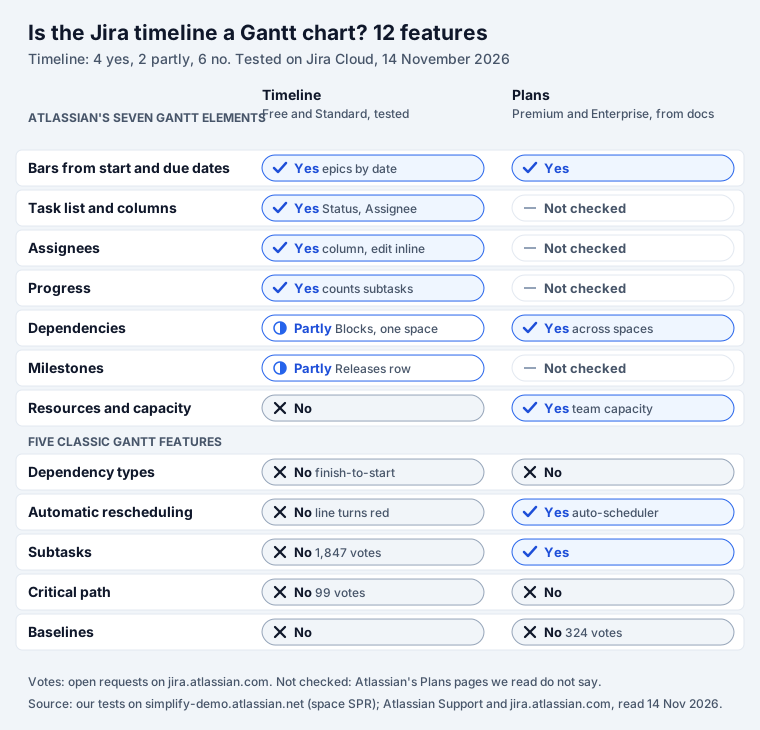
The scorecard, with the proof
The first seven rows are the elements Atlassian names in its Gantt guide: “the timeline, task list, dependencies, resource allocation, milestones, progress tracking, and assignees.” The last five are what a project manager coming from a Gantt tool looks for next.
| Feature | Timeline (Free, Standard) | Proof |
|---|---|---|
| Bars from start and due dates | Yes | Our four dated epics got bars from their own dates |
| Task list and columns | Yes | Work, Status and Assignee columns beside the chart |
| Assignees | Yes | Assignee column, editable in place |
| Progress | Yes | Epic SPR-41 showed “Done: 1 of 2”, counting a sub-task |
| Dependencies | Partly | Blocks links only, one space, finish-to-start |
| Milestones | Partly | No milestone type; releases appear as dots in a row along the top |
| Resources and capacity | No | No capacity on the timeline; Plans has it |
| Dependency types | No | “One must be finished before the next can begin” |
| Automatic rescheduling | No | The blocked epic kept its dates; the line turned red |
| Subtasks | No | Sub-task SPR-40 with dates got no row |
| Critical path | No | Not in Jira; request JRACLOUD-88163, 99 votes |
| Baselines | No | Not in Jira; request for Plans JRACLOUD-88013, 324 votes |
What we built to test it
In a company-managed scrum space (SPR) we created a small launch plan, all with the label
gantt-test so the timeline could be filtered to it:
- Four epics with their own dates: E1 design (23 to 27 November), E2 build (25 November to 4 December), E3 QA (7 to 11 December) and E4 launch day (14 December, start and due on the same day).
- Two Blocks links: E1 blocks E2 (their dates overlap) and E2 blocks E3 (a gap between them).
- Under E1, story SPR-36 (23 to 27 November) with a sub-task, SPR-40, that has its own dates (24 to 25 November), moved to Done.
- Release 2.1 (1 December) as the fix version of one story.
We did not change any board or space setting. On this board child items follow sprints, which matters below.
Where the timeline behaves like a Gantt chart
Bars. Each epic got a bar from its start date to its due date. E4, with the same start and due date, got a thin one-day bar. Epics without dates get a bar rolled up from their children, which our Jira timeline test covers in detail.
Children are the catch. Atlassian: “Child work items in Scrum spaces can be scheduled using the dates of the sprints to which they’re assigned or by Start date and Due date fields.” Our board used sprints, so SPR-36, with both dates and no sprint, had no bar. If your stories carry the dates, the board has to schedule children by dates. And “Child work items without a parent won’t appear on your timeline.”
List and columns. Next to the chart sits a list with Work, Status and Assignee. View settings add warnings, dependencies, releases and an Agent Sessions column, and switch bar colours between status and custom colours.
Progress. The Status column of a parent shows a progress bar. On E1 the tooltip read “Done: 1 of 2”: the open story SPR-36 and the Done sub-task SPR-40. Atlassian says the bar “shows the progress of all child work items, including subtasks.” So a sub-task counts here even though it never gets a row.
Dependencies: drawn, never enforced
A Blocks link between two items becomes a line. Ours from E1 to E2 was red, because E2 starts before E1 ends. The line from E2 to E3 was grey: E3 starts after E2 ends. Atlassian: “In the event of overlapping dates, the dependency link turns red, signaling the potential for delay or risk.”
Then we moved E2’s due date from 4 to 9 December, past E3’s start on 7 December. In a Gantt tool, E3 would slide right. In Jira E3 kept its dates. The line turned red, and clicking it showed E2 “Due date Dec 09, 2026”, “blocks”, E3 “Start date Dec 07, 2026” and a warning: “Dates overlap”. Someone has to move the bar.
Three more limits, all from Atlassian’s pages:
- Only one link type: “The timeline can only show work items with the Blocks work item link type and link work items from a single space.”
- Only finish-to-start: “If there’s a dependency between two work items, one must be finished before the next can begin.” There is no start-to-start, finish-to-finish or lag, though Atlassian’s own Gantt guide tells readers to “Use dependency types such as finish-to-start or start-to-start”.
- The direction is chosen for you when you draw a link on the chart: “The timeline automatically configures the order of the dependency (blocks or is blocked by) based on the order in which work items are scheduled.” Check the link on the work item afterwards.
Milestones: the Releases row
The timeline has no milestone type. What it has is a Releases row along the top, fed by the space’s versions: “Jira shows releases created in your space along the top of the timeline.” Ours showed 1.1 with a green check (released 10 November) and 2.1 as a blue dot on 1 December. Atlassian: green means shipped, red behind schedule, blue a future release.
So a milestone in Jira is a version with a release date, or a one-day item like our E4. How versions and release dates work is in our Jira fix version guide.
Subtasks are not on the timeline
This is the gap people search for most. Atlassian is plain about it: “The timeline doesn’t show work items at the subtask level (level −1).” The timeline shows two levels: epics (level 1) and the stories, tasks and bugs under them (level 0). Our sub-task SPR-40 had a start and a due date, and its story had no arrow to open.
The request JRACLOUD-91572, “Option to drill down to the Subtask level in the Timeline”, was opened in January 2020 and has 1,847 votes. Its status is In Progress. In May 2025 Atlassian wrote: “It’s currently on our roadmap this year.” On 14 November 2026 it was still open. If subtasks carry your schedule, the timeline will hide it; our Jira subtasks guide covers when a sub-task is the right tool at all.
What Plans adds, and what it still lacks
Plans (Atlassian’s guide calls it “Jira’s Advanced Roadmaps called Plans”) comes with Premium and Enterprise. Atlassian’s pricing page lists “Cross-team planning and dependency management” for Premium, and the timeline pages say: “Planning across multiple spaces is only possible in your plan, which is included with Jira Premium and Enterprise.” We could not open Plans on our site, so this part comes from Atlassian’s documents.
What Plans adds to the scorecard:
- Several spaces on one chart, with dependencies between them.
- Capacity: teams and their velocity or hours.
- An auto-scheduler, which “balances a range of different values from the dates assigned to a work item, work item estimates, a team’s capacity and velocity, and any dependencies between work items.” It proposes dates; it ignores Done work.
What it still lacks, by Atlassian’s own tracker:
- Critical path: JRACLOUD-88163, “Add in Critical Path Analysis”, 99 votes, Gathering Interest since January 2021.
- Baselines: JRACLOUD-88013, to “baseline a plan against target dates”, 324 votes, Gathering Interest since July 2020.
- Dependency types: a 2025 request, JRACLOUD-93685, says “all dependencies in the plan view are ‘finish to start’; there are no ‘start to start’ dependencies.”
The single-space limit of the timeline has its own request, JRACLOUD-91560, with 812 votes and the status Future Consideration.
Exporting the chart
Atlassian’s page “Share a screenshot of your timeline” describes one export: an image “(PNG format)” for a chosen view and date range. On our site the menu had more. More actions, Export offered Image (.png) and Spreadsheet (.csv). The CSV opens in Excel. There is no PDF; print the PNG if someone wants one. In Weeks view our timeline ran from November 2025 to November 2028, a year back and two years ahead.
Plans shares more ways: a link, an embed in Confluence, an iFrame, and the same image and CSV “(from the timeline only)”.
When you need more than the timeline
- One team, dated epics, a few dependencies: the timeline is enough. Schedule children by dates if your stories carry them, and add a version for each milestone.
- Several teams or spaces, capacity, suggested dates: Plans, on Premium.
- Critical path, baselines, subtasks on the chart: neither has them today. That is what the Gantt apps on the Atlassian Marketplace sell; check each listing for those exact words.
- A milestone chart for a status page or a stakeholder: sometimes a drawn chart is clearer than
a live one. Mermaid Tabs for Jira keeps a Mermaid gantt in a
tab on a work item, with milestones,
afterdependencies andcrittags. It is text you write; it is not synced with Jira’s dates, so treat it as a picture of the plan. The syntax is in our Mermaid gantt guide. - Items with a due date but no start date: they get no bar on any timeline. A due-date board such as Deadline Tracker lists them by how soon they are due.
How we tested
- Our Jira Cloud site simplify-demo.atlassian.net, 14 November 2026, space SPR: company-managed scrum, board 41, child items aligned to sprints (left as it was).
- Test items SPR-35 to SPR-44 created with
POST /rest/api/3/issue(labelgantt-test), links withPOST /rest/api/3/issueLink, read back withGET /rest/api/3/issue; SPR-40 moved to Done and SPR-42’s due date changed with the REST API; the timeline viewed in Weeks and Months, filtered by label. - The export menu was opened but not used. Plans was not tested.
- Atlassian quotes are from its Support pages on the timeline, dependencies, releases, progress, limits, the auto-scheduler and sharing a plan, its Gantt chart guide and its pricing page, all read the same day. Vote counts are from jira.atlassian.com on 14 November 2026.
Frequently asked questions
Can Jira make a Gantt chart?
Yes, without an app. Every software space has a timeline, which Atlassian describes as a view that "visualizes data from your work items in a Gantt chart", and the pricing page lists it on the Free plan. It draws bars from start and due dates, Blocks links as dependency lines, and releases along the top. In our test it lacked six classic Gantt features: subtasks, automatic rescheduling, dependency types, resources, critical path and baselines.
Does the Jira timeline show subtasks?
No. Atlassian says "The timeline doesn't show work items at the subtask level (level −1)." Our sub-task SPR-40 had its own start and due dates and still got no row. It does count in the parent's progress bar. The request to show subtasks, JRACLOUD-91572, has 1,847 votes and is In Progress; in May 2025 Atlassian wrote it was on its roadmap for that year.
Can I export a Jira timeline to Excel or PDF?
The timeline's More actions menu offers Export, then Image (.png) or Spreadsheet (.csv). The CSV opens in Excel. There is no PDF option; print the PNG to PDF if you need one. Plans on Premium can also give a link, an embed for Confluence or an iFrame.
Is there a Jira Gantt chart plugin?
Yes, the Atlassian Marketplace has several Gantt apps, for example Gantt Charts for Structure PPM by Tempo, which Google shows for this search. They add what the built-in timeline lacks, such as baselines or a critical path; check each listing for the exact features and price. Before you buy one, check whether the timeline or Plans already covers your need.
Is the Jira Gantt chart free?
The timeline is. Atlassian's pricing page lists "Backlog, list, board, timeline, calendar, and summary views" on Free, for up to 10 users. Plans, which adds cross-space planning, capacity and the auto-scheduler, comes with Premium and Enterprise.
Does the Jira timeline move dependent work automatically?
No. We pushed the due date of SPR-42 past the start of the item it blocks. The blocked item kept its dates, the dependency line turned red and the details said "Dates overlap". Someone has to move the bar. The auto-scheduler in Plans (Premium) can suggest new dates.