Jira Timeline: Why Bars Are Missing and What It Shows
On this page
A team lead opens the timeline before the quarterly review. Three epics, three grey bars, and under them a dozen stories with dates nobody can see. The stories have start dates. They have due dates. They have no bars.
We reproduced it on our Jira Cloud site on 10 November 2026 and found the cause in one view setting. Then we tested the other things people search for: why bars go missing, where an epic’s dates come from, dependencies and the limits.
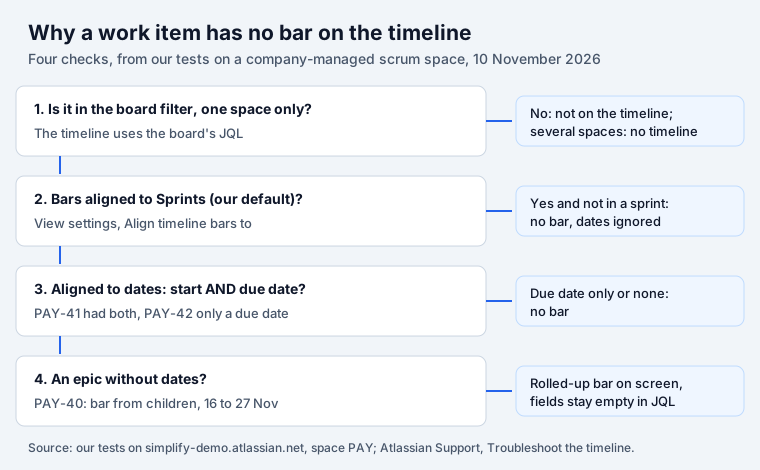
Short answer: the Jira timeline is a Gantt-style view of one space’s work: epics with their children, bars from dates, dependency lines, sprints and releases along the top. If a work item has no bar, check View settings: on our scrum board bars were aligned to Sprints, so stories outside a sprint had no bar even with dates. Aligned to dates, an item needs a start date and a due date; a due date alone gave no bar. Epics without dates get a bar rolled up from their children, but those dates are not saved on the epic.
What the Jira timeline shows
The timeline sits in every software space’s navigation, next to Backlog and Board. It lists parent items (epics) with their children under them, draws a bar for each item from its dates, and shows sprints and releases in rows along the top. You can switch between Weeks, Months and Quarters.
Its View settings panel holds the options that change what you see. On our site the list was: hide done work items; show inline hierarchy after filtering; Assignee and Status columns, warnings, dependencies and releases; bar colours; and Align timeline bars to: Work item start and end dates or Sprints. That last setting is the one this article keeps coming back to.
You do not buy the timeline separately: it is part of Jira’s software spaces, and Atlassian enables it by default in new ones.
Why work items have no bar
We created six test items in our scrum space PAY:
- PAY-40, an epic with no dates, and three children: PAY-41 with a start date (16 Nov) and a due date (20 Nov), PAY-42 with a due date only (27 Nov), and PAY-43 with no dates.
- PAY-44, an epic with its own dates (23 Nov to 11 Dec), and a child PAY-45 (17 to 19 Nov).
- A link: PAY-41 blocks PAY-45.
None of them was in a sprint. This is what the timeline showed:
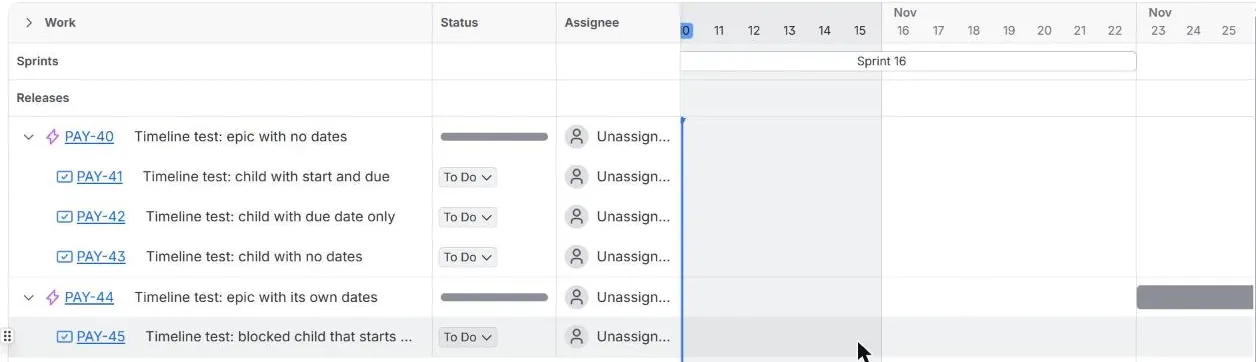
One bar, for the epic with its own dates. The board’s view settings had bars aligned to Sprints, so an item outside a sprint gets no bar whatever its dates say. After we switched to Work item start and end dates:
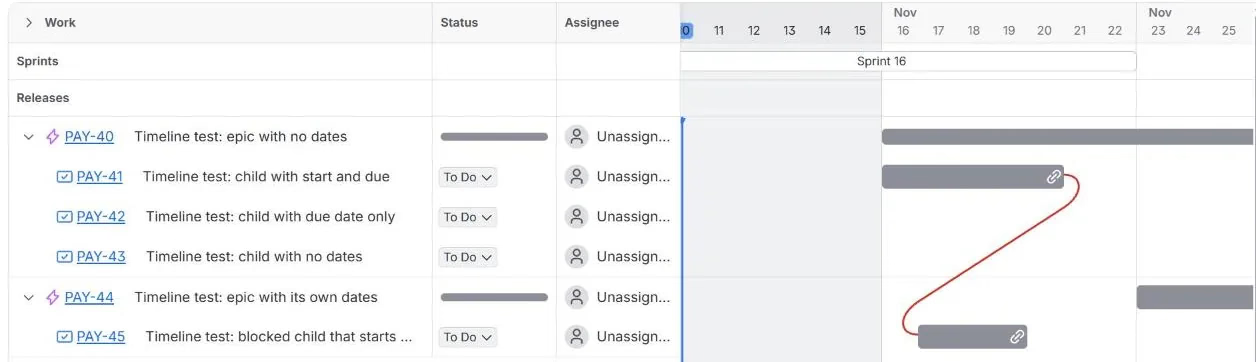
- PAY-41, with both dates, got its bar.
- PAY-42, with a due date only, still had none. A due date marks an end; the timeline needs a start to draw a bar.
- PAY-43, with no dates, had none.
- PAY-40, the epic without dates, got a bar from its children (more on that below).
If you plan by sprints, keep the Sprints setting and put items into sprints; the bars follow the sprint dates. If you plan by dates, switch the setting and give items both dates.
Other reasons, from Atlassian
Atlassian’s troubleshooting page for company-managed spaces adds the cases we did not build:
- The board filter. “The timeline is based on the same JQL filters as your board.” A kanban
board whose filter leaves out epics (
workType != Epic) shows no parents; Atlassian’s fix is to move that clause into the kanban sub-filter. - One space only. A board filter that pulls in several spaces gives the message “Timelines are designed for a single space”.
- Limits. “The timeline view of Jira can only show 5,000 work items at once with no more than 500 being at the parent level.” Items moved to Done more than a year ago are left out.
- No epic type. Without a work type configured as an epic, the timeline does not load.
- Sprints in the top row come only from the same board, with dates within “the previous one year or the next two years”.
- Date fields. “Start Date and Due Date fields must be in the field scheme associated to your space.”
The fix that did not work: space =
The same page says that when a timeline asks you to “Update your board JQL to continue”, “a space
admin needs to simply add space = “YourProjectKey” to the board JQL”. On our site that clause does not
exist. space = PAY returned no work items and no error from the search API, and the strict JQL check
said: Field 'space' does not exist or you do not have permission to view it. The field in JQL is
still project: project = PAY returned all 39 items. If you follow Atlassian’s advice, check the
board straight after; an empty board means you need project = instead.
Epics get dates they do not have
Hover over PAY-40’s bar and Jira shows its span: from 16 November to “Nov 27, 2026 (12 days)”. The start is PAY-41’s start date. The end is PAY-42’s due date, the child that had no bar of its own.
Then we read the epic through the API: Start date empty, Due date empty. The timeline draws the
roll-up but does not store it. So duedate < endOfMonth() will not find that epic, a report grouped
by due date will not count it. If people outside the
timeline need an epic’s dates, set them on the epic.
With bars aligned to Sprints, the same epic had no bar at all, because none of its children was in a sprint.
Dependencies on the timeline
We linked PAY-41 (16 to 20 Nov) as blocking PAY-45 (17 to 19 Nov). With bars aligned to dates the timeline drew a line from the end of PAY-41 to the start of PAY-45, and it was red: the blocked item starts before its blocker ends. Nothing else changed; the dates stay as they are until someone moves a bar.
Two details from the test. Dependencies are an ordinary Blocks link, so they also show on the work item itself. And the direction matters: our first API call created the link the wrong way round (“PAY-45 blocks PAY-42”), which the timeline would have drawn as a perfectly fine plan. Read the link on the work item after you create it.
Timeline vs Plans, roadmaps and milestones
| You need | Use |
|---|---|
| Epics and their stories for one team, by date or sprint | The timeline, in every software space |
| Several spaces or teams on one view | Plans (Premium and Enterprise) |
| A list of what is due and what is late | A due-date view or filter, not a Gantt |
Atlassian is direct about the second row: “Cross-space planning is only possible in your plan, which is included with Jira Premium and Enterprise.” The timeline has no milestone item; it has a Releases row along the top, which many teams use for their milestones.
The last row is where our app fits. Deadline Tracker is not a timeline and does not draw bars. It groups work by due date (Overdue, Today, 1 to 3 days, 4 to 7 days, 1 to 2 weeks) across one or many spaces, and a due date alone is enough, so the PAY-42 kind of item that the timeline leaves blank shows up where it belongs. Dragging a card to another column changes its due date. It is free for up to 10 users; install it from the Atlassian Marketplace. How Jira decides what counts as overdue is in our Jira deadlines guide.
How we tested
- Our Jira Cloud site (simplify-demo.atlassian.net), 10 November 2026, space PAY: company-managed
scrum, board 4 with filter
project = "PAY" ORDER BY Rank ASC, sprints 14 to 16. - PAY-40 to PAY-45 created with
POST /rest/api/3/issue(Start date iscustomfield_10015on our site), the link withPOST /rest/api/3/issueLink; fields read back withGET /rest/api/3/issue. - The timeline viewed in Weeks, filtered to the test items, first with bars aligned to Sprints (the board’s setting), then to work item dates, then switched back.
- JQL checked with
POST /rest/api/3/search/jqland/rest/api/3/jql/parse. Atlassian quotes are from “Troubleshoot the timeline for company-managed spaces”, read the same day.
Frequently asked questions
Why is my Jira timeline not showing work items?
Check four things. The item must match the board's filter, and the filter must cover one space. On a scrum board, View settings may align bars to Sprints, so an item outside a sprint gets no bar even with dates; switch to Work item start and end dates. With dates, an item needs both a start date and a due date: our story with a due date only had no bar. And Atlassian's limits apply: 5,000 work items, no more than 500 at the parent level, and Done items older than a year are left out.
What is the difference between the Jira timeline and Plans?
The timeline is part of every software space and plans the work of one space. Atlassian says a timeline built on a filter that pulls in several spaces does not load: "Cross-space planning is only possible in your plan, which is included with Jira Premium and Enterprise." Use Plans for several teams or spaces, capacity and cross-space dependencies.
Does the Jira timeline have milestones?
Not as a separate item. The timeline has a Releases row along the top, and many teams use a release or a short work item as a milestone.
Why does my epic show dates on the timeline when its fields are empty?
With bars aligned to dates, an epic without its own dates gets a bar from its children. Our epic PAY-40 had no start or due date; the timeline drew it from 16 to 27 November, taking the start from one child and the end from another child's due date. The epic's Start date and Due date fields stayed empty, so JQL, filters and reports do not see those dates.
How do I show dependencies on the Jira timeline?
Link the work items with a Blocks link and keep Dependencies switched on in View settings. A line joins the two bars. On our timeline the line was red when the blocked item started before its blocker ended.
Is the Jira timeline free?
The timeline comes with Jira's software spaces, and Atlassian enables it by default in every new software space; you do not buy it separately. Plans, for several spaces, is part of Premium and Enterprise.
Keep reading
- Jira, JSM and the Marketplace · 10 minJira Velocity and Burndown Charts: What They Count, Tested
- Jira, JSM and the Marketplace · 13 minJira Sprints: Start, Complete and What Counts, Tested
- Jira, JSM and the Marketplace · 11 minJira Labels vs Components: When to Use Each, Tested
- Free toolBusiness days calculator